
 100% FREE ACCESS
11th Standard Syllabus & Materials
11th Standard
TN 11th Tamil இயற்கை வேளாண்மை,சுற்றுச்சூழல் -செய்யுள் - மனோன்மணீயம் Important Questions And Answers Study Material - QB365 Set A
NEW11th Standard
TN 11th Tamil என்னுயிர் என்பேன் -துணைப்பாடம் - இசைத்தமிழர் இருவர் Important Questions And Answers Study Material - QB365 Set A
NEW11th Standard
TN 11th Tamil மொழி கலை -செய்யுள் - ஒவ்வொரு புல்லையும் Important Questions And Answers Study Material - QB365 Set A
NEW11th Standard
TN 11th Tamil பீடு பெற நில் - இலக்கணம் - பகுபத உறுப்புகள் Important Questions And Answers Study Material - QB365 Set A
NEW11th Standard
TN 11th Tamil பீடு பெற நில் - துணைப்பாடம் - வாடிவாசல் Important Questions And Answers Study Material - QB365 Set A
NEW11th Standard
TN 11th Tamil பீடு பெற நில் - செய்யுள் - குறுந்தொகை Important Questions And Answers Study Material - QB365 Set A

Published on: 01/08/2018
Some of the important questions are prepared from this Introduction to Computers. In this question paper, questions are prepared from the book back and creative question.
For Teachers, please subscribes and gets the plenty of question paper based on chapter wise and also predefined blueprint. For subscription, please Click Here.
Download Tamil Nadu 11th Standard Computer Applications question papers, model tests, one-mark questions, important questions, and public exam papers in PDF format. Free study materials and answer keys for TN State Board students.
Questions + Answers key
Take MCQ Computer Applications Test
1.
The Third generation computers belongs to the period _____
1940-1956
1956-1963
1964-1971
1980-1990
2.
Which of the following is not second generation computers?
IBM1401
IBM1620
UNIVAC1108
UNIVAI
3.
Which of the following is not a first generation computers?
ENIAC
EDVAC
UNIVAC 1
IBM1401
4.
Which of the following period the first generation computers belongs________.
1956-1963
1940-1956
1964-1971
1980-1990
5.
In which year the concept of the analytical engine was invented?
1837
1910
1991
1836
6.
Which generation of computer used IC's?
First
Second
Third
Fourth
7.
Which one of the following is the main memory?
ROM
RAM
Flash drive
Hard disk
8.
Expand POST
Post on Self Test
Power on Software Test
Power on Self Test
Power on Self Text
9.
When a system restarts which type of booting is used.
Warm booting
Cold booting
Touch boot
Real boot
10.
Which one of the following is used to in ATM machines
Touch Screen
Speaker
Monitor
Printer
11.
_____ Output device is used for printing building plan.
Thermal printer
Plotter
Dot matrix
Inkjet printer
12.
Identify the input device _____
Printer
Mouse
Plotter
Projector
13.
Identify the output device _____
Keyboard
Memory
Monitor
Mouse
14.
Name the volatile memory _____
ROM
PROM
RAM
EPROM
15.
First generation computers used ______.
Vacuum tubes
Transistors
Integrated circuits
Microprocessors
16.
Differentiate Input and output unit.
17.
What is the function of memory?
18.
Write the functions of control unit.
19.
What is the function of an ALU?
20.
What are the components of a CPU?
21.
Differentiate Dot Matrix Printer and Laser Printer.
22.
What is Integrated circuits?
23.
Define Punched cards.
24.
Define Transistor.
25.
Write a note Vaccum tube on.
26.
Explain booting of computer and its types.
27.
Explain Non-Impact printers with an example.
1.
(c)
1964-1971
2.
(d)
UNIVAI
3.
(d)
IBM1401
4.
(b)
1940-1956
5.
(a)
1837
6.
(c)
Third
7.
(b)
RAM
8.
(c)
Power on Self Test
9.
(a)
Warm booting
10.
(a)
Touch Screen
11.
(b)
Plotter
12.
(b)
Mouse
13.
(c)
Monitor
14.
(c)
RAM
15.
(a)
Vacuum tubes
16.
| Input Unit | Output Unit |
| Input unit is used to feed any form of data to the computer, which can be stored in the memory unit for further processing. | An output unit is any hardware component that conveys information to users in an understandable form. |
| Example: Keyboard, mouse etc. | Example: Monitor, Printer etc. |
17.
The primary memory is used to temporarily store the programs and data when the instructions are ready to execute. The secondary memory is used to store the data permanently
18.
The control unit controls the flow of data between the CPU, memory and I/O devices. It also controls the entire operation of a computer.
19.
(i) The ALU performs arithmetic operations.
(ii) The result of an operation is stored in internal memory of CPU.
(iii) The logical operations of ALU promote the decision making ability of a computer.
20.
The CPU has three components which are Control unit, Arithmetic and Lagic Unit (ALU) and Memory unit.
21.
| Dot Matrix Printer | Laser printer |
| Printing speed is slow | Printing speed is high. |
| Suitable for black and white printing. | Suitable of colour printing. |
| It makes noise while printing. | It is silent while printing. |
22.
(i) IC is short for Integrated Circuit or Integrated Chip.
(ii) The IC is a package containing many circuits, pathways, transistors, and other electronic components all working together to perform a particular function or a series of functions.
23.
Punch cards also known as Hollerith cards are paper cards containing several punched or perforated holes that were punched by hand or machine to represent data.
24.
(i) The transistor ("transfer resistance") is made up of semiconductors.
(ii) It is a component used to control the amount of current or voltage or used for amplification modulation or switching of an electronic signal.
25.
(i) Vacuum tubes contain electrodes for controlling electron flow and were used in early computers as a switch or an amplifier.
(ii) Vaccum tubes are big in size and consumed more power.
26.
Booting of computer:
(i) An Operating system (OS) is a basic software that makes the computer to work. When a computer is switched on, there is no information in its RAM.
(ii) At the same time, in ROM, the pre-written program called POST (Power on Self Test) will be executed first. This program checks if the devices like RAM, keyboard, etc., are connected properly and ready to operate. If these devices are ready, then the BIOS (Basic Input Output System) gets executed. This process is called Booting.
(iii) There after, a program called "Bootstrap Loader" transfers OS from hard disk into main memory. Now the OS gets loaded (Windows/Linux, etc.,) and will get executed. Booting process is of two types.
1) Cold Booting
2) Warm Booting
(iv) Cold Booting:
When the system starts from initial state i.e. it is switched on, we call it cold booting or Hard Booting. When the user presses the Power button, the instructions are read from the ROM to initiate the booting process.
(v) Warm Booting:
When the system restarts or when Reset button is pressed, we call it Warm Booting or Soft Booting. The system does not start from initial state arid so all diagnostic tests need not be carried out in this case. There are chances of data loss and system damage as the data might not have been stored properly.
27.
Non-Impact Printers:
(i) These printers do not use striking mechanism for printing. They use electrostatic or laser technology.
(ii) Quality and speed of these printers are better than Impact printers. For example, Laser printers and Inkjet printers are non-impact printers.
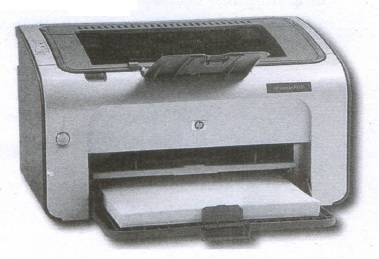
Laser Printers:
(i) Laser printers mostly work with similar technology used by photocopiers.
(ii) It makes a laser beam scan back and forth across a drum inside the printer, building up a pattern. It can produce very good quality of graphic images.
(iii) One of the chief characteristics oflaser printer is their resolution - how many Dots perinch(DPI). The available resolution range around 1200 dpi. Approximately it can print 100 pages per minute(PPM).
Inkjet Printers:
(i) Inkjet Printers use colour cartridges which combined Magenta, Yellow and Cyan inks to create color tones.
(ii) A black cartridge is also used for monochrome output. Inkjet printers work by spraying ionised ink at a sheet of paper.
(iii) The speed of Inkjet printers generally ranges from 1-20 PPM (Page Per Minute).
(iv) They use the technology offering ink by heating it so that it explodes towards the paper in bubbles or by using piezoelectricity in which tiny electric currents controlled by electronic circuits are used inside the printer to spread ink in jet speed.
(v) An Inkjet printer can spread millions of dots of ink at the paper every single second.

11th Standard Syllabus & Materials
11th Standard
TN 11th Tamil பீடு பெற நில் - செய்யுள் - காவடிச்சிந்து Important Questions And Answers Study Material - QB365 Set A
NEW11th Standard
TN 11th Tamil பீடு பெற நில் - உரைநடை - மலை இடப்பெயர்கள் : ஓர் ஆய்வு Important Questions And Answers Study Material - QB365 Set A
NEW11th Standard
TN 11th Tamil மாமழை போற்றுதும் - துணைப்பாடம் - யானை டாக்டர் Important Questions And Answers Study Material - QB365 Set A
NEW11th Standard
TN 11th Tamil மாமழை போற்றுதும் - செய்யுள் - ஐங்குறுநூறு Important Questions And Answers Study Material - QB365 Set A



Tamilnadu Stateboard 11th Standard Subjects

Maths

Commerce

Economics

Biology

Business Maths and Statistics

Accountancy

Computer Science

Physics

Chemistry
Maths
Biology
Economics
Physics
Chemistry

History
Business Maths and Statistics

Computer Science
Accountancy
Computer Applications
History
Computer Technology
Commerce
Computer Applications
Computer Technology

Tamil

English

French
Tamilnadu Stateboard Standards
