
 100% FREE ACCESS
11th Standard Syllabus & Materials
11th Standard
TN 11th Tamil இயற்கை வேளாண்மை,சுற்றுச்சூழல் -செய்யுள் - மனோன்மணீயம் Important Questions And Answers Study Material - QB365 Set A
NEW11th Standard
TN 11th Tamil என்னுயிர் என்பேன் -துணைப்பாடம் - இசைத்தமிழர் இருவர் Important Questions And Answers Study Material - QB365 Set A
NEW11th Standard
TN 11th Tamil மொழி கலை -செய்யுள் - ஒவ்வொரு புல்லையும் Important Questions And Answers Study Material - QB365 Set A
NEW11th Standard
TN 11th Tamil பீடு பெற நில் - இலக்கணம் - பகுபத உறுப்புகள் Important Questions And Answers Study Material - QB365 Set A
NEW11th Standard
TN 11th Tamil பீடு பெற நில் - துணைப்பாடம் - வாடிவாசல் Important Questions And Answers Study Material - QB365 Set A
NEW11th Standard
TN 11th Tamil பீடு பெற நில் - செய்யுள் - குறுந்தொகை Important Questions And Answers Study Material - QB365 Set A

Published on: 04/03/2019
11th Public Official Model Question 2019
Download Tamil Nadu 11th Standard Computer Applications question papers, model tests, one-mark questions, important questions, and public exam papers in PDF format. Free study materials and answer keys for TN State Board students.
Questions + Answers key
Take MCQ Computer Applications Test
1.
Which of the following statement is true?
(i) An expression is formed by joining operators
(ii) An expression is evaluated and produces result
(iii) There are three types of expressions in Javascript
Only(i)
only (ii)
only (iii)
all the above
2.
Which of the following application have more than 30000 Tamil words equivalent to enlglish words?
Kamban
Thamizpori
Vani
Ponmozhi
3.
Which of the following statement is not true?
(i) The function name is any valid identifier
(ii) The function parameter list contians only one valid variable name.
(iii) The function parameter lists parameters are seperated by
only (ii)
only (iii)
only (i)
both (ii) and (iii)
4.
< script type = "text / javascript" >
x = 6 + "3";
document write (x);
< script > what will be the output?
6
9
63
Error
5.
Which of the following is not an image editing applications?
Photoshop
Picasa
GIMP
HTML-5
6.
The extension of CSS file is
.ssc
.css
.csc
.htm
7.
Read the following statement and choose the correct statement(s):
(I) Link in HTML is used to create hyperlinks to web content.
(II) HREF is abbreviated as Hypertext Markup File
I is correct
II is correct
I and II is correct
Both are wrong
8.
The tag used to insert a line break:
< h1 >
< br >
< html >
< p >
9.
Which is the default application for spreadsheets in Ubuntu? This is available in the software launcher?
Libre Office Writer
Libre Office Calc
Libre Office Impress
Libre Office Spreadsheet
10.
How many memory locations are identified by a processor with 8 bits address bus at a time?
28
1024
256
8000
11.
Which indicates whether the given value is 82 positive or negative?
Signed bit
Unsigned bit
1's complement
2's complement
12.
Identify the output device _____
Keyboard
Memory
Monitor
Mouse
13.
Identify the extension of the Impress presentation.
.odp
.ppt
.odb
ood
14.
Which of the following command used to check the worksheet required format to be printed?
File Page view
File Page preview
Format Page
File Print preview
15.
The shortcut key used to view the non-printing characters in table is_______.
Ctrl + F9
Ctrl + F10
Ctrl + F11
Ctrl + F12
16.
Write few accepted standards in cyber world.
17.
What is Inline Style?
18.
What are the types of list in HTML?
19.
List any four types of available networks?
20.
List out any two uses of Operating System?
21.
How the contents of EPROM erased?
22.
What is the function of an ALU?
23.
24.
How will you change the Page orientation?
25.
Write a note on method attribute of < form > tag.
26.
Write note on string Operator.
27.
What is if statement and write its types?
28.
Explain the attributes available with < body > tag.
29.
Write the classification of OS according to availability.
30.
Write down the interfaces and ports available in a computer.
31.
Describe the parameters are used to determine the value of each digit in a number.
32.
33.
Differentiate continuous and discontinuous selection of text in the document.
34.
Explain how will you add video and sound in HTML.
35.
Explain about the popup dialog boxes in JavaScript.
36.
Write a Javascript to display the given number is words using switch-case (Number between only 1 and 5)
37.
Classify and explain any five e-commerce parties with suitable examples.
38.
Complete the following matrix.
| Navigational method | Located on | Ideally suited for |
|---|---|---|
| Start button | Task bar | |
| Desktop | Exploring your disk drives and using system tools. | |
| Windows Explorer | Seeing hierarchy of all computer contents and resources in one window. | |
| Quick Launch |
39.
Answer the following:
(a) Which Class of software the OS belongs?
(b) What is the need of OS?
(c) Why OS is important?
(d) Name any three types of Operating systems.
(e) Name any three functions of OS.
40.
Explain RAM in detail.
41.
Discuss the various generations of computers.
42.
Explain how a presentation can help a sales person to promote his/her products.
43.
Explain Reference operator with an example.
1.
(d)
all the above
2.
(b)
Thamizpori
3.
(d)
both (ii) and (iii)
4.
(d)
Error
5.
(d)
HTML-5
6.
(b)
.css
7.
(a)
I is correct
8.
(b)
< br >
9.
(b)
Libre Office Calc
10.
(c)
256
11.
(a)
Signed bit
12.
(c)
Monitor
13.
(a)
.odp
14.
(b)
File Page preview
15.
(b)
Ctrl + F10
16.
(i) Do not use pirated software.
(ii) Do not use unauthorized user accounts.
(ill) Do not steal others passwords.
(iv) Do not hack.
17.
"Inline style is used to define style for a particular tag anywhere in an HTML document. You can define styles for any tag within an HTML document. But it is applicable only on that line where it is defined.
18.
HTML supports three types of lists viz. numbered, unnumbered and definition, These lists are called as Ordered List, Unordered List and Definition List respectively.
19.
(i) Local Area Network (LAN)
(ii) Metropolitan Area Network (MAN)
(iii) Wide Area Network (WAN)·
(iv) Campus Area. Network (CAN)
(v) Wireless Local Area Network (W-LAN)
20.
(i) To ensure that a computer can be used to extract what the user wants it do.
(ii) Easy interaction between the users and computers
21.
(i) Erasable Programmable Read-Only Memory is a special type of memory which serves as a PROM, but the content can be erased using ultraviolet rays.
(ii) EPROM retains its contents until it is exposed to ultraviolet light.
(iii) The ultraviolet light clears its contents, making it possible to reprogram the memory.
22.
(i) The ALU performs arithmetic operations.
(ii) The result of an operation is stored in internal memory of CPU.
(iii) The logical operations of ALU promote the decision making ability of a computer.
23.
24.
To change the orientation:
(i) Select the page whose orientation is to be changed
(ii) In the page style dialog box; under the Orientation group,
(iii) Select Portrait or Landscape button.
25.
The method attribute of the form tag is used to identify how the form element names and values will be sent to the server. The get method will append the names of the form elements and their values to the URL. The post method will send the names and values of the form elements as packets.
26.
One of the built-in features of JavaScript is the ability to concatenate strings. The + operator performs addition on numbers but also serves as the concatenation operator for strings. Because string concatenation has precedence over numeric addition, + will be interpreted as string concatenation if any of the operands are strings. + operator which is also called as the string concatenation operator.
27.
The if statement is the fundamental control statement that allows JavaScript to make decisions to execute statements conditionally. This statement has two forms. The form is for only true condition.
The syntax is
if(condition)
{
True block;
}
Types of if statement:
if else statement
else if statement
nested if statement
28.
The <body> tag defines the documents body. The contents of an HTML page reside within the <body> tag. <body> tag contains several attributes.
(i) Background Colour: bgcolor = color:
By default all the browsers display the text on white background. However, the background color of the browser can be changed by using bgcolor tag.
The tag to change background colour:
<body bgcolor = color_name/color_code>
<body bgcolor = yellow>
(ii) Body text Colour: text = color: The default text colour of body section is "black; it is often called as automatic color, text attribute within body tag is used to change the text colour.
The tag to change body text colour:
<body text = color_name/color_code>
<body text = #FFFF00>
(iii) Background image: background = image:
An image or picture can be applied as background to a webpage. When you insert an image as background, the text will be displayed on top of the image. Background images can be a texture or bitmap or even a photo.
The tag to apply an image as background:
<body background = "image_name_with_extenstion">
<body background = "E:\Images\ flower01.gif">
(iv) Setting Margins:margin = value : The margin refers the blank area from left or top edge of the browser window. Generally there is no default margin setting in any bowser. If you want to leave some space as margin to left or top; leftmargin or topmargin attributes will be used respectively.
The tag to specify the left and top margin:
<body leftmargin = value topmargin = value>
<body leftmargin = 50 topmargin = 50>
29.
Operating System
(i) Proprietary Licence
(a) Microsoft Windows
(b) Apple Mac OS
(c) Apple IOS [Mobile Device]
(ii) Open source Free licence (GNU)
(a) UNIX
(b) LINUX
(c) Google's Android [Mobile Device].
30.
(i) Serial Port
(ii) Parallen Port
(iii) USB 3.0
(iv) VGA connector
(v) Audio plugs
(vi) PS/2 Port
(vii) SCSI Port
(viii) High Definition Multimedia Interface(HDMI).
31.
(i) The absolute value is the magnitude of a digit in a number.
(ii) For example, the digit 5 in 7458 has an absolute value of 5 according to its value in the number line.
(iii) The place value of a digit in a number refers to the position of the digit in that number such as tens, hundreds, and thousands.
(iv) The total value of a number is the sum of the absolute value x place value of each digit that the number consists of.
(v) The base value of a number is also known as the radix, which depends on the type of the number of systems that are being used.
32.
33.
| S.No | Continuous | Discontinuous |
| 1. | To select the text continuously take the insertion pointer to the starting of the text. |
To select the text not continuously, take the insertion pointer to the starting of the text |
| 2 | Hold the Shift key and drag the mouse across until the required text is selected and then release the shift key. |
Hold the Ctrl key and drag across it till the required text is selected and release the Ctrl key |
| The required text is selected for any operation |
The required text is selected for any operation. |
34.
(i) Video and Sound are the core part of the modern web pages. In HTML, a video or audio content may be included as Inline or external data. The inline refers to audio or video files are handled as part of the page. These media files play the audio or video when the page is visible in the browser window. The external refers, linking external audio or video files as url.
(ii) The < embed > tag is used to attach an audio or video file easily within webpage. This tag includes the controls of the multimedia automatically in the browser. The < noembed > tag may be used as an alternate to display some other media file, in the case of the browser does not support < embed > tag.
(iii) Src is the primary attribute used with < embed > tag. The src attribute used to specify the name of the media file with its source location. Other attributes such as alt, height, width and align are used as it is used with < img >.
General Format:
< embed src = audio / video file name with location > < /embed >
Background music:
(i) Music can be played in the background to a webpage, while the page is viewed. This is known as 'inline' sound or movie.
(ii) The < bgsound > tag is used to attach an inline sound file in HTML. The src attribute is used to define the location of the media file. Volume attribute used to adjust volume control. The loop attribute defines the duration of play. The 'infinite' value causes the audio play as long as the page is in view.
General Format:
< bgsound src=music file name with location >
35.
JavaScript supports three important types of dialog boxes. Dialog boxes are also called as Popup Boxes. These dialog boxes can be used to raise an alert, or to get confirmation on any input or to have a kind of input from the users.JavaScrípt supports three kind of popup boxes: Alert box, Confirm box, and Promnpt box.
Alert Dialog Box: An alert dialog box is mostly used to give a warning message to the users. For example, if one input field requires to enter some text but the user does not provide any input, then as a part of validation, you can use an alert box to give a warning message. Alert box gives only one button "OK" to select and proceed.
The syntax of alert box is
alert("Message");
(or) Window.alert ("Message");
Example:
alert("Name is compulsory entry);
(or) window.alert("Name is compulsory entry");
Confirm Dialog Box : A confirmation dialog box is mostly used to take user's consent on any option. It displays a dialog box with two buttons: OK and Cancel. If the user clicks on the OK button, the confirm() will return true. If the user clicks on the Cancel button, then confirm() returns false.
The syntax of confirm dialog box is
confirm("message");
(or)
window.confirm("message");
Example :
confirm("Hai Do you want to continue:");
(or)
window.confirm(“Hai Do you want to continue:");
Prompt Dialog Box: The prompt dialog box is very useful when the user want to pop-up a text box to get user input. Thus, it enables you to interact with the user. The user needs to fill in the text box field and then click OK.
The prompt dialog box is displayed using a method called prompt()which takes two parameters :
(i) a label which you want to display in the text box and (ii) a default string to display in the text box. This dialog box has two buttons: OK and Carncel. If the user clicks the OK button, the prompt() will return the entered value from the text box. If the user clicks the Cancel button, the prompt() returns null. The Sntax of prompt dialog box is,
Prompt("Message","default Value");
(or)
window.prompt("sometext","defaultText");
Example:
prompt("Enter Your Name:"Name");
(or)
window.prompt("Enter Your Name:"Name");
36.
< Html >
< Body >
< script language="Javascript" type="text/ javascript" > .
var N=0;
var N = promt ("Enter the Number","0");
switch (N)
{
case 1 :
document.write ("One");
break;
case 2 :
document.write ("Two");
break;
case 3 :
document.write ("Three");
break;
case 4 :
document.write ("Four");
break;
case 5 :
document.write ("Five");
break;
default:
document.write ("Invalid! Enter between 1 and 5");
}
< /script >
< /body >
< /Html >
37.
Classifying e-commerce according to the parties involved:
1. Business to consumer (B2C) : Transactions happen between businesses and consumers. In B2C e-commerce, businesses are the ones selling products or services to end-users (i.e. consumers).
2. Business to business (B2B) : As its name states, B2B e-commerce pertains to transactions conducted between two businesses. Any company whose customers are other businesses operate on a B2B model.
3. Consumer to business (C2B) : Consumer to qusiness e-commerce happens when a consumer sells or contributes monetary value to a business. Many crowdsourcing campaigns fall under C2B e-commerce.
4. Consumer to consumer (C2C) : As you might have guessed, C2C e-commerce happens when something is bought and sold between two consumers. C2C commonly takes place on online marketplaces such as eBay, in which one individual sells a product or service to another
5. Government to business (G2B) : G2C transactions take place when a company pays for government goods, services, or fees online. Examples could be a business paying for taxes using the Internet.
6. Business to government (B2G) : When a government entity uses the Internet to purchases goods or services from a business, the transaction may fall under B2G e-commerce. Let's say a city or town hires a web design firm to update its website. This type of deal may be considered a form of B2G.
7. Consumer to government (G2C) : Consumers can also engage in B2C e-commerce. People paying for traffic tickets or paying for their car registration renewals Online may fall under this category
38.
| S.No | Navigational method | Located on | Ideally suited for |
|---|---|---|---|
| 1. | Start button | Taskbar | Quick acces common apps and settings |
| 2. | My computer | Desktop | Exploring your disk drives and using system tools. |
| 3. | Windows Explorer | Taskbar | Seeing hierarchy of all computer contents and resources in one window. |
| 4. | Quick Launch | Taskbar | To open the programs quickly |
39.
(a) System Software
(b) Provide a platform to run application programs and activate the basic level hardware.
(c) Act as an interface between user, software and hardware.
(d) 1. Real-Time OS
2. BOSS
3. Interactive OS
(e) 1. Process Management
2. Storage Management
3. Device Management.
40.
(i) The main memory is otherwise called as Random Access Memory. This is available in computers in the form of Integrated Circuits ( lCs ). It is the place in a computer where the Operating System, Application Programs and the data in current use are kept temporarily so that they can be accessed by the computer's processor.
(ii) The smallest unit of information that can be stored in the memory is called as a bit. The memory can be accessed by a collection of 8 bits which is called as a byte.
(iii) The bytes are referred by 'B'. If a computer has 1 megabyte of memory, then it can store 10,48,576 bytes.(or characters) of information. [Hence 1MB is 1024KB and 1 KB is 1024 Bytes, So 1024 x 1024 =10,48,576 Bytes].
(iv) RAM is a volatile memory, which means that the information stored init is not permanent. As soon as the power is turned off, whatever data resides in RAM is lost. It allows both read and write operations.
(v) There are two basic types of RAM Dynamic RAM (DRAM), Static RAM (SRAM)
(vi) These two types differ in the technology they use to hold data. Dynamic RAM being a common type needs to be refreshed frequently. Static RAM needs to be refreshed less often, which makes it faster.
(vii) Hence, Static RAM is more expensive than Dynamic RAM.
41.
| S.No | Generation | Period | Main Component used | Merits/ Demerits |
| 1 | First Generation | 1940 - 1956 | Vaccum tubes | 1. Big in size 2. Consumed more power 3. Malfunction due to over heat 4. Machine Language was used |
| First Generation Computer - ENIAC, EDVAC, UNIVAC 1 ENIAC weighed about 27 tons, size 8 feet x 100 feet x 3 feet and consumed around 150 watts of power |
||||
| 2 | Second Generation | 1956-1964 | Transistors | 1. Smaller compared to First Generation 2. Generated Less Heat 3. Consumed less power compared to first generation 4. Punched cards were used 5. First operating system was developed - Batch Processing and Multiprogramming Operating System 6. Machine language as well as Assembly language was used. |
| Second Generation Computers - IBM 1401, IBM 1620, UNIVAC 1108 | ||||
| 3 | Third Generation | 1964-1971 | Integrated Circuits (IC) | 1. Computers were smaller, faster and more reliable 2. Consumed less power. 3. High-Level Languages were used |
| Third Generation Computers -IBM ·360 series, Honeywell 6000 series | ||||
| 4 | Fourth Generation | 1971-1980 | Microprocessor Very Large Scale Integrated Circuits (VLSI) |
1. Smaller and Faster 2. Microcomputer series such as IBM and APPLE were developed 3. portable Computers were introduced |
| 5 | Fifth Generation | 1980-till date | Ultra Large Scale Integration (ULSI) | 1. Parallel, Processing 2. Super conductors 3. Computers size was drastically reduced. 4. Can recognize Images and Graphics 5. Introduction of Artificial Intelligence and Expert Systems 6. Able to solve high complex problems including decision making and logical reasoning |
| 6 | Sixth Generation | In future |  |
1. Parallel and Distributed computing 2. Computers have become smarter faster and smaller 3. Development of robotics 4. Natural Language Processing 5. Development of Voice Recognition Software. |
42.
Presentation is helpful for a sales person to promote his/her products effectively.
(i) Presentation will give visual video, pictures to understand a goodness of the product.
(ii) By using presentation, sales person can make audience to understand easier and he can get more response from the people.
(iii) Presentation help sales person to present prospect challenges easier.
(iv) Sales person can explain with physical demonstration by shocking animations. It helps to increase the sales.
43.
Reference operators are used to refer cell ranges. A continuous group of cells is called as "Range". There are three types of reference operators that are used to refer cells in calc; They are
(i) Range Reference Operator,
(ii) Range Concatenation
(iii) Intersection Operator.
Range Reference Operator:
Colon (:) is the range reference operator. It is used to group a range of cells. An expression using a range operator has the following syntax:
reference left: reference right
Where reference left may be a starting cell address of a linear group of cells or upper left corner address of a rectangular group of cells. Reference right may be a last cell address of a linear group or lower right corner address of a rectangular group.
Example:
(i) Linear group of cells A1, A2, A3, A4, A5 will be referred as A1: A5
(ii) Rectangular group of cells A2, A3, A4, ..... B2, B3, B4.... D5, D6 will be referred as A2 : D6. Name box shows the reference A2 : C6 corresponding to the cells included in the drag operation with the mouse to highlight the range.
Reference concatenation operator:
Concatenation means joining together. Tilde (~) symbol is used as a concatenation operator in calc.
An expression using a concatenation' operator has the following syntax:
reference left ~ reference right
Example:
If you want to find the sum of the values from A1 to A6 and C3 to F3. The formula is =SUM(A1 : A6 ~ C3 : F3)
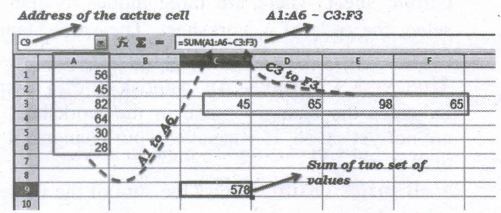
SUM is the function to find the sum of a group values. Later in this chapter you will learn more about functions. So, don't bother about SUM. Just learn the use of concatenation operator.
Intersection Operator:
Intersection operator is used to join two set of groups. It is very similar to Range concatenation operator. The intersection operator is represented by an exclamation mark (!). An expression using the intersection operator has the following syntax:
reference left ! reference right
If the references refer to a single range, the result" is a reference to a single range, containing all cells, which are both in the left reference and in the right reference.
If the references are reference lists, then each list item from the left is intersected with each one from the right and these results are concatenated to a reference list.
The order is to first intersect the first item from the left with all items from the right, then intersect the second item from the left with all items from the right, and so on.
Example: (A2:D3 ! B2:E4)

11th Standard Syllabus & Materials
11th Standard
TN 11th Tamil பீடு பெற நில் - செய்யுள் - காவடிச்சிந்து Important Questions And Answers Study Material - QB365 Set A
NEW11th Standard
TN 11th Tamil பீடு பெற நில் - உரைநடை - மலை இடப்பெயர்கள் : ஓர் ஆய்வு Important Questions And Answers Study Material - QB365 Set A
NEW11th Standard
TN 11th Tamil மாமழை போற்றுதும் - துணைப்பாடம் - யானை டாக்டர் Important Questions And Answers Study Material - QB365 Set A
NEW11th Standard
TN 11th Tamil மாமழை போற்றுதும் - செய்யுள் - ஐங்குறுநூறு Important Questions And Answers Study Material - QB365 Set A



Tamilnadu Stateboard 11th Standard Subjects

Maths

Commerce

Economics

Biology

Business Maths and Statistics

Accountancy

Computer Science

Physics

Chemistry
Maths
Biology
Economics
Physics
Chemistry

History
Business Maths and Statistics

Computer Science
Accountancy
Computer Applications
History
Computer Technology
Commerce
Computer Applications
Computer Technology

Tamil

English

French
Tamilnadu Stateboard Standards
