
 100% FREE ACCESS
11th Standard Syllabus & Materials
11th Standard
TN 11th Tamil இயற்கை வேளாண்மை,சுற்றுச்சூழல் -செய்யுள் - மனோன்மணீயம் Important Questions And Answers Study Material - QB365 Set A
NEW11th Standard
TN 11th Tamil என்னுயிர் என்பேன் -துணைப்பாடம் - இசைத்தமிழர் இருவர் Important Questions And Answers Study Material - QB365 Set A
NEW11th Standard
TN 11th Tamil மொழி கலை -செய்யுள் - ஒவ்வொரு புல்லையும் Important Questions And Answers Study Material - QB365 Set A
NEW11th Standard
TN 11th Tamil பீடு பெற நில் - இலக்கணம் - பகுபத உறுப்புகள் Important Questions And Answers Study Material - QB365 Set A
NEW11th Standard
TN 11th Tamil பீடு பெற நில் - துணைப்பாடம் - வாடிவாசல் Important Questions And Answers Study Material - QB365 Set A
NEW11th Standard
TN 11th Tamil பீடு பெற நில் - செய்யுள் - குறுந்தொகை Important Questions And Answers Study Material - QB365 Set A

Published on: 26/07/2019
Computer Organization
Download Tamil Nadu 11th Standard Computer Applications question papers, model tests, one-mark questions, important questions, and public exam papers in PDF format. Free study materials and answer keys for TN State Board students.
Questions + Answers key
Take MCQ Computer Applications Test
1.
The first general purpose Microprocessor developed by ............
IBM
Intel
Apple
Microsoft
2.
Microprocessors were first introduced in the early_________.
1956
1958
1960
1970
3.
Which of the following performs all tasks in the computer?
Chips
Bus
CPU
I/O devices
4.
Which of the following involved in designing a computer?
Computer architecture
Computer Organization
Computer Software
Memory
5.
Which of the following deals with the hardware components of a computer system?
Application software
Computer architecture
Computer Organization
System software
6.
Which of the following is not included in computer organization?
I/O devices
Software
CPU
Main memory
7.
Display devices are connected to the computer through __________
USB port
Ps/2 port
SCSI port
VGA connector
8.
What is the smallest size of data represented in a CD?
blocks
sectors
pits
tracks
9.
What is the capacity of 12cm diameter DVD with single sided and single layer?
4.7 GB
5.5 GB
7.8 GB
2.2 GB
10.
Which of the following is said to be the brain of a computer?
Input devices
Output devices
Memory device
Microprocessor
11.
Draw the block diagram of a microprocessor based system.
12.
What are the collections of System Bus?
13.
Name the communication channels between the microprocessor and other devices in the computer.
14.
Which source is used to erase the content of a EPROM?
15.
What is HDMI?
16.
What is microprocessor?
17.
Write the three main units of microprocessor.
18.
How will you differentiate a flash memory and an EEPROM?
19.
Differentiate CD and DVD.
20.
Write down the interfaces and ports available in a computer.
21.
Explain any three secondary storage devices.
22.
Explain the classification of Microprocessor based on Instruction set?
23.
Explain the types of ROM.
1.
(b)
Intel
2.
(d)
1970
3.
(c)
CPU
4.
(a)
Computer architecture
5.
(c)
Computer Organization
6.
(b)
Software
7.
(d)
VGA connector
8.
(c)
pits
9.
(a)
4.7 GB
10.
(d)
Microprocessor
11.
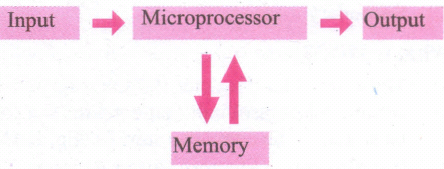
12.
(i) Address Bus
(ii) Data Bus
(iii) Control Bus
13.
(i) Address Bus
(ii) Control Bus
(iii) Data Bus
14.
Ultra-violet-rays is used to erase the content of a EPROM.
15.
High-Definition Multimedia Interface is an audio/ video interface which transfers the uncompressed video and audio data from a video controller, to a compatible computer monitor, LCD projector, digital television etc.
16.
(i) The microprocessor which is an Integrated Circuit. Microprocessors were first introduced in early 1970s. The first general purpose microprocessor, 4004 was developed by Intel Inc.
(ii) The microprocessor is a programmable multipurpose silicon chip. It is driven by clock pulses. It accepts input as a binary data and after processing, it provides the output data as per the instructions stored in the memory.
17.
The microprocessor is made up on main units. They are:
(i) Arithmetic and Logic unit (ALU): To perform arithmetic and logical instructions based on computer instructions.
(ii) Control unit : To control the overall operations of the computer through signals.
(iii) Registers (Internal Memory): They are used to hold the instruction and data for the execution of the processor.
18.
Flash memory devices:
(i) Flash memory is an clectronic (solid-state) non-volatile computer storaye medium that can be electrically erased and reprogrammed.
(ii) Flash memories can be used in personal computers, Personal Digital Assistants (PDA). digital audio players, digital cameras and mobile phones.
(iii) Flash memory offers fast access timcs. The time taken to read or write a character in memory is called access is time.
(iv) Examples for Flash memories arc pen memory drives, cards etc.
EEPROM :
(i) Electrically Erasable Programmable Read Only Memory can be erased by exposing it to an electrical charge.
(ii) EEPROM is non-volatile.
(iii) EEPROM is slower in performance.
19.
| CD | DVD |
| Expansion is Compact Disk | Expansion is Digital Versatile Disc. |
| A standard CD can store about 700 MB of Data. | A standard DVD can hold 4.7 GB of data. |
| CD players cannot play DVDs. | DVD players can play CDs. |
| It stores upto 80min of audio. | It can range from 4.7GB to 17.08 GB. |
20.
(i) Serial Port
(ii) Parallen Port
(iii) USB 3.0
(iv) VGA connector
(v) Audio plugs
(vi) PS/2 Port
(vii) SCSI Port
(viii) High Definition Multimedia Interface(HDMI).
21.
Hard disk :
(i) Hard disk is a magnetic disk on which you can store data. The hard disk has the stacked arrangement of disks accessed by a pair of heads for each of the disks.
(ii) The hard disks come with a single or double-sided disk.
Compact Disk (CD) :
.png)
(i) A CD or CD-ROM is made from 1.2 millimetres thick, polycarbonate plastic material. A thin layer of aluminium or gold is applied to the surface.
(ii) CD data is represented as tiny indentations known as "pits", encoded in a spiral track moulded into the top of the polycarbonate layer. The areas between pits are known as "lands".
(iii) A motor within the CD player rotates the disk. The capacity of an ordinary CD- ROM is 700MB.
Digital Versatile Disc (DVD):
.png)
(i) A DVD (Digital Versatile Disc or Digital Video Disc) is an optical disc capable of storing up to 4.7 GB of data, more than six times what a CD can hold.
(ii) DVDs are often used to store movies at a better quality. Like CDs, DVDs are read with a laser. The disc can have one or two sides, and one or two layers of data per side; the number of sides and layers determines how much it can hold.
(iii) A 12 em diameter disc with a single-sided, single layer has 4.7 GB capacity, whereas the single-sided, double layer has 8.5 GB capacity.
(iv) The 8 em DVD has 1.5 GB capacity. The capacity of a DVD-ROM can be visually determined by noting the number of data sides of the disc. Double-layered sides- are usually gold-coloured, while single-layered sides are usually silver-coloured, like a CD.
22.
(i) The size of the instruction set is another important consideration while categorizing microprocessors.
(ii) Initially, microprocessors had very small instruction sets because complex hardware was expensive as well as difficult to build.
(iii) As technology had developed to overcome these issues, more and more complex instructions were added to increase the functionality of the microprocessor,
(iv) Let us learn more about the two types of microprocessors which are based on their instruction sets.
(v) RISC stands for Reduced Instruction Set Computers. They have a small set of highly optimized instructions.
(vi) Complex instructions are also implemented using simpler instructions, thus reducing the size of the instruction set.
(vii) Examples of RISC processors are Intel P6, Pentium IV, AMD K6 and K7.
(viii) CISC stands for Complex Instruction Set Computers. They support hundreds of instructions. Computers supporting CISC can accomplish a wide variety of tasks, making them ideal for personal computers.
(ix) Examples of CISC processors are Intel 386 & 486, Pentium, Pentium II and III, and Motorola 68000.
23.
Read only memory (ROM):
(i) Read Only Memory refers to special memory in a computer with pre-recorded data at manufacturing time which cannot be modified. The stored programs that start the computer and perform diagnostics are available in ROMs.
(ii) ROM stores critical programs such as the program that boots the computer. Once the data has been written onto a ROM chip, it cannot be modified or removed and can only be read.
(iii) ROM retains its contents even when the computer is turned off. So, ROM is called as a non-volatile memory
Programmable Read only memory (PROM):
(i) Programmable read only memory is also a non-volatile memory on which data can be written only once. Once a program has been written onto a PROM, it remains there forever.
(ii) Unlike the main memory, PROMs retain their Contents even when the computer is turned off.
(iii) PROM is manufactured as a blank memory, whereas ROM is programmed during the manufacturing process itself. PROM programmer or a PROM burner is used to write data to a PROM chip. The process of programming a PROM is called burning the PROM.
Erasable Programmable Read-only memory (EPROM):
(i) Erasable Programmable Read-Only Memory is a special type of memory which serves as a PROM. The content can be erased using ultraviolet rays.
(ii) An EPROM differs from a PROM. PROM can be written only once and cannot be erased.
(iii) EPROMs are used widely in personal computer, because they enable the manufacturer to change the contents of the PROM to replace with updated versions or erase the contents before the computer is delivered.
Electrically Erasable Programmable Read-Only Memory (EEPROM)
(i) Electrically Erasable Programmable Read-Only Memory can be erased by exposing it to an electrical charge.
(ii) Like other types of PROM, EEPROM retains its contents even when the power is turned off. Comparing with all other types of ROM, EEPROM is slower in performance.

11th Standard Syllabus & Materials
11th Standard
TN 11th Tamil பீடு பெற நில் - செய்யுள் - காவடிச்சிந்து Important Questions And Answers Study Material - QB365 Set A
NEW11th Standard
TN 11th Tamil பீடு பெற நில் - உரைநடை - மலை இடப்பெயர்கள் : ஓர் ஆய்வு Important Questions And Answers Study Material - QB365 Set A
NEW11th Standard
TN 11th Tamil மாமழை போற்றுதும் - துணைப்பாடம் - யானை டாக்டர் Important Questions And Answers Study Material - QB365 Set A
NEW11th Standard
TN 11th Tamil மாமழை போற்றுதும் - செய்யுள் - ஐங்குறுநூறு Important Questions And Answers Study Material - QB365 Set A



Tamilnadu Stateboard 11th Standard Subjects

Maths

Commerce

Economics

Biology

Business Maths and Statistics

Accountancy

Computer Science

Physics

Chemistry
Maths
Biology
Economics
Physics
Chemistry

History
Business Maths and Statistics

Computer Science
Accountancy
Computer Applications
History
Computer Technology
Commerce
Computer Applications
Computer Technology

Tamil

English

French
Tamilnadu Stateboard Standards
