
 100% FREE ACCESS
11th Standard Syllabus & Materials
11th Standard
TN 11th Tamil இயற்கை வேளாண்மை,சுற்றுச்சூழல் -செய்யுள் - மனோன்மணீயம் Important Questions And Answers Study Material - QB365 Set A
NEW11th Standard
TN 11th Tamil என்னுயிர் என்பேன் -துணைப்பாடம் - இசைத்தமிழர் இருவர் Important Questions And Answers Study Material - QB365 Set A
NEW11th Standard
TN 11th Tamil மொழி கலை -செய்யுள் - ஒவ்வொரு புல்லையும் Important Questions And Answers Study Material - QB365 Set A
NEW11th Standard
TN 11th Tamil பீடு பெற நில் - இலக்கணம் - பகுபத உறுப்புகள் Important Questions And Answers Study Material - QB365 Set A
NEW11th Standard
TN 11th Tamil பீடு பெற நில் - துணைப்பாடம் - வாடிவாசல் Important Questions And Answers Study Material - QB365 Set A
NEW11th Standard
TN 11th Tamil பீடு பெற நில் - செய்யுள் - குறுந்தொகை Important Questions And Answers Study Material - QB365 Set A

Published on: 18/02/2019
11th First Revision Test Answer Key
Download Tamil Nadu 11th Standard Computer Applications question papers, model tests, one-mark questions, important questions, and public exam papers in PDF format. Free study materials and answer keys for TN State Board students.
Questions + Answers key
Take MCQ Computer Applications Test
1.
_______are used to keep code that performs a particular job in one place in order to enhance reusability and program clarity.
Function
Loop
Control structures
None of these
2.
_________ tag includes the controls of the multimedia automatically in the browser.
< Embed >
< Bgsound >
< Img >
None of these
3.
How many types of dialog boxes supported by Javascript?
4
5
3
2
4.
In white OS, SeUinam Tamil keyboard layout works?
windows
linux
Android
iOS
5.
Which part of the loop statement determines the number of times, the loop will be iterated?
First
Second
Third
Final
6.
Which of the following is the page level style?
< Page >
< Style >
< Link >
< H >
7.
The tags < sub > and < sup > are used for:
Subject and Super
Subscript and Super
Subject and Superscript
Subscript and Superscript
8.
The coded HTML keywords that indicates how web browser should format and display the content is called_________.
Tags
Attributes
Headings
Body
9.
Which of the following in Ubuntu OS is used to view the options for the devices installed?
Settings
Files
Dash
VBox_GAs_5.2 ..2
10.
Which of the following is a CISC processor?
Intel P6
AMD K6
Pentium III
Pentium IV
11.
NOR is a combination of?
NOT(OR)
NOT(AND)
NOT(NOT)
NOT(NOR)
12.
Which one of the following is used to in ATM machines
Touch Screen
Speaker
Monitor
Printer
13.
In Impress, which views shows thumbnail versions of all your slides arranged in horizontal rows.
Notes
Outline
Handout
Slide Sorter
14.
The main area of the OpenOffice calc window is called_______.
Work area
Worksheet
Work space
All of these
15.
Which of the following statement is false?
(i) Rulers are not used to change margins.
(ii) The file content typed in workspace.
(iii) File Save As can not be used save the document for first time.
(iv) The status bar is not at the bottom of the window.
(v) There are 3 control buttons in the window title bar.
Only (i), (ii) and (iv)
Only (i), (iii) and (iv)
Only (ii) and (iv)
Only (iii) and (iv)
16.
Name the crime for the following function.
(i) Overloading a system with fake requests.
(ii) Distributing unwanted e-mail to a large number of Internet users.
(iii) Stealing conceptual information developed by another person
17.
Write down general format of CSS declaration.
18.
Write about any two attributes of font tag.
19.
What is a network?
20.
What is multi-user Operating System?
21.
What is word size?
22.
Distinguish between data and information
23.
What are the keyboard shortcuts to cut, copy and paste?
24.
What is ruler?
25.
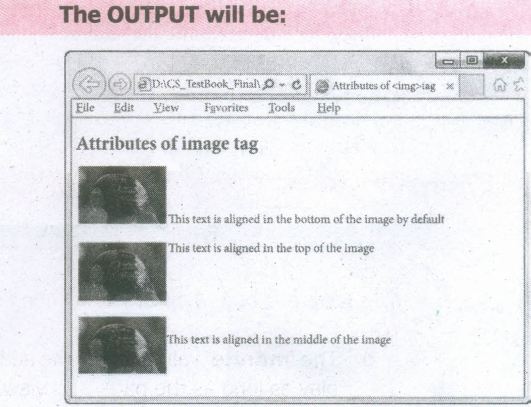
What is the use of align attribute of < img > tag? Explain its values.
26.
Brief the basic data types in Java Scripts.
27.
28.
How do you save a file as HTML file?
29.
Write a note on BOSS.
30.
Differentiate Computer Organisation from Computer Architecture.
31.
Add 2010+2510
32.
Who uses the presentation software and why
33.
How will you delete rows or columns inside a table?
34.
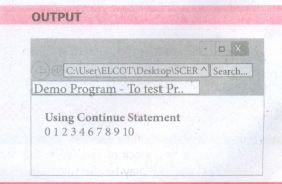
Explain while loop with suitable example do .... while loop.
35.
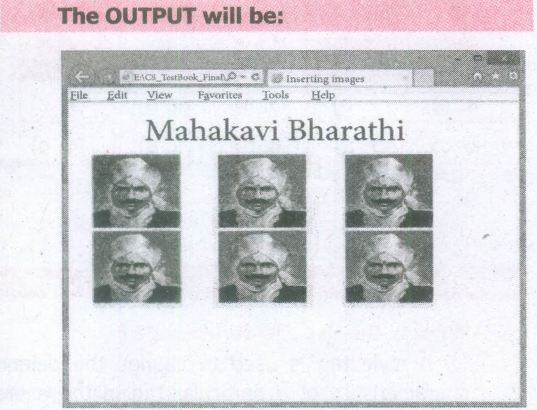
Explain all the attributes of < IMG > tag with suitable HTML code.
36.
Explain about the popup dialog boxes in JavaScript.
37.
Explain the different types of interactions in e-governance.
38.
Explain the versions of Windows Operating System.
39.
Explain the following in detail.
(a) FIFO (b) SJF (c) Round Robin
40.
Explain any three secondary storage devices.
41.
Explain the following:
a. Inkjet Printer
b. Multimedia projector
c. Bar code / QR code Reader
42.
Sivabalan created a presentation to be shown at his school's Annual Function. Just 5 minutes before the presentation, he noticed that he has misspelt the name of the school, which is appearing in all the 30 slides of the presentation. How can he rectify this mistake in all the slides in one-shot?
43.
Write the steps to apply standard filter?
1.
(a)
Function
2.
(a)
< Embed >
3.
(c)
3
4.
(c)
Android
5.
(b)
Second
6.
(b)
< Style >
7.
(d)
Subscript and Superscript
8.
(a)
Tags
9.
(a)
Settings
10.
(c)
Pentium III
11.
(a)
NOT(OR)
12.
(a)
Touch Screen
13.
(d)
Slide Sorter
14.
(d)
All of these
15.
(b)
Only (i), (iii) and (iv)
16.
(i) Denial of Service Attack
(ii) Scam
(ill) Spam.
17.
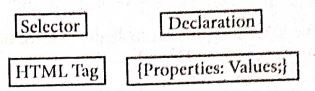
18.
(i) Face: The face is an attribute to set different font style. The name of a font has multiple words it should be specified within double quote.
(ii) Size : The size attribute is used to set size of the text. The size can have an absolute value from 1 to 7. These predefined sizes are known as virtual size. Each virtual size is successively 20% larger than the previous one.
19.
A network is a collection of interconnected devices (such as computers, printers, etc.).
20.
Multi-user Operating Systems:
1. It is used in computers and laptops that allow same data and applications to be accessed by multiple users at the same time.
2. The users can also communicate with each other. Windows, Linux and UNIX are examples for multi-user Operating System.
21.
The number of bits that can be processed by a processor in a single instruction is called its word SIze.
22.
| Data | Information |
| Data is defined as an unprocessed collection of raw facts, suitable for communication, interpretation or processing. | Information is a collection of facts from which conclusions may be drawn. |
| (Eg) 134, 16, 'Kavitha', 'C' | (Eg) Kavitha is 16 years old. |
23.
The keyboard shortcuts to cut, copy, paste
Cut - Ctrl + X
Copy - Ctrl + C
Paste - Ctrl + V
24.
The ruler is a scale below the formatting toolbar which shows the margins.
There are two set of rulers
(1) Horizontal ruler and
(2) Vertical ruler.
Horizontal ruler is used to set left and right margins of a page and vertical ruler for top and bottom setting.
25.
Align:
The align attribute used to aligns the image with respect to the base line of the text. This attribute has the following values.
(i) Bottom - Aligns the bottom of the image with the baseline of the text. This is the default setting.
(ii) Middle - Aligns the middle of the image with the baseline of the text.
(iii) Top - Aligns the top of the image with the baseline of the text.
Left and Right values of Align attribute:
Using left and right values with align attribute, displayed the image on the left and right side of the text.
An HTMLcode to demonstrate baseline of text:
< html >
< head >
< title > Attributesof < img > tag < /title >
< /head >
< body >
< h2 > Attributes of imagetag < /h2 >
< img src="D:\Images\Bird.jpg" alt =
"ParrotImage" >
This text is aligned in the bottom of the
imageby default < br > < br > < br >
< img src="D:\Images\Bird.jpg" alt =
"ParrotImage" align=top >
This text is aligned in the top of the
image
< br > < br >
< img src="D:\Images\Bird.jpg"
alt="Parrot Image" allqn=middle >
This text is alignedon the middleof the
image
< /body >
< /html >
26.
The basic data types in JavaScript are Strings, Numbers, and Booleans.
(i) A string is a list of characters, and a string literal is indicated by enclosing the characters in single or double quotes. Strings may contain a single character or multiple characters, including whitespace and special characters such as \n (the newline).
(ii) Numbers can be integer or floating-point numerical value and numeric literals are specified in the natural way.
(iii) Boolean can be any one of two values: true or false. Boolean literals are indicated by using true or false directly in the source code.
27.
28.
(i) Click File \(\rightarrow\) Save (or) Press Ctrl + S
(ii) Save as dialog box appears.
(iii) In "File Name" text box, type a file name with .htm or .html extension.
(iv) Select "All Files" from "Save as type" list box.
(v) Click "Save" button.
29.
(i) Bharat Operating System Solution (BOSS) is the acronym of BOSS GNU / Linux or BOSS Linux.
(ii) It has been described as 'India's Own PC OS'.
(iii) It is developed by National Resource Center for Free/Open Source Software (NRCFOSS). It is available in all official Indian languages.
30.
1. Computer Organization deals with the hardware components that are transparent to the programmer.
2. Computer architecture deals with the engineering considerations involved in designing a computer.
31.
.png)
8 bit Format of 2010 = 00010100
8 bit format of 2510 = 00011001
2010 + 2510 = _________
00101101
__________
2010 + 2510 = 001011012
32.
Several people make use of the presentation software while giving presentations, some examples are as follows.
(i) Sales persons need to give presentation to their customers clients and managers.
(ii) Human Resource departments use the presentation to provide training to new staff.
(iii) In schools, teachers can better explain concepts by the means of presentation.
(iv) Students also create presentation on topic given by their teachers.
(v) The presentation software is mostly used during seminars, conferences. This helps the presenter easily project his key points on a large screen while talking about the topic simultaneously.
33.
(i) Place the cursor in the row or column to be deleted and right-click.
(ii) Choose Row ➝ Delete - to delete a row or Column ➝ Delete- to delete a column.
(iii) The selected row / column is deleted.
34.
The do .... while loop is like a while loop, except that the loop expression is tested at the end of the loop rather than at the beginning. This means that the body of the loop is always executed at least once.
The syntax is:
do
{
body of the loop
} while (expression);
An important difference between while and do..while statement is in the do..while loop body of the loop always executed at least once before the condition can be executed. In a while loop, first condition will be evaluated and then only based on the result of the condition the body of the loop will be executed or not.
Example:
< Htrnl >
< Head >
< Title > Program - To test do..while
statement in JavaScript < /Title >
< /Head >
< Body >
< script language="javascript"
type= "text/javascri pt" >
document.write("< h2 > Using do..while
Statement < /h2 >'');
var no2=0;
do
{
document. write( no2+" ");
no2=no2+2;
}while(no2<=10);
< /script >
< /Body >
< /Html >
35.
Attributes of < img > tag:
Other than src, the < img > tag has many attributes the enable to control how the image is presented on the page.
Alt (Alternative Text)
The alt attribute within < img > tag is used to describe the image, so that some text is conveyed even when the image cannot be displayed.
Ex:
< img src = bharathiyar.gif alt = "National Poet of India" >
Width and Height:
Width and Height attributes are used to set the width and height of an image. The values of these attributes should be either pixels or percentage of its actual size. If these attributes are not specified, the browser displays the image in its original size.
Vspace (Vertical Space) and Hspace (Horizontal Space):
Vspace and Hspace attributes are used to set Vertical and Horizontal space between the images.
An HTML code to demonstrate < img > attributes:
< html >
< head >
< title > Inserting Images < /title >
< /head >
< body >
< h1 align = center > Mahakavi Bharathi
< /h1 >
< img src = bharathiyar.gif alt = "National
Poet of' India" Width = 20% Height = 25% vpace = 20 Hspace = 20 >
< img src = bharathiyar.gif alt = "National
Poet of India" Width = 20% Height = 25% vpace = 20 Hspace = 20 >
< img src = bharathiyar.gif alt = "National
Poet of India" Width = 20% Height = 25% vpace = 20 Hspace = 20 > < br >
< img src = bharathiyar.gif alt = "National
Poet of 'India" Width = 20% Height = 25% vpace = 20 Hspace = 20 >
< img src = bharathiyar.gif alt = "National
Poet of India" Width = 20% Height = 25% vpace = 20 Hspace = 20 >
< img src = bharathiyar.gif alt = "National
Poet of India" Width = 20% Height = 25% vpace = 20 Hspace = 20 > < br >
< /body >
< /html >
36.
JavaScript supports three important types of dialog boxes. Dialog boxes are also called as Popup Boxes. These dialog boxes can be used to raise an alert, or to get confirmation on any input or to have a kind of input from the users.JavaScrípt supports three kind of popup boxes: Alert box, Confirm box, and Promnpt box.
Alert Dialog Box: An alert dialog box is mostly used to give a warning message to the users. For example, if one input field requires to enter some text but the user does not provide any input, then as a part of validation, you can use an alert box to give a warning message. Alert box gives only one button "OK" to select and proceed.
The syntax of alert box is
alert("Message");
(or) Window.alert ("Message");
Example:
alert("Name is compulsory entry);
(or) window.alert("Name is compulsory entry");
Confirm Dialog Box : A confirmation dialog box is mostly used to take user's consent on any option. It displays a dialog box with two buttons: OK and Cancel. If the user clicks on the OK button, the confirm() will return true. If the user clicks on the Cancel button, then confirm() returns false.
The syntax of confirm dialog box is
confirm("message");
(or)
window.confirm("message");
Example :
confirm("Hai Do you want to continue:");
(or)
window.confirm(“Hai Do you want to continue:");
Prompt Dialog Box: The prompt dialog box is very useful when the user want to pop-up a text box to get user input. Thus, it enables you to interact with the user. The user needs to fill in the text box field and then click OK.
The prompt dialog box is displayed using a method called prompt()which takes two parameters :
(i) a label which you want to display in the text box and (ii) a default string to display in the text box. This dialog box has two buttons: OK and Carncel. If the user clicks the OK button, the prompt() will return the entered value from the text box. If the user clicks the Cancel button, the prompt() returns null. The Sntax of prompt dialog box is,
Prompt("Message","default Value");
(or)
window.prompt("sometext","defaultText");
Example:
prompt("Enter Your Name:"Name");
(or)
window.prompt("Enter Your Name:"Name");
37.
Types of Interactions in e-Govemance :
1. G2G (Government to Government): When the exchange of information and services is within the periphery of the government, is termed as G2G interaction. This can be both horizontal, i.e. among various government entities and vertical, i.e. between national, state and local government entities and within different levels of the entity
2. G2C (Government to Citizen): The interaction amidst the government and general public isG2C interaction. Here an interface is set up between government and citizens, which enables citizens to get access to wide variety of public services. The citizens has the freedom to share their views and grievances on government policies anytime, anywhere.
3. G2B (Government to Business): In this case, the e-governance helps the business class to .interact with the government seamlessly, It aims at eliminating red-tapism, saving time, cost and establish transparency in the business environment, while interacting with government.
4. G2E (Government to Employees): The government of arty country is the biggest employer and so it also deals with employees on a regular basis, as other employers do. ICT helps in making the interaction between government, and employees fast and efficient, along with raising their level of satisfaction by providing perquisites and add-on benefits.
E-governance has a great role to play, that improves and supports all tasks performed by the government department andagencies, because it simplifies the task on the one hand and increases the quality of work on the other.
38.
| S.No | Versions | Year | Specific features |
| 1. | Windows 1.x | 1985 | 1. Introduction of GUI in 16 - bit. processor 2. Mouse was introduced as an input device |
| 2. | Windows 2.x | 1987 | 1. Supports to minimize or maximize windows. 2. Control panel feature was introduced with various system settings and customising options. |
| 3. | Windows 3.x | 1992 | 1. Introduced the concept of multitasking. 2. Supported 256 colours which brought a more modern, colourful look to the interface. |
| 4. | Windows 95 | 1995 | 1. Introduced Start button, the taskbar, Windows Explorer and Start menu. 2. Introduced 32 - bit processor and focused more on multitasking. |
| 5. | Windows 98 | 1998 | 1. Integration of the Web browser (Internet Explorer) with the Operating System. 2. DOS gaming began to disappear as Windows based games improved. 3. Plug and play feature was introduced. |
| 6. | Windows NT | Designed to act as servers in network. | |
| 7. | Windows Me | 2000 | It introduced automated system diagnostics and recovery tools. |
| 8. | Windows 2000 | 2000 | 1. Served as an Operating System for business desktop and laptop systems. 2. Four versions of Windows 2000 were released: Professional (for business desktop and laptop systems), Server (both a Web server and an office server), Advanced Server (for line-of-business applications) and Data Centre Server (for high traffic computer networks). |
| 9. | Windows XP | 2001 | 1. Introduced 64-bit Processor. 2. Improved Windows appearance with themes and offered a stable version |
| 10. | Windows Vista | 2006 | Updated the look and feel of Windows |
| 11. | Windows 7 | 2009 | Booting time was improved, introduced new user interfaces like Aero Peek, pinning programs to taskbar, handwriting recognition etc. and Internet Explorer 8. |
| 12. | Windows 8 | 2012 | 1. Windows 8 is faster than previous versions of Windows. 2. Start button was removed 3. Windows 8 takes better advantage of multi-core processing, solid state drives (SSD), touch screens and other alternate input methods. 4. Served as common platform for mobile and computer. |
| 13. | Windows 10 | 2015 | 1. Start Button was added again. 2. Multiple desktop. 3. Central Notification Center for App notification and quick actions. 4. Cortana voice activated personal assistant. |
39.
(a) FIFO (First In First Out)Scheduling :
(i) This algorithm is based on queuing technique. Assume that a student is standing in a queue (Row) to get grade sheet from his/her teacher.
(ii) The other student who stands first in the queue gets his/her grade sheet first and leaves from the queue (Row). Followed by the next student in the queue gets it corrected and so on. This is the basic logic of the FIFO algorithm.
(iii) Technically, the process that enters the queue first is executed first by the CPU, followed by the next and so on. The processes are executed in the order of the queue (row).
(b) SJF (Shortest Job First)Scheduling:
(i) This algorithm works based on the size of the job being executed by the CPU.
(ii) Consider two jobs A and B.
(iii) 1) A = 6 kilo bytes 2) B = 9 kilo bytes.
(iv) First the job "A" will be assigned and then job "B" gets its turn.
(c) Round RobinScheduling :
(i) The Round Robin (RR) scheduling algorithm is designed especially for time sharing systems.
(ii) Jobs (processes) are assigned and processor time in a circular method.
(iii) For example take three jobs A, B, C. First the job A is assigned to CPU then job B and job C and then again A, Band C and so on.
40.
Hard disk :
(i) Hard disk is a magnetic disk on which you can store data. The hard disk has the stacked arrangement of disks accessed by a pair of heads for each of the disks.
(ii) The hard disks come with a single or double-sided disk.
Compact Disk (CD) :
.png)
(i) A CD or CD-ROM is made from 1.2 millimetres thick, polycarbonate plastic material. A thin layer of aluminium or gold is applied to the surface.
(ii) CD data is represented as tiny indentations known as "pits", encoded in a spiral track moulded into the top of the polycarbonate layer. The areas between pits are known as "lands".
(iii) A motor within the CD player rotates the disk. The capacity of an ordinary CD- ROM is 700MB.
Digital Versatile Disc (DVD):
.png)
(i) A DVD (Digital Versatile Disc or Digital Video Disc) is an optical disc capable of storing up to 4.7 GB of data, more than six times what a CD can hold.
(ii) DVDs are often used to store movies at a better quality. Like CDs, DVDs are read with a laser. The disc can have one or two sides, and one or two layers of data per side; the number of sides and layers determines how much it can hold.
(iii) A 12 em diameter disc with a single-sided, single layer has 4.7 GB capacity, whereas the single-sided, double layer has 8.5 GB capacity.
(iv) The 8 em DVD has 1.5 GB capacity. The capacity of a DVD-ROM can be visually determined by noting the number of data sides of the disc. Double-layered sides- are usually gold-coloured, while single-layered sides are usually silver-coloured, like a CD.
41.
(a) Inkjet Printers:
(i) Inkjet Printers use colour cartridges which combined Magenta, Yellow and Cyan inks to create color tones. A black cartridge is also used for monochrome output. Inkjet printers work by spraying jonised ink at a sheet of paper.
(ii) They use the technology of firing ink by heating it so that it explodes towards the paper in bubbles or by using piezoelectricity in which tiny electric currents controlled by electronic circuits are used inside the printer to spread ink in jet speed.
(iii) An Inkjet printer can spread millions of dots of ink at the paper every single second.
(b) Multimedia Projectors:
(i) Multimedia projectors are used to produce computer output on a big screen.
(i) These are used to display presentations in meeting halls or in classrooms.
(c) Bar Code / QR Code Reader:
(i) A Bar code is a pattern printed in lines of different thickness. The Bar code reader scans the information on the bar codes transmits to the Computer for further processing.
(ii) The system gives fast and error free entry of information into the computer.
QR (Quick response) Code:
The QR code is the two dimension bar code which can be read by a camera and processed to interpret the image.
42.
The slide master will be helpful in this situation. Select the Master slide,
(i) Choose Edit \(\rightarrow\)Find & Replace option from the menu bar. The Find & Replace Dialog box appears on the screen.
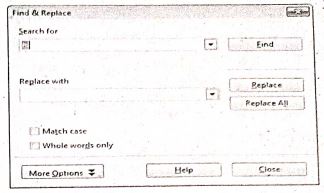
(ii) In the search for box type the misspelt word. |
(iii) Type the correct word in the Replace with box.
(iv) Click the Find option to find the misspelt word.
(v) Click the Replace All option to replace the correct word in all the slides. You can see the replacemnent in all the slides.
43.
Step 1:
(i) Select Data ➝ Filter ➝ Standard Filter.
(ii) Now, the entire data is selected and "Standard Filter" dialog box displays.
Step 2:
(i) Select the column heading from the "Filed name" list box for first criteria.
(ii) Select conditional operator such as > , < , = etc., from "Condition" list box.
(iii) Type or select the value of criteria in the "Value" box.
Step 3:
(i) Select the one of the logical operator (And / Or) from "Operator" list box to fix second criteria.
(ii) Follow the step 2, for the next criteria.
Step 4:
Click "OK" to finish.

11th Standard Syllabus & Materials
11th Standard
TN 11th Tamil பீடு பெற நில் - செய்யுள் - காவடிச்சிந்து Important Questions And Answers Study Material - QB365 Set A
NEW11th Standard
TN 11th Tamil பீடு பெற நில் - உரைநடை - மலை இடப்பெயர்கள் : ஓர் ஆய்வு Important Questions And Answers Study Material - QB365 Set A
NEW11th Standard
TN 11th Tamil மாமழை போற்றுதும் - துணைப்பாடம் - யானை டாக்டர் Important Questions And Answers Study Material - QB365 Set A
NEW11th Standard
TN 11th Tamil மாமழை போற்றுதும் - செய்யுள் - ஐங்குறுநூறு Important Questions And Answers Study Material - QB365 Set A



Tamilnadu Stateboard 11th Standard Subjects

Maths

Commerce

Economics

Biology

Business Maths and Statistics

Accountancy

Computer Science

Physics

Chemistry
Maths
Biology
Economics
Physics
Chemistry

History
Business Maths and Statistics

Computer Science
Accountancy
Computer Applications
History
Computer Technology
Commerce
Computer Applications
Computer Technology

Tamil

English

French
Tamilnadu Stateboard Standards
