
 100% FREE ACCESS
11th Standard Syllabus & Materials
11th Standard
TN 11th Tamil இயற்கை வேளாண்மை,சுற்றுச்சூழல் -செய்யுள் - மனோன்மணீயம் Important Questions And Answers Study Material - QB365 Set A
NEW11th Standard
TN 11th Tamil என்னுயிர் என்பேன் -துணைப்பாடம் - இசைத்தமிழர் இருவர் Important Questions And Answers Study Material - QB365 Set A
NEW11th Standard
TN 11th Tamil மொழி கலை -செய்யுள் - ஒவ்வொரு புல்லையும் Important Questions And Answers Study Material - QB365 Set A
NEW11th Standard
TN 11th Tamil பீடு பெற நில் - இலக்கணம் - பகுபத உறுப்புகள் Important Questions And Answers Study Material - QB365 Set A
NEW11th Standard
TN 11th Tamil பீடு பெற நில் - துணைப்பாடம் - வாடிவாசல் Important Questions And Answers Study Material - QB365 Set A
NEW11th Standard
TN 11th Tamil பீடு பெற நில் - செய்யுள் - குறுந்தொகை Important Questions And Answers Study Material - QB365 Set A

Published on: 01/10/2019
HTML - Formatting text, Creating Tables, List and Links
Download Tamil Nadu 11th Standard Computer Applications question papers, model tests, one-mark questions, important questions, and public exam papers in PDF format. Free study materials and answer keys for TN State Board students.
Questions + Answers key
Take MCQ Computer Applications Test
1.
Which of the following tag is a phrase tag?
< strong >
< phrase >
< p >
< em >
2.
3.
To create internal link, which of the following attribute should be used?
link
name
local
Inter
4.
Definition list has how many parts?
5
4
3
2
5.
Which feature is used to call attention to the reader?
Highlight
Bold
Italics
Underline
6.
How will you define numbered list?
7.
What is pixel?
8.
Write about any two attributes of font tag.
9.
What is the use of < mark > tag?
10.
Write a short note on
(i) < strong >
(ii) < em >
11.
Explain Highlighting text with an example.
12.
Define
(i) cell
(ii) Border
(iii) column
(iv) Table.
13.
Difference between < UL > and < OL > tags.
14.
What are the core tags used to create table in HTML?
15.
Briefly explain the attributes of < hr > tag.
16.
What is Link and explain the types of links.
17.
Explain the attributes used with < table > tag in HTML.
1.
(b)
< phrase >
2.
(c)
3.
(b)
name
4.
(d)
2
5.
(a)
Highlight
6.
Numbered list is defined within the tag pair <OL>...</OL> tag. It is also called ordered list. It display items in a numberical or alphabetical order.
7.
Thickness of the horizontal line can be changed with size attribute.The size is given in terms of pixels. A pixel is one of the tiny dots that make up the display on computer. Generally, 72 pixels is equal to an inch. Pixel is usually referred as points.
8.
(i) Face: The face is an attribute to set different font style. The name of a font has multiple words it should be specified within double quote.
(ii) Size : The size attribute is used to set size of the text. The size can have an absolute value from 1 to 7. These predefined sizes are known as virtual size. Each virtual size is successively 20% larger than the previous one.
9.
The \(<mark>\) tag is used to highlight the text in HTML. This is also a container tag. Highlighting is an important formatting feature used to call attention to the reader.
10.
(i) < strong > Important text :The < strong > tag is a phrase tag. It is used to define important text. This tag displays the text as bold.
(ii) < em > Exphasized text : The < em > tag is used to emphasize the text. That means, when this tag used the text will be in italics.
11.
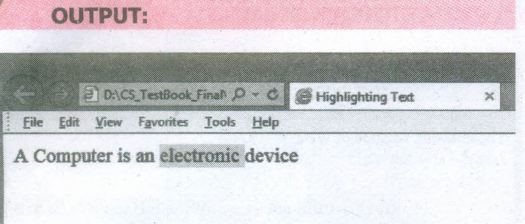
Highlighting text :
Highlighting is an important formatting feature is used to call attention to the reader. The < mark > tag is used to highlight the text in HTML. This is also a container tag. Whatever the text given between < mark > and < /mark > will be displayed as highlighting with default color.
HTML CODE:
< html >
< head >
< title > Highlighting text < /title >
< /head >
< body >
A Computer is an < mark > electronic
< /mark > device
< /body >
< /html >
12.
(i) Cell: An individual box in a table.
(ii) Border: A line surrounded by cells.
(iii) Column: Vertical structure of a table.
(iv) Table: A Structure of rows and columns or grid of cells.
13.
| <UL> | <OL> |
| It is used to create unordered list | It is used to create ordered list |
| It displays items in a numerical or alphabetical order | It displays items prefixed with a special bullet symbol |
| It has a type value Standard Arabic numerals, lower case letters, upper case, letters, lower case Roman Numerals, Upper case Roman numerals | It has a type value Disc, Square, Circle |
14.
There are five core tags are used to create a table in HTML. They are
(i) < table > tag is used to create a table
(ii) < tr > tag defines table rows
(iii) < th > tag defined table columns
(iv) < td > tag is used to specify the data in a cell
(v) < caption > tag defines title for the table.
15.
The < hr > tag having four attributes viz., size, width, noshade and color. These attributes are used to set size, width, 3D appearance and color to the horizontal line respectively.
The general syntax of < hr > tag with attributes:
< hr size = value width = value noshade, color = color_name/code >
(i) Size: Thickness of the horizontal line can be changed with size attribute.
(ii) Width: The width attribute specifies the horizontal width of the line
(iii) Noshade: The default view of a horizontal rule line is 3D. So, no need to specify the term "noshade" as an attribute with < hr > tag. If you specify the attribute "noshade" turn off 3D view, turns on 2D view.
(iv) The color attribute is used to change the default color to desired color.
16.
Link isan important feature of HTML to connect web resources. Link in HTML is used to create hyperlinks to web content. Web content may be an HTML document or an external webpage or any multimedia content such as an image, video, audio, animation etc., or even a part of the current document.
There are two important things needed to create a link in HTML,
1. The name of the file or URL to Which you want to link
2. The text that will serve as the clickable link.
The anchor tag < A > is used to create links along with HREF attribute. HREF is abbreviated as "Hypertext Reference".
Internal Links: Creating a link to a particular section of the same document is known as Internal Link. To create an internal link, the attribute Name is used along with < A > tag. The Name attribute of < A > tag establish the link to the content within the document.
An HTML code to demonstrate Internal Linking:
< html >
< head >
< title > South India< /title >
< /head >
< body >
< A href = #TN > Tamil Nadu < /A >
< A Name =TN > < B > Tamilnadu < /B > < /A >
< p > Tamil Nadu literally 'The Land of Tamils' or 'Tamil Country' is one of the 29 states of India. Its capital and largest city is Chennai (formerly
known as Madras). < /p >
< /body >
< /html >
External Links : To Establish link with an external web page in known as external link. It is created by províding the URL of the external file in the HREF attribute of < A > tag of the current page.
An HTML code to demonstrate Internal Linking with an external websisite/webpage:
< html >
< head >
< title > Links< /title >
< /head >
< body >
< hI align=center >
Welcome to < br >
< A href= "http://www.tnscert.org" >
State Council of Educational Research and Training, Tamilnadu < /A >
< /h1 >
< /body >
< /html >
17.
The <table> is a container tag. There are several attributes to improve the layout of the table. They are listed below:
(i) Cellspacing : It is used to set the space between cells in a table.The value should be in pixels.
(ii) Cellpadding: It is used to set the space between the contents of a cell and its border the value should be in pixels.
(iii) Border : Border attribute with <table> tag is used to specify the thickness of the border lines around the table. The value of the border attribute should be non zero value in pixels. If its value is zero, HTML displays the table without border. The default value is Zero in most of the browsers.
(iv) Bordercolor : It is used to apply colour to the border lines.
(v) Align : It is used to set the position of the table within the browser window. Left is the default position. Right or centre may be the value of align attribute.
(vi) BGcolor : It is used to apply background colour to the table.
(vii) Height and Width : These two attributes are used to specify the height and width of a table in terms of pixels or percentage.

11th Standard Syllabus & Materials
11th Standard
TN 11th Tamil பீடு பெற நில் - செய்யுள் - காவடிச்சிந்து Important Questions And Answers Study Material - QB365 Set A
NEW11th Standard
TN 11th Tamil பீடு பெற நில் - உரைநடை - மலை இடப்பெயர்கள் : ஓர் ஆய்வு Important Questions And Answers Study Material - QB365 Set A
NEW11th Standard
TN 11th Tamil மாமழை போற்றுதும் - துணைப்பாடம் - யானை டாக்டர் Important Questions And Answers Study Material - QB365 Set A
NEW11th Standard
TN 11th Tamil மாமழை போற்றுதும் - செய்யுள் - ஐங்குறுநூறு Important Questions And Answers Study Material - QB365 Set A



Tamilnadu Stateboard 11th Standard Subjects

Maths

Commerce

Economics

Biology

Business Maths and Statistics

Accountancy

Computer Science

Physics

Chemistry
Maths
Biology
Economics
Physics
Chemistry

History
Business Maths and Statistics

Computer Science
Accountancy
Computer Applications
History
Computer Technology
Commerce
Computer Applications
Computer Technology

Tamil

English

French
Tamilnadu Stateboard Standards
