
 100% FREE ACCESS
11th Standard Syllabus & Materials
11th Standard
TN 11th Tamil இயற்கை வேளாண்மை,சுற்றுச்சூழல் -செய்யுள் - மனோன்மணீயம் Important Questions And Answers Study Material - QB365 Set A
NEW11th Standard
TN 11th Tamil என்னுயிர் என்பேன் -துணைப்பாடம் - இசைத்தமிழர் இருவர் Important Questions And Answers Study Material - QB365 Set A
NEW11th Standard
TN 11th Tamil மொழி கலை -செய்யுள் - ஒவ்வொரு புல்லையும் Important Questions And Answers Study Material - QB365 Set A
NEW11th Standard
TN 11th Tamil பீடு பெற நில் - இலக்கணம் - பகுபத உறுப்புகள் Important Questions And Answers Study Material - QB365 Set A
NEW11th Standard
TN 11th Tamil பீடு பெற நில் - துணைப்பாடம் - வாடிவாசல் Important Questions And Answers Study Material - QB365 Set A
NEW11th Standard
TN 11th Tamil பீடு பெற நில் - செய்யுள் - குறுந்தொகை Important Questions And Answers Study Material - QB365 Set A

Published on: 18/02/2019
11th Second Revision Test 2019
Download Tamil Nadu 11th Standard Computer Applications question papers, model tests, one-mark questions, important questions, and public exam papers in PDF format. Free study materials and answer keys for TN State Board students.
Questions + Answers key
Take MCQ Computer Applications Test
1.
A________ function definition may include a list of identifiers that work as local variables for the body of the function
Parameterized
Non-parameterized
Either A or B
None of these
2.
Which of the following is used to insert remarks in JavaScript source code?
dialog box
operators
comments
identifiers
3.
Which of the following language used to design "Ezhil"? Tamil programming language?
c
c++
Java
Python
4.
< script type = "text / javascript" >
x = 6 + "3";
document write (x);
< script > what will be the output?
6
9
63
Error
5.
Which of the following are used to depict many complex concepts in simple way?
Images
Tables
Links
Audio
6.
The Declaration block of CSS is surrounded by
( )
[ ]
{ }
< >
7.
Which feature is used to call attention to the reader?
Highlight
Bold
Italics
Underline
8.
Which of the following tag is a structural tag?
< html >
< h1 >
< br >
< p >
9.
Which is the default folder for many Windows Applications to save your file?
My Document
My Pictures
Documents and Settings
My Computer
10.
Which of the following is said to be the brain of a computer?
Input devices
Output devices
Memory device
Microprocessor
11.
A Latin prefix Deci means.........
2
8
16
10
12.
Which one of the following is the main memory?
ROM
RAM
Flash drive
Hard disk
13.
Identify the extension of the Impress presentation.
.odp
.ppt
.odb
ood
14.
How many ways are there open chart wizard?
2
more than 2
3
more than 3
15.
The default font name is_____.
Arial
Arial Black
Times New Roman
None of these
16.
What is cyber crime?
17.
Write down general format of CSS declaration.
18.
What is the use of < mark > tag?
19.
What is CC and BCC in an email?
20.
What are the security management features available in Operating System?
21.
What do you understand by an instruction cycle?
22.
What is the function of an ALU?
23.
What are the keyboard shortcuts to cut, copy and paste?
24.
Name the type of Help system is Openoffice writer?
25.
Explain any 2 use of the < Marquee > tag.
26.
What are the advantages of programming language?
27.
Write the syntax for else-if statement.
28.
What are the attributes available in < html >tags?
29.
What is meant by distributed computing?
30.
Write down the classifications of microprocessors based on the instruction set.
31.
Write a note on a hexadecimal number system
32.
How are transition effects helpful in creating an effective presentation in Impress?
33.
How will you formate the table using formatting toolbar?
34.
Explain how will you Inserting image with HTML document.
35.
Explain about the Arithmetic operator with suitable example.
36.
Write a Javascript to display the given number is words using switch-case (Number between only 1 and 5)
37.
Explain any five types of internet services.
38.
Draw and compare the icon equivalence in windows and Ubuntu.
39.
Explain the following in detail.
(a) FIFO (b) SJF (c) Round Robin
40.
Define the following. (a) Bus (b) Data bus (c) Address bus (d) Control Bus
41.
Discuss the various generations of computers.
42.
Sivabalan created a presentation to be shown at his school's Annual Function. Just 5 minutes before the presentation, he noticed that he has misspelt the name of the school, which is appearing in all the 30 slides of the presentation. How can he rectify this mistake in all the slides in one-shot?
43.
Explain the features of OpenOffice Calc.
1.
(a)
Parameterized
2.
(c)
comments
3.
(d)
Python
4.
(d)
Error
5.
(a)
Images
6.
(c)
{ }
7.
(a)
Highlight
8.
(a)
< html >
9.
(a)
My Document
10.
(d)
Microprocessor
11.
(d)
10
12.
(b)
RAM
13.
(a)
.odp
14.
(a)
2
15.
(c)
Times New Roman
16.
Cybercrime is an intellectual, white-collar crime. Those who commit such crimes generally manipulate the computer system in an intelligent manner.
17.
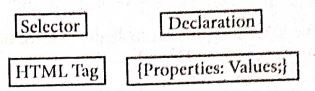
18.
The \(<mark>\) tag is used to highlight the text in HTML. This is also a container tag. Highlighting is an important formatting feature used to call attention to the reader.
19.
(i) CC (Carbon Copy) : The CC (Carbon Copy) field allows you to specify recipients who are not direct addressees (listed in the "To" field). This field is optional.
(ii) BCC(Blind Carbon Copy): The BCC (Blind Carbon Copy) field is similar to CC, except the recipients are secret.
20.
The Operating System provides three levels of securities to the user end. They are
(i) File access level
(ii) System level
(ill) Network level.
21.
The processing required for a single instruction is called Instruction Cycle. Each Instruction Cycle consists of two parts.
(a) The Fetch Cycle - That Fetches the instruction to be executed.
(b) The Execute Cycle - That Executes the instruction Fetched.
22.
(i) The ALU performs arithmetic operations.
(ii) The result of an operation is stored in internal memory of CPU.
(iii) The logical operations of ALU promote the decision making ability of a computer.
23.
The key board shortcuts to cut, copy, paste
Cut - Ctrl + X
Copy - Ctrl + C
Paste - Ctrl + V
24.
Help (F1), Tool tips, Extended tips, Help Agent.
25.
(i) Direction:
1. This is used to specify the direction of the movement of text or image.
2. The text or image will move towards right to left by default. So, the default direction is left.
3. The Possible values are 'up', 'down', 'left' or 'right'.
(ii) Behaviour:
1. This attribute is used to specify the type of scrolling.
2. The values are 'scroll', 'slide' and 'alternate'.
26.
(i) JavaScript programming language is used to develop interactive web pages called Dynamic Web pages.
(ii) User entered data in the Dynamic Web page can be validated before sending it to the server. This saves server traffic, which means less load on your server
(iii) JavaScript includes items such as Texboxes, Buttons, drag-and-drop components and sliders to give a Rich Interface to site visitors.
27.
if (expression)
{
// Execute code block #1
}
else if (expression)
{
// Execute code block #2
}
else if (expression)
{
// Execute code block #3
}
else
{
// if all else fails, execute block #4
}
28.
Attributes of < html > tag:
(i) The < html > tag is used to specify the beginning and closing of an HTML document. This tag does not have any effect on the appearance of a document. This is only used to make browsers and other programs, known that this is an HTML document.
(ii) < html > tag has two attributes viz. dir and lang to specify the text direction and language setting respectively.
| Attribute | Value to be set to attribute | Description |
| dir | Itr (align left-to-right) rtl (align right-to-Ieft) | dir attribute specifies the direction of the text to be aligned within the entire document. It is global attribute. i) Itr is the default value. ii) rtl is used for Arabian languages. |
| lang | Predefined language code English - en Tamil- ta Telugu - te |
lang attribute specify the language used within the document. Predefined language code will be used for this purpose. Malayalam - ml; Kannada - kn; Hindi - hi; French - fr; German - de; |
29.
(i) Distributed computing is a field of computer science that studies distributed systems.
(ii) A distributed system is a model in which components located on networked computers communicate and coordinate their actions by passing messages.
(iii) The components interact with each other in order to achieve a common goal.
30.
There are two types of microprocessors based on their instruction sets.
(i) Reduced Instruction Set Computers (RISC)
(ii) Complex Instruction Set Computers (CISC)
31.
1. The base or radix is 16. Thus it has 16 possible digit symbols. It uses the digits 0 to 9 plus the. letters A, B, C, D, E and F (with respect to 10, 11, 12, 13, 14, 15).
2. It is generally used in microcomputers. Eg. (ABC)16.
32.
Transition effects are special effects that play when the user view a presentation in slide show. In other words,it appear after vanishing of the current slide and before the appearance of the next slide. These effects are used to enhance the initial appearance of the slides.
33.
Formatting a table involves formatting of the table layout, formatting of the table text, adjusting the size of the table, its position on the page, adding or removing rows or columns, merging and splitting cells, changing borders and the background.
34.
The < IMG > tag along with the attribute src (Source) is used to add images in HTML document.
General format:
< img src = image_name _with_extension >
(OR)
< img src = URL >
Example: < img src =image 1.gif >
Src attribute is the main attribute used to specify the file name of the image to be inserted. If the image is not in the current working folder, the image file name should clearly specify with the path of the file or URL, where the file is available
Example: < img src = "D:\images\animals\cat.jpeg'' >
Alt (Alternative Text): The alt attribute within < img > tag is used to describe the image, so that some text is conveyed even when the image cannot be displayed.
Example: < img src = bharathiyar.gif alt = "National Poet of India" >
Width and Height: Width and Height attributes ate used to set the width and height of an image. The values of these attributes should be either pixels or percentage of its actual size. If these attributes are not specified, the browser displays the image in its original size.
Vspace (Vertical Space) and Hspace (Horizontal Space): Vspace and Hspace attributes are used to set Vertical and Horizontal space between the images.
Align: The align attribute used to aligns the image with respect to the base line of the text. This attribute has the following values.
(i) Bottom - Aligns the bottom of the image with the baseline of the text. This is the default setting.
(ii) Middle - Aligns the middle of the image with the baseline of the text.
(iii) Top - Aligns the top of the image with the baseline of the text.
Left and Right values of Align attribute: Using left and right values with align attribute, displayed. the image on the left and right side of the text.
35.
Javascript supports all the basic arithmetic operators like addition (+),subtraction (-) multiplication (*), division (/), and modulus (%, also known as the remainder operator)
Arithmetic operators :
| Arithmetic Operator | Meaning | Example | Result |
|---|---|---|---|
| + | Addition | var sum = 20 + 120 | Variable sum = 140 |
| - | Subtraction | var diff = 120 - 20 | Variable diff = 100 |
| * | Multiplication | var prod = 10*100 | Variable prod = 1000 |
| / | Division | var res = 100 / 522 | Variable res = 5.22 |
| % | Modulus operator | var rem = 100 % 522 | Variable rem = 22 (remainder) |
36.
< Html >
< Body >
< script language="Javascript" type="text/ javascript" > .
var N=0;
var N = promt ("Enter the Number","0");
switch (N)
{
case 1 :
document.write ("One");
break;
case 2 :
document.write ("Two");
break;
case 3 :
document.write ("Three");
break;
case 4 :
document.write ("Four");
break;
case 5 :
document.write ("Five");
break;
default:
document.write ("Invalid! Enter between 1 and 5");
}
< /script >
< /body >
< /Html >
37.
(i) Wireless: Radio frequency bands are used in place of telephone or cable networks. One of the greatest advantages of wireless Internet connections is the "always-on" connection that can be accessed from any location that falls within network coverage. Wireless connections are made possible through the use of a modem, which picks up Internet signals and sends them to other devices.
(ii) Mobile : Many cell phone and smartphone providers offer voice plans with Internet access. Mobile Internet connections provide good speeds and allow you to access the Internet.
(iii) Cable : Cable Internet connection is a form of broadband access. Through use of a cable modem, users can access the Internet over cable TV lines. Cable modems can provide extremely fast access to the Internet.
(iv) Satellite : In certain areas where broadband connection is not yet offered, a satellite Internet option may be available, Similar to wireless access, satellite connection utilizes a modem.
(v) ISDN: ISDN (Integrated Services Digital Network) allows users to send data, voice and video content over digital telephone lines or standard telephone wires. The installation of an ISDN adapter is required at both ends of the transmission-on the part of the user as well as the Internet access provider.
38.
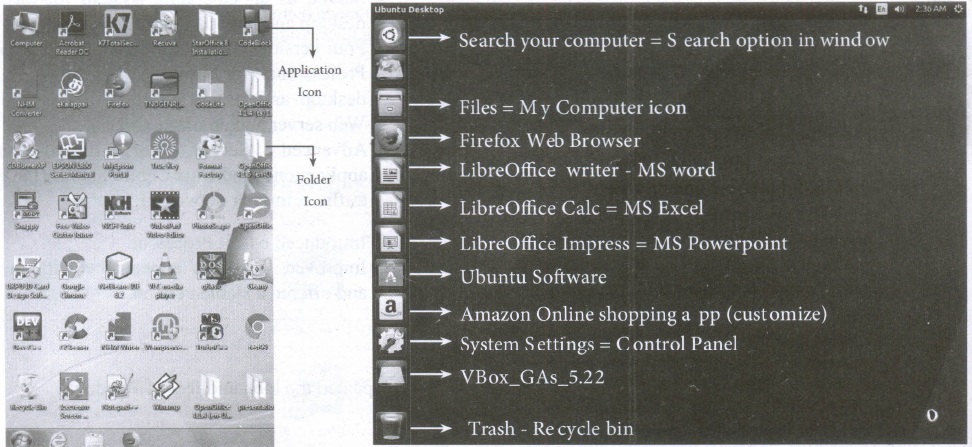
| S.No | Windows | Ubuntu |
| 1. | Recycle Bin | Trash |
| 2. | My computer | Files |
| 3. | Ms word | Libreoffice writer |
39.
(a) FIFO (First In First Out)Scheduling :
(i) This algorithm is based on queuing technique. Assume that a student is standing in a queue (Row) to get grade sheet from his/her teacher.
(ii) The other student who stands first in the queue gets his/her grade sheet first and leaves from the queue (Row). Followed by the next student in the queue gets it corrected and so on. This is the basic logic of the FIFO algorithm.
(iii) Technically, the process that enters the queue first is executed first by the CPU, followed by the next and so on. The processes are executed in the order of the queue (row).
(b) SJF (Shortest Job First)Scheduling:
(i) This algorithm works based on the size of the job being executed by the CPU.
(ii) Consider two jobs A and B.
(iii) 1) A = 6 kilo bytes 2) B = 9 kilo bytes.
(iv) First the job "A" will be assigned and then job "B" gets its turn.
(c) Round RobinScheduling :
(i) The Round Robin (RR) scheduling algorithm is designed especially for time sharing systems.
(ii) Jobs (processes) are assigned and processor time in a circular method.
(iii) For example take three jobs A, B, C. First the job A is assigned to CPU then job B and job C and then again A, Band C and so on.
40.
(a) Bus:
A bus is a collection of wires used for communication between the internal components of a computer.
(b) Data bus:
(i) Data busis a collection of wires to carry data in bits.
(ii) A data bus is used to transfer data between the memory and the CPU.
(iii) The data bus is bidirectional.
(c) Address bus:
(i) Address bus is a collection of wires to carry data in bits.
(ii) The address bus is used to point a memory location.
(iii) The address bus is unidirectional.
(d) Control bus:
(i) Control bus is a control line/collection of wires to control the operation/functions.
(ii) The control bus controls both read and write operations.
41.
| S.No | Generation | Period | Main Component used | Merits/ Demerits |
| 1 | First Generation | 1940 - 1956 | Vaccum tubes | 1. Big in size 2. Consumed more power 3. Malfunction due to over heat 4. Machine Language was used |
| First Generation Computer - ENIAC, EDVAC, UNIVAC 1 ENIAC weighed about 27 tons, size 8 feet x 100 feet x 3 feet and consumed around 150 watts of power |
||||
| 2 | Second Generation | 1956-1964 | Transistors | 1. Smaller compared to First Generation 2. Generated Less Heat 3. Consumed less power compared to first generation 4. Punched cards were used 5. First operating system was developed - Batch Processing and Multiprogramming Operating System 6. Machine language as well as Assembly language was used. |
| Second Generation Computers - IBM 1401, IBM 1620, UNIVAC 1108 | ||||
| 3 | Third Generation | 1964-1971 | Integrated Circuits (IC) | 1. Computers were smaller, faster and more reliable 2. Consumed less power. 3. High-Level Languages were used |
| Third Generation Computers -IBM ·360 series, Honeywell 6000 series | ||||
| 4 | Fourth Generation | 1971-1980 | Microprocessor Very Large Scale Integrated Circuits (VLSI) |
1. Smaller and Faster 2. Microcomputer series such as IBM and APPLE were developed 3. portable Computers were introduced |
| 5 | Fifth Generation | 1980-till date | Ultra Large Scale Integration (ULSI) | 1. Parallel, Processing 2. Super conductors 3. Computers size was drastically reduced. 4. Can recognize Images and Graphics 5. Introduction of Artificial Intelligence and Expert Systems 6. Able to solve high complex problems including decision making and logical reasoning |
| 6 | Sixth Generation | In future |  |
1. Parallel and Distributed computing 2. Computers have become smarter faster and smaller 3. Development of robotics 4. Natural Language Processing 5. Development of Voice Recognition Software. |
42.
The slide master will be helpful in this situation. Select the Master slide,
(i) Choose Edit \(\rightarrow\)Find & Replace option from the menu bar. The Find & Replace Dialog box appears on the screen.
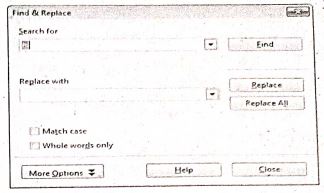
(ii) In the search for box type the misspelt word. |
(iii) Type the correct word in the Replace with box.
(iv) Click the Find option to find the misspelt word.
(v) Click the Replace All option to replace the correct word in all the slides. You can see the replacemnent in all the slides.
43.
1. Connecting with Excel: Ability to open, edit, and save Microsoft Excel spreadsheets
2. AutoSum: Helps you to add the contents of a cluster of adjacent cells.
3. List AutoFill: Automatically extends cell formatting when a new item is added to the end of a list.
4. AutoFill: Allows you to quickly fill cells with repetitive or sequential data such as chronological dates or numbers, and repeated text. AutoFill can also be used to copy functions. You can also alter text and numbers with this feature.
5. AutoShapes toolbar: Will allow you to draw a number of geometrical shapes, arrows, flowchart elements, stars and more. With these shapes, you can draw your own graphs.
6. Wizard: Guides you to work effectively while you work by displaying various helpful tips and techniques based on what you are doing.
7. Drag and Drop: It will help you to reposition the data and text by simply dragging the data with the help of a mouse.
8. Charts: It will help you in presenting a graphical representation of your data in the form of Pie, Bar, Line charts and more.
9. PivotTable: It flips and sums data in seconds and allows you to perform data analysis and generating reports like periodic financial statements, statistical reports, etc. You can also analyze complex data relationships graphically.
10. Shortcut Menus: The commands that are appropriate to the task that you are doing will appear by clicking the right mouse button.
11. Functions: which can be used to create formulas to perform complex calculations on data. Database functions, to arrange, store, and filter data
12. Import and export: of spreadsheets in multiple formats, including HTML, CSV, PDF, and PostScript.

11th Standard Syllabus & Materials
11th Standard
TN 11th Tamil பீடு பெற நில் - செய்யுள் - காவடிச்சிந்து Important Questions And Answers Study Material - QB365 Set A
NEW11th Standard
TN 11th Tamil பீடு பெற நில் - உரைநடை - மலை இடப்பெயர்கள் : ஓர் ஆய்வு Important Questions And Answers Study Material - QB365 Set A
NEW11th Standard
TN 11th Tamil மாமழை போற்றுதும் - துணைப்பாடம் - யானை டாக்டர் Important Questions And Answers Study Material - QB365 Set A
NEW11th Standard
TN 11th Tamil மாமழை போற்றுதும் - செய்யுள் - ஐங்குறுநூறு Important Questions And Answers Study Material - QB365 Set A



Tamilnadu Stateboard 11th Standard Subjects

Maths

Commerce

Economics

Biology

Business Maths and Statistics

Accountancy

Computer Science

Physics

Chemistry
Maths
Biology
Economics
Physics
Chemistry

History
Business Maths and Statistics

Computer Science
Accountancy
Computer Applications
History
Computer Technology
Commerce
Computer Applications
Computer Technology

Tamil

English

French
Tamilnadu Stateboard Standards
