
 100% FREE ACCESS
11th Standard Syllabus & Materials
11th Standard
TN 11th Tamil இயற்கை வேளாண்மை,சுற்றுச்சூழல் -செய்யுள் - மனோன்மணீயம் Important Questions And Answers Study Material - QB365 Set A
NEW11th Standard
TN 11th Tamil என்னுயிர் என்பேன் -துணைப்பாடம் - இசைத்தமிழர் இருவர் Important Questions And Answers Study Material - QB365 Set A
NEW11th Standard
TN 11th Tamil மொழி கலை -செய்யுள் - ஒவ்வொரு புல்லையும் Important Questions And Answers Study Material - QB365 Set A
NEW11th Standard
TN 11th Tamil பீடு பெற நில் - இலக்கணம் - பகுபத உறுப்புகள் Important Questions And Answers Study Material - QB365 Set A
NEW11th Standard
TN 11th Tamil பீடு பெற நில் - துணைப்பாடம் - வாடிவாசல் Important Questions And Answers Study Material - QB365 Set A
NEW11th Standard
TN 11th Tamil பீடு பெற நில் - செய்யுள் - குறுந்தொகை Important Questions And Answers Study Material - QB365 Set A

Published on: 03/09/2019
Working With Typical Operating System ( Windows & Linux)
Download Tamil Nadu 11th Standard Computer Applications question papers, model tests, one-mark questions, important questions, and public exam papers in PDF format. Free study materials and answer keys for TN State Board students.
Questions + Answers key
Take MCQ Computer Applications Test
1.
Where will you select the option to log out suspend, restart, or shut down from the desktop of Ubuntu OS?
Session Indicator
Launcher
Files
Search
2.
Which is the default browser for Ubuntu?
Firefox
Internet Explorer
Chrome
Thunderbird
3.
Identify the default email client in Ubuntu?
Thunderbird
Firefox
Internet Explorer
Chrome
4.
Under which of the following OS, the option Shift + Delete - permanently deletes a file or folder?
Windows 7
MS - DOS
Linux
Android OS
5.
From the options given below, choose the operations managed by the operating system.
Memory
Processes
Disks and I/O devices
all of the above
6.
How will you log off from Ubuntu OS?
7.
What is Open Source?
8.
What is the use of a file extension?
9.
Differentiate Save, Save As and Save a Copy in Ubuntu OS.
10.
Write the specific use of Cortana.
11.
Analyse: Why the drives are segregated?
12.
Write the procedure to create, rename, delete and save a file in Ubuntu OS. Compare it with Windows OS.
13.
Draw and compare the icon equivalence in windows and Ubuntu.
1.
(a)
Session Indicator
2.
(a)
Firefox
3.
(a)
Thunderbird
4.
(a)
Windows 7
5.
(d)
all of the above
6.
Choose an option logout through the session indicator on the far right side of the top paner.
7.
Open Source refers to a program or software in which the source code is available in the web to the general public free of cost.
8.
File extension is used to know that in which the file is associated with.
9.
Save - This will save the document without asking for a new name or location. It will overwrite the original.
Save As- This will prompt you to save the document using a dialog box. This allows to change the file name or location.
10.
Use of Cortana
(i) Gives reminders based on time, places or people.
(ii) Track packages, teams, interests and flights.
(iii) Send emails and texts.
(iv) Find facts, files, places and information.
(v) Open any application on your system.
11.
The drives are segregated because
(i) Save space and increase performance.
(ii) To include other Operating systems, isolate programs and keep files tidy.
(iii) It might help to isolate operating systems or programs from other user.
12.
In Ubuntu OS:
(i) Create a file: By right-clicking in the desktop' and also files be created by using the file menu.
(ii) Delete a file: By using right-click choosing a move to trash or by using the menu.
(iii) Rename a file: By using right-click and choosing rename option.
(iv) Save a file: Press ctrl + x or F2 to exit. You will. then be asked if you want to save. (or) Press ctrl+ 0 or F3 and ctrl + x or F2 for save and exit.
In Windows OS:
(i) Create file: Open an application and create it by using the file menu.
(ii) Delete a file: By right click on a file and choosing the delete option to delete a file.
(iii) Rename a file: By right-clicking on a file and choosing rename option to rename a file.
(iv) Save file: Press ctrl+S or file - save to save the file.
13.
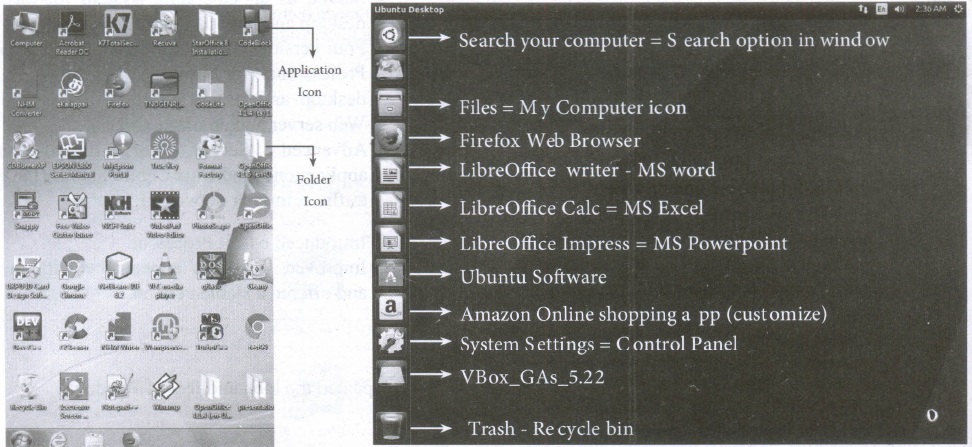
| S.No | Windows | Ubuntu |
| 1. | Recycle Bin | Trash |
| 2. | My computer | Files |
| 3. | Ms word | Libreoffice writer |

11th Standard Syllabus & Materials
11th Standard
TN 11th Tamil பீடு பெற நில் - செய்யுள் - காவடிச்சிந்து Important Questions And Answers Study Material - QB365 Set A
NEW11th Standard
TN 11th Tamil பீடு பெற நில் - உரைநடை - மலை இடப்பெயர்கள் : ஓர் ஆய்வு Important Questions And Answers Study Material - QB365 Set A
NEW11th Standard
TN 11th Tamil மாமழை போற்றுதும் - துணைப்பாடம் - யானை டாக்டர் Important Questions And Answers Study Material - QB365 Set A
NEW11th Standard
TN 11th Tamil மாமழை போற்றுதும் - செய்யுள் - ஐங்குறுநூறு Important Questions And Answers Study Material - QB365 Set A



Tamilnadu Stateboard 11th Standard Subjects

Maths

Commerce

Economics

Biology

Business Maths and Statistics

Accountancy

Computer Science

Physics

Chemistry
Maths
Biology
Economics
Physics
Chemistry

History
Business Maths and Statistics

Computer Science
Accountancy
Computer Applications
History
Computer Technology
Commerce
Computer Applications
Computer Technology

Tamil

English

French
Tamilnadu Stateboard Standards
