
 100% FREE ACCESS
11th Standard Syllabus & Materials
11th Standard
TN 11th Tamil இயற்கை வேளாண்மை,சுற்றுச்சூழல் -செய்யுள் - மனோன்மணீயம் Important Questions And Answers Study Material - QB365 Set A
NEW11th Standard
TN 11th Tamil என்னுயிர் என்பேன் -துணைப்பாடம் - இசைத்தமிழர் இருவர் Important Questions And Answers Study Material - QB365 Set A
NEW11th Standard
TN 11th Tamil மொழி கலை -செய்யுள் - ஒவ்வொரு புல்லையும் Important Questions And Answers Study Material - QB365 Set A
NEW11th Standard
TN 11th Tamil பீடு பெற நில் - இலக்கணம் - பகுபத உறுப்புகள் Important Questions And Answers Study Material - QB365 Set A
NEW11th Standard
TN 11th Tamil பீடு பெற நில் - துணைப்பாடம் - வாடிவாசல் Important Questions And Answers Study Material - QB365 Set A
NEW11th Standard
TN 11th Tamil பீடு பெற நில் - செய்யுள் - குறுந்தொகை Important Questions And Answers Study Material - QB365 Set A

Published on: 21/03/2019
+1 Public Exam March 2019 Important Creative 3 Mark Questions and Answers
Download Tamil Nadu 11th Standard Computer Science question papers, model tests, one-mark questions, important questions, and public exam papers in PDF format. Free study materials and answer keys for TN State Board students.
Questions + Answers key
Take MCQ Computer Science Test
1.
Differentiate break and continue statement.
2.
What is goto statement? Explain
3.
Write a C++ program to find sum of any 5 numbers.
4.
What do you know about switch statement?
5.
6.
Write a short note on memory allocation of objects.
7.
What is inline and outline member function?
8.
When copy constructor is called?
9.
What is copy constructor?
10.
Differentiate implicit call and explicit call of involving parameterized constructor.
11.
Can a derived class get access privilege for a private member of the base class? If yes, how?
12.
Write the output of the following program.
#include< iostream >
using namespace std;
class T
{
public:
int x;
void foot()
{
x = 6; // same as this->x = 6;
this ->x = 5; // explicit use of this ->
cout<
}
void foo(int x) // parameter x shadows the member
with the same name
{
this->x = x; // unqualified x refers to the
parameter.'this->' required for disambiguation
cout<< endl << x <<" "<
}};
int main()
{
T t1,t2;
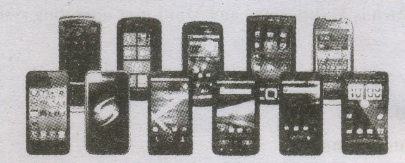
t1.foot();
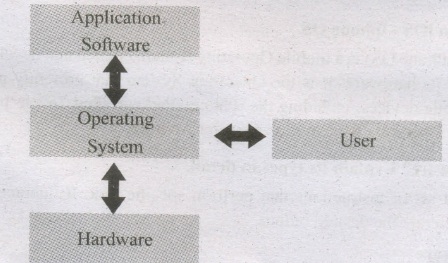
t2.food();
}
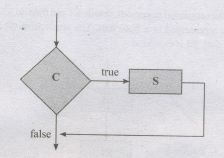
13.
Write the output of the following program.
//Implementation of Single Inheritance using public
visibility mode
#include < iostream >
using namespace std;
class Shape
{
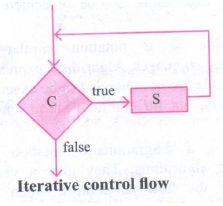
private:
int count;
protected:
int width;
int height;
public:
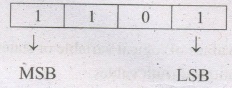
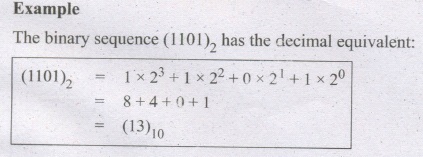
void setWidth(int w)
{
width=w;
}
void setHeight(int h)
{
height=h;
}
};
class Rectangle: publicShape
{
public:
int getArea()
{
return (width * height);
}
};
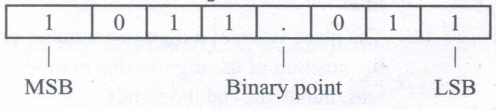
int main()
{
Rectangle Rect;
Rect.setWidth( 5);
Rect.setHeight(7);
II Print the area of theobject.
cour<< "Total area: "<< Rect.getArea() << endl;
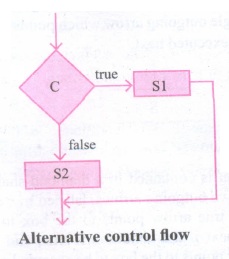
return ();
}
14.
In what situation shadowing base class function inderived class arises? How will you resolve the situation?
15.
Explain the uses of private, protected and public inheritance.
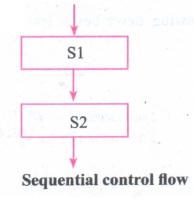
16.
Why do you need for inheritance?
17.
Write a short not on used defined function.
18.
Which function is used to convert the given character into its uppercase? Give example.
19.
Write a C++ program to find area a circle.
20.
What is the use of return statement?
21.
What are the rules followed by the function definition?
22.
Write about strupr ( ) function.
23.
What does the following function denotes?
(1) display 0
(2) display (x, y)
(3) x=display 0
(4) x=display(x, y)
24.
Write anote on isdigit ().
25.
Write a note on isalpha() function.
26.
Write a note on 2D array declaration.
27.
What is the output of this program?
of this program?
#include< iostream >
int main()
{ int hrs,mins,scs;
};
int to seconds(Time now);
int main 0
{
Time t;
t.hrs=5;
t.mins=30;
t.scs=45;
cout <<"Total seconds << endl;
return 0;·
<< toseconds(t)
}
int toseconds(Time now)
{
return 3600*now.hrs+60*now.ins+ seconds.
}
28.
Explain one-dlmenstional array with an example.
29.
Write a C++ program to find the area of circle?
30.
Write a C++ program to get the following output format
Enter a character: a
The Next character: c
31.
Write a C++ program to find the sum of two integer numbers?
32.
Name the type of error (syntax, runtime or logical & error) in each case given below:
(i) Division by a variable that contains a value of 0
(ii) Multiplication operator used when the operation should be division
(iii) Missing Semicolon.
33.
What is an expression?
34.
Differentiate float type and double type intiatigations?
35.
What do you mean by type conversion? How is implicit conversion different from explicit conversion?
36.
Define the term
(i) Source code
(ii) object code.
37.
Name two different styles of expressing a comment in C++ programing
38.
State the escape sequences for horizontal tab and new line feed.
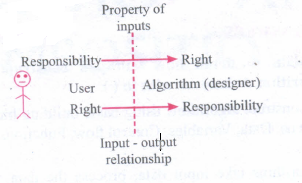
39.
What kind of program elements are the following: 13, 'b', 4.38, "b", main ()?
40.
What type of constant are the following: 15, 012, 0 x 2B, 17, 014, "a"?
41.
What will be the result of a = 5/3 if a is
(i) float
(ii) int
42.
What is the value of i after the following code segments executes?
(1) int i =8; i>>=2;
(2) int i=17; i>>=1;
43.
Given the following code segment
int ch = 30;
cout << ++ch;
cout << ch;
(ii) What is the output of replacing ++ch with ch+1;
44.
Distinguish between a unary, a binary and a ternary operator? Give examples for each one at them?
45.
What is the purpose of using "Using namespace std"; statement?
46.
What is the use of assignment operators?
47.
What are the characters used in C++?
48.
Rewrite the following program segment using if else statement.
Com = (sales> 15000) ? sale A5/100 : 0;
49.
a. If a = 4, b = 3, find the value of c = a ++ * 6 + ++b * 5+ 10;
b. if x = 4; find the value of a * = ++ a/6 + b++ %3;
50.
What is an operator? What are the three main types of operators? Name them.
51.
Indicate whether the following statements results in True or false.
(i) 4 > 7 || 7 > 15
(ii) 5 + 3 > 7 & & 7 > = 4 + 3
(iii) ! (5 < 3)
52.
Give the output, if the following statement is executed:
C = (val +550 < 1700)? 200 : 400;
if a. val = 1000
b. val = 1500
53.
Write a note an insertion or put to operator.
54.
Write a note on input operator.
55.
Write a note on conditional operator.
56.
Tabulate the relational operator.
57.
Why the following identifiers are invalid? Give reason
(i) num-add
(ii) This
(iii) 2myfile
58.
Write the rules for naming an identifier.
59.
Write a note on history of C++.
60.
Write a short note on operator overloading.
61.
What is the output of the following program:
#inclue
using namespace std;
void print(int i)
void print(double f)
{cout << '' It is fioat" << f << endl;}
void print(string c)
{cout << '' it is string'' << c << endl;}
int main 0 {
print(10);
print(10.10);
print("Ten ");
return 0;
}
62.
Write a note on Iteration.
63.
Write a note on Recursion.
64.
Write a note on OS for mobile devices.
65.
Why the operating system is needed?
66.
Write a note on refinement.
67.
Explain conditional statement.
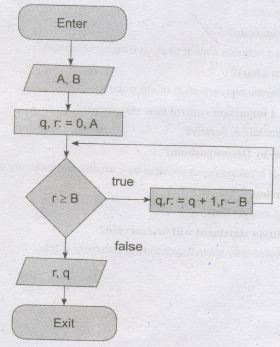
68.
Draw the diagram flowchart for integar division.
69.
What are the elements of Ubuntu?
70.
How will you create a shortcuts on the desktop?
71.
List out the important functions of an OS?
72.
How will you renaming the files or folders?
73.
Write the following
(i) initial state
(ii) final state.
74.
Define functions.
75.
Write the Iterative control flow statement.
76.
What is Decomposition?
77.
Define Alternative control flow statement.
78.
What is memory?
79.
What is truth table?
80.
Write the distributive law?
81.
What is binary number system?
82.
Define touch screen?
83.
Explain fingerprint scanner and retinal scanner?
84.
Define Keyer?
85.
Differentiate warm booting and cold booting?
86.
Complete the Table
1) 0 \(\div \) _ = 0
2) 0 \(\div \) 1 = _
3) 1 \(\div \) _ = 1
4) 0 \(\div \) 1 = _
87.
Complete the Table
1) 0 x 0 = _
2) 1 x 1 =_
3) 1 x _= 0
4) _ x 0 = 0
88.
How will you convert decimal number into Octal number?
89.
Name the different types of operations that can be performed in Binary arithmetics
90.
Subtract 101111 from 110101
91.
Add the binary numbers 1101012 and 1011112
92.
Convert B2F16 to octal
93.
What are the important things to note about ASCII Code?
94.
What is use of BCD?
95.
Find the Answer the Following ; 10112 + 1112
96.
Write the steps to find 2's complement
97.
Write the three common ways of representing a signed binary number?
98.
What is MSB, LSB and Binary point? Give example.
99.
Perform the following expressions. (FACE)16 = (?)2
100.
Draw a flowchart that depicts iterative control flow.
101.
Define iteration.
102.
Describe iterative statement.
103.
Write an algorithm to find the minimum of two number.
104.
Describe conditional statement.
105.
Describe alternative statement.
106.
Draw a flowchart for alternative control flow.
107.
Give examples of 16-bit, 32-bit, 64-bit Microprocessor.
108.
Differentiate between CISC and RISC.
109.
Why Blu-Ray disc is developed ?
110.
Which variant of the alternative statement is called a conditional statement?
111.
How the sequential statement represented in a flowchart?
112.
Name the three control flow statement.
113.
What are the disadvantage of using flowchart?
114.
Write a note on Pseudo code.
115.
What is a function in defining algorithm?
116.
Define Decomposition in defining algorithm.
117.
What are the notations used for expressing algorithms?
118.
Define iterative statement?
119.
Write a note on alternative statement?
120.
What are the compound statements?
121.
Using a loop variant how will you construct a loop?
122.
What are the important points in which a loop variant is true?
123.
Consider two variable m and n under the assignment m, n : = m + 3, n - 1. Is the expression m + 3n an invariant?
124.
Show that p - c is an invariant of the assignment. P, C : = P + 1, C + 1
125.
How will you solve a problem using recursion?
126.
Write a note on loop variant?
127.
What is the use of repeating the same action again and again?
128.
Differentiate Primary Memory and secondary memory.
129.
Expand PROM, EPROM and EEPROM.
130.
Describe the parameters are used to determine the value of each digit in a number.
131.
(101010)2 \(\rightarrow \) (?10) \(\rightarrow \) (?10)
132.
What are the methods used to access the memory?
133.
What is the use of System Bus?
134.
What does word size determines?
135.
List out the operation carried out by and Instruction set.
136.
What is Clock speed?
137.
What is microprocessor?
138.
Write the three main units of microprocessor.
139.
Why is the number conversion necessary?
140.
How will you create desktop shortcuts in windows?
141.
Name the methods followed while copying files and folders to removable disk.
142.
Write a note on Ubuntu OS.
143.
How will you delete files and folders?
144.
What is use of windows elements corners and borders?
145.
What is the difference between the application window and the document window?
146.
Write the graphical representation of disk drive icons.
147.
Write a note on desktop.
148.
Differentiate between Windows 7 and Windows 8.
149.
Write the most popular operating systems.
150.
Why modern OS use a GUI?
151.
What is protected by the security modules of an OS?
152.
What is the use of control over system performance?
153.
Write the memory management techniques.
154.
How is virtual memory is implemented?
155.
Give an example of Real Time Processing.
156.
How many ways the technique of multi programming can be done? What are they?
157.
Write the classification of OS according to availability.
158.
Write a note on BOSS.
159.
Differentiate Impact Printers and Non-Impact Printers.
160.
Define Hardware and software.
161.
Differentiate optical mouse and laser mouse.
162.
Write a note on Touch Screen.
163.
Write the advantages of fingerprint scanner.
164.
What is an operating system and how are they classified based on Interaction?
165.
Write a short note on Interactive OS.
166.
Identify the functions of OS for the following statement.
(a) Physical and virtual devices are maintained.
(b) Partitioned allocation is one of the technique
(c) Deadlock handling
167.
Write a note of RTOS or Real time OS?
168.
What is the function of file management?
169.
What does security management refers?
170.
Define POST.
171.
What is Nano-technology?
172.
What is Robotics?
173.
What is Machine language?
174.
Define Transistor.
175.
Write a note Vacuum tube on.
176.
Explain Time sharing scheduling or priority scheduling.
177.
Write few goals of scheduling.
178.
Write the objectives of operating system.
179.
Write the types of Operating System?
180.
Write the usage of operating system.
181.
Differentiate Internet and Intranet.
182.
What is meant by distributed computing?
183.
How the assignment statement changes the state of an algorithm?
184.
Differentiate state and functions of an algorithm.
185.
Define state of an algorithm.
186.
What does the specification abstracts in an algorithm?
187.
What is the use of abstraction?
188.
Define the input-output relationship between the designer and user of the algorithm.
189.
Write the specification format of an algorithm for computing the square root of a number.
190.
Write a note on the parts of specification of an algorithm.
191.
Differentiate initial and final state of an algorithm.
192.
What should we know while designing algorithm.
193.
Write the goal of the algorithm.
194.
Name the basic principles and techniques for designing algorithms
195.
Name the control flow statements used in an algorithm.
196.
What is control flow?
197.
How do you know whether the state changes in an algorithm?
198.
How will you construct an algorithm?
199.
Add 2010+2510
200.
What is association?
1.
| Break | Continue |
|---|---|
| The break is used to terminate the execution of the loop | Continue is not used to terminate the execution of the loop. |
| It breaks the iteration | It skips the iteration |
| When this statement is executed, control will come out from the loop and execute the the statement immediately after the loop. |
When this statement is executed, it will not come out of the loop but moves/jumps to the next iteration of the loop. |
| The break is used with loops as well as switch cases. | Continue is only used in loops, it is not used in switch cases. |
2.
The goto statement is a control statement which is used to transfer the control from one place to another place without any condition in a program.
The syntax of the goto statement is;
|
Syntax 1 label; |
Syntax 2 ------------- |
3.
#include< iostream.h >
using namespace std;
int main ( )
{
int i=1,num,avg,sum=0;
while(i < =5)
{
cout << "Enter the number :";
cin>>num;
sum=sum+num;
i++;
}
avg=sum/5;
cout << "The sum is" << sum << endl;
}
Output
Enter the number: 1
Enter the number: 2
Enter the number: 3
Enter the number: 4
Enter the number: 5
The sum is 15
4.
There are some important things to know about the switch statement. They are
(1) A switch statement can only work for quality of comparisons.
(2) No two case labels in the same switch can have identical values
(3) If character constants are used in the switch statement; they are automatically converted to their equivalent ASCII codes.
(4) The switch statement is a more efficient choice than if in a situation that supports the nature of the switch operation.
5.
6.
The member functions are created and placed in the memory space only when they are defined as a part of the class specification. Since all the objects belonging to that class use the same member function, no separate space is allocated for member functions when the objects are created. Memory space required for the member variable are only allocated separately for each object because the member variables will hold different data values for different objects.
7.
Inside the class definition:
When a member function is defined inside a class, it behaves like inline functions. These are called Inline member functions.
Outside the class definition:
When Member function defined outside the class just like normal function definition (Function definitions you are familiar with) then it is be called as outline member function or non-inline member function.
8.
A copy constructor is called
(i) When an objects is passed as a parameter to any of the member functions.
Example void simple::tputdata(simple x);
(ii) When a member function returns an object
Example simple getdata( ) { }
(iii) When an object is passed by reference to an instance of its own class.
For example: simples1, s2(s1); // s2(s1) calls copy constructor
9.
A constructor having a reference to an already existing object of its own class is called copy constructor. In other words Copy Constructor is a type of constructor which is used to create a copy of an already existing object of a class type. It is usually of the form simple (simple &), where simple is the class name. The compiler provides a default Copy Constructor to all the classes.
10.
Implicit call: In this method, the parameterized constructor is invoked automatically whenever an object is created. For example simple s1(10,20); in this for creating the object s 1 parameterized constructor is automatically invoked.
Explicit call: In this method, the name of the constructor is explicitly given to invoke the parameterized constructor so that the object can be created and initialized.For example: simple s1=simple(10,20); //explicit call.
11.
A derived class does not get direct access privilege for a private member of its base class, however, it always can access(indirectly) the private members of its base class through an inherited function that is accessing these members.
12.
Output:
55
55
13.
Output:
Total area: 35.
14.
In case of inheritance there are situations where the member function of the base class and derived classes have the same name. If the derived class object calls the overloaded member function it leads confusion to the compiler as to which function is to be invoked. The derived class member function have higher priority than the base class member function. This shadows the member function of the base class which has the same name like the member function of the derived class. The scope resolution operator resolves this problem.
15.
(i) Private inheritance should be used when you want the features of the base class to be available to the derived class but not to the classes that are derived from the derived class.
(ii) Protected inheritance should be used when features of base class to be available only to the derived class members but not to the outside world.
(iii) Public inheritance can be used when features of base class to be available the derived class members and also to the outside world.
16.
(i) Inheritance is an important feature of object oriented programming used for code reusability. It is a process of creating new classes called derived classes, from the existing or base classes.
(ii) Inheritance allows us to inherit all the code (except declared as private) of one class to another class. The class to be inherited is called base class or parent class and the class which inherits the other class is called derived class or child class.
(iii) The derived class is a power packed class, as it can add additional attributes and methods and thus enhan e its functionality.
17.
The user can also define new functions to perform a specific task. These are called as user-defined functions. User-defined functions are created by the user. A function can optionally define input parameters that enable callers to pass arguments into the function. A function can also optionally return a value as output. Functions are useful for encapsulating common operations in a single reusable block, ideally with a name that clearly describes what the function does
18.
toupper(): This function is used to convert the given character into its uppercase. This function will return the uppercase equivalent of the given character. If the given character itself is in upper case, the output will be the same
Syntax:
char toupper( char c);
The following statement will assign the character constant 'K' to the variable c.
char c = toupper('k');
19.
#include < iostream >
using namespace std;
double area(const double r,const double pi=3.14)
{
return(pi*r*r);
}
int main 0
{
double rad,res;
cout << "\nEnter Radius :";
cin >> rad; .
res=area(rad);
cout << "\nThe Area of Circle =" << res;
return 0;
}
Output:
Enter Radius :5
The Area of Circle =78.5
20.
The return statements is used to return from a function. It is categorized as a jump statement because it terminates the execution of the function and transfer the control to the called statement. A return may not may not have a value associated with it. If return has a value associated with it, that value becomes the return value for the calling statement. Even for void function return statement without parameter can be used to terminate the function.
Syntax: return expression/variable;
Example: return(a+b); return(a);
return; // to terminate the function
The functions that return no value is declared as void. The data type of a function is treated as int, if no data type is explicitly mentioned
21.
(i) The Return_Data _Type is any valid data type of C++
(ii) The Function_name is a user-defined identifier.
(iii) The parameter list, which is optional, is a list of parameters, i.e., a list of variables preceded by data types and separated by commas.
(iv) The body of the function comprises C++ statements that are required to perform the intended task of this function.
22.
The strupr() function is used to convert the given string into Uppercase letters.
For example:
int mair()
{
char strl[50];
cout << "\nType any string in Lower case:";
gets(str 1);
cout<< "\nConverted the Sources
string' << strl << into Uppe case
is"<< strupr( str 1);
return 0;
}
Output:
Type any string in Lower case: computer science
Converted the Source string computer science into
Upper Case is COMPUTER SCIENCE
23.
| 1 | display() | calling the function without a return value and without any argument |
| 2 | display(x, y) | calling the function without a return value and with arguments |
| 3 | x= display() | calling the function with a return value and without any argument |
| 4 | x = display(x, y) | calling the function with return value and with arguments |
24.
This function is used to check whether a given character is a digit or not. This function will return 1 if the given character is a digit, and 0 otherwise.
Syntax: int is digit(char c); When the following program is executed, the value of the variable n will be 1, since the given character is not a digit.
Example:
isdigit(3)
output :1
isdigit(A)
output: 0
25.
The isalpha() function is used to check whether the given character is an alphabet or not.
Syntax:
int isalpha(char c);
This function will return 1 if the given character is an alphabets, and 0 otherwise 0. The following statement assigns 0 to the variable n, since the given character is not an alphabet.
int n=isalphaf ('3');
But, the statement given below display 1, since the given character is an alphabet.
cout << isalpha ('a')
26.
The declaration of a 2-D array is data-type array_name [row-size][col-size];
In the above declaration, data-type refers to any valid C++ data-type, array_name refers to the name of the 2-D array, row-size refers to the number of rows and col-size refers to the number of columns in the 2-D array.
For example: intA[3][4];
27.
Output:
19845.
28.
This is the simplest form of an array. A one dimenstional array represents values that are stored in a single row or in a single column.
Declaration
Syntax:
< data type > < array _name >[ < array_size >];
data_type declares the basic type of the array, which is the type of each element in the array.
array_name specifies the name with which the array will be referenced.
array_size defines how many elements the array will hold. Size should be specified with square btrackets [].
Example: in num[10];
29.
#include < iostream.h >
using namespace std;
int main ( )
{
float r, area;
cout << "\n Enter Radius: ";
cin >> r;
area = 3.14 * r* r;
cout << "\n The Area of the circle is" << area;
return 0;
}
30.
#include < iostream.h >
using namespace std;
int main( )
{
char ch;
cout << "\n Enter a character: ";
cin >> ch;
ch=ch=2;
cout << "\n The Next character: " << ch;
return 0;
}
31.
# include < iostream.h >
using namespace std;
int main( )
{
cout << "\n Enter Number 1: ";
cin >> num1;
cout << "\n Enter Number 2; ";
cin >> num2;
sum = num 1 + num2;
cout << "\n The sum of' <
}
32.
(i) Runtime error
(ii) logical error
(iii) syntax error.
33.
An expression in C++ is any valid combination of operators, constants and variables ie., a legal combination of C++ tokens.
34.
(i) A float type variable is initialized with a fractional value such as 0.0Lwhere as a double type variable is initialized with a fractional value as 0.0D. The difference between initialized is the suffir L and D respectively
(ii) Eg: float a = 0.0f; double x = 0.0 D.
35.
(i) In a mixed expression the result must be obtained into a specific data type. For this purpose; the data type needs to be converted into the required type. It is known as type conversion.
(ii) In an implicit type conversion, the result of a mixture made expression is obtained in to the higher most data type without any intervention of the user.
Eg: int a; float b; float c; C = a+b;
(iii) In case of explicit type conversion, the data gets converted to another type as per user's choice. Eg: int a; float b; double c; b = (float) (a*c).
36.
(i) Source code - A program written High level language.
(ii) Object code - Source code converted into Machine Readable code is called object code.
37.
(i) Single line comment
(ii) Multiline comment
38.
Escape sequences for horizontal tab is "\t" and for new line is "\n".
39.
1. 13 - Integer constant
2. 'b' - Character constant
3. "b" - String constant
4. 38 - floating point constant main ( )- function.
40.
15, 17 are Integer constant
012,017 are octal constant
0 x 2B hexadecimal constant
"a" is string constant
41.
(i) 1.6666
(ii) 1
42.
(1) i is 2
(2) i is 8
43.
(i) 21
21
(ii) 21
20
44.
A unary operator requires a single operands eg.++,--
A binary operator requires two operands eg.%,/,*
A ternary operator requires three operands eg.? :
45.
The line using namespace std; tells the compiler to use standard namespace. Namespace collects identifiers used for class, object and variables. Namespaces provide a method of preventing name conflicts in large projects. It is a new concept introduced by the ANSI C++ standards committee.
46.
Assignment operator is used to assign a value to a variable which is on the left-hand side of an assignment statement = (equal to) is commonly used as the assignment operator in all computer programming languages. This operator copies the value at the right side of the operator to the left side variable. It is a binary operator.
47.
| Alphabets | A .... Z,a ....z |
|---|---|
| Numeric | 0 .... 9 |
| Special Characters | +-*/-!@#$%^& [ ] ( ) { } => <_\ I? . , : ' " ; |
| Whitespace | Blank space, Horizontal tab, Carriage return, Newline, Form feed |
| Other characters | C++ can process any of 256 ASCII characters as data |
48.
if (sales > 15000)
com = sales * 5/100;
else
com = 0;
49.
a) C = a++ * 6 + ++b * 5 + 10
=4*6+4*5+10
= 24 + 20 + 10 = 54
b) = 12 * (++ a/6 + b++%3);
= 12 * (13/6 + 8%3)
= 12 * (2+2) = 48
50.
An operator is basically a symbol or token which performs arithmetical or logical operations and gives a meaningful result. The three types of operator Arithmetic operator, logical operator, Relational operator.
51.
(i) False
(ii) True
(iii) True
52.
a.c = 200
b.c =400
53.
(i) C++ provides << operator to perform output operation. The operator << is called the " Stream insertion " or " put to " operator. It is used to send the strings or values of the variables on its right to the object on its left << is a binary operator.
(ii) The first operand is the pre-defined identifier cout (pronounced as C-Out) that identifiers monitor as the standard output object. The second operand may be a constant, variable or an expression.
54.
(i) Input operator C++ provides the operator >> to get input. It extracts the value through the keyboard and assigns it to the variable on its right; hence, it is called as "Stream extraction" or "getfrom" operator.
(ii) It is a binary operator i.e., it requires two operands. The first operand is the pre-defined identifier cin(pronounced as C-In) that identified keyboard as the input device. The second operand must be a variable.
55.
In C++, there is only one conditional operator that is used. ?: is a conditional Operator. This is a Ternary Operator, This operator is used as an alternative to if... else control statement.
56.
| Operator | Operation |
|---|---|
| > | Greater than |
| < | Less than |
| >= | Greater than or equal to |
| <= | Less than or equal to |
| == | Equal to |
| != | Not equal |
57.
| Identifiers | Valid/ Invalid | Reason for invalid |
|---|---|---|
| num-add | Invalid | Contains special character (-) |
| This | Invalid | This is one of the keywords. keywords cannot be used as identifier names. |
| 2myfile | Invalid | The name must start with an alphabet or an underscore |
58.
Rules for naming an identifier:
1. The first character of an identifier must be an alphabet or an underscore ( _ ).
2. Only alphabets, digits, and underscores are permitted. Other special characters are not allowed as part of a name.
3. Uppercase and lowercase letters are considered differently.
4. Reserved words or keywords cannot be used as an identifier.
59.
C++ was developed by Bjarne Stroustrup at AT & T Bell Laboratory in 1979. C++ is originally derived from C language and influenced by many languages like Simula BCPL, Ada, ML, CLU, and ALGOL 68. Till 1983, it was referred "New C" and "C with Classes". In 1983, the name was changed to C++ by Rick Mascitti.
60.
(i) The term operator overloading, refers to giving additional
(ii) Functionality to the normal C++ operators like +,++,-,--,+=,-=,*,<,>. It is also a type of polymorphism in which an operator is overloaded to give user-defined meaning to it.
(iii) For example '+' operator can be overloaded to perform addition on various data types, like for Integer, String( concatenation), etc.
(iv) Almost all operators can be overloaded in C++. However, there are few operators which can not be overloaded.
61.
Output:
it is integer 10
it is float 10.1
it is string Ten
62.
Iteration:
In iteration, the loop body is repeatedly executed as long as the loop condition is true. Each time the loop body is executed, the variables are updated. However, there is also a property of the variables which remains unchanged by the execution of the loop body, This unchanging property is called the loop invariant. Loop invariant is the key to construct and to reason about iterative algorithms.
63.
Recursion:
Recursion is another algorithm design technique, closely related to iteration, but more powerful. Using recursion, we solve a problem with a given input, by solving the same problem with" a part of the input, and constructing a solution to the original problem from the solution to the partial input.
64.
Operating systems for mobile devices
Mobile devices such as phones, tablets and MP3 players are different from desktop and laptop computers and hence they need special Operating Systems. Examples of mobile Operating Systems are Apple iOS and Google Android. The iOS running on an iPad is
Operating systems for mobile devices generally are not as fully featured as those made for desktop and laptop computers and they are not able to run all software.
65.
Need for operating system:
Operating System has become essential to enable the users to design applications without the knowledge of the computer's internal structure of hardware. Operating System manages all the Software and Hardware. Most of the time there are many different computer programmes running at the same time, they all need to access the Computers, CPU, Memory and Storage. The need of Operating System is basically- an interface between the user and hardware
Operating System works as translator, while it translates the user request into machine languagetfsinary language), processes it and then sends it back to Operating System. Operating System converts processed information into user readable form.
66.
After decomposing a -problem into smaller subproblems, the next step is either to' refine the subproblem or to abstract the subproblem.
1. Each subproblem can be expanded into more detailed steps. Each step can be further expanded to still finer steps, and so on. This is known as refinement.
2. We can also abstract the subproblem. We specify each subproblem by its input property and the input-output relation. While solving the main problem, we only need to know the specification of the subproblems. We do not need to know how the subproblems are solved.
67.
Conditional statement: Sometimes we need to execute a statement only if a condition is true and do nothing if the condition is false. This is equivalent to the alternative statement in which the elseclause is empty. This variant of alternative statement is called a conditional statement. If C is a condition and S is a statement, then
if C
S
is a statement, called a conditional statement, that describes the following action:
1. Test whether C is true or false.
2. If C is true then do S; otherwise do nothing.
The conditional control flow is depicted in the flowchart.
68.
69.
(i) Search your Computer Icon
(ii) Files
(iii) Firefox Web browser
(iv) Libre Office Writer
(v) Libre Office Calc
(vi) Libre Office Impress
(vii) Ubuntu software icon
(viii) Online shopping icon
(ix) System settings icon
(x) Trash
70.
Creating Shortcuts on the Desktop
Shortcuts to your most often used folders and files may be created and placed on the Desktop to help automate your work.
(i) Select the file or folder that you wish to have as a shortcut on the Desktop.
(ii) Right click on the file or folder.
(iii) Select Send to from the shortcut menu, then select Desktop (create shortcut) from the submenu.
(iv) A shortcut for the file or folder will now appear on your desktop and you can open it from the desktop in the same way as any other icon.
71.
Following are some of the important functions of an Operating System:
(i) Memory Management
(ii) Process Management
(iii) Device Management
(iv) File Management
(v) Security Management
(vi) Control overall system performance
(vi) Error detecting aids
(vii) Coordination between other software and users
72.
Using the FILE Menu
1. Select the File or Folder you wish to Rename.
2. Click File → Rename.
3. Type in the new name.
4. To finalise the renaming operation, press Enter
73.
The values of the variables when the algorithm starts is known as the initial state, and the values of the variables when the algorithm finishes is known as the final state.
74.
The parts of an algorithm are known as functions. A function is like a sub-algorithm. It takes an input, and produces an output, satisfying a desired input output relation.
75.
In iterative control flow, a condition ofthe state is tested, and if the condition is true, a statement is executed. The two steps of testing the condition and executing the statement are repeated until the condition becomes false.
76.
We divide the main algorithm into functions. We construct each function independently of the main algorithm and other functions. Finally, we construct the main algorithm using the functions. When we use the functions, it is enough to know the specification of the function. It is not necessary to know how the function is implemented.
77.
In alternative control flow, a condition of the state is tested, and if the condition is true, one statement is executed; if the condition is false, an alternative statement is executed.
78.
A memory is just like a human brain. It is used to store data and instructions. Computer memory is the storage space in the computer, where data and instructions are stored.
79.
A truth table represents all the possible values of logical variable or statements along with all the possible results of given combination of truth values.
80.
A ,(B+C)=A· B+A- C
A + (B .C) = (A + B) .(A + C)
81.
There are only two digits in the Binary, system, namely, 0 and 1. The numbers in the binary system are represented to the base 2 and the positional multipliers are the powers of2. The left most bit in the binary number is called asthe Most Significant Bit (MSB) and it has the largest positional weight. The right most bit is the Least Significant Bit (LSB) and has the smallest positional weight.
82.
Touch Screen:
A touch screen is a display device that allows the user to interact with a computer by using the finger. It can be quite useful as an alternative to a mouse or keyboard for navigating a Graphical User Interface (GUI). Touch screens are used on a wide variety of devices such as computers, laptops, monitors, smart phones, tablets, cash registers and information kiosks. Some touch screens use a grid of infrared beams to sense the presence of a finger instead of utilizing touch-sensitive input.
83.
Fingerprint Scanner:
Finger print Scanner is a fingerprint recognition device used for computer security, equipped with the fingerprint recognition feature that uses biometric technology. Fingerprint Reader / Scanner is a very safe and convenient device for security instead of using passwords, which is vulnerable to fraud and is hard to remember.
Retinal Scanner:
This performs a retinal scan which is a biometric technique that uses unique patterns on a person's retinal blood vessels.
84.
A Keyer is a device for signaling by hand, by way of pressing one or more switches. Modern keyers have a large number of switches but not as many as a full size keyboard. Typically, this number is between 4 and 50. A keyer differs from a keyboard, which has "no board", but the keys are arranged in a cluster.
85.
| Cold Booting | Warm Booting |
| When the system starts from initial state i.e. it is switched on, we call it cold booting or Hard Booting. When the user presses the Power button, the instructions are read from the ROM to initiate the booting process. |
When the system restarts or when Reset button is pressed, we call it Warm Booting or Soft Booting. The system does not start from initial state and so all diagnostic tests need not be carried out in this case. There are chances of data loss and system damage as the data might not have been stored properly. |
86.
1) 0 \(\div \) 0 = 0
2) 0 \(\div \) 1 = 0
3) 1 \(\div \) 1 = 1
4) 0 \(\div \) 1 = infinite
87.
1) 0 x 0 = 0
2) 1 x 1 = 1
3) 1 x 0 = 0
4) 0 x 0 = 0
88.
The Conversion of a decimal number to an octal number can be performed by successively dividing a number by 8 and collect the remainder from top to bottom. The remainders also must be taken in octal
89.
1. Addition
2. Subtraction
3. Multiplication
4. Division
90.
1 1 0 1 0 1
- 1 0 1 1 1 1
____________
0 0 0 1 1 0
____________
91.
1 1 0 1 0 1
+ 1 0 1 1 1 1
__________
11 0 0 1 0 0
__________
92.
B2F16 = 1011 0010 1111 (Convert to binary
= 101 100 101 111 (group bits by 3s)
= 54578 (Convert to Octal)
93.
(i) The numeric digits, 0-9, are encoded in sequence starting at 30h. For example, ASCII value of ' 0' is 30h(4810).
(ii) The upper case alphabetic characters are sequential beginning at 41h. For example, ASCII value of 'A' is 41h(6510).
(iii) The lower case alphabetic characters are sequential beginning at 61h. For example, ASCII value of 'a' is 61h(9710);
94.
(i) Binary Coded Decimal is mostly used in simple electronic devices like calculators and microwaves.
(ii) This is because it makes it easier to process and display individual numbers. on their Liquid Crystal Display (LCD) screens.
95.
10112 + 1112
1011
+111
_____
100102
_____
96.
Step 1: Find 1's complement (Replace 1 by 0 and 0 by 1
Step 2: Add 1 to the 1's complement
97.
In computer technology, there are three common ways of representing a signed Binary number.
(i) Prefixing an extra sign bit to a Binary number.
(ii) Using one's complement.
(iii) Using two's complement
98.
(i) MSB (Most Significant Bit) - The leftmost bit carries the largest weight and hence, is called the MSB.
(ii) LSB (Least Significant Bit) - The rightmost bit carries the smallest weight and hence, is called the LSB.
(iii) Binary Point - It is used to separate the integer and fractional part of the binary number, Eg. (1011.011)2
99.
(FACE)16
\(\overset { F }{ \underset { 1110 }{ \downarrow } } \) \(\overset { A}{ \underset { 1111 }{ \downarrow } } \)\(\overset { C }{ \underset { 1010 }{ \downarrow } } \)\(\overset { E }{ \underset { 1110 }{ \downarrow } } \)
(FACE)10 (1111101011001110)2
100.
101.
Testing the loop condition and executing the loop body once is called an iteration.
102.
(i) Test whether C is true or false.
(ii) If C is true, then do S and go back to step 1; otherwise do nothing.
103.
1. minimum(a,b)
2. --a,b
3. ifa
4. result:=a
5. else
6. result=b
7. --result=a \(\downarrow\) b
104.
(i) Test whether C is true or false.
(ii) If C is true then do S; otherwise do nothing
105.
(i)Test whether C is true or false.
(ii) If C is true, then do S1; otherwise do S2.
106.
107.
(i) 16-bit - Intel 80186, Intel 80286
(ii) 32-bit - Intel 80486, Pentium IV
(iii) 64-bit - Intel dual core, Core 2duo, core i3, Core i5, Core i7
(iv) 128-bit- Power PC 460 Sx embedded processor.
108.
| S.No | CISC | RISC |
| 1. | Includes multi-clock complex instructions | Single-clock, reduced instruction only. |
| 2. | Small code sizes, high cycles per second | Low cycles per second, large code sizes. |
| 3. | Transistors used for storing complex instructions. | Transistors used on memory register. |
109.
(i) Blu - Ray disc was developed to enable recording, rewriting and playback of high-definition video as well as storing large amount of data.
(ii) DVD uses a red laser to read and write data.
(iii) But, Blu-ray uses a blue-violet laser to write. Hence, it is called as Blu-Ray.
110.
To execute a statement only if a condition is true and do nothing if the condition is false. This is equivalent to the alternative statement in which the else-clause is empty. This variant of alternative statement is called a conditional statement.
111.
112.
There are three important control flow statements:
(i) Sequential
(ii) Alternative
(iii) Iterative
113.
Flowcharts have disadvantages:
(i) Flowcharts are less compact than a representation of algorithms in 132 programming language or pseudo code.
(ii) They obscure the basic hierarchical structure of the algorithms.
(iii) Alternative statements and loops are disciplined control flow structures. Flowcharts do not restrict us to disciplined control flow structures
114.
(i) Pseudo code is a mix of programming-language like constructs and plain English. This notation is not formal nor exact. It uses the same building blocks as programs, such as variables and control flow.
(ii) But it allows the use of natural English for statements and conditions. An algorithm expressed as pseudo code is not for computers to execute directly, but for 'human readers to understand.
(iii) Therefore, there is no need to follow the rules of the grammar of a programming language. However, even pseudo-code must be rigorous and correct. Pseudo code is the most widely used notation to represent algorithms
115.
A function is an abstraction of a subproblem and specified by its input property, and its input-output relation.
116.
Decomposition breaks down a problem into smaller subproblems and combines their solutions to solve the original problem.
117.
Programming language, pseudo code, flowchart are notations for expressing algorithms.
118.
Iterative statement repeatedly evaluates a condition and executes a statement as long as the condition is true.
119.
Alternative statement selects and executes exactly one of the two statements, depending on value of the condition.
120.
Compound statements are composed of sequential, alternative and iterative control flow statements.
121.
(i) Establish the loop invariant at the start of the loop.
(ii) The loop body should so update the variables as to progress toward the end and maintain the loop invariant, at the same time.
(iii) When the loop ends, the termination condition and the loop invariant should establish the input-output relation
122.
a loop variant, then it is true at four important points in the algorithm
(i) at the start of the loop (just before the loop).
(ii) at the start of each iteration (before loop body)
(iii) at the end of each iteration (after loop body).
(iv) at the end of the loop (just after the loop).
123.
Let P(m, n) = m + 3n. Then
P(m, n) [m, n := m + 3, n -1]
= m + 3n [m, n := m + 3, n -1]
= (m + 3) + 3(n -1)
= m + 3 + 3n - 3
= m + 3n
= P(m, n)
Since (m + 3n) [m, n : = m + 3, n - 1] = m + 3n, m + 3n an invariant of the assignment m, n := m + 3, n-1.
124.
Let P (p, c) = p - c. Then
P (p, c) [p, c := p + 1, c + 1]
= p - c [p, c := p + 1, c + 1]
= (p + 1)-(c + 1)
= p-c
= p(P, c)
Since (p - c) [p, c := p + 1, c + 1] = p - c, p - c is an invariant of the assignment p, c := p + 1, c + 1.
125.
Recursion is another algorithm design technique, closely related to iteration. Using recursion, we solve a problem with a given input, by solving the same problem with a part of the input, and constructing a solution to the original problem from the solution to the partial input.
126.
(I) In iteration, the loop body is repeatedly executed as long as the loop condition is true. Each time the loop body is executed, the variables are updated.
(ii) However, there is also a property of the variables which remains unchanged by the execution of the loop body.
(iii) This unchanging property is called the loop invariant. Loop invariant is the key to construct and to reason about iterative algorithms.
127.
(i) Even though the action is the same, the state in which the action is executed is not the same. Each time we execute the action, the state changes.
(ii) Therefore, the same action is repeatedly executed, but in different states.
(iii) The state changes in such a way that the process progresses to achieve the desired input-output relation.
128.
| S.No | Primary memory | Secondary memory |
| 1. | It is the main memory of the computer system. | It is the auxiliary memory from where stored data can be retrieved. |
| 2. | Data and Instructions are temporary. | Data and Instructions are permanent |
| 3. | Example: RAM, ROM | Example: Hard disk, CD, DVD. |
129.
(i) PROM - Programmable Read only Memory.
(ii) EPROM - Erasable Read only Memory.
(iii) EEPROM - Electrically Erasable Read Only Memory.
130.
(i) The absolute value is the magnitude of a digit in a number.
(ii) For example, the digit 5 in 7458 has an absolute value of 5 according to its value in the number line.
(iii) The place value of a digit in a number refers to the position of the digit in that number such as tens, hundreds, and thousands.
(iv) The total value of a number is the sum of the absolute value x place value of each digit that the number consists of.
(v) The base value of a number is also known as the radix, which depends on the type of the number of systems that are being used.
131.
1010102
= 0010 0010
= 2 10
= 2 A
(101010)2 = (2A)16
(101010)2 = (1 x 25) + ( 0 x 24) + (1 x 23) + (0 x 22) + ( 1x 21) + (0 x 20)
= 32 + 0 + 8 + 0 + 2 + 0 = 4210
(101010)2 = (2A)16 = 42(10)
132.
(i) There are two types of accessing methods to access (read and write) the memory.
(ii) They are sequential access and random access. In sequential access, the memory is accessed an orderly manner from starting to end.
(iii) But, in random access, any byte of memory can be accessed directly without navigating through previous bytes.
133.
(i) The address bus is used to point a memory location.
(ii) A decoder, a digital circuit is used to point to the specific memory location where the word can be located.
(iii) The address register is connected with the address bus, which provides the address of the instruction.
(iv) A data bus is used to transfer data between the memory and the CPU.
(v) The data bus is bidirectional and the address bus is unidirectional.
(vi) The control bus controls both read and write operations.
(vii) The system bus is a bunch of wires which is the collection of address bus, data bus and control bus that serves as communication channels between the microprocessor and other devices.
134.
Word size determines the amount of RAM that can be accessed by a at one time and the total number of pins on the microprocessor. Total number of input and output pins in turn determines the architecture of the microprocessor.
135.
(i) Data transfer
(ii) Arithmetic operations
(iii) Logical operations
(iv) Control flow
(v) Input/output
136.
Every microprocessor has an internal clock that regulates the speed at which it executes instructions. The speed at which the microprocessor executes instructions is called clock speed. Clock speed is measured in MHz (Mega Hertz) or in GHz (Giga Hertz).
137.
(i) The microprocessor which is an Integrated Circuit. Microprocessors were first introduced in early 1970s. The first general purpose microprocessor, 4004 was developed by Intel Inc.
(ii) The microprocessor is a programmable multipurpose silicon chip. It is driven by clock pulses. It accepts input as a binary data and after processing, it provides the output data as per the instructions stored in the memory.
138.
The microprocessor is made up on main units. They are:
(i) Arithmetic and Logic unit (ALU):
To perform arithmetic and logical instructions based on computer instructions.
(ii) Control unit :
To control the overall operations of the computer through signals.
(iii) Registers (Internal Memory):
They are used to hold the instruction and data for the execution of the processor.
139.
The number conversion is necessary because us enters the data into the computer in decimal form only and the computer is then expected to convert the decimal number to other number systems which it understands.
140.
Shortcuts to our most often used folders and files may be created and placed on the Desktop to help automate your work.
(i) Select the file or folder that you wish to have as a shortcut on the Desktop.
(ii) Right click on the file or folder.
(iii) Select Send to from the shortcut menu, then select Desktop (create shortcut) from the sub-menu.
(iv) A shortcut for the file or folder will now appear on your desktop and you can open it from the desktop in the same way as any other icon.
141.
There are several methods of transferring files to or from a removable disk.
(i) Copy and Paste
(ii) Drag and Drop
(iii) Send To
(iv) Copy and Paste using keyboard shortcuts
142.
(i) Ubuntu is a Linux-based operating system. It is designed for computers, smart phones, and network servers.
(ii) The system is developed by a UK based company called Canonical Ltd.
(iii) All the principles used to develop the Ubuntu software are based on the principles of Open Source software development.
143.
(i) When you delete a folder, the folder and its entire contents (any files or sub-folders) will also be deleted.
(ii) When you delete a file, the file and its contents are deleted.
(iii) If you delete a file or folder from the C: or D: drives (your local hard drives), they will go into your Recycle bin which means you still have an opportunity to recover them.
(iv) If you delete a file or folder from any other drive, including network drives, the C: drive or thumb drives, they are permanently deleted
To delete a file or folder: Right- click the file or folder that you want to delete, and then click Delete.
144.
(i) The comers and borders of the windows help to drag and hence help to resize the Windows.
(ii) The mouse cursor changes to a double arrow when positioned over a border or a comer.
(iii) Drag the border or' comer in the direction indicated by the double arrow to the desired shape.
(iv) The comers can be resized diagonally by dragging it across any of the comers.
(v) It will resize the window on all the sides simultaneously. On the other hand, the borders will let you to resize the window by either dragging it in left side, right side, from the top or from the bottom of the window.
(vi) It will change the size of the window at one side only depending on the side in which the dragging is made.
145.
(i) When we open any application such as OpenOffice Writer, Open Office Impress or OpenOffice Calc etc., you will find two Windows on the screen.
(ii) The larger Window is called the Application Window. This Window helps the user to communicate with the Application program.
(iii) The smaller window, which is inside the Application Window, is called the Document window.
(iv) This Window is used for typing, editing, drawing, and formatting the text and graphics.
146.
The disk drive icons graphically represent five disk drive options.
(i) Hard disk (C: D: E:)
(ii) CD-ROM/DVD Drive (F:)
(iii) Pen drive (I:)
(iv) Other removable storage such as mobile, smart phone, tablet etc.,
(v) Network drives if your system is connected with other system.
147.
(i) The opening screen of Windows is called "Desktop".
(ii) The desktop of your computer may look different
(iii) This is because Windows allows you to change the appearance of the desktop.
(iv) The desktop is the opening screen which consists of the icons as well as the Start button.
(v) The desktop can be used to store information temporarily or to move around documents and windows.
148.
|
Windows 7 |
Windows 8 |
|---|---|
| Faster boot times, introduced new user interfaces and Internet Explorer 8. | Windows 8 was faster than previous versions of Windows. |
| Most used operating system on the Internet and also the most used for PC gaming. | Windows 8 takes better advantage of multi-core processing, solid-state drives (SSD), touch screens and other alternate input methods. |
149.
The most popular operating systems are as follows:
(i) Windows 7 is the most popular operating system for desktop and laptop computers.
(ii) Android is the most popular smart phone operating system.
(iii) iOS is the most popular tablet operating system.
150.
Modern operating systems use a graphical user interface, or GUI. A GUI use the mouse to click icons, buttons, menus and everything is clearly displayed on the screen using a combination of graphics and text elements.
151.
The security modules of an Operating System protect the resources and information of a computer system against destruction and unauthorized user access. It is a process of ensuring OS integrity, confidentiality and availability.
152.
This feature helps to recording delays between request for a service and response from the distributed or parallel computer system. It helps to monitoring system performance in various situations to resolves the problems and finds the root cause of the reported Issues.
153.
The memory management techniques are
(i) Single contiguous allocation.
(ii) Partitioned allocation
(iii) Paged Memory Management
(iv) Segmented Memory Management.
154.
The idea of virtual memory is to use disk space to extend the RAM. The illusion of such a large amount of memory is created by subdividing the virtual memory into smaller pieces, which can be loaded into physical memory whenever they are needed by a process.
155.
(i) Air traffic Control System, where at any moment the user must know the latest information to take further action.
(ii) Updating of a bank account of a customer to know the various transactions and balance to go for the next action.
156.
(i) Time Sharing
(ii) Real Time, Sharing
157.
Operating System
(i) Proprietary Licence
(a) Microsoft Windows
(b) Apple Mac OS
(c) Apple IOS [Mobile Device]
(ii) Open source Free licence (GNU)
(a) UNIX
(b) LINUX
(c) Google's Android [Mobile Device].
158.
(i) Bharat Operating System Solution (BOSS) is the acronym of BOSS GNU / Linux or BOSS Linux.
(ii) It has been described as 'India's Own PC OS'.
(iii) It is developed by National Resource Center for Free/Open Source Software (NRCFOSS). It is available in all official Indian languages.
159.
| Impact Printers | Non-Impact Printers |
| It uses ribbons/carbon papers to leave the impressions on the paper. | It uses ink cartridges and the impressions appear on the paper with the flow of ink. |
| The quality of printing is a draft quality. | The quality of printing is high quality. |
| Striking Mechanism used to produce output. | No striking mechanism is used to produce output. |
160.
Hardware are the physical components of a computer like a motherboard, memory devices, monitor, keyboard etc while the software is the set of programs or instructions. Both hardware and software together make the computer system function.
161.
(i) Optical mouse uses Red, Blue or Green LED whereas Laser mouse uses only infrared LED.
(ii) Optical mouse has three buttons; Laser mouse has as many as 12 buttons and can be programmed by user.
(iii) Optical mouse is less sensitive and sensitive towards surface but Laser mouse is highly sensitive and able to work on any hard surface.
162.
(i) A touch screen is a display device that allows the user to interact with a computer by using the finger.
(ii) It can be quite useful as an alternative to a mouse or keyboard for navigating a graphical user interface (GUI).
(iii) Touch screens are used on a wide variety of devices such as computer and laptop, monitors, smart phones, tablets, cash registers, and information kiosks.
(iv) Some touch screens uses a grid of infrared beams to sense the presence of a finger instead of utilizing touch-sensitive input.
163.
Fingerprint Scanner:
Fingerprint Scanners is a fingerprint recognition device used for computer security equipped with the fingerprint recognition module feature that uses biometric technology. Fingerprint Reader/Scanner is very safe and convenient device for security instead of password, that is vulnerable to fraud and is hard to remember.
164.
(i) An as is a system software which serves as the interface between a user and computer.
(ii) It is defined as a collection of programs that coordinates the operations of computer hardware and software.
(iii) On the basis of interaction, the Operating systems are divided in two types as GUI and CUI.
165.
(i) This is the operating system that provides a Graphic User Interface (GUI) through which the user can easily navigate and interact.
(ii) The computer responds almost immediately after an instruction has been entered, and the user can enter new instructions after seeing the results of the previous instructions.
166.
(a) Device Management
(b) Memory Management
(c) Process Management
167.
(i) It is a multi-tasking and multi user operating system designed for real time based applications such as robotics, weather and climate prediction software etc.
(ii) In this type of operating system, given tasks have to be done within a fixed timeline.
(iii) The system performance is good if the given task is finished within this time line.
(iv) If it is not done, the situation is called "Deadline Overrun".
168.
File management functions of an operating system involves keeping track of all different data/files and maintaining the correctness of data stored in the files including file directory structure.
169.
(i) OS security management refers to specified steps or measures used to protect the as from threats, viruses, worms, malware or remote hacker intrusions.
(ii) OS security encompasses all preventive-control techniques, which safeguard any computer assets capable of being stolen, edited or deleted if OS security is compromised.
170.
(i) POST (Power-On Self-Test) is the diagnostic testing sequence that a computer's basic input! output system runs to determine if the computer keyboard, random access memory, disk drives and other hardware are working correctly.
(ii) If the necessary hardware is detected and found to be operating properly, the computer begins to boot.
171.
Nano-technology is an engineering, science, and technology that develops machines or works with one atom or one molecule that is 100 nanometers or smaller.
172.
(i) Robot is a term coined by Karel Capek in the 1921 play RUR (Rossum's Universal Robots).
(ii) It is used to describe a computerized machine designed to respond to input received manually or from its surroundings.
173.
(i) Machine language is a collection of binary digits or bits that the computer reads and interprets.
(ii) In first generation, machine language was used.
174.
(i) The transistor ("transfer resistance") is made up of semiconductors.
(ii) It is a component used to control the amount of current or voltage or used for amplification! modulation or switching of an electronic signal.
175.
(i) Vacuum tubes contain electrodes for controlling electron flow and were used in early computers as a switch or an amplifier.
(ii) Vaccum tubes are big in size and consumed more power.
176.
(i) Each program or task is given a fixed amount of time to execute.
(ii) The CPU continues with the execution till either the allotted time is over or there is some interrupt request or the task is completed before the allotted time.
177.
(i) Farmers
(ii) Response time
(iii) Throughput
(iv) Turn around time
178.
(i) To hide details of hardware by creating abstraction.
(ii) To allocate resources to processes.
(iii) Provide a interactive and effective interface.
179.
(i) Single-user operating system
(ii) Multi-user Operating system
(iii) Distributed Operating system
(iv) Operating system
(v) Mobile Operating system.
180.
(i) Easy interaction between the human and computer.
(ii) Starting computer operation automatically when power in turned on (Booting).
(iii) Controlling input & output devices.
(iv) Managing the utilization of main memory.
(v) Providing security to user program.
181.
| Internet | Intranet |
| The Internet is the global system of interconnected computer networks that use the Internet protocol suite (TCP/IP) to link devices worldwide. | A local or restricted communications network, especially a private network created using World Wide Web software. |
182.
(i) Distributed computing is a field of computer science that studies distributed systems.
(ii) A distributed system is a model in which components located on networked computers communicate and coordinate their actions by passing messages.
(iii) The components interact with each other in order to achieve a common goal.
183.
Assignment statement changes the values of variables, and hence the state.
184.
| State | Functions |
|---|---|
|
In algorithms, the state of a computation |
When an algorithm is very complex, we can decompose it into functions and abstract each function by its specification |
185.
State is a basic and important abstraction. Computational processes have state. A computational process starts with an initial state. As actions are performed, its state changes. It ends with a final state. State of a process is abstracted by a set of variables in the algorithm. The state at any point of execution is simply the values of the variables at that point
186.
Specification abstracts a problem by the properties of the inputs and the desired input-output relation
187.
The abstraction used in a variety of ways while constructing algorithms - in the specification of problems, representing state by variables, and decomposing an algorithm to functions.
188.
189.
square_root(n)
--inputs: n is a real number, n > O.
--outputs: y is a real number such that y2 = n.
190.
The specification in a standard three-part format:
1. The name of the algorithm and the inputs.
Input: the property of the inputs.
Output: the desired input-output relation.
1. The first part is the name of the algorithm and the inputs. The second part is the property of the inputs.
2. It is written as a comment which starts with - inputs:
3. The third part is the desired input-output relation. It written as a comment which starts with - outputs:
4. The input and output can be written using English and mathematical notation.
191.
The inputs and outputs are passed between an algorithm and the user through variables. The values of the variables when the algorithm starts is known as the initial state, and the values of the variables when the algorithm finishes is known as the final state.
192.
To design an algorithm for solving a problem, we should know the properties of the given input and the properties of the desired output
193.
The goal of the algorithm is to establish the relation between the input and the desired output.
194.
(i) Specification
(ii) Abstraction
(iii) Composition
(iv) Decomposition.
195.
(i) Sequential Control Flow
(ii) Alternative Control Flow
(iii) Iterative Control Flow.
196.
The order in which the statements are executed may differ from the order in which they are written in the algorithm. This order of execution of statements is known as the control flow.
197.
As the values of the variables are changed, the state changes
198.
(i) Data
(ii) Variables
(ill) Control flow
(iv) Functions.
199.
.png)
8 bit Format of 2010 = 00010100
8 bit format of 2510 = 00011001
2010 + 2510 = _________
00101101
__________
2010 + 2510 = 001011012
200.
Operators are executed in the order of precedence. The operands and the operators are grouped in a specific logical way for evaluation. This logical grouping is called as an Association.

11th Standard Syllabus & Materials
11th Standard
TN 11th Tamil பீடு பெற நில் - செய்யுள் - காவடிச்சிந்து Important Questions And Answers Study Material - QB365 Set A
NEW11th Standard
TN 11th Tamil பீடு பெற நில் - உரைநடை - மலை இடப்பெயர்கள் : ஓர் ஆய்வு Important Questions And Answers Study Material - QB365 Set A
NEW11th Standard
TN 11th Tamil மாமழை போற்றுதும் - துணைப்பாடம் - யானை டாக்டர் Important Questions And Answers Study Material - QB365 Set A
NEW11th Standard
TN 11th Tamil மாமழை போற்றுதும் - செய்யுள் - ஐங்குறுநூறு Important Questions And Answers Study Material - QB365 Set A



Tamilnadu Stateboard 11th Standard Subjects

Maths

Commerce

Economics

Biology

Business Maths and Statistics

Accountancy
Computer Science

Physics

Chemistry
Maths
Biology
Economics
Physics
Chemistry

History
Business Maths and Statistics

Computer Science
Accountancy

Computer Applications
History
Computer Technology
Commerce
Computer Applications
Computer Technology

Tamil

English

French
Tamilnadu Stateboard Standards
