
 100% FREE ACCESS
11th Standard Syllabus & Materials
11th Standard
TN 11th Tamil இயற்கை வேளாண்மை,சுற்றுச்சூழல் -செய்யுள் - மனோன்மணீயம் Important Questions And Answers Study Material - QB365 Set A
NEW11th Standard
TN 11th Tamil என்னுயிர் என்பேன் -துணைப்பாடம் - இசைத்தமிழர் இருவர் Important Questions And Answers Study Material - QB365 Set A
NEW11th Standard
TN 11th Tamil மொழி கலை -செய்யுள் - ஒவ்வொரு புல்லையும் Important Questions And Answers Study Material - QB365 Set A
NEW11th Standard
TN 11th Tamil பீடு பெற நில் - இலக்கணம் - பகுபத உறுப்புகள் Important Questions And Answers Study Material - QB365 Set A
NEW11th Standard
TN 11th Tamil பீடு பெற நில் - துணைப்பாடம் - வாடிவாசல் Important Questions And Answers Study Material - QB365 Set A
NEW11th Standard
TN 11th Tamil பீடு பெற நில் - செய்யுள் - குறுந்தொகை Important Questions And Answers Study Material - QB365 Set A

Published on: 21/03/2019
11th Public Exam March 2019 Creative 5 Marks Questions Test
Download Tamil Nadu 11th Standard Computer Science question papers, model tests, one-mark questions, important questions, and public exam papers in PDF format. Free study materials and answer keys for TN State Board students.
Questions + Answers key
Take MCQ Computer Science Test
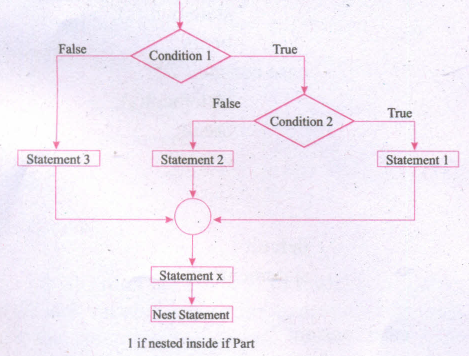
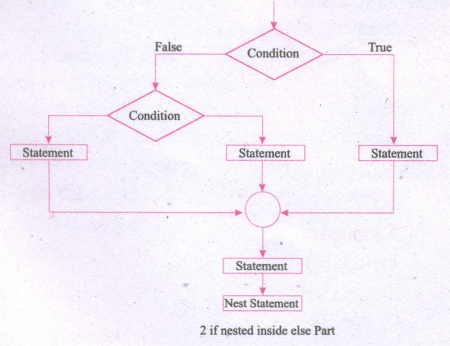
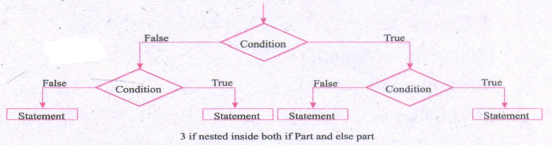
1.
Draw the flowchart that shows the working procedure of.
(i) if nested inside if part
(ii) if nested inside else part
(iii) if nested inside both if part and else part
2.
Write the output for the following program.
#include < iostream >
using namespcae std;
class Test
{
private:
intX;
intY;
public:
Test (int, int); //parameterized constructor declaration
Test (Test &); //Declaration of copy constructor to initialize data members.
void Display( );
};//End of class
Test:: Test(int a, int b) //Definition of parameterized constructor.
{
X=a;
Y=b;
}
Thet: :Test(Test &T) //Definition of copy constructor
{
X=T.X:
Y=T.Y;
}
void Test:: Displayt// !Definition of Display ( ) member function
{
cout << endl << "X; " << X;
cout << endl << "Y; " << Y << endl;
}
int main ( )
{
Test Tl (10,20);/ /Parameterized Constructor automatically called when //object is created.
cout << endl << "T1 Object:" << endl;
cout << "Value after initialization: "
T1.Display( );
Test T2(T1);//Initalize object with other object using copy constructor
cout << endl << "T2 Object:" << endl;
cout << "Value after initialization: "
T2.Display( );
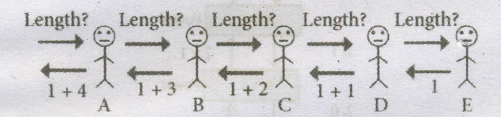
return 0;
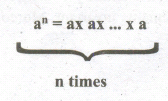
}
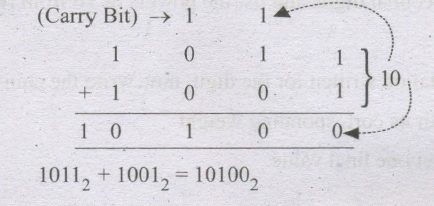
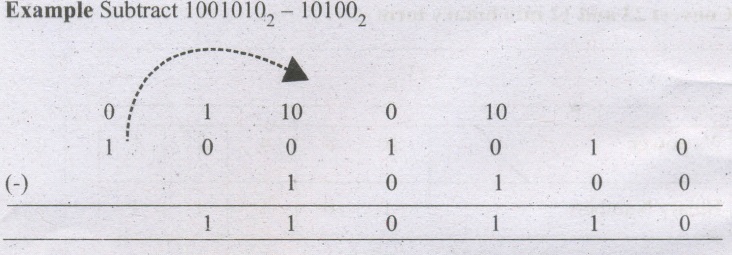
3.
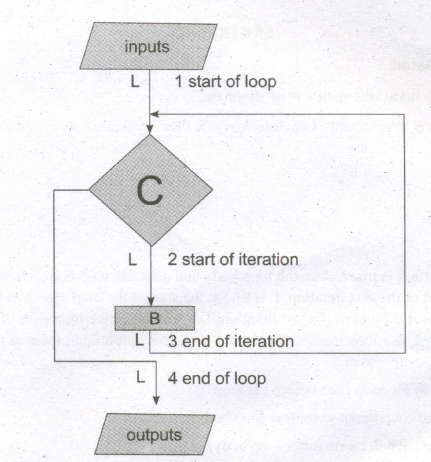
Write the output of the following program.
#include < iostream >
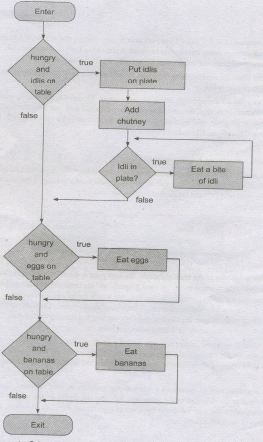
using namespcae std;
class simple
{
private:
int a,b;
public:
simple( ) //default constructor
{
a=0;
b=0;
cout << "\n default constructor" << endl;
}
int getdata( );
};
int simple :: getdata( )
{ int tot;
cout << "\nEnter two values";
cin >> a >> b;
tot=a+b;
return tot;
}
int sum=0;
simple s 1[3];
cout << "\n\t\tObject 1 with both values \n";
for(int i=0;i<3 ;i++)
sum+=s 1[i].getdata( );
cout << "\nsum of all object value is'
return 0;
}
4.
Write the output of the following program
#include < iostream >
using namespcae std;
class simple
{
private:
int a,b;
public:
simple(int m, int n=100) //default argument
{
a=m;
b=n;
cout << "\n Parameterized Constnictor with default argument" << endl;
}
void putdata( )
{
cout << "\nThe two integers are " << a <<'\t' << b << endl;
cout << "\nThe sum of the variables" << a << "+" << b << " = " << a+b;
}
};
int main( )
{
simple s1(10,20), s2(50);
cout << "\n\t\tObject 1 with both values \n";
s1.putdata( );
cout << "\n\t\tObject 2 with both values \n";
s2.putdata( );
return 0;
}
5.
Write the output of the following program
#include < iostream >
using namespcae std;
class simple
{
private:
int a,b;
public:
simple( )
{
a=0;
b=0;
cout << "\n Constructor of class-simple";
}
void getdata( )
{
cout << "\nEnter value for a and b (sample data 6 and 7)...";
cin >> a >> b;
}
void putdata( )
{
cout << "\nThe two integers are ... " << a << 't\' << b << endl;
cout << "\nThe sum of the variables" << a << " + " << b << "=" << a+b;
}
};
int main ( )
{
simple s;
s.getdata( );
s.putdata( );
return 0;
}
6.
Write the output of the following program.
#include < iostream >
using namespcae std;
class simple
{
private:
int a,b;
public:
simple(int m, int n)
{
a=m;
b=n;
cout << "\nParameterized Constructor of classsimple" << endl;
}
void putdata( )
{
cout << "\nThe two integers are ..." << a <<"\t << b << endl;
cout << "\nThe sum of the variables " << a << " + " << b << "=" << a+b;
}
};
int main( )
{
simple s1(10,20),s2(30,45);//Created two objects with different values created
cout << "\n\t\tObject 1\n";
s 1.putdata( );
cout << "\n\t\tObject 2\n";
s2.putdata( );
return 0;
}
7.
What is containership write a C++ program to illustrate the containership
8.
Explain how the objects can be passed in pass reference method.
9.
What are the part of a loop? Binary explain
10.
Write the syntax of Nested loop using. (i) for (ii) while (iii) do-while
11.
Explain for loop with an example.
12.
Explain Nested switch with an example.
13.
What are difference the between if-else and switch.
14.
Explain switch-case with an example.
15.
Write the rules following while using switch-case in C++.
16.
Write the syntax of if nested inside both if part and else part
17.
Explain how the objects can be passed in pass by value method.
18.
Explain the scope resolution operator with an example.
19.
Write a C++ program to find square and cube of a number showing the use of nesting of members functions.
20.
Write a C++ program example of creating global and local object
21.
Explain the different methods of creating an object in C++.
22.
Explain the types of access specifiers used in C++.
23.
a. Write a program to convert the temperature from Fahrenheit to celsius
b. Write a program to find the volume of a sphere Volume of a sphere= 4/3\(\pi \)r3
24.
Evaluate the following C++ expressions where a,b,c are integers and d,e,f are floating point numbers, where a=5, b=3 and d =1.5
(i) f = a+b/a
(ii) c = (a++) * d+a
(iii) c = d * a+b
(iv) c = a - (b++) * (- -d)
(v) (++b)*b-a
25.
Write a program in C++ to accept Employee number and Basic pay. Find the gross pay of an employee for the following allowances and deduction. Use meaningful variables:
Dearness Allowance = 25% of Basic pay
House Rent Allowance = 15% of Basic pay
Provident Fund = 8.33% of Basic pay
Net pay = Basic Pay +Dearness Allowance +House Rent Allowance
Gross pay = Netpay - provident fund
26.
Write a program to accept perpendicular and base of a right angles triangle. Calculate and display hypotenuse, area, and perimeter of the triangle.
27.
Write a program in C++ to accept the number of days and display the result after converting into a number of years, number of months and the remaining number of days.
28.
Explain the function of digital signature.
29.
Explain the different types of encryption.
30.
Write the reasons. now websites typically use cookies.
31.
Explain social engineering with an example.
32.
Write a C++ program to convert a Celsius 100°C to Fahrenheit;
33.
Write a program that computer sum of three given numbers and find the largest of the three.
34.
Write a program to find the difference between Simple Interest and Compound Interest when Principal, Rate and Time are given, (principal = 500, Rate = 10, Time = 2).
35.
Write a program to find the area, perimeter and diagonal of a rectangle.
36.
Explain any five type of expression used in C++ Give an example for each.
37.
Write a C++ program to find the perimeter and area of a Semicircle.
38.
Explain the use of scope resolution operator with an example
39.
Explain Inline function with an example
40.
Explain call by reference or address method with suitable example.
41.
42.
Explain the punctuators used in C++.
43.
Explain Bitwise Shift operator with an example.
44.
Write C++ program to show how the strucrures can be returned from a function.
45.
Write a C++ program to display the contents of the following structure definition.
46.
Explain logical bitwise operator with an example.
47.
Explain the uses of logical operators in C++.
48.
Write a C++ program to perform addition of two matrices.
49.
Write a C++ program to find whether a given string is a palindrome or not.
50.
Write a C++ program to input 10numbers in onedimensional array and search the given number in an array using linear search Techinique.
51.
Write a C++ profram to input 10 values in an array and count the number of odd and even numbers.
52.
Write a C++ program to read the marks of 10 students in an array and to find the average of all those marks.
53.
Explain increment and decrement operator with an example.
54.
Explain the types of integer constants.
55.
Write the benefits of C++;
56.
Differentiate C and C++.
57.
Explain any five familion applications developed by C++?
58.
Write the advantages and disadvantages of OOPs.
59.
Explain the main features of OOPs.
60.
Write the important features of object oriented programming.
61.
Write a C++ program to concatenate two strings using operator overloading.
62.
Write a c++ program to find Addition and Subtraction of complex number using operator overloading.
63.
Customers are waiting in a line at a counter. The man at the counter wants to know how many customers are waiting in the line.
64.
Give an example for loop invariant.
65.
Explain the binary addition and binary subtraction.
66.
Explain Loop invariant with a neat diagram.
67.
Write six uses of operating system.
68.
Draw the flowchart for Eat breakfast.
69.
What is a functions? Explain in detail.
70.
Write a note on case analysis.
71.
Explain the sequential statement in detail with the diagram.
72.
Write the disadvantages of flowcharts.
73.
How will you copying files and folders to removable disk?
74.
Discuss about the mouse actions.
75.
Explain the cache memory.
76.
Explain the secondary storage devices.
77.
Explain the data communication between CPU and memory.
78.
Explain the flash memory devices and BIu-ray disc.
79.
Explain the specification format.
80.
Explain Algorithm Design Techniques.
81.
Explain the three control flow statement.
82.
Explain the ports and interfaces.
83.
Explain the different types of number systems?
84.
Explain input devices of a computer?
85.
86.
Convert the following Decimal numbers to its equivalent Binary, Octal, Hexadecimal. - 126
87.
Explain the elements of Ubuntu.
88.
Explain the most common indicators in Ubuntu OS menu bar.
89.
Write the significant features of Ubuntu OS.
90.
Explain the procedure of shutting down or logging of computer.
91.
Explain the methods followed while copying files and folders to removable disk.
92.
Explain the different methods of moving files and folders in windows.
93.
Explain the different methods of renaming files and folders.
94.
Convert the Following (101011001)2 \(\rightarrow \) (?16) = (?)8
95.
Write the steps for converting Decimal to Binary numbers.
96.
Explain the following terms in detail. (1) ASCII (2) BCD (3) EBCDIC
97.
What is number system? Describe different number systems in detail.
98.
Explain Unicode.
99.
Write an algorithm to test whether a triangle is right-angled are not.
100.
Construct an iterative algorithm to find quotient and remainder of two integer division.
101.
Explain case analysis in detail with an example.
102.
Explain the types of symbols used in flowchart in detail.
103.
Explain the three notations for representing algorithms.
104.
Explain any three secondary storage devices.
105.
Define the following. (a) Bus (b) Data bus (c) Address bus (d) Control Bus
106.
Explain the classification of Microprocessor based on Instruction set?
107.
Explain how will you find a file or folder in Windows.
108.
Explain the elements of Windows.
109.
Explain the different types of icons of windows desktop
110.
Write the action and reaction of using mouse.
111.
Write the important functions of an operating system?
112.
Explain the outline of recursive problem-solving technique.
113.
Explain how will you solve a problem recursively.
114.
Explain the classification of Opensource OS
115.
Explain the classification of proprietary licensed OS.
116.
What the Sixth generation computers could be defined as the era of intelligent computers?
117.
What are Registers? Explain the five Registers that are essential for instruction execution.
118.
Explain booting of computer and its types.
119.
Explain Impact Printers with an Example.
120.
Explain in detail the different types of Mouse.
121.
Explain the following in detail.
(a) FIFO (b) SJF (c) Round Robin
122.
Explain memory management techniques.
123.
Explain any two input and output devices.
124.
Explain how will you design algorithms.
125.
Explain the types of control flow statements.
126.
Explain in detail how will you construct an algorithm. Whatever with in ( )
127.
What is a software? Explain its types in detail.
128.
Write a note on iOS - iphone OS.
129.
What are the functions of Windows Operating system.
130.
Convert the following Octal numbers into Binary numbers. - 472
1.
(i) if nested inside if par
(ii) if nested inside else part
(iii) if nested inside both if part and else part
2.
Output:
T1 Object:
Value after initialization:
X:10
Y:20
T2 Object:
Value after initialization:
X:10
Y:20
3.
Output:
default constructor
default constructor
default constructor
Object 1 with both values
Enter two values 10 20
Enter two values 30 40
Enter two values 50 50
sum of all object values is 200
4.
Output:
Parameterized Constructor with default argument
Parameterized Constructor with default argument
Object 1 with both values
The two integers are ... 10 20
The sum of the variables 10 + 20 = 30
Object 2 with one value and one default value
The two integers are ...50 100
The sum of the variables 50 + 100 = 150
5.
Output:
Constructor of class-simple
Enter values for a and b (sample data 6 and 7)...6 7
The two integers are ...6 7
The sum of the variables 6 + 7 = 13
6.
Output:
Parameterized Constructor of class-simple
Parameterized Constructor of class-simple
Object 1
The two integers are ..10 20
The sum of the variables 10 + 20 = 30
Object 2
The two integers are ..30 45
The sum of the variables 30 + 45 = 75
7.
Whenever an object of a class is declared as a member of another class it is known as a container class. In the container-ship the object of one class is declared in another class.
Illustration: C++ program to illustrate the containership
#include < iostream >
using namespace std;
class outer
{
int date;
public:
void get ( );
};
class inner
{
int value;
outer ot;
//object ot of class outer is declared in
class inner
public;
void getdata( );
};
void outer::get( )
{
cout << "\nEnter a value";
cin >> data;
cout << "\nThe given value is" << data;
}
void inner:: getdata( )
{
cout << "\nEnter a value";
cin >> value;
cout << "\nThe given value is " << value;
ot.get( ); //calling of get( ) of class outer in getdata( )of class inner
}
int main ( )
{
inner in;
in.getdata( );
return( );
}
Output:
Enter a value 10
To given value is 10
Enter a value 20
The given value is 20
8.
When an object is passed by reference, its memory address is passed to the function so the called function works directly on the original object used in the function call. So any changes made to the object inside the function definition are reflected in original object.
Example: C++ program to illustrate how the pass by reference method work
#include< iostream >
using namespace std;
class Sample
{
private:
int num;
public:
void set (int x)
{
nurn=x;
}
void pass(Sample &obj 1, Sample &obj2)
{
obj 1.num= 100;
obj 2.nurn=200;
cout << "\n\n changed value of object 1" << obj 1.num;
cout << "\n\n changed value of object 2" << obj 2.num;
}
void print ( )
{
cout << num;
}
};
int main( )
{
clrscr( );
Sample s1;
Sample s2;
Sample s3;
s1.set(10);
s2.set(20);
cout << "\n\t\t\Eaxmple program for pass by reference\n\n\n";
cout << "\n\nValue of object 1 before passing?;
s1.print( );
cout << "\n\nValue of object 2 before passing";
s2.print( );
s3.pass(s1,s2);
cout << "\n\nValue of object 1 after passing";
s1.print( );
count << "\n\nValue of object 2 after passing";
s2.print( );
return 0;
}
Output:
Example program for PASS BY REFERENCE
Value of object 1 before passing 10
Value of object 2 before passing 20
Changed value of object 1 100
Changed value of object 2 200
Value of object 1 after passing 100
Value of object 2 after passing 200
9.
Every loop has four elements that are used for different purpose. These elements are
(i) Initialization expression
(ii) Test expression
(iii) Update expression
(iv) The body of the loop
(i) Initialization expression(s): The control variable(s) must be initialized before the control enters into loop. The initialization of the control variable takes place under the initialization expressions. The initialization expression is executed only once at the beginning of the loop.
(ii) Test Expression: The test expression is an expression or condition whose value decides whether the loop-body will be executed or not. If the expression evaluates to true(i.e., 1), the body of the loop executed, otherwise the loop is terminated. In an entry-controlled loop, the test-expression is evaluated before the entering into a loop whereas in an exit-controlled loop, the test-expression is evaluated before exit from the loop.
(iii) Update expression: It is used to change the value of the loop variable. This statement is executed at the end of the loop after the body of the loop is executed.
(iv) The body of the loop: A statement or set of statements forms a body of the loop that are executed repetitively. In an entry-controlled loop, first, the test-expression is evaluated and . if it is nonzero, the body of the loop is executed otherwise the loop is terminated. In an exit controlled loop, the body of the loop is executed first then the test-expression is evaluated. If the test expression is true the body of the loop is repeated otherwise loop is terminated.
10.
(i) For:
for (initialization(s); test-expression; update expression(s))
{
for (initialization( s); test-expression; update expression(s))
{
statement( s);
}
statement(s);
}
(ii) while: while( condition)
{
while( condition)
{
statement(s);
}
statement(s);
}
(iii) do while :
do
{
statement(s);
do
{
statement(s);
}while( condition);
} while( condition );
11.
For loop: The for, loop is the easiest looping, statement which allows code to be executed repeatedly. It contains three different statement (initialization, condition or test-expression and update expression(s) separated by semicolons.
The general syntax is
for (initialization(s); test-expression; update expression( s))
{
Statement 1;
Statement 2;
}
Statement-x;
The initialization part is used to initialize variables or declare variable which are executed only once, then the control passes to test-expression. After evaluation of test-expression, if the result is false, the control transferred to statement-x. If the result is true, the body of the for loop is executed, next, the control is transferred to update expression. After evaluation of update expression part, the control is transferred to the test-expression part.
Example:
#include < iostream.h >
using namespace std;
int main ( )
{
int i;
for(i = 0; i < 10; i ++ )
cout << "value of i :" << i << endl;
}
Output:
value of i : 0
value of i : 1
value of i : 2
value of i : 3
value of i : 4
value of i : 5
value of i : 6
value of i : 7
value of i : 8
value of i : 9
12.
When a switch is a part of the statement sequence of another switch, then it is called as nested switch statement. The inner switch and the outer switch content may or may not be the same.
The syntax of the nested switch statement is:
switch (expression)
{
case constant 1:
statement( s);
break;
switch( expression)
{
case constant 1:
statement(s);
break;
case constant 2:
statement(s);
break;
.
.
.
default:
statement( s);
}
case constant 2:
statement(s);
break;
.
.
default:
statement(s);
}
Example:
switch (a)
{
case 0:
cout < "The Number is: zero" << endl;
break;
default:
cout < "The Number is a non-zero integer' < xendl;
intb = a % 2;
witch (b)
{
case 0:
cout << "The Number is even" << endl;
break;
case 1:
cout << "The number is odd' << endl;
break;
}
}
13.
(i) Expression inside if statement decide whether to execute the statements inside if block or under else block. On the other hand, the expression inside a switch statement decides which case to execute.
(ii) An if-else statement uses multiple statements for multiple choices. On other hands, switch statement uses single expression for multiple choices.
(iii) If-else statement checks for equality as well as for logical expression. On the other hand, switch checks only for equality.
(iv) The if statement evaluates integer, charter, pointer or floating-point type or Boolean type. On the other hand, switch statement evaluates only character or integer data type.
(v) Sequence of execution is like statement under if block will execute or statements under else block statement will execute. On the other hand, the expression in switch statement decide which case to execute and if do not apply a break statement after each case it will execute till the end of switch statement.
(vi) If expression inside if turns out to be false, statement inside else block will be executed. If expression inside a switch statement turns out to be false then default statements are executed.
(vii) It is difficult to edit if-else statements as it is tedious to trace where the correction is required. On the other hand, it is easy to edit switch, statements as they are easy to trace.
14.
The switch statement is a multi-way branch statement. It provides an easy way to dispatch execution to different parts of code based on the value of the expression. The switch statement replaces multiple if-else sequence.
The syntax of the switch statement is:
switch( expression)
{
case constant 1:
statement( s);
break;
case constant 2:
statement( s);
break;
default:
statement(s);
}
Example:
#include < iostream.h >
using namespace std;
int main( )
{
int num;
cout << "\n Enter week day number:";
cin >> num;
switch (num)
{
easel : cout << "\n Sunday";break;
case2 : cout << "\n Monday";break;
case3 : cout << "\n Tuesday";break;
case4 : cout << "\n Wednesday";break;
case5 : cout << "\n Thursday'xbreak;
case6 : cout << "\n Friday";break;
case7 : cout << "\n Saturday";break;
default: cout << "\n Wrong input.. ...";
}
}
Output:
Enter week day number: 6
Friday
15.
Rules:
(i) The expression provided in the switch should result in a constant value otherwise it would not be valid.
(ii) Duplicate case values are not allowed.
(iii) The default statement is optional.
(iv) The break statement is used inside the switch to terminate a statement sequence. When a break statement is reached, the switch terminates, and the flow of control jumps to the next line following the switch statement.
(v) The break statement is optional, 'If omitted, execution will continue on into the next case. The flow of control will fall through to subsequent cases until a break is reached.
(vi) Nesting of switch statements is also allowed.
16.
The syntax of if nested inside both if part and else part
if( expression)
{
if( expression)
{
True_Part _Statements;
}
else
{
Flase Part_Statements;
}
}
else
{
if(expression)
{
True_Part _Statements;
}
else
{
False Part_Statements;
}
}
17.
When an object is passed by value the function creates its own copy of the object and works on it. Therefore any changes made to the object inside the function do not affect the original object.
C++ program to illustrate how the pass by value method work.
#include < iostream >
using namespace std;
class Sample
{
private:
int num;
public:
void set(int x)
{
num = x;
}
void pass(Sample obj 1, Sample obj 2)
{
obj 1.num= 100;
obj 2.num=200;
cout << "\n\n Changed value of object1 "<< obj 1.num;
cout << "\n\n Changed value of object1 "<< obj 2.num;
}
void print ( )
{
cout << num;
}
};
int main ( )
{
Sample s1;
Sample s2;
Sample s3;
s1.set(10);
s2.set(20);
cout << "\n\t\tExample program for pass by value \n\n\n";
cout << "\n\n Value of object1 before passing;s1.print( );
cout << "\n\n Value of object2 before passing";
s2.print( );
s3.pass(s1,s2);
cout << "\n\n Value of object1 after passing";
s1.print( );
cout << "\n\n Value of object2 after passing";
s2.print ( );
return ( );
}
Output:
Example program for PASS BY VALUE
Value of object 1before passing 10
Value of object 2 before passing 20
Changed value of object 1 100
Changed value of object 200
Value of object 1 after passing 10
Value of object 1 after passing 20
18.
If there are multiple variables with the same name defined in separate block as then: :(Scope resolution) operator will reveal the hidden file scope(global) variable.
Example:
#include < iostream >
using namespaces std;
int a=100;
class A
{
int a;
public:
void fun ( )
{
a=20;
a+=::a; //using global variable value
cout << a;
}
};
int main ( )
{
clrscr ( );
A a1;
a1.fun ( );
return 0;
}
Output:
120
In the program the class data member and the global variable have same name. To use the global variable :: used.
19.
#include < iostream >
using namespace std
class nest
{
int a;
int square _num( )
{
return a* a;
{
}
public;
void input_ num( )
{
cout << "\nEnter a number";
cin >> a;
}
int cube_num( )
{
retun a* a*a;
void disp_num( )
{
int sq=square_num( ); //nesting of member function
int cu=cube_num( ); //nesting of member function
cout <<"\n The square of" << a << "is" << sq;
cout << "\nThe cube of" << a << "is" << cu;
}
};
int main( )
{
nest n1;
n1.input_ num( );
n1.disp _num( );
return 0;
}
Output:
Enter a number 5
The square of 5 is 25
The cube of 5 is 125
20.
#include< iostream >
#include< conio >
using namespace std
class add //Global class
{
int a,b;
public;
int sum;
void getdata( )
{
a=5;
b=10;
sum=a+b;
}
} a1; //global object
add a2; //global object
int main ( )
{
add a3; //Local object for a global class
a1.getdata( );
a2.getdata( );
a3.getdata( );
cout << a1.sum; //public data member accessed from outside the class
cout << a2.sum;
cout << a3.sum;
return 0;
}
Output:
151515
21.
Objects can be created in two methods:
i. Global object,
ii. Local object
(i) Global Object:
If an object is declared outside all the function bodies or by placing their names immediately after the closing brace of the class declaration then it is called as Global object. These objects can be used by any function in the program.
(ii) Local Object:
If an object is declared with in a function then it is called local object. It cannot be accessed from outside the function.
22.
(i) The Public Members:
A public member is accessible from anywhere outside the class but within a program. You can set and get the value of public data members even without using any member function.
(ii) The Private Members :
A private member cannot be accessed from outside the class. Only the class member functions can access private members. By default all the members of a class would be private.
(iii) The Protected Members
A protected member is very similar to a private member but it provides one additional benefit that they can be accessed in child classes which are called derived classes (inherited classes).
23.
(a) #include< iostream.h >
void main ( )
{
float f, c;
cout << "\n Enter fahrenheit";
cin >> f;
c =(f-32)/1.8;
cout << "celsius = " << c;
}
(b) #include< iostream.h >
void main( )
{
float r;
cout << "\n Enter radius";
cin >> r;
cout << "volume of a sphere = " << ( 4/3 * 3.14 * r*r*r);
}
24.
(i) f = 5 +3/5
= 5+0
f = 5.0
(ii) c = 5*1/5+6
= 7.5+6 = 13.6
c = 13
(iii) e = 1/5*5+3
= 7.5+3
c =10
(iv) e = 5-(3) *(0.5)
= 5-(1-5)
= 3.5
c = 3
(v) f= 4*4-5
= 16-5
=11
f = 11.0
25.
#include < iostream.h >
void main ( )
{
int en;
double basic, da, bra, pf, np, gp;
cout << "Enter Employee number and Basic Salary" << endl;
cin >> en >> basic;
basic*0.25;
hra = basic*0.15%;
pf= basic*8.33/100;
gp=basic+da+hra;
np=gp-pf;
cout << "Employee number" << en << endl;
cout << "Gross Pay = Rs:" << gp << endl;
cout << "Net Pay = Rs:" << np << endl;
}
26.
#include < iostream.h >
#iriclude < math.h >
void main ( )
{
int p, b;
cout << "Enter perpendicular and base of a triangle" << endl;
cin >> p >> b;
h=sqrt (p*p+b*b);
ar= 1.0/2.0*p*b;
pm=(p*h*h);
cout << "Hypotenur of the triangle =" << h << endl;
cout << "Area of the traingle =" << ar << endl;
cout << "Perimeter of the traingle =" << pm << endl;
}
27.
#include < iostream.h >
void main ( )
{
int a, b, y, m, d;
cout << "Enter number of days" << endl;
cin>>a:
y=a/365;
b=a%365;
m=b/30;
d=b%30;
cout << "The number ofyears=" << y << endl;
cout << "The number ofmonths=" << m << endl;
cout << "The number of days=" << d << endl;
}
28.
Digital signature:
(i) Digital signatures are based on asymmetric cryptography and can provide assurances of evidence to origin, identity and status of an electronic document, transaction or message, as well as acknowledging informed by the signer.
(ii) To create a digital signature, signing software (email) Creates a one-way hash of the electronic data to be signed.
(iii) The user's private key to encrypt the hash, returning a value that is unique to the hashed data. The encrypted hash, along with other information such as the hashing algorithm, forms the digital signature. Any change in the data, even to a single bit, results in a different hash value.
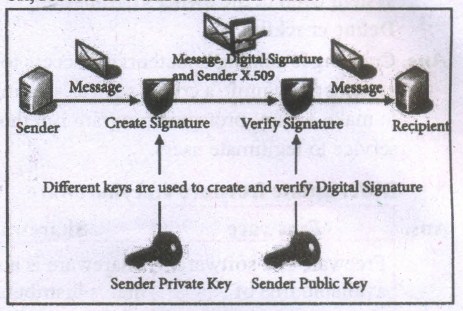
(iv) This attribute enables others to validate the integrity of the data by using the signer's public key to decrypt the hash. If the decrypted hash matches a second computed hash of the same data, it proves that the data hasn't changed since it was signed.
(v) If the two hashes don't match, the data has either been tampered with in some way (indicating a failure of integrity) or the signature-was created with a private key that doesn't correspond to the public key presented by the signer (indicating a failure of authentication).
29.
Types of Encryption :
There are two types of encryption schemes as listed below: Symmetric Key encryption, Public Key encryption.
(i) Symmetric Key Encryption:
Symmetric encryption is a technique to use the same key for both encryption and decryption. The main disadvantage of the symmetric key encryption is that all authorized persons involved, have to exchange the key used to encrypt the data before they can decrypt it. If anybody intercepts-the key information, they may read all message. Depicts the working of symmetric key encryption.
(ii) Public Key Encryption:
Public key encryption is also called Asymmetric encryption. It uses the concept of a key value pair, a different key is used for the encryption and decryption process. One of the keys is typically known as the private key and the other is known as the public key. The private key is kept secret by the owner and the public key is either shared amongst authorized recipients or made available to the public at large. The data encrypted with the recipient's public key can only be decrypted with the corresponding private key. public key encryption
30.
Web sites typically use cookies for the following reasons :
(i) To collect demographic information about who has visited the Web site.
(ii) Sites often use this information to track how often visitors come to the site and how long they remain on the site.
(iii) It helps to personalize the user's experience on the Web site.
(iv) Cookies can help store personal information about users so that when a user subsequently returns to the site, a more personalized experience is provided.
31.
(i) Social engineering:
A misuse of an individual's weakness, achieved by making them to click malicious links, or by physically accessing the computer through tricks. Phishing and pharming are examples of social engineering.
(ii) Phishing:
Phishing is a type of computer crime used to attack, steal user data, including login name, password and credit card numbers. It occurs when an attacker targets a victim into opening an e-mailor an instant text message. The attacker uses p .shing to distribute malicious links or attachments that can perform a variety of functions. including the extraction of sensitive login credentials from victims.
(iii) Pharming:
Pharming is a scamming practice in which malicious code is installed on a personal computer or server, misdirecting users to fraudulent web sites without their knowledge or permission. Pharming has been called "phishing without a trap": It is another way hackers attempt to manipulate users en the Internet. It -is a cyber-attack intended to redirect a website's traffic to a fake site.
32.
#include < iostream.h >
void main ( )
{
double temp =100.0;
double tempf;
tempf= (temp(*1.8)+32);
cout << "Faherenheit=" << temp << endl;
}
33.
#include < iostream.h >
void main ( )
{
int a = 3, b =7, c=1;
int large, sum;
cout << "Sum of" << a << "and" << b< "and" << C << "is" << sum;
large = ((a>b)? ((a>c) ? a: c) : ((b>c) ? b: c));
cout << "Largest of" << a << ","<< b << "&" << C << " is" << large;
}
34.
#include < iostream.h >
#include< math.in >
void main ( )
{
int p, t;
double r; si, amt, ci, d;
d=0;
p = 5000; r=10; t -'2;
amt = p * (pow (l +r/100,t);
ci = amt - p;
si=p*r*t/100;
d=ci-si;
cout << "The compount interest=" << (float) ci << endl";
cout << "The simple interest=" << si << endl";
cout << "The difference between C.I and SI=" << (float) d << end1";
}
35.
#include < math.h >
#include < iostream.h >
void main ()
{
int 1,b, ar, p;
double d;
1= 20; b = 10;
ar = 1* b;
p = 2 * (l+b);
d = sqrt (l*&+b*b);
cout << "The area of rectangle" << ar << endl";
cout << "The perimeter of rectangle" << p << endl";
cout << "The diagonal of rectangle" << d << endl";
}
36.
| Expression | Description | Example |
|---|---|---|
| Constant Expression | The constant expression consists only of constant values | int num - 100; |
| Integer Expression | The combination of Integer and character values and /or variables with simple arithmetic operators to produce integer results. | sum=num1+num2 avg=sum/5 |
| Float Expression | The combination of floating-point values and /or variables with simple arithmetic operators produces floating-point results. | Area=3 .14*r*r; |
| Relational Expression | The combination of values and/or variables with relational operators to produce bool values as results. | x>y; a+b==c+d; |
| Logical Expression | The combination . of values and/or variables with Logical operators to produce bool values as results. | (a>b)&&(c==10); |
37.
#include < iostream.h >
using namespace std;
int main( )
{
int radius;
float pi = 3.14;
cout << "\n Enter Radius (in em): ";
cin >> radius;
float perimeter = (pi+2)*radius;
float area = (pi*radius*radius)/2;
cout << "\n Perimeter of the semicircle is "<< perimeter <<" em";
cout << "\n Area of the semicircle is " << area << "sq.cm ";
}
38.
The scope operator reveals the hidden scope of a variable. The scope resolution operator (::) is used for the following purposes. To access a Global variable when there is a Local variable with same name. An example using Scope Resolution Operator.
// Program to show that we can access a global variable
// using scope resolution operator :: when there is a local
// variable with same name //
#include< iostream >
using namespace std;
int x=45; // Global Variable x
int main()
{
int x = 10; // Local Variable x
cout << "\nValue of global x is " << ::x;
cout << "\nValue oflocal x is" << x;
return 0;
}
Output:
Value of global x is 45 .
Value of local x is 10
39.
Inline functions can be used to reduce the overheads like STACKS for small function definition.
An inline function looks like normal function in the source file but inserts the function's code directly into the calling program. To make a function inline, one has to insert the keyword inline in the function header.
Syntax:
inline retuntype functionname( datatype parametemame1, ... datatype parametemameN)
Advantages of inline functions: Inline functions execute faster but requires more memory space. Reduce the complexity of using STACKS.
Example:
#include< iostream >
using namespace std;
inline float simpleinterest(float.pl, float nl, float rl)
{
float si 1=(p1*n1*r1)/100;
retumf si 1);
}
intmain0
{
float si.p,n,r;
cout<< "\nEnter the Principal Amount Rs.:";
cin> p;
cout<< "\nEnter the Number of Years :";
cin<< n;
cout << "\nEnter the Rate ofInterest :";
cin>> r:
si=simpleinterest(p,n,r) ;
cout<< "\nThe Simple Interest = Rs."<< si;
return 0;
}
40.
Call by reference or address Method: This method copies the address of the actual argument into the formal parameter. Since the address of the argument is passed any change made in the formal parameter will be reflected back in-the actual parameter
#include< iostream >
using namespace std;
void display(int &x) // passing address of all
{
x=x*x;
cout << "\n\nThe Value inside display function (n1 x n1):" << x;
}
int main ()
{
{
int nl;
cout<< "\nEnter the Value for N1:";
cin >> n1;
cout << "\nThe Value of N1 is inside main function Before passing: " << n1;
display(n1);
cout<< "\nThe Value of N1 is inside main function
After passing (n1 x n1 ) :" << n1;
return();
}
Output:
Enter the Value for N1 :45
The Value of N1 is inside main function Before passing: 45
The Value inside display function (n1 x n1) :2025
The Value of N1 is inside main function After passing (n1 x n1) : 2025
41.
42.
Punctuators are symbols, which are used as delimiters, while constructing a C++ program. They are also called as "Separators". The following punctuators are used in C++; most of these symbols are very similar to C and Java.
| Separator | Description |
|---|---|
| Curly braces { } | Opening and closing curly braces indicate the start and the end of a block of code. A block of code containing more than one executable statement. These statements together are called as "compound statements". |
| Parenthesis ( ) | Opening and closing parenthesis indicate function calls and function parameters. |
| Square brackets [ ] | It indicates single and multidimensional arrays. |
| Comma, | It is used as a separator in an expression. |
| Semicolon ; | Every executable statement in C++ should terminate with a semicolon. |
| Colon: | It is used to label a statement. |
| Comments // /* */ |
All statements that begin with II are treated as comments. Comments are simply ignored by compilers. i.e., the compiler does not execute any statement that begins with a // // Single line comment /* */ Multiline comment. |
43.
(i) The Bitwise shift operators: There are two bitwise shift operators in C++, Shift left ( <<) and Shift right (>>).
(ii) Shift left (<<)-: The value of the left operandis moved to left by the number of bits specified by . the right operand. Right operand should be an unsigned integer.
(iii) Shift right (>>)-: The value of the left operand is moved to right by the number of bits specified by the right operand. Right operand should be an unsigned integer.
Example:
If a = 15; Equivalent binary value of a is 0000 1111
| Operator | Operation | Result | ||||||||||||||||||
|---|---|---|---|---|---|---|---|---|---|---|---|---|---|---|---|---|---|---|---|---|
| << | a << 3 |
|
44.
#include < iostream.h
using namespace std;
struct Employee
{
int Id;
char Name[25];
int Age;
long Salary;
};
Employee Inpt();
void main()
{
Employee e;
Emp = Input();
cout << "The values Entered are' << end1:
cout << n\n\nEmployee Idr' << e.Id;
cout << "\nEmployee Name:"<< e.Name;
cout << "\nEmployee Age.<< e.Age;
cout << n\nEmployee Salary:" << e.Salary;
}
Employee Input()
}
Employee e;
cout << n\nEnter Employee Id:";
cint >> e.Id;
cout << "\nEnter Employee Name:";
cin >> e.Name;
cout << "\nEnter Employee Age:";
circ >> e.Age;
cout << n\nEnter Employee Salary:";
cin >> e.Salary;
return;
}
45.
Struct Employee { char name[50]; int age; float salary};
#include < iostream >
using namespace std;
struct Employee
{
char name[50];
int age;
float salary;
};
int maim)
{
Employee e1;
cout' << "Enter Full name: ";
cin >> e1.name;
cout << ccend1 << x'Bnter age: ";
cin >> e1.age;
cout << ccend1' << "Enter salary: ";
cin >> e1.salary;
cout << "\nDisplaying Information." .
<< end1;
,cout << "Name: n << e1.name << end1;
cout << "Age: " << e1.age << end1:
cout << "Salary: " << e1.salary;
return 0;
}
Output:
Enter Full name: Ezhil
Enter age: 27
Enter salary: 40000.00
Displaying Iriformation.
Name: Ezhil
Age: 27
Salary: 40000.00
46.
(i) Logical bitwise operators:
&Bitwise AND (Binary AND)
I Bitwise OR (Binary OR)
^ Bitwise Exclusive OR (Binary XOR)
1. Bitwise AND (&) will return 1 (True) if both the operands are having the value 1 (True); Otherwise, it will return 0 (False)
2. Bitwise OR ( I) will return 1 (True) if any one of the operands is having a value 1 (True); It returns 0 (False) if both the operands are having the value 0 (False).
3. Bitwise XOR (") will return 1 (True) if only one of the operand is having a value 1 (True). If both are True or both are False it will return 0 (False).
The truth table for bitwise operators (AND, OR, XOR).
| A | B | A&B | A|B | A^B |
|---|---|---|---|---|
| 1 | 1 | 1 | 1 | 0 |
| 0 | 0 | 0 | 1 | 1 |
| 0 | 1 | 0 | 1 | 1 |
| 0 | 0 | 0 | 0 | 0 |
Example:
If a = 65, b=15
Equivalent binary values of 65 = 0100 0001;
15 = 0000 1111
| Operator | Operation | Result | |||||||||||||||||||||||||||
|---|---|---|---|---|---|---|---|---|---|---|---|---|---|---|---|---|---|---|---|---|---|---|---|---|---|---|---|---|---|
| & | a&b |
|
|||||||||||||||||||||||||||
| | | alb |
|
|||||||||||||||||||||||||||
| ^ | a^b |
|
47.
A logical operator is used to evaluate logical and relational expressions. The logical operators act upon operands that are themselves called as logical expressions. C++ provides three logical operators.
| Operator | Operation | Description |
|---|---|---|
| && | AND | The logical AND combines two different relational expressions into one. It returns 1 (True) if both expressions are true, otherwise, it returns 0 (false). |
| || | OR | The logical OR combines two different relational expressions into one. It returns 1 (True), if either one of the expressions is true. It returns 0 (false), if both the expression are false. |
| ! | NOT | NOT works on a single expression/operand. It simply negates or inverts the truth value. i.e., if an operand / expression is 1 (true) then this operator returns 0 (false) and vice versa. |
48.
#include < iostream >
#include < conio >
using namespeace std;
int maim()
{
int row, col, ml[10][10], m2[10][10], sum[10][10];
cout << "Enter the number of rows :";
cin >> row;
cout << "Enter the number of column :";
cin << col;
cout << "Enter the elements of first marrixr' < xendl,
for (int i = O;i < row;i++)
for (int j = O;j < col;j++)
cin >> ml[i][j];
cout << "Enter the elements of second matrix: " << endl;
for (int i = O;i < row;i++)
for (int j = O;j < col;j++)
cin >> m2[i][j];
cout << "Output: "<< endl;
for (int i = O;i < row;i++)
for (int j = O;j < col;j++)
{
sum[i][j]=ml [i][j]+m2[i] [j];
cout << sum[i][j] << " ";
}
cout << end1 << endl;
}
getcht);
return 0;
}
49.
#include < iostream >
using namespace std;
int main()
{
int i, j len, flag = 1;
char a [20];
cout << "Enter a string:";
cin >> a;
for(len=O;a[len] !='\O';++len)
for(!=OJ=len -I ;i < len/2;++i,--j)
{
if(a[j]!=a[i])
flag=O;
}
iflflag 1)
cout << "\n The String is palmdrome";
else
cout << "\n The String is not palindrome";
return 0;
}
Output:
Enter a string: madam
The String is a palindrome.
50.
Program for Linear Search
#inc1ude < iostream >
using namespace std;
int Search(int arr[], int size, int value)
{
for(int i=O; i<size; i++)
{
if (arr[i] =value)
return i; // return index value
}
return - 1;
}
int maint()
{
int num[IO], val, id;
for (in i=O; i<lO; i++)
{
cout << "\n Enter value" << i+ 1 << "="; ,
cin-c-numli];
}
cout << "\n Enter a value to be searched:";
cin=c-val;
id=Search(num, 10,val);
if(id==-I)
cout << "\n Given value is not found in the
array ..";
else
cout << "\n The value IS found at the
position " << id+ I;
return 0;
}
51.
#include < iostream >
using namespace std;
int main()
{
int num[10], even=0, odd=0;
for(int i=0; i < 10; i++)
{
cout << "\nEnter Mark' < xi+ I << "=";
cin >> marks[i];
if (num[i] % 2 =0
++even;
else
++odd;
}
cout << "\n There are" << even << "Even Numbers";
cout << "\n There are" << odd << "Odd Numbers";
}
52.
#include < iostream >
using namespace std;
int mainf)
{
int marks[10], sum=0;
float avg;
for(int i=0; i<10; i++)
{
cout << "\nEnter Mark' << xi+ I << "=";
cin >> marks[i];
sum=sum+marks[ i];
}
avg=sum/10.0;
cout << "\n The Total Marksr'' << csum;
cout << "\n The Average Mark:" << avg;
}
53.
| Operator | Operation | Example (Assume n=2; what will be value of n) | |
|---|---|---|---|
| Prefix | Postfix | ||
| ++ | Increment | ++n; | n++; |
| n=n+1; Value of n; | Value of n; n=n+1; | ||
| Value of n = 3 | Value of n = 2 | ||
| -- | Decrement | --n; | n--; |
| n=n-1; Value of n; | Value of n; n=n-1; | ||
| Value of n = 1 | Value of n = 2 | ||
54.
Integer Constants / Fixed point constants: Integers are whole numbers without any fractions. An integer constant must have at least one digit without a decimal point. It may be signed or unsigned. Signed integers are considered as negative. In C++, there are three types of integer constants:
(i) Decimal:
1. Any sequence of one or more digits (0.....9)
2. It may or may not be signed.
3. Comma and blank spaces are not allowed as part of it.
| Valid Decimal constants |
Invalid Decimal constants |
|---|---|
| 725 | 7,500 (Comma is not allowed) |
| -27 | 5 66(Blank space is not allowed) |
| 4.56 |
Note: If a Decimal constant with fractions, then the compiler will take only the integer part of the value and it will ignore its fractional part. This is called as "Implicit Conversion". It will bediscussed late.
For example: If you assign 4.56 as an integer decimal constant, the compiler will accept only the integer portion of 4.56 ie. 4. It will simply ignore.56.
(ii) Octal:
1. Any sequence of one or more octal values (0 ...7 ) that starts with 0 is considered as an Octal constant.
2. It may or may not be signed.
3. Decimal points(Dot), Commas and blank spaces are not allowed as part of it.
| Valid Octal | Invalid Octal constants |
|---|---|
| 012 | 05,600 (Comma is not allowed) |
| -027 | 04.56(Decimal point is not allowed) |
| +0231 | 0158 (8 is not a permissible digit in octal system) |
** When you use a fractional number that beings with 0, it will be considered as an integer number not as Octal.
(iii) Hexadecimal:
1. Any sequence of one or more Hexadecimal values (0 ... 9, A .... E) that starts with Ox or OXis considered as a Hexadecimal constant.
2. All Hexadecimal values are unsigned
3. Decimal points(Dot), Commas and blank spaces are not allowed as part of it.
| Valid Hexadecimal constants |
Invalid Hexadecimal constants |
|---|---|
| 0 x 123 | 0 x 1, A5 (Comma is not allowed) |
| 0 x 568 | 0x.14E(The decimal point is not allowed |
| -0 x 8E55 (Sign not allowed) |
55.
(i) C++ is highly portable language and is often the language of choice for multi-device, multi-platform app development.
(ii) C++ is an object-oriented programming language and includes classes, inheritance, polymorphism, data abstraction and encapsulation.
(iii) C++ has a rich function library
(iv) C++ allows exception handling, and function overloading which are not possible in C.
(v) C++ is a powerful, efficient and fast language. It finds a wide range of applications from GUI applications to 3D graphics for games to real-time mathematical simulations.
56.
| C | C++ |
|---|---|
| C is a subset of C++ | C++ is a superset of C |
| Supports Procedural Programming Paradigm. | Supports both Procedural and Object Oriented Programming. So, C++ is also called as "Hybrid Language". |
| Data and Functions are separate and free entities. | Data and functions are encapsulated together in form of an object. |
| No Data hiding. | Encapsulation hides data. |
| Function-driven language. | Object-driven language. |
| Does not have a namespace feature. | Uses namespace which avoids name collision. |
| scanf and printf functions are used for input and output. | cin and cout objects are used for input and output. |
| Not support reference variable. | Supports reference variable. |
| Not support virtual and friend functions. | Supports virtual and friend functions. |
| No Exception handling. | Supports exception handling. |
57.
(i) Android - Famous Operating system for smart phones developed by Java and C++
(ii) Adobe Systems - All major applications are developed in C++
Photoshop & ImageReady
Illustrator
Acrobat,
InDesign,
GoLive,
Frame (mostly C, some C++)
(iii) Maya - 3D Animation Multimedia software has been used in the production of every major film involving computer-generated effects including Star Wars, Spider Man, Lord of the Rings, Stuart Little etc.,
(iv) Amazon.com - Large scale e-commerce application
(v) Amadeus: running the biggest non-military datacenter in Europe (in excess of 5000transactions per second, 2,00,000 terminals connected, 24/7 operation) is doing most of its current development in C++. All Unix - based server applications are completely C++. Some of them :
Car reservation
Customer profile server
Electronic ticketing
TCP lIP front end
(vi) Facebook - Several high performance and high-reliability components
58.
Advantages of OOP:
(i) Re-usability: Write once and use it multiple times you can achieve this by using class.
(ii) Redundancy: Inheritance is the good feature for data redundancy. If you need a same functionability in multiple class you can write a common class for the same functionality and inherit that class to sub class.
(iii) Easy Maintenance: It is easy to maintain and modify existing code as new objects can be created with small difference to existing ones.
(iv) Security: Using data hiding and abstraction only necessary data will be provided thus maintains the security of data.
Disadvantages of OOP:
(i) Size: Object Oriented Programs are much larger than other programs.
(ii) Effort: Object Oriented Programs require a lot of work to create.
(iii) Speed: Object Oriented Programs are slower than other programs, because of their size
59.
(i) The mechanism by which the data and functions are bound together into a single unit is known as ENCAPSULATION. It implements abstraction.
(ii) Abstraction refers to showing only the essential features without revealing background details.
(iii) Modularity is designing a system that is divided into a set of functional units that can be composed into a larger application.
(iv) Polymorphims is the ability of a message or function to be displayed in more than one form.
(v) Inheritance is the technique of building new classes (derived class) from an existing class.
(vi) The most important advantage of inheritance is code reusability.
(vii) Inheritance is transitive in nature.
60.
Important features of Object oriented programming:
(i) Emphasizes on data rather than algorithm.
(ii) Data abstraction is introduced in addition to procedural abstraction.
(iii) Data and its associated operations are grouped in to single unit.
(iv) Programs are designed around the data being operated
(v) Relationships can be created between similar, yet distinct data types
(vi) Example: C++, Java, VB.Net, Python etc.
61.
#include< string.h >
#include< iostram >
using namespace std;
class strings
{
public:
char s[20];
void getstring( char str[])
{
strcpy(s,str);
}
void operator+(strings);
};
void strings::operator+(strings ob)
{
strcat(s,ob.s);
cout << "\nConcatnated String is:"<< s;
intmain()
{
strings ob 1, ob2;
char string 1 [10], string2[10];
cout << "\nEnter First String:";
cin>>string 1 ;
ob1.getstring(string 1);
cout << "\nEnter Second String:";
cin>>sting 2;
ob2.getstring(string2);
//Calling + operator to Join/Concatenate strings
obl +ob2;
return 0;
}
Output:
Enter First String:COMPUTER
Enter Second String:SCIENCE
Concatenated String is:COMPUTERSCIENCE
62.
//Complex number addition and subtraction
#include < iostream >
using namespace std;
class complex
{
int real, img;
public;
void readt)
{
cout << "\nEnter the REAL PART :";
cin >> real;
cout << "\nEnter the IMAGINARY PART :";
cin >> img;
}
complex operator +( complex c2)
{
complex c3;
c3.real=real-c2.real;
c3 .img=img-c2.img;
return c3;
}
void display()
{
cout << real << "+" << img << "i";
};
int maim)
{
complex c 1,c2,c3;
int choice, cout;
do
{
cout << "\t\tCOMPLEX NUMBERS\n\n1.
ADDITION\n\n2.SUBTRACTION\n\n";
cout << "\nEnter your choice:";
cin>>choice;
if(choice== 1llchoice=2)
{
cout << "\n\nEnter the First Complex Number";
c1.read();
cout << "\n\nEnter the Second Complex
Number";
c2.readO;
}
switch( choice)
{
case 1 :c3=c1 +c2; //binary + overloaded
cout << "\n\nSUM .= ";
c3.dispaly();
break;
case 2 :c3=cl-c2; //binary -overloaded
cout << "\n\nResult = ";
c3.display();
break;
default :cout << "\n\nUndefined Choice";
}
cout«"\n\nDo You Want to Continue?
(1-Y,0-N)";
cin>>cout;
}while(cout==1);
return 0;
}
63.
Customers are waiting in a line at a counter. The man at the counter wants to know how many customers are waiting in the line.
Instead of counting the length himself, he asks customer A for the length of the line with him at the head, customer A asks customer B for the length of the line with customer B at the head, and so on. When the query reaches the last customer in the line, E, since there is no one behind him, he replies 1 to D who asked him. D replies 1 + 1 = 2 to C, C replies 1 + 2 = 3 to B, B replies 1 + 3 = 4 to A, and A replies 1 + 4 = 5 to the man in the counter
64.
The loop invariant is true in four crucial points in a loop. Using the loop invariant, we can construct the loop and reason about the properties of the variables at these points.
Example:
Design an iterative algorithm to compute an , Let us name the algorithm power(a, n).
For example,
power(10, 4) = 10000
power (5 , 3) = 125
power (2 , 5) = 32
Algorithm power (a, n) computes an by multiplying a cumulatively n times.
The specification and the loop invariant are shown as comments.
power (a, n)
-- inputs: n is a positive integer
-- outputs: p = an
p, i := 1 ,0
while i \(\neq \) n
-- loop invariant: p = a i
p, i:=p x a, i+ 1
The step by step execution of power (2, 5) is shown in Table. Each row shows the values of the two variables p and i at the end of an iteration, and how they are calculated. We see that p = a' is true at the start of the loop, and remains true in each row. Therefore, it is a loop invariant.
| iteration | p | p\(\times \)a | i | i+1 | ai |
| 0 1 2 3 4 5 |
1 2 4 8 16 32 |
1 \(\times \) 2 2 \(\times \) 2 4 \(\times \) 2 8 \(\times \) 2 16 \(\times \) 2 |
0 1 2 3 4 5 |
0+1 1+1 2+1 3+! 4+1 |
20 21 22 23 24 25 |
When the loop ends, p = a' is still true, but i = 5. Therefore, p = a5. In general, when the loop ends, p = an. Thus, we have verified that power(a, n) satisfies its specification.
65.
Binary Addition
The following table is useful when adding two binary numbers
| A | B | SUM(A+B) | Carry |
| 0 | 0 | 0 | - |
| 0 | 1 | 1 | - |
| 1 | 0 | 1 | - |
| 1 | 1 | 0 | 1 |
In 1+ 1= 10,is considered as sum 0and the 1as carry bit. This carry bit is added with the previous position of the bit pattern
Example Add: 10112 + 10012
Example Perform Binary addition for the
following: 2310 + 1210
Step 1: Convert 23 and 12 into binary form
| 2310 | |||||
| 2's Power | 16 | 8 | 4 | 2 | 1 |
| Binary Number | 1 | 0 | 1 | 1 | 1 |
| 2310 =000101112 | |||||
| 1210 | |||||
| 2's Power | 8 | 4 | 2 | 1 | |
| Binary Number | 1 | 1 | 0 | 0 | |
| 1210 =000011002 | |||||
Step 2: Binary Addition of 23 and 12 :
| Carry Bit \(\rightarrow \) | 1 | 1 | |||||
| 2310=0 | 0 | 0 | 1 | 0 | 1 | 1 | 1 |
| 1210=0 | 0 | 0 | 0 | 1 | 1 | 0 | 0 |
| 3510 | 0 | 1 | 0 | 0 | 0 | 1 | 1 |
Binary Subtraction
The table for Binary Subtraction is as follows:
| A | B | Differnce (A-B) | Borrow |
| 0 | 0 | 0 | 0 |
| 1 | 0 | 1 | 0 |
| 1 | 1 | 0 | 0 |
| 0 | 1 | 1 | 1 |
When subtracting 1 from 0, borrow 1 from the next Most Significant Bit, when borrowing from the next Most Significant Bit, if it is 1, replace it with O. If the next Mos.t Significant Bit is 0, you must borrow from a more significant bit that contains 1 and replace it with 0 and Os upto that point become 1s.
Example Perform binary addition for the following: (-21)10 + (5)10
Step 1: Change -21 and 5 into binary form
| 2110 | |||||
| 2's Power | 16 | 8 | 4 | 2 | 1 |
| Binary Number | 1 | 0 | 1 | 1 | 1 |
| 2110 =000101012 | |||||
| 510 | |||||
| 2's Power | 4 | 2 | 1 | ||
| Binary Number | 1 | 1 | 0 | ||
| 510 =00001012 | |||||
| 2110 | 0 | 0 | 0 | 1 | 0 | 1 | 0 | 1 |
| 1's Compliment | 1 | 1 | 1 | 0 | 1 | 0 | 1 | 0 |
| 2's Compliment | 1 | 1 | 1 | 0 | 1 | 0 | 1 | 1 |
Step 3:
Binary Addition of -21 and 5:
| Carry Bit | 1 | 1 | 1 | 1 | ||||
| -2110 | 1 | 1 | 1 | 0 | 1 | 0 | 1 | 1 |
| 510 | 0 | 0 | 0 | 0 | 0 | 1 | 0 | 1 |
| -1610 | 1 | 1 | 1 | 1 | 0 | 0 | 0 | 0 |
66.
In a loop, if L is an invariant of the loop body B, then L is known as a loop invariant.
while C
--L
B
-- L
The loop invariant is true before the loop body and after the .loop body, each time. Since L is true at the start of the first iteration, L is true at the start of the loop also (just before the loop). 'Since L is true at the end of the last iteration, L is true when the loop ends also (just after the loop). Thus,.if L is a loop variant, then it is true at four important points in the algorithm, as annotated in the algorithm.
1. At the start of the loop (just before the loop)
2. at the start of each iteration (before loop body)
3. at the end of each iteration (after loop body)
4. at the end of the loop (just after the loop)
1. -- L, start of loop
while
C
2. -- L, start of iteration
B
3. -- L, end of the iteration
4. -- L, end of the loop
67.
The main use of Operating System is
1. to ensure that a computer can be used to extract what the user wants it do.
2. Easy interaction between the users and computers.
3. Starting computer operation automatically when power is turned on (Booting),
4. Controlling Input and Output Devices
5. Manage the utilization of main memory.
6. Providing security to user programs.
68.
69.
After an algorithmic problem is decomposed into subproblems, we can abstract the subproblems as functions. A function is like a sub-algorithm. Similar to an algorithm, a function is specified by the input property, and the desired input-output relation.
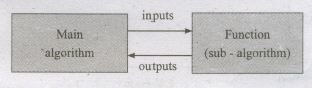
To use a function in the main algorithm, the user need to know only the specification of the function- the function name, the input property, and the input-output relation. The user must ensure that the inputs passed to the function will satisfy the specified property and can assume that the outputs from the function satisfy the input-output relation. Thus, users of the function need only to know what the function does, and not how it is done by the function. The function can be used a "black box" in solving other problems.
Ultimately, someone implements .the function using an algorithm. However, users of the function need not know about the algorithm used to implement the function. It is hidden from the users. There is no need for the users to know how the function is implemented in order to use it.
An algorithm used to implement a function may maintain its own variables. These' variables are local to the function in the sense that they are not visible to the user of t~e function. Consequently, the user has fewer variables to maintain in the main algorithm, reducing the clutter of the main algorithm.
70.
The alternative statement analyses the problem into two cases. The case analysis statement generalizes it to multiple cases. Case analysis splits the problem into an exhaustive set of disjoint cases. For each case, the problem is solved independently. if Cl, C2, and C3 are conditions, and S1, S2, S3, and S4 are statements, a 4-case analysis statement has the form,
1. Case C1
2. S1
3. Case C2
4. S2
5. Case C3
6. S3
7. else
8.S4
The conditions C1, C2, and C3 are evaluated in turn. For the first condition that evaluates to true, the corresponding statement is executed, and the case analysis statement ends. If none of the conditions evaluates to true, then the default case S4 is executed.
1. The cases are exhaustive: at least one' of the cases is true. If all conditions are false, the default case is true.
2. The cases are disjoint: only one of the cases is true. Though it is possible for more than one condition to be true, the case analysis always executes only one case, the first one that is true. If the three conditions are disjoint, then the four cases are (1) C1, (2) C2, (3) C3, (4), (not C1) and (not C2) and (not C3).
71.
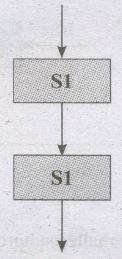
A sequential statement is composed of a sequence of statements. The statements in the sequence are executed one after another, in the same order as they are written in the algorithm, and the control flow is said to be sequential. Let S1 and S2 be statements. A sequential statement composed of S1 and S2 is written as
S1
S2
In order to execute the sequential statement, first do S 1and then do S2. The sequential statement given above can be represented in a flowchart. The arrow from S 1 to S2 indicates that S1is executed, and after that, S2 is executed.
Let the' input property be P, and the input-output relation be Q', for a problem. If statement S solves the problem, it is written as
1. '-- P
2. S
3. -- Q
If we decompose the problem into two components, we need to compose S as a sequence of two statements S 1 and S2 such that the input-output relation of S 1, say R, is the input property of S2.
1. -- p
2. Sl
3. -- R
4.. S2
5. -- Q
72.
Disadvantages of flowcharts:
1. Flowcharts are less compact than representation of algorithms in programming language or pseudo code.
2. They obscure the basic hierarchical structure of the algorithms.
3: Alternative statements and loops are disciplined control flow structures.
73.
Copying Files and Folders to removable disk:
There are several methods of transferring files to or from a removable disk:
(i) Copy and Paste
(ii) Send To
METHOD I - Copy and Paste
(i) Plug the USB flash drive directly into an available USB port.
(ii) If the USB flash drive or external drive folder does NOT open automatically, follow these steps:
(iii) Click → Start Computer.
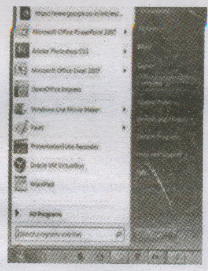
(iv) Double-click on the Removable Disk associated with the USB flash drive.
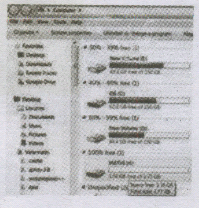
(v) Navigate to the -folders in your computer containing files you want to transfer. Right-click on the file you want to copy, then select Copy.
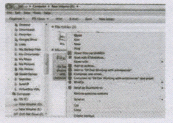
(iv) Return to the Removable Disk window, right-click within the window, then select Paste.
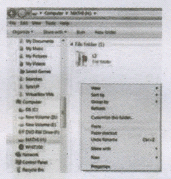
METHOD II - Send To
(i) Plug the USB flash drive directly into an available USB port.
(ii) Navigate to the folders in your computer containing files you want to transfer.
(iii) Right-click on the file you want to transfer to your removable disk.
(iv) Click Send To and select the Removable Disk associated with the USB flash drive.
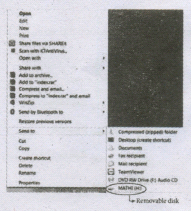
74.
| Action | Reaction |
| Point to an item | Move the mouse pointer over the item. |
| click | Point to the item on the screen, press and release the left mouse button. |
| Right-click | Point to the item on the screen, press and release the right mouse button. Clicking the right mouse button displays a pop-up menu with various options. |
| Double-click | Point to the item on the screen, quickly press twice the left mouse button. |
| Drag and drop | Point to an item then hold the left mouse button as you move the pointer press and you have reached the desired position, release the mouse button. |
75.
Cache Memory:
The cache memory is a very high speed and expensive memory, which is used to speed up the memory retrieval process. Due to its higher cost, the CPU comes with a smaller size of cache memory compared with the size of the main memory. Without cache memory, every time the CPU requests the data, it has to be fetched from the main memory which will consume more time. The idea. of introducing a cache is that, this extremely fast memory would store data that is frequently accessed and if possible, the data that is closer to it.This helps to achieve the fast response- time, Where response time, (Access Time) refers to how quickly the memory can respond to a read / write request. Arrangement of cache memory between the CPU and the main memory is shown below

76.
Secondary Storage Devices
A computer generally has limited amount of main memory which is expensive and volatile. To store data and programs permanently, secondary storage devices are used. Secondary storage devices serve as a supportive storage to main memory and they are non-volatile in nature, secondary storage is also called as Backup storage.
Hard Disks
Hard disk is a magnetic disk on which you can store data. The hard disk has the stacked arrangement of disks accessed by a pair of heads for each of the disks. The hard disks come with a single or double sided disk.
Compact Disc (CD)
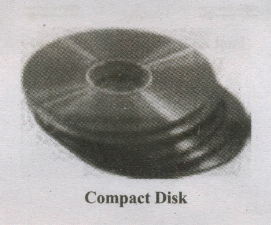
A CD or.CD-ROM is made from 1.2 millimeters thick, polycarbonate plastic material. A thin layer of aluminum or gold is applied to the surface. CD data is represented as tiny indentations known as "pits", encoded in a spiral track moulded into the top of the polycarbonate layer. The areas between pits are known as "lands". A motor within the CD player rotates the disk. The capacity of an ordinary CD-ROM is 700 MB.
Digital Versatile Disc (DVD)
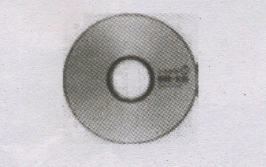
(A DVD Digital Versatile Disc or Digital Video Disc) is an optical disc capable of storing up to 4.7 GB of data, more than six times what a CD can hold. DVDs are often used to store movies at a better quality. Like CDs, DVDs are read with a laser.
The disc can have one or two sides, and one or two layers of data per side; the number of sides and layers determines how much it can hold. A 12 mm diameter disc with single sided, single layer has 4.7 GB capacity, whereas the single sided, double layer has 8.5 GB capacity. The 8 em DVD has 1.5 GB capacity. The capacity of a DVD-ROM can be visually determined by noting the number of data sides of the disc. Double-layered sides are usually gold-coloured, while single-layered sides are usually silver-coloured, like a CD
77.
Data communication between CPU and memory
The Central Processing Unit(CPU) has a Memory Data Register (MDR) and a Memory Address Register (MAR). The Memory Data. Register (MDR) keeps the data which is transferred between the Memory and the Cl'U. The Program Counter (PC) is a special register in the CPU which always keeps the address of the next instruction to be executed.
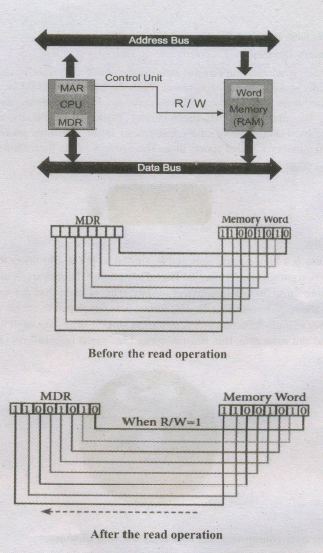
The read operation transfers the data(bits) from word to Memory Data Register. The write operation transfers the data(bits) from Memory Data Register to word.
78.
Flash Memory Devices
Flash memory is an electronic (solid-state) non-volatile computer storage medium that can be electrically erased and reprogrammed. They are either EEPROM or EPROM. Examples for Flash memories are pendrives, memory cards etc. Flash memories can be used in personal computers, Personal Digital Assistants (PDA), digital audio players, digital cameras and mobile phones. Flash memory offers fast access times. The time taken to read or write a character in memory is called access time. The capacity of the flash memories vary from 1 Gigabytes (GB) to 2 Terabytes (TB).
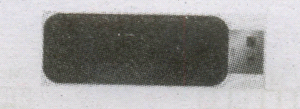
BIu-Ray Disc
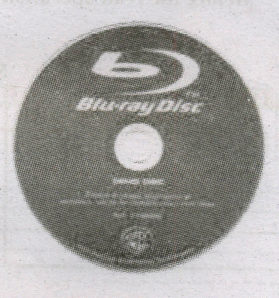
Blu-Ray Disc is a high-density optical disc similar to DVD. Blu-ray is the type of discussed for PlayStation games and for playing High-Definition (HD) movies. A double-layer Blu-Ray disc can store up to 50 GB (gigabytes) of data. This is more than 5 times the capacity of a DVD, and above 70 times of a CD. The format was developed to enable recording, rewriting and playback of high-definition video, as well as storing large amount of data. DVD uses a red laser to read and write data. But, Blu-ray uses a blue-violet laser to write. Hence, it is called as Blu-Ray.
79.
Specification format:
We can write the specification in a standard three part format:
(i) The name of the algorithm and the inputs
(ii) Input: the property of the inputs
(iii) Output: the desired input-output relation
The first part is the name of the algorithm and the inputs. The second part is the property of the inputs. It is written as a comment which starts with - inputs: The third part is the desired input-output relation. It is written as a comment which starts with - outputs. \(\therefore \) The input and output can be written using English and mathematical notation.
80.
There are a few basic principles and techniques for designing algorithms.
1. Specification:
The first step in problem-solving is to state the problem precisely. A problem is specified in terms of the input given and the output desired. The specification must also state the . properties of the given input; and the relation between the input and the output.
2. Abstraction:
A problem can involve a lot of details. Several of these details are unnecessary for solving the problem. Only a few details are essential. Ignoring or hiding unnecessary details and modeling an entity only by its essential properties is known as abstraction. For example, when we represent the state of a process, we select only the variables essential to the problem and ignore inessential details.
3. Composition:
An algorithm is composed of assignment and control flow statements. A control flow statement tests a condition of the state and depending on the value of the condition, decides the next statement to be executed.
4. Decomposition:
We divide the main algorithm into functions. We construct each function independently of the main algorithm and other functions. Finally, we construct the main algorithm using. the functions. When we use the functions, it is enough to know the specification of the function. It is not necessary to know how the function is implemented.
81.
There are three important control flow statements to alter the control flow depending on the state.
(i) In sequential control flow, a sequence of statements are executed one after another in the same order as they are written
(ii) In alternative control flow, a condition of the state is tested, and if the condition is true, one statement is executed; if the condition is false, an alternative statement is executed.
(iii) In iterative control flow, a condition of the state is tested, and if the condition is true, a statement is executed. The two steps of testing the condition and executing the statement are repeated until the condition becomes false.
82.
Ports and Interfaces
The Motherboard of a computer has many I/O sockets that are connected to the ports and interfaces found on the rear side of a computer. The external devices can be connected to the ports and interfaces. The various types of ports are given below:
Serial Port:
To connect the external devices, found in old computers.
Parallel Port:
To connect the printers,.found in old computers.
USB Ports:
To connect external devices like cameras, scanners, mobile phones, external hard disks and printers to the computer. USB 3.0 is the third major version of the Universal Serial Bus (USB) standard to connect
computers with other electronic gadgets. USB 3.0 can transfer data up to 5 Giga byte/second. USB 3.1 and USB 3.2 are also released
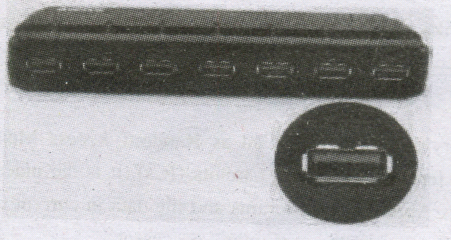
SCSI Port:
To connect the hard disk drives and network connectors.
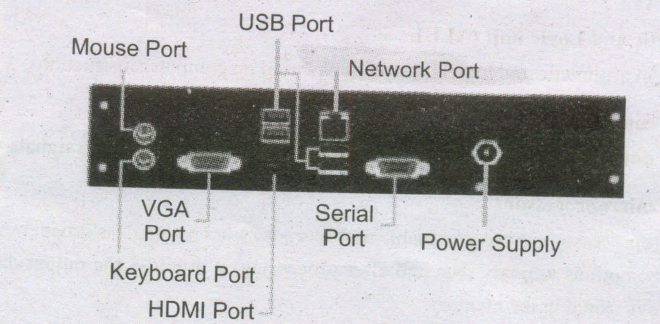
83.
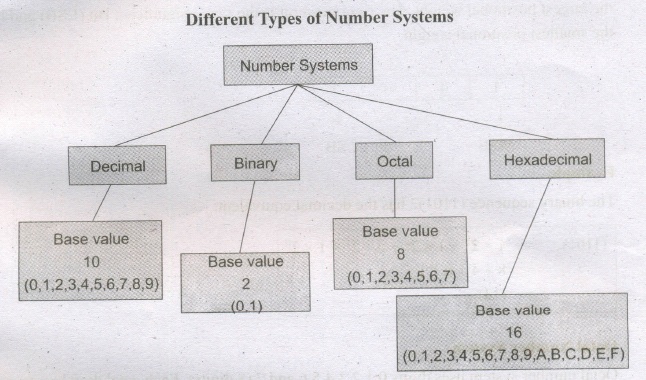
A numbering system is a way of representing numbers. The most commonly used numbering system in real life is Decimal number system.· Other number systems are Binary, Octal, Hexadecimal number system. Each number system 'is uniquely identified by its base value or radix. Radix or base is the count of number of digits in each number system. Radix or base is the general idea behind positional numbering system.
Decimal Number System
It consists of 0,1,2,3,4,5,6,7,8,9(10 digits). It is the oldest and most popular number system used in our day to day life, In the positional number system, each decimal digit is weighted relative to its position in the number. This means that each digit in the number is multiplied by 10 raised to a power corresponding to that digit's position.
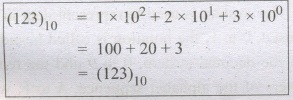
Binary Number System
There are only two digits in the Binary system, namely, 0 and 1. The numbers in the binary system are represented to the base 2 and the positional multipliers are the powers of2. The left most bit in the binary number is called as the Most Significant Bit (MSB) and it has the largest positional weight. The right most bit is the Least Significant Bit (LSB) and has the smallest positional weight.
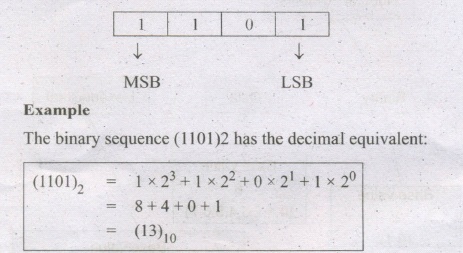
Octal Number System
Octal number system uses digits 0,1,2,3,4,5,6 and 7-(8 digits). Each octal digit.has its own positional value or weight as a power of 8.
Example
The Octal sequence (547)8 has the decimal equivalent:
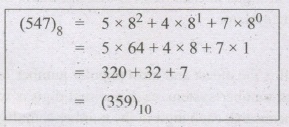
Hexadecimal Number System:
A hexadecimal number is represented using base 16. Hexadecimal or Hex numbers are used as a shorthand form of binary sequence. This system is used to represent data in a more compact manner. Since 16 symbols are used, 0 to F, the notation is called hexadecimal. The first 10 symbols are the same as in the decimal system, 0 to 9 and the remaining 6 symbols are taken from the first 6 letters of the alphabet sequence, A to F, where A represents 10, B is 11, C is 12, D is 13, E is 14 and F is 15.
84.
Input Devices:
Keyboard:
Keyboard (wired 1 wireless, virtual) is the most common input device used today. The individual keys for letters, numbers and special characters are collectively known as character keys. This keyboard-layout is derived from the keyboard of original typewriter.
Mouse:
Mouse (wired/wireless) is a pointing device used to control the movement of the cursor on the display screen.
Types of Mouses:
(i) Mechanical Mouse
(ii) Optical Mouse
(iii) Laser Mouse
Scanner:
Scanners are used to enter the information directly into the computer's memory. This device works like a Xerox machine. The scanner converts any type of printed or written information including photographs into a digital format, which can be manipulated by the computer.
Track Ball:
Track ball is similar to the upside- down design of the mouse. The user moves the ball directly, while the device itself remains stationary. The user spins the ball in various directions to navigate the screen movements.
Retinal Scanner:
This performs a retinal scan which is a biometric technique that uses unique patterns on a person's retinal blood vessels.
Light Pen:
A light pen is a pointing device shaped like a pen and is connected to a monitor. The tip of the light pen contains a light-sensitive element which detects the light from the screen enabling the computer to identify the location of the pen on the screen. Light pens have the advantage of 'drawing' directly onto the screen, but this becomes hard to use, and is also not accurate.
Optical Character Reader:
It is a device which detects characters printed or written on a paper with OCR, a user can scan a page from a book. The Computer will recognize the characters in the page as letters and punctuation marks and stores. The Scanned document can be edited using a word processor.
Bar Code / QR Code Reader:
A Bar code is a pattern printed in lines of different thickness. The Bar code reader scans the information on the .bar codes transmits to the Computer for further processing. The system gives fast and error free entry of information into the computer.
QR (Quick response) Code:
The QR code is the two dimensional bar code which can be read by a camera and processed to interpret the image
Voice Input Systems:
Microphone serves as a voice Input device. It captures the voice data and send it to the Computer. Using the microphone along with speech recognition software can offer a completely new approach to input information into the Computer.
Digital Camera:
It captures images / videos directly in the digital form. It uses a CCD (Charge Coupled Device) electronic chip. When light falls on the chip through the lens, it converts light rays into digital format.
Touch Screen:
A touch screen is a display device that allows the user to interact with a computer by using the finger. It can be quite useful as an alternative to a mouse or keyboard for navigating a Graphical User Interface (GUI). Touch screens are used on a wide variety of devices such as computers, laptops, monitors, smart phones, tablets, cash registers and information kiosks. Some touch screens use a grid of infrared beams to sense the presence of a finger instead of utilizing touch-sensitive input.
Keyer:
A Keyer is a device for signalling by hand, by way of pressing one or more switches. Modern keyers have a large number of switches but not as many as a full size keyboard. Typically, this number is between 4 and 50.
85.
86.
12610
.png)
= 1111112
= 11111102 = ?8
= \(\overline { \underset { \overset { \downarrow }{ 1 } }{ 11 } } \) \(\overline { \underset { \overset { \downarrow }{ 7 } }{ 111 } } \) \(\overline { \underset { \overset { \downarrow }{ 6 } }{ 110 } } \)= 1788
=11111102 =?16
= \(\overline { \underset { \overset { \downarrow }{ \overset { 7 }{ \overset { \downarrow }{ 7} } } }{ 111 } } \) \(\overline { \underset { \overset { \downarrow }{ \overset { 14 }{ \overset { \downarrow }{ E } } } }{ 1100 } } \)
=7E16
=12610 = 11111102 = 1768 = 7E16
87.
Elements of Ubuntu:
Search your Computer Icon:
This icon is equal to search button or icon in Windows OS. Here, you have to give the name of the File or Folder for searching them.
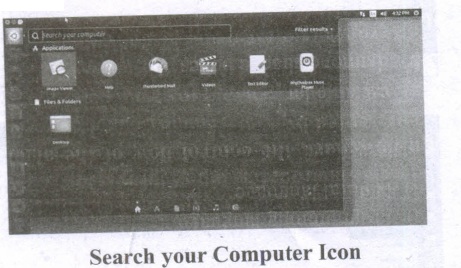
Files: This icon is equivalent to My Computer icon. From here, you can directly go to Desktop, Documents and so on
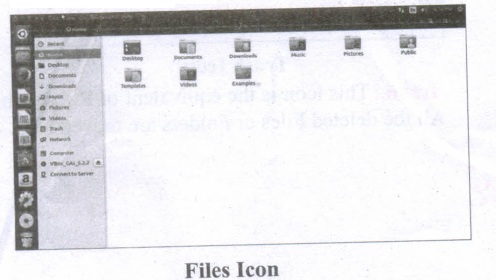
Firefox Web Browser:
By clicking this icon, you can directly browse the Internet. This is equivalent to clicking the Web Browser in Task bar or in Desktop or in Start button in Windows.
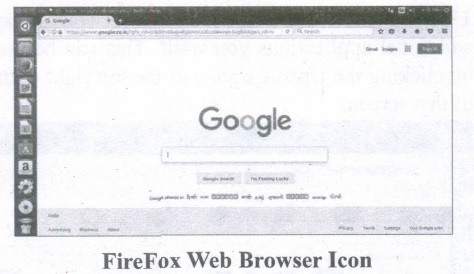
LibreOffice Writer:
This icon will directly take you to document preparation application like MS Word in Windows.
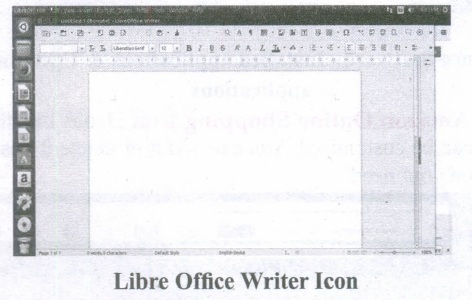
LibreOffice Calc:
This icon will lead you to spreadsheet preparation application like MS Excel in Windows.
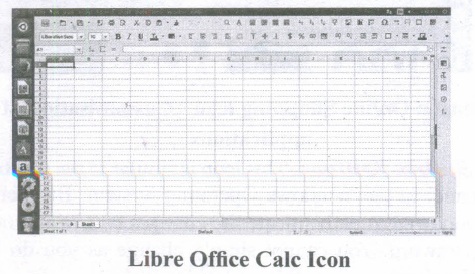
LibreOffice Impress:
By clicking this icon, you can prepare any presentations in Ubuntu like MS PowerPoint.
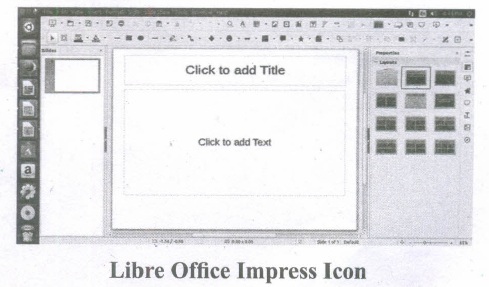
Ubuntu Software:
This icon will let you add any additional applications you want. This can be done by clicking the Update option at the top right corner of that screen.
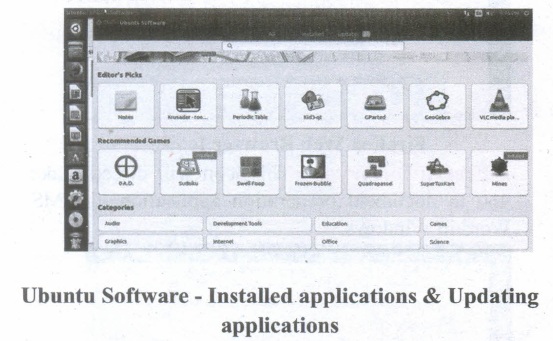
Amazon Online Shopping icon:
Icons like this can be customised. You can add it or delete it based on your need.
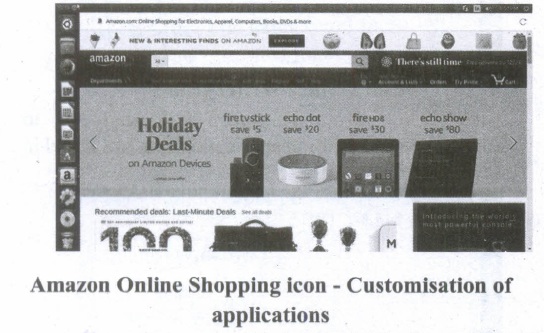
System Settings:
This icon is similar to the Control panel in the Windows Operating System. But here, you need to authenticate the changes by giving your password. You cannot simply change as you do in Windows.
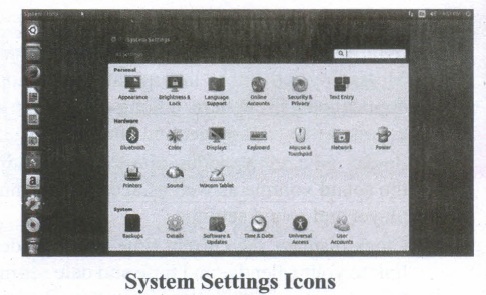
VBox_GAs_5.2.2:
The expansion for VBox is Virtual Box. The reason to use Oracle Virtual Box is Ubuntu Linux can be run as a guest OS within the virtual machine.
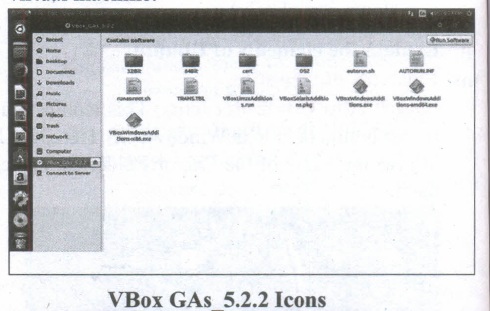
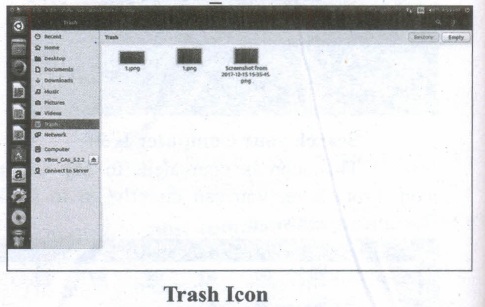
Trash: This icon is the equivalent of Recycle bin. All the deleted Files or Folders are moved here.
88.
The most common indicators in the Menu bar are:

(i) Network indicator (or) manages network connections, allowing you to connect quickly and easily to a wired or wireless network.
(ii) Text entry settings shows the current keyboard layout (such as En, Fr, Ku, and so on). If more than one keyboard layout is shown, it allows you to select a keyboard layout out of those choices. The keyboard indicator menu contains the following menu items: Character Map, Keyboard Layout Chart, and Text Entry Settings.
(iii) Messaging indicator incorporates your social applications. From here, among others, you can access instant messenger and email clients.
(iv) Sound indicator provides an easy way to adjust the sound volume as well as access your music player and sound settings.
(v) Clock displays the current time and provides a link to your calendar and time and date settings.
(vi) Session indicator is a link to the system settings, Ubuntu Help, and session options (like locking your computer, user/guest session, logging out of a session, restarting the computer, or shutting down completely).
89.
(i) The desktop version of Ubuntu supports all the normal software on Windows such as Firefox, Chrome, VLC, etc.
(ii) It supports the office suite called LibreOffice.
(iii) Ubuntu has an in-built email software called Thunderbird, which gives the user access to email such as Exchange, Gmail, Hot mail, etc.
(iv) There are a host of free applications for users to view and edit photos.
(v) There are also applications to manage share videos.
(vi) It is easy to find content on Ubuntu with the smart searching facility.
90.
Log Off:
To log off from our computer:
(i) Click on the start button.
(ii) Select log off.
(iii) If any open programs asked to be closed then Windows force them to shut down. Any unsaved information will be last.
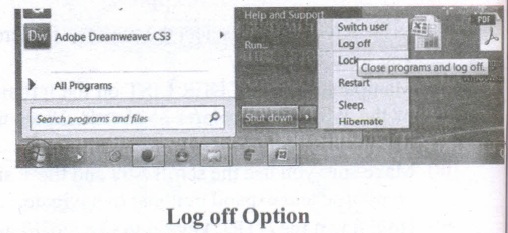
Shut Down:
To shut down our computer:
(i) Click on the start button.
(ii) Select shut down.
(iii) Then see the shut down windows dialog box opens.
(iv) If any open programs asked to be closed then Windows, force them to shut down. Any unsaved information will be lost.
91.
There are several methods of transferring files to or from a removable disk.
(i) Copy and Paste
(ii) Drag and Drop
(iii) Send To
(iv) Copy and Paste using keyboard shortcuts
METHOD 1:
Plug the USB flash drive directly into an available USB port.
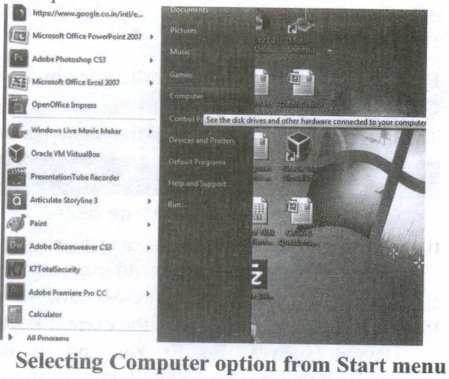
(i) Click Start ⟶ Computer.
(ii) Double-click on the Removable Disk associated with the USB flash drive.
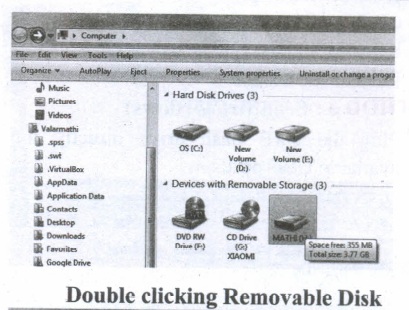
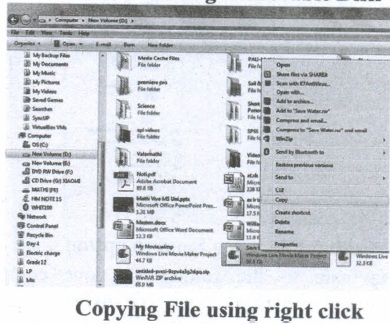
(i) Navigate to the folders in your computer containing files you want to transfer Right click on the file you want to copy, then select Copy.
(ii) Return to Removable Disk window, right click within the window, then select Paste.
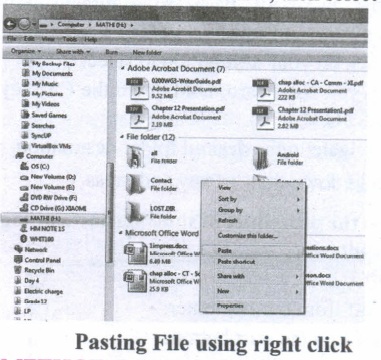
METHOD 2:
Drag and Drop
(i) Plug the USB flash drive directly into an available USB port.
(ii) Allow the computer to recognize the drive, then click Start ⟶ Computer.
(iii) Navigate to 'the folders in your computer containing files you want to transfer.
(iv) Click and drag the files you want to the Removable Disk.
(v) Release the mouse.
METHOD 3:
Send To (Windows)
(i) Plug the USB flash drive directly into an available USB port.
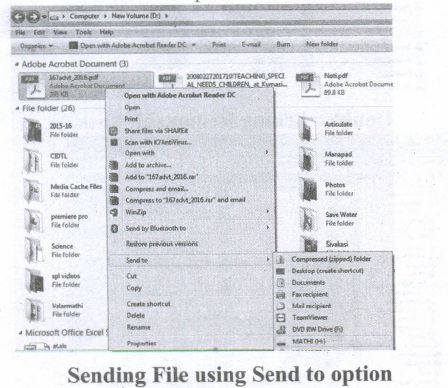
(ii) Navigate to the folders in your computer containing files you want to transfer.
(iii) Right-click on the file you want to transfer to your removable disk.
(iv) Click Send To and select the Removable Disk associated with the USB flash drive.
METHOD 4:
Copy and Paste using keyboard shortcuts (Windows)
(i) Plug the USB flash drive directly into an available USB port.
(ii) Click on your desired file to select it.
(iii) On your keyboard, hold down the Ctrl key and press C.
(iv) Navigate to the desired folder destination.
(v) Hold down the Ctrl key and press V.
92.
To move a file(s) or folder(s), first select the file(s) or folder(s) and then choose one of the following.
(i) Click on the EDIT menu, select the CUT function.
(ii) Keyboard shortcut, CTRL + X.
(iii) Or else click on the selected item with the RIGHT mouse button and select "CUT" from the shortcut Menu.
(iv) To bring back the file(s) or folder(s) in the new location, navigate to the new location then paste using one of the following:
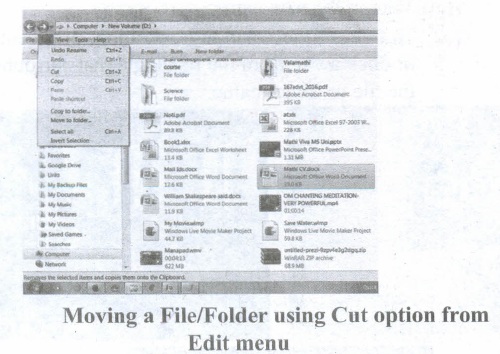
(v) Click on the EDIT menu, select the PASTE function.
(vi) Keyboard shortcut is, CTRL + V.
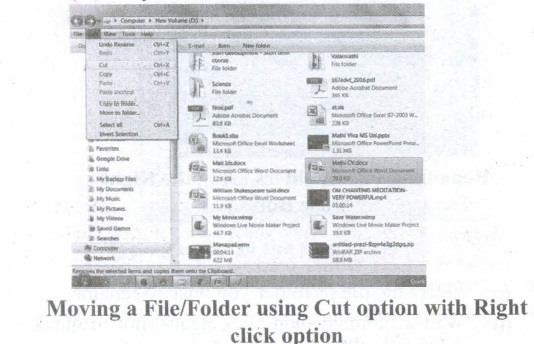
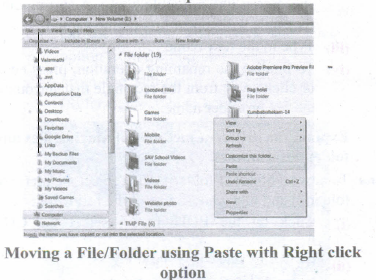
(vii) In the position where you want the item to be pasted, click with the Right mouse button and select "Paste" from the shortcut menu. The file will be pasted in the new location.
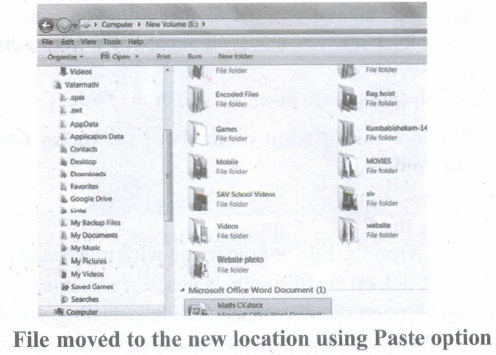
Method 2 - Dragging and Dropping
(i) In the right pane, select the file(s) or folder(s) you want to move.
(ii) Manipulate the Folder List on the left side of the Windows Explorer so that it shows the new location.
(iii) Make sure you use the scroll bars and the + and (collapse and expand buttons) to navigate.
(iv) Click and drag the selected file(s) or folder(s) from the RIGHT pane, over to the Folder List A on the left.
(v) Release the mouse button when the target folder is highlighted (active).
(vi) The file(s) or folder(s) will now appear in the new area.
93.
Method 1
Using the FILE Menu:
(i) Select the File or Folder you wish to Rename.
(ii) Click on the File menu and select Rename.
(iii) Type in the new name. While renaming a file keep the same file extension (e.g. ".doc") as it earlier had, otherwise, the file will no longer be associated with the program that created it.
(iv) To finalise the renaming operation, press Enter the file or folder name.
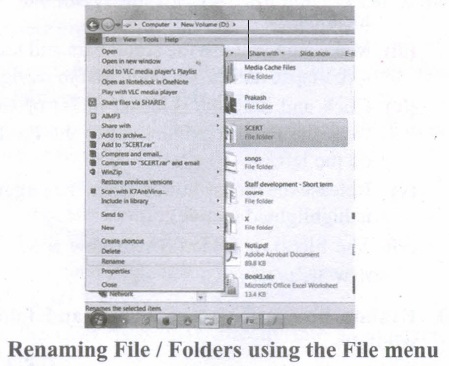
Method 2
Using the Right Mouse Button:
(i) Select the file or folder you wish to rename.
(ii) Click the right mouse button while still pointing to the file.
(iii) Select Rename from the shortcut menu.
(iv) Type in the new name.
(v) To finalise the renaming operation, press enter or click away from the rectangle that surrounds the file or folder name.
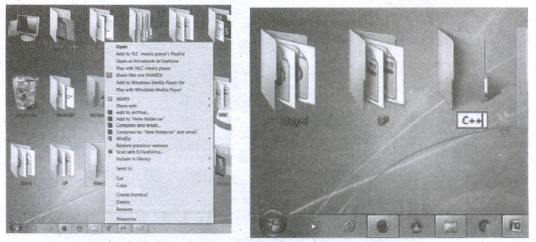
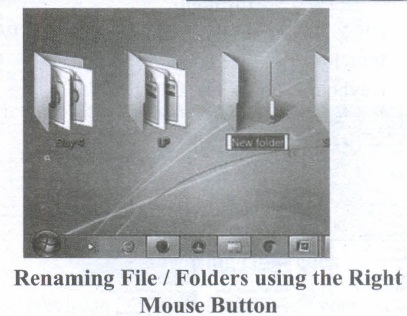
Method 3
Using the Left Mouse Button
(i) Select the file or folder you wish to rename.
(ii) Wait a moment then click again (not in quick succession like a double click). A surrounding rectangle will appear around the name;
(iii) Type in the new name.
(iv) To finalise the renaming operation, press enter or click away from the rectangle that surrounds the file or folder-name.
94.
(101011001)2 in hexadecimal Form
= 1 \(\overline { 0101 } \) \(\overline { 1001 } \)
(101011001)2 = (159)16
(101011001)2 = (159)16
(101011001)2 octal form
\(\overset { 101 }{ \underset { 5 }{ \downarrow } } \) \(\overset { 011 }{ \underset { 3 }{ \downarrow } } \) \(\overset { 001 }{ \underset { 1 }{ \downarrow } } \)
(101011001)2 = (531)8
Thus(101011001)2 \(\rightarrow \) = (531)8
95.
Steps for Decimal to Binary Conversion.
Step 1: Divide the decimal number which is to be converted by two which is the base of the binary number.
Step 2: The remainder which is obtained from step 1 is the least significant bit of the new binary number.
Step 3: Divide. the quotient which is obtained from the step 2 and the remainder obtained from this is the second least significant bit of the binary number
Step 4: Repeat the process until the quotient becomes zero.
Step 5: The last remainder obtained from the division is the most significant bit of the binary number. Hence, arrange the number from the most significant bit to the least significant bit (i.e., from bottom to top).
96.
(i) ASCII : American Standard Code for Information Interchange (ASCII).
(ii) BCD : Binary Coded Decimal (BCD)
(iii) EBCDIC: Extended Binary Coded Decimal Interchange Code (EBCDIC)
(i) ASCII : American Standard Code for Information Interchange (ASCII) is a 7-bit code, which means that only 128 (27) characters can be represented. However, manufacturers have added an eighth bit to this coding scheme with which it is possible to represent 256 characters. This 8-bit coding scheme is referred to as an 8-bit American standard code for information interchange. The symbolic representation of letter A using this scheme is 10000012(6510).
It is a character encoding standard developed several decades ago to provide a standard way for digital machines to encode characters. The ASCII code provides a mechanism for encoding alphabetic characters, numeric digits, and punctuation marks.
(ii) BCD: Binary Coded Decimal is a 4-bit code used to represent the numeric data alone. For example, a number like 9 can be represented using Binary Coded Decimal as 10012 . Binary Coded Decimal is mostly used in simple electronic devices like calculators and microwaves. This is because it makes it easier to process and display individual numbers on their Liquid Crystal Display (LCD) screens.
A Standard Binary Coded Decimal, an enhanced format of Binary Coded Decimal, is a 6-bit representation scheme which can represent non-numeric characters. This allows 64 characters to be represented.
(iii) EBCDIC: Extended Binary Coded Decimal Interchange Code (EBCDIC) is an 8-bit character-coding .scheme used primarily on IBM computers. A total of 256 (28) characters can"be coded using this scheme.
97.
A number system is a set of digits used to represent the values derived from a common base or radix.
Decimal Number System:
(i) The term Decimal is derived from a Latin prefix deci, which means ten.
(ii) The Decimal number system has ten digits ranging from 0-9. Because this system has ten digits.
(iii) It is also called as a base ten number system or denary number system.
(iv) Decimal number should always be written with a subscript 10.
Binary Number System:
(i) The decimal number system is not convenient to implement in digital system.
(ii) For instance, it is very difficult to design electronic equipment so that it can work with 10 different voltage levels (each one representing one decimal character, 0 through 9).
(iii) On other hand, it is very easy to design simple, accurate electronic circuits that operate with only 2 voltage levels.
(iv) For this reason, almost every digital system utilizes the binary number system (base 2) as the basic number system of its operation;
(v) In a binary system, there are only two symbols or possible digit values, 0 and 1.
Octal Number System:
(i) The octal number system is playing a vital role in digital computer work.
(ii) The octal number system has a base of 8.
(iii) It means that it has eight unique symbols such as 0,1,2,3,4,5,6 and 7.
(iv) Thus, each digit of an octal number can have any value from 0 to 7.
(v) The places to the left of the octal point are positive powers of 8 and places to the right are negative powers of 8.
Hexadecimal Number System:
(i) The hexadecimal system uses base 16 in digital systems.
(ii) It has 16 possible symbols.
(iii) It uses the digits 0 through 9 plus the letters A, B, C, D, E and F as the 16 different symbols.
(iv) Hexadecimal System is a positional value system, wherein each hexadecimal digit has its own value or weight expressed as a power of 16.
98.
(i) Unicode is the newest concept in digital coding. In Unicode, every number has a unique character.
(ii) Unicode is the universal character encoding standard used for the representation of text for computer processing
(iii) It can be used to store and process all significant current and past languages. Unicode provides a unique hex encoded number for every character
(iv) Unicode is a 16-bit code, which allows for about 65,000 different representations. This is enough to encode the popular Asian languages (Chinese, Korean, Japanese, etc.)
(v) It also turns out that ASCII codes are preserved. Therefore, conversion between ASCII and Unicode is a simple method (take all one byte ASCII codes and zero-extend them to 16 bits).
(vi) This will be the Unicode version of the ASCII characters. The C, C++ programs use the ASCII Code, and Java programs have already used Unicode. The Unicode Standard has been adopted by industry leaders such as Apple, HP, IBM, Microsoft, Oracle, SAP, Sun, Sybase, and Unisys. Unicode is required by web users and modem standards.
99.
1. right_angled(a, b, c)
2. -- inputs:
3. -- outputs: result = true if c2=a2+b2
4. result = false , otherwise
5. if square (c) = square (a) + square (b)
6. result := true
7. else
8. result := false
100.
divide (A, B)
-- inputs: A is an integer and \(B\ne 0\)
--outputs: q and r such that A = q X B + r and
--0 < r < B
q:= 0,A
while r > B
q, r:= q + 1, r - B
101.
Alternative statement analyses the problem into two cases. Case analysis statement generalizes it to multiple cases. Case analysis splits the problem into an exhaustive set of disjoint cases. For each case, the problem is solved independently. If C1, C2, and C3 are conditions, and S1, S2, S3 and S4 are statements, a 4-case analysis statement has the form,
1. case C1
2. S1
3. case C2
4. S2
5. case C3
6. S3
7. else
8. S4
The conditions C1, C2, and C3 are evaluated in turn. For the first condition that evaluates to true, the corresponding statement is executed, and the case analysis statement ends. If none of the conditions evaluates to true, then the default case S4 is executed.
(i) The cases are exhaustive: at least one of the cases is true. If all conditions are false, the default case is true.
(ii) The cases are disjoint: only one of the cases is true. Though it is possible for more than one condition to be true, the case analysis always executes only one case, the first one that is true. If the three conditions are disjoint, then the four cases are (1) C1, (2) C2, (3) C3, (4) (not C1) and (not C2) and (not C3).
102.
Flowchart is a diagrammatic notation for representing algorithms. They show the control flow of algorithms using diagrams in a visual manner. In flowcharts, rectangular boxes represent simple statements, diamond-shaped boxes represent conditions, and arrows describe how the control flows during the execution of the algorithm. A flowchart is a collection of boxes containing statements and conditions which are connected by arrows showing the order in which the boxes are to be executed.
(i) A statement is contained in a rectangular box with a single outgoing arrow, which points to the box to be executed next.
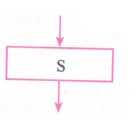
(ii) A condition is contained in a diamond-shaped box with two outgoing arrows, labelled true and false. The true arrow points to the box to be executed next if the condition is true, and the false arrow points to the box to be executed next if the condition is false.
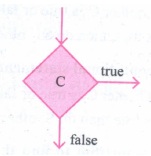
(iii) Parallelogram boxes represent inputs given and outputs produced.
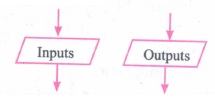
(iv) Special boxes marked Start and End are used to indicate the start and end of execution:
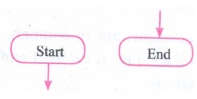
103.
There are mainly three different notations for representing algorithms.
(i) A programming language is a notation for expressing algorithms to be executed by computers .
(ii) Pseudo code is a notation similar. to programming languages. Algorithms expressed in pseudo code are not intended to be executed by computers, but for communication among people.
(iii) Flowchart is a diagrammatic notation for representing algorithms. They give a visual intuition of the flow of control, when the algorithm is executed.
104.
Hard disk :
(i) Hard disk is a magnetic disk on which you can store data. The hard disk has the stacked arrangement of disks accessed by a pair of heads for each of the disks.
(ii) The hard disks come with a single or double-sided disk.
Compact Disk (CD) :
.png)
(i) A CD or CD-ROM is made from 1.2 millimetres thick, polycarbonate plastic material. A thin layer of aluminium or gold is applied to the surface.
(ii) CD data is represented as tiny indentations known as "pits", encoded in a spiral track moulded into the top of the polycarbonate layer. The areas between pits are known as "lands".
(iii) A motor within the CD player rotates the disk. The capacity of an ordinary CD- ROM is 700MB.
Digital Versatile Disc (DVD):
.png)
(i) A DVD (Digital Versatile Disc or Digital Video Disc) is an optical disc capable of storing up to 4.7 GB of data, more than six times what a CD can hold.
(ii) DVDs are often used to store movies at a better quality. Like CDs, DVDs are read with a laser. The disc can have one or two sides, and one or two layers of data per side; the number of sides and layers determines how much it can hold.
(iii) A 12 em diameter disc with single sided, single layer has 4.7 GB capacity, whereas the single sided, double layer has 8.5 GB capacity.
(iv) The 8 em DVD has 1.5 GB capacity. The capacity of a DVD-ROM can be visually determined by noting the number of data sides of the disc. Double-layered sides- are usually gold-coloured, while single-layered sides are usually silver-coloured, like a CD.
105.
(a) Bus:
A bus is a collection of wires used for communication between the internal components of a computer.
(b) Data bus:
(i) Data bus is a collection of wires to carry data in bits.
(ii) A data bus is used to transfer data between the memory and the CPU.
(iii) The data bus is bidirectional.
(c) Address bus:
(i) Address bus is a collection of wires to carry data in bits.
(ii) The address bus is used to point a memory location.
(iii) The address bus is unidirectional.
(d) Control bus:
(i) Control bus is a control line/collection of wires to control the operation/functions.
(ii) The control bus controls both read and write operations.
106.
(i) The size of the instruction set is another important consideration while categorizing microprocessors.
(ii) Initially, microprocessors had very small instruction sets because complex hardware was expensive as well as difficult to build.
(iii) As technology had developed to overcome these issues, more and more complex instructions were added to increase the functionality of the microprocessor,
(iv) Let us learn more about the two types of microprocessors which are based on their instruction sets.
(v) RISC stands for Reduced Instruction Set Computers. They have a small set of highly optimized instructions.
(vi) Complex instructions are also implemented using simpler instructions, thus reducing the size of the instruction set.
(vii) Examples of RISC processors are Intel P6, Pentium IV, AMD K6 and K7.
(viii) CISC stands for Complex Instruction Set Computers. They support hundreds of instructions. Computers supporting CISC can accomplish a wide variety of tasks, making them ideal for personal computers.
(ix) Examples of CISC processors are Intel 386 & 486, Pentium, Pentium II and III, and Motorola 68000.
107.
(i) Click the Start button, search text box appears above the start button in Windows 7 and type the name of the file or the folder you want to search.
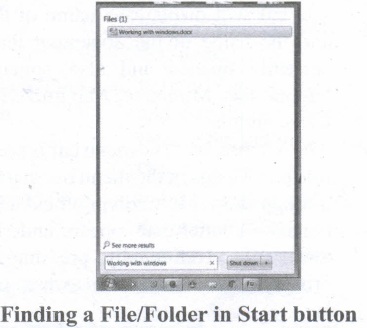
(ii) The file or the folder will appear at the top of that dialog box.
(iii) If you click that file, it will directly open that file or the folder.
(iv) Also, there is another option called "See more results" which appears above the search text box.
(v) If you click it, it will lead you to a search results dialog box where you can click and open that file or the folder.
(vi) In other ways, click Computer from desktop or from Start menu.
(vii) The Computer disk drive screen will appear and at the top right comer of that screen, there is a search text box option.
(viii) Type the name of the file or folder you want to find and it will display that particular file or the folder.
(ix) Just click and open that file or the folder.
108.
(i) The Title Bar and control buttons - The title bar will display the name of the program and the name of the document that has been currently opened and also contains control buttons like Minimize, MaximizelRestore and Close buttons.
(ii) The Menu bar - The menu bar is seen under the title bar. Menus in the menu bar can be accessed through shortcuts involving the Alt key and the mnemonic letter that appears underlined in the menu title. Additionally, pressing Alt or F 10 brings the focus on the first menu of the menu bar.
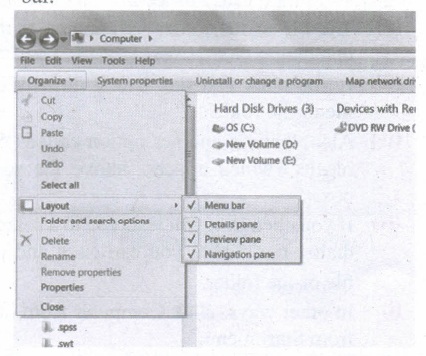
(iii) In Windows 7, in the absence of the menu bar, you have to click organize and in the sub menu list, click the layout option from it and then select the desired item from that list.
(iv) The Workspace: The Workspace is the area in the document window where you enter or type the text of document. It is the point of insertion for typing within the document.
(v) The Scroll bars: A scrollbar is an interaction technique in which continuous text, pictures, or any other content can be scrolled in a predetermined direction (up, down, left, or right) on a computer display so that all contents can be viewed, even if only a fraction of the content can be seen on a device's screen at a time. Refer figure 5.10 to view the Scroll bars.
(vi) Corners and borders: The corners and borders of the windows help to drag and hence help to resize the Windows. The mouse cursor changes to a double arrow when positioned over a border or a corner. Drag the border or corner in the direction indicated by the double arrow to the desired shape.
(a) The corners can be resized diagonally by dragging it across any of the corners. It will resize the window on all the sides simultaneously.
(b) On the other hand, the borders will let you to resize the window by either dragging it in left side, right side, from the top or from the bottom of the window.
(c) It will change the size of the window at one side only depending on the side in which the dragging is made.
109.
Application Icons:
(i) These icons are representing Software package's logo. Double-click over this icon, the related application gets invoked.
(ii) Shortcut Icons: These icons point to a particular application or file or folder. By double clicking over them the related application or file or folder will open. This represents the shortcut form to open a particular application.
(iii) Document Icons: Active document window which is a window within an application window is called as the document icon.
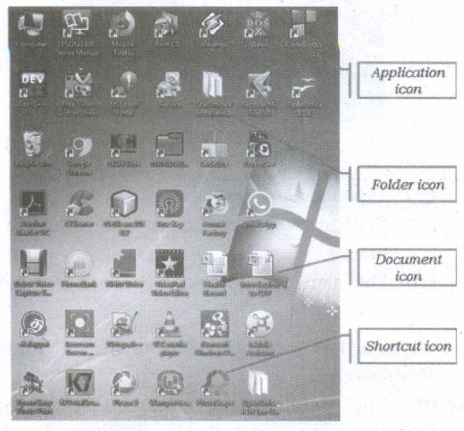
110.
| Action | Reaction |
| Point to an item | Move the mouse to place the pointer on the item. |
| Click an item | Point to the item on your screen and quickly press and release the left mouse button. |
| Right-click an item | Point to the item on your screen and then quickly press and release the right mouse button. Clicking the right mouse button displays a short cut menu from which you can choose among a list of commands that apply to that item. |
| Double-click an item | Point to the item on your screen and then quickly press and release the left mouse button twice. |
| Drag an item | Point to an item and then hold down the left mouse button as you move the pointer |
| Drag and drop | Point to an item and then hold down the left mouse button as you move the pointer and when you have reached the desired position, release the mouse button. |
111.
The important functions of an operating System.
(i) Memory Management
(ii) Processor Management
(iii) Device Management
(iv) File Management
(v) Security
(vi) Control over system performance
(vii) Job accounting
(viii) Error detecting aids
(ix) Coordination between other software and users
112.
The outline of recursive problem-solving technique.
solver (input)
if the input is small enough
construct solution
else
find subproblems of reduced input solutions to subproblems = solver for each subproblem construct a solution to the problem from solutions to the subproblems
Whenever we solve a problem using recursion, we have to ensure these two cases: In the recursion step, the size of the input to the recursive call is strictly smaller than the size of the given input, and there is loop at least one base case.
113.
To solve a problem recursively, the solver reduces the problem to sub-problems, and calls another instance of the solver, known as sub-solver, to solve the sub-problem. The input size to a sub-problem is smaller than the input size to the original problem. When the solver calls a sub-solver, it is known as recursive call. The magic of recursion allows the solver to assume that the sub-solver (recursive call) outputs the solution to the sub-problem. Then, from the solution to the sub-problem, the solver constructs the solution to the given problem.
As the sub-solvers go on reducing the problem into sub-problems of smaller sizes, eventually the subproblem becomes small enough to be solved directly, without recursion. Therefore, a recursive. solver has two cases:
1. Base case: The problem size is small enough to be solved directly. Output the solution. There must be at least one base case.
2. Recursion step: The problem size is not small enough. Deconstruct the problem into a subproblem, strictly smaller in size than the given problem. Call a. sub-solver to solve the subproblem.
solver (input)
if input is small enough
construct solution
else
find sub_problems of reduced
input
solutions to sub_problems = solver for each sub_problem
construct a solution to the problem from
solutions to the sub_problems
Whenever we solve a problem using recursion, we have to ensure these two cases: In the recursion step, the size of the input to the recursive call is strictly smaller than the size of the given input, and there is at least one base case.
114.
(i) Android is a mobile operating system developed by Google, based on the Linux and designed primarily for touchscreen mobile devices such as smartphones and tablets.
(ii) Google has further developed Android TV for televisions, Android Auto for cars and Android Wear for wrist watches, each with a specialized user interface.
(iii) Variants of Android are also used on game consoles, digital cameras, PCs and other electronic gadgets.
UNIX :
UNIX is a family of multitasking, multi-user operating systems that derive originally from AT&T Bell Labs, where the development began in the 1970s by Ken Thompson and Dennis Ritchie.
Linux
(i) Linux is a family of open-source operating systems. It can be modified and distributed by anyone around the world.
(ii) This is different from proprietary software like Windows, which can only be modified by the company that owns it.
(iii) The main advantage of the Linux operating system is that it is open source. There are many versions and their updates
(iv) Most of the servers run on Linux because it is easy to customize.
115.
Microsoft Windows is a family of proprietary operating systems designed by Microsoft Corporation and primarily targeted to Intel architecture based computers. Windows comes as pre-loaded on most of the new personal Computers and laptops.
Microsoft Windows Home Screen
iOS - iPhone OS
iOS (formerly iPhone OS) is a mobile operating system created and developed by Apple Inc. exclusively for its hardware. It is the operating system that presently powers many of the company's mobile devices, including the iPhone, iPad and iPod Touch. It is the second most popular mobile operating system globally after Android.
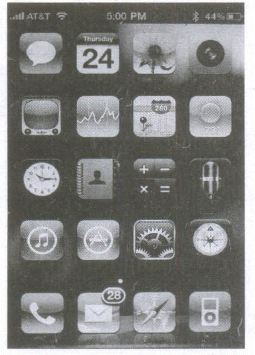
iPhone Home Screen.
116.
(i) The Sixth Generation, computers could be defined as the era of intelligent computers, based on Artificial Neural Networks. This generation gave a start to parallel computing.
(ii) One of the most dramatic changes in the sixth generation will be the explosive growth of wide is a component of artificial intelligence
(iii) Robotics is a branch of engineering that involves the conception, design, manufacture, and operation of robots.
(iv) This field overlaps with electronics, computer science, artificial intelligence, mechatronics, nanotechnology and bioengineering.
(v) Artificial neural networks (ANNs) are computing systems inspired by the biological neural networks that constitute animal brains.
(vi) Such systems learn (progressively improve performance on) tasks by considering examples, generally without task-specific programming.
(vii) An ANN is based on a collection of connected units or nodes called Artificial Neurons (analogous to biological neurons in an animal brain).
(viii) Each connection (synapse) between neurons can transmit a signal from one to another. The receiving neuron can process the signal(s) and then signal neurons connected to it.
(ix) Parallel computing is a type of computation in which many calculations or the execution of processes are carried out simultaneously.
(x) Large problems can often be divided into smaller ones, which can then be solved at the same time. There are several different forms of parallel computing: bit-level, instruction-level, data, and task parallelism.
(xi) Parallelism has been employed for many years, mainly in high-performance computing, but interest in it has grown lately due to the physical constraints preventing frequency scaling.
(xii) As power consumption by computers has become a concern in recent years, parallel computing has become the dominant paradigm in computer architecture, mainly in the form of multi-core processors.
117.
Registers:
(i) Registers are the high-speed temporary storage locations in the CPU. Hence, their contents can be handled much faster than the' contents of memory.
(ii) Although the number of registers varies from computer to computer, there are some registers which are common to all computers. Five registers that are essential for instruction execution are:
(iii) Program Counter (PC): Contains the address of the next instruction to be fetched.
(iv) Instruction Register (IR): Contains the instruction most recently fetched.
(v) Memory Address Registers (MAR): Contain the address of a location in memory for read and write operations.
(vi) Memory Buffer Register (MBR): It contains the value to be stored in memory or the last value read from memory.
(vii) Accumulator (ACC): An accumulator is a general purpose register used for storing temporary result produced by the arithmetic logic unit.
118.
Booting of computer:
(i) An Operating system (OS) is a basic software that makes the computer to work. When a computer is switched on, there is no information in its RAM.
(ii) At the same time, in ROM, the pre-written program called POST (Power on Self Test) will be executed first. This program checks if the devices like RAM, keyboard, etc., are connected properly and ready to operate. If these devices are ready, then the BIOS (Basic Input Output System) gets executed. This process is called Booting.
(iii) Thereafter, a program called "Bootstrap Loader" transfers OS from hard disk into main memory. Now the OS gets loaded (Windows/Linux, etc.,) and will get executed. Booting process is of two types.
1) Cold Booting
2) Warm Booting
(iv) Cold Booting:
When the system starts from the initial state i.e. it is switched on, we call it cold booting or Hard Booting. When the user presses the power button, the instructions are read from the ROM to initiate the booting process.
(v) Warm Booting:
When the system restarts or when Reset button is pressed, we call it Warm Booting or Soft Booting. The system does not start from the initial state and so all diagnostic tests need not be carried out in this case. There are chances of data loss and system damage as the data might not have been stored properly.
119.
Impact Printers:
(i) These printers print with striking of hammers or pins on ribbon. These printers can print on multi-part (using carbon papers) by using mechanical pressure.
(ii) For example, Dot Matrix printers and Line matrix printers are impact printers.
(iii) A Dot matrix printer that prints using a fixed number of pins or wires. Each dot is produced by a tiny metal rod, also called a "wire" or "pin", which works by the power of a tiny electromagnet or solenoid, either directly or through a set of small levers.
(iv) It generally prints one line of text at a time. The printing speed of these printers varies from 30 to 1550 CPS (Character Per Second).
(v) A Dot matrix printer that prints using a fixed number of pins or wires. Each dot is produced by a tiny metal rod, also called a "wire" or "pin", which works by the power of a tiny electromagnet or solenoid, either directly or through a set of small levers.
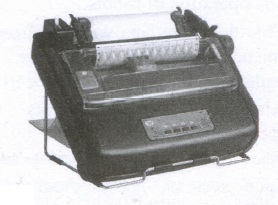
(vi) It generally prints one line of text at a time. The printing speed of these printers varies from 30 to 1550 CPS (Character Per Second).
120.
| S.No | Type of Mouse | Mechanism | Developed and Introduced |
| 1 | 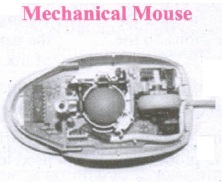 |
1. A small ball is kept inside and touches the pad through a hole at the bottom of the mouse. |
Telefunken, German Company, 0211011968 |
| 2 | 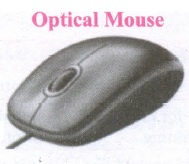 |
1. Measures the motion and acceleration of pointer. |
In 1988, Richard Lyon, Steve Krish independently invented different versions of Optical Mouse. |
| 3 | 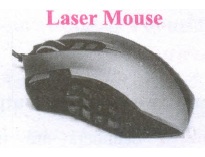 |
1. Measures the motion and acceleration of pointer. |
121.
(a) FIFO (First In First Out)Scheduling :
(i) This algorithm is based on queuing technique. Assume that a student is standing in a queue (Row) to get grade sheet from his/her teacher.
(ii) The other student who stands first in the queue gets his/her grade sheet first and leaves from the queue (Row). Followed by the next student in the queue gets it corrected and so on. This is the basic logic of the FIFO algorithm.
(iii) Technically, the process that enters the queue first is executed first by the CPU, followed by the next and so on. The processes are executed in the order of the queue (row).
(b) SJF (Shortest Job First)Scheduling:
(i) This algorithm works based on the size of the job being executed by the CPU.
(ii) Consider two jobs A and B.
(iii) 1) A = 6 kilo bytes 2) B = 9 kilo bytes.
(iv) First the job "A" will be assigned and then job "B" gets its turn.
(c) Round Robin Scheduling :
(i) The Round Robin (RR) Scheduling algorithm is designed especially for time sharing systems.
(ii) Jobs (processes) are assigned and processor time in a circular method.
(iii) For example take three jobs A, B, C. First the job A is assigned to CPU then job B and job C and then again A, Band C and so on.
122.
Memory Management:
(i) Memory Management is the process of controlling and coordinating computer's main memory and assigning memory block (space) to various running programs to optimize overall computer performance.
(ii) The Memory management involves the allocation of specific memory blocks to individual programs based on user demands. At the application level, memory management ensures the availability of adequate memory for each running program at all times.
(iii) The objective of Memory Management process is to improve both the utilization of the CPU and the speed of the computer's response to its users via main memory. For these reasons, the computers must keep several programs in main memory that associates with many different Memory Management schemes.
(iv) The Operating System is responsible for the following activities in connection with memory management.
(v) Keeping track of which portion of memory are currently being used and who is using them.
(vi) Determining which processes (or parts of processes) and data to move in and out of memory.
(vii) Allocation and de-allocation of memory blocks as needed by the program in main memory. (Garbage Collection).
123.
(i) Scanner:
Scanners are used to enter the information directly into the computer's memory. This device works like a Xerox machine. The scanner converts any type of printed or written information including photographs into a digital format, which can be manipulated by the computer.
(ii) Fingerprint Scanners:
Fingerprint Scanner is a fingerprint recognition device used for computer security, equipped with the fingerprint recognition feature that uses biometric technology. Fingerprint Reader / Scanner is a very safe and convenient device for security instead of using passwords, which is vulnerable to fraud and is hard to remember.
(iii) Monitor:
Monitor is the most commonly used output device to display the information. It looks like a TV. Pictures on a monitor are formed with picture elements called PIXELS. Monitors may either be Monochrome which display text or images in Black and White or can be color, which display results in multiple colors. There are many types of monitors available such as CRT (Cathode Ray Tube), LCD (Liquid Crystal Display) and LED (Light Emitting Diodes). The monitor works with the VGA (Video Graphics Array) card. The video graphics card helps the keyboard to communicate with the screen. It acts as an interface between the computer and display monitor. Usually the recent motherboards incorporate built-in video card.
(iv) Plotter:
Plotter is an output device that is used to produce graphical output on papers. It uses single colour or multi colour pens to draw pictures.
124.
There are a few basic principles and techniques for designing algorithms.
(i) Specification:
The first step in problem solving is to state the problem precisely. A problem is specified in terms of the input given and the output desired. The specification must also state the properties of the given input, and the relation between the input and the output.
(ii) Abstraction:
A problem can involve a lot of details. Several of these details are unnecessary for solving the problem. Only a few details are essential. Ignoring or hiding unnecessary detail and modeling an entity only by its essential properties is known as abstraction.
(iii) Composition:
An algorithm is composed of assignment and control flow statements. A control flow statement tests a condition of the state and, depending on the value of the condition, decides the next statement to be executed.
(iv) Decomposition:
We divide the main algorithm into functions. We construct each function independently of the main algorithm and other functions. Finally, construct the main algorithm using the functions. When we use the functions. it is enough to know the specification of the function. It is not necessary to know how the function is implemented.
125.
There are three important control flow .statements to alter the control flow depending on the state.
(i) In sequential control flow, a sequence of statements are executed one after another in the same order as they are written.
(ii) In alternative control flow, a condition of the state is tested, and if the condition is true, one statement is executed; if the condition is false an alternative statement is executed.
(iii) In iterative control flow, a condition of the state is tested, and if the condition is true, a statement is executed. The two steps of testing the condition and executing the statement are repeated until the condition becomes false.
126.
To construct algorithms using basic building blocks such as. Data, Variables, Control flow, Functions.
Data:
Algorithms take input data, process the data, and produce output data. Computers provide instructions to perform operations on data. For example, there are instructions for doing arithmetic operations on numbers, such as add, subtract, multiply and divide. There are different kinds of data such as numbers and text.
Variables:
Variables are named boxes for storing data. When we do operations on data, we need to store the results in variables. The data stored in a variable is also known as the value of the variable. We can store a value in a variable or change the value of variable, using an assignment statement.
Control flow :
An algorithm is a sequence of statements. However, after executing a statement, the next statement executed need not be the next statement in the algorithm. The statement to be executed next may depend on the state of the process. Thus, the order in which the statements are executed may differ from the order in which they are written in the algorithm. This order of execution of statements is known as the control flow.
Functions:
Algorithms can become very complex. The variables of an algorithm and dependencies among the variables may be too many. Then; it is difficult to build algorithms correctly. In such situations, we break an algorithm into parts, construct each part separately, and then integrate the parts to the complete algorithm. The parts of an algorithm are known as functions. A function is like a sub-algorithm. It takes an input, and produces an output, satisfying a desired input-output relation.
127.
A Software is a set of instructions that perform a specific task. It interacts basically with the hardware to generate the desired output.
Types of Software
Software is classified into two types:
1. Application Software
2. System Software
Application Software:
Application software is a set of programs to perform specific tasks. For example, MS-word is an application software to create a text document and VLC player is a familiar application software to play audio, video files, and many more.
System Software:
System software is a type of computer program that is designed to run the computer's hardware and application programs. For example Operating System and Language Processor.
128.
iOS (formerly iPhone OS) is a mobile Operating System created and developed by Apple Inc., exclusively for its hardware. It is the Operating System that presently powers many of the company's mobile devices, including the iPhone, iPad and iPod Touch. It is the second most popular mobile Operating System globally after Android.
129.
The functions of Windows operating system which allows you to do are:
(i) Access applications (programs) on computer (word processing, games, spread sheets, calculators and so on).
(ii) Load any new programs on to the computer.
(iii) Manage hardware such as printers, scanners, mouse, digital cameras etc.
(iv) Manage how files are stored on your computer.
(v) Change computer settings such as colour schemes, screen savers and the resolution of monitor.
130.
4728
= \(\overset { 4 }{ \underset { 100 }{ \downarrow } } \)\(\overset { 7 }{ \underset { 111 }{ \downarrow } } \)\(\overset { 2 }{ \underset { 010 }{ \downarrow } } \)
4728= 100110102

11th Standard Syllabus & Materials
11th Standard
TN 11th Tamil பீடு பெற நில் - செய்யுள் - காவடிச்சிந்து Important Questions And Answers Study Material - QB365 Set A
NEW11th Standard
TN 11th Tamil பீடு பெற நில் - உரைநடை - மலை இடப்பெயர்கள் : ஓர் ஆய்வு Important Questions And Answers Study Material - QB365 Set A
NEW11th Standard
TN 11th Tamil மாமழை போற்றுதும் - துணைப்பாடம் - யானை டாக்டர் Important Questions And Answers Study Material - QB365 Set A
NEW11th Standard
TN 11th Tamil மாமழை போற்றுதும் - செய்யுள் - ஐங்குறுநூறு Important Questions And Answers Study Material - QB365 Set A



Tamilnadu Stateboard 11th Standard Subjects

Maths

Commerce

Economics

Biology

Business Maths and Statistics

Accountancy
Computer Science

Physics

Chemistry
Maths
Biology
Economics
Physics
Chemistry

History
Business Maths and Statistics

Computer Science
Accountancy

Computer Applications
History
Computer Technology
Commerce
Computer Applications
Computer Technology

Tamil

English

French
Tamilnadu Stateboard Standards
