
 100% FREE ACCESS
11th Standard Syllabus & Materials
11th Standard
TN 11th Tamil இயற்கை வேளாண்மை,சுற்றுச்சூழல் -செய்யுள் - மனோன்மணீயம் Important Questions And Answers Study Material - QB365 Set A
NEW11th Standard
TN 11th Tamil என்னுயிர் என்பேன் -துணைப்பாடம் - இசைத்தமிழர் இருவர் Important Questions And Answers Study Material - QB365 Set A
NEW11th Standard
TN 11th Tamil மொழி கலை -செய்யுள் - ஒவ்வொரு புல்லையும் Important Questions And Answers Study Material - QB365 Set A
NEW11th Standard
TN 11th Tamil பீடு பெற நில் - இலக்கணம் - பகுபத உறுப்புகள் Important Questions And Answers Study Material - QB365 Set A
NEW11th Standard
TN 11th Tamil பீடு பெற நில் - துணைப்பாடம் - வாடிவாசல் Important Questions And Answers Study Material - QB365 Set A
NEW11th Standard
TN 11th Tamil பீடு பெற நில் - செய்யுள் - குறுந்தொகை Important Questions And Answers Study Material - QB365 Set A

Published on: 01/10/2019
Data Tools and Printing
Download Tamil Nadu 11th Standard Computer Technology question papers, model tests, one-mark questions, important questions, and public exam papers in PDF format. Free study materials and answer keys for TN State Board students.
Questions + Answers key
Take MCQ Computer Technology Test
1.
Write the steps to format the margin of the paper as 1” in all sides.
2.
What is header and footer?
3.
4.
Write the steps to print the title row on every page of the spread-sheet.
5.
Write the steps for sorting the database based on the customer name in ascending order.
6.
Explain the applications of Header and Footer with example.
7.
Create a student database with register number, student name, Mark1, Mark2, and Mark3. Calculate the total and average of the students. Show the marks which are below 50 in red colour and marks above 50 is shown in green colour.
8.
The size of an A4 paper is 21 cm x 29 cm. If the user chooses Landscape orientation, then the size of the paper is…..?
21 x 29
29 x 21
None of the above
All of the above
9.
In a form, the teacher needs “True or False” as a drop down menu. Which of the following tool is used?
Form
Data
List
Format
10.
There are 10000 rows in a worksheet. The user need to view only particular row of the database. Which of the following tool is used?
Sorting
Merging
Filtering
Formatting
1.
A margin is the space between the text and the edge of your document.
To format the margin of the paper as 1" in all sides, one need to follow the given steps:
1. Go to Format $\rightarrow$ Page in the menu bar.
2. Choose Page Tab.
3.Choose Page margin from the dialog box where Left, Right, Top and Bottom margin is to be set as 1".
4. Click OK.
Page margin is available in the Page tab of the Format tab of Menu bar.
2.
(i) Header and Footer are some titles (such as Document Title, Author Name) or references (such as page no, number of pages, date) or remarks to be printed in the top (called as Header) and bottom of the page (called as Footer).
(ii) Headers and Footers are useful for including material that you want to appear on every page of the document.
3.
4.
If a sheet is printed on multiple pages, you can set up certain rows or columns to repeat on each printed page.
Steps to print the title row on every page of the spread-sheet:
(i) On the Page Layout tab, in the Page Setup group, click Page Setup.
(ii) Under Print Titles, click in Rows to repeat at top or Columns to repeat at left and select the column or row that contains the titles you want to repeat.
(iii) Click OK.
(iv) Choose Format → Print Ranges → Edit.
(v) On the Edit Print Ranges dialog box, type the rows in the text entry box under Rows to repeat.
5.
Given database is to be sorted on the basis of customer name in ascending order.
Step 1: Place the cell pointer in the field (customer name) to be sorted.
Step 2: Click Sort Ascending icon.
Database can be sorted in either way ascending or descending order depending upon the requirement
6.
Header is the top margin of the page and Footer is the bottom margin of the page.
Application of Header and Footer:
(i) Header and Footer are some titles (such as Document Title, Author Name) or references (such as page no, number of pages, date) or remarks to be printed in the top (called as Header) and bottom of the page (called as Footer).
(ii) If we wish to get some information on every page, either on top or bottom of the page, we need to use header or footer as per the requirement.
7.
Data base here will be a table with column name as register number, student name, Mark1, Mark2, and Mark3.
Below is the database as per the requirement given in the question:
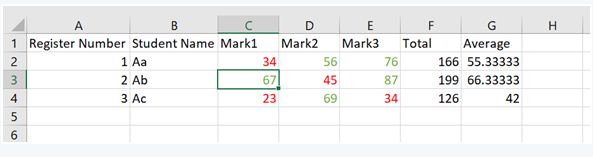
For total, Formula used is =Sum (C2:E2) and then drag the cursor for below rows.
For average, Formula used is =F2/3 and then drag the cursor for below rows.
8.
(b)
29 x 21
9.
(c)
List
10.
(c)
Filtering

11th Standard Syllabus & Materials
11th Standard
TN 11th Tamil பீடு பெற நில் - செய்யுள் - காவடிச்சிந்து Important Questions And Answers Study Material - QB365 Set A
NEW11th Standard
TN 11th Tamil பீடு பெற நில் - உரைநடை - மலை இடப்பெயர்கள் : ஓர் ஆய்வு Important Questions And Answers Study Material - QB365 Set A
NEW11th Standard
TN 11th Tamil மாமழை போற்றுதும் - துணைப்பாடம் - யானை டாக்டர் Important Questions And Answers Study Material - QB365 Set A
NEW11th Standard
TN 11th Tamil மாமழை போற்றுதும் - செய்யுள் - ஐங்குறுநூறு Important Questions And Answers Study Material - QB365 Set A



Tamilnadu Stateboard 11th Standard Subjects

Maths

Commerce

Economics

Biology

Business Maths and Statistics

Accountancy

Computer Science

Physics

Chemistry
Maths
Biology
Economics
Physics
Chemistry

History
Business Maths and Statistics

Computer Science
Accountancy
Computer Applications
History
Computer Technology
Commerce
Computer Applications
Computer Technology

Tamil

English

French
Tamilnadu Stateboard Standards
