
 100% FREE ACCESS
11th Standard Syllabus & Materials
11th Standard
TN 11th Tamil இயற்கை வேளாண்மை,சுற்றுச்சூழல் -செய்யுள் - மனோன்மணீயம் Important Questions And Answers Study Material - QB365 Set A
NEW11th Standard
TN 11th Tamil என்னுயிர் என்பேன் -துணைப்பாடம் - இசைத்தமிழர் இருவர் Important Questions And Answers Study Material - QB365 Set A
NEW11th Standard
TN 11th Tamil மொழி கலை -செய்யுள் - ஒவ்வொரு புல்லையும் Important Questions And Answers Study Material - QB365 Set A
NEW11th Standard
TN 11th Tamil பீடு பெற நில் - இலக்கணம் - பகுபத உறுப்புகள் Important Questions And Answers Study Material - QB365 Set A
NEW11th Standard
TN 11th Tamil பீடு பெற நில் - துணைப்பாடம் - வாடிவாசல் Important Questions And Answers Study Material - QB365 Set A
NEW11th Standard
TN 11th Tamil பீடு பெற நில் - செய்யுள் - குறுந்தொகை Important Questions And Answers Study Material - QB365 Set A

Published on: 13/03/2020
11th Standard Computer Technology English Medium All Chapter Book Back and Creative Two Marks Questions 2020
Download Tamil Nadu 11th Standard Computer Technology question papers, model tests, one-mark questions, important questions, and public exam papers in PDF format. Free study materials and answer keys for TN State Board students.
Questions + Answers key
Take MCQ Computer Technology Test
1.
Which does not require data source facilities?
2.
Name the facilities used to sent a list of documents to different recipients
3.
What does = < B2 : B10 > denotes?
4.
Differentiate the key tab and shift + tab?
5.
Name the default toolbars available in openoffice writer document
6.
Writer the contents of openoffice writer window.
7.
What is TSCII?
8.
Write a short note about Tamil Programming Language.
9.
What is a Static web Page?
10.
What is a browser?
11.
Differentiate 3G and 4G communication.
12.
Define Computer network.
13.
Define slide master.
14.
Define Extended Tips option?
15.
Define a template in Impress.
16.
What is the difference between a slide and a slide show?
17.
Write the steps to format the margin of the paper as 1” in all sides.
18.
19.
What is Chart?
20.
What are the types of Cell addressing?
21.
Differentiate between Copy -Paste and Cut-Paste.
22.
Write the general syntax of constructing a formula in Calc.
23.
What is Ambiance in Ubuntu OS?
24.
Name the Linux free server distributions.
25.
How will you log off from Ubuntu OS?
26.
What is the advantage of open source?
27.
What is a mobile OS?
28.
What is the major drawback of priority scheduling?
29.
What are the security management features available in Operating System?
30.
What is the multi-user Operating system?
31.
Differentiate RAM and ROM.
32.
Which Microprocessor supports the minimal instruction set?
33.
What is HDMI?
34.
What is a program counter?
35.
What is Tamil glyphs?
36.
Write a short note on NAND Gate.
37.
Convert (46)10 into Binary number.
38.
What is data?
39.
What does reboot mean?
40.
Name the types of computer introduced in Fourth generation computers.
41.
Differentiate Input and output unit
42.
What are the components of a CPU?
43.
How will you replace a misspelled word with a correct word?
44.
What is Address book?
45.
How do you split and merge cells in a table?
46.
How do you insert pictures in to your document?
47.
What are the different packages in Open Office writer?
48.
What is Text formatting?
1.
Labels, Envelops
2.
Mailng, Labels, Envelops.
3.
It denotes that It find summation of the selected range.
4.
Move from one cell to the next cell towards right by pressing the Tab key and press Shift + Tab to move towards left.
5.
There are two toolbars available by default. They are:
(1) Standard Toolbar
(2) Formatting Toolbar.
6.
The contents of OpenOffice Writer window such as Title bar, Menu bar, Standard Toolbar, Formatting Tool bar, Ruler, Work space and Status bar.
7.
1. TSCII (Tamil Script Code for Information Interchange) is the first coding system to handle our Tamil language.
2. This encoding scheme was registered in IANA (Internet Assigned Numbers Authority) a unit of ICANN.
3. This is one of the encoding schemes specially designed for Indian languages including Tamil. It was unified with Unicode.
4. Unicode is an encoding system, designed to handle various world languages, including Tamil. Its first version 1.0.0 was introduced in October 1991. Unicode is the best suitable to handle Tamil.
5. Computers use ASCll encoding system to handle data and information. because computers handle data and information as binary system. But ASCII encoding system is applicable only for handling English language. So TSCII (Tamil Script Code for Information Interchange) came in demand.
8.
1. Programming languages to develop software in computers and smart phones are available only in English.
2. Based on Python programming language, the first Tamil programming language "Ezhil" (எழில்) is designed.
3. Ezhil allows easy representation of computer program closer to the Tamil language Iogical constructs equivalent to the conditional, branch and loop statements in modern English based programming languages.
4. Ezhil converts the program code into Python AST objects and executes them as Python objects with full access to the Python programming language environment.
5. Ezhil is a promising candidate for a general purpose interpreted programming language in Tamil. Ezhil is currently a work in progress with several new and consistent features. We have reported the successful prototyping of Ezhil in Python
9.
(i) A static web page is a webpage that is delivered to the user’s web browser exactly as stored.
(ii) Static webpages are often HTML documents stored as files in the file system and made available by web server over HTTP.
10.
Looking for an information on the internet is called browsing or surfing. To browse the internet, a software called the web browser or browser is used.
11.
3G communication
1. It stands for 3rd generation technology.
2. Maximum upload rate of 3 G technology is 5 Mbps.
3. Maximum download rate of 3 G technology is 21 Mbps.
4. It uses packet switching technique.
5. The frequency range of 3 G technology is from 1.8 GHz to 2.5 GHz
4G communication
1. It stands for 4rd generation technology.
2. Maximum upload rate of 4 G technology is 500 Mbps.
3. Maximum download rate of 4 G technology is 1 Gbps.
4. It uses packet switching technique as well as message switching technique.
5. Its frequency range is from 4 G technology is from 2 GHz to 8 GHz.
12.
(i) Network is a broad term similar to "system". Network is a communication system which supports many users. In relation with the computer, we can say that a "computer network" is a system which allows communication among the computers connected in the network.
(ii) In a computer network, we need to make use of hardware and software. The hardware consists of connecting cables, connectors, network connecting devices and the software consists of protocols, programs, etc. This enables the systematic exchange of information between the computers connected in the network.
13.
(i) Slide Master is a slideshow slide template that determines the style, textures, theme, fonts, and background to be used on the slides. Slide Master can be used to adjust the presentation of all display slides at the same time.
(ii) A screen leader is the highest slide in a slider ladder that stores details about a presentation's theme and slide designs, including the setting, texture, fonts, effects, placeholder sizes, and placement. Find the master slide with a mouse, then select Master Layout from the Slide Master tab.
14.
When you start a new job in Writer, the Help Agent appears. It appears in a narrow window in the document's bottom right corner. To view packed assistance with details specific to the mission, click the Help Agent. The Help Agent would close after several seconds if you do not select it. It would vanish if you neglect or near it three times for that same mission. Click Reset Help Agent to restore the Help Agent to its default state.
15.
Design template is a set containing graphic design and colour scheme of the presentation.
16.
| Slide | Slide show |
| (i) Slide is an editable format | (i) Slide show is a combination of a number of slides that run one after the other |
| (i) Slide is single page of a presentation | (ii) Slides how is a presentation of a series of slides |
17.
A margin is the space between the text and the edge of your document.
To format the margin of the paper as 1" in all sides, one need to follow the given steps:
1. Go to Format $\rightarrow$ Page in the menu bar.
2. Choose Page Tab.
3.Choose Page margin from the dialog box where Left, Right, Top and Bottom margin is to be set as 1".
4. Click OK.
Page margin is available in the Page tab of the Format tab of Menu bar.
18.
19.
Chart is a powerful way to convey information to the reader through a pictorial representation. This facility enhances the presentation of data in an effective manner.
20.
(i) Relative cell addressing
(ii) Absolute cell addressing
21.
| Copy -Paste | Cut-Paste |
| Select the cell or group of cells you want to copy, then using Select Edit → Copy or Click "Copy" icon from the standard tool bar or Press Ctrl + C |
Select the cell or group of cells you want to cut, them using Edit → Cut or Click "Cut" icon from the standard tool bar or Press Ctrl + X |
| Move the cell pointer to the cell in which you want to paste, Edit → paste or Press or Click "Paste" icon or Press Ctrl + V |
Move the cell pointer to the cell in which you want to paste, Edit → Paste or Click "Paste" icon or Press Ctrl + V |
22.
General Syntax of constructing a formula is : = cell reference 1 <operator> cell reference 2 <operator> ......................
23.
The default desktop background, or wallpaper, belonging to the default Ubuntu 16.04 theme known as Ambiance.
24.
Ubuntu and Cent OS.
25.
Choose an option logout through the session indicator on the far right side of the top paner.
26.
(i) The Open source software is free to use, distribute, and modify.
(ii) It has lower cost in most cases in only the fraction of the cost of their proprietary counter parts.
(iii) It is most secured as the code is accessable to everyone.
27.
A mobile OS controls a mobile device and its design supports wireless communication and different types of mobile applications.
28.
The major drawback of priority scheduling is that even a small job has to wait for a long time when a long duration job with higher priority is being executed.
29.
The Operating System provides three levels of securities to the user end. They are
(i) File access level
(ii) System level
(iii) Network level.
30.
Multi-user Operating Systems:
(i) It is used in computers and laptops that allow same data and applications to be accessed by multiple users at the same time.
(ii) The users can also communicate, with each other. Windows, Linux and UNIX are examples for multi-user Operating System.
31.
RAM is a volatile memory, which means that the information stored in it is not permanent. As soon as the power is turned off, whatever data that resided in a RAM is lost. It allows both read and write operations. ROM retains its contents even when the computer is turned off. So, ROM is called as a non-volatile memory.
32.
RISC (Reduced Instruction Set Computers)
33.
High-Definition Multimedia Interface is an audio/ video interface which transfers the uncompressed video and audio data from a video controller, to a compatible computer monitor, LCD projector, digital television etc.
34.
The Program Counter (PC) is a special register in the CPU which always keeps the address of the next instruction to be executed.
35.
Meaning in Tamil, Audio pronunciation, synonyms.
36.
The NAND is the combination of NOT and AND. The NAND is generated by inverting the output of an AND operator. The algebraic expression of the NAND function is : Y = A . B
37.
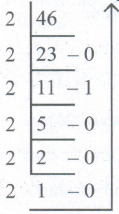
4610 - 1011102
38.
The term data comes from the word datum, which means a raw fact. The data is a fact about people. places or some objects
39.
It means to reload the operating system.
40.
(i) Microcomputer
(ii) Portal Computers
41.
| Input Unit | Output Unit |
| Input unit is used to feed any form of data to the computer which can be stored in the memory unit for further processing. | An output unit is any hardware component that conveys information to users in an understandable form. |
| Example: Keyboard, mouse etc. | Example: Moniter, Printer etc. |
42.
The CPU has three components which are Control Unit, Arithmetic and logic unit (ALU) and Memory unit.
43.
(i) Auto spell check icon
(ii) Using spell check dialog box
(iii) Using find and replace dialog box.
44.
An address book is a book or a database used for storing entries called, contacts. Each contact entry consist of fields like First name, Address, City, Pincode, Phone number etc.
45.
To merge a group of cells:
(i) Select the cells to merge.
(ii) Click Table ⟶ Merge Cells or click merge cells icon or Right Click ⟶ Cell ⟶ Merge,
(iii) The selected cells will be merged into a single cell.
To split a single cell:
(i) Place the insertion point inside the cell.
(ii) Click Table ⟶ Split Cells or click split cells icon or Right click ⟶ Cell ⟶ Split, the split cells dialog box appears 3. Select the number of cells to split using spin arrows or enter the value directly.
(iii) Select the direction of the split, horizontally (for rows), or vertically (for columns).
(iv) A single cell is split into the desired number of rows and columns.
46.
The picture gallery of the writer consists of a collection of images from which the desired image can be selected and inserted into the document.
47.
OpenOffice Writer - Word Processor to create text documents
(i) OpenOffice Calc - Spreadsheet to create worksheets.
(ii) OpenOffice Base - Database.
(iii) OpenOffice Impress - Presentation software.
(iv) OpenOffice Draw - Drawing Software.
(v) OpenOffice Formula - Create formula and equations.
48.
Changing the default appearance of the text like changing the font type, size, color, style etc., are called as Text formatting.

11th Standard Syllabus & Materials
11th Standard
TN 11th Tamil பீடு பெற நில் - செய்யுள் - காவடிச்சிந்து Important Questions And Answers Study Material - QB365 Set A
NEW11th Standard
TN 11th Tamil பீடு பெற நில் - உரைநடை - மலை இடப்பெயர்கள் : ஓர் ஆய்வு Important Questions And Answers Study Material - QB365 Set A
NEW11th Standard
TN 11th Tamil மாமழை போற்றுதும் - துணைப்பாடம் - யானை டாக்டர் Important Questions And Answers Study Material - QB365 Set A
NEW11th Standard
TN 11th Tamil மாமழை போற்றுதும் - செய்யுள் - ஐங்குறுநூறு Important Questions And Answers Study Material - QB365 Set A



Tamilnadu Stateboard 11th Standard Subjects

Maths

Commerce

Economics

Biology

Business Maths and Statistics

Accountancy

Computer Science

Physics

Chemistry
Maths
Biology
Economics
Physics
Chemistry

History
Business Maths and Statistics

Computer Science
Accountancy
Computer Applications
History
Computer Technology
Commerce
Computer Applications
Computer Technology

Tamil

English

French
Tamilnadu Stateboard Standards
