
 100% FREE ACCESS
11th Standard Syllabus & Materials
11th Standard
TN 11th Tamil இயற்கை வேளாண்மை,சுற்றுச்சூழல் -செய்யுள் - மனோன்மணீயம் Important Questions And Answers Study Material - QB365 Set A
NEW11th Standard
TN 11th Tamil என்னுயிர் என்பேன் -துணைப்பாடம் - இசைத்தமிழர் இருவர் Important Questions And Answers Study Material - QB365 Set A
NEW11th Standard
TN 11th Tamil மொழி கலை -செய்யுள் - ஒவ்வொரு புல்லையும் Important Questions And Answers Study Material - QB365 Set A
NEW11th Standard
TN 11th Tamil பீடு பெற நில் - இலக்கணம் - பகுபத உறுப்புகள் Important Questions And Answers Study Material - QB365 Set A
NEW11th Standard
TN 11th Tamil பீடு பெற நில் - துணைப்பாடம் - வாடிவாசல் Important Questions And Answers Study Material - QB365 Set A
NEW11th Standard
TN 11th Tamil பீடு பெற நில் - செய்யுள் - குறுந்தொகை Important Questions And Answers Study Material - QB365 Set A

Published on: 18/02/2019
11th First Revision Test 2019
Download Tamil Nadu 11th Standard Computer Technology question papers, model tests, one-mark questions, important questions, and public exam papers in PDF format. Free study materials and answer keys for TN State Board students.
Questions + Answers key
Take MCQ Computer Technology Test
1.
W3C was established in 1994 by
Tim Berners-Lee
Tim Burnard Lee
Kim Berners
Kim Bernard Lee
2.
Identify the data communication system within a building or campus.
LAN
WAN
MAN
None of the mentioned
3.
Which is not pre-packaged layout in presentation?
Main Content layout
Title, 6 Content layout
Blank Slide layout
Title, 2 content over content
4.
Which is the shortcut key to view the slideshow?
F6
F9
F5
F10
5.
In a form, the teacher needs “True or False” as a drop down menu. Which of the following tool is used?
Form
Data
List
Format
6.
To select multiple continuous sheet which key is used?
Ctrl
Shift
Alt
tab
7.
Which is the first electronic spreadsheet?
Excel
Lotus 1-2-3
Visicalc
Open Office Calc
8.
Multiple applications execute simultaneously in windows is know as.
Multiprocessing
Multitasking
Multiprogramming
None of these
9.
Which of the following Operating systems support Mobile Devices?
Windows 7
Linux
BOSS
iOS
10.
In CDs, the areas between pit's are called ....................
Memories
Address
Lands
Rays
11.
Which coding schemes used by Asian languages?
Unicode
Byte Code
BCD
none of these
12.
Which one of the following is the main memory?
ROM
RAM
Flash drive
Hard disk
13.
Which of the following option is not responsible for external address book creation wizard?
Mozilla/Netscape
LDAP Address Data
Outlook address book
windows system address book
14.
Which option helps to assign text, tables, graphics and other items to a key or key combination?
Autoformat
Automatic
Auto text
Autographics
15.
Changing the default appearance of the text is called?
Text formatting
Page formatting
special formatting
paragraph formatting
16.
List of the search engines supporting Tamil.
17.
Define Extended Tips option?
18.
19.
Can you edit the contents of a cell? If yes, explain any one of the method of editing the cell content.
20.
What is single user OS?
21.
Which source is used to erase the content of a EPROM?
22.
How the given messages are represented in computers?
23.
Differentiate Input and output unit
24.
How do you make corrections to your document?
25.
What is the difference between Static and dynamic web page.
26.
How many types of views are provided by Impress to its users?
27.
Write briefly about ASIN function in Open Office Calc.
28.
Analyse: Why the drives are segregated?
29.
Differentiate Primary Memory and secondary memory.
30.
Add the binary numbers 1101012 and 1011112
31.
Write the characteristics of sixth generation.
32.
Open a document and find the number of words available in the document.
33.
How do you insert rows and columns?
34.
Explain any five internet applications with suitable examples.
35.
Define wired technology. Explain the common types of bounded media in the data transmission.
36.
Explain how a presentation can help a sales person to promote his/her products.
37.
How to use function in Open Office Calc? Explain with suitable example.
38.
Complete the following matrix.
| Navigational method | Located on | Ideally suited for |
|---|---|---|
| Start button | Task bar | |
| Desktop | Exploring your disk drives and using system tools. | |
| Windows Explorer | Seeing hierarchy of all computer contents and resources in one window. | |
| Quick Launch |
39.
Explain the following in detail.
(a) FIFO (b) SJF (c) Round Robin
40.
Explain RAM in detail.
41.
Explain Non-Impact printers with an example.
42.
Explain Mail Merge feature.
43.
Write the steps to compute the sum for a set of data in a table by using formulae.
1.
(a)
Tim Berners-Lee
2.
(a)
LAN
3.
(d)
Title, 2 content over content
4.
(c)
F5
5.
(c)
List
6.
(b)
Shift
7.
(c)
Visicalc
8.
(b)
Multitasking
9.
(d)
iOS
10.
(c)
Lands
11.
(a)
Unicode
12.
(b)
RAM
13.
(a)
Mozilla/Netscape
14.
(a)
Autoformat
15.
(a)
Text formatting
16.
1. The big growth of the web has led to an information leading to a situation where it has become very difficult to find relevant information in the web. Search engines are used for this purpose and the Tamil Search engine described here searches Tamil web pages upon an user query.
2. There are many search engines, but only a few of them are frequently in use.
3. In the top ten search engines, Google, Bing and Yahoo take first three places respectively. Google and Bing provide searching facilities in Tamil.
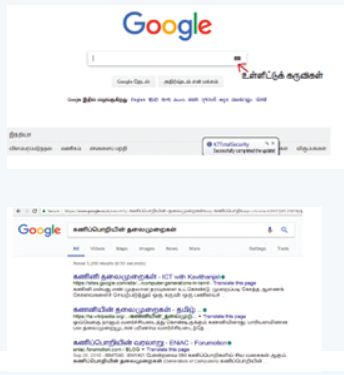
which means you can search everything through Tamil.
17.
When you start a new job in Writer, the Help Agent appears. It appears in a narrow window in the document's bottom right corner. To view packed assistance with details specific to the mission, click the Help Agent. The Help Agent would close after several seconds if you do not select it. It would vanish if you neglect or near it three times for that same mission. Click Reset Help Agent to restore the Help Agent to its default state.
18.
19.
(i) Yes, you can edit the contents of a cell.
(ii) Click the cell that contains the data that you want to edit, and then press F2. This starts Edit mode and Positions the cursor at the end of the cell contents.
20.
An operating system allows a single user to perform a task at a time. It is called as Single user and single Task operating system.
21.
Ultra-violet-rays is used to erase the content of a EPROM.
22.
The given messages are represented in computer as Information \(\rightarrow \) Data \(\rightarrow \)Knowledge.
23.
| Input Unit | Output Unit |
| Input unit is used to feed any form of data to the computer which can be stored in the memory unit for further processing. | An output unit is any hardware component that conveys information to users in an understandable form. |
| Example: Keyboard, mouse etc. | Example: Moniter, Printer etc. |
24.
Corrections can be made in two different ways :
(i) Backspace Key: Deletes the character left of the insertion pointer.
(ii) Delete Key: Deletes the character right of the insertion pointer.
25.
| Static webpage | Dynamic webpage |
| 1. In static webpages, pages will remain same until someone changes it manually. | 1. In dynamic webpages, content of pages are different for different visitors. |
| 2. Pages are simple. | 2. Dynamic webpages are complicated. |
| 3. In static webpage, information are change rarely. | 3. In dynamic webpages, information are change frequently. |
| 4. Database is not used in static webpages. | 4. Database is used in dynamic webpages. |
| 5. Static webpages are written in languages such as: HTML, JavaScript, CSS, etc. | 5. Dynamic webpages are written in languages such as: CGI, A JAX, ASP, ASP.NET, etc. |
| 6. Static webpages are easy to develop. | 6. Dynamic webpages development requires programming skills. |
26.
Normal view:
is the main view for creating individual slides. Use this view to format and design slides and to add text, graphics, and animation effects.
Outline view:
Shows topic titles, bulleted lists, and numbered lists for each slide in outline format. Use this view to rearrange the order of slides, edit titles and headings, rearrange the order of items in a list, and add new slides.
Notes view:
lets you add notes to each slide that are not seen when the presentation is shown.
Slide Sorter view:
Shows a thumbnail of each slide in order. Use this view to rearrange the order of slides, produce a timed slide show, or add transitions between selected slides.
Handout view:
Lets you print your slides for a handout. You can choose one, two, three, four, or six slides per page from Tasks pane → Layouts. Thumbnails can be re-arranged in this view by dragging and dropping them.
27.
ASIN (Number/Cell Address): This function returns the inverse trigonometric sine of Number that is the angle (in radians) whose sine is Number. The angle returned is in the range – PI/2 to +PI/2. To return the angle in degrees, use the DEGREES function.
Example : = ASIN (0) returns 0. = ASIN (1) returns 1.5707963267949 (PI/2 radians).
= DEGREES (ASIN (0.5)) returns 30. The sine of 30 degrees is 0.5.
28.
The drives are segregated because
(i) Save space and increase performance.
(ii) To include other Operating systems, isolate programs and keep files tidy.
(iii) It might help to isolate operating systems or programs from other user.
29.
| S.No | Primary memory | Secondary memory |
| 1. | It is the main memory of the computer system. | It is the auxiliary memory from where stored data can be retrieved. |
| 2. | Data and Instructions are temporary. | Data and Instructions are permanent |
| 3. | Example: RAM, ROM | Example: Hard disk, CD, DVD |
30.
1 1 0 1 0 1
+ 1 0 1 1 1 1
__________
11 0 0 1 0 0
__________
31.
(i) In the Sixth Generation, computers could be defined as the era of intelligent computers based on Artificial Neural Networks.
(ii) One of the most dramatic changes in the sixth generation will be the explosive growth of Wide Area Networking.
(iii) Natural Language Processing (NLP) is a component of Artificial Intelligence (AI).
(iv) It provides the ability to develop the computer program to understand human language.
32.
Open a document, then choose file ⟶ properties. A dialog box appears. Click statistics tab on the dialog box. The word count appears in the dialog box.
33.
To insert rows in a table there are different ways:
(i) The easiest way to add a row is to press Tab from the last cell.
(ii) To insert a single row anywhere, place the insertion point in that particular cell and click the Insert row icon  from the Table Formatting toolbar.
(iii) To insert more than one row, click Table ⟶ Insert ⟶ Rows, the Insert Rows dialog box appears enter the of value using spin arrows or type the number directly. In the position option, select Before or After radio button to specify the position of the row.
(iv) Click OK button
Inserting Columns:
To insert columns there are different ways
(i) Place the insertion point in the particular column and click the Insert column icon .JPG) to insert a blank column right of the insertion point.
to insert a blank column right of the insertion point.
(ii) To insert more than one column, place the insertion point in the particular column and click Table ⟶ Insert ⟶ Column, the insert column dialog box appears enter the value using spin arrows or type the number directly.
(iii) In the position option, select Before or After radio button to specify the position of the column.
(iv) Click OK button
34.
There are many applications of internet such as:
1. Communication: Computer users around the world extensively use the email service on internet to communicate with each other. Pictures, documents and other files are sent as email attachments. VolP stands for Voice over Internet Protocol, referring to the protocol that underlies all internet communication.
2. Job search:
Nowadays many people search for their jobs online as it is quicker and there is a larger variety of jobs vacancies present. People can publish resume online for prospective job. Popular examples are Naukri.com, Linkedln, etc
3. Video conferencing: It enables direct face to face communication across networks via web cameras, microphones and other communication tools. Video conferencing can enable individuals in distant locations to participate in meetings on short notice, with time and money saving. Video conferencing is very interactive in education to communicate between teacher to teacher, teacher to classroom and classroom to classroom with students at different places.
4. E-commerce: E-commerce or electronic commerce is the buying and selling of goods and services, or transmitting of funds or data, over an electronic network. These transactions occur either business-to-business, business to consumer, consumer to consumer or consumer to business. Flipkart, Snapdeal, Paytm, etc are example of e-commerce.
5 Travel: One can use internet to gather information about various tourist place. It can be used for booking Holiday tours. Some of the websites providing this service are goibibo.com, makemytrip.com, olacabs.com.
6. Nowadays internet is almost use in every fields. Due to increase in technology, use of internet has benefitted the users in many ways. Internet enables millions of computers from different organization and people to communicate and share resource globally.
35.
Wired Technology: Wired technology is more associated with wired communication. Wired technology refers to the transmission of data over a wired based communication technology.
Types of bounded media in the data transmission:
1. Twisted pair Cable:
(i) A twisted pair consists of two conductors (normally copper), each with its own plastic insulation, twisted together.
(ii) One of these wires is used to carry signals to the receiver, and the other is used only as ground reference. In addition to the signal sent by the sender on one of the wires, interference (noise) and crosstalk may affect both wires and create unwanted signals.
(iii) Twisted Pair is of two types:
(a) Unshielded Twisted Pair (UTP)
(b) Shielded Twisted Pair (STP)
2. Fibre Optical Cable:
(i) A fibre-optical cable is made of glass or plastic and transmits signals in the form of light.
(ii) In fibre optical cable, light moves only in one direction.
(iii) For two-way communication to take place a second communication must be made between the two devices.
(iv) Optical fibres use reflection to guide light through a channel. A glass or plastic core is surrounded by a cladding of less dense glass or plastic.
(v) The difference in density of the two materials must be such that a beam of light moving through the core is reflected off the cladding instead of being refracted into it.
3. Coaxial Cable:
(i) Coaxial is called by this name because it contains two conductors that are parallel to each other.
(ii) Copper is used in this as a central conductor. It is surrounded by PVCinstallation.
(iii) Outer metallic wrapping is used as a shield against noise and as a second conductor which completes the circuit.
(iv) The outer conductor is also encased inan insulating sheath.
(v) The outermost partis the plastic cover which protects the whole cable.
(vi) Anything and everything you see around yourself having wires and uses electricity to operate belongs to wired technology.
36.
1. Presentation is help a sales person to promote his / her products, explain the short presentation.
2. Presentation will give visual video, pictures to understand a better of products.
3. Presentation help sales person to present prospect challenges is easier.
4. By using presentation, sales person can make audience understand easier and he can get more feedback.
5. Sales person can explain with physical demonstration by shocking animations. It makes the audience to concentrate.
6. If we wish to get some information on every page, either on top or bottom of the page, we need to use header or footer as per the requirement.
37.
The most commonly used feature input method is built-in functions, the Function Wizard. To open the Function Wizard can be opened through. The menu choose Insert→ Function or using the shortcut key press Ctrl+F2.
(i) Once open, Select a category of functions to shorten the list, then scroll down through the named functions and select the required one.
(ii) When you select a function its description appears on the right-hand side of the dialog. Double-click on the required function.
(iii) The Wizard now displays a textbox where you can enter data manually in text boxes and the result will be displayed in the Result text box
ABS (Number/Cell Address): Number/ Cell Address is the value whose absolute value is to be calculated. The absolute value of a number is its value without +/- sign.
Example : =ABS (-76) returns 76, =ABS (74) returns 7, =ABS (0) returns 0.
38.
| S.No | Navigational method | Located on | Ideally suited for |
|---|---|---|---|
| 1. | Start button | Task bar | Quick acces common apps and settings |
| 2. | My computer | Desktop | Exploring your disk drives and using system tools. |
| 3. | Windows Explorer | Task bar | Seeing hierarchy of all computer contents and resources in one window. |
| 4. | Quick Launch | Task bar | To open the programs quickly |
39.
(a) FIFO (First In First Out) Scheduling:
(i) This algorithm is based on queuing technique. Assume that a student is standing in a queue (Row) to get grade sheet from his/her teacher.
(ii) The other student who stands first in the queue gets his/her grade sheet first and leaves from the queue (Row). Followed by the next student in the queue gets it corrected and so on. This is the basic logic of the FIFO algorithm.
(iii) Technically, the process that enters the queue first is executed first by the CPU, followed by the next and so on. The processes are executed in the order of the queue (row).
(b) SJF (Shortest Job First) Scheduling:
(i) This algorithm works based on the size of the job being executed by the CPU.
(ii) Consider two jobs A and B.
(iii) 1) A = 6 kilo bytes 2) B = 9 kilobytes.
(iv) First the job "A" will be assigned and then job "B" gets its turn.
(c) Round Robin Scheduling:
(i) The Round Robin (RR) scheduling algorithm is designed especially for time sharing systems.
(ii) Jobs (processes) are assigned and processor time in a circular method.
(iii) For example take three jobs A, B, C. First the job A is assigned to CPU then job B and job C and then again A, B and C and so on.
40.
(i) The main memory is otherwise called as Random Access Memory. This is available in computers in the form of Integrated Circuits (lCs). It is the place in a computer where the Operating System, Application Programs and the data in current use are kept temporarily so that they can be accessed by the computer's processor.
(ii) The smallest unit of information that can be stored in the memory is called as a bit. The memory can be accessed by a collection of 8 bits which is called as a byte.
(iii) The bytes are referred by 'B'. If a computer has 1 megabyte of memory, then it can store 10,48,576 bytes. (or characters) of information. [Hence 1MB is 1024KB and 1 KB is 1024 Bytes, So 1024X1024 =10,48,576 Bytes].
(iv) RAM is a volatile memory, which means that the information stored init is not permanent. As soon as the power is turned off, whatever data that resides in RAM is lost. It allows both read and write operations.
(v) There are two basic types of RAM Dynamic RAM (DRAM), Static RAM (SRAM).
(vi) These two types differ in the technology they use to hold data. Dynamic RAM being a common type needs to be refreshed frequently. Static RAM needs to be refreshed less often, which makes it faster.
(vii) Hence, Static RAM is more expensive than Dynamic RAM.
41.
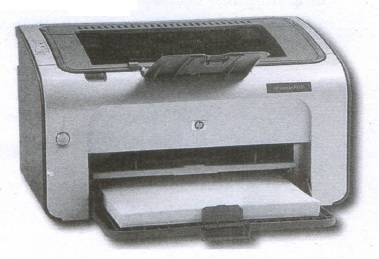
Non-Impact Printers:
(i) These printers do not use striking mechanism for printing. They use electrostatic or laser technology.
(ii) Quality and speed of these printers are better than Impact printers. For example, Laser printers and Inkjet printers are non-impact printers.
Laser Printers:
(i) Laser printers mostly work with similar technology used by photocopiers.
(ii) It makes a laser beam scan back and forth across a drum inside the printer, building up a pattern. It can produce very good quality of graphic images.
(iii) One of the chief characteristics of laser printer is their resolution - how many Dots per inch(DPI). The available resolution range around 1200 dpi. Approximately it can print 100 pages per minute(PPM).
Inkjet Printers:
(i) Inkjet Printers use colour cartridges which combined Magenta, Yellow and Cyan inks to create color tones.
(ii) A black cartridge is also used for monochrome output. Inkjet printers work by spraying ionised ink at a sheet of paper.
(iii) The speed of Inkjet printers generally ranges from 1-20 PPM (Page Per Minute).
(iv) They use the technology offering ink by heating it so that it explodes towards the paper in bubbles or by using piezoelectricity in which tiny electric currents controlled by electronic circuits are used inside the printer to spread ink in jet speed.
(v) An Inkjet printer can spread millions of dots of ink at the paper every single second.
42.
(i) Mail merge is a process to create personalized letters and pre-addressed enveloped or mailing labels forms mailings form a form letter
(ii) The feature is usually employed in a word processing document which contains fixed text and variables (which act as place holders that are replaced by text from the data source.)
(iii) It is used to create multiple documents at once. These documents have identical layout, formatting, text and graphics.
(iv) The documents can create will mail merge include bulk labels, letters, envelops and emails and more using information stored in a list, database or spreadsheet
43.
To perform calculations on the data in the table Create a Table with the following data:
| tem sold | Jan | Feb | Total |
| Books | 15 | 70 | |
| Pens | 30 | 50 | |
| Ruler | 25 | 25 | |
| Total Goods |
Click in the empty cell where you want a calculation.
(i) Choose Table ⟶ Formula or press F2 and spreadsheet-like toolbar with the formula entry field appears
(ii) If you want to add a range of cells then in the current cell type = <B2:B4>and press Enter key. The total will appear as given in the example below.
| tem sold | Jan | Feb | Total |
| Books | 15 | 70 | |
| Pens | 30 | 50 | |
| Ruler | 25 | 25 | |
| Total Goods | = < B2:B4 > |
The formula Toolbar can be used when the user want to perform other arithmetic calculations.
| tem sold | Jan | Feb | Total |
| Books | 15 | 70 | = < b2 > + < c2 > |
| Pens | 30 | 50 | |
| Ruler | 25 | 25 | |
| Total Goods | = < B2:B4 > |
(i) If you want to perform calculations using individual cells, individual cell reference should be placed within < > .
Note: In the table structure the columns are labelled as A, B, C and the rows are numbered as 1,2,3, etc. For Ex. The first cell is referred as A1, B1 etc.
(ii) In the above example, to find the sum, of the books purchased in January and February, the total is calculated using the formula = < b2 > + < c2 >.
(iii) A subtraction formula for instance is given as = < b2 > - < c2 >.
(iv) If you want something more complicated· than addition, subtraction, multiplication, and division, click on the formula dropdown list.

11th Standard Syllabus & Materials
11th Standard
TN 11th Tamil பீடு பெற நில் - செய்யுள் - காவடிச்சிந்து Important Questions And Answers Study Material - QB365 Set A
NEW11th Standard
TN 11th Tamil பீடு பெற நில் - உரைநடை - மலை இடப்பெயர்கள் : ஓர் ஆய்வு Important Questions And Answers Study Material - QB365 Set A
NEW11th Standard
TN 11th Tamil மாமழை போற்றுதும் - துணைப்பாடம் - யானை டாக்டர் Important Questions And Answers Study Material - QB365 Set A
NEW11th Standard
TN 11th Tamil மாமழை போற்றுதும் - செய்யுள் - ஐங்குறுநூறு Important Questions And Answers Study Material - QB365 Set A



Tamilnadu Stateboard 11th Standard Subjects

Maths

Commerce

Economics

Biology

Business Maths and Statistics

Accountancy

Computer Science

Physics

Chemistry
Maths
Biology
Economics
Physics
Chemistry

History
Business Maths and Statistics

Computer Science
Accountancy
Computer Applications
History
Computer Technology
Commerce
Computer Applications
Computer Technology

Tamil

English

French
Tamilnadu Stateboard Standards
