
 100% FREE ACCESS
11th Standard Syllabus & Materials
11th Standard
TN 11th Tamil இயற்கை வேளாண்மை,சுற்றுச்சூழல் -செய்யுள் - மனோன்மணீயம் Important Questions And Answers Study Material - QB365 Set A
NEW11th Standard
TN 11th Tamil என்னுயிர் என்பேன் -துணைப்பாடம் - இசைத்தமிழர் இருவர் Important Questions And Answers Study Material - QB365 Set A
NEW11th Standard
TN 11th Tamil மொழி கலை -செய்யுள் - ஒவ்வொரு புல்லையும் Important Questions And Answers Study Material - QB365 Set A
NEW11th Standard
TN 11th Tamil பீடு பெற நில் - இலக்கணம் - பகுபத உறுப்புகள் Important Questions And Answers Study Material - QB365 Set A
NEW11th Standard
TN 11th Tamil பீடு பெற நில் - துணைப்பாடம் - வாடிவாசல் Important Questions And Answers Study Material - QB365 Set A
NEW11th Standard
TN 11th Tamil பீடு பெற நில் - செய்யுள் - குறுந்தொகை Important Questions And Answers Study Material - QB365 Set A

Published on: 12/03/2019
+1 Public Exam March 2019 Important Creative Questions and Answers
Download Tamil Nadu 11th Standard Computer Technology question papers, model tests, one-mark questions, important questions, and public exam papers in PDF format. Free study materials and answer keys for TN State Board students.
Questions + Answers key
Take MCQ Computer Technology Test
1.
What can be accessed through openoffice mail merge?
2.
What is TSCII?
3.
List of the search engines supporting Tamil.
4.
What is Phishing?
5.
What is a Dynamic web page?
6.
What is a Static web Page?
7.
What is CC and BCC in an email?
8.
What are the components of url addressing?
9.
What is a network?
10.
Differentiate 3G and 4G communication.
11.
What is spamming?
12.
Define Computer network.
13.
Define slide master.
14.
Define Extended Tips option?
15.
Define a template in Impress.
16.
What is the difference between a slide and a slide show?
17.
What are the type of the filters?
18.
19.
What are the types of Cell addressing?
20.
How to select continuous and non-continuous sheets in OpenOffice Calc?
21.
Can you edit the contents of a cell? If yes, explain any one of the method of editing the cell content.
22.
Write the general syntax of constructing a formula in Calc.
23.
Write about the text operator in OpenOffice Calc.
24.
What are the types of toolbars available in OpenOffice calc?
25.
What is the difference between UNIX and LINUX?
26.
What is Ubuntu?
27.
What is root directory?
28.
What is Launcher?
29.
What is the advantage of open source?
30.
Differentiate Files and Folders
31.
What is the use of a file extension?
32.
What is workstation?
33.
Write a note on android.
34.
What is Storage Management?
35.
What do you mean by Time Sharing OS?
36.
Write a note on Multi user operating system.
37.
What is freeware?
38.
What is Open source Software?
39.
What is multi-processing?
40.
What are the security management features available in Operating System?
41.
What is the multi-user Operating system?
42.
What are the advantages of memory management in Operating System?
43.
Which component of Microprocessor is used to transfer data?
44.
Expand RISC and CISC
45.
What is memory access time?
46.
Define Decoder.
47.
What is Bus?
48.
What is instruction set?
49.
Name the communication channels between the microprocessor and other devices in the computer.
50.
What is HDMI?
51.
What is an instruction?
52.
Convert EB4A16 to decimal
53.
List the types of information stored in a computer
54.
What Is Boolean Algebra?
55.
List the encoding systems that represents characters in memory
56.
Write the 1's complement procedure.
57.
How BIOS works in a computer system?
58.
Name the different keys available in the keyboard.
59.
What is Non-Impact printers?
60.
What is NLP?
61.
Name the Second generation computers.
62.
Distinguish Primary and Secondary memory.
63.
What is the function of an ALU?
64.
What is a computer?
65.
What is Data source?
66.
What is Mail Merge?
67.
What is the use of WordArt in writer?
68.
Write the steps to insert special characters in a document?
69.
How do you make corrections to your document?
70.
State the difference between Proprietary software and open source software.
71.
What is Text formatting?
72.
Write a note on two access methods of connecting to internet.
73.
What is TCP/IP?
74.
Write short notes on the following: a) Hub b) Switch c) Gateway
75.
Differentiate Web page, Web browser and a Web Server.
76.
How to create first slide in presentation?
77.
How are transition effects helpful in creating an effective presentation in Impress?
78.
How many types of views are provided by Impress to its users?
79.
Write the steps for sorting the database based on the customer name in ascending order.
80.
What is range? Give example.
81.
Differentiate relative Cell addressing from absolute cell addressing
82.
Write about inserting columns and rows in Calc.
83.
Differentiate Thunderbird and Firefox in Ubuntu OS.
84.
Write the specific use of Cortana.
85.
What are the advantages and disadvantages of Time-sharing features?
86.
How will you differentiate a flash memory and an EEPROM?
87.
Write down the classifications of microprocessors based on the instruction set.
88.
Complete the Table
1) 0 - 0 = _
2) _ - 0 = 1
3) 1 -1 = _
4) 0 -1 = _
89.
What is MSB, LSB and Binary point? Give example.
90.
Reason out why the NAND an NOR are called universal gates?
91.
What is radix of a number system? Give example
92.
Differentiate Impact Printers and Non-Impact Printers.
93.
Write a note on Touch Screen.
94.
What is Robotics?
95.
Differentiate Optical and Laser mouse.
96.
What are the characteristics of a computer?
97.
List the advantages of the Mail Merge feature.
98.
How do you insert rows and columns?
99.
What are the different types of orientation?
100.
What is the difference between moving and copying text?
1.
Open Office Mail merge can access a wide variety of data sources, including spreadsheets, text files and databases such as MySQL, Adabas, and ODBC.
2.
1. TSCII (Tamil Script Code for Information Interchange) is the first coding system to handle our Tamil language.
2. This encoding scheme was registered in IANA (Internet Assigned Numbers Authority) a unit of ICANN.
3. This is one of the encoding schemes specially designed for Indian languages including Tamil. It was unified with Unicode.
4. Unicode is an encoding system, designed to handle various world languages, including Tamil. Its first version 1.0.0 was introduced in October 1991. Unicode is the best suitable to handle Tamil.
5. Computers use ASCll encoding system to handle data and information. because computers handle data and information as binary system. But ASCII encoding system is applicable only for handling English language. So TSCII (Tamil Script Code for Information Interchange) came in demand.
3.
1. The big growth of the web has led to an information leading to a situation where it has become very difficult to find relevant information in the web. Search engines are used for this purpose and the Tamil Search engine described here searches Tamil web pages upon an user query.
2. There are many search engines, but only a few of them are frequently in use.
3. In the top ten search engines, Google, Bing and Yahoo take first three places respectively. Google and Bing provide searching facilities in Tamil.
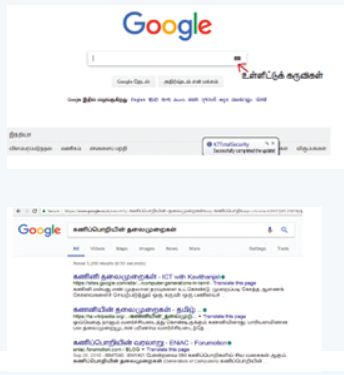
which means you can search everything through Tamil.
4.
(i) Phishing is a types of social engineering attack often used to steal user data, including login credentials and credit card numbers.
(ii) Phishing is one of the easiest forms of cyber-attack to deliver malware.
5.
(i) A dynamic webpage is a webpage that displays different content each time its viewed.
(ii) A dynamic web page contains information that changes, depending on the viewer, the time of the day, the time zone, the viewer's native language ang other factors.
6.
(i) A static web page is a webpage that is delivered to the user’s web browser exactly as stored.
(ii) Static webpages are often HTML documents stored as files in the file system and made available by web server over HTTP.
7.
(i) CC: CC means carbon copy. The CC field in an email allows the sender to send a "carbon copy" of the email to someone apart from the recipient in the 'To:' field of the email. The CC field in email lets you keep recipients in the loop.
(ii) BCC: BCC stands for Blind Carbon Copy. Just like how CC works in an email, BCC is used to send a carbon copy of the email to someone. When you CC an email to someone, the recipients in both the To field and the CC field are able to see the email addresses of each other.
8.
(i) URL is an abbreviation of Uniform Resource Locator. It is an address that shows where a particular page can be found on the World Wide Web.
(ii) The main purpose of URL is to identify the location of a document and other resources available on the internet and specify the mechanism for accessing it through a web browser.
9.
(i) A network is any interconnection of two or more station that wish to communicate Network is a broad term similar to a "system". Network is a communication system which supports many users.
(ii) In relation with the computer, we can say that a computer network is a system which allows communication among the computers connected in the network.
(iii) The interconnection of one station to many stations is called as networking.
10.
3G communication
1. It stands for 3rd generation technology.
2. Maximum upload rate of 3 G technology is 5 Mbps.
3. Maximum download rate of 3 G technology is 21 Mbps.
4. It uses packet switching technique.
5. The frequency range of 3 G technology is from 1.8 GHz to 2.5 GHz
4G communication
1. It stands for 4rd generation technology.
2. Maximum upload rate of 4 G technology is 500 Mbps.
3. Maximum download rate of 4 G technology is 1 Gbps.
4. It uses packet switching technique as well as message switching technique.
5. Its frequency range is from 4 G technology is from 2 GHz to 8 GHz.
11.
(i) Spam can be defined as irrelevant or unsolicited messages sent over the internet. These are usually sent to a large number of users for advertising, phishing, spreading malware, etc.
(ii) Spamming is the process of sending digital junk mail: unsolicited communication sent in bulk over the internet or through any electronic messaging system.
12.
(i) Network is a broad term similar to "system". Network is a communication system which supports many users. In relation with the computer, we can say that a "computer network" is a system which allows communication among the computers connected in the network.
(ii) In a computer network, we need to make use of hardware and software. The hardware consists of connecting cables, connectors, network connecting devices and the software consists of protocols, programs, etc. This enables the systematic exchange of information between the computers connected in the network.
13.
(i) Slide Master is a slideshow slide template that determines the style, textures, theme, fonts, and background to be used on the slides. Slide Master can be used to adjust the presentation of all display slides at the same time.
(ii) A screen leader is the highest slide in a slider ladder that stores details about a presentation's theme and slide designs, including the setting, texture, fonts, effects, placeholder sizes, and placement. Find the master slide with a mouse, then select Master Layout from the Slide Master tab.
14.
When you start a new job in Writer, the Help Agent appears. It appears in a narrow window in the document's bottom right corner. To view packed assistance with details specific to the mission, click the Help Agent. The Help Agent would close after several seconds if you do not select it. It would vanish if you neglect or near it three times for that same mission. Click Reset Help Agent to restore the Help Agent to its default state.
15.
Design template is a set containing graphic design and colour scheme of the presentation.
16.
| Slide | Slide show |
| (i) Slide is an editable format | (i) Slide show is a combination of a number of slides that run one after the other |
| (i) Slide is single page of a presentation | (ii) Slides how is a presentation of a series of slides |
17.
OpenOffice Calc allows three types of filters. They are:
1. AutoFilter
2. Standard Filter
3. Advanced Filter.
Filters are a feature for displaying and browsing a selected list or subset of data from a worksheet. The visible records satisfy the condition set by the user.
18.
19.
(i) Relative cell addressing
(ii) Absolute cell addressing
20.
Select continuous: The following steps should be followed to select multiple continuous sheets.
(i) Click on the sheet tab for the first desired sheet.
(ii) Hold down the Shift key and click on the last sheet tab.
non-continous sheets: If you want to select multiple non-continuous sheets the following steps will be followed.
(i) Click on any sheet,
(ii) Hold down the Ctrl key,
(iii) Click another sheet.
Ctrl + Click on any sheet is used to select multiple sheets. Selected sheets tab colour turns into “White”.
21.
(i) Yes, you can edit the contents of a cell.
(ii) Click the cell that contains the data that you want to edit, and then press F2. This starts Edit mode and Positions the cursor at the end of the cell contents.
22.
General Syntax of constructing a formula is : = cell reference 1 <operator> cell reference 2 <operator> ......................
23.
In Calc, "&" is a text operator which is used t combine two or more text. Joining two different texts is also known as "Text Concatenation". An expression using the text operator has the following syntax: text reference 1 & text reference 2.
24.
There are three toolbars available by default. They are :
(i) Standard Toolbar
(ii) Formatting Toolbar
(iii) Formula bar
25.
| S.No | Unix | Linux |
| 1. | Unix is a proprietary operation system. |
Linux is a open source operating system. |
| 2. | Unix OS primarily uses a command line Interface. |
Linux OS primarily uses GUI Interface. |
26.
(i) A quality that includes the essential human virtues, comparison and humanity is called ubuntu.
(ii) Ubuntu is an open source OS for computer.
(iii) It is a Linux distribution based on the debian architecture.
27.
The first level in a multilevel or hierarchical directory system is root directory, which is created automatically at the time of disk formatting.
28.
(i) The vertical bar of icons on the left side of the desktop is called the Launcher.
(ii) The Launcher provides easy access to applications, mounted devices, and toe Trash.
29.
(i) The Open source software is free to use, distribute, and modify.
(ii) It has lower cost in most cases in only the fraction of the cost of their proprietary counter parts.
(iii) It is most secured as the code is accessable to everyone.
30.
| Files | Folders |
| File is the collection of records. |
Folder is a collections of files. |
31.
File extension is used to know that in which the file is associated with.
32.
A workstation is a special computer designed for technical or scientific applications
33.
Android is a mobile operating system developed by Google, based on the Linux and designed primarily for touchscreen mobile devices such as smart phones and tablets.
34.
Storage Management creates various methods, tables and trees to store data efficiently, so the user won't have to mention addresses as to where to store data.
35.
It allows execution of more than one tasks or processes concurrently. For this, the processor time is divided amongst different tasks. This division of time is also called time sharing.
36.
(i) It is used in computers and laptops that allow same data and applications to be accessed by multiple users at the same time.
(ii) The users can also communicate with each other. Windows, Linux and UNIX are examples for multi user Operating System.
37.
It refers to the softwares which are available for use at no cost or for an optional fee.
38.
Open source based "Software refers to those categories of software/programs whose licenses do not impose much condition.
39.
This is a one of the features of Operating System. It has two or more processors for a single running process (job).
40.
The Operating System provides three levels of securities to the user end. They are
(i) File access level
(ii) System level
(iii) Network level.
41.
Multi-user Operating Systems:
(i) It is used in computers and laptops that allow same data and applications to be accessed by multiple users at the same time.
(ii) The users can also communicate, with each other. Windows, Linux and UNIX are examples for multi-user Operating System.
42.
(i) Keeping track of which portion of memory are currently being used and who is using them.
(ii) Determining which processes (or parts of processes) and data to move in and out of memory.
(iii) Allocation and de-allocation of memory blocks as needed by the program in main memory. (Garbage Collection).
43.
Data bus is used to transfer data.
44.
(i) RISC - Reduced Instruction Set Computers
(ii) CISC - Complex Instruction Set Computers
45.
It is the time required to read or write data in a proper memory location or to retrieve stored data from the storage unit.
46.
A decoder, a digital circuit is used to point to the specific memory location where the word can be located.
47.
A bus is a collection of wires used for communication between the internal components of a computer
48.
Basic set of machine level instructions that a microprocessor is designed to execute is called as an instruction set.
49.
(i) Address Bus
(ii) Control Bus
(iii) Data Bus
50.
High-Definition Multimedia Interface is an audio/ video interface which transfers the uncompressed video and audio data from a video controller, to a compatible computer monitor, LCD projector, digital television etc.
51.
A command which is given to a computer to perform an operation on data is called an instruction
52.
EB4A16 = 14 x 163 + 11 x 162 + 4 x 161 + 10 x 160
= 57344 + 2816 + 64 + 10
= 6023410
53.
(i) Numbers
(ii) Text
(iii) Graphics
(iv) Animations
(v) Audio
(vii) Video etc
54.
Boolean algebra is a mathematical discipline that is used for designing digital circuits in a digital computer. It describes the relation between inputs and outputs of a digital circuit. The name Boolean algebra has been given in honor of an English mathematician George Boole who proposed the basic principles of this algebra.
55.
(i) BCD - Binary Coded Decimal.
(ii) EBCDIC - Extended Binary Coded Decimal Interchange Code.
(iii) ASCII - American Standard Code for Information Interchange,
(iv) Unicode.
(v) ISCII - Indian Standard Code for Information Interchange
56.
Step 1: Convert given Decimal number into Binary.
Step 2: Check if the binary number contains 8 bits. if less add 0 at the left most bit, to make it as 8 bits.
Step 3: Invert all bits (i.e. Change 1 as 0 and 0 as 1).
57.
The necessary hardware is detected and found to be operating properly, the computer begins to boot. If the hardware is not detected or not operating properly, the BIOS (Basic Input Output System) will issue an error message.
58.
There are different set of keys available in the keyboard such as character keys, modifier keys, system and GUI keys, enter and editing keys, function keys, navigation keys, numeric keypad and lock keys.
59.
These printers do not use striking mechanism for printing. They use electrostatic and laser technology. Quality and speed of these printers is better than Impact printers. For example, Laser printers and Inkjet printers are non-impact printers.
60.
Natural Language Processing is the ability of a computer program to understand human language. It is a component of artificial intelligence.
61.
IBM 1401, IBM 1620, UNIVAC 1108
62.
| Primary Memory | Secondary memory |
| It is used to temporarily store the programs and data when the instructions are ready to execute. | It is used to store the data permanently. |
| It is volatile, the content is lost when the power supply is switched off. Eg.RAM. |
It is non-volatile, the content is available even after the power supply is switched off. Eg. ROM, CD-ROM, DVD ROM. |
63.
(i) The ALU performs arithmetic operations.
(ii) The result of an operation is stored in internal memory of CPU.
(iii) The logical operations of ALU promote the decision making ability of a computer.
64.
(i) A computer is an electronic device that manipulates information, or data. It has the ability to store, retrieve, and process data.
(ii) Computer works faster than human being and given the values more accuracy and reliable.
65.
A data source is a database containing the name and address or records of other information from which a mailing list may be derived. Printing the mailing labels and envelopes does not require data source facilities.
66.
Mail merge is used to send multiple copies of a document to a list of different recipients.
67.
Inserting Word Art:
WordArt is a feature in OpenOffice Writer used to includes effects such as shadows, outlines, colors, gradients, and 3D effects that can be added to a word or phrase to make it more presentable and attractive.
68.
To insert characters, the procedure given below is followed:
(i) Place the cursor in your document where you want the character to appear
(ii) Click on the Insert ⟶ Special character
(iii) The Special character dialog box appears from which the desired symbol can be selected by clicking on the character.
(iv) Click the OK button to insert the special character
69.
Corrections can be made in two different ways :
(i) Backspace Key: Deletes the character left of the insertion pointer.
(ii) Delete Key: Deletes the character right of the insertion pointer.
70.
| Proprietary Software | Open Source Software |
| 1. Proprietary software retains the source code. | Open source software publishes the source code |
| 2. No license needed | License needed. |
71.
Changing the default appearance of the text like changing the font type, size, color, style etc., are called as Text formatting.
72.
1. Indirect access:
(i) This is most common method used in home and office networks.
(ii) The device e.g. computer connects to a network using Ethernet or Wi-Fi and the network connects to the Internet using Asymmetric digital subscriber line ADSL (cable or fibre).
2. Direct access:
(i) This is most common method used when travelling.
(ii) The device e.g. smart phone connects directly to the Internet using 3G/4G mobile networks or public Wi-Fi.
(iii) Internet access is sold by Internet Service Provider(ISPs) delivering connectivity at a wide range of data transfer rates via various networking technologies.
73.
1. A protocol suite is defined as the set of protocols organized in different layers. The TCP/IP protocol suite is used in internet today.
2. TCP/IP stands for Transmission Control Protocol/Internet Protocol, is the standard internet communications protocols that allow digital computers to communicate over long distances.
3. The internet is a packet-switched network, in which information is broken down into small packets, sent individually over many different rotes at the same time, and then reassembled at the receiving end.
4. TCP is a component that collects and reassembles the packets of data, while $\mathbb{I}$ is responsible for making sure the packets are sent to the right destination.
5. TCP/IP is a hierarchical protocol suite means that each upper layer protocol receives support and services from either one or more lower-level protocols.
74.
1. A hub is the most basic networking device that connects multiple computers or other network device together.
2. It joins together the workstations, printers, and servers on a network to communicate with each other.
3. Each hub has a number of ports that connect it to the other devices via a network cable.
4. A hub connects all the devices on its port together.
5. When data arrives at one port, it is sent to the other ports so that all the devices can see all the information, commonly known as packets.
6. There is no intelligence in hub about what devices are connected to hub. When one device sends packet to the hub, it just broadcasts the packet on all ports.
75.
Web Browser:
Internet Browser is an Application program that shows a World wide web report. It ordinarily utilizes the web access to get to the archive.
Web Server:
Web worker is a program or the PC that offer types of assistance to different projects called customer.
Web Page:
A page (or site page) is a hypertext report given by a site and showed to a client in an internet browser. A site ordinarily comprises of many pages connected together in a rational style. The name "page" is an allegory of paper pages bound together into a book.
At the point when the web worker gets the solicitation, it look through its stores to track down the fitting page. On the off chance that the web worker can find the page, it distributes to the HTML contained inside, delivers these bundles to the program (utilizing HTTP), and communicate them back across the organization.
76.
1. A title slide in PowerPoint may have a various meanings, but in most situations, it is the first slide in the display and appears in the PowerPoint workspace when it is opened.
2. The description slideshow in Power point presentation comes with two text boxes with a title and a subtitle by chance.
3. Choose the slider on which one you want to adjust the layout so that it can have a subtitle.
4. Choose Home > Layout from the drop-down list.
5. Prefer Title Slide if you want a standalone title tab, or Title and Content if you want a slide with a title and a full slide text box.
6. Select the button that says "Click to add title text.
7. The titles of your slides should be short and to the point, not long and winding.
8. The text of the slide should be better then the rest of the text on the slide.
9. The direction of the slide titles should be consistent.
10. The titles of the slides should be easy to read.
11. Before I get hundreds of comments warning me that this is nonsense and that "less is enough," let me be clear: every slide must have a title, but it does not have to be noticeable to the crowd.
77.
(i) Slide transitions are the animation like effects that occur when you move from one slide to the next during a presentation, you can control the speed, add sound and customize the properties of transition effects. Using this transition effects will keep the audience visually interested by using movements.
(ii) Transitions dictate how a presentation progresses from one slide to next.
78.
Normal view:
is the main view for creating individual slides. Use this view to format and design slides and to add text, graphics, and animation effects.
Outline view:
Shows topic titles, bulleted lists, and numbered lists for each slide in outline format. Use this view to rearrange the order of slides, edit titles and headings, rearrange the order of items in a list, and add new slides.
Notes view:
lets you add notes to each slide that are not seen when the presentation is shown.
Slide Sorter view:
Shows a thumbnail of each slide in order. Use this view to rearrange the order of slides, produce a timed slide show, or add transitions between selected slides.
Handout view:
Lets you print your slides for a handout. You can choose one, two, three, four, or six slides per page from Tasks pane → Layouts. Thumbnails can be re-arranged in this view by dragging and dropping them.
79.
Given database is to be sorted on the basis of customer name in ascending order.
Step 1: Place the cell pointer in the field (customer name) to be sorted.
Step 2: Click Sort Ascending icon.
Database can be sorted in either way ascending or descending order depending upon the requirement
80.
Range is the range to which the criteria are to be applied.
Example: Criteria indicates the criteria in the form of a number, an expression or a text string. These criteria determine which cells are counted.
A1:A10 is a cell range containing the numbers 2000 to 2009. Cell B1 contains the number 2006. In cell B2, you enter a formula:
= COUNTIF (A1:A10;2006) - this returns 1
81.
(i) Relative here means that the reference to this cell address will be changed automatically when you copy the formulae.
(ii) Absolute references are the opposite of relative addressing. A dollar sign is placed before each column name and row number in an absolute reference.
82.
Insert a new column anywhere in the worksheet.
Step 1 : Select the column where a new column to be inserted.
Step 2 : Right–click on the selected column name that you selected. A pop-up menu appears.
Step 3 : click the "Insert Columns" option from the menu.
a new column will be inserted to the left of the current column. Insert a new row in the worksheet.
Step 1 : Select the row where a new row to be inserted.
Step 2 : Right–click on the row number, a pop-up menu appears.
Step 3 : click "Insert Rows" option from the menu a new row will be inserted to above the current row.
83.
Five fox is a browser. Thunderbird is email client which can be used view emails received.
84.
Use of Cortana
(i) Gives reminders based on time, places or people.
(ii) Track packages, teams, interests and flights.
(iii) Send emails and texts.
(iv) Find facts, files, places and information.
(v) Open any application on your system.
85.
| Time-Sharing Operating Systems | |
| Advantages | Disadvantages |
| Provides the advantage of quick response. |
Problem of reliability. |
| Avoids duplication of software. | Questions of security and integrity of uses programs and data |
| Reduces CPU idle time. | Problem of data communication. |
86.
| Flash memory | EEPROM |
| Faster in performance | Slower in performance |
| Flash uses the slower NAND gate. | EEPROM uses the faster NOR gate |
| Using flash, access and erase data in block- Wise. | Using EEPROM, access and erase data only byte-wise or byte at a time. |
| Storage capacity can range from a GB to hundred of GB. | Storage capacity can range from a kilobytes to a couple of megabytes. |
87.
The two types of microprocessors which are based on their instruction sets.
(i) Reduced Instruction Set Computers (RISC)
(ii) Complex Instruction Set Computers (CISC)
88.
1) 0 - 0 = 0
2) 1 - 0 = 1
3) 1 -1 = 0
4) 0 -1 = 1
89.
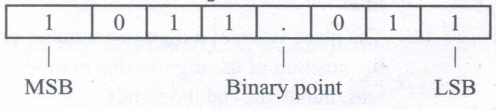
(i) MSB (Most Significant Bit) - The leftmost bit carries the largest weight and hence, is called the MSB.
(ii) LSB (Least Significant Bit) - The rightmost bit carries the smallest weight and hence, is called the LSB.
(iii) Binary Point - It is used to separate the integer and fractional part of the binary number, Eg. (1011.011)2
90.
NAND and NOR gates are called Universal gates, because the fundamental logic gates can be realized through them
91.
A numbering system is a way of representing numbers. Each number system is uniquely identified by its base value or radix. Radix or base is the count of number of digits in each number system. Radix or base is the general idea behind positional numbering system.
Example:
Binary Number System - Radix 2
Octal Number System - Radix 8
Deciaml Number System - Radix 10
Hexadecimal Number System - Radix 16.
92.
| Impact Printers | Non-Impact Printers |
| It uses ribbons/carbon papers to leave the impressions on the paper. | It use ink cartridges and the impressions appear on the paper with the flow of ink. |
| The quality of printing is a draft quality. | The quality of printing is a high quality. |
| Striking Mechanism used to produce output. | No striking mechanism used to produce output. |
93.
(i) A touch screen is a display device that allows the user to interact with a computer by using the finger.
(ii) It can be quite useful as an alternative to a mouse or keyboard for navigating a graphical user interface (GUI).
(iii) Touch screens are used on a wide variety of devices such as computer and laptop, monitors, smart phones, tablets, cash registers, and information kiosks.
(iv) Some touch screens uses a grid of infrared beams to sense the presence of a finger instead of utilizing touch-sensitive input.
94.
(i) Robot is a term coined by Karel Capek in the 1921 play RUR (Rossum's Universal Robots).
(ii) It is used to describe a computerized machine designed to respond to input received manually or from its surroundings.
95.
| Optical Mouse | Laser Mouse |
| Measures the motion and acceleration of pointer. | Measures the motion and acceleration of pointer. |
| It uses light source instead of ball to judge the motion of the pointer. | Laser Mouse uses Laser Light. |
| Optical mouse is less sensitive towards surface. | Laser Mouse is highly sensitive and able to work on any hard surface. |
96.
(i) Computer is the powerful machine.
(ii) It can perform large number of tasks.
(iii) The main capacities of computer are work length, speed accuracy, diligence, versatility memory and automation and lots of more tasks.
97.
(i) one standard letter can be send to all without having to manually add each name and address.
(ii) The letter can be personalized - it looks like the letter has been written to the individual person.
(iii) It is a very fast method to produce hundred of personalized letter.
98.
To insert rows in a table there are different ways:
(i) The easiest way to add a row is to press Tab from the last cell.
(ii) To insert a single row anywhere, place the insertion point in that particular cell and click the Insert row icon  from the Table Formatting toolbar.
(iii) To insert more than one row, click Table ⟶ Insert ⟶ Rows, the Insert Rows dialog box appears enter the of value using spin arrows or type the number directly. In the position option, select Before or After radio button to specify the position of the row.
(iv) Click OK button
Inserting Columns:
To insert columns there are different ways
(i) Place the insertion point in the particular column and click the Insert column icon .JPG) to insert a blank column right of the insertion point.
to insert a blank column right of the insertion point.
(ii) To insert more than one column, place the insertion point in the particular column and click Table ⟶ Insert ⟶ Column, the insert column dialog box appears enter the value using spin arrows or type the number directly.
(iii) In the position option, select Before or After radio button to specify the position of the column.
(iv) Click OK button
99.
There are two different orientations:
(i) Landscape: The width of the document is more than the height. This is best suited for displaying table, professional photos, invitations, album etc.
(ii) Portrait: This is the most common and default orientation. Here, the height of the document is more than the width. Normally books, newspapers will be displayed in this format.
100.
| Moving | Copying |
| 1. It moves the text from one place to another. | It makes a duplication of text. |
| 2. It should be done using Edit ⟶ cut or ctrl +X and edit paste or ctrl +V. | It should be done using edit ⟶ copy or ctrl + C and edit paste or ctrl + V. |

11th Standard Syllabus & Materials
11th Standard
TN 11th Tamil பீடு பெற நில் - செய்யுள் - காவடிச்சிந்து Important Questions And Answers Study Material - QB365 Set A
NEW11th Standard
TN 11th Tamil பீடு பெற நில் - உரைநடை - மலை இடப்பெயர்கள் : ஓர் ஆய்வு Important Questions And Answers Study Material - QB365 Set A
NEW11th Standard
TN 11th Tamil மாமழை போற்றுதும் - துணைப்பாடம் - யானை டாக்டர் Important Questions And Answers Study Material - QB365 Set A
NEW11th Standard
TN 11th Tamil மாமழை போற்றுதும் - செய்யுள் - ஐங்குறுநூறு Important Questions And Answers Study Material - QB365 Set A



Tamilnadu Stateboard 11th Standard Subjects

Maths

Commerce

Economics

Biology

Business Maths and Statistics

Accountancy

Computer Science

Physics

Chemistry
Maths
Biology
Economics
Physics
Chemistry

History
Business Maths and Statistics

Computer Science
Accountancy
Computer Applications
History
Computer Technology
Commerce
Computer Applications
Computer Technology

Tamil

English

French
Tamilnadu Stateboard Standards
