
 100% FREE ACCESS
11th Standard Syllabus & Materials
11th Standard
TN 11th Tamil இயற்கை வேளாண்மை,சுற்றுச்சூழல் -செய்யுள் - மனோன்மணீயம் Important Questions And Answers Study Material - QB365 Set A
NEW11th Standard
TN 11th Tamil என்னுயிர் என்பேன் -துணைப்பாடம் - இசைத்தமிழர் இருவர் Important Questions And Answers Study Material - QB365 Set A
NEW11th Standard
TN 11th Tamil மொழி கலை -செய்யுள் - ஒவ்வொரு புல்லையும் Important Questions And Answers Study Material - QB365 Set A
NEW11th Standard
TN 11th Tamil பீடு பெற நில் - இலக்கணம் - பகுபத உறுப்புகள் Important Questions And Answers Study Material - QB365 Set A
NEW11th Standard
TN 11th Tamil பீடு பெற நில் - துணைப்பாடம் - வாடிவாசல் Important Questions And Answers Study Material - QB365 Set A
NEW11th Standard
TN 11th Tamil பீடு பெற நில் - செய்யுள் - குறுந்தொகை Important Questions And Answers Study Material - QB365 Set A

Published on: 04/03/2019
11th Public Exam March 2019 Model Test
Download Tamil Nadu 11th Standard Computer Technology question papers, model tests, one-mark questions, important questions, and public exam papers in PDF format. Free study materials and answer keys for TN State Board students.
Questions + Answers key
Take MCQ Computer Technology Test
1.
Looking for information on the internet is called
Surfing
Searching
Finding
glancing
2.
Identify the network security system that uses rules to control incoming and outgoing network traffic.
Firewall
Cookies
Hacking
Crackers
3.
You can use the running slideshow option by clicking slide show button on the ___________
Tool bar
Menu Bar
Navigation Bar
Sliding Tool Bar
4.
Which menu contains the Slide Transition option?
Slide Show
View
Tools
Format
5.
In a form, the teacher needs “True or False” as a drop down menu. Which of the following tool is used?
Form
Data
List
Format
6.
Which command is used to show the hidden row in OpenOffice Calc?
Format → Row → Show
Format → Show → Row
Format→ Display → Row
Format → Row → Display
7.
Which is the first electronic spreadsheet?
Excel
Lotus 1-2-3
Visicalc
Open Office Calc
8.
Which wildcard character used to substitute for a single character in a file name?
*
@
?
%
9.
Which of the following OS is a Commercially licensed Operating system?
Windows
UBUNTU
FEDORA
REDHAT
10.
Portion of secondary memory which can serve as an extension of the main memory is called.
Primary Memory
ROM
Virtual Memory
EEPROM
11.
A Latin prefix Deci means ________
2
8
16
10
12.
Which one of the following is used to in ATM machines
Touch Screen
Speaker
Monitor
Printer
13.
Which among the following list of files cannot be used as an Address List in Mail Merge?
OpenOffice Calc
Microsoft Excel
OpenOffice Base
OpenOffice Impress
14.
Which command on the insert menu is used to insert a page break in the document?
Manual Break
Hard page break
Section break
Page Break
15.
Which button selects all instances of the search text in the document?
Find
Find All
Replace
replace All
16.
What are the keyboard layouts used in Android?
17.
What is Phishing?
18.
Define Extended Tips option?
19.
20.
Define the following (i) Text Operator (ii) Rows and Columns of spreadsheet.
21.
What is Device Management?
22.
What are the parameters which influence the characteristics of a microprocessor?
23.
Which method is used to convert the decimal number to Octal number system?
24.
Write the functions of control unit.
25.
What is Text formatting?
26.
What is a Normal view? Explain.
27.
Differentiate relative Cell addressing from absolute cell addressing
28.
Write the specific use of Cortana.
29.
List out the operation carried out by and Instruction set.
30.
Complete the Table
1) 0 x 0 = _
2) 1 x 1 = _
3) 1 x _ = 0
4) _ x 0 = 0
31.
What are the characteristics of a computer?
32.
Write down the steps to find the number of words in a paragraph.
33.
How do you change the clarity of the picture in background?
34.
Explain any five types of internet services.
35.
Define wired technology. Explain the common types of bounded media in the data transmission.
36.
Sivabalan created a presentation to be shown at his school’s Annual Function. Just 5 minutes before the presentation, he noticed that he has misspelt the name of the school, which is appearing in all the 30 slides of the presentation. How can he rectify this mistake in all the slides in one-shot?
37.
Create a Worksheet to contain student database with following fields.
Rollno., Name, English, Tamil, Maths, Science, Social, Total, average.
38.
Explain the versions of Windows Operating System.
39.
Explain memory management techniques.
40.
Define the following. (a) Bus (b) Data bus (c) Address bus (d) Control Bus
41.
What the Sixth generation computers could be defined as the era of intelligent computers?
42.
Explain Address book feature.
43.
Write the steps to preview before printing and steps in printing a document.
1.
(a)
Surfing
2.
(a)
Firewall
3.
(a)
Tool bar
4.
(a)
Slide Show
5.
(c)
List
6.
(a)
Format → Row → Show
7.
(c)
Visicalc
8.
(c)
?
9.
(a)
Windows
10.
(c)
Virtual Memory
11.
(d)
10
12.
(a)
Touch Screen
13.
(d)
OpenOffice Impress
14.
(d)
Page Break
15.
(b)
Find All
16.
There are many good options, though. Let’s take a look at the best Android keyboards !
(i) SwiftKey is definitely among the best Android keyboards ever. It has top of the line prediction and auto-correction along with gesture typing, cloud syncing so all of your devices can stay up to date, themes, keyboard customization, a number row, and more....
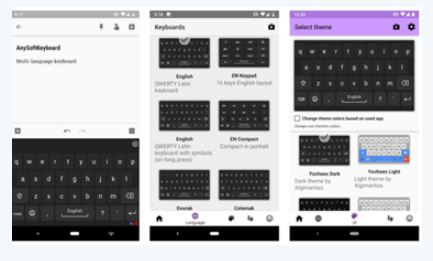
(ii) There are a number of different arrangements of alphabetic, numeric, and punctuation symbols on keys. These different keyboard layouts arise mainly because different people need easy access to different symbols, either because they are inputting text in different languages, or because they need a specialized layout for mathematics, accounting, computer programming, or other purposes..
17.
(i) Phishing is a types of social engineering attack often used to steal user data, including login credentials and credit card numbers.
(ii) Phishing is one of the easiest forms of cyber-attack to deliver malware.
18.
When you start a new job in Writer, the Help Agent appears. It appears in a narrow window in the document's bottom right corner. To view packed assistance with details specific to the mission, click the Help Agent. The Help Agent would close after several seconds if you do not select it. It would vanish if you neglect or near it three times for that same mission. Click Reset Help Agent to restore the Help Agent to its default state.
19.
20.
(i) Text Operator : In Calc, "&" is a text operator which is used to combine two or more text. Joining two different texts is also known as "Text Concatenation".
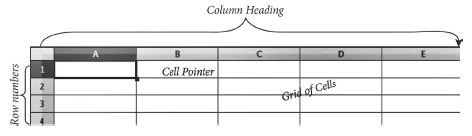
(ii) Row and Columns : A row is a horizontal group of values within a table. It contains values for multiple fields, which are defined by columns. The rows are numbered from 1, 2, 3…. OpenOffice Calc version 4.1.5 contains 10,48,576 rows. A column is a vertical group of values within a table. It contains values from a single field in multiple rows. Each column is labelled as A, B, C, D ….. AA, AB, AC …..It contains 1024 columns.
21.
Device management is the process of managing the operation, implementation, maintenance of physical and virtual devices.
22.
A Microprocessor's performance depends on the following characteristics:
(a) Clock speed
(b) Instruction set
(c) Word size
23.
Repeated division method with a division factor of 8.
24.
The control unit controls the flow of data between the CPU, memory and I/O devices. It also controls the entire operation of a computer.
25.
Changing the default appearance of the text like changing the font type, size, color, style etc., are called as Text formatting.
26.
(i) Normal view is the main view for creating individual slides.
(ii) There are two ways to place a slide in the Slide Design area of the Normal view: clicking the slide thumbnail in the Slides pane or using the Navigator. To open the Navigator, click the Navigator button in the Standard Toolbar or press Ctrl + Shift + F5 and select a slide by scrolling down the Navigator list until you find the one that you want and then double-click it.
27.
(i) Relative here means that the reference to this cell address will be changed automatically when you copy the formulae.
(ii) Absolute references are the opposite of relative addressing. A dollar sign is placed before each column name and row number in an absolute reference.
28.
Use of Cortana
(i) Gives reminders based on time, places or people.
(ii) Track packages, teams, interests and flights.
(iii) Send emails and texts.
(iv) Find facts, files, places and information.
(v) Open any application on your system.
29.
(i) Data transfer
(ii) Arithmetic operations
(iii) Logical operations
(iv) Control flow
(v) Input/output
30.
1) 0 x 0 = 0
2) 1 x 1 = 1
3) 1 x 0 = 0
4) 0 x 0 = 0
31.
(i) Computer is the powerful machine.
(ii) It can perform large number of tasks.
(iii) The main capacities of computer are work length, speed accuracy, diligence, versatility memory and automation and lots of more tasks.
32.
Step 1: Select the required paragraph.
Step 2: Click tools ⟶ word count Number of words and character in the selected paragraph appear in word count dialog box.
33.
Clicking on Transparency icon helps  to adjust the clarity of the picture in %.
34.
1. Mobile:
(i) Many cell phone and smartphone providers offer voice plans with Internet access.
(ii) Mobile Internet connections provide good speeds and allow you to access the Internet.
2. DSL:
(i) DSL, which stands for Digital Subscriber Line, uses existing 2-wire copper telephone line connected to one's home so service is delivered at the same time as landline telephone service.
(ii) Customers can still place calls while surfing the Internet.
3. Satellite:
(i) In certain areas where broadband connection is not yet offered, a satellite Internet option may be available
(ii) Similar to wireless access, satellite connection utilizes a modem.
4. Cable:
(i) Cable Internet connection is a form of broadband access.
(ii) Through use of a cable modem, users can access the Internet over cable TV lines.
(iii) Cable modems can provide extremely fast access to the Internet.
5. Wireless:
(i) Radio frequency bands are used in place of telephone or cable networks.
(ii) One of the greatest advantages of wireless Internet connections is the "always-on" connection that can be accessed from any location that falls within network coverage.
(iii) Wireless connections are made possible through the use of a modem, which picks up Internet signals and sends them to other devices.
35.
Wired Technology: Wired technology is more associated with wired communication. Wired technology refers to the transmission of data over a wired based communication technology.
Types of bounded media in the data transmission:
1. Twisted pair Cable:
(i) A twisted pair consists of two conductors (normally copper), each with its own plastic insulation, twisted together.
(ii) One of these wires is used to carry signals to the receiver, and the other is used only as ground reference. In addition to the signal sent by the sender on one of the wires, interference (noise) and crosstalk may affect both wires and create unwanted signals.
(iii) Twisted Pair is of two types:
(a) Unshielded Twisted Pair (UTP)
(b) Shielded Twisted Pair (STP)
2. Fibre Optical Cable:
(i) A fibre-optical cable is made of glass or plastic and transmits signals in the form of light.
(ii) In fibre optical cable, light moves only in one direction.
(iii) For two-way communication to take place a second communication must be made between the two devices.
(iv) Optical fibres use reflection to guide light through a channel. A glass or plastic core is surrounded by a cladding of less dense glass or plastic.
(v) The difference in density of the two materials must be such that a beam of light moving through the core is reflected off the cladding instead of being refracted into it.
3. Coaxial Cable:
(i) Coaxial is called by this name because it contains two conductors that are parallel to each other.
(ii) Copper is used in this as a central conductor. It is surrounded by PVCinstallation.
(iii) Outer metallic wrapping is used as a shield against noise and as a second conductor which completes the circuit.
(iv) The outer conductor is also encased inan insulating sheath.
(v) The outermost partis the plastic cover which protects the whole cable.
(vi) Anything and everything you see around yourself having wires and uses electricity to operate belongs to wired technology.
36.
Open the presentation and then follow the below given steps:
1. On the 'Home' Tab → Editing → Choose → Replace option. Top left of the screen, then click Find → Replace option.
2. New window pops-out. Find what box.
3. In the find what box, you can enter the word 'Miss-pelt school name'.
4. Then in the replace with box enter the correct 'school name word' and then click 'Replace All' option.
5. Now, the correct school Name will be changed in all slides.
6. After following the above steps correctly, one can rectify the mistake.
37.
In cell A1, type Roll no
In cell B1, type Name
In cell C1, type English
In cell D1, type Tamil
In cell E1, type Maths
In cell F1, type Science
In cell G1, type Social
In cell H1, type Total
In cell 11, type Average.
38.
| S.No | Versions | Logo | Year | Prominent feature |
| 1. | Windows 1.x |  |
1985 | 1. Introduction of GUI in 16 - bit. processor 2. Mouse was introduced as an input device |
| 2. | Windows 2.x |  |
1987 | 1. Supports to minimize or maximize windows. 2. Control panel feature was introduced with various system settings and customising options. |
| 3. | Windows 3.x |  |
1992 | 1. Introduced the concept of multitasking. 2. Supported 256 colours which brought a more modem, colourful look to the interface. |
| 4. | Windows 95 |  |
1995 | 1. Introduced Start button, the taskbar, Windows Explorer and Start menu. 2. Introduced 32 - bit processor and focused more on multitasking. |
| 5. | Windows 98 |  |
1998 | 1. Integration of the Web browser (Internet Explorer) with the Operating System. 2. DOS gaming began to disappear as Windows based games improved. 3. Plug and play feature was introduced. |
| 6. | Windows NT |  |
Designed to act as servers in network. | |
| 7. | Windows Me |  |
2000 | IIt introduced automated system diagnostics and recovery tools. |
| 8. | Windows 2000 |  |
2000 | 1. Served as an Operating System for business desktop and laptop systems. 2. Four versions of Windows 2000 were released: Professional (for business) 3. desktop and laptop systems), Server (both a Web server and an office server), 4. Advanced Server (for line-of-business applications) and Data Centre Server (for high traffic computer networks). |
| 9 | Windows XP |  |
2001 | 1. Introduced 64-bit Processor. 2. Improved Windows appearance with themes and offered a stable version |
| 10. | Windows Vista |  |
2006 | Updated the look and feel of Windows |
| 11. | Windows 7 |  |
2009 | Booting time was improved, introduced new user interfaces like Aero Peek, pinning programs to taskbar, handwriting recognition etc. and Internet Explorer 8. |
| 12. | Windows 8 |  |
2012 | 1. Windows 8 was faster than previous versions of Windows. 2. Start button was removed 3. Windows 8 takes better advantage of multicore processing, solid state drives (SSD), touch screens and other alternate input methods. 4. Served as common platform for mobile and computer. |
| 13. | Windows 10 |  |
2015 | 1. Start Button was added again. 2. Multiple desktop. 3. Central Notification Center for App notification and quick actions. 4. Cortana voice activated personal assistant. |
39.
Memory Management:
(i) Memory Management is the process of controlling and coordinating computer's main memory and assigning memory block (space) to various running programs to optimize overall computer performance.
(ii) The Memory management involves the allocation of specific memory blocks to individual programs based on user demands. At the application level, memory management ensures the availability of adequate memory for each running program at all times.
(iii) The objective of Memory Management process is to improve both the utilization of the CPU and the speed of the computer's response to its users via main memory. For these reasons, the computers must keep several programs in main memory that associates with many different Memory Management schemes.
(iv) The Operating System is responsible for the following activities in connection with memory management.
(v) Keeping track of which portion of memory are currently being used and who is using them.
(vi) Determining which processes (or parts of processes) and data to move in and out of memory.
(vii) Allocation and de-allocation of memory blocks as needed by the program in main memory. (Garbage Collection).
40.
(a) Bus: A bus is a collection of wires used for communication between the internal components of a computer.
(b) Data bus:
(i) Data busis a collection of wires to carry data in bits.
(ii) A data bus is used to transfer data between the memory and the CPU.
(iii) The data bus is bidirectional.
(c) Address bus:
(i) Address bus is a collection of wires to carry data in bits.
(ii) The address bus is used to point a memory location.
(iii) The address bus is unidirectional.
(d) Control bus:
(i) Control bus is a control line/collection of wires to control the operation/functions.
(ii) The control bus controls both read and write operations.
41.
(i) The Sixth Generation, computers could be defined as the era of intelligent computers, based on Artificial Neural Networks. This generation gave a start to parallel computing.
(ii) One of the most dramatic changes in the sixth generation will be the explosive growth of wide is a component of artificial intelligence
(iii) Robotics is a branch of engineering that involves the conception, design, manufacture, and operation of robots.
(iv) This field overlaps with electronics, computer science, artificial intelligence, mechatronics, nanotechnology and bioengineering.
(v) Artificial neural networks (ANNs) are computing systems inspired by the biological neural networks that constitute animal brains.
(vi) Such systems learn (progressively improve performance on) tasks by considering examples, generally without task-specific programming.
(vii) An ANN is based on a collection of connected units or nodes called Artificial Neurons (analogous to biological neurons in an animal brain).
(viii) Each connection (synapse) between neurons can transmit a signal from one to another. The receiving neuron can process the signal(s) and then signal neurons connected to it.
(ix) Parallel computing is a type of computation in which many calculations or the execution of processes are carried out simultaneously.
(x) Large problems can often be divided into smaller ones, which can then be solved at the same time. There are several different forms of parallel computing: bit-level, instruction-level, data, and task parallelism.
(xi) Parallelism has been employed for many years, mainly in high-performance computing, but interest in it has grown lately due to the physical constraints preventing frequency scaling.
(xii) As power consumption by computers has become a concern in recent years, parallel computing has become the dominant paradigm in computer architecture, mainly in the form of multi-core processors.
42.
(i) An a address book is a database that stores names, address and other contact information for a computer user.
(ii) Address books allow easy access to the user's friend, family business associates and others by maintaining their email and other contact details on their computer.
(iii) Address books can be software based, or accessed online or through a network.
(iv) User may also be able to export contacts from their address books to mobile phone, PDAs and other portable electronic devices.
43.
to preview the document before taking the print out.
The steps to be followed to preview the document:
(i) Click File ⟶ Page Preview, or click the Page Preview button. The Writer displays the Page Preview toolbar displayed.
(ii) In the page preview toolbar click Multiple pages icon to display multiple pages.
(iii) To close the preview click on Close Preview button.
The following are some steps to change the printer setting:
(i) Click File ⟶ Print or Ctrl+P or' Print File icon which opens the Print dialog box that appears
(ii) Click General tab.
(iii) Select the required printer from the list of printers
(iv) Under Range and copies section: select All pages option to print all pages, select Pages option to specify the particular page or page range.
(v) Specify Number of copies using spin arrows.
(vi) Click Print button.

11th Standard Syllabus & Materials
11th Standard
TN 11th Tamil பீடு பெற நில் - செய்யுள் - காவடிச்சிந்து Important Questions And Answers Study Material - QB365 Set A
NEW11th Standard
TN 11th Tamil பீடு பெற நில் - உரைநடை - மலை இடப்பெயர்கள் : ஓர் ஆய்வு Important Questions And Answers Study Material - QB365 Set A
NEW11th Standard
TN 11th Tamil மாமழை போற்றுதும் - துணைப்பாடம் - யானை டாக்டர் Important Questions And Answers Study Material - QB365 Set A
NEW11th Standard
TN 11th Tamil மாமழை போற்றுதும் - செய்யுள் - ஐங்குறுநூறு Important Questions And Answers Study Material - QB365 Set A



Tamilnadu Stateboard 11th Standard Subjects

Maths

Commerce

Economics

Biology

Business Maths and Statistics

Accountancy

Computer Science

Physics

Chemistry
Maths
Biology
Economics
Physics
Chemistry

History
Business Maths and Statistics

Computer Science
Accountancy
Computer Applications
History
Computer Technology
Commerce
Computer Applications
Computer Technology

Tamil

English

French
Tamilnadu Stateboard Standards
