
 100% FREE ACCESS
11th Standard Syllabus & Materials
11th Standard
TN 11th Tamil இயற்கை வேளாண்மை,சுற்றுச்சூழல் -செய்யுள் - மனோன்மணீயம் Important Questions And Answers Study Material - QB365 Set A
NEW11th Standard
TN 11th Tamil என்னுயிர் என்பேன் -துணைப்பாடம் - இசைத்தமிழர் இருவர் Important Questions And Answers Study Material - QB365 Set A
NEW11th Standard
TN 11th Tamil மொழி கலை -செய்யுள் - ஒவ்வொரு புல்லையும் Important Questions And Answers Study Material - QB365 Set A
NEW11th Standard
TN 11th Tamil பீடு பெற நில் - இலக்கணம் - பகுபத உறுப்புகள் Important Questions And Answers Study Material - QB365 Set A
NEW11th Standard
TN 11th Tamil பீடு பெற நில் - துணைப்பாடம் - வாடிவாசல் Important Questions And Answers Study Material - QB365 Set A
NEW11th Standard
TN 11th Tamil பீடு பெற நில் - செய்யுள் - குறுந்தொகை Important Questions And Answers Study Material - QB365 Set A

Published on: 13/05/2022
QB365 provides detailed and simple solution for every Book back Questions in class 11 Accountancy Subject. It will helps to get more idea about question pattern in every book back questions with solution.
latest Book back QuestionsDownload Tamil Nadu 11th Standard Accountancy question papers, model tests, one-mark questions, important questions, and public exam papers in PDF format. Free study materials and answer keys for TN State Board students.
Questions + Answers key
Take MCQ Accountancy Test
1.
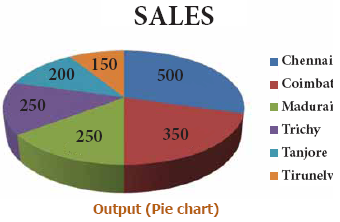
Sales volume of Moon Ltd during 2017 is given below.
Draw Pie chart
| A | B | C | D | E | F | G | |
|---|---|---|---|---|---|---|---|
| 1 | CITY | Chennai | Coimbatore | Madurai | Trichy | Tanjore | Tirunelveli |
| 2 | SALES (Rs in lakhs) |
500 | 350 | 250 | 250 | 200 | 150 |
2.
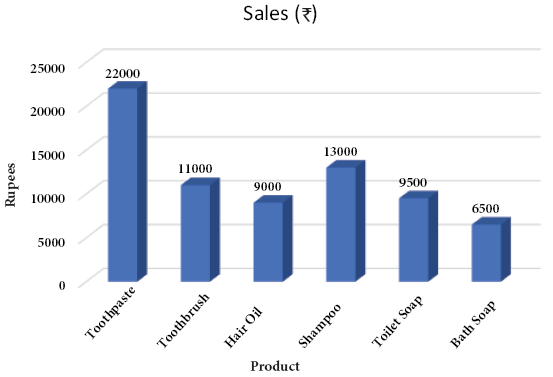
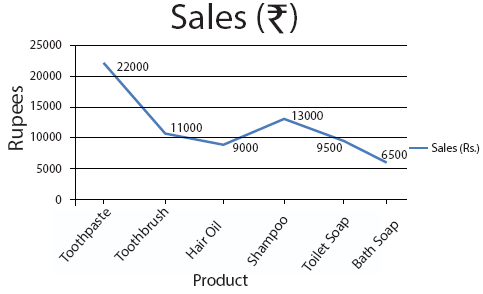
The total sales volume (Product wise) of TECH Ltd for the year 2016-2017 is given below:
| Product | Sales |
|---|---|
| Toothpaste | 22000 |
| Toothbrush | 11000 |
| Hair Oil | 9000 |
| Shampoo | 13000 |
| Toilet Soap | 9500 |
a) Present the data in a column chart
b) Change the chart type to line chart.
3.
Prepare payroll of the following employees.
| A | B | |
| 1 | Name | Basic pay(Rs.) |
| 2 | Sasi | 8000 |
| 3 | Hari | 10000 |
| 4 | Karthi | 6500 |
| 5 | Viji | 12000 |
| 6 | Soni | 9000 |
Additional information:
a. DA: 125% of basic pay
b. HRA: Rs.4,000 for employees basic pay greater than Rs.8,000, for others Rs.2,500.
c. PF Contribution: 12% of basic pay and DA
d. TDS: 10% for Gross pay greater than Rs.25,000, otherwise NIL.
4.
Sara Ltd., sells goods on credit basis. Their policy is to charge interest @ 2% p.a., for the period of default. From the following data, find out the amount to be collected from each customer. Assume 365 days in the year.
| Customer | Sales | Date of Sales | Period of Credit (days) |
Date of Settlement |
| M | 25,000 | 10-04-2016 | 60 | 05-07-2016 |
| N | 14,000 | 28-05-2016 | 30 | 25-07-2016 |
| P | 28,000 | 14-07-2016 | 45 | 25-08-2016 |
| R | 54,000 | 03-08-2016 | 90 | 02-01-2017 |
5.
From the data given below
i) Fill the address in B3 using CONCATENATE Function.
ii) Change KAMARAJAR SALAI given in C2 as lower case in C3
iii) Change Chennai given in D2 as upper case in D3
| A | B | C | D | E | |
| 1 | NAME | HOUSE NO. | STREET | PLACE | PINCODE |
| 2 | ANAND | 123 | KAMARAJAR SALAI | Chennai | 600018 |
1.
Procedure
Pie chart
(i) Enter the data given in the table in a new spreadsheet.
(ii) Select the data range from A1 to G2.
(iii) Go to Insert menu and select Pie Chart (3D Type)
(iv) Right click pie chart and select ‘Add Data Labels’
2.
Procedure
(a) Column chart
(i) Enter the data given in the table in a new spreadsheet.
(ii) Select the data range from A1 to B7.
(iii) Go to Insert menu and select Column Chart (3D)
(iv) Right click column chart and select ‘Add Data Labels’
(v) Choose layout tab under Chart tools.
(vi) Select Axis title and name them.
(b) Line Chart
(i) Select the data range from A1 to B7.
(ii) Go to Insert menu and select Line Chart (2D)
(iii) Right click chart and select ‘Add Data Labels’
(iv) Choose layout tab under Chart tools.
(v) Select Axis title and name them.
3.
(i) Open a new spreadsheet in MS-EXCEL
(ii) Enter labels and values in the cells as given above
iii) To calculate DA in Cell C2
= B2*125%
iv) To calculate HRA in Cell D2
= IF(B2>8000,4000,2500)
v) To calculate Gross Pay in Cell E2
=SUM(B2:D2)
vi) To calculate PF in Cell F2
=(B2+C2)*12%
vii) To calculate TDS in Cell G2
=IF(E2>25000,E2*10%,0)
viii) To calculate Net Pay in Cell H2
=E2-(F2+G2)
Output
| A | B | C | D | E | F | G | H | |
| 1 | Name | Basic Pay(Rs.) | DA | HRA | Gross pay | PF | TDS | Net Pay |
| 2 | Sasi | 8000 | 10000 | 2500 | 20500 | 2160 | 0 | 18340 |
| 3 | Hari | 10000 | 12500 | 4000 | 26500 | 2700 | 2650 | 21150 |
| 4 | Karthi | 6500 | 8125 | 2500 | 17125 | 1755 | 0 | 15370 |
| 5 | Viji | 12000 | 15000 | 4000 | 31000 | 3240 | 3100 | 24660 |
| 6 | Soni | 9000 | 11250 | 4000 | 24250 | 2430 | 0 | 21820 |
4.
(i) Open a new spreadsheet in MS-Excel
(ii) Enter the table headings as given below in different cells
A1 Customer
B1 Sales (`)
C1 Date of sales
D1 Period of credit (days)
E1 Date of settlement
F1 Credit period availed (days)
G1 Days of default
H1 Interest
I1 Amount collected
(iii) Enter customer names in A2:A5
(iv) Enter sales figures in B2:B5
(v) Enter date of sales in C2:C5
(vi) Enter period of credits in D2:D5
(vii) Enter date of settlements in E2:E5
(viii) In the cell F2 enter the formula =E2-C2 to calculate the period of credit availed in days. (ix) In the cell G2 enter the formula
=IF(F2-D2>0,F2-D2,0) to calculate the default days. (IF condition is used to avoid negative values in the case of payment before due date)
(x) In the cell H2 enter the formula =ROUNDUP((B2*2%)*(G2/365),0) to calculate interest for the default days and to round it to the nearest rupee.
(xi) In the cell I2 enter the formula =B2+H2 to add the amount of Sales and Interest.
(xii) Select the range F2:I2 and copy these cells down to the last customer.
| Customer | Sales | Date of Sales | Period of Credit (days) |
Date of Settlement |
Credit period availed |
Days of default |
Interest | Amount to be collected |
| M | 25,000 | 10-04-2016 | 60 | 05-07-2016 | 86 | 26 | 36 | 25,036 |
| N | 14,000 | 28-05-2016 | 30 | 25-07-2016 | 58 | 28 | 22 | 14,022 |
| P | 28,000 | 14-07-2016 | 45 | 25-08-2016 | 42 | 0 | 0 | 28,000 |
| R | 54,000 | 03-08-2016 | 90 | 02-01-2017 | 152 | 62 | 184 | 54,184 |
5.
Procedure
i) To fill the address
a. Open a new spreadsheet in MS-Excel
b. Enter all given values as given in the question
c. Enter the formula in the cell B3 as
=CONCATENATE(A2,” “,B2,” “,C2,” “,D2,” “,E2)
ANAND 123 KAMARAJAR SALAI Chennai 600018
ii) To change KAMARAJAR SALAI given in C2 as lower case in C3
Enter the formula in the cell C3 as
=LOWER(C2)
kamarajar salai
iii) To change Chennai given in D2 as upper case in D3
Enter the formula in the cell D3 as
=UPPER(D2)
CHENNAI

11th Standard Syllabus & Materials
11th Standard
TN 11th Tamil பீடு பெற நில் - செய்யுள் - காவடிச்சிந்து Important Questions And Answers Study Material - QB365 Set A
NEW11th Standard
TN 11th Tamil பீடு பெற நில் - உரைநடை - மலை இடப்பெயர்கள் : ஓர் ஆய்வு Important Questions And Answers Study Material - QB365 Set A
NEW11th Standard
TN 11th Tamil மாமழை போற்றுதும் - துணைப்பாடம் - யானை டாக்டர் Important Questions And Answers Study Material - QB365 Set A
NEW11th Standard
TN 11th Tamil மாமழை போற்றுதும் - செய்யுள் - ஐங்குறுநூறு Important Questions And Answers Study Material - QB365 Set A



Tamilnadu Stateboard 11th Standard Subjects

Maths

Commerce

Economics

Biology

Business Maths and Statistics
Accountancy

Computer Science

Physics

Chemistry
Maths
Biology
Economics
Physics
Chemistry

History
Business Maths and Statistics

Computer Science
Accountancy

Computer Applications
History
Computer Technology
Commerce
Computer Applications
Computer Technology

Tamil

English

French
Tamilnadu Stateboard Standards


