
 100% FREE ACCESS
11th Standard Syllabus & Materials
11th Standard
TN 11th Tamil இயற்கை வேளாண்மை,சுற்றுச்சூழல் -செய்யுள் - மனோன்மணீயம் Important Questions And Answers Study Material - QB365 Set A
NEW11th Standard
TN 11th Tamil என்னுயிர் என்பேன் -துணைப்பாடம் - இசைத்தமிழர் இருவர் Important Questions And Answers Study Material - QB365 Set A
NEW11th Standard
TN 11th Tamil மொழி கலை -செய்யுள் - ஒவ்வொரு புல்லையும் Important Questions And Answers Study Material - QB365 Set A
NEW11th Standard
TN 11th Tamil பீடு பெற நில் - இலக்கணம் - பகுபத உறுப்புகள் Important Questions And Answers Study Material - QB365 Set A
NEW11th Standard
TN 11th Tamil பீடு பெற நில் - துணைப்பாடம் - வாடிவாசல் Important Questions And Answers Study Material - QB365 Set A
NEW11th Standard
TN 11th Tamil பீடு பெற நில் - செய்யுள் - குறுந்தொகை Important Questions And Answers Study Material - QB365 Set A

Published on: 11/06/2021
QB365 provides detailed and simple solution for every book back questions in class 11 Computer Applications subject.It will helps to get more idea about question pattern in every book back questions with solution.
Download Tamil Nadu 11th Standard Computer Applications question papers, model tests, one-mark questions, important questions, and public exam papers in PDF format. Free study materials and answer keys for TN State Board students.
Questions + Answers key
Take MCQ Computer Applications Test
1.
What are the HTMLwriting tools?
2.
What are the guidelines to be followed by any computer user?
3.
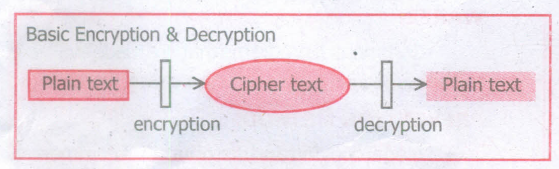
Write about encryption and decryption.
4.
5.
6.
What is if statement and write its types?
7.
Write a CSS file to define text color and alignment to < p > tag.
8.
What are the advantages of using CSS?
9.
Explain the values of < input > tag’s type attribute.
10.
11.
Write an HTML code to provide hyperlink to https://www.w3schools.com
12.
Briefly explain the attributes of < hr > tag.
13.
How do you view the source file?
14.
Explain the attributes available with < body > tag.
15.
Write a note on W3C?
16.
Differentiate Website and Webpage.
17.
Differentiate PAN and CAN network
18.
Explain and list out examples of mobile operating system.
19.
Write down the interfaces and ports available in a computer.
20.
Write short note on impact printer.
21.
Name any three output devices.
22.
Write the applications of computer.
23.
24.
Who uses the presentation software and why
25.
Differentiate Deleting data using Backspace and Delete.
1.
HTML Writing Tools:
i) To get started writing HTML, there is no need of web server, web hosting or even internet connection. We can write, test and link web pages without a network.
ii) To create and testing a HTML document i.e. web page need an application text editor to write HTML code and a browser to view them.
2.
Generally, the following guidelines should be observed by computer users.
1. Honesty: Users should be truthful while using the internet.
2. Confidentiality: Users should not share any important information with unauthorized people.
3. Respect: Each user should respect the privacy of other users.
4. Responsibility: Each user should take ownership and responsibility for their actions.
3.
(i) Encryption: Encryption is the process of translating the plain text data(plaintext) into random and mangled data (called cipher-text).
(ii) Decryption: Decryption is the reverse process of converting the cipher-text back to plaintext Encryption and decryption are done by cryptography: In cryptography a key is a piece of information (parameter) that determines the functional output of a cryptographic algorithm.
4.
5.
6.
The if statement is the fundamental control statement that allows JavaScript to make decisions to execute statements conditionally. This statement has two forms. The form is for only true condition.
The syntax is
if(condition)
{
True block;
}
Types of if statement:
if else statement
else if statement
nested if statement
7.
{
color: red; Text-align : center;
}
8.
(i) Maintainability : CSS are also defined and stored as separate files. So, the style and appearance of a web page can be dynamically changed and maintained with less effort.
(ii) Reusability : The styles defined in CSS can be reused in multiple HTML pages.
(iii) Easy to understand : The tags in web pages are well organized with style specifications and therefor it is easy to understand.
9.
| Value of type attribute | Description |
|---|---|
| Text | Create a Text Box. The element used to get all kind of text input such as name, address etc., |
| Password | Similar as Text box. But, while entering data, the characters are appearing as coded symbols such as asterisk |
| Checkbox Multi select box | Check box is an element appearing like a small square box. When the user click on the square a tiny tick mark will appear inside the square. This element is used to select multiple options. |
| Radio Button | Radio button is used to select anyone of the multiple options from the list. This element looks like a small circle, when the user select an item, a tiny dot will appear within the circle. If the user selects another option, previously selected option will be deselected. This means, user can select anyone of the given option form a group |
| Reset | It is a special command button used to clear all the entries made in the form. |
| Submit | It is also a special command button used to submit all the entries made in the form to the backend server. |
| Button | This is a standard graphical button on the form used to call functions on click |
10.
11.
< html >
< head >
< title > Hyperlink < /title >
< /head >
< body >
< a href = "https://www.w3 schools.com" > w3schools < /a >
< /body >
< /html >
12.
The < hr > tag having four attributes viz., size, width, noshade and color. These attributes are used to set size, width, 3D appearance and color to the horizontal line respectively.
The general syntax of < hr > tag with attributes:
< hr size = value width = value noshade, color = color_name/code >
(i) Size: Thickness of the horizontal line can be changed with size attribute.
(ii) Width: The width attribute specifies the horizontal width of the line
(iii) Noshade: The default view of a horizontal rule line is 3D. So, no need to specify the term "noshade" as an attribute with < hr > tag. If you specify the attribute "noshade" turn off 3D view, turns on 2D view.
(iv) The color attribute is used to change the default color to desired color.
13.
Viewing Source file : Source file is an HTML document, what you actually type in text editor (Notepad or getit). You can view your original source fle in the browser. The following steps are to be followed to view a source file.
(i) Double click on the browser.
(ii) Select View \(\rightarrow\) PageSource(FirefoxandChrome)/ View Source (Internet Explorer) Ctrl + U (all browser).
(iii) Source file will be displayed.
(iv) In Internet Explorer, View \(\rightarrow\) Source is also used to open source file.
14.
The <body> tag defines the documents body. The contents of an HTML page reside within the <body> tag. <body> tag contains several attributes.
(i) Background Colour: bgcolor = color:
By default all the browsers display the text on white background. However, the background color of the browser can be changed by using bgcolor tag.
The tag to change background colour:
<body bgcolor = color_name/color_code>
<body bgcolor = yellow>
(ii) Body text Colour: text = color: The default text colour of body section is "black; it is often called as automatic color, text attribute within body tag is used to change the text colour.
The tag to change body text colour:
<body text = color_name/color_code>
<body text = #FFFF00>
(iii) Background image: background = image:
An image or picture can be applied as background to a webpage. When you insert an image as background, the text will be displayed on top of the image. Background images can be a texture or bitmap or even a photo.
The tag to apply an image as background:
<body background = "image_name_with_extenstion">
<body background = "E:\Images\ flower01.gif">
(iv) Setting Margins:margin = value : The margin refers the blank area from left or top edge of the browser window. Generally there is no default margin setting in any bowser. If you want to leave some space as margin to left or top; leftmargin or topmargin attributes will be used respectively.
The tag to specify the left and top margin:
<body leftmargin = value topmargin = value>
<body leftmargin = 50 topmargin = 50>
15.
i) W3C stands for "World Wide Web Consortium." The W3C is an international community that includes a full-time staff, industry experts, and several member organizations. These groups work together to develop standards for the World Wide Web.
ii) The World Wide Web Consortium (W3C) is an international organization committed to improving the web. It is made up of several hundred member organizations from a variety of related IT industries.
iii) W3C sets standards for the World Wide Web (WWW) to facilitate better communication ability and cooperation among all web stakeholders.
iv) It was established in 1994 by the creator of the WWW, Tim Berners-Lee.
16.
| Website | Web page |
| A collection of multiple documents displayable by a browser. |
Consists of a Single document displayed by a browser. |
| Has its own unique domain name | Shares a unique domain name. |
| Contains one or more web pages. | Makes up a website. |
17.
| Characteristics | Personal Area Network (PAN) | Campus Area Network (CAN) |
| Range | Upto 100 meters | Upto 5 Kms |
| Location | Used for a shorter distance, controlled by a single person within a single building | Larger than LAN Larger than LAN MAN. University, school or small business, enterprise |
| Speed | Up to 250 Kbps | 40 KB/s To 1 MB/s |
| Advantages | Efficient, Cost-effective, and convenient. Controlled by a single person Hotspot may connect up to 8 devices | Cost-effective, Wired or Wireless Network, High Bandwidth with Multi-departmental Network access |
| Disadvantages | Shorter distance up to 10 meters only. The data rate is low compared to other networks | Difficult to manage. |
18.
A mobile operating system controls a mobile device and its design supports wireless communication and different types of mobile applications. It operates 012 smart phones Tablets and Digital Mobile devices.
(i) Google Android
(ii) Apple iOS
(iii) Blackberry
(iv) Symbian
19.
(i) Serial Port
(ii) Parallen Port
(iii) USB 3.0
(iv) VGA connector
(v) Audio plugs
(vi) PS/2 Port
(vii) SCSI Port
(viii) High Definition Multimedia Interface(HDMI).
20.
Impact printers:
(i) These printers print with striking of hammers or pins on ribbon. These printers can print multi-part (using carbon papers) by using mechanical pressure. For example, Dot Matrix printers and Line matrix printers are impact printers.
(ii) A Dot matrix printer that prints using a fixed number of pins or wires.
(iii) Line matrix printers use a fixed print head for printing.
21.
(i) Monitor
(ii) Printer
(iii) Plotter
(iv) Speaker
(v) Multimedia projectors are the output devices.
22.
The various applications of computers are,
(i) Business
(ii) Education
(iii) Marketing
(iv) Banking
(v) Insurance
(vi) Communication
(vii) Health care
(viii) Engineering - Robotics, Nano technology, Bio Engineering
23.
24.
Several people make use of the presentation software while giving presentations, some examples are as follows.
(i) Sales persons need to give presentation to their customers clients and managers.
(ii) Human Resource departments use the presentation to provide training to new staff.
(iii) In schools, teachers can better explain concepts by the means of presentation.
(iv) Students also create presentation on topic given by their teachers.
(v) The presentation software is mostly used during seminars, conferences. This helps the presenter easily project his key points on a large screen while talking about the topic simultaneously.
25.
| Backspace | Delete |
| Deletes the character to the left of the insertion pointer. | Deletes the character to the right of the insertion pointer |

11th Standard Syllabus & Materials
11th Standard
TN 11th Tamil பீடு பெற நில் - செய்யுள் - காவடிச்சிந்து Important Questions And Answers Study Material - QB365 Set A
NEW11th Standard
TN 11th Tamil பீடு பெற நில் - உரைநடை - மலை இடப்பெயர்கள் : ஓர் ஆய்வு Important Questions And Answers Study Material - QB365 Set A
NEW11th Standard
TN 11th Tamil மாமழை போற்றுதும் - துணைப்பாடம் - யானை டாக்டர் Important Questions And Answers Study Material - QB365 Set A
NEW11th Standard
TN 11th Tamil மாமழை போற்றுதும் - செய்யுள் - ஐங்குறுநூறு Important Questions And Answers Study Material - QB365 Set A



Tamilnadu Stateboard 11th Standard Subjects

Maths

Commerce

Economics

Biology

Business Maths and Statistics

Accountancy

Computer Science

Physics

Chemistry
Maths
Biology
Economics
Physics
Chemistry

History
Business Maths and Statistics

Computer Science
Accountancy
Computer Applications
History
Computer Technology
Commerce
Computer Applications
Computer Technology

Tamil

English

French
Tamilnadu Stateboard Standards


