
 100% FREE ACCESS
11th Standard Syllabus & Materials
11th Standard
TN 11th Tamil இயற்கை வேளாண்மை,சுற்றுச்சூழல் -செய்யுள் - மனோன்மணீயம் Important Questions And Answers Study Material - QB365 Set A
NEW11th Standard
TN 11th Tamil என்னுயிர் என்பேன் -துணைப்பாடம் - இசைத்தமிழர் இருவர் Important Questions And Answers Study Material - QB365 Set A
NEW11th Standard
TN 11th Tamil மொழி கலை -செய்யுள் - ஒவ்வொரு புல்லையும் Important Questions And Answers Study Material - QB365 Set A
NEW11th Standard
TN 11th Tamil பீடு பெற நில் - இலக்கணம் - பகுபத உறுப்புகள் Important Questions And Answers Study Material - QB365 Set A
NEW11th Standard
TN 11th Tamil பீடு பெற நில் - துணைப்பாடம் - வாடிவாசல் Important Questions And Answers Study Material - QB365 Set A
NEW11th Standard
TN 11th Tamil பீடு பெற நில் - செய்யுள் - குறுந்தொகை Important Questions And Answers Study Material - QB365 Set A

Published on: 13/05/2022
QB365 provides detailed and simple solution for every book back questions in class 11 Computer Applications subject.It will helps to get more idea about question pattern in every book back questions with solution.
latest Book back QuestionsDownload Tamil Nadu 11th Standard Computer Applications question papers, model tests, one-mark questions, important questions, and public exam papers in PDF format. Free study materials and answer keys for TN State Board students.
Questions + Answers key
Take MCQ Computer Applications Test
1.
What are the different ways to save a document?
2.
What are the different types of orientation?
3.
Explain symmetric key encryption.
4.
What is the role of firewalls?
5.
Write a program in JavaScript to find the cube of a number using function.
6.
Differentiate between while and do while statements
7.
Write the syntax for else-if statement.
8.
Write a CSS file to define font type, style and size to < h1 > tag.
9.
Write a short note on rule of CSS.
10.
Explain the attributes of < select > and < option > tags.
11.
Explain the main attributes used with < form > tag.
12.
Write an HTML code to display the following text in exactly the same way as given below.
I am studying Computer Application.
13.
How do you save a file as HTML file?
14.
Differentiate browser and a search engine with suitable examples.
15.
What is TCP/IP ?
16.
List out the major differences between Windows and Ubuntu OS.
17.
Are drives such as hard drive and floppy drives represented with drive letters?
18.
Explain and list out examples of mobile operating system.
19.
Differentiate PROM and EPROM
20.
Classify the microprocessor based on the size of the data .
21.
Write the characteristics of sixth generation.
22.
What is an input device? Give two examples.
23.
Who uses the presentation software and why
24.
In cell A1=34 A2=65 A3=89 write the formula to find the average.
25.
Differentiate Deleting data using Backspace and Delete.
1.
(i) You can save by clicking File \(\rightarrow\) Save on top left corner and then click File \(\rightarrow\) Save As or Ctrl+Shift+S. After that browse the location where exactly you want to save in your computer.
(ii) You can also save by just pressing Ctrl + S and then browse the location where you want to save.
(iii) All documents in OpenOffice writer will be stored with .odt extension. You can store your OpenOffice document as Microsoft Word document or pdf.
2.
There are two different orientation :
(i) Landscape: The width of the document is more than the height. This is best suited for displaying professional photos, invitatíons, albums, tables etc.
(ii) Portrait :This is the most common and default orientation. Here, the height of the document is more than the width. Normally books, newspapers will be displayed in this format.
3.
1. Symmetric encryption is a technique to use the same key for both encryption and decryption. The main disadvantage of the symmetric key encryption is that all authorized persons involved, have to exchange the key used to encrypt the data before they can decrypt it. If anybody intercepts the key information, they may read all message.
2. The following Figure depicts the working of symmetric key encryption.
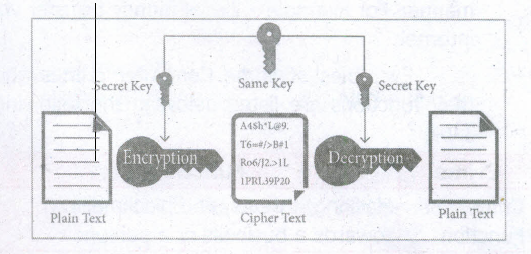
4.
1. A fire wall is a computer network security based system that monitors and controls incoming and outgoing network traffic based on predefined security rules.
2. A firewall commonly establishes a block between a trusted internal computer network and entrusted computer outside the network.
5.
Program to find the cube of a number:
< html >
< body >
< script language = "JavaScript" type = "text/ JavaScript" >
var N = window.prompt("Enter the number to find cube" ,"O")',
var x = parse Int(N);
vary s = cube (x);
document, written ("The cube of a number" + x + "is" +s); function cube(m)
{
var s = m*m*m;
returns s ;
}
< /script >
< /body >
< /html >
6.
| While Statements | Do while Statements |
| 1. First condition will be evaluated and they only based on the result of the condition the body of the loop will be executed or not. | do.... while loop body of the loop always executed atleast once before the condition can be execued. |
| 2. Entry check loop | Exit check loop. |
| 3. Checking and execution time of loop is differ in while loop. | Checking and execution time of loop is same in do while loop. |
7.
if (expression)
{
// Execute code block #1
}
else if (expression)
{
// Execute code block #2
}
else if (expression)
{
// Execute code block #3
}
else
{
// if all else fails, execute block #4
}
8.
H1
{
Font-family
}
Font-family : "Arial";
Font-style : Italic;
Font-size : 24px;
}
9.
CSS style declaration consists of two major parts; Selector and Declaration. The Selector refers an HTML tag in which you want to apply styles. The Declaration is a block of code that contains style definition. It should be surrounded by curly braces. Any number of properties for each selector can be included and they must be separated by semicolons. The property name and its value should be separated by a colon. Each declaration should be terminated by a semicolon (;).
10.
Attributes of <Select> tag:
(i) The <select> tag is used to create dropdown list box in HTML.
(ii) It provides a list of various options as a dropdown list.
(iii) This element is more helpful when a number of options are to be displayed in a limited space.
(iv) The <option> tag is used to specify list items.
(v) Name - Provide the name to the control, which is sent to the server.
(vi) Size - Determine the style of dropdown list box.
Size = 1 dropdown list box.
Size =2 List box
(vii) Multiple - Allows user to select multiple values.
Attributes of <option> tag :
(i) Selected - Indicate default selection.
(ii) Value - Value to be submitted to server.
11.
The important attributes used with the < form > tag are method and action attributes.
(i) Method : The method attribute of the form tag is used to identify how the form element names and values will be sent to the server. The get method will append the names of the form elements and their values to the URL. The post method will send the names and values of the form elements as packets.
(ii) Action: The action attribute identifies the server side program or script that will process the form. The action will be the name of a Common Gateway Interface (CGI) program written in programming languages, like Perl, JavaScript, PHP or Active Server Pages (ASP).
General Format of < form > tag
< Form method=get/post action= "back_end_server_script" >
Form elements
< /Form >
12.
< Html >
< Head >
< title >Html< /title >
< /head>
< body >
I am studying Computer Application
< /body>
< /html >
13.
(i) Click File \(\rightarrow\) Save (or) Press Ctrl + S
(ii) Save as dialog box appears.
(iii) In "File Name" text box, type a file name with .htm or .html extension.
(iv) Select "All Files" from "Save as type" list box.
(v) Click "Save" button.
14.
| Browser | Search Engine |
| A browser is used to access websites and web pages whereas a search engine is used to search for particular information. | A search engine is a software system that is designed to search for information on the World Wide Web. |
| Examples Internet Explorer, Chrome, Firefox, Safari etc., and are the most popular web browsers which Google and Yahoo are the most popular search engines. | Examples of popular search engines are Yahoo, Lycos, Altavista, Hotbot, Google and Askjeeves. |
| A browser is used to access the Internet whereas in order to open a search engine you need a browser. | The list of content returned via a search engine to a user is known as a search engine result page (SERP). |
15.
The Internet works by using a protocol called TCP/ IP. TCP/IP allows one computer to talk to another computer via the Internet through compiling packets of data and sending them to right location.
16.
| S.No | Ubuntu OS | Windows |
| 1. | Open-source (Licensing freedom) |
Closed source (Licensing Restriction |
| 2. | Online peer support | Paid-help-desk support |
| 3. | Full hardware support | Partial hardware support |
| 4. | Support CUI | No CUI support |
| 5. | Flexibility | Rigidity |
17.
Yes, hard drives and floppy drives represented with drive letters.
18.
A mobile operating system controls a mobile device and its design supports wireless communication and different types of mobile applications. It operates 012 smart phones Tablets and Digital Mobile devices.
(i) Google Android
(ii) Apple iOS
(iii) Blackberry
(iv) Symbian
19.
| PROM | EPROM |
| (i) Programmable Read Only Memory | Erasable Programmable Read Only Memory |
| (ii) It is also a non volatile memory on which data can be written only one. | It is also a non-volatile memory and a special type of memory. |
| (iii) PROM burner is used to write data to a PROM chip | Which serves as a PROM, but the content can be erased using ultraviolet rays |
20.
Microprocessors can process instructions. The microprocessors can be classified as follows based on the size of the data.
1. 8-bit microprocessor
2. 16-bit microprocessor
3. 32-bit microprocessor
4. 64-bit microprocessor
21.
(i) Parallel and Distributed computing
(ii) Computers have become smarter, faster and smaller
(iii) Development of robotics
(iv) Natural Language Processing
(v) Development of Voice Recognition Software
22.
Input device is used to feed any form of data to the computer, which can be stored in the memory unit for further processing.
Example: Keyboard, mouse, Scanner, Fingerprint scanner, Track Ball, Retinal Scanner, Light pen etc.
23.
Several people make use of the presentation software while giving presentations, some examples are as follows.
(i) Sales persons need to give presentation to their customers clients and managers.
(ii) Human Resource departments use the presentation to provide training to new staff.
(iii) In schools, teachers can better explain concepts by the means of presentation.
(iv) Students also create presentation on topic given by their teachers.
(v) The presentation software is mostly used during seminars, conferences. This helps the presenter easily project his key points on a large screen while talking about the topic simultaneously.
24.
=(A1 + A2 + A3)/3 (or) = Average (A1 : A3) = 62.7%
25.
| Backspace | Delete |
| Deletes the character to the left of the insertion pointer. | Deletes the character to the right of the insertion pointer |

11th Standard Syllabus & Materials
11th Standard
TN 11th Tamil பீடு பெற நில் - செய்யுள் - காவடிச்சிந்து Important Questions And Answers Study Material - QB365 Set A
NEW11th Standard
TN 11th Tamil பீடு பெற நில் - உரைநடை - மலை இடப்பெயர்கள் : ஓர் ஆய்வு Important Questions And Answers Study Material - QB365 Set A
NEW11th Standard
TN 11th Tamil மாமழை போற்றுதும் - துணைப்பாடம் - யானை டாக்டர் Important Questions And Answers Study Material - QB365 Set A
NEW11th Standard
TN 11th Tamil மாமழை போற்றுதும் - செய்யுள் - ஐங்குறுநூறு Important Questions And Answers Study Material - QB365 Set A



Tamilnadu Stateboard 11th Standard Subjects

Maths

Commerce

Economics

Biology

Business Maths and Statistics

Accountancy

Computer Science

Physics

Chemistry
Maths
Biology
Economics
Physics
Chemistry

History
Business Maths and Statistics

Computer Science
Accountancy
Computer Applications
History
Computer Technology
Commerce
Computer Applications
Computer Technology

Tamil

English

French
Tamilnadu Stateboard Standards


