
 100% FREE ACCESS
11th Standard Syllabus & Materials
11th Standard
TN 11th Tamil இயற்கை வேளாண்மை,சுற்றுச்சூழல் -செய்யுள் - மனோன்மணீயம் Important Questions And Answers Study Material - QB365 Set A
NEW11th Standard
TN 11th Tamil என்னுயிர் என்பேன் -துணைப்பாடம் - இசைத்தமிழர் இருவர் Important Questions And Answers Study Material - QB365 Set A
NEW11th Standard
TN 11th Tamil மொழி கலை -செய்யுள் - ஒவ்வொரு புல்லையும் Important Questions And Answers Study Material - QB365 Set A
NEW11th Standard
TN 11th Tamil பீடு பெற நில் - இலக்கணம் - பகுபத உறுப்புகள் Important Questions And Answers Study Material - QB365 Set A
NEW11th Standard
TN 11th Tamil பீடு பெற நில் - துணைப்பாடம் - வாடிவாசல் Important Questions And Answers Study Material - QB365 Set A
NEW11th Standard
TN 11th Tamil பீடு பெற நில் - செய்யுள் - குறுந்தொகை Important Questions And Answers Study Material - QB365 Set A

Published on: 03/07/2021
QB365 provides detailed and simple solution for every Creative Questions in class 11 Computer Applications Subject. It will helps to get more idea about question pattern in every Creative questions with solution.
Download Tamil Nadu 11th Standard Computer Applications question papers, model tests, one-mark questions, important questions, and public exam papers in PDF format. Free study materials and answer keys for TN State Board students.
Questions + Answers key
Take MCQ Computer Applications Test
1.
What is use of windows elements corners and borders?
2.
What is the difference between the application window and the document window?
3.
Write the graphical representation of disk drive icons.
4.
Differentiate between Windows 7 and Windows 8.
5.
Identify the type of OS for the following statement.
(a) It is a family of open-source OS.
(b) It is a family of proprietary OS.
(c) It is a family of multitasking and Multi user OS.
(d) It is a windows alternative open source OS.
(e) Most common in tablets, phones.
(f) Concept of having more than one OS in a single PC.
6.
What is an operating system and how are they classified based on Interaction?
7.
Write the functions of OS.
8.
Give examples of 16-bit, 32-bit, 64-bit Microprocessor.
9.
Why Blu-Ray disc is developed ?
10.
Write a note on DVD.
11.
Expand PROM, EPROM and EEPROM.
12.
What are the methods used to access the memo
13.
Complete the Table
1) 0 \(\div \) _ = 0
2) 0 \(\div \) 1 = _
3) 1 \(\div \) _ = 1
4) 0 \(\div \) 1 = _
14.
Divide 11110 by 110
15.
Describe Octal Number system
16.
Describe the parameters are used to determine the value of each digit in a number.
17.
(101010)2 \(\rightarrow \) (?10) \(\rightarrow \) (?10)
18.
Reason out why the NAND an NOR are called universal gates?
19.
Write the merits of fifth generation computers.
20.
Write the advantages of fingerprint scanner.
21.
Define POST.
22.
What is Robotics?
23.
What is Machine language?
24.
Define Transistor.
25.
Write the steps to save the document with password.
1.
(i) The comers and borders of the windows help to drag and hence help to resize the Windows.
(ii) The mouse cursor changes to a double arrow when positioned over a border or a comer.
(iii) Drag the border or' comer in the direction indicated by the double arrow to the desired shape.
(iv) The comers can be resized diagonally by dragging it across any of the comers.
(v) It will resize the window on all the sides simultaneously.
(vi) On the other hand, the borders will let you to resize the window by either dragging it in left side, right side, from the top or from the bottom of the window.
(vii) It will change the size of the window at one side only depending on the side in which the dragging is made.
2.
(i) When we open any application such as OpenOffice Writer, Open Office Impress or OpenOffice Calc etc., you will find two Windows on the screen.
(ii) The larger Window is called the Application Window. This Window helps the user to communicate with the Application program.
(iii) The smaller window, which is inside the Application Window, is called the Document window.
(iv) This Window is used for typing, editing, drawing, and formatting the text and graphics.
3.
The disk drive icons graphically represent five disk drive options.
(i) Hard disk (C: D: E:)
(ii) CD-ROM/DVD Drive (F:)
(iii) Pen drive (I:)
(iv) Other removable storage such as mobile, smart phone, tablet etc.,
(v) Network drives if your system is connected with other system.
4.
| Windows 7 | Windows 8 |
|---|---|
| Faster boot times, introduced new user interfaces and Internet Explorer 8. | Windows 8 was faster than previous versions of Windows. |
| The most used operating system on the Internet and also the most used for PC gaming. |
Windows 8 takes better advantage of multi-core processing, solid state drives (SSD), touch screens and other alternate input methods. |
5.
(a) Linux
(b) Windows
(c) Unix
(d) React OS
(e) Android
(f) Virtual OS
6.
(i) An as is a system software which serves as the interface between a user and computer.
(ii) It is defined as a collection of programs that coordinates the operations of computer hardware and software.
(iii) On the basis of interaction, the Operating systems are divided in two types as GUI and CUI.
7.
The functions of OS
(i) Process Management
(ii) Device management
(iii) Memory Management
(iv) File Management
(v) Security Management
(vi) Storage Management
8.
(i) 16-bit - Intel 80186, Intel 80286
(ii) 32-bit - Intel 80486, Pentium IV
(iii) 64-bit - Intel dual core, Core 2duo, core i3, Core is, Core :7
(iv) 128-bit- Power PC 460 Sx embedded processor.
9.
(i) BIu - Ray disc was developed to enable recording, rewriting and playback of high-definition video as well as storing large amount of data.
(ii) DVD uses a red laser to read and write data. But, Blu-ray uses a blue-violet laser to write. Hence, it is called as Blu-Ray.
10.
(i) A DVD (Digital Versatile Disc or Digital Vi Disc) is an optical disc capable of storing up to 4 GB of data, more than six times what a CD hold.
(ii) DVDs are often used to store movies at a better quality than with a VHS. DVDs can also have interactive menus land bonus features such as deleted scenes and commentaries.
(iii) Like CDs, DVDs are read with a laser.
11.
(i) PROM - Programmable Read only Memory.
(ii) EPROM - Erasable Read only Memory.
(iii) EEPROM - Electrically Erasable Read 0nly Memory.
12.
(i) There are two types of accessing methods to access (read and write) the memory.
(ii) They are sequential access and random access. In sequential access, the memory is accessed an orderly manner from starting to end.
(iii) But, in random access, any byte of memory can be accessed directly without navigating through previous bytes.
13.
1) 0 \(\div \) 0 = 0
2) 0 \(\div \) 1 = 0
3) 1 \(\div \) 1 = 1
4) 0 \(\div \) 1 = infinite
14.
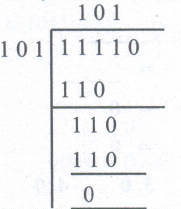
15.
(i) The octal number system is playing a vital role in digital computer work.
(ii) The octal number system has a base of 8: It means that it has eight unique symbols such as 0,1 ,2,3,4,5,6 and 7.
(iii) Thus, each digit of an octal number can have any value from 0 to 7
16.
(i) The absolute value is the magnitude of a digit in a number.
(ii) For example, the digit 5 in 7458 has an absolute value of 5 according to its value in the number line.
(iii) The place value of a digit in a number refers to the position of the digit in that number such as tens, hundreds, and thousands.
(iv) The total value of a number is the sum of the absolute value x place value of each digit that the number consists of.
(v) The base value of a number is also known as the radix, which depends on the type of the number of systems that are being used.
17.
1010102
= 0010 0010
= 2 10
= 2 A
(101010)2 = (2A)16
(101010)2 = (1 x 25) + ( 0 x 24) + (1 x 23) + (0 x 22) + ( 1x 21) + (0 x 20)
= 32 + 0 + 8 + 0 + 2 + 0 = 4210
(101010)2 = (2A)16 = 42(10)
18.
NAND and NOR gates are called Universal gates, because the fundamental logic gates can be realized through them
19.
(i) Super Large Scale Integrated chips
(ii) Parallel Processing
(iii) Superconductors
(iv) Computers very small in size
(v) Acts more faster
(vi) Usage of High-level languages
(vii) Can recognize Images and Graphs
(viii) Introduction of Artificial Intelligence Software
(ix) Able to solve high complex problems including decision making and logical reasoning.
20.
Fingerprint scanner :
Fingerprint Scanners is a fingerprint recognition device used for computer security equipped with the fingerprint recognition module feature that uses biometric technology. Fingerprint Reader/Scanner is very safe and convenient device for security instead of password, that is vulnerable to fraud and is hard to remember.
21.
(i) POST (Power-On Self-Test) is the diagnostic testing sequence that a computer's basic input! output system runs to determine if the computer keyboard, random access memory, disk drives and other hardware are working correctly.
(ii) If the necessary hardware is detected and found to be operating properly, the computer begins to boot.
22.
(i) Robot is a term coined by Karel Capek in the 1921 play RUR (Rossum's Universal Robots).
(ii) It is used to describe a computerized machine designed to respond to input received manually or from its surroundings.
23.
(i) Machine language is a collection of binary digits or bits that the computer reads and interprets.
(ii) In first generation, machined language was used.
24.
(i) The transistor ("transfer resistance") is made up of semiconductors.
(ii) It is a component used to control the amount of current or voltage or used for amplification modulation or switching of an electronic signal.
25.
(i) In OpersOffice writer, a document can be protected with a password. You can set a password to protect your document while saving a file.
(ii) To save a file with password, click on "Save with Password"check box and then click "Save" button. Immediately it shows "Set Password" dialog box.
(iii) In this dialog box, Enter a password in "Enter Password to open" text box and retype the same password in "Confirm Password" box for confirmation. Finally click "OK" button.
(iv) "More Options" button provides some more features to your protected document such as "Read only" and change password.

11th Standard Syllabus & Materials
11th Standard
TN 11th Tamil பீடு பெற நில் - செய்யுள் - காவடிச்சிந்து Important Questions And Answers Study Material - QB365 Set A
NEW11th Standard
TN 11th Tamil பீடு பெற நில் - உரைநடை - மலை இடப்பெயர்கள் : ஓர் ஆய்வு Important Questions And Answers Study Material - QB365 Set A
NEW11th Standard
TN 11th Tamil மாமழை போற்றுதும் - துணைப்பாடம் - யானை டாக்டர் Important Questions And Answers Study Material - QB365 Set A
NEW11th Standard
TN 11th Tamil மாமழை போற்றுதும் - செய்யுள் - ஐங்குறுநூறு Important Questions And Answers Study Material - QB365 Set A



Tamilnadu Stateboard 11th Standard Subjects

Maths

Commerce

Economics

Biology

Business Maths and Statistics

Accountancy

Computer Science

Physics

Chemistry
Maths
Biology
Economics
Physics
Chemistry

History
Business Maths and Statistics

Computer Science
Accountancy
Computer Applications
History
Computer Technology
Commerce
Computer Applications
Computer Technology

Tamil

English

French
Tamilnadu Stateboard Standards


