
 100% FREE ACCESS
11th Standard Syllabus & Materials
11th Standard
TN 11th Tamil இயற்கை வேளாண்மை,சுற்றுச்சூழல் -செய்யுள் - மனோன்மணீயம் Important Questions And Answers Study Material - QB365 Set A
NEW11th Standard
TN 11th Tamil என்னுயிர் என்பேன் -துணைப்பாடம் - இசைத்தமிழர் இருவர் Important Questions And Answers Study Material - QB365 Set A
NEW11th Standard
TN 11th Tamil மொழி கலை -செய்யுள் - ஒவ்வொரு புல்லையும் Important Questions And Answers Study Material - QB365 Set A
NEW11th Standard
TN 11th Tamil பீடு பெற நில் - இலக்கணம் - பகுபத உறுப்புகள் Important Questions And Answers Study Material - QB365 Set A
NEW11th Standard
TN 11th Tamil பீடு பெற நில் - துணைப்பாடம் - வாடிவாசல் Important Questions And Answers Study Material - QB365 Set A
NEW11th Standard
TN 11th Tamil பீடு பெற நில் - செய்யுள் - குறுந்தொகை Important Questions And Answers Study Material - QB365 Set A

Published on: 13/05/2022
QB365 provides detailed and simple solution for every Creative Questions in class 11 Computer Applications Subject. It will helps to get more idea about question pattern in every Creative questions with solution.
latest Creative QuestionsDownload Tamil Nadu 11th Standard Computer Applications question papers, model tests, one-mark questions, important questions, and public exam papers in PDF format. Free study materials and answer keys for TN State Board students.
Questions + Answers key
Take MCQ Computer Applications Test
1.
How the Linux OS was created?
2.
What is protected by the security modules of an OS?
3.
What are the techniques employed by an OS to optimize the CPU time?
4.
Why do we need OS?
5.
Identify the functions of OS for the following statement.
(a) Physical and virtual devices are maintained.
(b) Partitioned allocation is one of the technique
(c) Deadlock handling
6.
Identify the feature belongs to the following statement
(a) It helps to recording delays between request for a service
(b) It is keeping track of time and resources.
(c) It enables, the identification and activation of devices connected to the computer.
7.
Identify the type of Operating system for the following.
(a) It is a multi-tasking and multiuser OS.
(b) MS-DOS is an example.
(c) It used to share data and files around the world.
8.
Write the types of Operating System?
9.
Differentiate RAM and ROM.
10.
Write a note on else processor.
11.
What is the use of System Bus?
12.
List out the operation carried out by and Instruction set.
13.
Complete the Table
1) 0 x 0 = _
2) 1 x 1 = _
3) 1 x _ = 0
4) _ x 0 = 0
14.
Complete the sequence of following binary numbers: 100, 101, 110,____,_____, ______,______
15.
Multiply 111 with 101
16.
Add the binary numbers 1101012 and 1011112
17.
What negative value does 1001 - 1011 represent
18.
(300)10 \(\rightarrow \) (?2) \(\rightarrow \) (?8) \(\rightarrow \) (?)16
19.
Why is the number conversion necessary?
20.
Give the truth table of XOR gate
21.
Write a short note on XNOR gate
22.
Write a note on Touch Screen.
23.
What is use of ALU?
24.
What is Nano-technology?
25.
What is Integrated circuits?
1.
The Linux operating system was originated in 1991, as a project of "Linus Torvalds" from a university student of Finland. He posted information about his project on a newsgroup for computer students and programmers. He received support and assistance from volunteers who succeeded in creating a complete and functional operating system. Linux is similar to UNIX operating system.
2.
The security modules of an Operating System protect the resources and information of a computer system against destruction and unauthorized user access. It is a process of ensuring OS integrity, confidentiality and availability.
3.
In order to optimize the CPU time, the operating system employs two techniques - Buffering and Spooling.
4.
(i) An OS is required to access and use the hardware resources.
(ii) It provides a stable, consistent way for applications to deal with the hardware.
(iii) An OS prepares the computer for taking instructions from the user and converts into machine code and gives into the CPU for execution.
(iv) as only co-ordinates and controls all the activities of a computer system.
5.
(a) Device Management
(b) Memory Management
(c) Process Management
6.
(a) Control over system performance.
(b) Job accounting.
(c) Coordination between Software and Users
7.
(a) Real Time OS
(b) Single user OS
(c) Distributed OS
8.
(i) Single-user operating system
(ii) Multi-user Operating system
(iii) Distributed Operating system
(iv) Operating system
(v) Mobile Operating system.
9.
| S.No | RAM | ROM |
| 1. | The data or instructions can randomly be read as well as written on it. | The information can only be read but cannot be written on it |
| 2. | Any information stored in it is lost when a power supply is switched off. | The information remains stored even is if the power supply is switched off. |
| 3. | It is volatile memory. | It is non-volatile memory. |
| 4. | Types are SRAM and DRAM | Types are PROM, EPROM, EEPROM |
10.
(i) CISC stands for Complex Instruction Set Computers.
(ii) They support hundreds of instructions. Computers supporting CISC can accomplish a wide variety of tasks, making them ideal for personal computers.
(iii) Examples of CISC processors are Intel 386 & 480 Pentium, Pentium II and Ill, and Motorola 68000
11.
(i) The address bus is used to point a memory location.
(ii) A decoder, a digital circuit is used to point to the specific memory location where the word can be located.
(iii) The address register is connected with the address bus, which provides the address of the instruction.
(iv) A data bus is used to transfer data between the memory and the CPU.
(v) The data bus is bidirectional and the address bus is unidirectional.
(vi) The control bus controls both read and write operations.
(vii) The system bus is a bunch of wires which is the collection of address bus, data bus and control bus that serves as communication channels between the microprocessor and other devices.
12.
(i) Data transfer
(ii) Arithmetic operations
(iii) Logical operations
(iv) Control flow
(v) Input/output
13.
1) 0 x 0 = 0
2) 1 x 1 = 1
3) 1 x 0 = 0
4) 0 x 0 = 0
14.
100 , 101 , 110, 111, 1000, 1001, 1010
15.
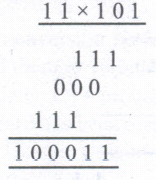
16.
1 1 0 1 0 1
+ 1 0 1 1 1 1
__________
11 0 0 1 0 0
__________
17.
The 2's complement of 10011011 is 01101010 This represents a 10110
Therefore 100110112 = - 10110
18.
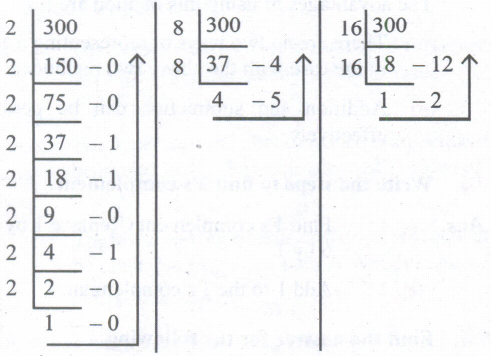
(300)10 \(\rightarrow \)(100101100)2 \(\rightarrow \) (454)8 \(\rightarrow \) (12C)16
19.
The number conversion is necessary because us enters the data into the computer in decimal fon only and the computer is then expected to convert the decimal number to other number systems which it understands.
20.
| A | B | A \(\oplus \)B |
| 0 | 0 | 0 |
| 0 | 1 | 1 |
| 1 | 0 | 1 |
| 1 | 1 | 0 |
21.
The XNOR (exclusive - NOR) gate is a combination XOR gate followed by an inverter. Its output is "true" if the inputs are the same, and "false" if the inputs are different. In simple words, the output is 1 if the input is the same, other wise the output is O.
22.
(i) A touch screen is a display device that allows the user to interact with a computer by using the finger.
(ii) It can be quite useful as an alternative to a mouse or keyboard for navigating a graphical user interface (GUI).
(iii) Touch screens are used on a wide variety of devices such as computer and laptop, monitors, smart phones, tablets, cash registers, and information kiosks.
(iv) Some touch screens uses a grid of infrared beams to sense the presence of a finger instead of utilizing touch-sensitive input.
23.
(i) The ALU is a part of the CPU where various computing functions are performed on data.
(ii) The ALU performs arithmetic operations such as addition, subtraction, multiplication, division and logical operations.
(iii) The result of an operation is stored in internal memory of CPU.
(iv) The logical operations of ALU promote the decision-making ability of a computer.
24.
Nano-technology is an engineering, science, and technology that develops machines or works with one atom or one molecule that is 100 nanometers or smaller.
25.
(i) IC is short for Integrated Circuit or Integrated Chip.
(ii) The IC is a package containing many circuits, pathways, transistors, and other electronic components all working together to perform a particular function or a series of functions.

11th Standard Syllabus & Materials
11th Standard
TN 11th Tamil பீடு பெற நில் - செய்யுள் - காவடிச்சிந்து Important Questions And Answers Study Material - QB365 Set A
NEW11th Standard
TN 11th Tamil பீடு பெற நில் - உரைநடை - மலை இடப்பெயர்கள் : ஓர் ஆய்வு Important Questions And Answers Study Material - QB365 Set A
NEW11th Standard
TN 11th Tamil மாமழை போற்றுதும் - துணைப்பாடம் - யானை டாக்டர் Important Questions And Answers Study Material - QB365 Set A
NEW11th Standard
TN 11th Tamil மாமழை போற்றுதும் - செய்யுள் - ஐங்குறுநூறு Important Questions And Answers Study Material - QB365 Set A



Tamilnadu Stateboard 11th Standard Subjects

Maths

Commerce

Economics

Biology

Business Maths and Statistics

Accountancy

Computer Science

Physics

Chemistry
Maths
Biology
Economics
Physics
Chemistry

History
Business Maths and Statistics

Computer Science
Accountancy
Computer Applications
History
Computer Technology
Commerce
Computer Applications
Computer Technology

Tamil

English

French
Tamilnadu Stateboard Standards


