
 100% FREE ACCESS
11th Standard Syllabus & Materials
11th Standard
TN 11th Tamil இயற்கை வேளாண்மை,சுற்றுச்சூழல் -செய்யுள் - மனோன்மணீயம் Important Questions And Answers Study Material - QB365 Set A
NEW11th Standard
TN 11th Tamil என்னுயிர் என்பேன் -துணைப்பாடம் - இசைத்தமிழர் இருவர் Important Questions And Answers Study Material - QB365 Set A
NEW11th Standard
TN 11th Tamil மொழி கலை -செய்யுள் - ஒவ்வொரு புல்லையும் Important Questions And Answers Study Material - QB365 Set A
NEW11th Standard
TN 11th Tamil பீடு பெற நில் - இலக்கணம் - பகுபத உறுப்புகள் Important Questions And Answers Study Material - QB365 Set A
NEW11th Standard
TN 11th Tamil பீடு பெற நில் - துணைப்பாடம் - வாடிவாசல் Important Questions And Answers Study Material - QB365 Set A
NEW11th Standard
TN 11th Tamil பீடு பெற நில் - செய்யுள் - குறுந்தொகை Important Questions And Answers Study Material - QB365 Set A

Published on: 13/05/2022
QB365 provides detailed and simple solution for every Creative Questions in class 11 Computer Applications Subject. It will helps to get more idea about question pattern in every Creative questions with solution.
latest Creative QuestionsDownload Tamil Nadu 11th Standard Computer Applications question papers, model tests, one-mark questions, important questions, and public exam papers in PDF format. Free study materials and answer keys for TN State Board students.
Questions + Answers key
Take MCQ Computer Applications Test
1.
Explain all the attributes of < IMG > tag with suitable HTML code.
2.
What do you known about
(i) Photoshop
(ii) Picasa
(ill) GIMP
(iv) HTML
(v) W3C
3.
Explain How will you create drop-down list box with an example.
4.
Explain the attributes of < input > tag.
5.
Explain scrolling text using < Marquee >.
1.
Attributes of < img > tag:
Other than src, the < img > tag has many attributes the enable to control how the image is presented on the page.
Alt (Alternative Text)
The alt attribute within < img > tag is used to describe the image, so that some text is conveyed even when the image cannot be displayed.
Ex:
< img src = bharathiyar.gif alt = "National Poet of India" >
Width and Height:
Width and Height attributes are used to set the width and height of an image. The values of these attributes should be either pixels or percentage of its actual size. If these attributes are not specified, the browser displays the image in its original size.
Vspace (Vertical Space) and Hspace (Horizontal Space):
Vspace and Hspace attributes are used to set Vertical and Horizontal space between the images.
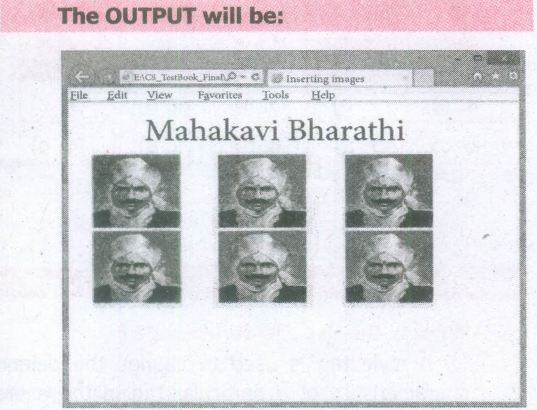
An HTML code to demonstrate < img > attributes:
< html >
< head >
< title > Inserting Images < /title >
< /head >
< body >
< h1 align = center > Mahakavi Bharathi
< /h1 >
< img src = bharathiyar.gif alt = "National
Poet of' India" Width = 20% Height = 25% vpace = 20 Hspace = 20 >
< img src = bharathiyar.gif alt = "National
Poet of India" Width = 20% Height = 25% vpace = 20 Hspace = 20 >
< img src = bharathiyar.gif alt = "National
Poet of India" Width = 20% Height = 25% vpace = 20 Hspace = 20 > < br >
< img src = bharathiyar.gif alt = "National
Poet of 'India" Width = 20% Height = 25% vpace = 20 Hspace = 20 >
< img src = bharathiyar.gif alt = "National
Poet of India" Width = 20% Height = 25% vpace = 20 Hspace = 20 >
< img src = bharathiyar.gif alt = "National
Poet of India" Width = 20% Height = 25% vpace = 20 Hspace = 20 > < br >
< /body >
< /html >
2.
(i) Photoshop: Familiar Photo editing tool developed by adobe.
(ii) Picasa: Free image organizer and editing tool developed by Lifescape.
(iii) GIMP: Open source image editing tool.
(iv) HTML5 : Latest version of HTML authorized by w3c.
(v) W3C: The World Wide Web Consortium; an International standards organization for the www.
3.
The < select > tag is used to create dropdown list box in HTML.
It provides a list of various options as a dropdown list.
This element is more helpful when a number of options are to be displayed in a limited space. The < option > tag.is used to specify list items
Attributes of < Select > tag:
Name - Provide the name to the control, which is sent to the server.
Size - Determine the style of dropdown list box.
Size = 1 dropdown list box
Size = 2 List box
Multiple -Allows user to select multiple values.
Attributes of < Option > tag:
Selected - Indicate default selection
Value - Value to be submitted to server
< Select name = area size= 2 >
< option value = CHN > Chennai < /option >
< option value = MDR selected > Madurai < /option >
< option value = CBO > Coimbatore < /option >
< option value = KKM > Kanyakumari < /option >
< /Select > < /p >
4.
Attributes of < input > tag:
(i) Type: This attribute is used define the type of control to be created by < input > tag.
(ii) Name: This attribute of < input > tag is used to assign a name to the input controls. When the form is submitted, the data values are passed to the server along with the names of the controls.
(iii) Value: This attribute is used to define default value to some controls.
(iv) Size: This is used to set the width of the input text in terms of characters. It is applicable only for textbox and password boxes.
(v) Maxlength: This attribute of < input > tag is used to set the length of the input character (number of characters to be inputted) to the textbox and password boxes.
5.
In HTML, a piece of text or image can be moved horizontally or vertically by using < marquee > tag. This feature makes a web page as more attractive.
(i) General format: < marquee > Text or image to be scroll < /marquee >
Attributes of < marquee >
(ii) Height and Width: These attributes are used to set height and width of the marquee. The values should be either in pixels or in percentage of browser window.
(iii) Direction: This is used to specify the direction of the movement of text or image. The text or image will move towards right to left by default. So, the default direction is left. The Possible values are up', 'down', 'left' or 'right'
(iv) Behaviour: This attribute is used to specify the type of scrolling. The values are scroll', 'slide' and 'alternate'.
(v) Scroll delay: This attribute is used to define the time delay between each jump. The time unit should be in seconds
(vi) Scrollamount: This is used to define the speed of the scroll.
(vii) Loop: This is for defining how many times the marquee element should repeat on the screen. The default value is 'infinite', which means the marquee element scrolls endlessly.
(viii) Bgcolor: This is used to specify the background color to the marquee elements.
(ix) Hspace and Vspace: This is for defining the horizontal and vertical space around the marquee. The value can be in pixels or percentage.
An HTML code to demonstrate marquee:
< html >
< head >
< title > Marquee < /title >
< /head >
< body >
< marquee > < b > The Government of
Tamilnadu < /b >, Directorate of School
Education < /marquee >
< marquee direction=right > Welcome
to < b > The State Council of Educational
Research and Training < /b >, Tamilnadu
< /marquee >
< /body >
< /html >

11th Standard Syllabus & Materials
11th Standard
TN 11th Tamil பீடு பெற நில் - செய்யுள் - காவடிச்சிந்து Important Questions And Answers Study Material - QB365 Set A
NEW11th Standard
TN 11th Tamil பீடு பெற நில் - உரைநடை - மலை இடப்பெயர்கள் : ஓர் ஆய்வு Important Questions And Answers Study Material - QB365 Set A
NEW11th Standard
TN 11th Tamil மாமழை போற்றுதும் - துணைப்பாடம் - யானை டாக்டர் Important Questions And Answers Study Material - QB365 Set A
NEW11th Standard
TN 11th Tamil மாமழை போற்றுதும் - செய்யுள் - ஐங்குறுநூறு Important Questions And Answers Study Material - QB365 Set A



Tamilnadu Stateboard 11th Standard Subjects

Maths

Commerce

Economics

Biology

Business Maths and Statistics

Accountancy

Computer Science

Physics

Chemistry
Maths
Biology
Economics
Physics
Chemistry

History
Business Maths and Statistics

Computer Science
Accountancy
Computer Applications
History
Computer Technology
Commerce
Computer Applications
Computer Technology

Tamil

English

French
Tamilnadu Stateboard Standards


