
 100% FREE ACCESS
11th Standard Syllabus & Materials
11th Standard
TN 11th Tamil இயற்கை வேளாண்மை,சுற்றுச்சூழல் -செய்யுள் - மனோன்மணீயம் Important Questions And Answers Study Material - QB365 Set A
NEW11th Standard
TN 11th Tamil என்னுயிர் என்பேன் -துணைப்பாடம் - இசைத்தமிழர் இருவர் Important Questions And Answers Study Material - QB365 Set A
NEW11th Standard
TN 11th Tamil மொழி கலை -செய்யுள் - ஒவ்வொரு புல்லையும் Important Questions And Answers Study Material - QB365 Set A
NEW11th Standard
TN 11th Tamil பீடு பெற நில் - இலக்கணம் - பகுபத உறுப்புகள் Important Questions And Answers Study Material - QB365 Set A
NEW11th Standard
TN 11th Tamil பீடு பெற நில் - துணைப்பாடம் - வாடிவாசல் Important Questions And Answers Study Material - QB365 Set A
NEW11th Standard
TN 11th Tamil பீடு பெற நில் - செய்யுள் - குறுந்தொகை Important Questions And Answers Study Material - QB365 Set A

Published on: 13/05/2022
QB365 provides detailed and simple solution for every Creative Questions in class 11 Computer Applications Subject. It will helps to get more idea about question pattern in every Creative questions with solution.
latest Creative QuestionsDownload Tamil Nadu 11th Standard Computer Applications question papers, model tests, one-mark questions, important questions, and public exam papers in PDF format. Free study materials and answer keys for TN State Board students.
Questions + Answers key
Take MCQ Computer Applications Test
1.
What are the different browsers? Explain.
2.
Explain the do’s and don’t of safe surfing on internet.
3.
Explain any four familiar Internet Browser
4.
Explain the advantages of email.
5.
Explain the structure of email.
1.
Familiar Internet Browser:
i) Google Chrome is a freeware familiar web browser developed by Google Inc. It is best for its speed, simplicity, security, privacy and custornlzatlon features. Google Chrome supports on Android 4.0 or higher, iOS 6.0 or higher, Mac OSX 10.6 or higher and Windows (XP or higher) and Linux system.
ii) Mozila Firefox is a free and open source web browser developed by Mozilla Foundation and Mozilla Corporation. Firefox is default browser in Ubuntu. It supports Windows, Mac OS X, Linux and Android system.
iii) Internet Explorer commonly known as Microsoft Internet Explorer or Windows Internet Explorer is the first or default browser for a Windows Pc. It is developed by Microsoft.
iv) Safari is a web browser developed by Apple Inc and comes with OS X and iOS. Some version of safari browser also supports in Windows Operating System. Exclusively used in Apple Mac system.
2.
Following is the do's and don't of safe surfing on Internet:
1. Don't give out your personal information - Don't put personal details such as your home address, telephone numbers or parent's work address online as cybercriminals can use this information to create a fake profile, with your details.
2. What goes online, stays online - Use privacy settings to make sure only your friends and family can see photos you post. Avoid posting holiday plans as criminals may track your movements
3. Check your security and privacy settings - Make sure your social network privacy settings are secured so only your friends can see your personal information and use your privacy settings to restrict who can see your posts, videos and photos
4. Password safety - Sharing your password with your parents is a sensible idea, but avoid sharing your password with your friends, even if they promise they won't tell anyone! Also, when setting your password, make sure it isn't something people may guess such as your pet's name. Use a mixture of letters, numbers and upper and lower case characters
5. Always protect your mobile device - Make sure your mobile phone is pin-protected so all your personal information stored on it is safe. Download a security app which allows you to remotely wipe any personal data, should your mobile be lost or stolen
6. Don't talk to strangers online or offline - Don't meet up with strangers and let your parents know if a stranger has tried to get in contact with you online
7. Listen to the adults who are known to you - Adults will always be worried about you. Help set their mind at rest and avoid chatting online with strangers
8. Be wary of unsecured or unknown websites - When shopping online, use reputable and known retailers.
9. Be careful what links you click on - Avoid clicking links in an email, Instant Message or on your social network unless you are sure the message is from someone you know.
3.
(i) Google Chrome is a freeware familiar web browser developed by Google Inc. It is best for its speed, simplicity, security, privacy and customization features. Google Chrome supports on Android 4.0 or higher, iOS 6.0 or higher, Mac OSX 10.6 or higher and Windows(XP sp2 or higher)and Linux system
(ii) Moziia Firefox is a free and open source web browser developed by Mozilla Foundation and Mozilla Corporation.FireFoxis default browser in Ubuntu It supportsWindows, Mac OS X, Linux and Android system
(iii) Internet Explorer commonly known as Microsoft Internet Explorer or WindowsInternet, Explorer is the first or default browser for a Windows Pc. It is developed by Microsoft.
(iv) Safari is a web browser developed by Apple Inc. and comes with OS X and iOS. Some version of safari browser also supportsinWindowsOperating System. Exclusively used inApple Mac system
4.
The main advantages of email are listed below:
Free delivery:
Sending an e-mail is virtually free, outside the cost of Internet service. There is no need to buy a postage stamp to send a letter.
Global delivery:
E-mail can be sent to nearly anywhere around the world, to any country.
Instant delivery:
An e-mail can be instantly sent and received by the recipient over the Internet.
File attachment:
An e-mail can include one or more file attachments, allowing a person to send documents, pictures, or other files with an e-mail.
Long-term storage:
E-mails are stored electronically, which allows for storage and archival over long periods of time.
Environmentally friendly:
Sending an e-mail does not require paper (Paperless), cardboard, or packing tape, conserving paper resources.
5.
Structure of email: Click the Compose button and then writing an e-mail contents.
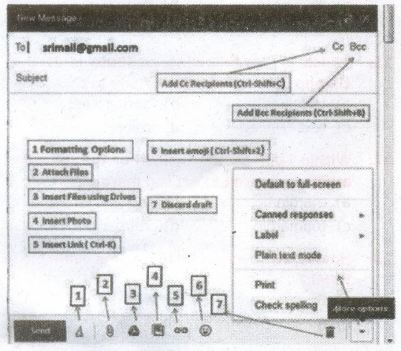
When sending an e-mail message, several fields are required to be filled:
(i) The To field is where you type the e-mail address of the person who is the recipient of your message.
(ii) The From filed should contain you e-mail address.
(iii) If you are replying to a message, the To and From fields are automatically filled out; if it's a new message, you'll need to enter them manually.
(iv) The Subject should consist of a few words describing the e-mail's contents. The Subject lets the recipient see what the e-mail is about, without opening and reading the full e-mail. This field is optional.
(v) The CC (Carbon Copy) field allows you to specify recipients who are not direct addressees (listed in the "To" field). This field is optional.
(vi) The BCC (Blind Carbon Copy) field is similar to CC, except the recipients are secret. Each BCC recipient will receive the e-mail, but will not see who else received a copy. The addressees(anyone listed in the "To" field) remain visible to all recipients. This field is optional.
(vii) Finally, the Message Body is the location you type your main message. It often contains your signature at the bottom; similar to a handwritten letter.

11th Standard Syllabus & Materials
11th Standard
TN 11th Tamil பீடு பெற நில் - செய்யுள் - காவடிச்சிந்து Important Questions And Answers Study Material - QB365 Set A
NEW11th Standard
TN 11th Tamil பீடு பெற நில் - உரைநடை - மலை இடப்பெயர்கள் : ஓர் ஆய்வு Important Questions And Answers Study Material - QB365 Set A
NEW11th Standard
TN 11th Tamil மாமழை போற்றுதும் - துணைப்பாடம் - யானை டாக்டர் Important Questions And Answers Study Material - QB365 Set A
NEW11th Standard
TN 11th Tamil மாமழை போற்றுதும் - செய்யுள் - ஐங்குறுநூறு Important Questions And Answers Study Material - QB365 Set A



Tamilnadu Stateboard 11th Standard Subjects

Maths

Commerce

Economics

Biology

Business Maths and Statistics

Accountancy

Computer Science

Physics

Chemistry
Maths
Biology
Economics
Physics
Chemistry

History
Business Maths and Statistics

Computer Science
Accountancy
Computer Applications
History
Computer Technology
Commerce
Computer Applications
Computer Technology

Tamil

English

French
Tamilnadu Stateboard Standards


