
 100% FREE ACCESS
11th Standard Syllabus & Materials
11th Standard
TN 11th Tamil இயற்கை வேளாண்மை,சுற்றுச்சூழல் -செய்யுள் - மனோன்மணீயம் Important Questions And Answers Study Material - QB365 Set A
NEW11th Standard
TN 11th Tamil என்னுயிர் என்பேன் -துணைப்பாடம் - இசைத்தமிழர் இருவர் Important Questions And Answers Study Material - QB365 Set A
NEW11th Standard
TN 11th Tamil மொழி கலை -செய்யுள் - ஒவ்வொரு புல்லையும் Important Questions And Answers Study Material - QB365 Set A
NEW11th Standard
TN 11th Tamil பீடு பெற நில் - இலக்கணம் - பகுபத உறுப்புகள் Important Questions And Answers Study Material - QB365 Set A
NEW11th Standard
TN 11th Tamil பீடு பெற நில் - துணைப்பாடம் - வாடிவாசல் Important Questions And Answers Study Material - QB365 Set A
NEW11th Standard
TN 11th Tamil பீடு பெற நில் - செய்யுள் - குறுந்தொகை Important Questions And Answers Study Material - QB365 Set A

Published on: 03/07/2021
QB365 provides detailed and simple solution for every Creative Questions in class 11 Computer Applications Subject. It will helps to get more idea about question pattern in every Creative questions with solution.
Download Tamil Nadu 11th Standard Computer Applications question papers, model tests, one-mark questions, important questions, and public exam papers in PDF format. Free study materials and answer keys for TN State Board students.
Questions + Answers key
Take MCQ Computer Applications Test
1.
What is conditional operator or ternary operator? Explain?
2.
What are the rules for naming avariable?
3.
Write a note on Relational operators.
4.
Write the syntax of alert dialog box.
5.
Explain the prompt Dialog Box.
1.
Conditional Operator (?:)
The 7: is the conditional operator in JavaScript, which requires three operands, hence it is called the ternary operator.
The syntax is:
var variablename=(condition) 7 valuel : value2;
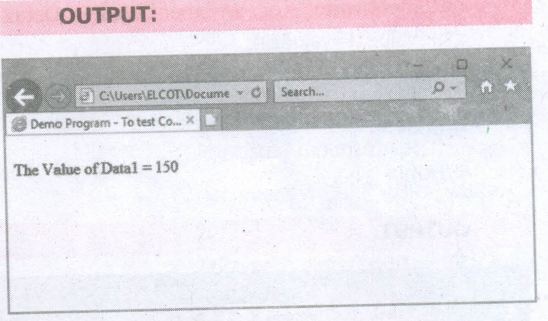
In the syntax condition may be relational expression or logical expression. First condition will be evaluated, if the condition returns true then the value of the left side of the colon is assigned to the variable otherwise the value of the right side of the colon will be assigned the variable. For example,
var result=(10 > 15) ? 100 : 150;
In the above example, since the conditlon returns false the value 150 will be assigned to result.
HTML CODE:
< Html >
< Head >
< Title >Demo Program - To test Conditional
Operator in JavaScript < /Title >
< /Head >
< Body >
< script language="javascript" type="text/
javascript" >
var valuel = 522, value2=150, value3;
value3=(valuel
"+value3);
< /script >
< /Body >
< /Html >
2.
Rules for naming variable:
a) The first character must be a letter or an underscore (-). Number cannot be as the first character.
b) The rest of the variable name can include any letter, any number, or the underscore. we can't use any other characters, including spaces, symbols, and punctuation marks.
c) JavaScript variable names are case sensitive. That is, a variable named Register Number is treated as an entirely different variable than one named registernumber.
d) There is no limit to the length of the variable name.
e) JavaScript's reserved words cannot be used as a variable name. All programming lanquaqes have a supply of words that are used internally by the language and that cannot be used for variable names.
3.
1. Relational operators are also called as Comparison operators, they compares two values and the result is true or false.
2. JavaScript provides a rich set of relational operators including = (equal to), ! = (not equal to), < (less than), > (greater than), < = (less than or equal to), and > = (greater than or equal to). Using a relational operator in an expression causes the expression to evaluate as true if the condition holds or false if otherwise.
4.
The syntax of alert box is
Alert(" Message ");
(or) Window.alert(" Message ");
Example:
alert (" Name is compulsory entry ");
(or) window.alert('' Name is compulsory entry ");
5.
The prompt dialog box is displayed using a method called prompt() which takes two parameters:
(i) a label which you want to display in the text box and
(ii) a default string !o display in the text box. This dialog box has two buttons: OK and Cancel.
If the user clicks the OK button, the prompt() will return the entered value from the text box. If the user clicks the Cancel button, the prompt () returns null.

11th Standard Syllabus & Materials
11th Standard
TN 11th Tamil பீடு பெற நில் - செய்யுள் - காவடிச்சிந்து Important Questions And Answers Study Material - QB365 Set A
NEW11th Standard
TN 11th Tamil பீடு பெற நில் - உரைநடை - மலை இடப்பெயர்கள் : ஓர் ஆய்வு Important Questions And Answers Study Material - QB365 Set A
NEW11th Standard
TN 11th Tamil மாமழை போற்றுதும் - துணைப்பாடம் - யானை டாக்டர் Important Questions And Answers Study Material - QB365 Set A
NEW11th Standard
TN 11th Tamil மாமழை போற்றுதும் - செய்யுள் - ஐங்குறுநூறு Important Questions And Answers Study Material - QB365 Set A



Tamilnadu Stateboard 11th Standard Subjects

Maths

Commerce

Economics

Biology

Business Maths and Statistics

Accountancy

Computer Science

Physics

Chemistry
Maths
Biology
Economics
Physics
Chemistry

History
Business Maths and Statistics

Computer Science
Accountancy
Computer Applications
History
Computer Technology
Commerce
Computer Applications
Computer Technology

Tamil

English

French
Tamilnadu Stateboard Standards


