
 100% FREE ACCESS
11th Standard Syllabus & Materials
11th Standard
TN 11th Tamil இயற்கை வேளாண்மை,சுற்றுச்சூழல் -செய்யுள் - மனோன்மணீயம் Important Questions And Answers Study Material - QB365 Set A
NEW11th Standard
TN 11th Tamil என்னுயிர் என்பேன் -துணைப்பாடம் - இசைத்தமிழர் இருவர் Important Questions And Answers Study Material - QB365 Set A
NEW11th Standard
TN 11th Tamil மொழி கலை -செய்யுள் - ஒவ்வொரு புல்லையும் Important Questions And Answers Study Material - QB365 Set A
NEW11th Standard
TN 11th Tamil பீடு பெற நில் - இலக்கணம் - பகுபத உறுப்புகள் Important Questions And Answers Study Material - QB365 Set A
NEW11th Standard
TN 11th Tamil பீடு பெற நில் - துணைப்பாடம் - வாடிவாசல் Important Questions And Answers Study Material - QB365 Set A
NEW11th Standard
TN 11th Tamil பீடு பெற நில் - செய்யுள் - குறுந்தொகை Important Questions And Answers Study Material - QB365 Set A

Published on: 26/06/2018
june month test
Download Tamil Nadu 11th Standard Computer Science question papers, model tests, one-mark questions, important questions, and public exam papers in PDF format. Free study materials and answer keys for TN State Board students.
Questions + Answers key
Take MCQ Computer Science Test
1.
Which generation of computer used IC's?
First
Second
Third
Fourth
2.
Which one of the following is the main memory?
ROM
RAM
Flash drive
Hard disk
3.
Expand POST
Post on self Test
Power on Software Test
Power on Self Test
Power on Self Text
4.
When a system restarts which type of booting is used.
Warm booting
Cold booting
Touch boot
Real boot
5.
Which one of the following is used to in ATM machines
Touch Screen
Speaker
Monitor
Printer
6.
_____ output device is used for printing building plan.
Thermal printer
Plotter
Dot matrix
Inkjet printer
7.
Identify the input device
Printer
Mouse
Plotter
Projector
8.
Identify the output device
Keyboard
Memory
Monitor
Mouse
9.
10.
First generation computers used
Vacuum tubes
Transistors
Integrated circuits
Microprocessors
11.
What is use of scanner?
12.
What is CPU?
13.
What is NLP?
14.
Write the developments of Sixth generation computers.
15.
Name the types of computer introduced in Fourth generation computers.
16.
Name the softwares introduced in fifth generation computers.
17.
Expand VLSI.
18.
Name the Third generation computers.
19.
Name the Second generation computers.
20.
Name the First generation computers.
21.
Distinguish Primary and Secondary memory.
22.
Differentiate Input and output unit.
23.
What is the function of memory?
24.
Write the functions of control unit.
25.
What is the function of an ALU?
26.
27.
28.
What is a computer?
29.
30.
What is an input device? Give two examples.
31.
Write the applications of computer
32.
What are the characteristics of a computer?
33.
34.
Discuss the various generations of computers.
35.
1.
(c)
Third
2.
(b)
RAM
3.
(d)
Power on Self Text
4.
(a)
Warm booting
5.
(a)
Touch Screen
6.
(b)
Plotter
7.
(b)
Mouse
8.
(c)
Monitor
9.
(c)
10.
(a)
Vacuum tubes
11.
The scanner converts any type of printed or written information including photographs into digital pulses, which can be manipulated by the computer.
12.
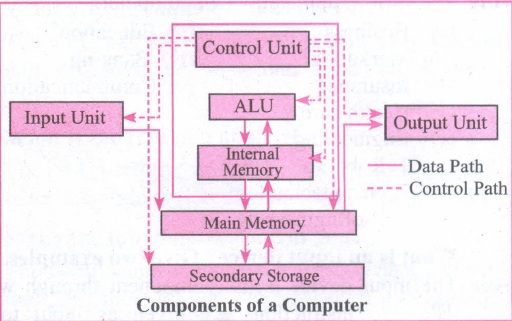
CPU is the major component which interprets and executes software instructions. It also controls the operation of all other components such as memory unit, input and output units.
13.
Natural Language Processing is the ability of a computer program to understand human language. It is a component of artificial intelligence.
14.
(i) Parallel Computing
(ii) Artificial Neural Networks
(iii) Robotics
(iv) Natural Language Processing
15.
(i) Micro computer
(ii) Portable Computers
16.
(i) Artificial Intelligence
(ii) Expert Systems
17.
(i) Very Large Scale Integrated Circuits.
(ii) Ultra Large Scale Integration
18.
IBM 360 Series, Honeywell 6000 series.
19.
IBM 1401, IBM 1620, UNIVAC 1108
20.
ENIAC, EDVAC, UNIVAC 1
21.
| Primary Memory | Secondary memory |
| It is directly accessed by CPU. | It is not directly accessed by CPU. |
| The access of memory is done by making use of addresses or data buses. | Here the Memory access is done through the input and output channels. |
| The Primary memory is embedded with 2 types of technologies. They are RAM and ROM. | The secondary memory are stored in mass storage units like CD ROM, CD, DVD, Floppy disk storage. |
| Volatile in nature. | Non-Volatile in nature. |
| Much faster than the secondary Memory. | Slower than the Primary Memory. |
| Costlier than secondary memory. | Cheaper than the Primary Memory. |
| It is temporary memory. | Secondary memory is permanent. |
22.
| Input Unit | Output Unit |
| An input device feeds information to a computer system for processing. | output device reproduces or displays the results of that processing. |
| Input devices only allow for input of data to a computer. | output devices only receive the output of data from another device. |
| It is a peripheral device used to provide data and control signals to an information processing system such as computer. | It is a unit which sends data from the computer to another device. |
| Eg. keyboard, mouse | Eg. printer, monitor |
23.
Memory enables the computer to store the program. The memory unit is of two types:
(i) Primary memory
(ii) Secondary memory
The primary memory is used to store data temporarily and secondary memory stores the data permanently.
24.
The control unit controls the flow of data between the CPU, memory I/O devices. It also controls the entire operations of a computer.
25.
The ALU is a part of CPU where various computing functions are performed on data. ALU performs arithmetic operations such as addition, subtraction, multiplication, division and logical operations.
26.
27.
28.
Computer is an Electronic Machine, capable of performing basic operations like addition, multiplication, division etc. Computer accepts data as input, process it, produce output and stores it for future.
29.
30.
Input Device:
It is a peripheral device used to provide data and control signals to an information processing system. Eg: Keyboard, Mouse, Scanners, Digital cameras, Joysticks.
31.
Applications of Computer: Banking, Insurance, Education, Marketing, Health care, Engineering design, Communication, Government, Weather forecasting.
32.
The Basic characteristics of the computers are:
(i) High speed
(ii) Stores Huge Data
(iii) They do millions of different tasks
(iv) Very versatile
(v) Accurate
(vi) Diligence
33.
34.
| Computers size was drastically reduced. S.No | Generation | Period | Main Component used | Merits/ Demerits |
| 1 | First Generation | 1942-1955 | 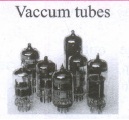 |
Big in size Consumed more power Malfunction due to overheating Machine Language was used Eg : ENIAC, EDVAC, UNIVAC |
| First Generation Computer - ENIAC, EDVAC, UNIVAC 1 ENIAC weighed about 27 tons, size 8 feet x 100 feet x 3 feet, and consumed around 150 watts of power | ||||
| 2 | Second Generation | 1955-1964 | 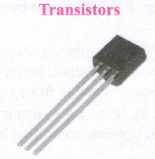 |
Smaller compared to First Generation Generated Less Heat Consumed less power compared to first-generation Punched cards were used. The first operating system was developed Batch Processing and Multiprogramming Operating System Machine language, as well as Assembly language, was used. |
| Second Generation Computers IBM 1404, IBM 1620, UNIVAC 1108 | ||||
| 3 | Third Generation | 1964-1975 | 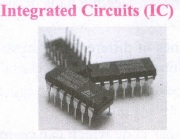 |
Computers were smaller, faster, and more reliable Consumed less power. High-Level Languages were used. |
| Third Generation Computers -IBM ·360 series, Honeywell 6000 series | ||||
| 4 | Fourth Generation | 1975-1980 | 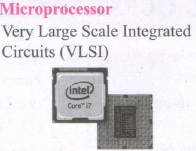 |
Smaller and Faster Microcomputer series such as IBM and APPLE was developed Portable Computers were introduced. |
| 5 | Fifth Generation | 1980-till date | 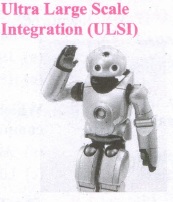 |
Parallel, Processing Superconductors Computers size was drastically reduced. Can recognize Images and Graphics Introduction of Artificial Intelligence and Expert Systems Able to solve highly complex problems including decision making and logical reasoning. |
| 6 | Sixth Generation | In future | 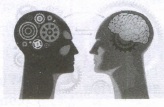 |
Parallel and Distributed computing Computers have become smarter faster and smaller Development of robotics Natural Language Processing Development of Voice Recognition Software. |
35.

11th Standard Syllabus & Materials
11th Standard
TN 11th Tamil பீடு பெற நில் - செய்யுள் - காவடிச்சிந்து Important Questions And Answers Study Material - QB365 Set A
NEW11th Standard
TN 11th Tamil பீடு பெற நில் - உரைநடை - மலை இடப்பெயர்கள் : ஓர் ஆய்வு Important Questions And Answers Study Material - QB365 Set A
NEW11th Standard
TN 11th Tamil மாமழை போற்றுதும் - துணைப்பாடம் - யானை டாக்டர் Important Questions And Answers Study Material - QB365 Set A
NEW11th Standard
TN 11th Tamil மாமழை போற்றுதும் - செய்யுள் - ஐங்குறுநூறு Important Questions And Answers Study Material - QB365 Set A



Tamilnadu Stateboard 11th Standard Subjects

Maths

Commerce

Economics

Biology

Business Maths and Statistics

Accountancy
Computer Science

Physics

Chemistry
Maths
Biology
Economics
Physics
Chemistry

History
Business Maths and Statistics

Computer Science
Accountancy

Computer Applications
History
Computer Technology
Commerce
Computer Applications
Computer Technology

Tamil

English

French
Tamilnadu Stateboard Standards
