
 100% FREE ACCESS
11th Standard Syllabus & Materials
11th Standard
TN 11th Tamil இயற்கை வேளாண்மை,சுற்றுச்சூழல் -செய்யுள் - மனோன்மணீயம் Important Questions And Answers Study Material - QB365 Set A
NEW11th Standard
TN 11th Tamil என்னுயிர் என்பேன் -துணைப்பாடம் - இசைத்தமிழர் இருவர் Important Questions And Answers Study Material - QB365 Set A
NEW11th Standard
TN 11th Tamil மொழி கலை -செய்யுள் - ஒவ்வொரு புல்லையும் Important Questions And Answers Study Material - QB365 Set A
NEW11th Standard
TN 11th Tamil பீடு பெற நில் - இலக்கணம் - பகுபத உறுப்புகள் Important Questions And Answers Study Material - QB365 Set A
NEW11th Standard
TN 11th Tamil பீடு பெற நில் - துணைப்பாடம் - வாடிவாசல் Important Questions And Answers Study Material - QB365 Set A
NEW11th Standard
TN 11th Tamil பீடு பெற நில் - செய்யுள் - குறுந்தொகை Important Questions And Answers Study Material - QB365 Set A

Published on: 08/06/2021
QB365 provides detailed and simple solution for every book back questions in class 11 Computer Science subject.It will helps to get more idea about question pattern in every book back questions with solution.
Download Tamil Nadu 11th Standard Computer Science question papers, model tests, one-mark questions, important questions, and public exam papers in PDF format. Free study materials and answer keys for TN State Board students.
Questions + Answers key
Take MCQ Computer Science Test
1.
Explain main memory and its types.
2.
Explain the types of ROM.
3.
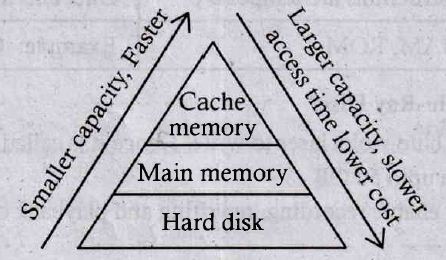
Arrange the memory devices in ascending order based on the access time.
4.
How the read and write operations are performed by a processor? Explain.
5.
1.
The main memory is otherwise called as Random Access Memory. This is available in computers in the form of Integrated Circuits (ICs). It is the place in a computer where the Operating System, Application Programs and the data in current use are kept temporarily so that they can be accessed by the computer's processor. The smallest unit of information that can be stored in the memory is called as a bit. The memory can be accessed by a collection of 8 bits which is called as a byte. The bytes are referred by 'B'. If a computer has 1 megabyte of memory, then it can store 10,48,576 bytes (or characters) of information. [Hence 1MB is 1024K.B and 1 K.Bis 1024 Bytes, So 1024 x 1024 =10,48,576 Bytes).
Types of RAM
There are two basic types of RAM
1. Dynamic RAM (DRAM)
2. Static RAM (SRAM)
These two types differ in the technology they use to hold data. Dynamic RAM being a common type needs to be refreshed frequently. Static RAM needs to be refreshed less often, which makes it faster. Hence, Static RAM is more expensive than Dynamic RAM.
2.
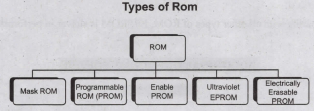
Read-only memory (ROM):
1. Read-Only Memory refers to special memory in a computer with pre-recorded data at manufacturing time which cannot be modified.
2. The stored programs that start the computer and perform diagnostics are available in ROMs. ROM stores critical programs such as the program that boots the computer.
3. Once the data has been written onto a ROM chip, it cannot be modified or removed and can only be read.
4. ROM retains its contents even when the computer is turned off. So, ROM is called as a non-volatile memory.
Programmable Read-Only Memory (PROM):
1. Programmable read-only memory is also a nonvolatile memory on which data can be written only once. Once a program has been written onto a PROM, it remains there forever.
2. Unlike the main memory, PROMs retain their contents even when the computer is turned off.
3. The PROM differs from ROM. PROM is manufactured as a blank memory, whereas a ROM is programmed during the manufacturing process itself.
4. PROM programmer or a PROM burner is used to write data to a PROM chip. The process of programming a PROM is called burning the PROM.
Erasable Programmable Read-Only Memory (EPROM):
1. Erasable Programmable Read-Only Memory is a special type of memory which serves as a PROM, but the content can be erased using ultraviolet rays.
2. EPROM retains its contents until it is exposed to ultraviolet light. The ultraviolet light clears its contents, making it possible to reprogram the memory.
3. An EPROM differs from a PROM. PROM can be written only once and cannot be erased.
4. EPROMs are used widely in personal computers because they enable the manufacturer to change the contents of the PROM to replace with updated versions or erase the contents before the computer is delivered.
Electrically Erasable Programmable Read-Only Memory (EEPROM)
1. Electrically Erasable Programmable Read-Only Memory is a special type of PROM that can be erased by exposing it to an electrical charge.
2. Like other types of PROM, EEPROM retains its contents even when the power is turned off.
3. Comparing with all other types of ROM, EEPROM is slower in performance.
3.
A memory is just like a human brain. It is used to store data and instructions. Computer memory is the storage space in the computer, where data and instructions are stored. There are two types of accessing methods to access (read or write) the memory. They are sequential access and random access. In sequential access, the memory is accessed in an orderly manner from starting to end. But, in random access, any byte of memory can be accessed directly without navigating through previous bytes. Different memory devices are arranged according to the capacity.
4.
1. The Central Processing Unit(CPU) has a Memory Data Register (MDR) and a Memory Address Register (MAR).
2. The Memory Data Register (MDR) keeps the data which is transferred between the memory and the CPU. The Program Counter (PC) is a special register in the CPU which always keeps the address of the next instruction to be executed.
3. The Arithmetic and Logic unit of CPU places the address of the memory to be fetched, into the Memory Address Register.
4. A bus is a collection of wires used for communication between the internal components of a computer.
5. The address bus is used to point a memory location. A decoder, a digital circuit is used to point to the specific memory location where the word can be located.
6. The address register is connected with the address bus, which provides the address of the instruction. A data bus is used to transfer data between the memory and the CPU.
7. The data bus is bidirectional and the address bus is unidirectional. The control bus controls both read and write operations.
8. The read operation fetches data from memory and transfers to MDR. A single control line performs two operations like Read/Write using 1 or 0.
9. Also, the write operation transfers data from the MDR to memory. This organization is shown below.
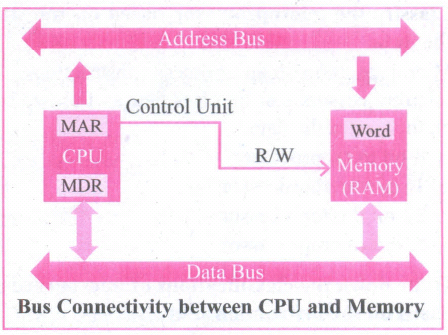
10. The word in the RAM has the same size (no. of bits) as the Memory Data Register (MDR). If the processor is an 8-bit RAM processor like Intel 8085, its MDR and the word in both have 8 bits.
11. If the size of the MDR is eight bits, which can be connected with a word in the memory which is also eight bits size. The data bus has eight parallel wires to transfer data either from MDR to word or word to MDR based on the control(Read or write).
.png)
12. This control line is labeled as which becomes 1 means READ operation and 0 means WRITE operation.
.png)
14. These pictures show the contents of MDR and the word before and after the READ operation.
i. The read operation transfers the data(bits) from word to Memory Data Register.
ii. The write operation transfers the data(bits) from Memory Data Register to word.
5.

11th Standard Syllabus & Materials
11th Standard
TN 11th Tamil பீடு பெற நில் - செய்யுள் - காவடிச்சிந்து Important Questions And Answers Study Material - QB365 Set A
NEW11th Standard
TN 11th Tamil பீடு பெற நில் - உரைநடை - மலை இடப்பெயர்கள் : ஓர் ஆய்வு Important Questions And Answers Study Material - QB365 Set A
NEW11th Standard
TN 11th Tamil மாமழை போற்றுதும் - துணைப்பாடம் - யானை டாக்டர் Important Questions And Answers Study Material - QB365 Set A
NEW11th Standard
TN 11th Tamil மாமழை போற்றுதும் - செய்யுள் - ஐங்குறுநூறு Important Questions And Answers Study Material - QB365 Set A



Tamilnadu Stateboard 11th Standard Subjects

Maths

Commerce

Economics

Biology

Business Maths and Statistics

Accountancy
Computer Science

Physics

Chemistry
Maths
Biology
Economics
Physics
Chemistry

History
Business Maths and Statistics

Computer Science
Accountancy

Computer Applications
History
Computer Technology
Commerce
Computer Applications
Computer Technology

Tamil

English

French
Tamilnadu Stateboard Standards


