
 100% FREE ACCESS
11th Standard Syllabus & Materials
11th Standard
TN 11th Tamil இயற்கை வேளாண்மை,சுற்றுச்சூழல் -செய்யுள் - மனோன்மணீயம் Important Questions And Answers Study Material - QB365 Set A
NEW11th Standard
TN 11th Tamil என்னுயிர் என்பேன் -துணைப்பாடம் - இசைத்தமிழர் இருவர் Important Questions And Answers Study Material - QB365 Set A
NEW11th Standard
TN 11th Tamil மொழி கலை -செய்யுள் - ஒவ்வொரு புல்லையும் Important Questions And Answers Study Material - QB365 Set A
NEW11th Standard
TN 11th Tamil பீடு பெற நில் - இலக்கணம் - பகுபத உறுப்புகள் Important Questions And Answers Study Material - QB365 Set A
NEW11th Standard
TN 11th Tamil பீடு பெற நில் - துணைப்பாடம் - வாடிவாசல் Important Questions And Answers Study Material - QB365 Set A
NEW11th Standard
TN 11th Tamil பீடு பெற நில் - செய்யுள் - குறுந்தொகை Important Questions And Answers Study Material - QB365 Set A

Published on: 01/07/2021
QB365 provides detailed and simple solution for every Creative Questions in class 11 Computer Science Subject. It will helps to get more idea about question pattern in every Creative questions with solution.
Download Tamil Nadu 11th Standard Computer Science question papers, model tests, one-mark questions, important questions, and public exam papers in PDF format. Free study materials and answer keys for TN State Board students.
Questions + Answers key
Take MCQ Computer Science Test
1.
Explain Alternative statement.
2.
Explain User Interface?
3.
Write a program to find the difference between Simple Interest and Compound Interest when Principal, Rate and Time are given, (principal = 500, Rate = 10, Time = 2).
4.
Write a C++ program to find C.S.A of a cylinder (CSA = \(2\pi rh\)).
5.
There are 6 equally spaced trees and 6 sparrows sitting on these trees,one sparrow on each tree. If a sparrow flies from one tree to another, then at the same time, another sparrow flies from its tree to some other tree the same distance away, but in the opposite direction. Is it possible for all the sparrows to gather on one tree?
6.
Explain Loop invariant with a neat diagram.
7.
How will you copying files and folders to removable disk?
8.
Explain the secondary storage devices.
9.
Explain the flash memory devices and BIu-ray disc.
10.
What are the values of variables m and n after the assignments in line (1) and line (3)?
11.
Explain Algorithm Design Techniques.
12.
Explain the most common indicators in Ubuntu OS menu bar.
13.
Explain the procedure of shutting down or logging of computer.
14.
Explain the different methods of renaming files and folders.
15.
Convert the Following - (3674)8 \(\rightarrow \) (?2) = (?)10
16.
Write the steps for converting Decimal to Binary numbers.
17.
Explain any three secondary storage devices.
18.
Define the following. (a) Bus (b) Data bus (c) Address bus (d) Control Bus
19.
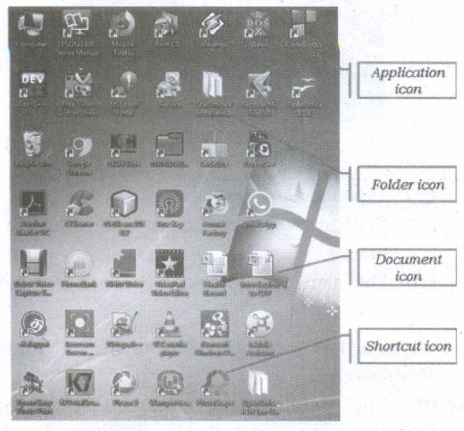
Explain the different types of icons of windows desktop
20.
Explain the classification of Opensource OS
21.
What are Registers? Explain the five Registers that are essential for instruction execution.
22.
Explain Non-Impact printers with an example.
23.
Explain in detail the different types of Mouse.
24.
Explain how will you design algorithms.
25.
What is a software? Explain its types in detail.
1.
Alternative statement:
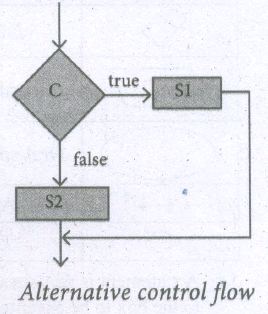
A condition is a phrase that describes a test of the state. If C is a condition and both S 1 and S2 are statements, then
if C
S1
else
S2
is a statement, called an alternative statement, that
describes the following action:
1. Test whether C is true or false.'
2. If C is true, then do S1; otherwise do. S2.
In pseudo-code, the two alternatives S 1 and S2 are indicated by indenting them from the keywords if and else, respectively. Alternative control flow is depicted in the flowchart. Condition C has two outgoing arrows, labeled true and false. The true arrow points to the S 1 box. The false arrow points to the S2 box. Arrows out of S 1 and S2 point to the same box, the box after the alternative statement.
Conditional statement:
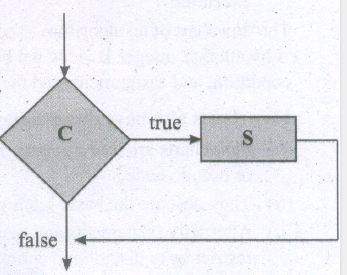
Sometimes we need to execute a statement only if a condition is true and do nothing if the condition is false .:This is equivalent to the alternative statement in which the else clause is empty. This variant of alternative statement is called a conditional statement. If C isa condition and S is a statement, then
if C
S
1. Test whether C is true or false.
2. If C is true then do S; otherwise do nothing.
The conditional control flow is depicted in the flowchart.
2.
User Interface:
User interface is one of the significant feature in Operating System. The only way that user can make interaction with a computer. If the computer interface is not user-friendly, the user slowly reduces the computer usage from their normal life. This is the main reason for the key success of GUI (Graphical User Interface) based Operating System. The GUI is a window based system with a pointing device to direct I/O, choose from menus, make selections and a keyboard to enter text. Its vibrant colours attract the user very easily. Beginners are impressed by the help and pop up window message boxes. Icons are playing vital role of the particular application.
Now Linux distribution is also available as GUI based Operating System.
The following points are considered when User Interface is designed for an application.
1. The user interface should enable the user to retain this expertise for a longer time
2. The user interface should also satisfy the customer based on their needs.
3. The user interface should save user's precious time. Create graphical elements like Menus,Window,Tabs, Icons and reduce typing work will be an added advantage of the Operating System.
4. The ultimate aim of any product is to satisfy the customer. The User Interface is also designed to satisfy the customer.
5. The user interface should reduce number of errors committed by the user with a little practice the user should be in a position to avoid errors (Error Log File)
3.
#include < iostream.h >
#include< math.in >
void main ( )
{
int p, t;
double r; si, amt, ci, d;
d=0;
p = 5000; r=10; t -'2;
amt = p * (pow (l +r/100,t);
ci = amt - p;
si=p*r*t/100;
d=ci-si;
cout << "The compount interest=" << (float) ci << endl";
cout << "The simple interest=" << si << endl";
cout << "The difference between C.I and SI=" << (float) d << end1";
}
4.
#include < iostream.h >
using namespace std;
int main( )
{
float pi = 3.14, radius, height, CSA;
cout << "\n Curved Surface Area of a cylinder";
cout << "\n Enter Radius (in em): ";
cin >> radius;
cout << "\n Enter Height (in em): ";
cin >> height;
CSA = (2*pi*radius)*height;
system("cls");
cout << "\n Radius: " << radius <<" em ";
cout << "\n Height: " << height c << " em ";
cout << "\n Curved Surface Area of a Cylinder is " << CSA << " sq.cm ";
}
5.
Let us index the trees from 1 to 6. The index of a sparrow is the index of the tree it is currently sitting on. A pair of sparrows flying can be modeled as an iterative step of a loop. When a sparrow at tree i flies to tree i + d, another sparrow at tree j flies to tree j - d. Thus, after each iterative step, the sum S of the indices of the sparrows remains invariant. Moreover, a loop invariant is true at the start and at the end of the loop.
At the start of the loop, the value of the invariant is
S = 1 + 2 + 3 + 4 + 5 + 6 = 21
When the loop ends, the loop invariant has the same value. However, when the loop ends, if all the sparrows were on the same tree, say k, then S = 6k
| S = 21, | loop invariant at the start of the loop |
| S =6k, | loop invariant at end of the loop |
| 6k= 21, | loop invariant has the same value at the start and the end |
It is not possible - 21 is not a multiple of 6. The desired final values of the sparrow indices is not possible with the loop invariant. Therefore, all the sparrows cannot gather on one tree.
6.
In a loop, if L is an invariant of the loop body B, then L is known as a loop invariant.
while C
--L
B
-- L
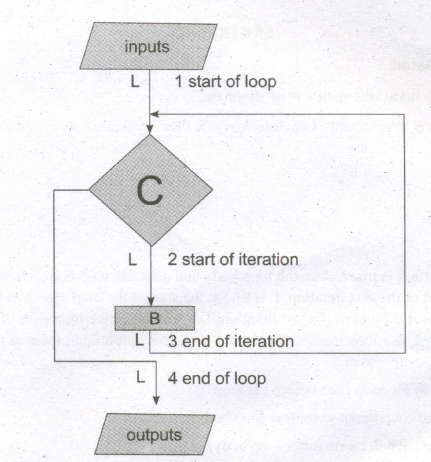
The loop invariant is true before the loop body and after the .loop body, each time. Since L is true at the start of the first iteration, L is true at the start of the loop also (just before the loop). 'Since L is true at the end of the last iteration, L is true when the loop ends also (just after the loop). Thus,.if L is a loop variant, then it is true at four important points in the algorithm, as annotated in the algorithm.
1. At the start of the loop (just before the loop)
2. at the start of each iteration (before loop body)
3. at the end of each iteration (after loop body)
4. at the end of the loop (just after the loop)
1. -- L, start of loop
while
C
2. -- L, start of iteration
B
3. -- L, end of the iteration
4. -- L, end of the loop
7.
Copying Files and Folders to removable disk:
There are several methods of transferring files to or from a removable disk:
(i) Copy and Paste
(ii) Send To
METHOD I - Copy and Paste
(i) Plug the USB flash drive directly into an available USB port.
(ii) If the USB flash drive or external drive folder does NOT open automatically, follow these steps:
(iii) Click → Start Computer.
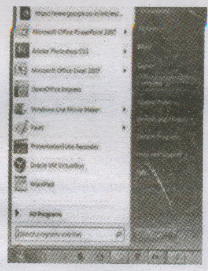
(iv) Double-click on the Removable Disk associated with the USB flash drive.
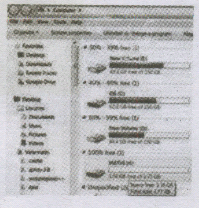
(v) Navigate to the -folders in your computer containing files you want to transfer. Right-click on the file you want to copy, then select Copy.
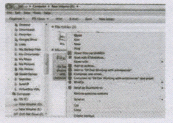
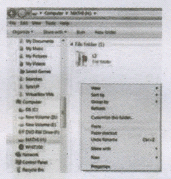
(iv) Return to the Removable Disk window, right-click within the window, then select Paste.
METHOD II - Send To
(i) Plug the USB flash drive directly into an available USB port.
(ii) Navigate to the folders in your computer containing files you want to transfer.
(iii) Right-click on the file you want to transfer to your removable disk.
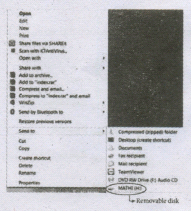
(iv) Click Send To and select the Removable Disk associated with the USB flash drive.
8.
Secondary Storage Devices
A computer generally has limited amount of main memory which is expensive and volatile. To store data and programs permanently, secondary storage devices are used. Secondary storage devices serve as a supportive storage to main memory and they are non-volatile in nature, secondary storage is also called as Backup storage.
Hard Disks
Hard disk is a magnetic disk on which you can store data. The hard disk has the stacked arrangement of disks accessed by a pair of heads for each of the disks. The hard disks come with a single or double sided disk.
Compact Disc (CD)
A CD or.CD-ROM is made from 1.2 millimeters thick, polycarbonate plastic material. A thin layer of aluminum or gold is applied to the surface. CD data is represented as tiny indentations known as "pits", encoded in a spiral track moulded into the top of the polycarbonate layer. The areas between pits are known as "lands". A motor within the CD player rotates the disk. The capacity of an ordinary CD-ROM is 700 MB.
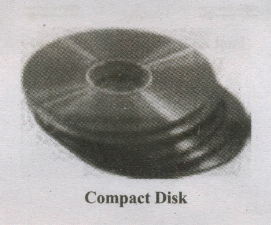
Digital Versatile Disc (DVD)
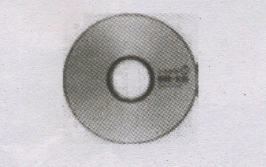
(A DVD Digital Versatile Disc or Digital Video Disc) is an optical disc capable of storing up to 4.7 GB of data, more than six times what a CD can hold. DVDs are often used to store movies at a better quality. Like CDs, DVDs are read with a laser.
The disc can have one or two sides, and one or two layers of data per side; the number of sides and layers determines how much it can hold. A 12 mm diameter disc with single sided, single layer has 4.7 GB capacity, whereas the single sided, double layer has 8.5 GB capacity. The 8 em DVD has 1.5 GB capacity. The capacity of a DVD-ROM can be visually determined by noting the number of data sides of the disc. Double-layered sides are usually gold-coloured, while single-layered sides are usually silver-coloured, like a CD
9.
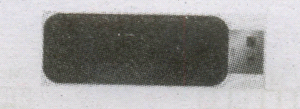
Flash Memory Devices
Flash memory is an electronic (solid-state) non-volatile computer storage medium that can be electrically erased and reprogrammed. They are either EEPROM or EPROM. Examples for Flash memories are pendrives, memory cards etc. Flash memories can be used in personal computers, Personal Digital Assistants (PDA), digital audio players, digital cameras and mobile phones. Flash memory offers fast access times. The time taken to read or write a character in memory is called access time. The capacity of the flash memories vary from 1 Gigabytes (GB) to 2 Terabytes (TB).
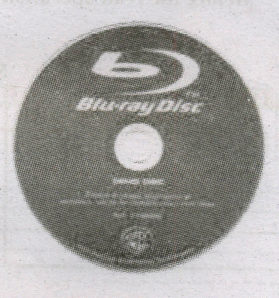
BIu-Ray Disc
Blu-Ray Disc is a high-density optical disc similar to DVD. Blu-ray is the type of discussed for PlayStation games and for playing High-Definition (HD) movies. A double-layer Blu-Ray disc can store up to 50 GB (gigabytes) of data. This is more than 5 times the capacity of a DVD, and above 70 times of a CD. The format was developed to enable recording, rewriting and playback of high-definition video, as well as storing large amount of data. DVD uses a red laser to read and write data. But, Blu-ray uses a blue-violet laser to write. Hence, it is called as Blu-Ray.
10.
1. m, n:= 2, 5
2. -- m, n = ? , ?
3. m,n: = m + 3, n - 1
4. -- m, n = ? , ?
The assignment in line (1) stores 2 in variable m, and 5 in variable n.
\(m\ n\\ \boxed { 2 } \ \boxed { 5 } \)
The assignment in line (3) evaluates the expressions m + 3 and n - 1 using the current values of m and n as
m+3,n-1
= 2+ 3,5-1
=5,4
and stores the values 5 and 4 in the variables m and n, respectively.
\(m\ n\\ \boxed { 4 } \ \boxed { 4 } \)
1. m, n:= 2,5
2. -- m, n = 2 , 5
3. m, n : = m + 3, n - 1
4. -- m, n = 2 + 3, 5-1 = 5, 4
Values of the variables after the two assignments are shown in line (2) and line (4).
11.
There are a few basic principles and techniques for designing algorithms.
1. Specification:
The first step in problem-solving is to state the problem precisely. A problem is specified in terms of the input given and the output desired. The specification must also state the . properties of the given input; and the relation between the input and the output.
2. Abstraction:
A problem can involve a lot of details. Several of these details are unnecessary for solving the problem. Only a few details are essential. Ignoring or hiding unnecessary details and modeling an entity only by its essential properties is known as abstraction. For example, when we represent the state of a process, we select only the variables essential to the problem and ignore inessential details.
3. Composition:
An algorithm is composed of assignment and control flow statements. A control flow statement tests a condition of the state and depending on the value of the condition, decides the next statement to be executed.
4. Decomposition:
We divide the main algorithm into functions. We construct each function independently of the main algorithm and other functions. Finally, we construct the main algorithm using. the functions. When we use the functions, it is enough to know the specification of the function. It is not necessary to know how the function is implemented.
12.
The most common indicators in the Menu bar are:

(i) Network indicator (or) manages network connections, allowing you to connect quickly and easily to a wired or wireless network.
(ii) Text entry settings shows the current keyboard layout (such as En, Fr, Ku, and so on). If more than one keyboard layout is shown, it allows you to select a keyboard layout out of those choices. The keyboard indicator menu contains the following menu items: Character Map, Keyboard Layout Chart, and Text Entry Settings.
(iii) Messaging indicator incorporates your social applications. From here, among others, you can access instant messenger and email clients.
(iv) Sound indicator provides an easy way to adjust the sound volume as well as access your music player and sound settings.
(v) Clock displays the current time and provides a link to your calendar and time and date settings.
(vi) Session indicator is a link to the system settings, Ubuntu Help, and session options (like locking your computer, user/guest session, logging out of a session, restarting the computer, or shutting down completely).
13.
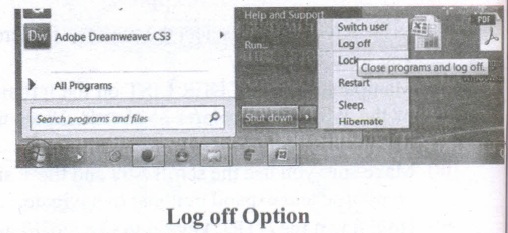
Log Off:
To log off from our computer:
(i) Click on the start button.
(ii) Select log off.
(iii) If any open programs asked to be closed then Windows force them to shut down. Any unsaved information will be last.
Shut Down:
To shut down our computer:
(i) Click on the start button.
(ii) Select shut down.
(iii) Then see the shut down windows dialog box opens.
(iv) If any open programs asked to be closed then Windows, force them to shut down. Any unsaved information will be lost.
14.
Method 1
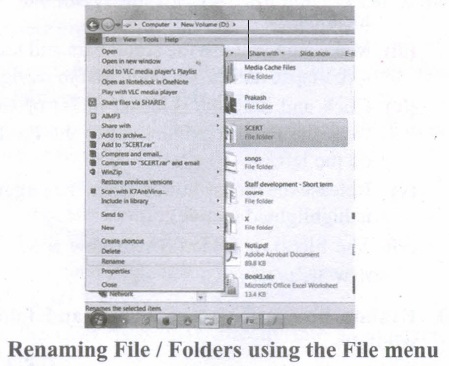
Using the FILE Menu:
(i) Select the File or Folder you wish to Rename.
(ii) Click on the File menu and select Rename.
(iii) Type in the new name. While renaming a file keep the same file extension (e.g. ".doc") as it earlier had, otherwise, the file will no longer be associated with the program that created it.
(iv) To finalise the renaming operation, press Enter the file or folder name.
Method 2
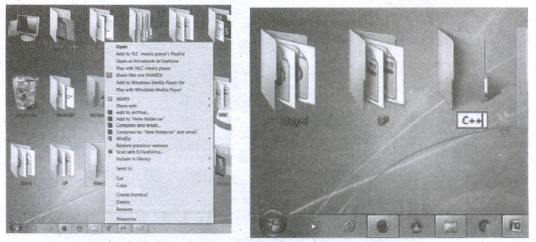
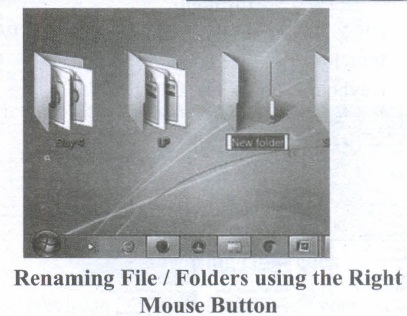
Using the Right Mouse Button:
(i) Select the file or folder you wish to rename.
(ii) Click the right mouse button while still pointing to the file.
(iii) Select Rename from the shortcut menu.
(iv) Type in the new name.
(v) To finalise the renaming operation, press enter or click away from the rectangle that surrounds the file or folder name.
Method 3
Using the Left Mouse Button
(i) Select the file or folder you wish to rename.
(ii) Wait a moment then click again (not in quick succession like a double click). A surrounding rectangle will appear around the name;
(iii) Type in the new name.
(iv) To finalise the renaming operation, press enter or click away from the rectangle that surrounds the file or folder-name.
15.
(3674)8 in binary From
3 6 7 4
011 110 111 100
(3674)8 = (011110111100)2
(3674)8 in decimal Form
(3674)8 = 3 x 83 + x 82 + 7 x 81 + 4 x 80
= 1536 + 384 + 56 + 4 = (1980)10
Thus (3674)8 \(\rightarrow \) (0111110111100)2 = (1980)10
16.
Steps for Decimal to Binary Conversion.
Step 1: Divide the decimal number which is to be converted by two which is the base of the binary number.
Step 2: The remainder which is obtained from step 1 is the least significant bit of the new binary number.
Step 3: Divide. the quotient which is obtained from the step 2 and the remainder obtained from this is the second least significant bit of the binary number
Step 4: Repeat the process until the quotient becomes zero.
Step 5: The last remainder obtained from the division is the most significant bit of the binary number. Hence, arrange the number from the most significant bit to the least significant bit (i.e., from bottom to top).
17.
Hard disk :
(i) Hard disk is a magnetic disk on which you can store data. The hard disk has the stacked arrangement of disks accessed by a pair of heads for each of the disks.
(ii) The hard disks come with a single or double-sided disk.
Compact Disk (CD) :
.png)
(i) A CD or CD-ROM is made from 1.2 millimetres thick, polycarbonate plastic material. A thin layer of aluminium or gold is applied to the surface.
(ii) CD data is represented as tiny indentations known as "pits", encoded in a spiral track moulded into the top of the polycarbonate layer. The areas between pits are known as "lands".
(iii) A motor within the CD player rotates the disk. The capacity of an ordinary CD- ROM is 700MB.
Digital Versatile Disc (DVD):
.png)
(i) A DVD (Digital Versatile Disc or Digital Video Disc) is an optical disc capable of storing up to 4.7 GB of data, more than six times what a CD can hold.
(ii) DVDs are often used to store movies at a better quality. Like CDs, DVDs are read with a laser. The disc can have one or two sides, and one or two layers of data per side; the number of sides and layers determines how much it can hold.
(iii) A 12 em diameter disc with single sided, single layer has 4.7 GB capacity, whereas the single sided, double layer has 8.5 GB capacity.
(iv) The 8 em DVD has 1.5 GB capacity. The capacity of a DVD-ROM can be visually determined by noting the number of data sides of the disc. Double-layered sides- are usually gold-coloured, while single-layered sides are usually silver-coloured, like a CD.
18.
(a) Bus:
A bus is a collection of wires used for communication between the internal components of a computer.
(b) Data bus:
(i) Data bus is a collection of wires to carry data in bits.
(ii) A data bus is used to transfer data between the memory and the CPU.
(iii) The data bus is bidirectional.
(c) Address bus:
(i) Address bus is a collection of wires to carry data in bits.
(ii) The address bus is used to point a memory location.
(iii) The address bus is unidirectional.
(d) Control bus:
(i) Control bus is a control line/collection of wires to control the operation/functions.
(ii) The control bus controls both read and write operations.
19.
Application Icons:
(i) These icons are representing Software package's logo. Double-click over this icon, the related application gets invoked.
(ii) Shortcut Icons: These icons point to a particular application or file or folder. By double clicking over them the related application or file or folder will open. This represents the shortcut form to open a particular application.
(iii) Document Icons: Active document window which is a window within an application window is called as the document icon.
20.
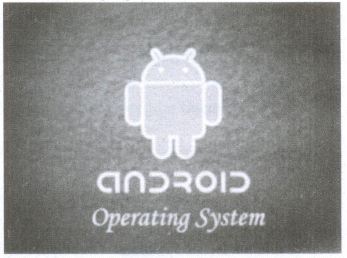
(i) Android is a mobile operating system developed by Google, based on the Linux and designed primarily for touchscreen mobile devices such as smartphones and tablets.
(ii) Google has further developed Android TV for televisions, Android Auto for cars and Android Wear for wrist watches, each with a specialized user interface.
(iii) Variants of Android are also used on game consoles, digital cameras, PCs and other electronic gadgets.
UNIX :
UNIX is a family of multitasking, multi-user operating systems that derive originally from AT&T Bell Labs, where the development began in the 1970s by Ken Thompson and Dennis Ritchie.
Linux
(i) Linux is a family of open-source operating systems. It can be modified and distributed by anyone around the world.
(ii) This is different from proprietary software like Windows, which can only be modified by the company that owns it.
(iii) The main advantage of the Linux operating system is that it is open source. There are many versions and their updates
(iv) Most of the servers run on Linux because it is easy to customize.
21.
Registers:
(i) Registers are the high-speed temporary storage locations in the CPU. Hence, their contents can be handled much faster than the' contents of memory.
(ii) Although the number of registers varies from computer to computer, there are some registers which are common to all computers. Five registers that are essential for instruction execution are:
(iii) Program Counter (PC): Contains the address of the next instruction to be fetched.
(iv) Instruction Register (IR): Contains the instruction most recently fetched.
(v) Memory Address Registers (MAR): Contain the address of a location in memory for read and write operations.
(vi) Memory Buffer Register (MBR): It contains the value to be stored in memory or the last value read from memory.
(vii) Accumulator (ACC): An accumulator is a general purpose register used for storing temporary result produced by the arithmetic logic unit.
22.
Non-Impact Printers:
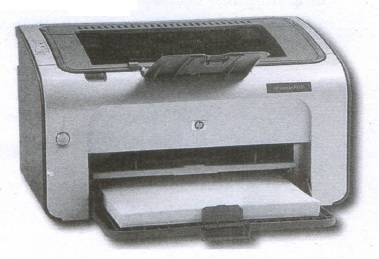
(i) These printers do not use striking mechanism for printing. They use electrostatic or laser technology.
(ii) Quality and speed of these printers are better than Impact printers. For example, Laser printers and Inkjet printers are non-impact printers.
Laser Printers:
(i) Laser printers mostly work with similar technology used by photocopiers.
(ii) It makes a laser beam scan back and forth across a drum inside the printer, building up a pattern. It can produce very good quality of graphic images.
(iii) One of the chief characteristics of laser printer is their resolution - how many Dots per inch(DPI). The available resolution range around 1200 DPI. Approximately it can print 100 pages per minute(PPM).
Inkjet Printers:
(i) Inkjet Printers use colour cartridges which combined Magenta, Yellow and Cyan inks to create color tones.
(ii) A black cartridge is also used for monochrome output. Inkjet printers work by spraying ionised ink at a sheet of paper.
(iii) The speed of Inkjet printers generally ranges from 1-20 PPM (Page Per Minute).
(iv) They use the technology offering ink by heating it so that it explodes towards the paper in bubbles or by using piezoelectricity in which tiny electric currents controlled by electronic circuits are used inside the printer to spread ink in jet speed.
(v) An Inkjet printer can spread millions of dots of ink at the paper every single second.
23.
| S.No | Type of Mouse | Mechanism | Developed and Introduced |
| 1 | 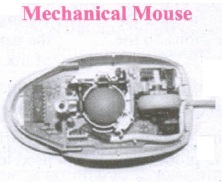 |
1. A small ball is kept inside and touches the pad through a hole at the bottom of the mouse. |
Telefunken, German Company, 0211011968 |
| 2 | 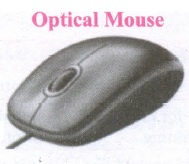 |
1. Measures the motion and acceleration of pointer. |
In 1988, Richard Lyon, Steve Krish independently invented different versions of Optical Mouse. |
| 3 | 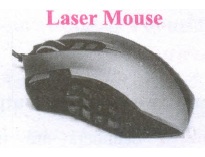 |
1. Measures the motion and acceleration of pointer. |
24.
There are a few basic principles and techniques for designing algorithms.
(i) Specification:
The first step in problem solving is to state the problem precisely. A problem is specified in terms of the input given and the output desired. The specification must also state the properties of the given input, and the relation between the input and the output.
(ii) Abstraction:
A problem can involve a lot of details. Several of these details are unnecessary for solving the problem. Only a few details are essential. Ignoring or hiding unnecessary detail and modeling an entity only by its essential properties is known as abstraction.
(iii) Composition:
An algorithm is composed of assignment and control flow statements. A control flow statement tests a condition of the state and, depending on the value of the condition, decides the next statement to be executed.
(iv) Decomposition:
We divide the main algorithm into functions. We construct each function independently of the main algorithm and other functions. Finally, construct the main algorithm using the functions. When we use the functions. it is enough to know the specification of the function. It is not necessary to know how the function is implemented.
25.
A Software is a set of instructions that perform a specific task. It interacts basically with the hardware to generate the desired output.
Types of Software
Software is classified into two types:
1. Application Software
2. System Software
Application Software:
Application software is a set of programs to perform specific tasks. For example, MS-word is an application software to create a text document and VLC player is a familiar application software to play audio, video files, and many more.
System Software:
System software is a type of computer program that is designed to run the computer's hardware and application programs. For example Operating System and Language Processor.

11th Standard Syllabus & Materials
11th Standard
TN 11th Tamil பீடு பெற நில் - செய்யுள் - காவடிச்சிந்து Important Questions And Answers Study Material - QB365 Set A
NEW11th Standard
TN 11th Tamil பீடு பெற நில் - உரைநடை - மலை இடப்பெயர்கள் : ஓர் ஆய்வு Important Questions And Answers Study Material - QB365 Set A
NEW11th Standard
TN 11th Tamil மாமழை போற்றுதும் - துணைப்பாடம் - யானை டாக்டர் Important Questions And Answers Study Material - QB365 Set A
NEW11th Standard
TN 11th Tamil மாமழை போற்றுதும் - செய்யுள் - ஐங்குறுநூறு Important Questions And Answers Study Material - QB365 Set A



Tamilnadu Stateboard 11th Standard Subjects

Maths

Commerce

Economics

Biology

Business Maths and Statistics

Accountancy
Computer Science

Physics

Chemistry
Maths
Biology
Economics
Physics
Chemistry

History
Business Maths and Statistics

Computer Science
Accountancy

Computer Applications
History
Computer Technology
Commerce
Computer Applications
Computer Technology

Tamil

English

French
Tamilnadu Stateboard Standards


