
 100% FREE ACCESS
11th Standard Syllabus & Materials
11th Standard
TN 11th Tamil இயற்கை வேளாண்மை,சுற்றுச்சூழல் -செய்யுள் - மனோன்மணீயம் Important Questions And Answers Study Material - QB365 Set A
NEW11th Standard
TN 11th Tamil என்னுயிர் என்பேன் -துணைப்பாடம் - இசைத்தமிழர் இருவர் Important Questions And Answers Study Material - QB365 Set A
NEW11th Standard
TN 11th Tamil மொழி கலை -செய்யுள் - ஒவ்வொரு புல்லையும் Important Questions And Answers Study Material - QB365 Set A
NEW11th Standard
TN 11th Tamil பீடு பெற நில் - இலக்கணம் - பகுபத உறுப்புகள் Important Questions And Answers Study Material - QB365 Set A
NEW11th Standard
TN 11th Tamil பீடு பெற நில் - துணைப்பாடம் - வாடிவாசல் Important Questions And Answers Study Material - QB365 Set A
NEW11th Standard
TN 11th Tamil பீடு பெற நில் - செய்யுள் - குறுந்தொகை Important Questions And Answers Study Material - QB365 Set A

Published on: 01/07/2021
QB365 provides detailed and simple solution for every Creative Questions in class 11 Computer Science Subject. It will helps to get more idea about question pattern in every Creative questions with solution.
Download Tamil Nadu 11th Standard Computer Science question papers, model tests, one-mark questions, important questions, and public exam papers in PDF format. Free study materials and answer keys for TN State Board students.
Questions + Answers key
Take MCQ Computer Science Test
1.
Explain about Inline functions with a suitable program.
2.
Explain about jump statements
3.
Explain various symbols in Flow chart,
4.
Explain the use of scope resolution operator with an example
5.
Explain Bitwise Shift operator with an example.
6.
Explain the uses of logical operators in C++.
7.
Explain the types of integer constants.
8.
Differentiate C and C++.
9.
Explain the specification format.
10.
Explain the three control flow statement.
11.
Explain the different types of number systems?
12.
Convert the given Binary number into its equivalent Decimal, Octal and Hexadecimal number - 101011111
13.
Convert the given Binary number into its equivalent Decimal, Octal and Hexadecimal number - 101110101
14.
Explain the elements of Ubuntu.
15.
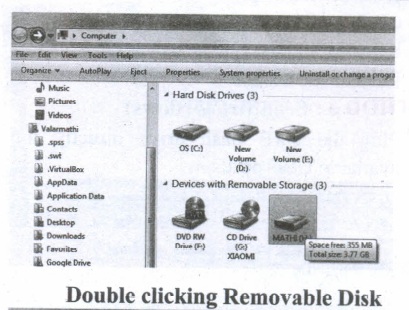
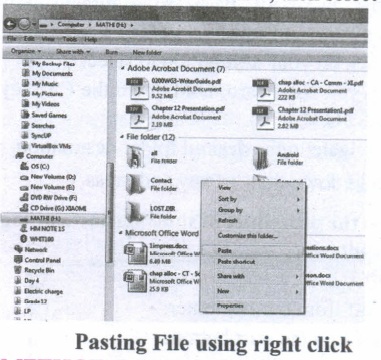
Explain the methods followed while copying files and folders to removable disk.
16.
Explain the different methods of moving files and folders in windows.
17.
Convert the Following - (101.10)16 \(\rightarrow \) (?2) = (?)10
18.
Explain the following terms in detail. (1) ISCII (2) TSCII
19.
What is number system? Describe different number systems in detail.
20.
What the Sixth generation computers could be defined as the era of intelligent computers?
21.
Explain booting of computer and its types.
22.
Explain File Management.
23.
Explain the types of control flow statements.
24.
Convert the following Octal numbers into Binary numbers. - 62478
25.
Convert the following Octal numbers into Binary numbers. - 145
1.
An inline function looks like normal function in the source file but inserts the function's code directly into the calling program. To make a function inline, one has to insert the keyword inline in the function header.
#include < iostteam >
using name space std;
inline float simple interest(float p1, float n1, float r1)
{
float si1=(p1*n1*r1)/100;
return( si 1);
}
int main ( )
{
float si.p.n,r;
cout < < "\0 Enter the Principle Amount Rs. :";
cin > >p;
cout < < "\0 Enter the Number of Years :";
cin > > n;
cout < < "\0 Enter the Rate ofInterest :";
cin > > r;
si=simple interest(p,n,r);
cout < < "\n The Simple Interest = Rs."< < si;
return 0;
}
Output:
Enter the Principle Amount Rs. :60000
Enter the Number of Years :10
Enter the Rate of Interest :5
The Simple Interest = Rs. 30000
2.
Jump statements are used to interrupt the normal flow of program. Types of Jump Statements are:
1. goto statement
2. break statement
3. continue statement
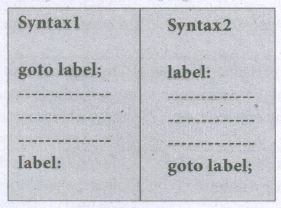
The goto statement is a control statement which is used to transfer the control from one place to another place without any condition in a program.
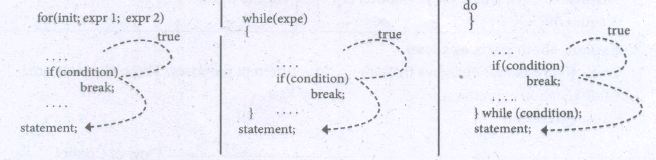
A break statement is a jump statement that terminates the execution of loop and the control is transferred to resume normal execution after the body of the loop.
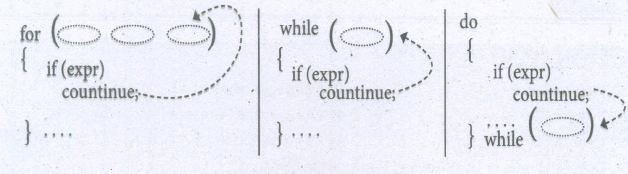
The continue statement works quite similar to the break statement. Instead of terminating the loop (break statement), continue statement forces the loop to continue or execute the next iteration. When the continue statement is executed in the loop, the code inside the loop following the continue statement will be skipped and next iteration of the loop will begin.
3.
A flowchart is a diagrammatic notation for representing algorithms. They show the control flow of algorithms using diagrams in a visual manner. In flowcharts, rectangular boxes represent simple statements, diamond-shaped boxes represent conditions, and arrows describe how the control flows during the execution of the algorithm. A flowchart is a collection of boxes containing statements and conditions which are connected by arrows showing the order in which the boxes are to be executed.
| Symbol | Name | Uses/Represents |
 |
Rectangle | Statements |
 |
Diamond | Condition |
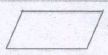 |
Parallelogram | Inputs, Outputs |
 |
Oral/special boxes | start, end |
| \(\rightarrow \quad\leftarrow\quad \downarrow\quad\uparrow \) | Arrows | The direction of control flow |
 |
Circle | Connector |
1. A statement is contained in a rectangular box with a single outgoing arrow, which points to the box to be executed next.
2. A condition is contained in a diamond-shaped box with two outgoing arrows, labeled true and false. The true arrow points to the box to be executed next if the condition is true, and the false arrow points to the box to be executed next if the condition is false.
3. Parallelogram boxes represent inputs given and outputs produced.
4. Special boxes marked Start and the End is used to indicate the start and the end of execution:
The flowchart of an algorithm to compute the quotient and remainder after dividing an integer A by another integer B is shown below, illustrating the different boxes such as input, output, condition, and assignment, and the control flow between the boxes.
Flowcharts also have disadvantages.
(i) Flowcharts are less compact than the representation of algorithms in a programming language or pseudo code.
(ii) They obscure the basic hierarchical structure of the algorithms.
(iii) Alternative statements and loops are disciplined control flow structures. Flowcharts do not restrict us to disciplined control now structures.
4.
The scope operator reveals the hidden scope of a variable. The scope resolution operator (::) is used for the following purposes. To access a Global variable when there is a Local variable with same name. An example using Scope Resolution Operator.
// Program to show that we can access a global variable
// using scope resolution operator :: when there is a local
// variable with same name //
#include< iostream >
using namespace std;
int x=45; // Global Variable x
int main()
{
int x = 10; // Local Variable x
cout << "\nValue of global x is " << ::x;
cout << "\nValue oflocal x is" << x;
return 0;
}
Output:
Value of global x is 45 .
Value of local x is 10
5.
(i) The Bitwise shift operators: There are two bitwise shift operators in C++, Shift left ( <<) and Shift right (>>).
(ii) Shift left (<<)-: The value of the left operandis moved to left by the number of bits specified by . the right operand. Right operand should be an unsigned integer.
(iii) Shift right (>>)-: The value of the left operand is moved to right by the number of bits specified by the right operand. Right operand should be an unsigned integer.
Example:
If a = 15; Equivalent binary value of a is 0000 1111
| Operator | Operation | Result | ||||||||||||||||||
|---|---|---|---|---|---|---|---|---|---|---|---|---|---|---|---|---|---|---|---|---|
| << | a << 3 |
|
6.
A logical operator is used to evaluate logical and relational expressions. The logical operators act upon operands that are themselves called as logical expressions. C++ provides three logical operators.
| Operator | Operation | Description |
|---|---|---|
| && | AND | The logical AND combines two different relational expressions into one. It returns 1 (True) if both expressions are true, otherwise, it returns 0 (false). |
| || | OR | The logical OR combines two different relational expressions into one. It returns 1 (True), if either one of the expressions is true. It returns 0 (false), if both the expression are false. |
| ! | NOT | NOT works on a single expression/operand. It simply negates or inverts the truth value. i.e., if an operand / expression is 1 (true) then this operator returns 0 (false) and vice versa. |
7.
Integer Constants / Fixed point constants: Integers are whole numbers without any fractions. An integer constant must have at least one digit without a decimal point. It may be signed or unsigned. Signed integers are considered as negative. In C++, there are three types of integer constants:
(i) Decimal:
1. Any sequence of one or more digits (0.....9)
2. It may or may not be signed.
3. Comma and blank spaces are not allowed as part of it.
| Valid Decimal constants |
Invalid Decimal constants |
|---|---|
| 725 | 7,500 (Comma is not allowed) |
| -27 | 5 66(Blank space is not allowed) |
| 4.56 |
Note: If a Decimal constant with fractions, then the compiler will take only the integer part of the value and it will ignore its fractional part. This is called as "Implicit Conversion". It will bediscussed late.
For example: If you assign 4.56 as an integer decimal constant, the compiler will accept only the integer portion of 4.56 ie. 4. It will simply ignore.56.
(ii) Octal:
1. Any sequence of one or more octal values (0 ...7 ) that starts with 0 is considered as an Octal constant.
2. It may or may not be signed.
3. Decimal points(Dot), Commas and blank spaces are not allowed as part of it.
| Valid Octal | Invalid Octal constants |
|---|---|
| 012 | 05,600 (Comma is not allowed) |
| -027 | 04.56(Decimal point is not allowed) |
| +0231 | 0158 (8 is not a permissible digit in octal system) |
** When you use a fractional number that beings with 0, it will be considered as an integer number not as Octal.
(iii) Hexadecimal:
1. Any sequence of one or more Hexadecimal values (0 ... 9, A .... E) that starts with Ox or OXis considered as a Hexadecimal constant.
2. All Hexadecimal values are unsigned
3. Decimal points(Dot), Commas and blank spaces are not allowed as part of it.
| Valid Hexadecimal constants |
Invalid Hexadecimal constants |
|---|---|
| 0 x 123 | 0 x 1, A5 (Comma is not allowed) |
| 0 x 568 | 0x.14E(The decimal point is not allowed |
| -0 x 8E55 (Sign not allowed) |
8.
| C | C++ |
|---|---|
| C is a subset of C++ | C++ is a superset of C |
| Supports Procedural Programming Paradigm. | Supports both Procedural and Object Oriented Programming. So, C++ is also called as "Hybrid Language". |
| Data and Functions are separate and free entities. | Data and functions are encapsulated together in form of an object. |
| No Data hiding. | Encapsulation hides data. |
| Function-driven language. | Object-driven language. |
| Does not have a namespace feature. | Uses namespace which avoids name collision. |
| scanf and printf functions are used for input and output. | cin and cout objects are used for input and output. |
| Not support reference variable. | Supports reference variable. |
| Not support virtual and friend functions. | Supports virtual and friend functions. |
| No Exception handling. | Supports exception handling. |
9.
Specification format:
We can write the specification in a standard three part format:
(i) The name of the algorithm and the inputs
(ii) Input: the property of the inputs
(iii) Output: the desired input-output relation
The first part is the name of the algorithm and the inputs. The second part is the property of the inputs. It is written as a comment which starts with - inputs: The third part is the desired input-output relation. It is written as a comment which starts with - outputs. \(\therefore \) The input and output can be written using English and mathematical notation.
10.
There are three important control flow statements to alter the control flow depending on the state.
(i) In sequential control flow, a sequence of statements are executed one after another in the same order as they are written
(ii) In alternative control flow, a condition of the state is tested, and if the condition is true, one statement is executed; if the condition is false, an alternative statement is executed.
(iii) In iterative control flow, a condition of the state is tested, and if the condition is true, a statement is executed. The two steps of testing the condition and executing the statement are repeated until the condition becomes false.
11.
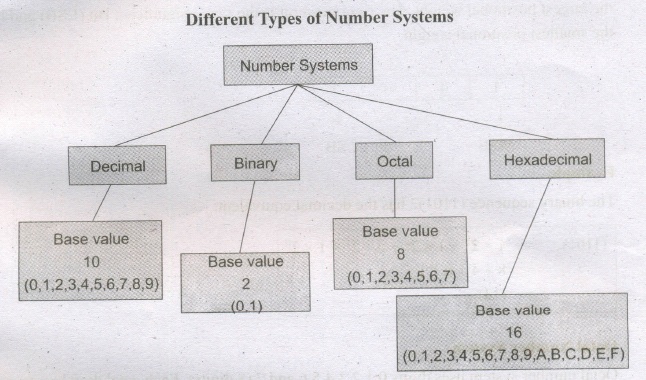
A numbering system is a way of representing numbers. The most commonly used numbering system in real life is Decimal number system.· Other number systems are Binary, Octal, Hexadecimal number system. Each number system 'is uniquely identified by its base value or radix. Radix or base is the count of number of digits in each number system. Radix or base is the general idea behind positional numbering system.
Decimal Number System
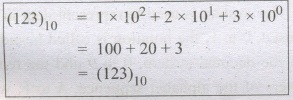
It consists of 0,1,2,3,4,5,6,7,8,9(10 digits). It is the oldest and most popular number system used in our day to day life, In the positional number system, each decimal digit is weighted relative to its position in the number. This means that each digit in the number is multiplied by 10 raised to a power corresponding to that digit's position.
Binary Number System
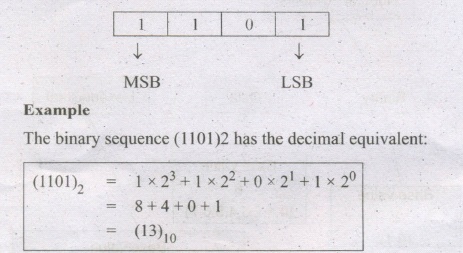
There are only two digits in the Binary system, namely, 0 and 1. The numbers in the binary system are represented to the base 2 and the positional multipliers are the powers of2. The left most bit in the binary number is called as the Most Significant Bit (MSB) and it has the largest positional weight. The right most bit is the Least Significant Bit (LSB) and has the smallest positional weight.
Octal Number System
Octal number system uses digits 0,1,2,3,4,5,6 and 7-(8 digits). Each octal digit.has its own positional value or weight as a power of 8.
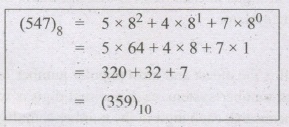
Example
The Octal sequence (547)8 has the decimal equivalent:
Hexadecimal Number System:
A hexadecimal number is represented using base 16. Hexadecimal or Hex numbers are used as a shorthand form of binary sequence. This system is used to represent data in a more compact manner. Since 16 symbols are used, 0 to F, the notation is called hexadecimal. The first 10 symbols are the same as in the decimal system, 0 to 9 and the remaining 6 symbols are taken from the first 6 letters of the alphabet sequence, A to F, where A represents 10, B is 11, C is 12, D is 13, E is 14 and F is 15.
12.
101011111
Decimal Equivalent;
= 1 x 28 x 0x27 + 1x 26 + 0 x25 + 1 x 24 +1 x23 + 1 x 22 + 1 x21 + 1x20
= 256 +64 + 16 + 8 +4 2 + 1 = 35110
Octal Equivalent;
= \(\overline { \overset { 101 }{ \overset { \downarrow }{ 5 } } } \)\(\overline { \overset { 011 }{ \overset { \downarrow }{ 3 } } } \)\(\overline { \overset { 111 }{ \overset { \downarrow }{ 7 } } } \)
=5378
Hexadecimal Equivalent;
\(\overline { \overset { 10 }{ \overset { \downarrow }{ \overset { 1 }{ \overset { \downarrow }{ 1 } } } } } \)\(\overline { \overset { 101 }{ \overset { \downarrow }{ \overset { 5 }{ \overset { \downarrow }{ 5 } } } } } \)\(\overline { \overset { 1111 }{ \overset { \downarrow }{ \overset { 15 }{ \overset { \downarrow }{ F } } } } } \)
=15F16
1010111112 =35110 =5378 =15F16
13.
101110101
Decimal Equivalent;
= 1 x 28 x 0x27 x 1 x26 + 1 x25 +1 x 24 +0x25 + 1 x 22 + 0x21 + 1 x 20
= 256 + 64 + 32 + 16 + 4 + 1 = 37310
Octal Equivalent;
= \(\overline { \overset { 101 }{ \overset { \downarrow }{ 5 } } } \) \(\overline { \overset { 110 }{ \overset { \downarrow }{ 6 } } } \) \(\overline { \overset { 101 }{ \overset { \downarrow }{ 5 } } } \)
=5658
Hexadecimal Equivalent;
= \(\overline { \overset { 10 }{ \overset { \downarrow }{ 1 } } } \) \(\overline { \overset { 1110 }{ \overset { \downarrow }{ 7 } } } \)\(\overline { \overset { 101 }{ \overset { \downarrow }{ 5 } } } \)
=17516
= 101101012 = 37310 =5658 =17516
14.
Elements of Ubuntu:
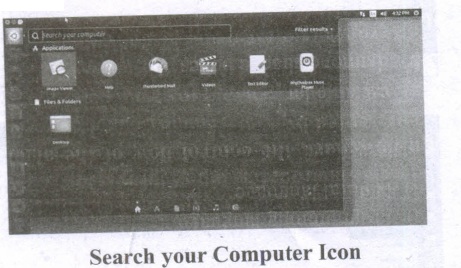
Search your Computer Icon:
This icon is equal to search button or icon in Windows OS. Here, you have to give the name of the File or Folder for searching them.
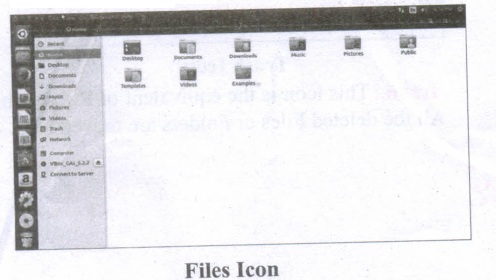
Files: This icon is equivalent to My Computer icon. From here, you can directly go to Desktop, Documents and so on
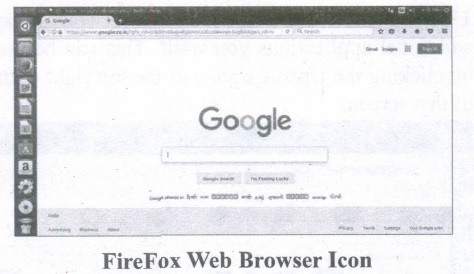
Firefox Web Browser:
By clicking this icon, you can directly browse the Internet. This is equivalent to clicking the Web Browser in Task bar or in Desktop or in Start button in Windows.
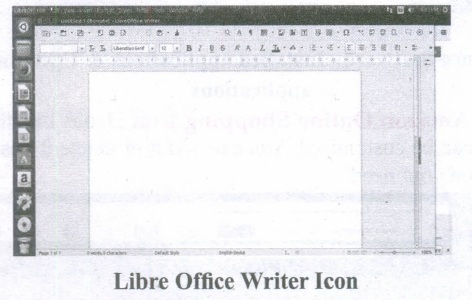
LibreOffice Writer:
This icon will directly take you to document preparation application like MS Word in Windows.
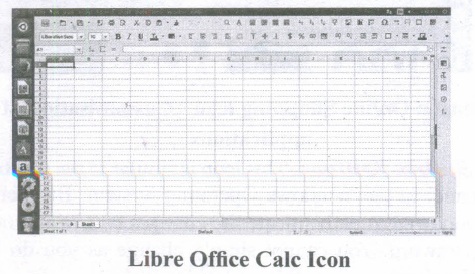
LibreOffice Calc:
This icon will lead you to spreadsheet preparation application like MS Excel in Windows.
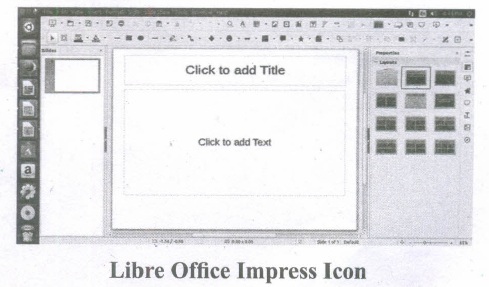
LibreOffice Impress:
By clicking this icon, you can prepare any presentations in Ubuntu like MS PowerPoint.
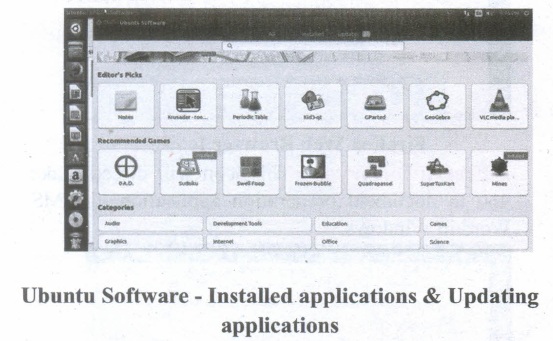
Ubuntu Software:
This icon will let you add any additional applications you want. This can be done by clicking the Update option at the top right corner of that screen.
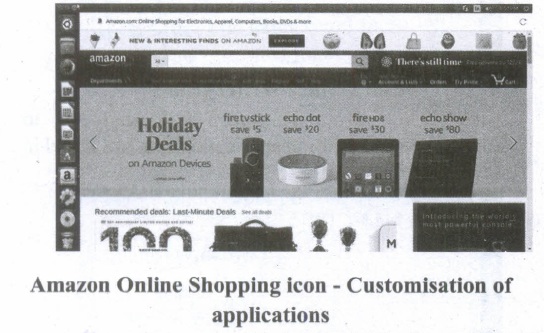
Amazon Online Shopping icon:
Icons like this can be customised. You can add it or delete it based on your need.
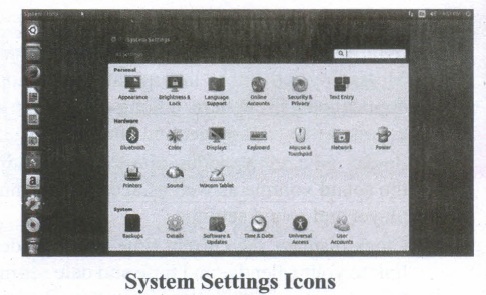
System Settings:
This icon is similar to the Control panel in the Windows Operating System. But here, you need to authenticate the changes by giving your password. You cannot simply change as you do in Windows.
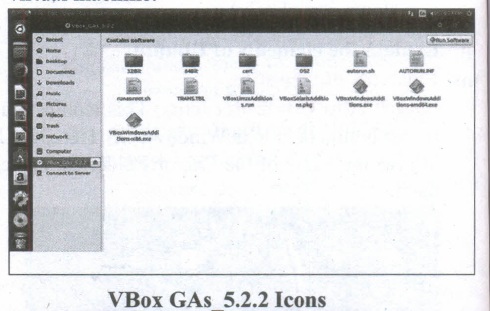
VBox_GAs_5.2.2:
The expansion for VBox is Virtual Box. The reason to use Oracle Virtual Box is Ubuntu Linux can be run as a guest OS within the virtual machine.
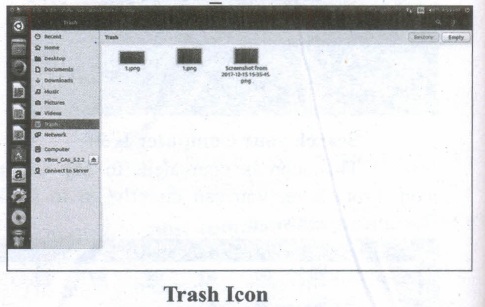
Trash: This icon is the equivalent of Recycle bin. All the deleted Files or Folders are moved here.
15.
There are several methods of transferring files to or from a removable disk.
(i) Copy and Paste
(ii) Drag and Drop
(iii) Send To
(iv) Copy and Paste using keyboard shortcuts
METHOD 1:
Plug the USB flash drive directly into an available USB port.
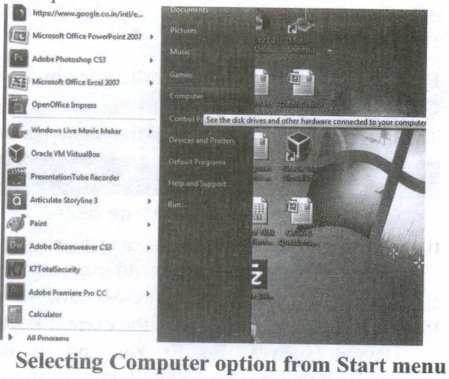
(i) Click Start ⟶ Computer.
(ii) Double-click on the Removable Disk associated with the USB flash drive.
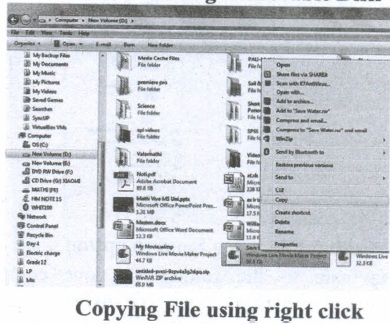
(i) Navigate to the folders in your computer containing files you want to transfer Right click on the file you want to copy, then select Copy.
(ii) Return to Removable Disk window, right click within the window, then select Paste.
METHOD 2:
Drag and Drop
(i) Plug the USB flash drive directly into an available USB port.
(ii) Allow the computer to recognize the drive, then click Start ⟶ Computer.
(iii) Navigate to 'the folders in your computer containing files you want to transfer.
(iv) Click and drag the files you want to the Removable Disk.
(v) Release the mouse.
METHOD 3:
Send To (Windows)
(i) Plug the USB flash drive directly into an available USB port.
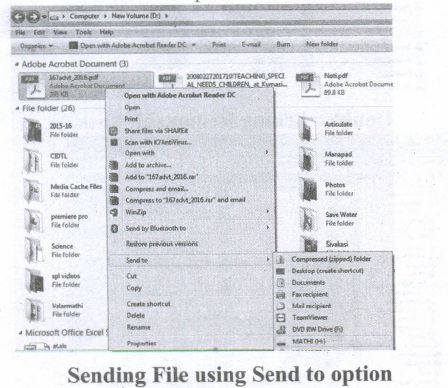
(ii) Navigate to the folders in your computer containing files you want to transfer.
(iii) Right-click on the file you want to transfer to your removable disk.
(iv) Click Send To and select the Removable Disk associated with the USB flash drive.
METHOD 4:
Copy and Paste using keyboard shortcuts (Windows)
(i) Plug the USB flash drive directly into an available USB port.
(ii) Click on your desired file to select it.
(iii) On your keyboard, hold down the Ctrl key and press C.
(iv) Navigate to the desired folder destination.
(v) Hold down the Ctrl key and press V.
16.
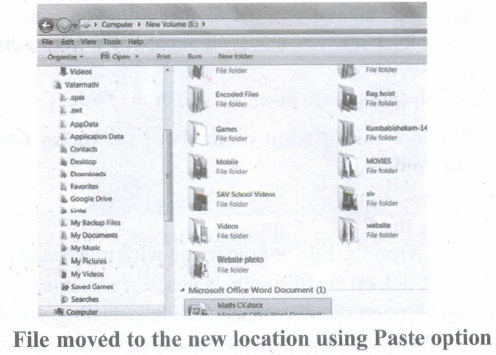
To move a file(s) or folder(s), first select the file(s) or folder(s) and then choose one of the following.
(i) Click on the EDIT menu, select the CUT function.
(ii) Keyboard shortcut, CTRL + X.
(iii) Or else click on the selected item with the RIGHT mouse button and select "CUT" from the shortcut Menu.
(iv) To bring back the file(s) or folder(s) in the new location, navigate to the new location then paste using one of the following:
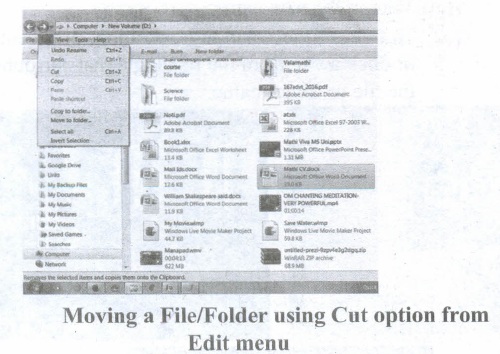
(v) Click on the EDIT menu, select the PASTE function.
(vi) Keyboard shortcut is, CTRL + V.
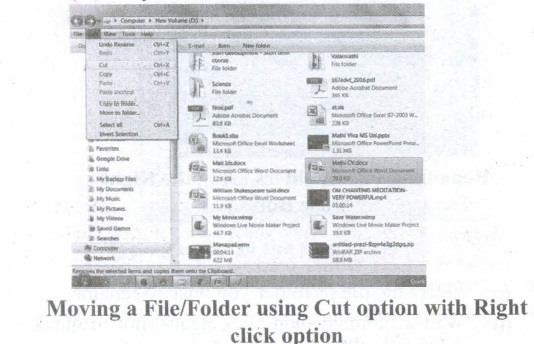
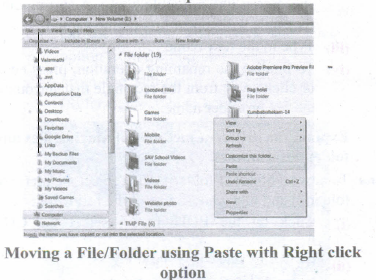
(vii) In the position where you want the item to be pasted, click with the Right mouse button and select "Paste" from the shortcut menu. The file will be pasted in the new location.
Method 2 - Dragging and Dropping
(i) In the right pane, select the file(s) or folder(s) you want to move.
(ii) Manipulate the Folder List on the left side of the Windows Explorer so that it shows the new location.
(iii) Make sure you use the scroll bars and the + and (collapse and expand buttons) to navigate.
(iv) Click and drag the selected file(s) or folder(s) from the RIGHT pane, over to the Folder List on the left.
(v) Release the mouse button when the target folder is highlighted (active).
(vi) The file(s) or folder(s) will now appear in the new area.
17.
(101.10)16 in binary From
= 1 0 1 1 0
0001 0000 0001 0001 0000
(101.10)2 = (000100000001.00010000)2
(101.10)16 in Decimal Form
(101.10)2 = 1 x 162 + x 161 + 1 x 160 + 1 x 16-1 + 0 x 16-2
= 256 + 0 + 1 + 0.0625 + 0 =(275.0625)10
18.
ISCII. (Indian Script Code for Information Interchange)
(i) In order to encode Indian languages on computers, a common standard for coding Indian scripts is developed which is called as ISCII. In 1991, the Bureau of Indian Standards adopted the Indian Standard Code for Information Interchange (ISCII).
(ii) ISCII standard is evolved by a standardization committee during 1986-88. The ISCII document is available as IS 13194: 1991 from the BIS offices.
(iii) Assamese, Bengali (Bangla), Devanagari, Gujarati, Gurmukhi, Kannada, Malayalam, Oriya, Tamil, and Telugu are supported in ISCII. ISCII has been used by IBM for PCDOS, Apple for ILK, and several companies are developing products and solutions based on this representation.
TSCII. (Tamil Standard Code for Information Interchange)
(i) Tamil Standard Code for Information Interchange is the Tamil encoding scheme designed to handle the entire Tamil alphabet. TSCII is proposed by Internet Working Group for the Tamil Standard Code (IWG-TSC).
(ii) The Tamil alphabets have vowels (247), grantha characters (13) and the Tamil numerals (13). The number of unique Tamil glyphs to consider is about 170. Since the number of slots available in upper-ASCII segment (#128-255) is much less than the required slot for each character in Tamil.
(iii) Therefore, few Tamil alphabets are to be included in the native form, and the others are generated using modifiers (several keystrokes in sequence).
19.
A number system is a set of digits used to represent the values derived from a common base or radix.
Decimal Number System:
(i) The term Decimal is derived from a Latin prefix deci, which means ten.
(ii) The Decimal number system has ten digits ranging from 0-9. Because this system has ten digits.
(iii) It is also called as a base ten number system or denary number system.
(iv) Decimal number should always be written with a subscript 10.
Binary Number System:
(i) The decimal number system is not convenient to implement in digital system.
(ii) For instance, it is very difficult to design electronic equipment so that it can work with 10 different voltage levels (each one representing one decimal character, 0 through 9).
(iii) On other hand, it is very easy to design simple, accurate electronic circuits that operate with only 2 voltage levels.
(iv) For this reason, almost every digital system utilizes the binary number system (base 2) as the basic number system of its operation;
(v) In a binary system, there are only two symbols or possible digit values, 0 and 1.
Octal Number System:
(i) The octal number system is playing a vital role in digital computer work.
(ii) The octal number system has a base of 8.
(iii) It means that it has eight unique symbols such as 0,1,2,3,4,5,6 and 7.
(iv) Thus, each digit of an octal number can have any value from 0 to 7.
(v) The places to the left of the octal point are positive powers of 8 and places to the right are negative powers of 8.
Hexadecimal Number System:
(i) The hexadecimal system uses base 16 in digital systems.
(ii) It has 16 possible symbols.
(iii) It uses the digits 0 through 9 plus the letters A, B, C, D, E and F as the 16 different symbols.
(iv) Hexadecimal System is a positional value system, wherein each hexadecimal digit has its own value or weight expressed as a power of 16.
20.
(i) The Sixth Generation, computers could be defined as the era of intelligent computers, based on Artificial Neural Networks. This generation gave a start to parallel computing.
(ii) One of the most dramatic changes in the sixth generation will be the explosive growth of wide is a component of artificial intelligence
(iii) Robotics is a branch of engineering that involves the conception, design, manufacture, and operation of robots.
(iv) This field overlaps with electronics, computer science, artificial intelligence, mechatronics, nanotechnology and bioengineering.
(v) Artificial neural networks (ANNs) are computing systems inspired by the biological neural networks that constitute animal brains.
(vi) Such systems learn (progressively improve performance on) tasks by considering examples, generally without task-specific programming.
(vii) An ANN is based on a collection of connected units or nodes called Artificial Neurons (analogous to biological neurons in an animal brain).
(viii) Each connection (synapse) between neurons can transmit a signal from one to another. The receiving neuron can process the signal(s) and then signal neurons connected to it.
(ix) Parallel computing is a type of computation in which many calculations or the execution of processes are carried out simultaneously.
(x) Large problems can often be divided into smaller ones, which can then be solved at the same time. There are several different forms of parallel computing: bit-level, instruction-level, data, and task parallelism.
(xi) Parallelism has been employed for many years, mainly in high-performance computing, but interest in it has grown lately due to the physical constraints preventing frequency scaling.
(xii) As power consumption by computers has become a concern in recent years, parallel computing has become the dominant paradigm in computer architecture, mainly in the form of multi-core processors.
21.
Booting of computer:
(i) An Operating system (OS) is a basic software that makes the computer to work. When a computer is switched on, there is no information in its RAM.
(ii) At the same time, in ROM, the pre-written program called POST (Power on Self Test) will be executed first. This program checks if the devices like RAM, keyboard, etc., are connected properly and ready to operate. If these devices are ready, then the BIOS (Basic Input Output System) gets executed. This process is called Booting.
(iii) Thereafter, a program called "Bootstrap Loader" transfers OS from hard disk into main memory. Now the OS gets loaded (Windows/Linux, etc.,) and will get executed. Booting process is of two types.
1) Cold Booting
2) Warm Booting
(iv) Cold Booting:
When the system starts from the initial state i.e. it is switched on, we call it cold booting or Hard Booting. When the user presses the power button, the instructions are read from the ROM to initiate the booting process.
(v) Warm Booting:
When the system restarts or when Reset button is pressed, we call it Warm Booting or Soft Booting. The system does not start from the initial state and so all diagnostic tests need not be carried out in this case. There are chances of data loss and system damage as the data might not have been stored properly.
22.
(i) File management is an important function of OS which handles the data storage techniques. The operating system manages the files, folders, and directory systems on a computer.
(ii) Any type of data in a computer is stored in the form of files and directories/folders through File Allocation Table (FAT).
(iii) The FAT stores general information about files like filename, type (text or binary), size, starting address and access mode (sequential/indexed / indexed-sequential/direct/relative).
(iv) The file manager of the operating system helps to create, edit, copy, allocate memory to the files, and also updates the FAT.
(v) The OS also takes care of the files that are opened with proper access rights to read or edit them. There are few other file management techniques available like Next-Generation File System (NTFS) and ext2(Linux).
23.
There are three important control flow statements to alter the control flow depending on the state.
(i) In sequential control flow, a sequence of statements are executed one after another in the same order as they are written.
(ii) In alternative control flow, a condition of the state is tested, and if the condition is true, one statement is executed; if the condition is false an alternative statement is executed.
(iii) In iterative control flow, a condition of the state is tested, and if the condition is true, a statement is executed. The two steps of testing the condition and executing the statement are repeated until the condition becomes false.
24.
62478
\(\overset { 6 }{ \underset { 110 }{ \downarrow } } \) \(\overset { 2 }{ \underset { 010 }{ \downarrow } } \) \(\overset { 4 }{ \underset { 100 }{ \downarrow } } \) \(\overset { 7 }{ \underset { 111 }{ \downarrow } } \)
62478 = 1100101001112
25.
1458
= \(\overset { 1 }{ \underset { 1 }{ \downarrow } } \) \(\overset { 4 }{ \underset { 100 }{ \downarrow } } \) \(\overset { 5 }{ \underset { 101 }{ \downarrow } } \)
= 1458 = 11001012

11th Standard Syllabus & Materials
11th Standard
TN 11th Tamil பீடு பெற நில் - செய்யுள் - காவடிச்சிந்து Important Questions And Answers Study Material - QB365 Set A
NEW11th Standard
TN 11th Tamil பீடு பெற நில் - உரைநடை - மலை இடப்பெயர்கள் : ஓர் ஆய்வு Important Questions And Answers Study Material - QB365 Set A
NEW11th Standard
TN 11th Tamil மாமழை போற்றுதும் - துணைப்பாடம் - யானை டாக்டர் Important Questions And Answers Study Material - QB365 Set A
NEW11th Standard
TN 11th Tamil மாமழை போற்றுதும் - செய்யுள் - ஐங்குறுநூறு Important Questions And Answers Study Material - QB365 Set A



Tamilnadu Stateboard 11th Standard Subjects

Maths

Commerce

Economics

Biology

Business Maths and Statistics

Accountancy
Computer Science

Physics

Chemistry
Maths
Biology
Economics
Physics
Chemistry

History
Business Maths and Statistics

Computer Science
Accountancy

Computer Applications
History
Computer Technology
Commerce
Computer Applications
Computer Technology

Tamil

English

French
Tamilnadu Stateboard Standards


