
 100% FREE ACCESS
11th Standard Syllabus & Materials
11th Standard
TN 11th Tamil இயற்கை வேளாண்மை,சுற்றுச்சூழல் -செய்யுள் - மனோன்மணீயம் Important Questions And Answers Study Material - QB365 Set A
NEW11th Standard
TN 11th Tamil என்னுயிர் என்பேன் -துணைப்பாடம் - இசைத்தமிழர் இருவர் Important Questions And Answers Study Material - QB365 Set A
NEW11th Standard
TN 11th Tamil மொழி கலை -செய்யுள் - ஒவ்வொரு புல்லையும் Important Questions And Answers Study Material - QB365 Set A
NEW11th Standard
TN 11th Tamil பீடு பெற நில் - இலக்கணம் - பகுபத உறுப்புகள் Important Questions And Answers Study Material - QB365 Set A
NEW11th Standard
TN 11th Tamil பீடு பெற நில் - துணைப்பாடம் - வாடிவாசல் Important Questions And Answers Study Material - QB365 Set A
NEW11th Standard
TN 11th Tamil பீடு பெற நில் - செய்யுள் - குறுந்தொகை Important Questions And Answers Study Material - QB365 Set A

Published on: 13/05/2022
QB365 provides detailed and simple solution for every book back questions in class 11 Computer Science subject.It will helps to get more idea about question pattern in every book back questions with solution.
latest Book back QuestionsDownload Tamil Nadu 11th Standard Computer Science question papers, model tests, one-mark questions, important questions, and public exam papers in PDF format. Free study materials and answer keys for TN State Board students.
Questions + Answers key
Take MCQ Computer Science Test
1.
Explain User Interface?
2.
Explain memory management techniques.
3.
Explain advantages and disadvantages of open source operating systems.
4.
List out the points to be noted while creating a user interface for an Operating system.
5.
Explain the concept of a Distributed Operating System along with its advantages.
1.
User Interface:
User interface is one of the significant feature in Operating System. The only way that user can make interaction with a computer. If the computer interface is not user-friendly, the user slowly reduces the computer usage from their normal life. This is the main reason for the key success of GUI (Graphical User Interface) based Operating System. The GUI is a window based system with a pointing device to direct I/O, choose from menus, make selections and a keyboard to enter text. Its vibrant colours attract the user very easily. Beginners are impressed by the help and pop up window message boxes. Icons are playing vital role of the particular application.
Now Linux distribution is also available as GUI based Operating System.
The following points are considered when User Interface is designed for an application.
1. The user interface should enable the user to retain this expertise for a longer time
2. The user interface should also satisfy the customer based on their needs.
3. The user interface should save user's precious time. Create graphical elements like Menus,Window,Tabs, Icons and reduce typing work will be an added advantage of the Operating System.
4. The ultimate aim of any product is to satisfy the customer. The User Interface is also designed to satisfy the customer.
5. The user interface should reduce number of errors committed by the user with a little practice the user should be in a position to avoid errors (Error Log File)
2.
Memory Management:
(i) Memory Management is the process of controlling and coordinating computer's main memory and assigning memory block (space) to various running programs to optimize overall computer performance.
(ii) The Memory management involves the allocation of specific memory blocks to individual programs based on user demands. At the application level, memory management ensures the availability of adequate memory for each running program at all times.
(iii) The objective of Memory Management process is to improve both the utilization of the CPU and the speed of the computer's response to its users via main memory. For these reasons, the computers must keep several programs in main memory that associates with many different Memory Management schemes.
(iv) The Operating System is responsible for the following activities in connection with memory management.
(v) Keeping track of which portion of memory are currently being used and who is using them.
(vi) Determining which processes (or parts of processes) and data to move in and out of memory.
(vii) Allocation and de-allocation of memory blocks as needed by the program in main memory. (Garbage Collection).
3.
The benefits of open source are tremendous and have gained huge popularity in the IT field in recent years. They are as follows:
1. Open source (OS) is free to use, distribute and modify.
2. Open source is independent of the company as author who originally created it.
3. It is accessible to everyone. Anyone can debug the coding.
4. It doesn't have the problem of incompatible formats that exists in proprietary software.
5. It is easy to customize as per our needs.
6. Excellent support will be provided by programmers who will assist in making solutions. Some of the disadvantages are:
7. Latest hardware are incompatible, i.e. lack of device drivers.
8. It is less user friendly and not as easy to use.
9. There may be some indirect costs involved such as paying for external support.
10. Malicious users can potentially view it and exploit any vulnerability.
4.
The main purpose of using an operating system:
(i) It controls and coordinates all the activities of a computer system.
(ii) It provides an environment for a computer user to execute programs on computer hardware in a convenient and efficient manner.
(iii) It enables the user to design the application, and also it provides an interface to interact with the computer and controls the execution of all kinds .of programs without knowing the internals of the hardware.
(iv) It interprets the command and instructions to perform the specified tasks.
(v) It coordinates and assigns the compilers, assemblers, utility programs to the users.
(vi) It detects errors present in the hardware and software.
(vii) It maintains the internal time clock.
(viii) It protects itself from being destroyed by any users.
(ix) It serves two major functions
1. Supervision (Prevent errors)
2. Management (Operation and control of I/O devices)
(x) It loads the program itself into memory so that user can interact with hardware and software.
5.
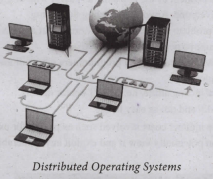
The data and application that are stored and processed on multiple physical locations across the world over the digital network (internet/intranet). The Distributed Operating System is used to access shared data and files that reside in any machine around the world. The user can handle the data from different locations. The users can access as if it is available on their own computer.
The advantages of distributed Operating System are as follows:
1. A user at one location can make use of all the resources available at another location over the network.
2. Many computer resources can be added easily in the network
3. Improves the interaction with the customers and clients.
4. Reduces the load on the host computer.

11th Standard Syllabus & Materials
11th Standard
TN 11th Tamil பீடு பெற நில் - செய்யுள் - காவடிச்சிந்து Important Questions And Answers Study Material - QB365 Set A
NEW11th Standard
TN 11th Tamil பீடு பெற நில் - உரைநடை - மலை இடப்பெயர்கள் : ஓர் ஆய்வு Important Questions And Answers Study Material - QB365 Set A
NEW11th Standard
TN 11th Tamil மாமழை போற்றுதும் - துணைப்பாடம் - யானை டாக்டர் Important Questions And Answers Study Material - QB365 Set A
NEW11th Standard
TN 11th Tamil மாமழை போற்றுதும் - செய்யுள் - ஐங்குறுநூறு Important Questions And Answers Study Material - QB365 Set A



Tamilnadu Stateboard 11th Standard Subjects

Maths

Commerce

Economics

Biology

Business Maths and Statistics

Accountancy
Computer Science

Physics

Chemistry
Maths
Biology
Economics
Physics
Chemistry

History
Business Maths and Statistics

Computer Science
Accountancy

Computer Applications
History
Computer Technology
Commerce
Computer Applications
Computer Technology

Tamil

English

French
Tamilnadu Stateboard Standards


