
 100% FREE ACCESS
11th Standard Syllabus & Materials
11th Standard
TN 11th Tamil இயற்கை வேளாண்மை,சுற்றுச்சூழல் -செய்யுள் - மனோன்மணீயம் Important Questions And Answers Study Material - QB365 Set A
NEW11th Standard
TN 11th Tamil என்னுயிர் என்பேன் -துணைப்பாடம் - இசைத்தமிழர் இருவர் Important Questions And Answers Study Material - QB365 Set A
NEW11th Standard
TN 11th Tamil மொழி கலை -செய்யுள் - ஒவ்வொரு புல்லையும் Important Questions And Answers Study Material - QB365 Set A
NEW11th Standard
TN 11th Tamil பீடு பெற நில் - இலக்கணம் - பகுபத உறுப்புகள் Important Questions And Answers Study Material - QB365 Set A
NEW11th Standard
TN 11th Tamil பீடு பெற நில் - துணைப்பாடம் - வாடிவாசல் Important Questions And Answers Study Material - QB365 Set A
NEW11th Standard
TN 11th Tamil பீடு பெற நில் - செய்யுள் - குறுந்தொகை Important Questions And Answers Study Material - QB365 Set A

Published on: 13/05/2022
QB365 provides detailed and simple solution for every book back questions in class 11 Computer Science subject.It will helps to get more idea about question pattern in every book back questions with solution.
latest Book back QuestionsDownload Tamil Nadu 11th Standard Computer Science question papers, model tests, one-mark questions, important questions, and public exam papers in PDF format. Free study materials and answer keys for TN State Board students.
Questions + Answers key
Take MCQ Computer Science Test
1.
Discuss about the mouse actions.
2.
Explain the different methods of renaming files and folders.
3.
Write the procedure to create, rename, delete and save a file in Ubuntu OS. Compare it with Windows OS.
4.
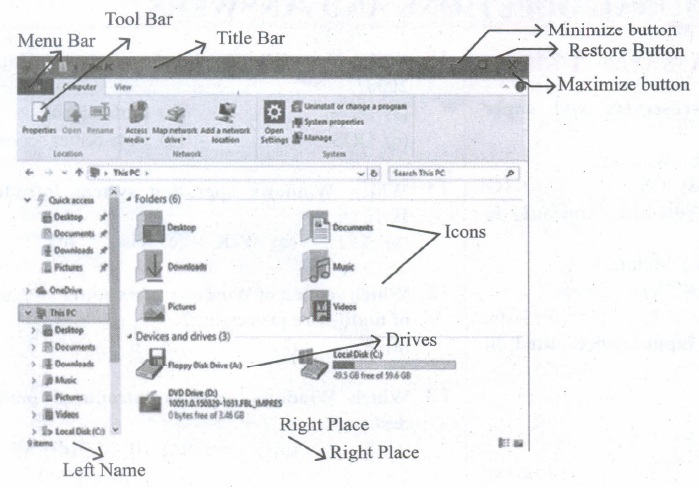
Observe the figure and mark all the window elements, Identify the version of the Windows OS.
5.
1.
| Action | Reaction |
| Point to an item | Move the mouse pointer over the item. |
| click | Point to the item on the screen, press and release the left mouse button. |
| Right-click | Point to the item on the screen, press and release the right mouse button. Clicking the right mouse button displays a pop-up menu with various options. |
| Double-click | Point to the item on the screen, quickly press twice the left mouse button. |
| Drag and drop | Point to an item then hold the left mouse button as you move the pointer press and you have reached the desired position, release the mouse button. |
2.
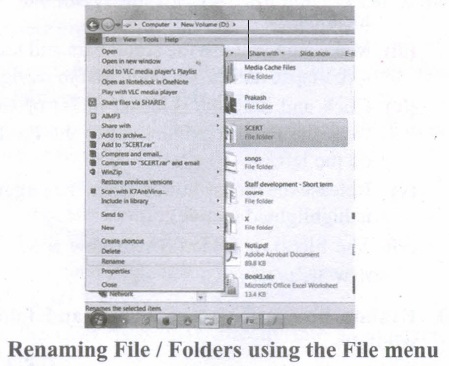
Method 1
Using the FILE Menu:
(i) Select the File or Folder you wish to Rename.
(ii) Click on the File menu and select Rename.
(iii) Type in the new name. While renaming a file keep the same file extension (e.g. ".doc") as it earlier had, otherwise, the file will no longer be associated with the program that created it.
(iv) To finalise the renaming operation, press Enter the file or folder name.
Method 2
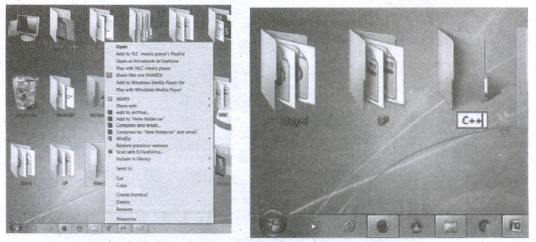
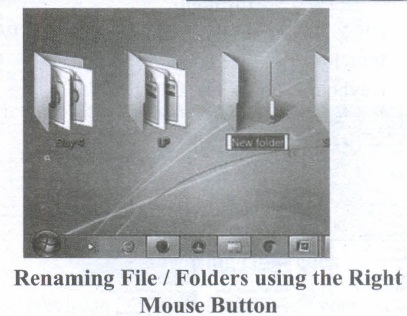
Using the Right Mouse Button:
(i) Select the file or folder you wish to rename.
(ii) Click the right mouse button while still pointing to the file.
(iii) Select Rename from the shortcut menu.
(iv) Type in the new name.
(v) To finalise the renaming operation, press enter or click away from the rectangle that surrounds the file or folder name.
Method 3
Using the Left Mouse Button
(i) Select the file or folder you wish to rename.
(ii) Wait a moment then click again (not in quick succession like a double click). A surrounding rectangle will appear around the name;
(iii) Type in the new name.
(iv) To finalise the renaming operation, press enter or click away from the rectangle that surrounds the file or folder-name.
3.
In Ubuntu OS:
(i) Create a file: By right clicking in the desktop and also files be created by using file menu.
(ii) Delete a file: By using right-click and choosing Move to Trash or by using the menu.
(iii) Rename a file: By using right-click and choosing rename option.
(iv) Save a file: Press Ctrl+X or F2 to exit. You will then be asked if you want to save. (or) Press Ctrl+O or F3 and Ctrl+X or F2 for save and exit.
In Windows OS:
(i) Create file: Open an application and create by using file menu.
(ii) Delete a file: By right click on a file and choosing the delete option to delete a file.
(iii) Rename a file: By right click on a file and choosing rename option to rename a file.
(iv) Save file: Press ctrl+S or file - save to save the file.
4.
5.
 1985 1. Introduction of GUI in 16-bit processor
 1987 1. Supports to minimize or maximize windows.
 1992 1. Introduced the concept of multitasking.
 1995 1. Introduced Start button, the taskbar, Windows Explorer and Start menu.
 1998 1. Integration of the Web browser (Internet Explorer) with the Operating System.
 Designed to act as servers in network. 7. Windows Me
  2000 It introduced automated system diagnostics and recovery tools. 8. Windows 2000
  2000 1. Served as an Operating System for business
 2001 1. Introduced 64-bit Processor.
 2006 Updated the look and feel of Windows 11. Windows 7
  2009 Booting time was improved, introduced new user interfaces like Aero Peek, pinning programs to the taskbar, handwriting recognition etc, and Internet Explorer 8. 12. Windows 8
  2012 1. Windows 8 was faster than previous versions of Windows.
 2015 1. Start Button was added again.
11th Standard Syllabus & Materials
11th Standard
TN 11th Tamil பீடு பெற நில் - செய்யுள் - காவடிச்சிந்து Important Questions And Answers Study Material - QB365 Set A
NEW11th Standard
TN 11th Tamil பீடு பெற நில் - உரைநடை - மலை இடப்பெயர்கள் : ஓர் ஆய்வு Important Questions And Answers Study Material - QB365 Set A
NEW11th Standard
TN 11th Tamil மாமழை போற்றுதும் - துணைப்பாடம் - யானை டாக்டர் Important Questions And Answers Study Material - QB365 Set A
NEW11th Standard
TN 11th Tamil மாமழை போற்றுதும் - செய்யுள் - ஐங்குறுநூறு Important Questions And Answers Study Material - QB365 Set A



Tamilnadu Stateboard 11th Standard Subjects

Maths

Commerce

Economics

Biology

Business Maths and Statistics

Accountancy
Computer Science

Physics

Chemistry
Maths
Biology
Economics
Physics
Chemistry

History
Business Maths and Statistics

Computer Science
Accountancy

Computer Applications
History
Computer Technology
Commerce
Computer Applications
Computer Technology

Tamil

English

French
Tamilnadu Stateboard Standards


