
 100% FREE ACCESS
11th Standard Syllabus & Materials
11th Standard
TN 11th Tamil இயற்கை வேளாண்மை,சுற்றுச்சூழல் -செய்யுள் - மனோன்மணீயம் Important Questions And Answers Study Material - QB365 Set A
NEW11th Standard
TN 11th Tamil என்னுயிர் என்பேன் -துணைப்பாடம் - இசைத்தமிழர் இருவர் Important Questions And Answers Study Material - QB365 Set A
NEW11th Standard
TN 11th Tamil மொழி கலை -செய்யுள் - ஒவ்வொரு புல்லையும் Important Questions And Answers Study Material - QB365 Set A
NEW11th Standard
TN 11th Tamil பீடு பெற நில் - இலக்கணம் - பகுபத உறுப்புகள் Important Questions And Answers Study Material - QB365 Set A
NEW11th Standard
TN 11th Tamil பீடு பெற நில் - துணைப்பாடம் - வாடிவாசல் Important Questions And Answers Study Material - QB365 Set A
NEW11th Standard
TN 11th Tamil பீடு பெற நில் - செய்யுள் - குறுந்தொகை Important Questions And Answers Study Material - QB365 Set A

Published on: 11/06/2021
QB365 provides detailed and simple solution for every Book back Questions in class 11 Computer Technology Subject. It will helps to get more idea about question pattern in every book back questions with solution.
Download Tamil Nadu 11th Standard Computer Technology question papers, model tests, one-mark questions, important questions, and public exam papers in PDF format. Free study materials and answer keys for TN State Board students.
Questions + Answers key
Take MCQ Computer Technology Test
1.
Explain the applications of internet.
2.
Mention the types of wireless technologies we are using. Write in brief on each of them.
3.
Define wired technology. Explain the common types of bounded media in the data transmission.
4.
Explain the types of computer networks based on its size, distance and the structure.
5.
Define Topology. Explain different topologies using schematic diagram.
1.
There are many applications of internet such as:
1. Communication: Computer users around the world extensively use the email service on internet to communicate with each other. Pictures, documents and other files are sent as email attachments. VolP stands for Voice over Internet Protocol, referring to the protocol that underlies all internet communication.
2. Job search: Nowadays many people search for their jobs online as it is quicker and there is a larger variety of jobs vacancies present. People can publish resume online for prospective job.
3. Video conferencing: It enables direct face to face communication across networks via web cameras, microphones and other communication tools. Video conferencing can enable individuals in distant locations to participate in meetings on short notice, with time and money saving. Video conferencing is very interactive in education to communicate between teacher to teacher, teacher to classroom and classroom to classroom with students at different places.
4. E-commerce: E-commerce or electronic commerce is the buying and selling of goods and services, or transmitting of funds or data, over an electronic network. These transactions occur either business-to-business, business to consumer, consumer to consumer or consumer to business.
5. Travel: One can use internet to gather information about various touristplace. It can be used for booking Holiday tours. Some of the websites providing this service are goibibo.com, makemytrip.com,olacabs.com.
6. Nowadays internet is almost use in every fields. Due to increase in technology, use of internet has benefitted the users in many ways. Internet enables millions of computers from different organization and people to communicate and share resource globally.
2.
Different types of wireless technologies are:
1. Bluetooth:
(i) It is named after a Danish king named Harald Bluetooth.
(ii) Bluetooth is used to connect different electronic devices wirelessly to a system for transferring and sharing data.
(iii) Cell phones are connected to hands-free earpieces, wireless keyboard, mice and mike to laptops with the help of Bluetooth as it transmits information from one device to other device.
2. Infrared:
(i) Infrared technology is a type of wireless communication technology to transfer data between two infrared enabled devices through infrared radiation.
(ii) This technology plays a very important role in wireless data communication
(iii) Infrared is used in devices such as the mouse, wireless keyboard and printers.
3. Wi-Fi:
(i) Wi-Fi is a low-cost wireless communication technology.
(ii) A Wi-Fi setup consists of a wireless router which serves a communication hub, linking portable device with an internet connection.
(iii) This network facilitates connection of many devices depending on the router configuration.
4. Radio link:
(i) A radio link is a wireless connection(also called wireless Point-to-Point connection) between two nodes, or radio units, in a data network.
(ii) Each radio unit consists of a transceiver(a device that can both send and receive communication) and a highly directive antenna.
(iii) The antenna only emits or receives power in the direction it is pointing.
5. Microwave Link:
(i) Microwave is a line-of-sight wireless communication technology that uses high frequency beams of radio waves to provide high speed wireless connections that can send and receive voice, video and data information.
(ii) One of the reasons microwave links are so adaptable is that they are broadband.
(iii) They require no equipment or facilities between the two terminal points, so installing a microwave link is often faster and less costly than a cable connection.
5. Microwave Link:
(i) Microwave is a line-of-sight wireless communication technology that uses high frequency beams of radio waves to provide high speed wireless connections that can send and receive voice, video and data information.
(ii) One of the reasons microwave links are so adaptable is that they are broadband.
(iii) They require no equipment or facilities between the two terminal points, so installing a microwave link is often faster and less costly than a cable connection.
6. Satellite Link:
(i) Satellite communication is one of the wireless technologies, used to transfer the signals from the transmitter to a receiver with the help of satellites.
(ii) It is widely spread all over the world allowing users to stay connected virtually anywhere on the Earth.
(iii) The Satellites used in this mode of communication, communicate directly with the orbiting satellites via radio signals.
3.
Wired Technology: Wired technology is more associated with wired communication. Wired technology refers to the transmission of data over a wired based communication technology.
Types of bounded media in the data transmission:
1. Twisted pair Cable:
(i) A twisted pair consists of two conductors (normally copper), each with its own plastic insulation, twisted together.
(ii) One of these wires is used to carry signals to the receiver, and the other is used only as ground reference. In addition to the signal sent by the sender on one of the wires, interference (noise) and crosstalk may affect both wires and create unwanted signals.
(iii) Twisted Pair is of two types:
(a) Unshielded Twisted Pair (UTP)
(b) Shielded Twisted Pair (STP)
2. Fibre Optical Cable:
(i) A fibre-optical cable is made of glass or plastic and transmits signals in the form of light.
(ii) In fibre optical cable, light moves only in one direction.
(iii) For two-way communication to take place a second communication must be made between the two devices.
(iv) Optical fibres use reflection to guide light through a channel. A glass or plastic core is surrounded by a cladding of less dense glass or plastic.
(v) The difference in density of the two materials must be such that a beam of light moving through the core is reflected off the cladding instead of being refracted into it.
3. Coaxial Cable:
(i) Coaxial is called by this name because it contains two conductors that are parallel to each other.
(ii) Copper is used in this as a central conductor. It is surrounded by PVCinstallation.
(iii) Outer metallic wrapping is used as a shield against noise and as a second conductor which completes the circuit.
(iv) The outer conductor is also encased inan insulating sheath.
(v) The outermost partis the plastic cover which protects the whole cable.
(vi) Anything and everything you see around yourself having wires and uses electricity to operate belongs to wired technology.
4.
Different types of computer networks are:
1. LAN(Local Area Network):
(i) The local area network is a network which is designed to operate over a small physical area such as an office, factory or a group of buildings. LAN are widely used in variety of applications.
(ii) In LAN all the machines are connected to a single cable. Different topologies such as Bus, Ring, Star, Tree, etc. are used for LANs.
(iii) The size of LAN is usually small. The various devices in LAN are connected to central devices called Hub or Switch using a cable.
(iv) A LAN is usually a privately owned and links the devices in a single office, building or campus of up to few kilometres in size.
(v) The data rate for LAN can now range from 4 to 16 Mbps.
2. MAN(Metropolitan Area Network):
(i) A MAN is basically a bigger version of LAN. It is designed to extend over the entire city. MANs extend beyond 100 KM.
(ii) The MAN can be in the form of a single network such as a cable network or it can be a combination of multiple LANs.
(iii) A MAN may be wholly owned and operated by a private company or it may be a service provided by a public company, such as local telephone company(telco).
3. WAN(Wide area network):
(i) When a network spans a large distance or when the computers to be connected to each other are at wide separated locations a local area network cannot be used. For such situation, a Wide area Network(WAN) must be installed.
(ii) The communication between different users of WAN is established using leased telephone lines or satellite links and similar channels.
(iii) A WAN provides a long-distance transmission of data, voice image and video information over large geographical areas that may comprise a country, a continent or even the whole world.
(iv) WANs may use public, leased or private communication devices, and can spread over a wide geographical area. WAN that is wholly owned and used by a single company is often called as enterprise network.
(v) In most WANs the network contains a large number of cables or telephone lines each one connecting a pair of routers.
4. PAN (Personal area network):
(i) A personal area network, or PAN, is a computer network that enables communication between computer devices.
(ii) PANs can be wired, such as USB or FireWire, or they can be wireless, such as infrared, ZigBee, Bluetooth and ultra-wide band (UWB).
(iii) The range of a PAN typically is a few meters. Examples of wireless PAN (WPAN) are devices include cell phone, headsets, wireless keyboards, wireless mice, printers, bar code scanners and game consoles.
(iv) Hence computer network are classified into four types based on the size, distance and the structure namely: LAN (Local Area Network), MAN (Metropolitan Area Network), WAN (Wide Area Network) and PAN (Personal Area Network).
5.
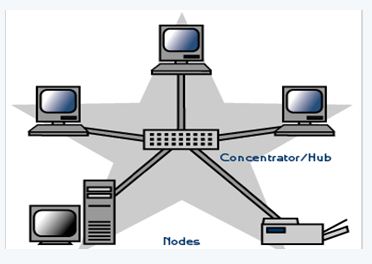
Topology describes the physical cabling layout and the logical way of moving data between components. Network topology is the schematic description of a network arrangement, connecting various nodes (sender and receiver) through lines of connection. The following are different types of network topology:
1. BUS topology: Bus topology is a network type in which every computer and network device is connected to a single cable.
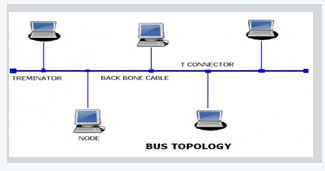
A single cable is used without additional electronics to amplify the signal or pass it along from computer to computer. Therefore, the bus is a passive topology.
Bus topology transmits data only in one direction.
2. STAR topology: In a star topology all the components are connected via a cable to a central location where they are all connected by a device called a hub. There is no direct connection among the computers. All the connections are made via the central hub.
TREE topology: This type of topology is arranged in the form of a tree like structure in which top level contains parent node (root node), which is connected with the child nodes in the second level of hierarchy. The second level nodes are connected to the third level nodes, which in turn are connected to the fourth level nodes and so on. Except thetop-level nodes, each level node has a parent node.
Devices or nodes in a network get connected to each other via communication links and all these links are related to each other in one way or other. The geometric representation of such relationship of links and nodes is known as the topology of that network.

11th Standard Syllabus & Materials
11th Standard
TN 11th Tamil பீடு பெற நில் - செய்யுள் - காவடிச்சிந்து Important Questions And Answers Study Material - QB365 Set A
NEW11th Standard
TN 11th Tamil பீடு பெற நில் - உரைநடை - மலை இடப்பெயர்கள் : ஓர் ஆய்வு Important Questions And Answers Study Material - QB365 Set A
NEW11th Standard
TN 11th Tamil மாமழை போற்றுதும் - துணைப்பாடம் - யானை டாக்டர் Important Questions And Answers Study Material - QB365 Set A
NEW11th Standard
TN 11th Tamil மாமழை போற்றுதும் - செய்யுள் - ஐங்குறுநூறு Important Questions And Answers Study Material - QB365 Set A



Tamilnadu Stateboard 11th Standard Subjects

Maths

Commerce

Economics

Biology

Business Maths and Statistics

Accountancy

Computer Science

Physics

Chemistry
Maths
Biology
Economics
Physics
Chemistry

History
Business Maths and Statistics

Computer Science
Accountancy
Computer Applications
History
Computer Technology
Commerce
Computer Applications
Computer Technology

Tamil

English

French
Tamilnadu Stateboard Standards


