
 100% FREE ACCESS
11th Standard Syllabus & Materials
11th Standard
TN 11th Tamil இயற்கை வேளாண்மை,சுற்றுச்சூழல் -செய்யுள் - மனோன்மணீயம் Important Questions And Answers Study Material - QB365 Set A
NEW11th Standard
TN 11th Tamil என்னுயிர் என்பேன் -துணைப்பாடம் - இசைத்தமிழர் இருவர் Important Questions And Answers Study Material - QB365 Set A
NEW11th Standard
TN 11th Tamil மொழி கலை -செய்யுள் - ஒவ்வொரு புல்லையும் Important Questions And Answers Study Material - QB365 Set A
NEW11th Standard
TN 11th Tamil பீடு பெற நில் - இலக்கணம் - பகுபத உறுப்புகள் Important Questions And Answers Study Material - QB365 Set A
NEW11th Standard
TN 11th Tamil பீடு பெற நில் - துணைப்பாடம் - வாடிவாசல் Important Questions And Answers Study Material - QB365 Set A
NEW11th Standard
TN 11th Tamil பீடு பெற நில் - செய்யுள் - குறுந்தொகை Important Questions And Answers Study Material - QB365 Set A

Published on: 01/08/2018
Based on the Working with Typical Operating System (Windows & Linux), some of the important questions are covered in this question paper.it covers the one mark, two, three marks and five marks prepared from the book back and the creative questions.
Teacher please subscribes and gets the plenty of question paper based on chapter wise and also predefined blueprint. For subscription, please Click Here.
Download Tamil Nadu 11th Standard Computer Technology question papers, model tests, one-mark questions, important questions, and public exam papers in PDF format. Free study materials and answer keys for TN State Board students.
Questions + Answers key
Take MCQ Computer Technology Test
1.
How many parent directory is allowed for a child directory?
2
Only One
More than 2
Less than 6
2.
The opening screen of Windows is called ______
Window
Workspace
task bar
Desk top
3.
The basic working platform of Windows is called ______
OS
Version
Icons
Desktop
4.
Which of the following is not a version of windows 2000?
server
professional
DOS
Data center server
5.
How many versions of Windows 2000 were released?
3
1
4
2
6.
Which version removed the option "Boot in DOS"?
Windows 98
Windows ME
W2K
Windows XP
7.
Which is the default browser for Ubuntu?
Firefox
Internet Explorer
Chrome
Thunderbird
8.
Which is the default application for spreadsheets in Ubuntu? This is available in the software launcher?
Libre Office Writer
Libre Office Calc
Libre Office Impress
Libre Office Spreadsheet
9.
Which of the following in Ubuntu OS is used to view the options for the devices installed?
Settings
Files
Dash
VBox_GAs_5.2 ..2
10.
Which is the default folder for many Windows Applications to save your file?
My Document
My Pictures
Documents and Settings
My Computer
11.
From the options given below, choose the operations managed by the operating system.
Memory
Processes
Disks and I/O devices
all of the above
12.
Write a note on Ubuntu OS.
13.
How will you delete files and folders using file menu?
14.
Write a note on window.
15.
Differentiate Thunderbird and Firefox in Ubuntu OS.
16.
Are there any difficulties you face while using Ubuntu? If so, mention it with reasons.
17.
Write the specific use of Cortana.
18.
If you are working on multiple files at a time, sometimes the system may hang. What is the reason behind it? How can you reduce it?
19.
Write the prominent feature of Windows 7 OS.
20.
Name the four versions of Windows 2000.
21.
What is recycle bin?
22.
Write the options appears which shutting down Ubuntu.
23.
Explain different ways of creating a new folder.
24.
Write the important functions of an operating system?
1.
(b)
Only One
2.
(d)
Desk top
3.
(d)
Desktop
4.
(c)
DOS
5.
(c)
4
6.
(b)
Windows ME
7.
(a)
Firefox
8.
(b)
Libre Office Calc
9.
(a)
Settings
10.
(a)
My Document
11.
(d)
all of the above
12.
(i) Ubuntu is a Linux-based operating system. It is designed for computers, smart phones, and network servers.
(ii) The system is developed by a UK based company called Canonical Ltd.
(iii) All the principles used to develop the Ubuntu software are based on the principles of Open Source software development.
13.
(i) Select the file or folder you wish to delete.
(ii) Click on the File menu and select Delete.
(iii) The file will be moved to Recycle bin.
14.
(i) The window is an area on the screen that displays information for a specific program.
(ii) Window is a typical rectangular area in an application or a document or a-dialog.
(iii) A typical window includes a title bar along the top that describes the contents of the window, A followed by a toolbar that contains user interface buttons.
(iv) Most of the window's remaining area is used to display the content.
15.
Five fox is a browser. Thunderbird is email client which can be used view emails received.
16.
(i) Different desktop managers lead to a fragmented experience.
(ii) Too many package Managers makes Ubuntu hard to learn and master.
(iii) Lack of software
(iv) Hardware compatibility.
17.
Use of Cortana
(i) Gives reminders based on time, places or people.
(ii) Track packages, teams, interests and flights.
(iii) Send emails and texts.
(iv) Find facts, files, places and information.
(v) Open any application on your system.
18.
(i) Due to low capacity of main memory (RAM) the system many hang while working with multiple files.
(ii) To reduce it increase the size of main memory and other reasons for hanging is over heating, driver corruption or errors, software errors and computer virus.
19.
(i) Faster boot times, introduced new user interfaces and Internet Explorer 8.
(ii) Most used operating system on the Internet and also the most used for PC gaming.
20.
The four versions of Windows 2000 were released:
(i) Professional (for business desktop and laptop systems),
(ii) Server (both a Web server and an office server),
(iii) Advanced Server (for line-of-business applications) and
(iv) Data Center Server (for high-traffic computer networks).
21.
It is a folder which contains all deleted files and folders have an opportunity to recover from it.
22.
(i) Log out
(ii) Suspend
(ill) Restart or shutdown
23.
There are two ways in which a new folder is created:
Way I:
(i) Locate and select the folder on the drive where you want to create a new folder. The folder must be selected before continuing. In figure (selecting a folder to create a folder under it) the folder Mathi is selected to create a New Folder under it.
(ii) Click on File menu, select New, then select Folder.
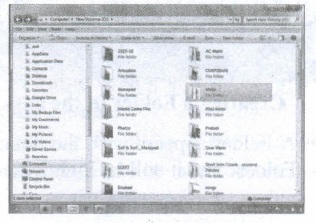
Selecting a folder to create a folder under it.
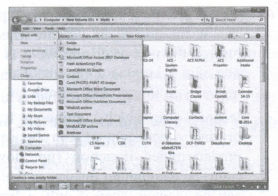
Creating a Folder using, File Menu
(i) Type in the folder name and press Enter to finalize (you can also click away from the new folder, outside its surrounding rectangle to finalize).
jpg.jpg)
Typing name to the newly created Folder
(ii) In this case, the folder name is given as "Test Folder".
Way II: In order to create a folder in the desktop:
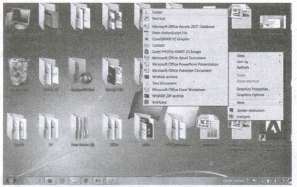
(i) On the Desktop, right click and select New option from the pop-up menu.
(ii) From the sub-menu, select Folder option. (Refer figure 5.23 to know the procedure)
(iii) A Folder appears with the default name "New Folder" and it will be highlighted.
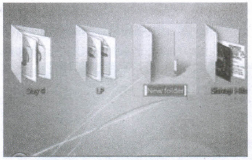
(iv) Type the name you want.
(v) Click anywhere else in the window or else press Enter key.
(vi) The name of the folder changes to what you have typed.
24.
The important functions of an operating System.
(i) Memory Management
(ii) Processor Management
(iii) Device Management
(iv) File Management
(v) Security
(vi) Control over system performance
(vii) Job accounting
(viii) Error detecting aids
(ix) Coordination between other software and users

11th Standard Syllabus & Materials
11th Standard
TN 11th Tamil பீடு பெற நில் - செய்யுள் - காவடிச்சிந்து Important Questions And Answers Study Material - QB365 Set A
NEW11th Standard
TN 11th Tamil பீடு பெற நில் - உரைநடை - மலை இடப்பெயர்கள் : ஓர் ஆய்வு Important Questions And Answers Study Material - QB365 Set A
NEW11th Standard
TN 11th Tamil மாமழை போற்றுதும் - துணைப்பாடம் - யானை டாக்டர் Important Questions And Answers Study Material - QB365 Set A
NEW11th Standard
TN 11th Tamil மாமழை போற்றுதும் - செய்யுள் - ஐங்குறுநூறு Important Questions And Answers Study Material - QB365 Set A



Tamilnadu Stateboard 11th Standard Subjects

Maths

Commerce

Economics

Biology

Business Maths and Statistics

Accountancy

Computer Science

Physics

Chemistry
Maths
Biology
Economics
Physics
Chemistry

History
Business Maths and Statistics

Computer Science
Accountancy
Computer Applications
History
Computer Technology
Commerce
Computer Applications
Computer Technology

Tamil

English

French
Tamilnadu Stateboard Standards
