
 100% FREE ACCESS
11th Standard Syllabus & Materials
11th Standard
TN 11th Tamil இயற்கை வேளாண்மை,சுற்றுச்சூழல் -செய்யுள் - மனோன்மணீயம் Important Questions And Answers Study Material - QB365 Set A
NEW11th Standard
TN 11th Tamil என்னுயிர் என்பேன் -துணைப்பாடம் - இசைத்தமிழர் இருவர் Important Questions And Answers Study Material - QB365 Set A
NEW11th Standard
TN 11th Tamil மொழி கலை -செய்யுள் - ஒவ்வொரு புல்லையும் Important Questions And Answers Study Material - QB365 Set A
NEW11th Standard
TN 11th Tamil பீடு பெற நில் - இலக்கணம் - பகுபத உறுப்புகள் Important Questions And Answers Study Material - QB365 Set A
NEW11th Standard
TN 11th Tamil பீடு பெற நில் - துணைப்பாடம் - வாடிவாசல் Important Questions And Answers Study Material - QB365 Set A
NEW11th Standard
TN 11th Tamil பீடு பெற நில் - செய்யுள் - குறுந்தொகை Important Questions And Answers Study Material - QB365 Set A

Published on: 30/10/2019
Download Tamil Nadu 11th Standard Computer Technology question papers, model tests, one-mark questions, important questions, and public exam papers in PDF format. Free study materials and answer keys for TN State Board students.
Questions + Answers key
Take MCQ Computer Technology Test
1.
You can use the running slideshow option by clicking slide show button on the ___________
Tool bar
Menu Bar
Navigation Bar
Sliding Tool Bar
2.
Which menu contains the Slide Transition option?
Slide Show
View
Tools
Format
3.
The customer is required to design the item number between 101 to 200. If the user types above 200 or below 100, the system should give an error message. Which of the following tool is used?
Listing
Filtering
Formatting
Validating
4.
What will be value returned by = DECIMAL (“16;”1101)
12
13
D
E
5.
The active sheet colour will be of which colour?
Grey
Green
White
Yellow
6.
Which of the following applications is the parent to OpenOffice Calc?
Visicalc
LibreCalc
Lotus 123
Star Office Calc
7.
Which is the default browser for Ubuntu?
Firefox
Internet Explorer
Chrome
Thunderbird
8.
Which of the following Operating systems support Mobile Devices?
Windows 7
Linux
BOSS
iOS
9.
Operating system is a
Application Software
Hardware
System Software
Component
10.
Which of the following device identifies the location when address is placed in the memory address register?
locator
encoder
decoder
multiplexed
11.
Which refers to the number of bits processed by a computer's CPU?
Byte
Nibble
Word length
Bit
12.
Identify the output device
Keyboard
Memory
Monitor
Mouse
13.
Which menu option of the menu bar is used to Mail Merge a document?
View
Format
Table
Tools
14.
Which icon on the drawing toolbar gets you a text box?
Text icon
Text box icon
Draw icon
Draw box icon
15.
The Find and Replace option is available in which menu?
File
Edit
Format
Tools
16.
How to Deleting a Slide in presentation?
17.
What is a Normal view? Explain.
18.
Add:
(a) -2210 + 1510
(b) 2010 + 2510
19.
Differentiate Optical and Laser mouse.
20.
Write about the drawing toolbar.
21.
What are the different types of orientation?
22.
List some advantages of using templates.
23.
Explain the applications of Header and Footer with example.
24.
Convert (98.46)10 to Binary
25.
Explain Mail Merge feature.
26.
What are Header and Footer? How do you insert page numbers?
27.
Define a template in Impress.
28.
Differentiate between Copy -Paste and Cut-Paste.
29.
What is the use of a file extension?
30.
What is GUI?
31.
Convert (46)10 into Binary number.
32.
What is the function of memory?
1.
(a)
Tool bar
2.
(a)
Slide Show
3.
(d)
Validating
4.
(b)
13
5.
(c)
White
6.
(d)
Star Office Calc
7.
(a)
Firefox
8.
(d)
iOS
9.
(c)
System Software
10.
(c)
decoder
11.
(c)
Word length
12.
(c)
Monitor
13.
(d)
Tools
14.
(b)
Text box icon
15.
(b)
Edit
16.
1. Open a Web Slides slideshow on your desktop.
2. Click the slide you want to disable on the left.
3. Keep the Change key when tapping several slides to uninstall them all at once.
4. On your screen, click Remove or Scroll lock.
5. Link to Leader on the View menu, then press Slide Master.
6. Click the slide template you want to disable in the scrolling window.
7. Select the Slide Master tab, then Uninstall under Slide Master.
8. Control +click or right -click to uninstall the slide and disable the leftmost column of the thumbnail. Alternatively, you should disable the slide and then remove it.
17.
(i) Normal view is the main view for creating individual slides.
(ii) There are two ways to place a slide in the Slide Design area of the Normal view: clicking the slide thumbnail in the Slides pane or using the Navigator. To open the Navigator, click the Navigator button in the Standard Toolbar or press Ctrl + Shift + F5 and select a slide by scrolling down the Navigator list until you find the one that you want and then double-click it.
18.
(a) -2210 + 1510
.JPG)
\((1111)_2 \Rightarrow(00001111)_2 \)
\((10110)_2 \Rightarrow(00010110)_2 \)
\(1 \text { 's complement } \quad \quad \quad =11101001 \)
\(2 \text {'s complement } \quad \quad \quad =11101010 \)
\((-22)_{10}+(15)_{10} \quad \quad \quad =11101001 \)
\(= 00001111\)
______________
1 1 1 0 1 0 1 0
______________
(b) 2010 + 2510
a.JPG)
(10100)2 = (11001)2
8 bit Format of 2010 = 00010100
8 bit format of 2510 = 00011001
2010 + 2510 = _________
00101101
__________
2010 + 2510 = 001011012
19.
| Optical Mouse | Laser Mouse |
| Measures the motion and acceleration of pointer. | Measures the motion and acceleration of pointer. |
| It uses light source instead of ball to judge the motion of the pointer. | Laser Mouse uses Laser Light. |
| Optical mouse is less sensitive towards surface. | Laser Mouse is highly sensitive and able to work on any hard surface. |
20.
OpenOffice writer uses the drawing tools, to create various shapes by using the Drawing toolbar. Select View ⟶Toolbars ⟶ Drawing to display drawing toolbar which contains various Drawing tools.
21.
There are two different orientations:
(i) Landscape: The width of the document is more than the height. This is best suited for displaying table, professional photos, invitations, album etc.
(ii) Portrait: This is the most common and default orientation. Here, the height of the document is more than the width. Normally books, newspapers will be displayed in this format.
22.
Advantages of using templates:
1. On using the standard templates, it is easy to create colour, attractive designs for slides.
2. Easily one can modify the templates, even we can download from Internet.
3. Attractive designs of templates are available; it will be the audience to look up of the presentation.
4. It creates attentive of audience.
5. Quick customization of templates, text, fonts, pictures were available. -
6. It have professional computer design.
7. A template is a design scheme and pre-defined layout for a specific purpose to be used for making presentations.
23.
Header is the top margin of the page and Footer is the bottom margin of the page.
Application of Header and Footer:
(i) Header and Footer are some titles (such as Document Title, Author Name) or references (such as page no, number of pages, date) or remarks to be printed in the top (called as Header) and bottom of the page (called as Footer).
(ii) If we wish to get some information on every page, either on top or bottom of the page, we need to use header or footer as per the requirement.
24.
98.4610
1. Integer part
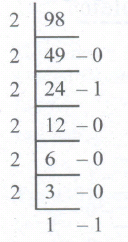
2. Fractional part
0.46 x 2 = 0.92 = 0
0.92 x 2 = 1.84 = 1
0.84 x 2 = 1.68 = 1
0.68 x 2 = 1.36 = 1
0.36 x 2 = 0.72 = 0
0.72 x 2 = 1.44 = 1
98.4610 = (1100010.011101...)2
25.
(i) Mail merge is a process to create personalized letters and pre-addressed enveloped or mailing labels forms mailings form a form letter
(ii) The feature is usually employed in a word processing document which contains fixed text and variables (which act as place holders that are replaced by text from the data source.)
(iii) It is used to create multiple documents at once. These documents have identical layout, formatting, text and graphics.
(iv) The documents can create will mail merge include bulk labels, letters, envelops and emails and more using information stored in a list, database or spreadsheet
26.
The header is a section of the document that appears in the top margin, while the footer is a section of the document that appears in the bottom margin of the page. Typically, headers display the title or chapter name, author name of a document while the footer displays the page number, date, time etc which gets displayed on all the pages automatically.
To Insert Headers and Footers:
(i) Select from the main menu Insert -> Header -> Default
(ii) The header text area is separated from the normal text are (a)
(iii) Enter the text that is to be repeated in all pages or Select Insert -> Fields -> Title.
(iv) The Header dialog box is displayed
To insert a Footer, the steps are as given below:
(i) Select from the main menu Insert -> Footer -> Default
(ii) Piace the cursor in the Footer part of the page.
(iii) Select Insert -> Fields -> Page Number.
Once the headers and footers are given in the first page, the same text appears in all the pages.
Inserting and Formatting Page Numbers:
Once the Header/footer area is enabled, the page numbers can be inserted by performing the following steps:
(i) position the cursor where you want to insert the number
(ii) choose Insert -> Fields -> Page Number
(iii) The page number appears with a gray background
Normally, the page numbers appear as 1,2,3 ..... , To change the numbering style, the following sequence of steps can be performed:
(i) Position the cursor where the page number has to appear
(ii) Select Format -> page, which will bring the page style dialog box
(iii) Select page Tab
(iv) In the Layout settings, select the format drop down combo box
(v) Select the desired style and click OK button
27.
Design template is a set containing graphic design and colour scheme of the presentation.
28.
| Copy -Paste | Cut-Paste |
| Select the cell or group of cells you want to copy, then using Select Edit → Copy or Click "Copy" icon from the standard tool bar or Press Ctrl + C |
Select the cell or group of cells you want to cut, them using Edit → Cut or Click "Cut" icon from the standard tool bar or Press Ctrl + X |
| Move the cell pointer to the cell in which you want to paste, Edit → paste or Press or Click "Paste" icon or Press Ctrl + V |
Move the cell pointer to the cell in which you want to paste, Edit → Paste or Click "Paste" icon or Press Ctrl + V |
29.
File extension is used to know that in which the file is associated with.
30.
The GUI is a window based system with a pointing device to direct I/O, choose from menus, make selections and a keyboard to enter text. Its vibrant colours attract the user very easily.
31.
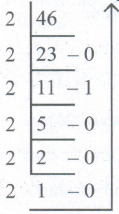
4610 - 1011102
32.
The primary memory is used to temporarily store the programs and data when the instructions are ready to execute. The secondary memory is used to store the data permanently.

11th Standard Syllabus & Materials
11th Standard
TN 11th Tamil பீடு பெற நில் - செய்யுள் - காவடிச்சிந்து Important Questions And Answers Study Material - QB365 Set A
NEW11th Standard
TN 11th Tamil பீடு பெற நில் - உரைநடை - மலை இடப்பெயர்கள் : ஓர் ஆய்வு Important Questions And Answers Study Material - QB365 Set A
NEW11th Standard
TN 11th Tamil மாமழை போற்றுதும் - துணைப்பாடம் - யானை டாக்டர் Important Questions And Answers Study Material - QB365 Set A
NEW11th Standard
TN 11th Tamil மாமழை போற்றுதும் - செய்யுள் - ஐங்குறுநூறு Important Questions And Answers Study Material - QB365 Set A



Tamilnadu Stateboard 11th Standard Subjects

Maths

Commerce

Economics

Biology

Business Maths and Statistics

Accountancy

Computer Science

Physics

Chemistry
Maths
Biology
Economics
Physics
Chemistry

History
Business Maths and Statistics

Computer Science
Accountancy
Computer Applications
History
Computer Technology
Commerce
Computer Applications
Computer Technology

Tamil

English

French
Tamilnadu Stateboard Standards
