
 100% FREE ACCESS
11th Standard Syllabus & Materials
11th Standard
TN 11th Tamil இயற்கை வேளாண்மை,சுற்றுச்சூழல் -செய்யுள் - மனோன்மணீயம் Important Questions And Answers Study Material - QB365 Set A
NEW11th Standard
TN 11th Tamil என்னுயிர் என்பேன் -துணைப்பாடம் - இசைத்தமிழர் இருவர் Important Questions And Answers Study Material - QB365 Set A
NEW11th Standard
TN 11th Tamil மொழி கலை -செய்யுள் - ஒவ்வொரு புல்லையும் Important Questions And Answers Study Material - QB365 Set A
NEW11th Standard
TN 11th Tamil பீடு பெற நில் - இலக்கணம் - பகுபத உறுப்புகள் Important Questions And Answers Study Material - QB365 Set A
NEW11th Standard
TN 11th Tamil பீடு பெற நில் - துணைப்பாடம் - வாடிவாசல் Important Questions And Answers Study Material - QB365 Set A
NEW11th Standard
TN 11th Tamil பீடு பெற நில் - செய்யுள் - குறுந்தொகை Important Questions And Answers Study Material - QB365 Set A

Published on: 30/10/2019
Download Tamil Nadu 11th Standard Computer Applications question papers, model tests, one-mark questions, important questions, and public exam papers in PDF format. Free study materials and answer keys for TN State Board students.
Questions + Answers key
Take MCQ Computer Applications Test
1.
A Data value for variable that appears directly in a program by using a
loop
Literal
Statement
Text
2.
Java Scripts can be implemented using which statements?
< head >
< Java >
< script >
< text >
3.
The Declaration block of CSS is surrounded by
( )
[ ]
{ }
< >
4.
Which value causes the audio play as long as the page is in view?
Stop
Never Stop
Continue
Infinite
5.
To create internal link, which of the following attribute should be used?
link
name
local
Inter
6.
Which of the following is a special word used inside a tag to specify additional information to the tag?
Tags
Attributes
Headings
Body
7.
The internet is governed by
ICANM
ICANN
ICMA
ICNNA
8.
Which is the default browser for Ubuntu?
Firefox
Internet Explorer
Chrome
Thunderbird
9.
From the options given below, choose the operations managed by the operating system.
Memory
Processes
Disks and I/O devices
all of the above
10.
Which of the following is not the part of a microprocessor unit?
ALU
Control unit
Cache memory
register
11.
Expansion for ASCII
American School Code for Information Interchange
American Standard Code for Information Interchange
All Standard Code for Information Interchange
American Society Code for Information Interchange
12.
Name the volatile memory _____
ROM
PROM
RAM
EPROM
13.
Which is the shortcut key to view the slide show?
F6
F9
F5
F10
14.
Which is the first electronic Spreadsheet?
Excel
Lotus 1-2-3
Visicalc
OpenOffice Calc
15.
Which menu contains the Numbering option?
File
Edit
Tools
Format
16.
Differentiate Files and Folders
17.
What is a GUI?
18.
What is HDMI?
19.
What is the function of memory?
20.
Define a template in Impress.
21.
What is auto text in writer?
22.
Explain about the popup dialog boxes in JavaScript.
23.
Explain the attributes used with < table > tag in HTML.
24.
Explain any five types of internet services.
25.
26.
Explain Page formatting in Writer.
27.
Write about  tag.
tag.
28.
How do you save a file as HTML file?
29.
What are Advantages of email?
30.
Add (a) -2210 + 1510 (b) 2010+2510
31.
Differentiate Optical and Laser mouse.
32.
Write any three formatting options.
1.
(b)
Literal
2.
(c)
< script >
3.
(c)
{ }
4.
(d)
Infinite
5.
(b)
name
6.
(b)
Attributes
7.
(b)
ICANN
8.
(a)
Firefox
9.
(d)
all of the above
10.
(c)
Cache memory
11.
(b)
American Standard Code for Information Interchange
12.
(c)
RAM
13.
(c)
F5
14.
(c)
Visicalc
15.
(d)
Format
16.
| Files | Folders |
| File is the collection of records. | Folder is a collections of files. |
| Create a file : Start \(\rightarrow\)All Programs \(\rightarrow\) select application \(\rightarrow\) ok |
Create a folders: Right click \(\rightarrow\)New \(\rightarrow\) folder \(\rightarrow\)ok |
17.
The GUI is a window based system with a pointing device to direct I/O, choose from menus, make selections and a keyboard to enter text. Its vibrant colours attract the user very easily.
18.
High-Definition Multimedia Interface is an audio/ video interface which transfers the uncompressed video and audio data from a video controller, to a compatible computer monitor, LCD projector, digital television etc.
19.
The primary memory is used to temporarily store the programs and data when the instructions are ready to execute. The secondary memory is used to store the data permanently
20.
Templates are built-in design files which contain different predefined styles, such as fond face and size, bullet size, place holder's size and position, background, colors heme and slide master.
21.
AutoText allows you to assign text, tables, grajphics and other items to a key or key combination. For example, rather than typing "TamilNadu" every time you use that phrase, you might just type "tn" and press F3.
22.
JavaScript supports three important types of dialog boxes. Dialog boxes are also called as Popup Boxes. These dialog boxes can be used to raise an alert, or to get confirmation on any input or to have a kind of input from the users.JavaScrípt supports three kind of popup boxes: Alert box, Confirm box, and Promnpt box.
Alert Dialog Box: An alert dialog box is mostly used to give a warning message to the users. For example, if one input field requires to enter some text but the user does not provide any input, then as a part of validation, you can use an alert box to give a warning message. Alert box gives only one button "OK" to select and proceed.
The syntax of alert box is
alert("Message");
(or) Window.alert ("Message");
Example:
alert("Name is compulsory entry);
(or) window.alert("Name is compulsory entry");
Confirm Dialog Box : A confirmation dialog box is mostly used to take user's consent on any option. It displays a dialog box with two buttons: OK and Cancel. If the user clicks on the OK button, the confirm() will return true. If the user clicks on the Cancel button, then confirm() returns false.
The syntax of confirm dialog box is
confirm("message");
(or)
window.confirm("message");
Example :
confirm("Hai Do you want to continue:");
(or)
window.confirm(“Hai Do you want to continue:");
Prompt Dialog Box: The prompt dialog box is very useful when the user want to pop-up a text box to get user input. Thus, it enables you to interact with the user. The user needs to fill in the text box field and then click OK.
The prompt dialog box is displayed using a method called prompt()which takes two parameters :
(i) a label which you want to display in the text box and (ii) a default string to display in the text box. This dialog box has two buttons: OK and Carncel. If the user clicks the OK button, the prompt() will return the entered value from the text box. If the user clicks the Cancel button, the prompt() returns null. The Sntax of prompt dialog box is,
Prompt("Message","default Value");
(or)
window.prompt("sometext","defaultText");
Example:
prompt("Enter Your Name:"Name");
(or)
window.prompt("Enter Your Name:"Name");
23.
The <table> is a container tag. There are several attributes to improve the layout of the table. They are listed below:
(i) Cellspacing : It is used to set the space between cells in a table.The value should be in pixels.
(ii) Cellpadding: It is used to set the space between the contents of a cell and its border the value should be in pixels.
(iii) Border : Border attribute with <table> tag is used to specify the thickness of the border lines around the table. The value of the border attribute should be non zero value in pixels. If its value is zero, HTML displays the table without border. The default value is Zero in most of the browsers.
(iv) Bordercolor : It is used to apply colour to the border lines.
(v) Align : It is used to set the position of the table within the browser window. Left is the default position. Right or centre may be the value of align attribute.
(vi) BGcolor : It is used to apply background colour to the table.
(vii) Height and Width : These two attributes are used to specify the height and width of a table in terms of pixels or percentage.
24.
(i) Wireless: Radio frequency bands are used in place of telephone or cable networks. One of the greatest advantages of wireless Internet connections is the "always-on" connection that can be accessed from any location that falls within network coverage. Wireless connections are made possible through the use of a modem, which picks up Internet signals and sends them to other devices.
(ii) Mobile : Many cell phone and smartphone providers offer voice plans with Internet access. Mobile Internet connections provide good speeds and allow you to access the Internet.
(iii) Cable : Cable Internet connection is a form of broadband access. Through use of a cable modem, users can access the Internet over cable TV lines. Cable modems can provide extremely fast access to the Internet.
(iv) Satellite : In certain areas where broadband connection is not yet offered, a satellite Internet option may be available, Similar to wireless access, satellite connection utilizes a modem.
(v) ISDN: ISDN (Integrated Services Digital Network) allows users to send data, voice and video content over digital telephone lines or standard telephone wires. The installation of an ISDN adapter is required at both ends of the transmission-on the part of the user as well as the Internet access provider.
25.
26.
(i) Page formatting: The most important thing in a word processor is how to format the page with elements such as margins, numbering, page layout, headers and footers. Formatting your pages makes it look more attractive and make it easier to read.
(ii) Changing page size : The default page size in writer is 8.5 \(\times\) 11'', the same as that of a standard A4 printing paper. However, for different types of documents, you may need to change the page size.To change the paper size:
Select the page to be resized.
Select Format \(\rightarrow\) Page, the page style dialog box
Select Page Tab
In the paper format group, select the format like A4, legal etc.
Or the width and height option can be used to set the page size.
(iii) Changing page margins :Changing or setting page margins in OpenOffice Writer can be done in two ways :
Using the Rulers - quick and easy, but does not have precise values.
Using the Page Style dialog box - can specify precise values for the margins.
1. Changing page margins - using Ruler.
The shaded sections of the rulers are the margins.
Hold the mouse pointer over the line between the gray and white sections.
The mouse pointer turns into a double-headed arrow.
Hold down the left mouse button and drag the mouse to move the margin and release it at the required point.
The new margin is set.
2. Using the Page Style dialog box.
To change margins using the Page Style dialog box
1. Right-click anywhere on the page and select Page from the popup menu and select page tab of Page Style dialog box as shown.
2. In the Margins group, specify the values for left,right, top and bottom margins.
3. Click ok button.
Orientation : Page orientation refers to how the document will be displayed On screen and printed. There are two different orientations:
Landscape - The width of the document is more than the height. This is best suited for displaying professional photos, invitations, albums, tables etc.
Portrait - This is the most common and default orientation.Here, the height of the document is more than the width. Normally books, newspapers will be displayed in this format.

To change the orientation :
Select the page whose orientation is to be changed
In the Page Style dialog box, under the Orientation group,
Select Portrait or Landscape button.
Click ok button.
Page colour and borders: Changing the page color is not quite common. To do so, in the Page Style dialog box,select Background tab, In As option click on color and select the color" from the color palette or select "graphic" to apply an image as a page background.
27.
JavaScript can be implemented using .... tags. The tag containing JavaScript can be placed anywhere within in the web page, but it is normally recommended to be kept within the \(<head>\) tags. The tag alerts the browser program to start interpreting all the text between these tags as a script command.
28.
(i) Click File \(\rightarrow\) Save (or) Press Ctrl + S
(ii) Save as dialog box appears.
(iii) In "File Name" text box, type a file name with .htm or .html extension.
(iv) Select "All Files" from "Save as type" list box.
(v) Click "Save" button.
29.
The main advantages of email are listed below :
(i) Free delivery: Sending an e-mail is virtually free, outsicde the cost of Internet service. There is no need to buy a postage stamp to send a letter.
(ii) Global delivery : E-mail can be sent to nearly anywhere around the world, to any country.
(iii) Instant delivery : An e-mail can be instantly sent and reccived by the recipient over the Internet. (iv) File attachment : An e-mail can include one or more file attachments, allowing a person to send documents, pictures, or other files with an e-mail.
(v) Long-term storage : E-mails are stored electronically, which allows for storage and archival over long periods of time.
(vi) Environment friendly: Sending an e-mail does not require paper( Paperless), cardboard, or packing tape, conserving paper resources.
30.
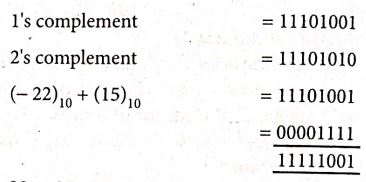
(a) -2210 + 1510
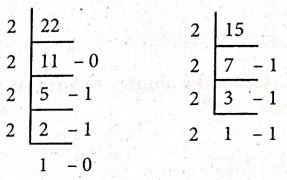
(1111)2 \(\Rightarrow\) (00001111)2
(10110)2 \(\Rightarrow\)(00010110)2
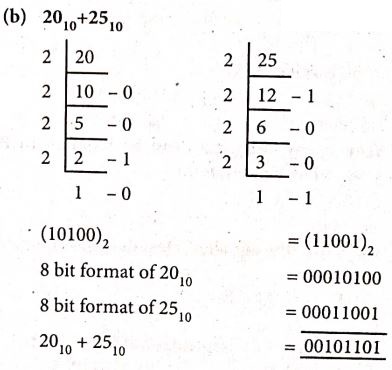
2010 + 2510 = 001011012
31.
| Optical Mouse | Laser Mouse |
| Measures the motion and acceleration of the pointer. | Measures the motion and acceleration of pointer. |
| It uses light source instead of ball to judge the motion of the pointer. | Laser Mouse uses Laser Light. |
| Optical mouse is less sensitive towards surface. | Laser Mouse is highly sensitive and able to work on any hard surface. |
32.
| Formatting Option | Keyboard Shortcut | Description |
| Bold | Ctrl + B | Used to make the data as Bold |
| Italic | Ctrl + I | Used to italicize data |
| Underline | Ctrl + U | Used to underline the data |

11th Standard Syllabus & Materials
11th Standard
TN 11th Tamil பீடு பெற நில் - செய்யுள் - காவடிச்சிந்து Important Questions And Answers Study Material - QB365 Set A
NEW11th Standard
TN 11th Tamil பீடு பெற நில் - உரைநடை - மலை இடப்பெயர்கள் : ஓர் ஆய்வு Important Questions And Answers Study Material - QB365 Set A
NEW11th Standard
TN 11th Tamil மாமழை போற்றுதும் - துணைப்பாடம் - யானை டாக்டர் Important Questions And Answers Study Material - QB365 Set A
NEW11th Standard
TN 11th Tamil மாமழை போற்றுதும் - செய்யுள் - ஐங்குறுநூறு Important Questions And Answers Study Material - QB365 Set A



Tamilnadu Stateboard 11th Standard Subjects

Maths

Commerce

Economics

Biology

Business Maths and Statistics

Accountancy

Computer Science

Physics

Chemistry
Maths
Biology
Economics
Physics
Chemistry

History
Business Maths and Statistics

Computer Science
Accountancy
Computer Applications
History
Computer Technology
Commerce
Computer Applications
Computer Technology

Tamil

English

French
Tamilnadu Stateboard Standards
