
 100% FREE ACCESS
11th Standard Syllabus & Materials
11th Standard
TN 11th Tamil இயற்கை வேளாண்மை,சுற்றுச்சூழல் -செய்யுள் - மனோன்மணீயம் Important Questions And Answers Study Material - QB365 Set A
NEW11th Standard
TN 11th Tamil என்னுயிர் என்பேன் -துணைப்பாடம் - இசைத்தமிழர் இருவர் Important Questions And Answers Study Material - QB365 Set A
NEW11th Standard
TN 11th Tamil மொழி கலை -செய்யுள் - ஒவ்வொரு புல்லையும் Important Questions And Answers Study Material - QB365 Set A
NEW11th Standard
TN 11th Tamil பீடு பெற நில் - இலக்கணம் - பகுபத உறுப்புகள் Important Questions And Answers Study Material - QB365 Set A
NEW11th Standard
TN 11th Tamil பீடு பெற நில் - துணைப்பாடம் - வாடிவாசல் Important Questions And Answers Study Material - QB365 Set A
NEW11th Standard
TN 11th Tamil பீடு பெற நில் - செய்யுள் - குறுந்தொகை Important Questions And Answers Study Material - QB365 Set A

Published on: 03/08/2018
From this syllabus, Term I model exam question paper is prepared .it covers the important one mark, two, three marks and five marks.
Chapters are covered in this question paper:
1.Introduction to Computers
2.Number Systems
3.Computer Organization
Download Tamil Nadu 11th Standard Computer Technology question papers, model tests, one-mark questions, important questions, and public exam papers in PDF format. Free study materials and answer keys for TN State Board students.
Questions + Answers key
Take MCQ Computer Technology Test
1.
Display devices are connected to the computer through.
USB port
Ps/2 port
SCSI port
VGA connector
2.
What is the smallest size of data represented in a CD?
blocks
sectors
pits
tracks
3.
Which of the following is a CISC processor?
Intel P6
AMD K6
Pentium III
Pentium IV
4.
Which of the following device identifies the location when address is placed in the memory address register?
locator
encoder
decoder
multiplexed
5.
How many bits constitute a word?
8
16
32
determined by the processor used.
6.
Which of the following is said to be the brain of a computer?
Input devices
Output devices
Memory device
Microprocessor
7.
A + A =?
A
O
I
A
8.
Which gate is called as the logical inverter?
AND
OR
NOT
XNOR
9.
For 11012 the equalent Hexadecimal equivalent is?
F
E
D
B
10.
2\(\wedge \)50 is referred as
Kilo
Tera
Peta
Zetta
11.
Expand POST
Post on self Test
Power on Software Test
Power on Self Test
Power on Self Text
12.
When a system restarts which type of booting is used.
Warm booting
Cold booting
Touch boot
Real boot
13.
Identify the input device
Printer
Mouse
Plotter
Projector
14.
Name the volatile memory
ROM
PROM
RAM
EPROM
15.
First generation computers used
Vacuum tubes
Transistors
Integrated circuits
Microprocessors
16.
Name the different types of CPU Register.
17.
What is instruction set?
18.
Name the measurement of clock speed of the computer.
19.
Which source is used to erase the content of a EPROM?
20.
What is bit?
21.
How the data classified based on their size?
22.
Write the 1's complement procedure.
23.
What is data?
24.
Name the types of computer introduced in Fourth generation computers.
25.
Name the first generation computers.
26.
Differentiate Input and output unit
27.
What is the function of memory?
28.
Complete the Table
1) 0 x 0 = _
2) 1 x 1 = _
3) 1 x _ = 0
4) _ x 0 = 0
29.
Complete the Table
1) 0 - 0 = _
2) _ - 0 = 1
3) 1 -1 = _
4) 0 -1 = _
30.
Describe binary number system.
31.
Complete the following Octal numbers 365, 366, 367,.......
32.
Write the truth table of fundamental gates
33.
Add 2010 + 2510
34.
What is Integrated circuits?
35.
What is Machine language?
36.
Write short note on impact printer.
37.
What is an input device? Give two examples.
38.
Explain RAM in detail.
39.
Write the steps for converting Decimal to Binary numbers.
40.
Explain Non-Impact printers with an example.
41.
Explain the basic components of a computer with a neat diagram.
1.
(d)
VGA connector
2.
(c)
pits
3.
(c)
Pentium III
4.
(c)
decoder
5.
(d)
determined by the processor used.
6.
(d)
Microprocessor
7.
(a)
A
8.
(c)
NOT
9.
(c)
D
10.
(c)
Peta
11.
(c)
Power on Self Test
12.
(a)
Warm booting
13.
(b)
Mouse
14.
(c)
RAM
15.
(a)
Vacuum tubes
16.
(i) MAR (Memory Address Register)
(ii) MDR (Memory Data Register)
17.
Basic set of machine level instructions that a microprocessor is designed to execute is called as an instruction set.
18.
(i) MHz (Mega Hertz)
(ii) GHz (Giga Hertz)
19.
Ultra-violet-rays is used to erase the content of a EPROM.
20.
The most basic unit of information in a digital computer is called a bit. A bit is a binary digit which can be 0, or 1
21.
Bits, Nibble, Bytes, and Word
22.
Step 1: Convert given Decimal number into Binary.
Step 2: Check if the binary number contains 8 bits. if less add 0 at the left most bit, to make it as 8 bits.
Step 3: Invert all bits (i.e. Change 1 as 0 and 0 as 1).
23.
The term data comes from the word datum, which means a raw fact. The data is a fact about people. places or some objects
24.
(i) Microcomputer
(ii) Portal Computers
25.
ENIAC, EDVAC, UNIVAC 1
26.
| Input Unit | Output Unit |
| Input unit is used to feed any form of data to the computer which can be stored in the memory unit for further processing. | An output unit is any hardware component that conveys information to users in an understandable form. |
| Example: Keyboard, mouse etc. | Example: Moniter, Printer etc. |
27.
The primary memory is used to temporarily store the programs and data when the instructions are ready to execute. The secondary memory is used to store the data permanently.
28.
1) 0 x 0 = 0
2) 1 x 1 = 1
3) 1 x 0 = 0
4) 0 x 0 = 0
29.
1) 0 - 0 = 0
2) 1 - 0 = 1
3) 1 -1 = 0
4) 0 -1 = 1
30.
(i) Computers use binary number system for counting and arithmetic operations.
(ii) The number system has base 2 and it uses 2 digits 0 and 1.
(iii) A string which have any combination of these two digits is called binary number. It would be written as (1001)2
31.
(365)8 = 3 x 82 x 6 x 81 + 5 x 80
= 192 + 48 + 5 = (245)10
(366)8 = 3 x 82 + 6 x 81 + 6 x 80
= 192 + 42 + 6 = (246)10
(367)8 = 3 x 82 + 6 x 81 + 7 x 80
= 192 + 42 + 6 = (247)10
In decimal form, the given sequence will be 245, 246, 247, 248, 249, 250. To complete the sequence of Octal number, we need to find the octal equal of 248, 249 and 250
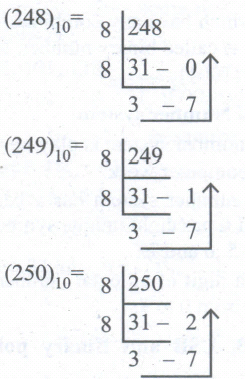
32.
a) AND gate truth table
| A | B | C |
| 0 | 0 | 0 |
| 0 | 1 | 0 |
| 1 | 0 | 0 |
| 1 | 1 | 1 |
b) OR Gate Truth table
| A | B | C |
| 0 | 0 | 0 |
| 0 | 1 | 1 |
| 1 | 0 | 1 |
| 1 | 1 | 1 |
c) Not Gate Truth Table
| A | A |
| 0 | 1 |
| 1 | 0 |
33.
.png)
8 bit Format of 2010 = 00010100
8 bit format of 2510 = 00011001
2010 + 2510 = _________
00101101
__________
2010 + 2510 = 001011012
34.
(i) IC is short for Integrated Circuit or Integrated Chip.
(ii) The IC is a package containing many circuits, pathways, transistors, and other electronic components all working together to perform a particular function or a series of functions.
35.
(i) Machine language is a collection of binary digits or bits that the computer reads and interprets.
(ii) In first generation, machined language was used.
36.
Impact printers:
(i) These printers print with striking of hammers or pins on ribbon. These printers can print on multipart (using carbon papers) by using mechanical pressure.
For example, Dot Matrix printers and Line matrix printers are impact printers.
(ii) A Dot matrix printer that prints using a fixed number of pins or wires.
(iii) Line matrix printers use a fixed print head for printing.
37.
Input device is used to feed any form of data to the computer, which can be stored in the memory unit for further processing.
Example: Keyboard, mouse, Scanner, Fingerprint scanner, Track Ball, Retinal Scanner, Light pen etc.
38.
(i) The main memory is otherwise called as Random Access Memory. This is available in computers in the form of Integrated Circuits (lCs). It is the place in a computer where the Operating System, Application Programs and the data in current use are kept temporarily so that they can be accessed by the computer's processor.
(ii) The smallest unit of information that can be stored in the memory is called as a bit. The memory can be accessed by a collection of 8 bits which is called as a byte.
(iii) The bytes are referred by 'B'. If a computer has 1 megabyte of memory, then it can store 10,48,576 bytes. (or characters) of information. [Hence 1MB is 1024KB and 1 KB is 1024 Bytes, So 1024X1024 =10,48,576 Bytes].
(iv) RAM is a volatile memory, which means that the information stored init is not permanent. As soon as the power is turned off, whatever data that resides in RAM is lost. It allows both read and write operations.
(v) There are two basic types of RAM Dynamic RAM (DRAM), Static RAM (SRAM).
(vi) These two types differ in the technology they use to hold data. Dynamic RAM being a common type needs to be refreshed frequently. Static RAM needs to be refreshed less often, which makes it faster.
(vii) Hence, Static RAM is more expensive than Dynamic RAM.
39.
Steps for Decimal to Binary Conversion.
Step 1: Divide the decimal number which is to be converted by two which is the base of the binary number.
Step 2: The remainder which is obtained from step 1 is the least significant bit of the new binary number.
Step 3: Divide. the quotient which is obtained from the step 2 and the remainder obtained from this is the second least significant bit of the binary number
Step 4: Repeat the process until the quotient becomes zero.
Step 5: The last remainder obtained from the division is the most significant bit of the binary number. Hence, arrange the number from the most significant bit to the least significant bit (i.e., from bottom to top).
40.
Non-Impact Printers:
(i) These printers do not use striking mechanism for printing. They use electrostatic or laser technology.
(ii) Quality and speed of these printers are better than Impact printers. For example, Laser printers and Inkjet printers are non-impact printers.
Laser Printers:
(i) Laser printers mostly work with similar technology used by photocopiers.
(ii) It makes a laser beam scan back and forth across a drum inside the printer, building up a pattern. It can produce very good quality of graphic images.
(iii) One of the chief characteristics of laser printer is their resolution - how many Dots per inch(DPI). The available resolution range around 1200 dpi. Approximately it can print 100 pages per minute(PPM).
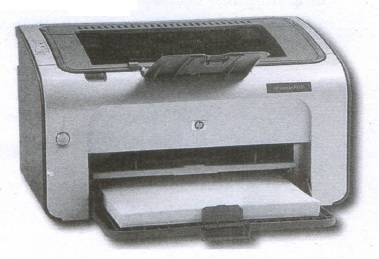
Inkjet Printers:
(i) Inkjet Printers use colour cartridges which combined Magenta, Yellow and Cyan inks to create color tones.
(ii) A black cartridge is also used for monochrome output. Inkjet printers work by spraying ionised ink at a sheet of paper.
(iii) The speed of Inkjet printers generally ranges from 1-20 PPM (Page Per Minute).
(iv) They use the technology offering ink by heating it so that it explodes towards the paper in bubbles or by using piezoelectricity in which tiny electric currents controlled by electronic circuits are used inside the printer to spread ink in jet speed.
(v) An Inkjet printer can spread millions of dots of ink at the paper every single second.
41.
Components of a Computer:
The computer is the combination of hardware and software. Hardware is the physical component of a computer like motherboard, memory devices, monitor, keyboard etc., while software is the set of programs or instructions. Both hardware and software together make the computer system to function. Every task given to a computer follows an Inputprocess - output cycle (IPO cycle).
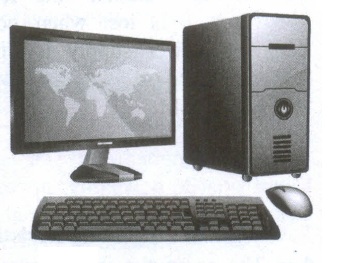
(i) Input unit: Input unit is used to feed any form of data to the computer, which can be stored in the memory unit for further processing.
Example: keyboard, mouse etc.
(ii) Central Processing Unit: CPU is the major component which interprets and executes software instructions. It also control the operation of all other components such as memory, input and output units.
(iii) Arithmetic and Logic Unit: The ALU is a part of the CPU where various computing functions are performed on data. The ALU performs arithmetic operations such as addition, subtraction, multiplication, division and logical operations.
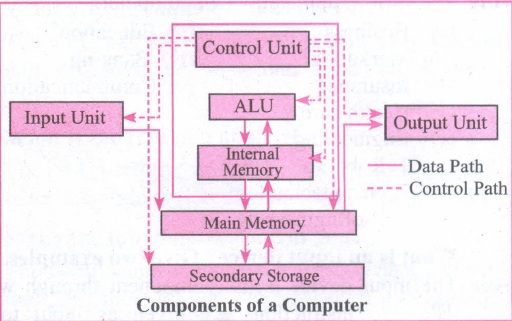
(iv) Control Unit: The control unit controls the flow of data between the CPU memory and I/o devices. It also controls the entire operation of a computer.
(v) Output Unit: An output unit is any hardware component that convey information to users in an understandable form. Example : Monitor, Printer etc.
(vi) Memory Unit: The Memory Unit is of two types which are primary memory and secondary memory. The primary memory is used to temporarily store the programs and data when the instructions are ready to execute. The secondary memory is used to store the data permanently. The Primary Memory is volatile, that is, the content is lost when the power supply is switched off. The Random Access Memory (RAM) is an example of a main memory. The Secondary memory is non volatile, that is, the content is available even after the power supply is switched off. Hard disk, CD-ROM and DVD ROM are examples of secondary memory.

11th Standard Syllabus & Materials
11th Standard
TN 11th Tamil பீடு பெற நில் - செய்யுள் - காவடிச்சிந்து Important Questions And Answers Study Material - QB365 Set A
NEW11th Standard
TN 11th Tamil பீடு பெற நில் - உரைநடை - மலை இடப்பெயர்கள் : ஓர் ஆய்வு Important Questions And Answers Study Material - QB365 Set A
NEW11th Standard
TN 11th Tamil மாமழை போற்றுதும் - துணைப்பாடம் - யானை டாக்டர் Important Questions And Answers Study Material - QB365 Set A
NEW11th Standard
TN 11th Tamil மாமழை போற்றுதும் - செய்யுள் - ஐங்குறுநூறு Important Questions And Answers Study Material - QB365 Set A



Tamilnadu Stateboard 11th Standard Subjects

Maths

Commerce

Economics

Biology

Business Maths and Statistics

Accountancy

Computer Science

Physics

Chemistry
Maths
Biology
Economics
Physics
Chemistry

History
Business Maths and Statistics

Computer Science
Accountancy
Computer Applications
History
Computer Technology
Commerce
Computer Applications
Computer Technology

Tamil

English

French
Tamilnadu Stateboard Standards
