
 100% FREE ACCESS
11th Standard Syllabus & Materials
11th Standard
TN 11th Tamil இயற்கை வேளாண்மை,சுற்றுச்சூழல் -செய்யுள் - மனோன்மணீயம் Important Questions And Answers Study Material - QB365 Set A
NEW11th Standard
TN 11th Tamil என்னுயிர் என்பேன் -துணைப்பாடம் - இசைத்தமிழர் இருவர் Important Questions And Answers Study Material - QB365 Set A
NEW11th Standard
TN 11th Tamil மொழி கலை -செய்யுள் - ஒவ்வொரு புல்லையும் Important Questions And Answers Study Material - QB365 Set A
NEW11th Standard
TN 11th Tamil பீடு பெற நில் - இலக்கணம் - பகுபத உறுப்புகள் Important Questions And Answers Study Material - QB365 Set A
NEW11th Standard
TN 11th Tamil பீடு பெற நில் - துணைப்பாடம் - வாடிவாசல் Important Questions And Answers Study Material - QB365 Set A
NEW11th Standard
TN 11th Tamil பீடு பெற நில் - செய்யுள் - குறுந்தொகை Important Questions And Answers Study Material - QB365 Set A

Published on: 01/08/2018
In this question paper, some of the important one mark, two and five marks questions from the chapter Introduction to Computers are covered. The questions are prepared from the book back and previous year questions.
For Students, subscribe and get plenty of question paper with answer key. For subscription please click here.
Download Tamil Nadu 11th Standard Computer Science question papers, model tests, one-mark questions, important questions, and public exam papers in PDF format. Free study materials and answer keys for TN State Board students.
Questions + Answers key
Take MCQ Computer Science Test
1.
Main component of second generation_____________
vacuum tubes
microprocessor
integrated circuits
transistor
2.
Which of the following is not Second generation computers?
IBM1401
IBM1620
UNIVAC1108
UNIVAI
3.
The Second generation computers belongs to period _____
1940-1956
1956-1963
1980-1990
1964-1971
4.
The component used in second generation computers is _____
Transistors
ICs
Vacuum tubes
Microprocessors
5.
Which of the following period the first generation computers belongs?
1956-1963
1940-1956
1964-1971
1980-1990
6.
Which one of the following is the main memory?
ROM
RAM
Flash drive
Hard disk
7.
_____ output device is used for printing building plan.
Thermal printer
Plotter
Dot matrix
Inkjet printer
8.
Identify the input device
Printer
Mouse
Plotter
Projector
9.
Identify the output device
Keyboard
Memory
Monitor
Mouse
10.
11.
First generation computers used
Vacuum tubes
Transistors
Integrated circuits
Microprocessors
12.
What is the use of Microphone?
13.
What is use of scanner?
14.
What is CPU?
15.
Name the types of computer introduced in Fourth generation computers.
16.
Name the softwares introduced in fifth generation computers.
17.
Differentiate Input and output unit.
18.
What is the function of memory?
19.
What is the function of an ALU?
20.
21.
22.
Write the advantages of fingerprint scanner.
23.
Differentiate optical and Laser mouse.
24.
25.
Explain Impact Printers with an Example.
26.
Explain in detail the different types of Mouse.
1.
(d)
transistor
2.
(d)
UNIVAI
3.
(a)
1940-1956
4.
(a)
Transistors
5.
(b)
1940-1956
6.
(b)
RAM
7.
(b)
Plotter
8.
(b)
Mouse
9.
(c)
Monitor
10.
(c)
11.
(a)
Vacuum tubes
12.
Microphone serves as a voice Input device. It captures the voice data and send it to the Computer.
13.
The scanner converts any type of printed or written information including photographs into digital pulses, which can be manipulated by the computer.
14.
CPU is the major component which interprets and executes software instructions. It also controls the operation of all other components such as memory unit, input and output units.
15.
(i) Micro computer
(ii) Portable Computers
16.
(i) Artificial Intelligence
(ii) Expert Systems
17.
| Input Unit | Output Unit |
| An input device feeds information to a computer system for processing. | output device reproduces or displays the results of that processing. |
| Input devices only allow for input of data to a computer. | output devices only receive the output of data from another device. |
| It is a peripheral device used to provide data and control signals to an information processing system such as computer. | It is a unit which sends data from the computer to another device. |
| Eg. keyboard, mouse | Eg. printer, monitor |
18.
Memory enables the computer to store the program. The memory unit is of two types:
(i) Primary memory
(ii) Secondary memory
The primary memory is used to store data temporarily and secondary memory stores the data permanently.
19.
The ALU is a part of CPU where various computing functions are performed on data. ALU performs arithmetic operations such as addition, subtraction, multiplication, division and logical operations.
20.
21.
22.
Fingerprint Scanner:
Fingerprint Scanners is a fingerprint recognition device used for computer security equipped with the fingerprint recognition module feature that uses biometric technology. Fingerprint Reader/Scanner is very safe and convenient device for security instead of password, that is vulnerable to fraud and is hard to remember.
23.
| Optical Mouse | Laser Mouse |
| It is less sensitive towards the surface | Highly sensitive |
| Tracking power is less | Tracking power is more |
| Old technology | Latest technology |
| This uses the light source instead of ball to judge the motion of the pointer. | This uses Laser light |
| Optical mouse has 3 buttons | No. of buttons will vary from 3 to many |
24.
25.
Impact Printers:
(i) These printers print with striking of hammers or pins on ribbon. These printers can print on multi-part (using carbon papers) by using mechanical pressure.
(ii) For example, Dot Matrix printers and Line matrix printers are impact printers.
(iii) A Dot matrix printer that prints using a fixed number of pins or wires. Each dot is produced by a tiny metal rod, also called a "wire" or "pin", which works by the power of a tiny electromagnet or solenoid, either directly or through a set of small levers.
(iv) It generally prints one line of text at a time. The printing speed of these printers varies from 30 to 1550 CPS (Character Per Second).
(v) A Dot matrix printer that prints using a fixed number of pins or wires. Each dot is produced by a tiny metal rod, also called a "wire" or "pin", which works by the power of a tiny electromagnet or solenoid, either directly or through a set of small levers.
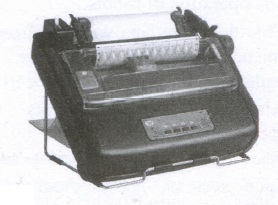
(vi) It generally prints one line of text at a time. The printing speed of these printers varies from 30 to 1550 CPS (Character Per Second).
26.
| S.No | Type of Mouse | Mechanism | Developed and Introduced |
| 1 | 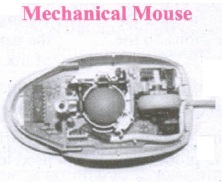 |
1. A small ball is kept inside and touches the pad through a hole at the bottom of the mouse. |
Telefunken, German Company, 0211011968 |
| 2 | 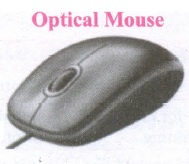 |
1. Measures the motion and acceleration of pointer. |
In 1988, Richard Lyon, Steve Krish independently invented different versions of Optical Mouse. |
| 3 | 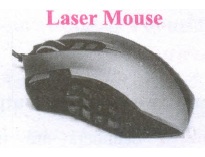 |
1. Measures the motion and acceleration of pointer. |

11th Standard Syllabus & Materials
11th Standard
TN 11th Tamil பீடு பெற நில் - செய்யுள் - காவடிச்சிந்து Important Questions And Answers Study Material - QB365 Set A
NEW11th Standard
TN 11th Tamil பீடு பெற நில் - உரைநடை - மலை இடப்பெயர்கள் : ஓர் ஆய்வு Important Questions And Answers Study Material - QB365 Set A
NEW11th Standard
TN 11th Tamil மாமழை போற்றுதும் - துணைப்பாடம் - யானை டாக்டர் Important Questions And Answers Study Material - QB365 Set A
NEW11th Standard
TN 11th Tamil மாமழை போற்றுதும் - செய்யுள் - ஐங்குறுநூறு Important Questions And Answers Study Material - QB365 Set A



Tamilnadu Stateboard 11th Standard Subjects

Maths

Commerce

Economics

Biology

Business Maths and Statistics

Accountancy
Computer Science

Physics

Chemistry
Maths
Biology
Economics
Physics
Chemistry

History
Business Maths and Statistics

Computer Science
Accountancy

Computer Applications
History
Computer Technology
Commerce
Computer Applications
Computer Technology

Tamil

English

French
Tamilnadu Stateboard Standards
