
 100% FREE ACCESS
11th Standard Syllabus & Materials
11th Standard
TN 11th Tamil இயற்கை வேளாண்மை,சுற்றுச்சூழல் -செய்யுள் - மனோன்மணீயம் Important Questions And Answers Study Material - QB365 Set A
NEW11th Standard
TN 11th Tamil என்னுயிர் என்பேன் -துணைப்பாடம் - இசைத்தமிழர் இருவர் Important Questions And Answers Study Material - QB365 Set A
NEW11th Standard
TN 11th Tamil மொழி கலை -செய்யுள் - ஒவ்வொரு புல்லையும் Important Questions And Answers Study Material - QB365 Set A
NEW11th Standard
TN 11th Tamil பீடு பெற நில் - இலக்கணம் - பகுபத உறுப்புகள் Important Questions And Answers Study Material - QB365 Set A
NEW11th Standard
TN 11th Tamil பீடு பெற நில் - துணைப்பாடம் - வாடிவாசல் Important Questions And Answers Study Material - QB365 Set A
NEW11th Standard
TN 11th Tamil பீடு பெற நில் - செய்யுள் - குறுந்தொகை Important Questions And Answers Study Material - QB365 Set A

Published on: 13/03/2019
+1 Public Exam March 2019 Important Creative Questions and Answers
Download Tamil Nadu 11th Standard Computer Applications question papers, model tests, one-mark questions, important questions, and public exam papers in PDF format. Free study materials and answer keys for TN State Board students.
Questions + Answers key
Take MCQ Computer Applications Test
1.
Write note on E-Library.
2.
Give the syntax of write ( ) statement with an example.
3.
Write about CSS Comments.
4.
What do you mean by parameterized function?
5.
Write about internal links in HTML document.
6.
Write note on
7.
Defined link.
8.
What is the use of < center > tag?
9.
Write a < style > tag to change color, font name and size of < h3 > tag?
10.
List the attributes used in < input > tag.
11.
Write the General format of < embed > tag?
12.
Name the main attribute of < img > tag state its use.
13.
What is the uses of prompt dialog box?
14.
What is conditional operator give suitable example?
15.
Write a notes to type casting in JavaScript
16.
What is the use of Tamil interfaces software?
17.
Write a note on < br > tag
18.
What is word processor?
19.
What is Cyber security?
20.
What is meant by unauthorized access?
21.
What is cyber crime?
22.
What is "Zombie" computer?
23.
What is URL?
24.
What is Intranet?
25.
What is E-mail?
26.
What are the needed for TCP/IP?
27.
Write the syntax of do-while loop
28.
Write the syntax of if statement?
29.
What are the keyboard layouts used in Android?
30.
What is a Cookie?
31.
What are Warez?
32.
Write the syntax of functions.
33.
Write a note on Library functions.
34.
What is a function in JavaScript?
35.
Differentiate the break and continue statement.
36.
What is meant by conditional statements in JavaScript?
37.
What is Inline Style?
38.
39.
What are the major attributes are available in < textarea > tag?
40.
What is the purpose of < input > tag?
41.
List out the popular image formats.
42.
What is pixel?
43.
Write a short note on
(i) < strong >
(ii) < em >
44.
How do you define comments in HTML?
45.
46.
What is a website?
47.
What is a network?
48.
What is the use of Start Menu?
49.
Name the elements of windows
50.
What is Multi-tasking?
51.
What is Shut down?
52.
What is Launcher?
53.
What is the advantage of open source?
54.
Differentiate Files and Folders
55.
Differentiate cut and copy options.
56.
What is workstation?
57.
What is process Management?
58.
Give any two advantages of UNIX
59.
What is shareware?
60.
What are the different Operating Systems used in computer?
61.
What is a GUI?
62.
What is multi-user Operating System?
63.
What is the function of accumulator?
64.
Which component of Microprocessor is used to transfer data?
65.
What is use of Cache memory?
66.
What is memory access time?
67.
Name the different types of CPU Register.
68.
Which source is used to erase the content of a EPROM?
69.
What is a program counter?
70.
What is sign bit?
71.
What is word length?
72.
Name the Number system is used in general.
73.
What Is Boolean Algebra?
74.
List the encoding systems that represents characters in memory.
75.
Convert (46)10 into Binary number
76.
Write the main advantages of using LED & LCD Screen.
77.
What does reboot mean?
78.
Differentiate keyer and keyboard.
79.
Name the types of Monitors.
80.
What is NLP?
81.
Distinguish Primary and Secondary memory.
82.
What is the function of memory?
83.
What are the components of a CPU?
84.
Distinguish between data and information
85.
What is a computer?
86.
What is presentation software?
87.
Define a template in Impress.
88.
What is the difference between a slide and a slide show?
89.
What is Active cell?
90.
What is cell address? Give example.
91.
What are the options available in "Insert Cells" dialog box?
92.
What are the keyboard shortcuts to cut, copy and paste?
93.
Write about the text operator in OpenOffice Calc.
94.
What is Wrap through?
95.
Differentiate left indent and right indent.
96.
Differentiate paste and paste special.
97.
What is Word wrap?
98.
What is the use of Word Art in writer?
99.
How do you merge cells in a table?
100.
How do you insert pictures in to your document?
1.
E-Libraries are portal or website of collection of e-books. Tamil e-Library services provide thousands of Tamil Books as ebooks mostly at free of cost. It is the most useful service to Tamil people who live far away from their home land.
2.
Write statement general syntax:
document write ("string" + var);
Ex: document write ("The Sum of Data1 and Data2 : "+sum);
3.
Many times, we may need to put additional comments in our style sheet blocks. We can simply put our comments inside.
/*.....this is a comment in style sheet.....*/
4.
A parameterized function definition may include a list of identifiers, known as parameters that work as local variables for the body of the function. Function invocations provide values or arguments for the function's parameters.
5.
Internal Links:
i. Creating a link to a particular section of the same document is known as Internal Link.
ii. To create an internal like, the attribute Name is used along with < A > tag.
iii. The Name attribute of < A > tag establish the link to the content within the document.
6.
i) The < title > tag contains the title of the document.
ii) The title specified between opening and closing tags appears in the title bar / page tab of the browser.
iii) < title > tag should be placed within < head > tag.
7.
Link is an important feature of HTML to connect web resources. Link in HTML is used to create hyperlinks to web content.
8.
The < center > tag is used to centralize a segment of text. It is a container tag. The text between < center > and < /center > will be displayed in the center of the browser.
9.
< style >
h3
{color.blue;
font-family: "Copperplate Gothic Bold";
font-size: 14pt;}
< /style >
10.
(i) Type
(ii) Name
(iii) Value
(iv) Size
(v) Maxlength.
11.
General Format: < embed src=audio/video file name with location > < /embed >.
12.
Src attribute is the main attribute used to specify the file name of the image to be inserted.
13.
The prompt dialog box is very useful when the user want to pop-up a text box to get user input. Thus, it enables you to interact with the users
14.
The?: is the conditional operator in JavaScript, which requires three operands, hence it is called the ternary operator. The syntax is
var variablename=(condition) ?value 1: value2;
Example :var result=(10>15)?100 :150;
15.
Type casting is the act of converting one data type into a different data type which is also called as casting. In JavaScript there are two type of casting,
(i) Implicit casting and
(ii) Explicit casting
Implicit casting occurs automatically in JavaScript when you change the data stored in a variable:
16.
Tamil interface software is the familiar one among the different Methods of typjng. This is the simplest method of typing Tamil in both Computer and Smart phones.
17.
The < br > tag is used for line break. The < br > is an empty tag, does not have close tag and attribute. It should be placed at the end of a line.
18.
An application used to create and manipulate text documents.
19.
Cyber security is a collection of various technologies, processes and measures that reduces the risk of cyber attacks and protects organizations and individuals from computer based threats.
20.
Unauthorized access is when someone gains access to a website, program, server, service, or other system by breaking into a legitimate user account.
21.
Cybercrime is an intellectual, white-collar crime. Those who commit such crimes generally manipulate the computer system in an intelligent manner.
22.
A botnet is a group of computers connected to the Internet that have been compromised by a hacker using a computer virus or Trojan horse. An individual computer in the group is known as a "zombie" computer.
23.
Every server on the internet has an IP number, a unique number consisting of four parts separated by dots. The IP number is the server's address.
Ex. 165.113.245.2 128.143.22.55. Addresses are given "word-based" addresses called URL. The URL and the IP number are one and the same.
24.
An Intranet is a website used by organizations to provide a place where employees can access company information, tools and collaborate to social sharing tools similar to facebook.
25.
i) Electronic mail or email is information stored on a computer that is exchanged between two users over telecommunications.
ii) Email is a message that may contain text, files, images or any other attachments sent through a network to a specified individual or group of individuals.
26.
Two things required for TCT/IP needed are
(i) Message to transmit
(ii) Means to reliably transmit the message
27.
do
{
body of the loop
} while (expression);
28.
if (condition)
{
True block;
}
29.
Sellinam and Ponmadal are familiar Tamil keyboard layouts that works on Android operating system in Smart phone using phonetics.
30.
A cookie is a small piece of data sent from a website and stored on the user's computer memory (Hard drive) by the user's web browser while the user is browsing internet.
31.
Commercial programs that are made available to the public illegally are often called warez.
32.
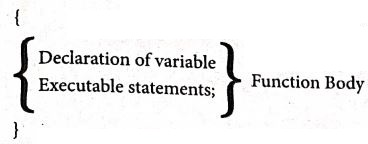
The format of a functions definition is
Function function-name(parametets list)
33.
Pre-defined functions are already defined in the JavaScript library which are also called Library functions. For example is NaN(), to UpperCase(), to LowerCase(), length(), alert(), prompt(), write() etc., are pre-defined functions.
34.
A function is a block ofJavaScript code that is defined once but may be executed or invoked any number of times.
35.
| Break Statement | Continue Statement |
| The break statement will terminate the loop irrespective of the condition. | The continue statement will skip back to the loop condition check. |
| The break statement is executed and the loop is terminated. | When the continue statement is executed, the current iteration of the enclosing loop is terminated, and the next iteration begins. |
36.
Conditional statements execute or skip one or set of statements depending on the value of a specified conditional expression.
37.
"Inline style is used to define style for a particular tag anywhere in an HTML document. You can define styles for any tag within an HTML document. But it is applicable only on that line where it is defined.
38.
39.
The main attributes of <textarea> are
(i) Name - Used to define name to the control.
(ii) Rows - Specifies the number of rows in the textarea control.
(iii) Cols - Specifies the number of columns in the text area, (number of characters in a line).
40.
The purpose of < input > tag is to form controls, form controls are created by using < input > tag. The < input > is an empty tag used to create different form elements or controls such as text box, radio buttons so on.
41.
(i) GIF : Graphical Interchange Format
(ii) JPEG : Joint Photographic Experts Group
(iii) PNG : Portable Network Graphics
(iv) SVG : Scalable Vector Graphics.
42.
Thickness of the horizontal line can be changed with size attribute.The size is given in terms of pixels. A pixel is one of the tiny dots that make up the display on computer. Generally, 72 pixels is equal to an inch. Pixel is usually referred as points.
43.
(i) < strong > Important text :The < strong > tag is a phrase tag. It is used to define important text. This tag displays the text as bold.
(ii) < em > Exphasized text : The < em > tag is used to emphasize the text. That means, when this tag used the text will be in italics.
44.
The tag <!> is used to create comments. In HTML, the text what you type within this tag is considered as comments and it is ignored by the browser. Comments never show up onscreen. Comments can be placed anywhere in HTML document.
The general form of comments: <! comments >
45.
46.
A website is a collection of webpages. For example if there is a company that owns sri company.com then this website will have several webpages like Home, About us, contact us, Testimonials, Products Services, FAQ'S and others. The first page of the website is called a Home Page. All of these pages together make up a website.
47.
A network is a collection of interconnected devices (such as computers, printers, etc.).
48.
The Start menu is used to start any application that have currently installed.
49.
Title bar, Menu bar, Scroll bars, Status bar, Borders, Work space and Comers.
50.
Multiple applications which can execute simultaneously in windows is known as "Multi tasking".
51.
Shut down is a term used to describe the process of closing all software programs in preparation to turn off a computer's power.
52.
(i) The vertical bar of icons on the left side of the desktop is called the Launcher.
(ii) The Launcher provides easy access to applications, mounted devices, and toe Trash.
53.
(i) The Open source software is free to use, distribute, and modify.
(ii) It has lower cost in most cases in only the fraction of the cost of their proprietary counter parts.
(iii) It is most secured as the code is accessable to everyone.
54.
| Files | Folders |
| File is the collection of records. | Folder is a collections of files. |
| Create a file : Start \(\rightarrow\)All Programs \(\rightarrow\) select application \(\rightarrow\) ok |
Create a folders: Right click \(\rightarrow\)New \(\rightarrow\) folder \(\rightarrow\)ok |
55.
| Cut | Copy |
| It is the process of moving a block from one place to another |
It is the process of making duplicate copies of the block of a worksheet. |
56.
A workstation is a special computer designed for technical or scientific applications
57.
It is the important part of an OS which enables the activities of planning, monitoring and performance of a process.
58.
(i) Full multitasking with protected memory.
(ii) Available on a wide variety of machines.
59.
It refers to the software which is made available with a right to redistribute copies.
60.
The different types of operating system uscd in the computer:
(i) Single User and Single Task Operating Systems
(ii) Multi User Operating Systems
(iii) Multi Pocessing Operating Systems
(iv) Distributed Operating Systems
(v) Prominent Operating Systems
61.
The GUI is a window based system with a pointing device to direct I/O, choose from menus, make selections and a keyboard to enter text. Its vibrant colours attract the user very easily.
62.
Multi-user Operating Systems:
1. It is used in computers and laptops that allow same data and applications to be accessed by multiple users at the same time.
2. The users can also communicate with each other. Windows, Linux and UNIX are examples for multi-user Operating System.
63.
An accumulator is a register that is a part of ALU of a processor. It is used for temporary storage of data and to perform arithmetic operations and logical operations. The result of operation is stared in accumulator.
64.
Data bus is used to transfer data.
65.
It is extremely fast memory would store data that is frequently accessed and if possible, the data that is closer to it. This helps to achieve the fast response time.
66.
It is the time required to read or write data in a proper memory location or to retrieve stored data from the storage unit.
67.
(i) MAR (Memory Address Register)
(ii) MDR (Memory Data Register)
68.
Ultra-violet-rays is used to erase the content of a EPROM.
69.
The Program Counter (PC) is a special register in the CPU which always keeps the address of the next instruction to be executed.
70.
The sign bit indicates the sign of a number and determines whether the numerical value is positive or negative.
71.
The term word length is used as the measure of the number of bits in each word. For example, a won can have a length of 16 bits, 32 bits, and 64 bits.
72.
The decimal Number system is the number system used in general.
73.
Boolean algebra is a mathematical discipline that is used for designing digital circuits in a digital computer. It describes the relation between inputs and outputs of a digital circuit. The name Boolean algebra has been given in honor of an English mathematician George Boole who proposed the basic principles of this algebra.
74.
1. BCD - Binary Coded Decimal.
2. EBCDIC - Extended Binary Coded Decimal Interchange Code.
3. ASCII - American Standard Code for Information Interchange,
4. Unicode.
5. ISCII - Indian Standard Code for Information Interchange
75.
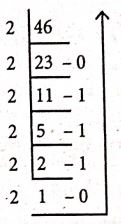
∴ 4610 - 1011102
76.
(1) It needs less space and looks slim.
(2) It consumes less power and does not radiate heat at the time of operation.
77.
It means to reload the operating system.
78.
Keyer :
A Keyer is a device for signaling by hand, by way of pressing one or more switches. Modem keyers have. a large number of switches but not as many as a full size keyboard. Typically, this number is between 4 and 50. A keyer differs from a keyboard, which has "no board", but the keys are arranged in a cluster.
79.
(i) CRT - Cathode Ray Tube
(ii) LCD - Liquid Crystal Display
(iii) LED - Light Emitting Diodes
80.
Natural Language Processing is the ability of a computer program to understand human language. It is a component of artificial intelligence.
81.
| Primary Memory | Secondary memory |
| It is used to temporarily store the programs and data when the instructions are ready to execute. | It is used to store the data permanently. |
| It is volatile, the content is lost when the power supply is Switched off. Eg. RAM |
It is non-volatile, the content is available even after the power supply is Switched off. Eg. ROM,CD-ROM, DVD ROM. |
82.
The primary memory is used to temporarily store the programs and data when the instructions are ready to execute. The secondary memory is used to store the data permanently
83.
The CPU has three components which are Control unit, Arithmetic and Lagic Unit (ALU) and Memory unit.
84.
| Data | Information |
| Data is defined as an unprocessed collection of raw facts, suitable for communication, interpretation or processing. | Information is a collection of facts from which conclusions may be drawn. |
| (Eg) 134, 16, 'Kavitha', 'C' | (Eg) Kavitha is 16 years old. |
85.
(i) A computer is an electronic device that manipulates information, or data. It has the ability to store, retrieve, and process data.
(ii) Computer works faster than human being and given the values more accuracy and reliable.
86.
A presentation software is a computer software package used to show information, in the form of a slide show.
87.
Templates are built-in design files which contain different predefined styles, such as fond face and size, bullet size, place holder's size and position, background, colors heme and slide master.
88.
| Slide | Slide Show |
| Slide means a single slide that contains different elements like text, tables, charts, clip-art etc. | A slide show is a presentation of a series of slides on a projection screen typically in a prearranged sequence. The changes between slide may be automatic or manually controlled by a presenter or the viewer. |
89.
The cell in which the cell pointer is currently located is known as "Active cell".
90.
Cell address is the combination of column heading and row number. For example, the intersection of column B and row 4 makes a cell B4.
91.
The options available in Insert cells dialog box are
(i) Shift cells down
(ii) Shift cells right
(iii) Entire row
(iv) Entire colunmn
92.
The key board shortcuts to cut, copy, paste
Cut - Ctrl + X
Copy - Ctrl + C
Paste - Ctrl + V
93.
In Calc, "&" is a text operator which is used to combine two or more text. Joining two different texts is also known as “Text Concatenation". An expression using the text operator has the following
syntax: text referencel & text reference2.
94.
The Wrap Through option inserts an image that overlaps the text which as a result will be hidden
95.
| S.No | Left indent | Right indent |
| 1. |
The Left indent controls the space between the |
The Right indent controls the space between the paragraph and the |
| 2. | This is the default indent. Each click on the increase indent icon moves the paragraph 1/2 inch away from the left margin. |
Each click on the decrease indent icon removes the indent applied by the increase indent that is the earlier indent is removed. |
96.
| Paste | Paste special |
| Paste is a feature that lets a user cut or copy items from Cells and transfer them to another completely. |
Paste Special allows the items being transferred to be formatted in several different ways. Paste Special is a feature found in software like Microsoft Word, Microsoft Excel and Open Office. |
97.
When the text reaches the end of the line, the word is automatically wrapped to the next line. This feature in any word processor is known as Word wrap.
98.
Word Art helps to apply Special effects and change the appearance of the text to make it more presentable and attractive.
99.
To merge a group of cells:
(i) Select the cells to merge.
(ii) Right click and choose Cell ➝ Merge or choose Table ➝ Merge Cells from the menu bar.
100.
Openoffice writer has the ability to insert and edit images in a more simply way.
(i) Place the insertion pointer where you want the image to appear
(ii) Select Insert \(\rightarrow\) Picture \(\rightarrow\) From file
(iii) The insert picture dialog box appears where the picture gallery opens from which the desired picture can be selected.
(iv) If the picture is not in the gallery, then browse the pictures from the folder, choose the desired picture.
(v) Click on the Open button
(vi) The selected picture is inserted into the document.

11th Standard Syllabus & Materials
11th Standard
TN 11th Tamil பீடு பெற நில் - செய்யுள் - காவடிச்சிந்து Important Questions And Answers Study Material - QB365 Set A
NEW11th Standard
TN 11th Tamil பீடு பெற நில் - உரைநடை - மலை இடப்பெயர்கள் : ஓர் ஆய்வு Important Questions And Answers Study Material - QB365 Set A
NEW11th Standard
TN 11th Tamil மாமழை போற்றுதும் - துணைப்பாடம் - யானை டாக்டர் Important Questions And Answers Study Material - QB365 Set A
NEW11th Standard
TN 11th Tamil மாமழை போற்றுதும் - செய்யுள் - ஐங்குறுநூறு Important Questions And Answers Study Material - QB365 Set A



Tamilnadu Stateboard 11th Standard Subjects

Maths

Commerce

Economics

Biology

Business Maths and Statistics

Accountancy

Computer Science

Physics

Chemistry
Maths
Biology
Economics
Physics
Chemistry

History
Business Maths and Statistics

Computer Science
Accountancy
Computer Applications
History
Computer Technology
Commerce
Computer Applications
Computer Technology

Tamil

English

French
Tamilnadu Stateboard Standards
