
 100% FREE ACCESS
11th Standard Syllabus & Materials
11th Standard
TN 11th Tamil இயற்கை வேளாண்மை,சுற்றுச்சூழல் -செய்யுள் - மனோன்மணீயம் Important Questions And Answers Study Material - QB365 Set A
NEW11th Standard
TN 11th Tamil என்னுயிர் என்பேன் -துணைப்பாடம் - இசைத்தமிழர் இருவர் Important Questions And Answers Study Material - QB365 Set A
NEW11th Standard
TN 11th Tamil மொழி கலை -செய்யுள் - ஒவ்வொரு புல்லையும் Important Questions And Answers Study Material - QB365 Set A
NEW11th Standard
TN 11th Tamil பீடு பெற நில் - இலக்கணம் - பகுபத உறுப்புகள் Important Questions And Answers Study Material - QB365 Set A
NEW11th Standard
TN 11th Tamil பீடு பெற நில் - துணைப்பாடம் - வாடிவாசல் Important Questions And Answers Study Material - QB365 Set A
NEW11th Standard
TN 11th Tamil பீடு பெற நில் - செய்யுள் - குறுந்தொகை Important Questions And Answers Study Material - QB365 Set A

Published on: 04/03/2019
Plus One Public Exam March 2019 Model Question Paper
Download Tamil Nadu 11th Standard Computer Applications question papers, model tests, one-mark questions, important questions, and public exam papers in PDF format. Free study materials and answer keys for TN State Board students.
Questions + Answers key
Take MCQ Computer Applications Test
1.
The ASCII encoding system is applicable only for handling__________ language
English
Hindi
French
Tamil
2.
In JavaScript __________ is an assignment operaton.
= =
=
: =
None of these
3.
The form entries are stored in _________.
web page
web site
web browser
web server
4.
The result of parseFloat("5.68") is __________.
5
5.6
5.68
error
5.
The _______ statement is especially useful when testing all the possible results of an expression.
While
Do while
Switch
If
6.
Expansion of CSS
Cascading Style Schools
Cascading Style Scheme
Cascading Style Sheets
Cascading Style Shares
7.
The tags < sub > and < sup > are used for:
Subject and Super
Subscript and Super
Subject and Superscript
Subscript and Superscript
8.
In HTML, colours are represented as
Binary values
Octal values
Decimal values
Hexadecimal values
9.
Which of the following OS is not based on Linux?
Ubuntu
Redhat
CentOs
BSD
10.
Which of the following device identifies the location when address is placed in the memory address register?
locator
encoder
decoder
multiplexed
11.
Expansion of BIT is............
BASIC DIGITS
BINARY DIGIT
BINARY INFORMATION TECHNOLOGY
BASE DIGIT
12.
When a system restarts which type of booting is used.
Warm booting
Cold booting
Touch boot
Real boot
13.
Which menu contains the Slide Transition option?
Slide Show
View
Tools
Format
14.
Auto fill only fills the cells in the direction_______.
right or down
left or right
right or up
left or up
15.
Which of the following is used to insert a Table?
Table ➝ Insert ➝ Table
Ctrl + F2
Table icon
anyone of these
16.
What is meant by computer Ethics?
17.
What is CSS?
18.
Write a short note on
(i) < strong >
(ii) < em >
19.
What are the components of URL addressing?
20.
What is multi-processing?
21.
What is computer memory?
22.
What is the function of an ALU?
23.
Write about the text operator in OpenOffice Calc.
24.
Name the types of paragraph alignment in Open office writer.
25.
How will you insert an image in a HTML document?
26.
Write note on string Operator.
27.
Write the syntax for else-if statement.
28.
What are the attributes available in < html >tags?
29.
Differentiate Internet and Intranet.
30.
Differentiate CD and DVD.
31.
Why is the number conversion necessary?
32.
33.
How will you formate the table using formatting toolbar?
34.
What do you known about
(i) Photoshop
(ii) Picasa
(ill) GIMP
(iv) HTML
(v) W3C
35.
Explain about the Arithmetic operator with suitable example.
36.
Write a Javascript to display the given number is words using switch-case (Number between only 1 and 5)
37.
Explain any five types of internet services.
38.
Write the procedure to create, rename, delete and save a file in Ubuntu OS. Compare it with Windows OS.
39.
Explain the following in detail.
(a) FIFO (b) SJF (c) Round Robin
40.
Explain any three secondary storage devices.
41.
Explain the basic components of a computer with a neat diagram.
42.
Explain how a presentation can help a sales person to promote his/her products.
43.
Explain the parts of OpenOffice Calc Status bar.
1.
(a)
English
2.
(b)
=
3.
(d)
web server
4.
(c)
5.68
5.
(c)
Switch
6.
(c)
Cascading Style Sheets
7.
(d)
Subscript and Superscript
8.
(d)
Hexadecimal values
9.
(d)
BSD
10.
(c)
decoder
11.
(b)
BINARY DIGIT
12.
(a)
Warm booting
13.
(a)
Slide Show
14.
(a)
right or down
15.
(d)
anyone of these
16.
Computer ethics deals with the procedures, values and practices that govern the process of consuming computer technology and its related disciplines without damaging or violating the moral values and beliefs of any individual, organization or entity.
17.
Cascading Style Sheets (CSS) are also called as Sitewide Style sheets or external style. CSS is a style sheet language used for describing the formatting of a document written in HTML.
18.
(i) < strong > Important text :The < strong > tag is a phrase tag. It is used to define important text. This tag displays the text as bold.
(ii) < em > Exphasized text : The < em > tag is used to emphasize the text. That means, when this tag used the text will be in italics.
19.
Protocol, domain, path, hash and query string.
20.
Multi-processing is a one of the features of Operating System. It has two or more processors for a single running process (job). Processing takes place in parallel is known as parallel processing.
21.
Computer memory is the storage space in the computer, where data and instructions are stored.
22.
(i) The ALU performs arithmetic operations.
(ii) The result of an operation is stored in internal memory of CPU.
(iii) The logical operations of ALU promote the decision making ability of a computer.
23.
In Calc, "&" is a text operator which is used to combine two or more text. Joining two different texts is also known as “Text Concatenation". An expression using the text operator has the following
syntax: text referencel & text reference2.
24.
There are four types of alignment available in Open office Writer - left-alignment, Right-alignment, Center-alignment, and Justify-alignment.
25.
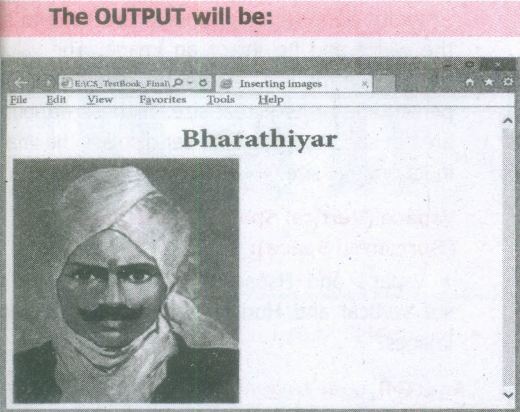
Inserting Images with HTML document
The < IMG > tag along with the attribute src (Source) is used to add images in HTML document.
General format:
< img src = image_name_with_extension > (OR)
< img src = URL >
Ex:
< img src = image1.gif >
Src attribute is the main attribute used to specify the filename of the image to be inserted.
If the image is not in the current working folder, image file name should clearly specify with the path of the file or URL, where the file is available.
Ex:
< img src = "D:\images\animals\cat.jpeg" >
An HTMLcode to insert an inline image:
< html >
< head >
< title > Inserting Images < /title >
< /head >
< body >
< h1 align = center > Bharathiyar< /h1 >
< img src = bharathiyar.gif >
< /body >
< /html >
26.
One of the built-in features of JavaScript is the ability to concatenate strings. The + operator performs addition on numbers but also serves as the concatenation operator for strings. Because string concatenation has precedence over numeric addition, + will be interpreted as string concatenation if any of the operands are strings. + operator which is also called as the string concatenation operator.
27.
if (expression)
{
// Execute code block #1
}
else if (expression)
{
// Execute code block #2
}
else if (expression)
{
// Execute code block #3
}
else
{
// if all else fails, execute block #4
}
28.
Attributes of < html > tag:
(i) The < html > tag is used to specify the beginning and closing of an HTML document. This tag does not have any effect on the appearance of a document. This is only used to make browsers and other programs, known that this is an HTML document.
(ii) < html > tag has two attributes viz. dir and lang to specify the text direction and language setting respectively.
| Attribute | Value to be set to attribute | Description |
| dir | Itr (align left-to-right) rtl (align right-to-Ieft) | dir attribute specifies the direction of the text to be aligned within the entire document. It is global attribute. i) Itr is the default value. ii) rtl is used for Arabian languages. |
| lang | Predefined language code English - en Tamil- ta Telugu - te |
lang attribute specify the language used within the document. Predefined language code will be used for this purpose. Malayalam - ml; Kannada - kn; Hindi - hi; French - fr; German - de; |
29.
| Internet | Intranet |
| The Internet is the global system of interconnected computer networks that use the Internet protocol suite (TCP/IP) to link devices worldwide. |
A local or restricted communications network, especially a private network created using World Wide Web software. |
30.
| CD | DVD |
| Expansion is Compact Disk | Expansion is Digital Versatile Disc. |
| A standard CD can store about 700 MB of Data. | A standard DVD can hold 4.7 GB of data. |
| CD players cannot play DVDs. | DVD players can play CDs. |
| It stores upto 80min of audio. | It can range from 4.7GB to 17.08 GB. |
31.
The number conversion is necessary because us enters the data into the computer in decimal fon only and the computer is then expected to convert the decimal number to other number systems which it understands.
32.
33.
Formatting a table involves formatting of the table layout, formatting of the table text, adjusting the size of the table, its position on the page, adding or removing rows or columns, merging and splitting cells, changing borders and the background.
34.
(i) Photoshop: Familiar Photo editing tool developed by adobe.
(ii) Picasa: Free image organizer and editing tool developed by Lifescape.
(iii) GIMP: Open source image editing tool.
(iv) HTML5 : Latest version of HTML authorized by w3c.
(v) W3C: The World Wide Web Consortium; an International standards organization for the www.
35.
Javascript supports all the basic arithmetic operators like addition (+),subtraction (-) multiplication (*), division (/), and modulus (%, also known as the remainder operator)
Arithmetic operators :
| Arithmetic Operator | Meaning | Example | Result |
|---|---|---|---|
| + | Addition | var sum = 20 + 120 | Variable sum = 140 |
| - | Subtraction | var diff = 120 - 20 | Variable diff = 100 |
| * | Multiplication | var prod = 10*100 | Variable prod = 1000 |
| / | Division | var res = 100 / 522 | Variable res = 5.22 |
| % | Modulus operator | var rem = 100 % 522 | Variable rem = 22 (remainder) |
36.
< Html >
< Body >
< script language="Javascript" type="text/ javascript" > .
var N=0;
var N = promt ("Enter the Number","0");
switch (N)
{
case 1 :
document.write ("One");
break;
case 2 :
document.write ("Two");
break;
case 3 :
document.write ("Three");
break;
case 4 :
document.write ("Four");
break;
case 5 :
document.write ("Five");
break;
default:
document.write ("Invalid! Enter between 1 and 5");
}
< /script >
< /body >
< /Html >
37.
(i) Wireless: Radio frequency bands are used in place of telephone or cable networks. One of the greatest advantages of wireless Internet connections is the "always-on" connection that can be accessed from any location that falls within network coverage. Wireless connections are made possible through the use of a modem, which picks up Internet signals and sends them to other devices.
(ii) Mobile : Many cell phone and smartphone providers offer voice plans with Internet access. Mobile Internet connections provide good speeds and allow you to access the Internet.
(iii) Cable : Cable Internet connection is a form of broadband access. Through use of a cable modem, users can access the Internet over cable TV lines. Cable modems can provide extremely fast access to the Internet.
(iv) Satellite : In certain areas where broadband connection is not yet offered, a satellite Internet option may be available, Similar to wireless access, satellite connection utilizes a modem.
(v) ISDN: ISDN (Integrated Services Digital Network) allows users to send data, voice and video content over digital telephone lines or standard telephone wires. The installation of an ISDN adapter is required at both ends of the transmission-on the part of the user as well as the Internet access provider.
38.
In Ubuntu OS:
(i) Create a file: By right-clicking in the desktop' and also files be created by using the file menu.
(ii) Delete a file: By using right-click choosing a move to trash or by using the menu.
(iii) Rename a file: By using right-click and choosing rename option.
(iv) Save a file: Press ctrl + x or F2 to exit. You will. then be asked if you want to save. (or) Press ctrl+ 0 or F3 and ctrl + x or F2 for save and exit.
In Windows OS:
(i) Create file: Open an application and create it by using the file menu.
(ii) Delete a file: By right click on a file and choosing the delete option to delete a file.
(iii) Rename a file: By right-clicking on a file and choosing rename option to rename a file.
(iv) Save file: Press ctrl+S or file - save to save the file.
39.
(a) FIFO (First In First Out)Scheduling :
(i) This algorithm is based on queuing technique. Assume that a student is standing in a queue (Row) to get grade sheet from his/her teacher.
(ii) The other student who stands first in the queue gets his/her grade sheet first and leaves from the queue (Row). Followed by the next student in the queue gets it corrected and so on. This is the basic logic of the FIFO algorithm.
(iii) Technically, the process that enters the queue first is executed first by the CPU, followed by the next and so on. The processes are executed in the order of the queue (row).
(b) SJF (Shortest Job First)Scheduling:
(i) This algorithm works based on the size of the job being executed by the CPU.
(ii) Consider two jobs A and B.
(iii) 1) A = 6 kilo bytes 2) B = 9 kilo bytes.
(iv) First the job "A" will be assigned and then job "B" gets its turn.
(c) Round RobinScheduling :
(i) The Round Robin (RR) scheduling algorithm is designed especially for time sharing systems.
(ii) Jobs (processes) are assigned and processor time in a circular method.
(iii) For example take three jobs A, B, C. First the job A is assigned to CPU then job B and job C and then again A, Band C and so on.
40.
Hard disk :
(i) Hard disk is a magnetic disk on which you can store data. The hard disk has the stacked arrangement of disks accessed by a pair of heads for each of the disks.
(ii) The hard disks come with a single or double-sided disk.
Compact Disk (CD) :
.png)
(i) A CD or CD-ROM is made from 1.2 millimetres thick, polycarbonate plastic material. A thin layer of aluminium or gold is applied to the surface.
(ii) CD data is represented as tiny indentations known as "pits", encoded in a spiral track moulded into the top of the polycarbonate layer. The areas between pits are known as "lands".
(iii) A motor within the CD player rotates the disk. The capacity of an ordinary CD- ROM is 700MB.
Digital Versatile Disc (DVD):
.png)
(i) A DVD (Digital Versatile Disc or Digital Video Disc) is an optical disc capable of storing up to 4.7 GB of data, more than six times what a CD can hold.
(ii) DVDs are often used to store movies at a better quality. Like CDs, DVDs are read with a laser. The disc can have one or two sides, and one or two layers of data per side; the number of sides and layers determines how much it can hold.
(iii) A 12 em diameter disc with a single-sided, single layer has 4.7 GB capacity, whereas the single-sided, double layer has 8.5 GB capacity.
(iv) The 8 em DVD has 1.5 GB capacity. The capacity of a DVD-ROM can be visually determined by noting the number of data sides of the disc. Double-layered sides- are usually gold-coloured, while single-layered sides are usually silver-coloured, like a CD.
41.
Components of a Computer :
The computer is the combination of hardware and software. Hardware is the physical component of a computer like motherboard, memory devices, monitor, keyboard etc., while software is the set of programs or instructions. Both hardware and software together make the computer system to function. Every task given to a computer follows an Input-process - output cycle (IPO cycle).
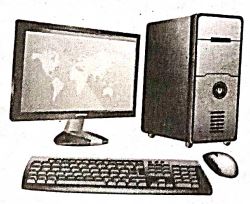
(i) Input unit: Input unit is used to feed any form of data to the computer, which can be stored in the memory unit for further processing.
Example : keyboard, mouse etc.
(i) Central Processing Unit : CPU is the major component which interprets and executes software instructions. It also control the operation of all other components such as memory, input and output units.
(iii) Arithmetic and Logic Unit : The ALU is a part of the CPU where various computing functions are performed on data. The ALU performs arithmetic operations such as addition, subtraction, multiplication, division and logical operations.
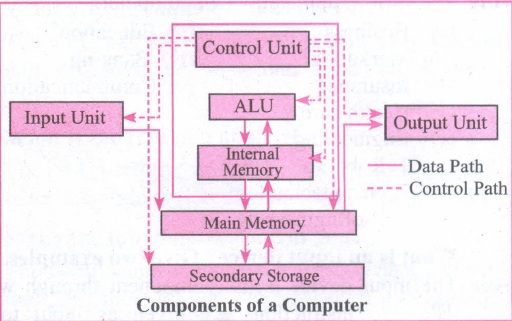
(iv) Control Unit : The control unit controls the flow of data between the CPU memory and I/o devices. It also controls the entire operation of a computer.
(v) Output Unit: An output unit is any hardware component that convey information to users in an understandable form. Example : Monitor, Printer etc.
(vi) Memory Unit: The Memory Unit is of two types which are primary memory and secondary memory. The primary memory is used to temporarily store the programs and data when the instructions are ready to execute. The secondary memory is used to store the data permanently. The Primary Memory is volatile, that is,the content is lost when the power supply is switched off. The Random Access Memory (RAM) is an example of a main memory. The Secondary memory is non volatile, that is, the content is available even after the power supply is switched off. Hard disk, CD-ROM and DVD ROM are examples of secondary memory.
42.
Presentation is helpful for a sales person to promote his/her products effectively.
(i) Presentation will give visual video, pictures to understand a goodness of the product.
(ii) By using presentation, sales person can make audience to understand easier and he can get more response from the people.
(iii) Presentation help sales person to present prospect challenges easier.
(iv) Sales person can explain with physical demonstration by shocking animations. It helps to increase the sales.
43.
Sheets count: Shows current serial number of the sheet / total number of sheets available.
Page Style: Shows the page style of the current sheet. To make changes, just double-click on "Default" and it will show you the "Page Style" dialog box, which is used to change the margin, orientation, paper size, inserting header, footer, border style etc.,
Selection Mode: Shows the selection mode of the current sheet. There are three modes available to select the cells of a worksheet. They are, Standard (STD), Extend (EXT) and Add (ADD).
Unsaved Changes: An asterisk ( * ) symbol indicates the changes made in the worksheet that are not yet saved. If you saved your changes, it will disappear.
Cell information: Shows the sum of the values of selected cells.
Zoom slider: used to increase or decrease the view scale (zoom). The default zooming scale is 100%.

11th Standard Syllabus & Materials
11th Standard
TN 11th Tamil பீடு பெற நில் - செய்யுள் - காவடிச்சிந்து Important Questions And Answers Study Material - QB365 Set A
NEW11th Standard
TN 11th Tamil பீடு பெற நில் - உரைநடை - மலை இடப்பெயர்கள் : ஓர் ஆய்வு Important Questions And Answers Study Material - QB365 Set A
NEW11th Standard
TN 11th Tamil மாமழை போற்றுதும் - துணைப்பாடம் - யானை டாக்டர் Important Questions And Answers Study Material - QB365 Set A
NEW11th Standard
TN 11th Tamil மாமழை போற்றுதும் - செய்யுள் - ஐங்குறுநூறு Important Questions And Answers Study Material - QB365 Set A



Tamilnadu Stateboard 11th Standard Subjects

Maths

Commerce

Economics

Biology

Business Maths and Statistics

Accountancy

Computer Science

Physics

Chemistry
Maths
Biology
Economics
Physics
Chemistry

History
Business Maths and Statistics

Computer Science
Accountancy
Computer Applications
History
Computer Technology
Commerce
Computer Applications
Computer Technology

Tamil

English

French
Tamilnadu Stateboard Standards
