
 100% FREE ACCESS
11th Standard Syllabus & Materials
11th Standard
TN 11th Tamil இயற்கை வேளாண்மை,சுற்றுச்சூழல் -செய்யுள் - மனோன்மணீயம் Important Questions And Answers Study Material - QB365 Set A
NEW11th Standard
TN 11th Tamil என்னுயிர் என்பேன் -துணைப்பாடம் - இசைத்தமிழர் இருவர் Important Questions And Answers Study Material - QB365 Set A
NEW11th Standard
TN 11th Tamil மொழி கலை -செய்யுள் - ஒவ்வொரு புல்லையும் Important Questions And Answers Study Material - QB365 Set A
NEW11th Standard
TN 11th Tamil பீடு பெற நில் - இலக்கணம் - பகுபத உறுப்புகள் Important Questions And Answers Study Material - QB365 Set A
NEW11th Standard
TN 11th Tamil பீடு பெற நில் - துணைப்பாடம் - வாடிவாசல் Important Questions And Answers Study Material - QB365 Set A
NEW11th Standard
TN 11th Tamil பீடு பெற நில் - செய்யுள் - குறுந்தொகை Important Questions And Answers Study Material - QB365 Set A

Published on: 13/03/2019
11th Public Exam March 2019 Important 5 Marks Questions
Download Tamil Nadu 11th Standard Computer Science question papers, model tests, one-mark questions, important questions, and public exam papers in PDF format. Free study materials and answer keys for TN State Board students.
Questions + Answers key
Take MCQ Computer Science Test
1.
Explain for loop with an example.
2.
Explain switch-case with an example.
3.
Explain the different methods of creating an object in C++.
4.
Explain the function of digital signature.
5.
Explain the different types of encryption.
6.
Write the reasons. now websites typically use cookies.
7.
Write a program to find the area, perimeter and diagonal of a rectangle.
8.
Explain Inline function with an example
9.
Write a C++ program to perform addition of two matrices.
10.
Write a C++ profram to input 10 values in an array and count the number of odd and even numbers.
11.
Explain increment and decrement operator with an example.
12.
Differentiate C and C++.
13.
Write the important features of object oriented programming.
14.
Write the different types of cyber attacks.
15.
What are the various crimes happening using computer?
16.
Explain the different visibility mode through pictorial representation.
17.
Explain the different types of inheritance.
18.
What are the rules for operator overloading?
19.
Mention the differences between constructor and destructor.
20.
21.
Write the differences between Object Oriented Programming and procedural programming
22.
Explain array of structures with example
23.
Explain scope of variable with example.
24.
What are the different forms of function return? Explain with example.
25.
26.
27.
Explain control statement with suitable example.
28.
What are the types of Errors?
29.
Write about Binary operators used in C++.
30.
Explain the theorems at boolean algebra.
31.
Write the disadvantages of flowcharts.
32.
Explain the secondary storage devices.
33.
Explain Algorithm Design Techniques.
34.
Explain the octal to decimal conversion and hexadecimal to decimal conversion.
35.
Write the significant features of Ubuntu OS.
36.
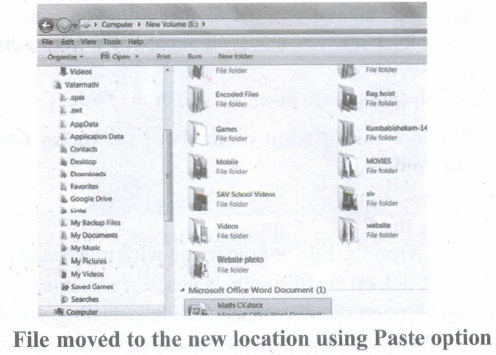
Explain the different methods of moving files and folders in windows.
37.
Convert the Following - (101.10)16 \(\rightarrow \) (?2) = (?)10
38.
What is number system? Describe different number systems in detail.
39.
Explain case analysis in detail with an example.
40.
Explain the classification of Microprocessor based on Instruction set?
41.
Write the important functions of an operating system?
42.
43.
Explain the classification of Opensource OS
44.
What are Registers? Explain the five Registers that are essential for instruction execution.
45.
Explain in detail the different types of Mouse.
46.
Explain the following in detail.
(a) FIFO (b) SJF (c) Round Robin
47.
Explain memory management techniques.
48.
Explain the types of control flow statements.
49.
Explain the Derived gates with expression and truth table.
50.
Write the procedure to create, rename, delete and save a file in Ubuntu OS. Compare it with Windows OS.
51.
52.
Explain the fundamental gates with expression and truth table.
53.
Discuss the various generations of computers.
54.
55.
Explain the types of ROM.
56.
Write the procedure to convert fractional Decimal to Binary.
57.
Explain advantages and disadvantages of open source operating systems.
58.
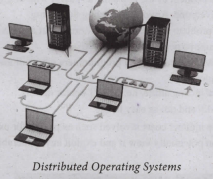
Explain the concept of a Distributed Operating System along with its advantages.
59.
60.
What is a software? Explain its types in detail.
1.
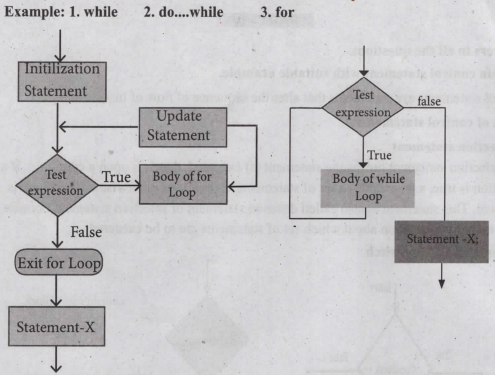
For loop: The for, loop is the easiest looping, statement which allows code to be executed repeatedly. It contains three different statement (initialization, condition or test-expression and update expression(s) separated by semicolons.
The general syntax is
for (initialization(s); test-expression; update expression( s))
{
Statement 1;
Statement 2;
}
Statement-x;
The initialization part is used to initialize variables or declare variable which are executed only once, then the control passes to test-expression. After evaluation of test-expression, if the result is false, the control transferred to statement-x. If the result is true, the body of the for loop is executed, next, the control is transferred to update expression. After evaluation of update expression part, the control is transferred to the test-expression part.
Example:
#include < iostream.h >
using namespace std;
int main ( )
{
int i;
for(i = 0; i < 10; i ++ )
cout << "value of i :" << i << endl;
}
Output:
value of i : 0
value of i : 1
value of i : 2
value of i : 3
value of i : 4
value of i : 5
value of i : 6
value of i : 7
value of i : 8
value of i : 9
2.
The switch statement is a multi-way branch statement. It provides an easy way to dispatch execution to different parts of code based on the value of the expression. The switch statement replaces multiple if-else sequence.
The syntax of the switch statement is:
switch( expression)
{
case constant 1:
statement( s);
break;
case constant 2:
statement( s);
break;
default:
statement(s);
}
Example:
#include < iostream.h >
using namespace std;
int main( )
{
int num;
cout << "\n Enter week day number:";
cin >> num;
switch (num)
{
easel : cout << "\n Sunday";break;
case2 : cout << "\n Monday";break;
case3 : cout << "\n Tuesday";break;
case4 : cout << "\n Wednesday";break;
case5 : cout << "\n Thursday'xbreak;
case6 : cout << "\n Friday";break;
case7 : cout << "\n Saturday";break;
default: cout << "\n Wrong input.. ...";
}
}
Output:
Enter week day number: 6
Friday
3.
Objects can be created in two methods:
i. Global object,
ii. Local object
(i) Global Object:
If an object is declared outside all the function bodies or by placing their names immediately after the closing brace of the class declaration then it is called as Global object. These objects can be used by any function in the program.
(ii) Local Object:
If an object is declared with in a function then it is called local object. It cannot be accessed from outside the function.
4.
Digital signature:
(i) Digital signatures are based on asymmetric cryptography and can provide assurances of evidence to origin, identity and status of an electronic document, transaction or message, as well as acknowledging informed by the signer.
(ii) To create a digital signature, signing software (email) Creates a one-way hash of the electronic data to be signed.
(iii) The user's private key to encrypt the hash, returning a value that is unique to the hashed data. The encrypted hash, along with other information such as the hashing algorithm, forms the digital signature. Any change in the data, even to a single bit, results in a different hash value.
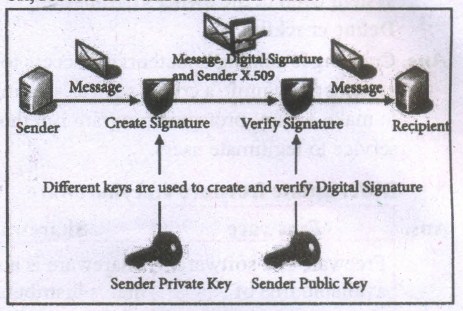
(iv) This attribute enables others to validate the integrity of the data by using the signer's public key to decrypt the hash. If the decrypted hash matches a second computed hash of the same data, it proves that the data hasn't changed since it was signed.
(v) If the two hashes don't match, the data has either been tampered with in some way (indicating a failure of integrity) or the signature-was created with a private key that doesn't correspond to the public key presented by the signer (indicating a failure of authentication).
5.
Types of Encryption :
There are two types of encryption schemes as listed below: Symmetric Key encryption, Public Key encryption.
(i) Symmetric Key Encryption:
Symmetric encryption is a technique to use the same key for both encryption and decryption. The main disadvantage of the symmetric key encryption is that all authorized persons involved, have to exchange the key used to encrypt the data before they can decrypt it. If anybody intercepts-the key information, they may read all message. Depicts the working of symmetric key encryption.
(ii) Public Key Encryption:
Public key encryption is also called Asymmetric encryption. It uses the concept of a key value pair, a different key is used for the encryption and decryption process. One of the keys is typically known as the private key and the other is known as the public key. The private key is kept secret by the owner and the public key is either shared amongst authorized recipients or made available to the public at large. The data encrypted with the recipient's public key can only be decrypted with the corresponding private key. public key encryption
6.
Web sites typically use cookies for the following reasons :
(i) To collect demographic information about who has visited the Web site.
(ii) Sites often use this information to track how often visitors come to the site and how long they remain on the site.
(iii) It helps to personalize the user's experience on the Web site.
(iv) Cookies can help store personal information about users so that when a user subsequently returns to the site, a more personalized experience is provided.
7.
#include < math.h >
#include < iostream.h >
void main ()
{
int 1,b, ar, p;
double d;
1= 20; b = 10;
ar = 1* b;
p = 2 * (l+b);
d = sqrt (l*&+b*b);
cout << "The area of rectangle" << ar << endl";
cout << "The perimeter of rectangle" << p << endl";
cout << "The diagonal of rectangle" << d << endl";
}
8.
Inline functions can be used to reduce the overheads like STACKS for small function definition.
An inline function looks like normal function in the source file but inserts the function's code directly into the calling program. To make a function inline, one has to insert the keyword inline in the function header.
Syntax:
inline retuntype functionname( datatype parametemame1, ... datatype parametemameN)
Advantages of inline functions: Inline functions execute faster but requires more memory space. Reduce the complexity of using STACKS.
Example:
#include< iostream >
using namespace std;
inline float simpleinterest(float.pl, float nl, float rl)
{
float si 1=(p1*n1*r1)/100;
retumf si 1);
}
intmain0
{
float si.p,n,r;
cout<< "\nEnter the Principal Amount Rs.:";
cin> p;
cout<< "\nEnter the Number of Years :";
cin<< n;
cout << "\nEnter the Rate ofInterest :";
cin>> r:
si=simpleinterest(p,n,r) ;
cout<< "\nThe Simple Interest = Rs."<< si;
return 0;
}
9.
#include < iostream >
#include < conio >
using namespeace std;
int maim()
{
int row, col, ml[10][10], m2[10][10], sum[10][10];
cout << "Enter the number of rows :";
cin >> row;
cout << "Enter the number of column :";
cin << col;
cout << "Enter the elements of first marrixr' < xendl,
for (int i = O;i < row;i++)
for (int j = O;j < col;j++)
cin >> ml[i][j];
cout << "Enter the elements of second matrix: " << endl;
for (int i = O;i < row;i++)
for (int j = O;j < col;j++)
cin >> m2[i][j];
cout << "Output: "<< endl;
for (int i = O;i < row;i++)
for (int j = O;j < col;j++)
{
sum[i][j]=ml [i][j]+m2[i] [j];
cout << sum[i][j] << " ";
}
cout << end1 << endl;
}
getcht);
return 0;
}
10.
#include < iostream >
using namespace std;
int main()
{
int num[10], even=0, odd=0;
for(int i=0; i < 10; i++)
{
cout << "\nEnter Mark' < xi+ I << "=";
cin >> marks[i];
if (num[i] % 2 =0
++even;
else
++odd;
}
cout << "\n There are" << even << "Even Numbers";
cout << "\n There are" << odd << "Odd Numbers";
}
11.
| Operator | Operation | Example (Assume n=2; what will be value of n) | |
|---|---|---|---|
| Prefix | Postfix | ||
| ++ | Increment | ++n; | n++; |
| n=n+1; Value of n; | Value of n; n=n+1; | ||
| Value of n = 3 | Value of n = 2 | ||
| -- | Decrement | --n; | n--; |
| n=n-1; Value of n; | Value of n; n=n-1; | ||
| Value of n = 1 | Value of n = 2 | ||
12.
| C | C++ |
|---|---|
| C is a subset of C++ | C++ is a superset of C |
| Supports Procedural Programming Paradigm. | Supports both Procedural and Object Oriented Programming. So, C++ is also called as "Hybrid Language". |
| Data and Functions are separate and free entities. | Data and functions are encapsulated together in form of an object. |
| No Data hiding. | Encapsulation hides data. |
| Function-driven language. | Object-driven language. |
| Does not have a namespace feature. | Uses namespace which avoids name collision. |
| scanf and printf functions are used for input and output. | cin and cout objects are used for input and output. |
| Not support reference variable. | Supports reference variable. |
| Not support virtual and friend functions. | Supports virtual and friend functions. |
| No Exception handling. | Supports exception handling. |
13.
Important features of Object oriented programming:
(i) Emphasizes on data rather than algorithm.
(ii) Data abstraction is introduced in addition to procedural abstraction.
(iii) Data and its associated operations are grouped in to single unit.
(iv) Programs are designed around the data being operated
(v) Relationships can be created between similar, yet distinct data types
(vi) Example: C++, Java, VB.Net, Python etc.
14.
| Cyber Attack | Function |
| Virus | A virus is a small piece of computer code that can repeat itself and spreads from one computer to another by attaching itself to another computer file. One of the most common virus is Trojan. |
| Worms | Worms are self- repeating and do not require a computer program to attach themselves. Worms continually look for vulnerabilities and report back to the author of the worm when weaknesses are discovered. |
| Spyware | Spyware can be installed on the computer automatically when the attachments are open, by clicking on links or by downloading infected software. |
| Ransomware | Ransomware is a type of malicious program that demands payment after launching a cyber-attack on a computer system. This type of malware has become increasingly popular among criminals and costs the organizations millions each year. |
15.
| Crime | Function |
| Crime Functions | Hacking, threats, and blackmailing towards a business or a person. |
| Cyberstalking | Harassing through online. |
| Malware | Malicious programs that can perform a variety of functions including stealing, encrypting or deleting sensitive data, altering or hijacking core computing functions and monitoring user's computer activity without their permission. |
| Harvesting | A person or program collects login and password information from a legitimate user to illegally gain access to others, account(s). |
| Identity theft | It is a crime where the criminals impersonate individuals, usually for financial gain. |
| Intellectual property theft |
Stealing practical or conceptual information. developed by another person or company |
| Salami slicing | Stealing tiny amounts of money from each transaction. |
16.
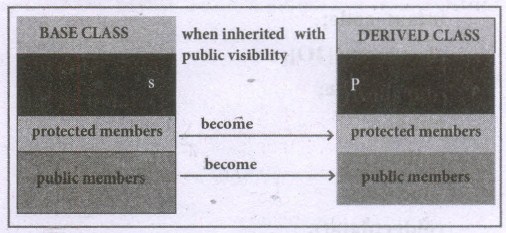
Visibility Modes :
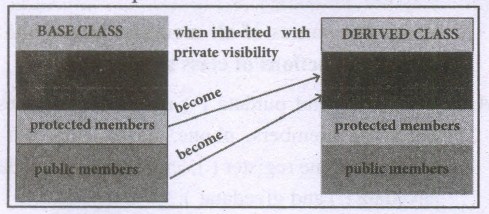
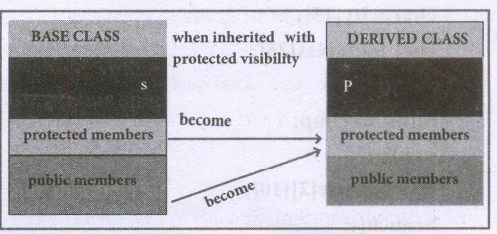
An important feature of Inheritance is to know which member of the base class will be acquired by the derived class. This is done by using visibility modes. The accessibility of base class by the derived class is controlled by visibility modes. The three visibility modes are private, protected and public. The default visibility mode is private. Though visibility modes and access specifiers look similar, the main difference between them is Access specifiers control the accessibility of the members with in the class where as visibility modes control the access of inherited members with in the class.
Private Visibility Mode :
When a base class is inherited with private visibility mode the public and protected members of the base class become 'private' members of the derived class.
Protected Visibility Mode:
When a base class is inherited with protected visibility mode the protected and public members of the base class become 'protected members ' of the derived class.
Public Visibility Mode :
When a base class is inherited with public visibility mode, the protected members of the base class will be inherited as protected members of the derived class and the public members of the base class will be inherited as public members of the derived class.
17.
Types of Inheritance
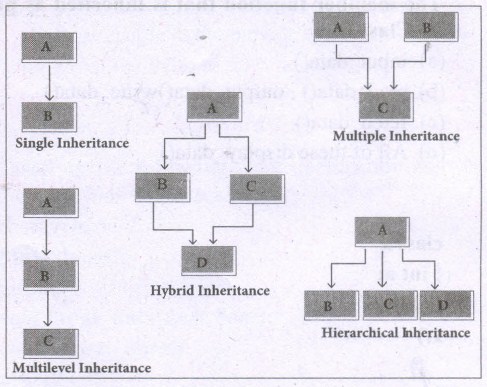
There are different types of inheritance viz., Single inheritance, Multiple inheritance, Multilevel inheritance, hybrid inheritance and hierarchical inheritance.
1. Single Inheritance: When a derived class inherits only from one base class, it is known as single inheritance.
2. Multiple Inheritance: When a derived class inherits from multiple base classes it is known as multiple inheritance.
3. Hierarchical inheritance: When more than one derived classes are created from a single base class, it is known as Hierarchical inheritance.
4. Multilevel Inheritance: The transitive nature of inheritance is itself reflected by this form of inheritance. When a class is derived from a class which is a derived class - then it is referred to as multilevel inheritance.
5. Hybrid inheritance: When there is a combination of more than one type of inheritance, it is known as hybrid inheritance. Hence, it may be a combination of Multilevel and Multiple inheritance or Hierarchical and Multilevel inheritance or Hierarchical, Multilevel and Multiple inheritance.
18.
Following are some rules to be followed while implementing operator overloading.
(i) Precedence and Associativity of an operator cannot be changed.
(ii) No new operators can be created, only existing operators can be overloaded.
(iii) Cannot redefine the meaning of an operator's procedure. You cannot change how integers are added. Only additional functions can be to an operator.
(iv) Overloaded operators cannot have default arguments.
(v) When binary operators are overloaded, the left hand object must be an object of the relevant class.
19.
| Constructor | Destructor |
|---|---|
| The name of the constructor must be same as that of the class. | The destructor has the same name as that of the class prefixed by the tilde character '~'.. |
| No return type can be specified for constructor. | It has no return type. |
| A constructor can have parameter list. | The destructor cannot have arguments |
| The constructor function can be overloaded. | Destructors cannot be overloaded i.e., there can be only one destructor in a class. |
| They cannot be inherited but a derived class can call the base class constructor. | They cannot be inherited. |
| The compiler generates a constructor, in the absence of a user defined constructor. | In the absence of user defined destructor, it is generated by the compiler. |
20.
21.
| Procedural programming | Object-Oriented Programming |
|---|---|
| Programs are organized in the form of subroutines or sub programs. | Emphasizes on data rather than algorithm. |
| All data items are global. | Data abstraction is introduced in addition to procedural abstraction. |
| Suitable for small sized software application. | Data and its associated operations are grouped in to single unit. |
| Difficult to maintain and enhance the program code as any change in data type needs to be propagated to all subroutines that use the same data type. | Programs are designed around the data being operated. |
| Example: FORTRAN and COBOL | Example: C++, Java, VB.Net, Python |
22.
An array of structures is declared in the same way as declaring and array with built-in data types like int or char. A class may contain many students. So, the definition of structure for one student can also be extended to all the students. If the class has 20 students, then 20 individual structures are required. For this purpose, an array of structures can be used
The following program read the details of 20 students and prints the same.
#include< iostream >
using namespace std;
struct Student
{
int age;
float height, weight;
char name[30];
};
void main()
{
Student std[20];
int i;
cout << "Enter the details for 20 students" << endl;
for(i=0;i<20;i++ )
cout << " Enter the details of student'' << i+ 1<< endl;
cout << " Enter the age:"<< endl;
cin >> std[i].age;
cout << "Enter the height:" << endl;
cin >> std[i].height;
cout << "Enter the weight" << endl;
cin >> std[i].weight;
}
cout << "The values entered for Age, height and weight are''<
cout << "Student'' << i+ 1<< "\t" << std[i].age << "\
cout << "std[i].height << "\t" << std[i].weight;
}
23.
Scope refers to the accessibility of a variable.
There are four types of scopes in C++
(i) Local Scope
(ii) Function Scope
(iii) File Scope
(iv) Class Scope
(i) Local Scope
1. A local variable is defined within a block. A block of code begins and ends with curly braces {}.
2. The scope of a local variable is the block in which it is defined.
3. A local variable cannot be accessed from outside the block of its declaration.
4. A local variable is created upon entry into its block and destroyed upon exit;
Example:
int main()
{
int a,b; //Local variable
}
(ii) Function Scope
1. The scope of variable within a function is extended to the function block and all sub-blocks therein.
2. The lifetime of a function scope variable is the lifetime of the function block.
Example:
int sum(intx, int y); //x and y has function scope.
(iii) File Scope
1. A variable declared above all blocks and functions (including main()) has the scope of a file.
2. The lifetime of a file scope variable is the lifetime of a program.
3. The file scope variable is also called as global variable.
Example:
#include<iostream>
using namespace std;
int x,y; // x and y are global variable
void main()
{
,,,,,
}
(iv) Class Scope
1. Data members declared in a class has the class scope.
2. Data members declared in a class can be accessed by all member functions of the class.
Example:
Class example
{
int x,y; //x and y can be accessed by print() and void():
void print():
void total();
};
24.
The return statement
Returning from the function is done by using the return statement. The return statement stops execution and returns to the calling function. When a return statement is executed, the function is terminated immediately at that point. The return statement is used to return from a function. It is categorized as a jump statement because it terminates the execution of the function and transfer the control to the called statement.
Syntax:
return expression/variable;
Example: return(a+b); return(a);
return; // to terminate the function
The Returning values:
The functions that return no value is declared a void. The data type of a function is treated as int, if no data type is explicitly mentioned. For example,
For Example:
int add (int, int);
add (int, int);
In both prototypes, the return value is int, because by default the return value of a function in C++ is of type int.
Returning Non-integer values
A string can also be returned to a calling statement.
#include <iostream>
#include<string.h>
using namespace std;
char*display()
{
return ("chennai");
}
int main()
{
char s[50];
strcpy(s,display());
cout<<"\n Example:Function with Non Integer Return"<<s;
return(0);}
Output:
Example: Function with Non Integer Return Chennai
The Returning by reference
#include<iostream>
using namespace std;
int main()
{
int nl-150;
int &nlrefn1;
cout<<"\nThe Value of NI =" <<n<< "and nl Reference="<<n/ref;
n1ref++;
cout<<"\n After nl increased the Value of N1 ="<<nl;
cout<<"and nl Reference="<<ntref;
return(0);
Output:
The Value of N1 - 150 and n1 Reference - 150
After n1 increased the Value of N1 =151 and n1 Reference = 151
25.
26.
27.
Control statements are statements that alter the sequence of flow of instructions.
Types of control statements:
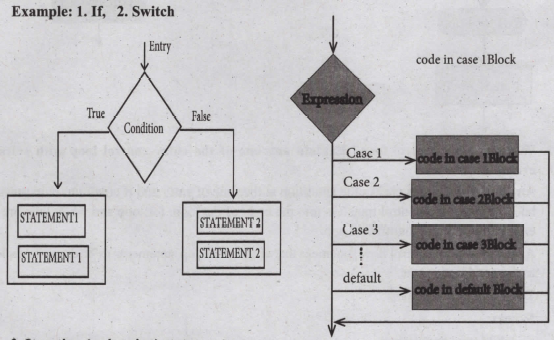
1. Selection statement
The selection statement means the statement (s) executed, depends upon a condition. If a condition is true, a true block (a set of statements) is executed otherwise a false block is executed. This statement is also called decision statement or selection statement because it helps in making decision about which set of statements are to be executed.
2. Iteration (or looping) statement
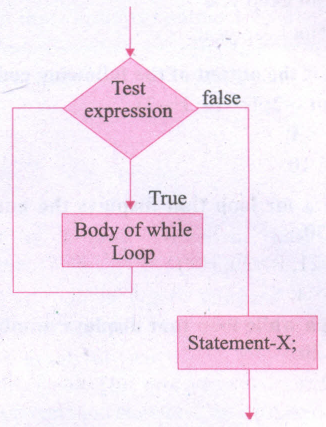
An iteration (or loop) is a sequence of one or more statements that are repeatedly executed until a condition is satisfied. These statements are also called as control flow statements. It is used to reduce the length of code to reduce the time to execute program and takes less memory space.
28.
| Type of Error | Description |
| Syntax Error | Syntax errors occur when grammatical rules of C++ are violated. |
| Semantic Error | Semantic Error occur when there is wrong use of variable/ operator/order of execution etc. It is also called as Logical Error. |
| Run-time error | A run time error occurs during the execution of a program. It is occurs because of some illegal operation that takes place. |
29.
Binary Operators require two operands.
Arithmetic operators that perform simple arithmetic operations like addition, subtraction, multiplication, division (+,-*, %,/) etc. are binary operators which requires minimum of two operands.
Relational operators are used to determine the relationship between its operands. The relational operators (<,>,>, <=,=, !=) are applied on two operands, hence they are binary operators.
AND, OR (logical operator) both are binary operators.
Assignment operator is also a binary operator (+=, -=, *=, /=, %=)
30.
THEOREMS OF BOOLEAN ALGEBRA
Identity
A + 0 = A
A.1=A
Complement
\(A+\bar { A } =1\)
\(A.\bar { A } =0\)
Commutative
A+B=B+A
A . B=B .A
Associative
A+(B+C)=(A+B)+C
A . (B . C) =(A .B) .C
Distributive
A . (B+C) = A . B+A . C
A +(B. C) = (A+B) .(A+C)
Null Element
A+1=1
A . 0= 0
Involution
\(\left( \overset { = }{ A } \right) \quad =A\)
Indempotence
A + A = A
A . A = A
Absorption
A+(A . B) = A
A . (A+B) = A
3rd Distributive
\(A+\bar { A } .B\ =A+B\)
De Morgan's
\(\bar { A+B } =\bar { A } .\bar { B } \)
\((\bar { A+B) } =\bar { A } +\bar { B } \)
31.
Disadvantages of flowcharts:
1. Flowcharts are less compact than representation of algorithms in programming language or pseudo code.
2. They obscure the basic hierarchical structure of the algorithms.
3: Alternative statements and loops are disciplined control flow structures.
32.
Secondary Storage Devices
A computer generally has limited amount of main memory which is expensive and volatile. To store data and programs permanently, secondary storage devices are used. Secondary storage devices serve as a supportive storage to main memory and they are non-volatile in nature, secondary storage is also called as Backup storage.
Hard Disks
Hard disk is a magnetic disk on which you can store data. The hard disk has the stacked arrangement of disks accessed by a pair of heads for each of the disks. The hard disks come with a single or double sided disk.
Compact Disc (CD)
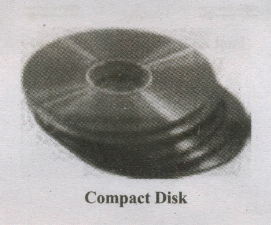
A CD or.CD-ROM is made from 1.2 millimeters thick, polycarbonate plastic material. A thin layer of aluminum or gold is applied to the surface. CD data is represented as tiny indentations known as "pits", encoded in a spiral track moulded into the top of the polycarbonate layer. The areas between pits are known as "lands". A motor within the CD player rotates the disk. The capacity of an ordinary CD-ROM is 700 MB.
Digital Versatile Disc (DVD)
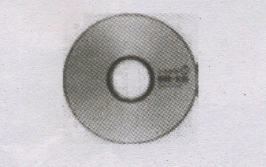
(A DVD Digital Versatile Disc or Digital Video Disc) is an optical disc capable of storing up to 4.7 GB of data, more than six times what a CD can hold. DVDs are often used to store movies at a better quality. Like CDs, DVDs are read with a laser.
The disc can have one or two sides, and one or two layers of data per side; the number of sides and layers determines how much it can hold. A 12 mm diameter disc with single sided, single layer has 4.7 GB capacity, whereas the single sided, double layer has 8.5 GB capacity. The 8 em DVD has 1.5 GB capacity. The capacity of a DVD-ROM can be visually determined by noting the number of data sides of the disc. Double-layered sides are usually gold-coloured, while single-layered sides are usually silver-coloured, like a CD
33.
There are a few basic principles and techniques for designing algorithms.
1. Specification:
The first step in problem-solving is to state the problem precisely. A problem is specified in terms of the input given and the output desired. The specification must also state the . properties of the given input; and the relation between the input and the output.
2. Abstraction:
A problem can involve a lot of details. Several of these details are unnecessary for solving the problem. Only a few details are essential. Ignoring or hiding unnecessary details and modeling an entity only by its essential properties is known as abstraction. For example, when we represent the state of a process, we select only the variables essential to the problem and ignore inessential details.
3. Composition:
An algorithm is composed of assignment and control flow statements. A control flow statement tests a condition of the state and depending on the value of the condition, decides the next statement to be executed.
4. Decomposition:
We divide the main algorithm into functions. We construct each function independently of the main algorithm and other functions. Finally, we construct the main algorithm using. the functions. When we use the functions, it is enough to know the specification of the function. It is not necessary to know how the function is implemented.
34.
Octal to Decimal Conversion:
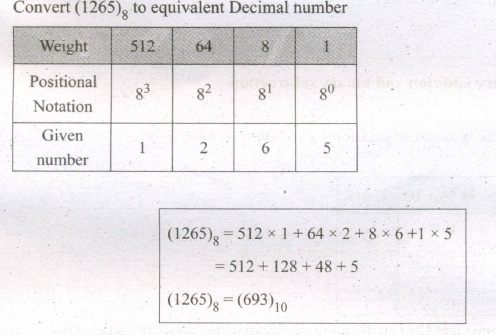
To convert Octal to Decimal, we can use positional notation method.
1. Write down the Octal digits and list the powers of8 from right to left(Positional Notation)
2. For each positional notation of the digit write the equivalent weight.
3. Multiply each digit with its corresponding weight
4. Add all the values
Example
Hexadecimal to Decimal Conversion:
To convert Hexadecimal to Decimal we can use positional notation-method.
1. Write down the Hexadecimal digits and list the powers of 16 from right to left
(Positional Notation)
2. For each positional notation written for the digit, now write the equivalent weight.
3. Multiply each digit with its corresponding weight
4. Add all the values to get one final value.
Example-
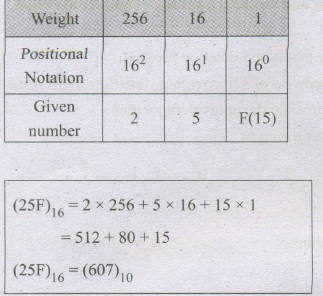
Convert (25F)16 into its equivalent Decimal number.
35.
(i) The desktop version of Ubuntu supports all the normal software on Windows such as Firefox, Chrome, VLC, etc.
(ii) It supports the office suite called LibreOffice.
(iii) Ubuntu has an in-built email software called Thunderbird, which gives the user access to email such as Exchange, Gmail, Hot mail, etc.
(iv) There are a host of free applications for users to view and edit photos.
(v) There are also applications to manage share videos.
(vi) It is easy to find content on Ubuntu with the smart searching facility.
36.
To move a file(s) or folder(s), first select the file(s) or folder(s) and then choose one of the following.
(i) Click on the EDIT menu, select the CUT function.
(ii) Keyboard shortcut, CTRL + X.
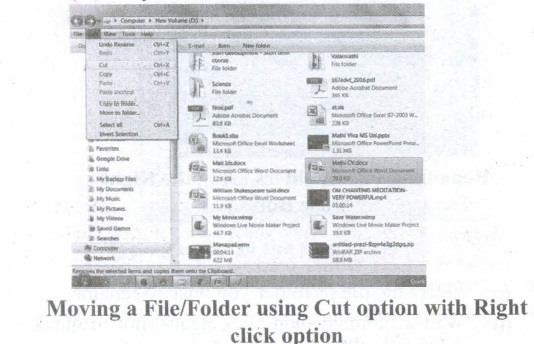
(iii) Or else click on the selected item with the RIGHT mouse button and select "CUT" from the shortcut Menu.
(iv) To bring back the file(s) or folder(s) in the new location, navigate to the new location then paste using one of the following:
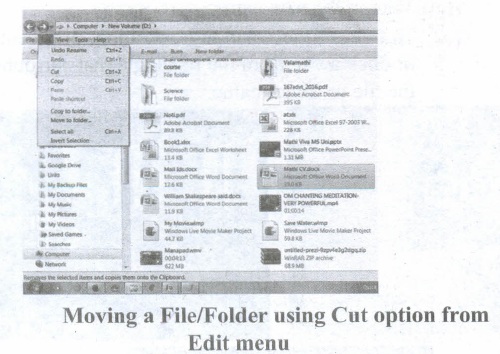
(v) Click on the EDIT menu, select the PASTE function.
(vi) Keyboard shortcut is, CTRL + V.
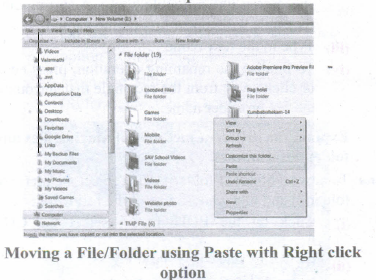
(vii) In the position where you want the item to be pasted, click with the Right mouse button and select "Paste" from the shortcut menu. The file will be pasted in the new location.
Method 2 - Dragging and Dropping
(i) In the right pane, select the file(s) or folder(s) you want to move.
(ii) Manipulate the Folder List on the left side of the Windows Explorer so that it shows the new location.
(iii) Make sure you use the scroll bars and the + and (collapse and expand buttons) to navigate.
(iv) Click and drag the selected file(s) or folder(s) from the RIGHT pane, over to the Folder List A on the left.
(v) Release the mouse button when the target folder is highlighted (active).
(vi) The file(s) or folder(s) will now appear in the new area.
37.
(101.10)16 in binary From
= 1 0 1 1 0
0001 0000 0001 0001 0000
(101.10)2 = (000100000001.00010000)2
(101.10)16 in Decimal Form
(101.10)2 = 1 x 162 + x 161 + 1 x 160 + 1 x 16-1 + 0 x 16-2
= 256 + 0 + 1 + 0.0625 + 0 =(275.0625)10
38.
A number system is a set of digits used to represent the values derived from a common base or radix.
Decimal Number System:
(i) The term Decimal is derived from a Latin prefix deci, which means ten.
(ii) The Decimal number system has ten digits ranging from 0-9. Because this system has ten digits.
(iii) It is also called as a base ten number system or denary number system.
(iv) Decimal number should always be written with a subscript 10.
Binary Number System:
(i) The decimal number system is not convenient to implement in digital system.
(ii) For instance, it is very difficult to design electronic equipment so that it can work with 10 different voltage levels (each one representing one decimal character, 0 through 9).
(iii) On other hand, it is very easy to design simple, accurate electronic circuits that operate with only 2 voltage levels.
(iv) For this reason, almost every digital system utilizes the binary number system (base 2) as the basic number system of its operation;
(v) In a binary system, there are only two symbols or possible digit values, 0 and 1.
Octal Number System:
(i) The octal number system is playing a vital role in digital computer work.
(ii) The octal number system has a base of 8.
(iii) It means that it has eight unique symbols such as 0,1,2,3,4,5,6 and 7.
(iv) Thus, each digit of an octal number can have any value from 0 to 7.
(v) The places to the left of the octal point are positive powers of 8 and places to the right are negative powers of 8.
Hexadecimal Number System:
(i) The hexadecimal system uses base 16 in digital systems.
(ii) It has 16 possible symbols.
(iii) It uses the digits 0 through 9 plus the letters A, B, C, D, E and F as the 16 different symbols.
(iv) Hexadecimal System is a positional value system, wherein each hexadecimal digit has its own value or weight expressed as a power of 16.
39.
Alternative statement analyses the problem into two cases. Case analysis statement generalizes it to multiple cases. Case analysis splits the problem into an exhaustive set of disjoint cases. For each case, the problem is solved independently. If C1, C2, and C3 are conditions, and S1, S2, S3 and S4 are statements, a 4-case analysis statement has the form,
1. case C1
2. S1
3. case C2
4. S2
5. case C3
6. S3
7. else
8. S4
The conditions C1, C2, and C3 are evaluated in turn. For the first condition that evaluates to true, the corresponding statement is executed, and the case analysis statement ends. If none of the conditions evaluates to true, then the default case S4 is executed.
(i) The cases are exhaustive: at least one of the cases is true. If all conditions are false, the default case is true.
(ii) The cases are disjoint: only one of the cases is true. Though it is possible for more than one condition to be true, the case analysis always executes only one case, the first one that is true. If the three conditions are disjoint, then the four cases are (1) C1, (2) C2, (3) C3, (4) (not C1) and (not C2) and (not C3).
40.
(i) The size of the instruction set is another important consideration while categorizing microprocessors.
(ii) Initially, microprocessors had very small instruction sets because complex hardware was expensive as well as difficult to build.
(iii) As technology had developed to overcome these issues, more and more complex instructions were added to increase the functionality of the microprocessor,
(iv) Let us learn more about the two types of microprocessors which are based on their instruction sets.
(v) RISC stands for Reduced Instruction Set Computers. They have a small set of highly optimized instructions.
(vi) Complex instructions are also implemented using simpler instructions, thus reducing the size of the instruction set.
(vii) Examples of RISC processors are Intel P6, Pentium IV, AMD K6 and K7.
(viii) CISC stands for Complex Instruction Set Computers. They support hundreds of instructions. Computers supporting CISC can accomplish a wide variety of tasks, making them ideal for personal computers.
(ix) Examples of CISC processors are Intel 386 & 486, Pentium, Pentium II and III, and Motorola 68000.
41.
The important functions of an operating System.
(i) Memory Management
(ii) Processor Management
(iii) Device Management
(iv) File Management
(v) Security
(vi) Control over system performance
(vii) Job accounting
(viii) Error detecting aids
(ix) Coordination between other software and users
42.
43.
(i) Android is a mobile operating system developed by Google, based on the Linux and designed primarily for touchscreen mobile devices such as smartphones and tablets.
(ii) Google has further developed Android TV for televisions, Android Auto for cars and Android Wear for wrist watches, each with a specialized user interface.
(iii) Variants of Android are also used on game consoles, digital cameras, PCs and other electronic gadgets.
UNIX :
UNIX is a family of multitasking, multi-user operating systems that derive originally from AT&T Bell Labs, where the development began in the 1970s by Ken Thompson and Dennis Ritchie.
Linux
(i) Linux is a family of open-source operating systems. It can be modified and distributed by anyone around the world.
(ii) This is different from proprietary software like Windows, which can only be modified by the company that owns it.
(iii) The main advantage of the Linux operating system is that it is open source. There are many versions and their updates
(iv) Most of the servers run on Linux because it is easy to customize.
44.
Registers:
(i) Registers are the high-speed temporary storage locations in the CPU. Hence, their contents can be handled much faster than the' contents of memory.
(ii) Although the number of registers varies from computer to computer, there are some registers which are common to all computers. Five registers that are essential for instruction execution are:
(iii) Program Counter (PC): Contains the address of the next instruction to be fetched.
(iv) Instruction Register (IR): Contains the instruction most recently fetched.
(v) Memory Address Registers (MAR): Contain the address of a location in memory for read and write operations.
(vi) Memory Buffer Register (MBR): It contains the value to be stored in memory or the last value read from memory.
(vii) Accumulator (ACC): An accumulator is a general purpose register used for storing temporary result produced by the arithmetic logic unit.
45.
| S.No | Type of Mouse | Mechanism | Developed and Introduced |
| 1 | 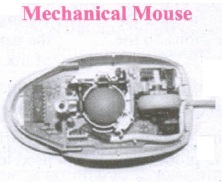 |
1. A small ball is kept inside and touches the pad through a hole at the bottom of the mouse. |
Telefunken, German Company, 0211011968 |
| 2 | 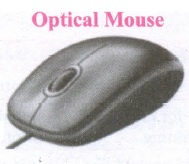 |
1. Measures the motion and acceleration of pointer. |
In 1988, Richard Lyon, Steve Krish independently invented different versions of Optical Mouse. |
| 3 | 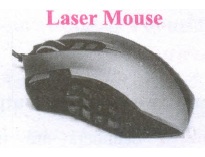 |
1. Measures the motion and acceleration of pointer. |
46.
(a) FIFO (First In First Out)Scheduling :
(i) This algorithm is based on queuing technique. Assume that a student is standing in a queue (Row) to get grade sheet from his/her teacher.
(ii) The other student who stands first in the queue gets his/her grade sheet first and leaves from the queue (Row). Followed by the next student in the queue gets it corrected and so on. This is the basic logic of the FIFO algorithm.
(iii) Technically, the process that enters the queue first is executed first by the CPU, followed by the next and so on. The processes are executed in the order of the queue (row).
(b) SJF (Shortest Job First)Scheduling:
(i) This algorithm works based on the size of the job being executed by the CPU.
(ii) Consider two jobs A and B.
(iii) 1) A = 6 kilo bytes 2) B = 9 kilo bytes.
(iv) First the job "A" will be assigned and then job "B" gets its turn.
(c) Round Robin Scheduling :
(i) The Round Robin (RR) Scheduling algorithm is designed especially for time sharing systems.
(ii) Jobs (processes) are assigned and processor time in a circular method.
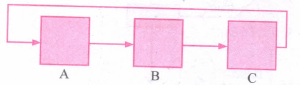
(iii) For example take three jobs A, B, C. First the job A is assigned to CPU then job B and job C and then again A, Band C and so on.
47.
Memory Management:
(i) Memory Management is the process of controlling and coordinating computer's main memory and assigning memory block (space) to various running programs to optimize overall computer performance.
(ii) The Memory management involves the allocation of specific memory blocks to individual programs based on user demands. At the application level, memory management ensures the availability of adequate memory for each running program at all times.
(iii) The objective of Memory Management process is to improve both the utilization of the CPU and the speed of the computer's response to its users via main memory. For these reasons, the computers must keep several programs in main memory that associates with many different Memory Management schemes.
(iv) The Operating System is responsible for the following activities in connection with memory management.
(v) Keeping track of which portion of memory are currently being used and who is using them.
(vi) Determining which processes (or parts of processes) and data to move in and out of memory.
(vii) Allocation and de-allocation of memory blocks as needed by the program in main memory. (Garbage Collection).
48.
There are three important control flow .statements to alter the control flow depending on the state.
(i) In sequential control flow, a sequence of statements are executed one after another in the same order as they are written.
(ii) In alternative control flow, a condition of the state is tested, and if the condition is true, one statement is executed; if the condition is false an alternative statement is executed.
(iii) In iterative control flow, a condition of the state is tested, and if the condition is true, a statement is executed. The two steps of testing the condition and executing the statement are repeated until the condition becomes false.
49.
The logic gates like NAND, NOR, XOR and XNOR are derived gates which are derived from the fundamental gates AND, OR NOT.
(1) NAND gate:
The NAND is the combination of NOT and AND. The NAND is generated by inverting the output of an AND operation.
Output: y = \(\overline { \left( A.B \right) } \)
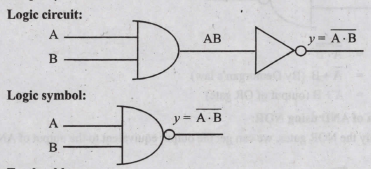
The truth table for NAND gate is
| Input | Output | |
| A | B | y = \(\overline { \left( A.B \right) } \) |
| 0 | 0 | 1 |
| 0 | 1 | 0 |
| 1 | 0 | 0 |
| 1 | 1 | 0 |
(ii) NOR gate:
The NOR is the combination of NOT and OR. The NOR is generated by inverting the output of an OR operation.
Logic function: y = \(\overline { \left( A+B \right) } \)
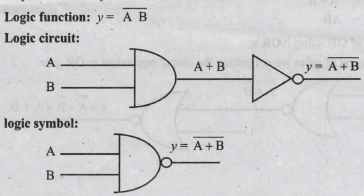
the truth table for NAND gate is
| Input | Output | |
| A | B | y = \(\overline { \left( A+B \right) } \) |
| 0 | 0 | 1 |
| 0 | 1 | 0 |
| 1 | 0 | 0 |
| 1 | 1 | 0 |
(iii) XOR gate:
The XOR (exclusive - OR) gate acts in the same way as the logical either /or.
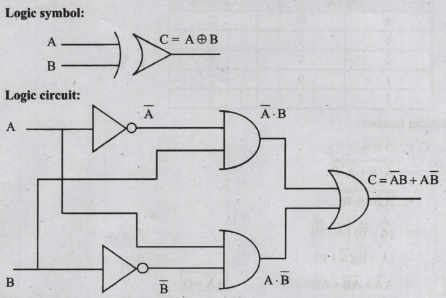
the truth table
| Input | Output | |
| A | B | C |
| 0 | 0 | 0 |
| 0 | 1 | 1 |
| 1 | 0 | 1 |
| 1 | 1 | 0 |
(iv) XNOR gate:
XNOR (exclusive - NOR) gate is a combination of XOR gate followed by an inverter.
Logic function: y= \(\overline { A \ B } \)
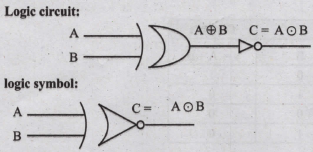
the truth table
| Input | Output | |
| A | B | C |
| 0 | 0 | 1 |
| 0 | 1 | 0 |
| 1 | 0 | 0 |
| 1 | 1 | 1 |
Boolean function:
\(\mathrm{C} =\overline{\mathrm{A} \oplus \mathrm{B}} \)
\(=\overline{{\overline{\mathrm{A}}} \cdot \mathrm{B}+\mathrm{A} \cdot \overline{\mathrm{B}}} \)
\(=\overline{\overline{\mathrm{A}} \cdot \mathrm{B}} \cdot \overline{\mathrm{A} \cdot \overline{\mathrm{B}}} \)
\(=(\overline{\mathrm{A}}+\overline{\mathrm{B}})(\overline{\mathrm{A}}+\overline{\bar{B}}) \)
\(=(\mathrm{A}+\overline{\mathrm{B}})(\overline{\mathrm{A}}+\mathrm{B}) \)
\(=\mathrm{A} \overline{\mathrm{A}}+\overline{\mathrm{AB}}+\mathrm{AB}+\mathrm{B} \overline{\mathrm{B}} \quad \mathrm{A \overline {A }}=\mathrm{O}\)
\(\mathrm{C} =\overline{\mathrm{A}} \overline{\mathrm{B}}+\mathrm{AB}\)
50.
In Ubuntu OS:
(i) Create a file: By right clicking in the desktop and also files be created by using file menu.
(ii) Delete a file: By using right-click choosing a move to trash or by using the menu.
(iii) Rename a file: By using right-click and choosing rename option.
(iv) Save a file: Press ctrl + x or F2 to exit. You will. then be asked if you want to save. (or) Press ctrl+ 0 or F3 and ctrl + x or F2 for save and exit.
In Windows OS:
(i) Create file: Open an application and create by using file menu.
(ii) Delete a file: By right click on a file and choosing the delete option to delete a file.
(iii) Rename a file: By right click on a file and choosing rename option to rename a file.
(iv) Save file: Press ctrl+S or file - save to save the file.
51.
 1985 1. Introduction of GUI in 16 - bit. processor
 1987 1. Supports to minimize or maximize windows.
 1992 1. Introduced the concept of multitasking.
 1995 1. Introduced Start button, the taskbar, Windows Explorer and Start menu.
 1998 1. Integration of the Web browser (Internet Explorer) with the Operating System.
 Designed to act as servers in network. 7. Windows Me
  2000 It introduced automated system diagnostics and recovery tools. 8. Windows 2000
  2000 1. Served as an Operating System for business
 2001 1. Introduced 64-bit Processor.
 2006 Updated the look and feel of Windows 11. Windows 7
  2009 Booting time was improved, introduced new user interfaces like Aero Peek, pinning programs to the taskbar, handwriting recognition etc, and Internet Explorer 8. 12. Windows 8
  2012 1. Windows 8 was faster than previous versions of Windows.
 2015 1. Start Button was added again.
52.
A gate is a basic electronic circuit which operates on one or more signals to produce an output signal.
The three fundamental gates are AND, OR and NOT gates.
AND Gate
The AND gate can have two or more input signals and produce an output signal. The output is "true" only when both inputs are "true", otherwise, the output is "false". In other words the output will be 1 if and only if both inputs are 1; otherwise the output is 0. The output of the AND gate is represented by a variable say C, where A and B are two and if input boolean variables. In boolean algebra, a variable can take either of the values '0' or '1'. The logical symbol of the AND gate is
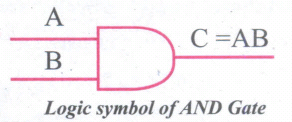
The Truth Table For AND Gate is
| Input | Output | |
| A | B | C |
| 0 | 0 | 0 |
| 0 | 1 | 0 |
| 1 | 0 | 0 |
| 1 | 1 | 1 |
OR Gate;
The OR gate gets its name from its behaviour like the logical inclusive "OR". The output is "true" if either or both of the inputs are "true". If both inputs are "false" then the output is "false". In other words the output will be 1 if and only if one or both inputs are 1; otherwise, the output is 0. The logical symbol of the OR gate is
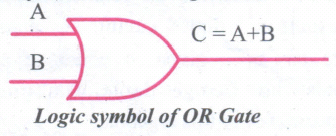
The truth table For OR Gate is
| Input | Output | |
| A | B | C |
| 0 | 0 | 0 |
| 0 | 1 | 1 |
| 1 | 0 | 0 |
| 1 | 1 | 1 |
NOT Gate;
The NOT gate, called a logical inverter, has only one input. It reverses the logical state. In other words the output C is always the complement of the input. The logical symbol of the NOT gate is
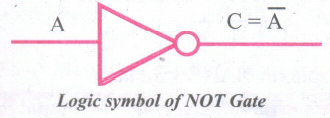
The truth table for NOT gate is
| Input | Output |
| A | C |
| 1 | 0 |
| 0 | 1 |
53.
| Computers size was drastically reduced. S.No | Generation | Period | Main Component used | Merits/ Demerits |
| 1 | First Generation | 1942-1955 | 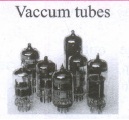 |
Big in size Consumed more power Malfunction due to overheating Machine Language was used Eg : ENIAC, EDVAC, UNIVAC |
| First Generation Computer - ENIAC, EDVAC, UNIVAC 1 ENIAC weighed about 27 tons, size 8 feet x 100 feet x 3 feet, and consumed around 150 watts of power | ||||
| 2 | Second Generation | 1955-1964 | 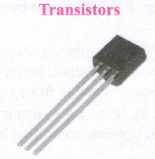 |
Smaller compared to First Generation Generated Less Heat Consumed less power compared to first-generation Punched cards were used. The first operating system was developed Batch Processing and Multiprogramming Operating System Machine language, as well as Assembly language, was used. |
| Second Generation Computers IBM 1404, IBM 1620, UNIVAC 1108 | ||||
| 3 | Third Generation | 1964-1975 | 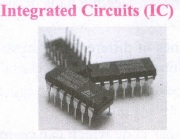 |
Computers were smaller, faster, and more reliable Consumed less power. High-Level Languages were used. |
| Third Generation Computers -IBM ·360 series, Honeywell 6000 series | ||||
| 4 | Fourth Generation | 1975-1980 | 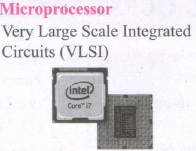 |
Smaller and Faster Microcomputer series such as IBM and APPLE was developed Portable Computers were introduced. |
| 5 | Fifth Generation | 1980-till date | 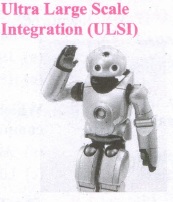 |
Parallel, Processing Superconductors Computers size was drastically reduced. Can recognize Images and Graphics Introduction of Artificial Intelligence and Expert Systems Able to solve highly complex problems including decision making and logical reasoning. |
| 6 | Sixth Generation | In future | 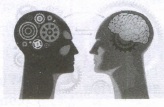 |
Parallel and Distributed computing Computers have become smarter faster and smaller Development of robotics Natural Language Processing Development of Voice Recognition Software. |
54.
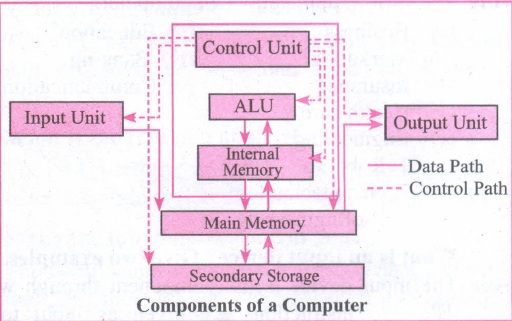
55.
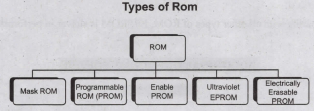
Read-only memory (ROM):
1. Read only memory refers to special memory in a computer with pre-recorded data at manufacturing time which cannot be modified.
2. The stored programs that start the computer and perform diagnostics are available in ROMs. ROM stores critical programs such as the program that boots the computer.
3. Once the data has been written onto a ROM chip, it cannot be modified or removed and can only be read.
4. ROM retains its contents even when the computer is. turned off. So, ROM is called as a non-volatile memory.
Programmable Read-Only Memory (PROM):
1. Programmable read-only memory is also a nonvolatile memory on which data can be written only once. Once a program has been written onto a PROM, it remains there forever.
2. Unlike the main memory, PROMs retain their contents even when the computer is turned off.
3. The PROM differs from ROM. PROM is manufactured as a blank memory, whereas a ROM is programmed during the manufacturing process itself.
4. PROM programmer or a PROM burner is used to write data to a PROM chip. The process of programming a PROM is called burning the PROM.
Erasable Programmable Read-Only Memory (EPROM):
1. Erasable Programmable Read Only Memory is a special type of memory which serves as a PROM, but the content can be erased using ultraviolet rays.
2. EPROM retains its contents until it is exposed to ultraviolet light. The ultraviolet light clears its contents, making it possible to reprogram the memory.
3. An EPROM differs from a PROM, PROM can be written only once and cannot be erased.
4. EPROMs are used widely in personal computers because they enable the manufacturer to change the contents of the PROM to replace with updated versions or erase the contents before the computer is delivered.
Electrically Erasable Programmable Read Only Memory (EEPROM)
1. Electrically Erasable Programmable Read Only Memory is a special type of PROM that can be erased by exposing it to an electrical charge.
2. Like other types of PROM, EEPROM retains its contents even when the power is turned off.
3. Comparing with all other types of ROM, EEPROM is slower in performance.
56.
The method of repeated multiplication by 2 has to be used to convert such kinds of decimal fractions.
The steps involved in the method of repeated multiplication by 2.
Step 1: Multiply the decimal fraction by 2 and note. the integer part. The integer part is either 0 or 1.
Step 2: Discard the integer part of the previous product. Multiply the fractional part of the previous product by 2. Repeat Step 1 until the same fraction repeats or terminates (0).
Step 3: The resulting integer part forms a sequence of 0's and 1's that become the binary equivalent of a decimal fractions.
Step 4: The final answer is to be written from first. integer part obtained till the last integer part is obtained.
57.
The benefits of open source are tremendous and have gained huge popularity in the IT field in recent years. They are as follows:
1. Open source (OS) is free to use, distribute and modify.
2. Open source is independent of the company as author who originally created it.
3. It is accessible to everyone. Anyone can debug the coding.
4. It doesn't have the problem of incompatible formats that exists in proprietary software.
5. It is easy to customize as per our needs.
6. Excellent support will be provided by programmers who will assist in making solutions. Some of the disadvantages are:
7. Latest hardware are incompatible, i.e. lack of device drivers.
8. It is less user friendly and not as easy to use.
9. There may be some indirect costs involved such as paying for external support.
10. Malicious users can potentially view it and exploit any vulnerability.
58.
The data and application that are stored and processed on multiple physical locations across the world over the digital network (internet/intranet). The Distributed Operating System is used to access shared data and files that reside in any machine around the world. The user can handle the data from different locations. The users can access as if it is available on their own computer.
The advantages of distributed Operating System are as follows:
1. A user at one location can make use of all the resources available at another location over the network.
2. Many computer resources can be added easily in the network
3. Improves the interaction with the customers and clients.
4. Reduces the load on the host computer.
59.
60.
A Software is a set of instructions that perform a specific task. It interacts basically with the hardware to generate the desired output.
Types of Software
Software is classified into two types:
1. Application Software
2. System Software
Application Software:
Application software is a set of programs to perform specific tasks. For example, MS-word is an application software to create a text document and VLC player is a familiar application software to play audio, video files, and many more.
System Software:
System software is a type of computer program that is designed to run the computer's hardware and application programs. For example Operating System and Language Processor.

11th Standard Syllabus & Materials
11th Standard
TN 11th Tamil பீடு பெற நில் - செய்யுள் - காவடிச்சிந்து Important Questions And Answers Study Material - QB365 Set A
NEW11th Standard
TN 11th Tamil பீடு பெற நில் - உரைநடை - மலை இடப்பெயர்கள் : ஓர் ஆய்வு Important Questions And Answers Study Material - QB365 Set A
NEW11th Standard
TN 11th Tamil மாமழை போற்றுதும் - துணைப்பாடம் - யானை டாக்டர் Important Questions And Answers Study Material - QB365 Set A
NEW11th Standard
TN 11th Tamil மாமழை போற்றுதும் - செய்யுள் - ஐங்குறுநூறு Important Questions And Answers Study Material - QB365 Set A



Tamilnadu Stateboard 11th Standard Subjects

Maths

Commerce

Economics

Biology

Business Maths and Statistics

Accountancy
Computer Science

Physics

Chemistry
Maths
Biology
Economics
Physics
Chemistry

History
Business Maths and Statistics

Computer Science
Accountancy

Computer Applications
History
Computer Technology
Commerce
Computer Applications
Computer Technology

Tamil

English

French
Tamilnadu Stateboard Standards
