
 100% FREE ACCESS
11th Standard Syllabus & Materials
11th Standard
TN 11th Tamil இயற்கை வேளாண்மை,சுற்றுச்சூழல் -செய்யுள் - மனோன்மணீயம் Important Questions And Answers Study Material - QB365 Set A
NEW11th Standard
TN 11th Tamil என்னுயிர் என்பேன் -துணைப்பாடம் - இசைத்தமிழர் இருவர் Important Questions And Answers Study Material - QB365 Set A
NEW11th Standard
TN 11th Tamil மொழி கலை -செய்யுள் - ஒவ்வொரு புல்லையும் Important Questions And Answers Study Material - QB365 Set A
NEW11th Standard
TN 11th Tamil பீடு பெற நில் - இலக்கணம் - பகுபத உறுப்புகள் Important Questions And Answers Study Material - QB365 Set A
NEW11th Standard
TN 11th Tamil பீடு பெற நில் - துணைப்பாடம் - வாடிவாசல் Important Questions And Answers Study Material - QB365 Set A
NEW11th Standard
TN 11th Tamil பீடு பெற நில் - செய்யுள் - குறுந்தொகை Important Questions And Answers Study Material - QB365 Set A

Published on: 04/03/2019
Plus One Official Model Question 2019
Download Tamil Nadu 11th Standard Computer Technology question papers, model tests, one-mark questions, important questions, and public exam papers in PDF format. Free study materials and answer keys for TN State Board students.
Questions + Answers key
Take MCQ Computer Technology Test
1.
How many types of websites are available?
3
2
4
6
2.
Identify the data communication system within a building or campus.
LAN
WAN
MAN
None of the mentioned
3.
Which is not pre-packaged layout in presentation?
Main Content layout
Title, 6 Content layout
Blank Slide layout
Title, 2 content over content
4.
Identify the extension of the Impress presentation.
.odp
.ppt
.odb
.ood
5.
The size of an A4 paper is 21 cm x 29 cm. If the user chooses Landscape orientation, then the size of the paper is…..?
21 x 29
29 x 21
None of the above
All of the above
6.
Which can be powerful way to convey information to the reader through a pictorial representation?
Charts and images
graphs and images
Charts and graphs
Images and Pictures
7.
What will be the result of the following formula (Assume A1 = 5, B2 = 2)? + A1 ^ B2
7
25
10
52
8.
Which icon on the desktop is used to recover the deleted files and folders?
My computer
This PC
Recycle bin
Computer bin
9.
Which of the following Operating systems support Mobile Devices?
Windows 7
Linux
BOSS
iOS
10.
Which bus in unidirectional?
Address bus
Control bus
Data bus
system bus
11.
Which is used to measure the number of bits in each word?
Word length
length
Size
word size
12.
When a system restarts which type of booting is used.
Warm booting
Cold booting
Touch boot
Real boot
13.
Which of the following option is not responsible for external address book creation wizard?
Mozilla/Netscape
LDAP Address Data
Outlook address book
windows system address book
14.
Which option helps to assign text, tables, graphics and other items to a key or key combination?
Autoformat
Automatic
Auto text
Autographics
15.
What is the shortcut key for finding and replacing text in a document?
Ctrl + F1
Ctrl + F4
Ctrl + F5
Ctrl + F7
16.
What is TSCII?
17.
List out pre-packaged layouts.
18.
What is header and footer?
19.
Can you edit the contents of a cell? If yes, explain any one of the method of editing the cell content.
20.
What is freeware?
21.
What are the parameters which influence the characteristics of a microprocessor?
22.
How the given messages are represented in computers?
23.
Distinguish between data and information.
24.
State the difference between Proprietary software and open source software.
25.
What is TCP/IP?
26.
How many types of views are provided by Impress to its users?
27.
What is range? Give example.
28.
Write the specific use of Cortana.
29.
List out the operation carried out by and Instruction set.
30.
How will you convert decimal number into Octal number?
31.
What are the characteristics of a computer?
32.
Open a document and find the number of words available in the document.
33.
How do you change the clarity of the picture in background?
34.
Write a note on any five Internet browsers other than that given in the book.an
35.
Explain the applications of internet.
36.
Explain how a presentation can help a sales person to promote his/her products.
37.
Discuss in detail the steps to create chart in OpenOffice calc.
38.
Complete the following matrix.
| Navigational method | Located on | Ideally suited for |
|---|---|---|
| Start button | Task bar | |
| Desktop | Exploring your disk drives and using system tools. | |
| Windows Explorer | Seeing hierarchy of all computer contents and resources in one window. | |
| Quick Launch |
39.
Explain the classification of proprietary licensed OS.
40.
Explain RAM in detail.
41.
Explain Impact Printers with an Example.
42.
Explain Address book feature.
43.
Write the steps to preview before printing and steps in printing a document.
1.
(b)
2
2.
(a)
LAN
3.
(d)
Title, 2 content over content
4.
(a)
.odp
5.
(b)
29 x 21
6.
(c)
Charts and graphs
7.
(b)
25
8.
(c)
Recycle bin
9.
(d)
iOS
10.
(a)
Address bus
11.
(a)
Word length
12.
(a)
Warm booting
13.
(a)
Mozilla/Netscape
14.
(a)
Autoformat
15.
(c)
Ctrl + F5
16.
1. TSCII (Tamil Script Code for Information Interchange) is the first coding system to handle our Tamil language.
2. This encoding scheme was registered in IANA (Internet Assigned Numbers Authority) a unit of ICANN.
3. This is one of the encoding schemes specially designed for Indian languages including Tamil. It was unified with Unicode.
4. Unicode is an encoding system, designed to handle various world languages, including Tamil. Its first version 1.0.0 was introduced in October 1991. Unicode is the best suitable to handle Tamil.
5. Computers use ASCll encoding system to handle data and information. because computers handle data and information as binary system. But ASCII encoding system is applicable only for handling English language. So TSCII (Tamil Script Code for Information Interchange) came in demand.
17.
However there is no uniform save file spot, the unofficial Unity save game destinations are all stored by default in the application 'persistant Data Path.' If you just use Unity PlayerPrefs, the information will be stored in the register.
18.
(i) Header and Footer are some titles (such as Document Title, Author Name) or references (such as page no, number of pages, date) or remarks to be printed in the top (called as Header) and bottom of the page (called as Footer).
(ii) Headers and Footers are useful for including material that you want to appear on every page of the document.
19.
(i) Yes, you can edit the contents of a cell.
(ii) Click the cell that contains the data that you want to edit, and then press F2. This starts Edit mode and Positions the cursor at the end of the cell contents.
20.
It refers to the softwares which are available for use at no cost or for an optional fee.
21.
A Microprocessor's performance depends on the following characteristics:
(a) Clock speed
(b) Instruction set
(c) Word size
22.
The given messages are represented in computer as Information \(\rightarrow \) Data \(\rightarrow \)Knowledge.
23.
| Data | Information |
| Data is defined as an unprocessed collection of raw facts, suitable for communications interpretation or processing. |
Information is a collection of facts from which conclusions may be drawn. |
| (Eg) 134, 16 'Kavitha', 'C" | (Eg) Kavitha is 16 years old |
24.
| Proprietary Software | Open Source Software |
| 1. Proprietary software retains the source code. | Open source software publishes the source code |
| 2. No license needed | License needed. |
25.
1. A protocol suite is defined as the set of protocols organized in different layers. The TCP/IP protocol suite is used in internet today.
2. TCP/IP stands for Transmission Control Protocol/Internet Protocol, is the standard internet communications protocols that allow digital computers to communicate over long distances.
3. The internet is a packet-switched network, in which information is broken down into small packets, sent individually over many different rotes at the same time, and then reassembled at the receiving end.
4. TCP is a component that collects and reassembles the packets of data, while $\mathbb{I}$ is responsible for making sure the packets are sent to the right destination.
5. TCP/IP is a hierarchical protocol suite means that each upper layer protocol receives support and services from either one or more lower-level protocols.
26.
Normal view:
is the main view for creating individual slides. Use this view to format and design slides and to add text, graphics, and animation effects.
Outline view:
Shows topic titles, bulleted lists, and numbered lists for each slide in outline format. Use this view to rearrange the order of slides, edit titles and headings, rearrange the order of items in a list, and add new slides.
Notes view:
lets you add notes to each slide that are not seen when the presentation is shown.
Slide Sorter view:
Shows a thumbnail of each slide in order. Use this view to rearrange the order of slides, produce a timed slide show, or add transitions between selected slides.
Handout view:
Lets you print your slides for a handout. You can choose one, two, three, four, or six slides per page from Tasks pane → Layouts. Thumbnails can be re-arranged in this view by dragging and dropping them.
27.
Range is the range to which the criteria are to be applied.
Example: Criteria indicates the criteria in the form of a number, an expression or a text string. These criteria determine which cells are counted.
A1:A10 is a cell range containing the numbers 2000 to 2009. Cell B1 contains the number 2006. In cell B2, you enter a formula:
= COUNTIF (A1:A10;2006) - this returns 1
28.
Use of Cortana
(i) Gives reminders based on time, places or people.
(ii) Track packages, teams, interests and flights.
(iii) Send emails and texts.
(iv) Find facts, files, places and information.
(v) Open any application on your system.
29.
(i) Data transfer
(ii) Arithmetic operations
(iii) Logical operations
(iv) Control flow
(v) Input/output
30.
The Conversion of a decimal number to an octal number can be performed by successively dividing a number by 8 and collect the remainder from top to bottom. The remainders also must be taken in octal
31.
(i) Computer is the powerful machine.
(ii) It can perform large number of tasks.
(iii) The main capacities of computer are work length, speed accuracy, diligence, versatility memory and automation and lots of more tasks.
32.
Open a document, then choose file ⟶ properties. A dialog box appears. Click statistics tab on the dialog box. The word count appears in the dialog box.
33.
Clicking on Transparency icon helps  to adjust the clarity of the picture in %.
34.
Five Internet Browsers are:
1. UC Browser:
(i) UC Browser is a creation of Chinese internet company UCWeb that was established in the year 2004.
(ii) UC Browser is a mobile browser that was originally launched as J 2 me-only application and today it is available for Android, iOS, BlackBerry, Symbian, Windows Phone and Java ME.
(iii) UC Browser has huge market share in India and China.
2. Opera:
(i) Opera is smaller and faster than most other browsers, yet it is full-featured.
(ii) It is fast, user-friendly, with keyboard interface, multiple windows, zoom functions, and more.
3. Microsoft Edge:
(i) Edge is a Microsoft product that symbolically follows its predecessor in ranking.
(ii) In contrast to Explorer, Edge is integrated with the latest extensions and does not support obsolete technologies.
(iii) It initially used EdgeHTML and Chakra engines by Microsoft. However, in 2019 the Blink and V8 engines were used to turn it into a Chromium-based browser.
4. Baidu:
(i) Baidu is a web browser created by an eponymous Chinese company.
(ii) Windows and Android users can attain and exploit it for free.
5. Lynx:
(i) Lynx is a fully-featured World Wide Web browser for users on Unix, VMS and other platforms running cursor-addressable, character-cell terminals or emulators.
35.
There are many applications of internet such as:
1. Communication: Computer users around the world extensively use the email service on internet to communicate with each other. Pictures, documents and other files are sent as email attachments. VolP stands for Voice over Internet Protocol, referring to the protocol that underlies all internet communication.
2. Job search: Nowadays many people search for their jobs online as it is quicker and there is a larger variety of jobs vacancies present. People can publish resume online for prospective job.
3. Video conferencing: It enables direct face to face communication across networks via web cameras, microphones and other communication tools. Video conferencing can enable individuals in distant locations to participate in meetings on short notice, with time and money saving. Video conferencing is very interactive in education to communicate between teacher to teacher, teacher to classroom and classroom to classroom with students at different places.
4. E-commerce: E-commerce or electronic commerce is the buying and selling of goods and services, or transmitting of funds or data, over an electronic network. These transactions occur either business-to-business, business to consumer, consumer to consumer or consumer to business.
5. Travel: One can use internet to gather information about various touristplace. It can be used for booking Holiday tours. Some of the websites providing this service are goibibo.com, makemytrip.com,olacabs.com.
6. Nowadays internet is almost use in every fields. Due to increase in technology, use of internet has benefitted the users in many ways. Internet enables millions of computers from different organization and people to communicate and share resource globally.
36.
1. Presentation is help a sales person to promote his / her products, explain the short presentation.
2. Presentation will give visual video, pictures to understand a better of products.
3. Presentation help sales person to present prospect challenges is easier.
4. By using presentation, sales person can make audience understand easier and he can get more feedback.
5. Sales person can explain with physical demonstration by shocking animations. It makes the audience to concentrate.
6. If we wish to get some information on every page, either on top or bottom of the page, we need to use header or footer as per the requirement.
37.
Creating and formatting charts :
(i) Select the cells that contain the data that you want to present in your chart.
(ii) Click the Insert → Chart option or click Insert Chart icon  on the Standard toolbar.
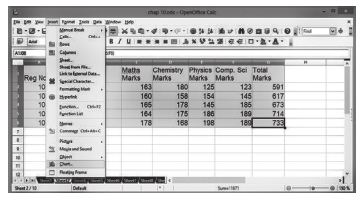
(iii) The Chart Wizard has three main part:
1. List of steps involved in setting up the chart, List of chart types, and The options for each chart type.
2. At any time you can go back to a previous step and change selections.
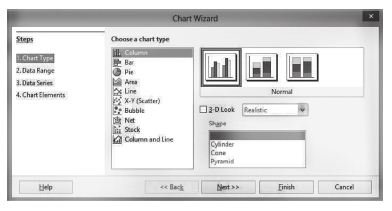
(iv) Choose a Chart type and its option type. Then click Next button.
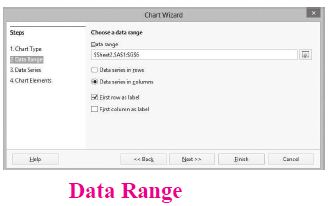
(v) In step 2, Data Range, manually correct any mistakes made in selecting the data. Click one of the options for data series in rows or in columns. Check whether the data range has labels in the first row or in the first column or both. Then click the finish button, or click Next to change some more details of the chart.
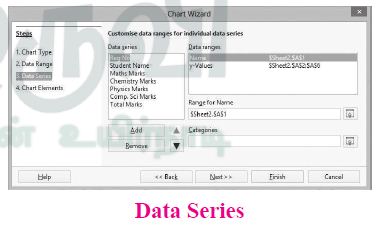
(vi) In the Data Series list box contains a list of all data series in the current chart.
1. To organize the data series, select an entry in the list
2. Click Add to add another data series below the selected entry. The new data series has the same type as the selected entry.
3. Click Remove to remove the selected entry from the Data Series list.
4. Use the Up and Down arrow buttons to move the selected entry in the list up or down. This does not change the order in the data source table, but changes only the arrangement in the chart.
5. Then click Next button.
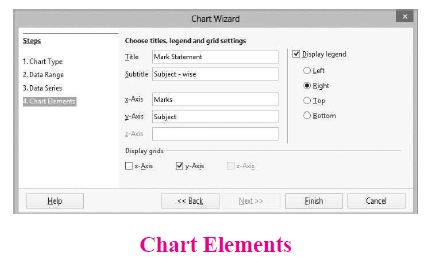
(vii) On the Chart Elements page, chart a title and, if desired, a subtitle. Use a title that draws the viewer's attention to the purpose of the chart: Then click Finish to create chart.
38.
| S.No | Navigational method | Located on | Ideally suited for |
|---|---|---|---|
| 1. | Start button | Task bar | Quick acces common apps and settings |
| 2. | My computer | Desktop | Exploring your disk drives and using system tools. |
| 3. | Windows Explorer | Task bar | Seeing hierarchy of all computer contents and resources in one window. |
| 4. | Quick Launch | Task bar | To open the programs quickly |
39.
Microsoft Windows is a family of proprietary operating systems designed by Microsoft Corporation and primarily targeted to Intel architecture based computers. Windows comes as pre-loaded on most of the new personal Computers and laptops.
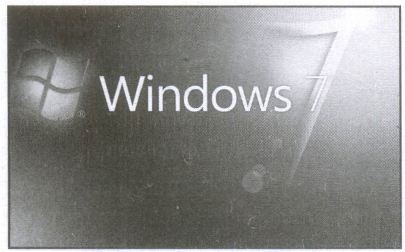
Microsoft Windows Home Screen
iOS - iPhone OS
iOS (formerly iPhone OS) is a mobile operating system created and developed by Apple Inc. exclusively for its hardware. It is the operating system that presently powers many of the company's mobile devices, including the iPhone, iPad and iPod Touch. It is the second most popular mobile operating system globally after Android.
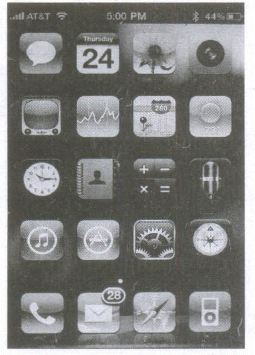
iPhone Home Screen
40.
(i) The main memory is otherwise called as Random Access Memory. This is available in computers in the form of Integrated Circuits (lCs). It is the place in a computer where the Operating System, Application Programs and the data in current use are kept temporarily so that they can be accessed by the computer's processor.
(ii) The smallest unit of information that can be stored in the memory is called as a bit. The memory can be accessed by a collection of 8 bits which is called as a byte.
(iii) The bytes are referred by 'B'. If a computer has 1 megabyte of memory, then it can store 10,48,576 bytes. (or characters) of information. [Hence 1MB is 1024KB and 1 KB is 1024 Bytes, So 1024X1024 =10,48,576 Bytes].
(iv) RAM is a volatile memory, which means that the information stored init is not permanent. As soon as the power is turned off, whatever data that resides in RAM is lost. It allows both read and write operations.
(v) There are two basic types of RAM Dynamic RAM (DRAM), Static RAM (SRAM).
(vi) These two types differ in the technology they use to hold data. Dynamic RAM being a common type needs to be refreshed frequently. Static RAM needs to be refreshed less often, which makes it faster.
(vii) Hence, Static RAM is more expensive than Dynamic RAM.
41.
Impact Printers:
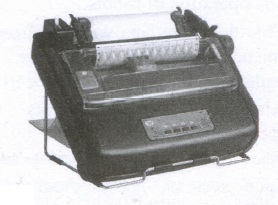
(i) These printers print with striking of hammers or pins on ribbon. These printers can print on multi-part (using carbon papers) by using mechanical pressure.
(ii) For example, Dot Matrix printers and Line matrix printers are impact printers.
(iii) A Dot matrix printer that prints using a fixed number of pins or wires. Each dot is produced by a tiny metal rod, also called a "wire" or "pin", which works by the power of a tiny electromagnet or solenoid, either directly or through a set of small levers.
(iv) It generally prints one line of text at a time. The printing speed of these printers varies from 30 to 1550 CPS (Character Per Second).
(v) A Dot matrix printer that prints using a fixed number of pins or wires. Each dot is produced by a tiny metal rod, also called a "wire" or "pin", which works by the power of a tiny electromagnet or solenoid, either directly or through a set of small levers.
(vi) It generally prints one line of text at a time. The printing speed of these printers varies from 30 to 1550 CPS (Character Per Second).
42.
(i) An a address book is a database that stores names, address and other contact information for a computer user.
(ii) Address books allow easy access to the user's friend, family business associates and others by maintaining their email and other contact details on their computer.
(iii) Address books can be software based, or accessed online or through a network.
(iv) User may also be able to export contacts from their address books to mobile phone, PDAs and other portable electronic devices.
43.
to preview the document before taking the print out.
The steps to be followed to preview the document:
(i) Click File ⟶ Page Preview, or click the Page Preview button. The Writer displays the Page Preview toolbar displayed.
(ii) In the page preview toolbar click Multiple pages icon to display multiple pages.
(iii) To close the preview click on Close Preview button.
The following are some steps to change the printer setting:
(i) Click File ⟶ Print or Ctrl+P or' Print File icon which opens the Print dialog box that appears
(ii) Click General tab.
(iii) Select the required printer from the list of printers
(iv) Under Range and copies section: select All pages option to print all pages, select Pages option to specify the particular page or page range.
(v) Specify Number of copies using spin arrows.
(vi) Click Print button.

11th Standard Syllabus & Materials
11th Standard
TN 11th Tamil பீடு பெற நில் - செய்யுள் - காவடிச்சிந்து Important Questions And Answers Study Material - QB365 Set A
NEW11th Standard
TN 11th Tamil பீடு பெற நில் - உரைநடை - மலை இடப்பெயர்கள் : ஓர் ஆய்வு Important Questions And Answers Study Material - QB365 Set A
NEW11th Standard
TN 11th Tamil மாமழை போற்றுதும் - துணைப்பாடம் - யானை டாக்டர் Important Questions And Answers Study Material - QB365 Set A
NEW11th Standard
TN 11th Tamil மாமழை போற்றுதும் - செய்யுள் - ஐங்குறுநூறு Important Questions And Answers Study Material - QB365 Set A



Tamilnadu Stateboard 11th Standard Subjects

Maths

Commerce

Economics

Biology

Business Maths and Statistics

Accountancy

Computer Science

Physics

Chemistry
Maths
Biology
Economics
Physics
Chemistry

History
Business Maths and Statistics

Computer Science
Accountancy
Computer Applications
History
Computer Technology
Commerce
Computer Applications
Computer Technology

Tamil

English

French
Tamilnadu Stateboard Standards
