
 100% FREE ACCESS
11th Standard Syllabus & Materials
11th Standard
TN 11th Tamil இயற்கை வேளாண்மை,சுற்றுச்சூழல் -செய்யுள் - மனோன்மணீயம் Important Questions And Answers Study Material - QB365 Set A
NEW11th Standard
TN 11th Tamil என்னுயிர் என்பேன் -துணைப்பாடம் - இசைத்தமிழர் இருவர் Important Questions And Answers Study Material - QB365 Set A
NEW11th Standard
TN 11th Tamil மொழி கலை -செய்யுள் - ஒவ்வொரு புல்லையும் Important Questions And Answers Study Material - QB365 Set A
NEW11th Standard
TN 11th Tamil பீடு பெற நில் - இலக்கணம் - பகுபத உறுப்புகள் Important Questions And Answers Study Material - QB365 Set A
NEW11th Standard
TN 11th Tamil பீடு பெற நில் - துணைப்பாடம் - வாடிவாசல் Important Questions And Answers Study Material - QB365 Set A
NEW11th Standard
TN 11th Tamil பீடு பெற நில் - செய்யுள் - குறுந்தொகை Important Questions And Answers Study Material - QB365 Set A

Published on: 26/02/2019
+1 Third Revision Exam Question Paper 2019
Download Tamil Nadu 11th Standard Computer Technology question papers, model tests, one-mark questions, important questions, and public exam papers in PDF format. Free study materials and answer keys for TN State Board students.
Questions + Answers key
Take MCQ Computer Technology Test
1.
Which of the following is malware?
Viruses
Worms
Trojan horses
All the above
2.
Identify the device that forwards packets between networks by processing the routing information included in the packet.
bridge
firewall
router
all of the mentioned
3.
Which is not pre-packaged layout in presentation?
Main Content layout
Title, 6 Content layout
Blank Slide layout
Title, 2 content over content
4.
Which menu contains the Slide Transition option?
Slide Show
View
Tools
Format
5.
There are 10000 rows in a worksheet. The user need to view only particular row of the database. Which of the following tool is used?
Sorting
Merging
Filtering
Formatting
6.
What will be value returned by = DECIMAL (“16;”1101)
12
13
D
E
7.
Which of the following applications is the parent to OpenOffice Calc?
Visicalc
LibreCalc
Lotus 123
Star Office Calc
8.
Which one is a popular open source version of UNIX?
Windows
Linux
Minix
C++
9.
File Management manages
Files
Folders
Directory systems
All the Above
10.
Which type of ROM is slower in performance?
PROM
EPROM
EEPROM
DROM
11.
Which coding scheme is used to LCD?
Unicode
ASCII
EBCDIC
BCD
12.
_____ Output device is used for printing building plan.
Thermal printer
Plotter
Dot matrix
Inkjet printer
13.
Which of the following option is not responsible for external address book creation wizard?
Mozilla/Netscape
LDAP Address Data
Outlook address book
windows system address book
14.
To give precise measurement for column width, which command gets the Table Format dialog box?
File ⟶ Table properties
Format ⟶ Table properties
Table ⟶ Table properties
Table ⟶ Table format
15.
Which is the command to be selected to open the Table Format dialog box
File ⟶ Table properties
Format ⟶ Table properties
Table ⟶ Table properties
Edit ⟶ Table properties
16.
List of the search engines supporting Tamil.
17.
What are the benefits of e-governance?
18.
What do you understand by Save Auto Recovery Information?
19.
Write the steps to format the margin of the paper as 1” in all sides.
20.
Match the following
| A | B |
|---|---|
| (a) Cut, Copy and Paste | (1) Absolute Cell |
| (b) Cell pointer | (2) Status bar |
| (c) Selection Mode | (3) Standard Toolbar |
| (d) $A$5 | (4) Active cell |
21.
What is Intranet and Internet?
22.
What is a program counter?
23.
Convert 1010100.0112 to a decimal number
24.
Differentiate Input and output unit
25.
How do you make corrections to your document?
26.
What is a Normal view? Explain.
27.
Differentiate relative Cell addressing from absolute cell addressing
28.
Differentiate Save, Save As and Save a Copy in Ubuntu OS.
29.
What is microprocessor?
30.
What is use of BCD?
31.
Write the significant features of monitor.
32.
List the advantages of the Mail Merge feature.
33.
How do you insert rows and columns?
34.
Explain the do’s and don’t of safe surfing on internet.
35.
Mention the types of wireless technologies we are using. Write in brief on each of them.
36.
Valarmathi’s teacher asks her to create a presentation in OpenOffice Impress. As Valarmathi has never worked in Impress before, help her to perform the following tasks:
a. She wants that except for the first slide, all the slides should have the same design. For this, what does she need to do?
b. To easily communicate with her audience, she wants to provide them with a hard copy of the slides of the presentation. What should she create for it?
c. She wants to insert some pictures and movie files in some slides. How can she do that?
d. Suggest her the view that would be the most suitable for showing the presentation to the audience.
e. To make her presentation more attractive, she wants to add some effects in it. How can she do it? Suggest.
37.
Create a Worksheet to contain student database with following fields.
Rollno., Name, English, Tamil, Maths, Science, Social, Total, average.
38.
Draw and compare the icon equivalence in windows and Ubnutu.
39.
Explain the following in detail.
(a) FIFO (b) SJF (c) Round Robin
40.
Explain RAM in detail.
41.
Explain booting of computer and its types.
42.
Explain Mail Merge feature.
43.
How do you resize the position of a table?
1.
(a)
Viruses
2.
(c)
router
3.
(d)
Title, 2 content over content
4.
(a)
Slide Show
5.
(c)
Filtering
6.
(b)
13
7.
(d)
Star Office Calc
8.
(b)
Linux
9.
(d)
All the Above
10.
(c)
EEPROM
11.
(d)
BCD
12.
(b)
Plotter
13.
(a)
Mozilla/Netscape
14.
(c)
Table ⟶ Table properties
15.
(c)
Table ⟶ Table properties
16.
1. The big growth of the web has led to an information leading to a situation where it has become very difficult to find relevant information in the web. Search engines are used for this purpose and the Tamil Search engine described here searches Tamil web pages upon an user query.
2. There are many search engines, but only a few of them are frequently in use.
3. In the top ten search engines, Google, Bing and Yahoo take first three places respectively. Google and Bing provide searching facilities in Tamil.
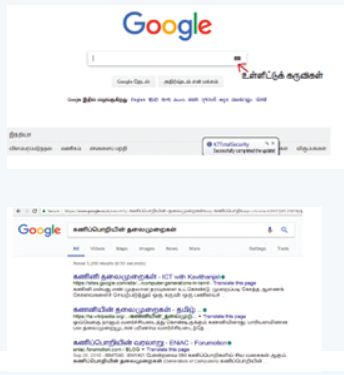
which means you can search everything through Tamil.
17.
Benefits of e-governance
(i) Reduced corruption
(ii) High transparency
(iii) Increased convenience
(iv) Reduction in overall cost
(v) Expanded reach of government.
18.
(i) Auto Recovery is a key feature of Microsoft Word that enables you to retrieve documents if your computer crashes. Auto Recovery allows Word to save your file while you work on it so that you can recover it later.
(ii) You can type any integer from 1 to 120 in the seconds box. This box controls the amount of time that passes between saves. You will enter the path and folder name of the directory where you want the Auto-Recover files to sit in the Auto-Recover file location box.
19.
A margin is the space between the text and the edge of your document.
To format the margin of the paper as 1" in all sides, one need to follow the given steps:
1. Go to Format $\rightarrow$ Page in the menu bar.
2. Choose Page Tab.
3.Choose Page margin from the dialog box where Left, Right, Top and Bottom margin is to be set as 1".
4. Click OK.
Page margin is available in the Page tab of the Format tab of Menu bar.
20.
| A | B |
|---|---|
| (a) Cut, Copy and Paste | (3) Standard Toolbar |
| (b) Cell pointer | (4) Active cell |
| (c) Selection Mode | (2) Status bar |
| (d) $A$5 | (1) Absolute Cell |
21.
(i) Intranet is a network of computers designed for a specific group of users.
(ii) Internet is wide network of computers and is open to all.
22.
The Program Counter (PC) is a special register in the CPU which always keeps the address of the next instruction to be executed.
23.
1010100.0112
= 1 x 26 x 0 x 25 x 1 x 24 x 0 x 23 + 1 x 22 + 0 x 21 + 0 x 2-1 + 1 x 2-2 + 1 x 2-3
= 64 + 0 + 16 + 0 + 4 + 0 + 0 + 0 + 0.25 + 0.125
= 84.32510
24.
| Input Unit | Output Unit |
| Input unit is used to feed any form of data to the computer which can be stored in the memory unit for further processing. | An output unit is any hardware component that conveys information to users in an understandable form. |
| Example: Keyboard, mouse etc. | Example: Moniter, Printer etc. |
25.
Corrections can be made in two different ways :
(i) Backspace Key: Deletes the character left of the insertion pointer.
(ii) Delete Key: Deletes the character right of the insertion pointer.
26.
(i) Normal view is the main view for creating individual slides.
(ii) There are two ways to place a slide in the Slide Design area of the Normal view: clicking the slide thumbnail in the Slides pane or using the Navigator. To open the Navigator, click the Navigator button in the Standard Toolbar or press Ctrl + Shift + F5 and select a slide by scrolling down the Navigator list until you find the one that you want and then double-click it.
27.
(i) Relative here means that the reference to this cell address will be changed automatically when you copy the formulae.
(ii) Absolute references are the opposite of relative addressing. A dollar sign is placed before each column name and row number in an absolute reference.
28.
Save - This will save the document without asking for a new name or location. It will overwrite the original.
Save As - This will prompt you to save the document using a dialog box. This allows to change the file name or location.
29.
(i) The microprocessor which is an Integrated Circuit. Microprocessors were first introduced in early 1970s. The first general purpose microprocessor, 4004 was developed by Intel Inc.
(ii) The microprocessor is a programmable multipurpose silicon chip. It is driven by clock pulses. It accepts input as a binary data and after processing, it provides the output data as per the instructions stored in the memory.
30.
(i) Binary Coded Decimal is mostly used in simple electronic devices like calculators and microwaves.
(ii) This is because it makes it easier to process and display individual numbers on their Liquid Crystal Display (LCD) screens.
31.
Monitor:
(i) Monitor is the most commonly used output device to display the information. It looks like a TV.
(ii) Pictures on a monitor are formed with picture elements called PIXELS.
(iii) Monitors may either be Monochrome which display text or images in Black and White or can be color, which display results in multiple colors.
(iv) There are many types of monitors available such as CRT (Cathode Ray Tube), LCD (Liquid Crystal Display) and LED (Light Emitting Diodes).
(v) The video graphics card helps the keyboard to communicate with the screen.
(vi) It acts as an interface between the computer and display monitor.
32.
(i) one standard letter can be send to all without having to manually add each name and address.
(ii) The letter can be personalized - it looks like the letter has been written to the individual person.
(iii) It is a very fast method to produce hundred of personalized letter.
33.
To insert rows in a table there are different ways:
(i) The easiest way to add a row is to press Tab from the last cell.
(ii) To insert a single row anywhere, place the insertion point in that particular cell and click the Insert row icon  from the Table Formatting toolbar.
(iii) To insert more than one row, click Table ⟶ Insert ⟶ Rows, the Insert Rows dialog box appears enter the of value using spin arrows or type the number directly. In the position option, select Before or After radio button to specify the position of the row.
(iv) Click OK button
Inserting Columns:
To insert columns there are different ways
(i) Place the insertion point in the particular column and click the Insert column icon .JPG) to insert a blank column right of the insertion point.
to insert a blank column right of the insertion point.
(ii) To insert more than one column, place the insertion point in the particular column and click Table ⟶ Insert ⟶ Column, the insert column dialog box appears enter the value using spin arrows or type the number directly.
(iii) In the position option, select Before or After radio button to specify the position of the column.
(iv) Click OK button
34.
Do's and don'ts of Safe internet:
1. Don't give out your personal information - Don't put personal details such as your home address, telephone numbers or parent's work address online as cybercriminals can use this information to create a fake profile with your details.
2. What goes online, stays online - Use privacy settings to make sure only your friends and family can see photos you post. Avoid posting holiday plans as criminals have been known to track your movements.
3. Check your security and privacy settings - Make sure your social network privacy settings are secured so only your friends can see your personal information and use your privacy settings to restrict who can see your posts, videos and photos.
4. Password safety - Sharing your password with your parents is a sensible idea, but avoid sharing your password with your friends, even if they promise they won't tell anyone! Also, when setting your password, make sure it isn't something people may guess such as your pet's name. Use a mixture of letters, numbers and upper and lower cases characters.
5. Always protect your mobile device - Make sure your mobile phone is pin-protected so all your personal information stored on it is safe. Download a security app which allows you to remotely wipe any personal data, should your mobile be lost or stolen.
6. Don't talk to strangers online or offline - Don't meet up with strangers and let your parents know if a stranger has tried to get in contact with you online.
7. Listen to the adults who know - Adults will always be worried about you. Help set their mind at rest and avoid chatting online with strangers.
35.
Different types of wireless technologies are:
1. Bluetooth:
(i) It is named after a Danish king named Harald Bluetooth.
(ii) Bluetooth is used to connect different electronic devices wirelessly to a system for transferring and sharing data.
(iii) Cell phones are connected to hands-free earpieces, wireless keyboard, mice and mike to laptops with the help of Bluetooth as it transmits information from one device to other device.
2. Infrared:
(i) Infrared technology is a type of wireless communication technology to transfer data between two infrared enabled devices through infrared radiation.
(ii) This technology plays a very important role in wireless data communication
(iii) Infrared is used in devices such as the mouse, wireless keyboard and printers.
3. Wi-Fi:
(i) Wi-Fi is a low-cost wireless communication technology.
(ii) A Wi-Fi setup consists of a wireless router which serves a communication hub, linking portable device with an internet connection.
(iii) This network facilitates connection of many devices depending on the router configuration.
4. Radio link:
(i) A radio link is a wireless connection(also called wireless Point-to-Point connection) between two nodes, or radio units, in a data network.
(ii) Each radio unit consists of a transceiver(a device that can both send and receive communication) and a highly directive antenna.
(iii) The antenna only emits or receives power in the direction it is pointing.
5. Microwave Link:
(i) Microwave is a line-of-sight wireless communication technology that uses high frequency beams of radio waves to provide high speed wireless connections that can send and receive voice, video and data information.
(ii) One of the reasons microwave links are so adaptable is that they are broadband.
(iii) They require no equipment or facilities between the two terminal points, so installing a microwave link is often faster and less costly than a cable connection.
5. Microwave Link:
(i) Microwave is a line-of-sight wireless communication technology that uses high frequency beams of radio waves to provide high speed wireless connections that can send and receive voice, video and data information.
(ii) One of the reasons microwave links are so adaptable is that they are broadband.
(iii) They require no equipment or facilities between the two terminal points, so installing a microwave link is often faster and less costly than a cable connection.
6. Satellite Link:
(i) Satellite communication is one of the wireless technologies, used to transfer the signals from the transmitter to a receiver with the help of satellites.
(ii) It is widely spread all over the world allowing users to stay connected virtually anywhere on the Earth.
(iii) The Satellites used in this mode of communication, communicate directly with the orbiting satellites via radio signals.
36.
a. Select Format → Page from the Menu bar on the page setup, dialog box, choose background tab.
b. Select the type of fill you want for your background from the fine choices, None, color, gradient, hatching or bitmap. A list of choices for the selected fill type will appear → select it. Select one of the items on the list and click OK. The fill you have chosen is added to slide master then go normal view.
c. Select the first slide then right click → select slide design then select the design in slide master, then right click, a popup menu will appear, it displays 'back ground settings for all' you can choose 'No' option. The only first slide would not appear the background design.
Follow above steps to make first slide different from other slides.
37.
In cell A1, type Roll no
In cell B1, type Name
In cell C1, type English
In cell D1, type Tamil
In cell E1, type Maths
In cell F1, type Science
In cell G1, type Social
In cell H1, type Total
In cell 11, type Average.
38.
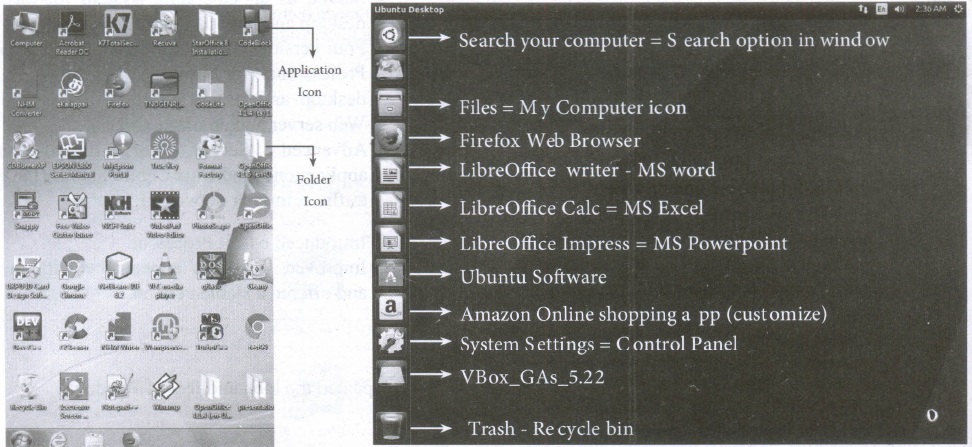
| S.No | Windows | Ubuntu |
| 1. | Recycle Bin | Trash |
| 2. | My computer | Files |
| 3. | Ms word | Libreoffice writer |
39.
(a) FIFO (First In First Out) Scheduling:
(i) This algorithm is based on queuing technique. Assume that a student is standing in a queue (Row) to get grade sheet from his/her teacher.
(ii) The other student who stands first in the queue gets his/her grade sheet first and leaves from the queue (Row). Followed by the next student in the queue gets it corrected and so on. This is the basic logic of the FIFO algorithm.
(iii) Technically, the process that enters the queue first is executed first by the CPU, followed by the next and so on. The processes are executed in the order of the queue (row).
(b) SJF (Shortest Job First) Scheduling:
(i) This algorithm works based on the size of the job being executed by the CPU.
(ii) Consider two jobs A and B.
(iii) 1) A = 6 kilo bytes 2) B = 9 kilobytes.
(iv) First the job "A" will be assigned and then job "B" gets its turn.
(c) Round Robin Scheduling:
(i) The Round Robin (RR) scheduling algorithm is designed especially for time sharing systems.
(ii) Jobs (processes) are assigned and processor time in a circular method.
(iii) For example take three jobs A, B, C. First the job A is assigned to CPU then job B and job C and then again A, B and C and so on.
40.
(i) The main memory is otherwise called as Random Access Memory. This is available in computers in the form of Integrated Circuits (lCs). It is the place in a computer where the Operating System, Application Programs and the data in current use are kept temporarily so that they can be accessed by the computer's processor.
(ii) The smallest unit of information that can be stored in the memory is called as a bit. The memory can be accessed by a collection of 8 bits which is called as a byte.
(iii) The bytes are referred by 'B'. If a computer has 1 megabyte of memory, then it can store 10,48,576 bytes. (or characters) of information. [Hence 1MB is 1024KB and 1 KB is 1024 Bytes, So 1024X1024 =10,48,576 Bytes].
(iv) RAM is a volatile memory, which means that the information stored init is not permanent. As soon as the power is turned off, whatever data that resides in RAM is lost. It allows both read and write operations.
(v) There are two basic types of RAM Dynamic RAM (DRAM), Static RAM (SRAM).
(vi) These two types differ in the technology they use to hold data. Dynamic RAM being a common type needs to be refreshed frequently. Static RAM needs to be refreshed less often, which makes it faster.
(vii) Hence, Static RAM is more expensive than Dynamic RAM.
41.
Booting of computer:
(i) An Operating system (OS) is a basic software that makes the computer to work. When a computer is switched on, there is no information in its RAM.
(ii) At the same time, in ROM, the pre-written program called POST (Power on Self Test) will be executed first. This program checks if the devices like RAM, keyboard, etc., are connected properly and ready to operate. If these devices are ready, then the BIOS (Basic Input Output System) gets executed. This process is called Booting.
(iii) Thereafter, a program called "Bootstrap Loader" transfers OS from hard disk into main memory. Now the OS gets loaded (Windows/Linux, etc.,) and will get executed. Booting process is of two types.
1) Cold Booting
2) Warm Booting
(iv) Cold Booting:
When the system starts from initial state i.e. it is switched on, we call it cold booting or Hard Booting. When the user presses the Power button, the instructions are read from the ROM to initiate the booting process.
(v) Warm Booting:
When the system restarts or when Reset button is pressed, we call it Warm Booting or Soft Booting. The system does not start from initial state arid so all diagnostic tests need not be carried out in this case. There are chances of data loss and system damage as the data might not have been stored properly.
42.
(i) Mail merge is a process to create personalized letters and pre-addressed enveloped or mailing labels forms mailings form a form letter
(ii) The feature is usually employed in a word processing document which contains fixed text and variables (which act as place holders that are replaced by text from the data source.)
(iii) It is used to create multiple documents at once. These documents have identical layout, formatting, text and graphics.
(iv) The documents can create will mail merge include bulk labels, letters, envelops and emails and more using information stored in a list, database or spreadsheet
43.
Resize the position of Table:
A newly created table will occupy the entire width of the page area by default. The table can be resized as per our requirement:
(i) To resize a table quickly, move the mouse over the table edge until the cursor becomes a double headed arrow, and drag the border to its new desired position.
(ii) To resize a row height/column width using Mouse:
(iii) To resize row height
(iv) Move the insertion point over the horizontal border for the row height now the insertion point will change into double headed arrow, click and drag to resize the row height.

11th Standard Syllabus & Materials
11th Standard
TN 11th Tamil பீடு பெற நில் - செய்யுள் - காவடிச்சிந்து Important Questions And Answers Study Material - QB365 Set A
NEW11th Standard
TN 11th Tamil பீடு பெற நில் - உரைநடை - மலை இடப்பெயர்கள் : ஓர் ஆய்வு Important Questions And Answers Study Material - QB365 Set A
NEW11th Standard
TN 11th Tamil மாமழை போற்றுதும் - துணைப்பாடம் - யானை டாக்டர் Important Questions And Answers Study Material - QB365 Set A
NEW11th Standard
TN 11th Tamil மாமழை போற்றுதும் - செய்யுள் - ஐங்குறுநூறு Important Questions And Answers Study Material - QB365 Set A



Tamilnadu Stateboard 11th Standard Subjects

Maths

Commerce

Economics

Biology

Business Maths and Statistics

Accountancy

Computer Science

Physics

Chemistry
Maths
Biology
Economics
Physics
Chemistry

History
Business Maths and Statistics

Computer Science
Accountancy
Computer Applications
History
Computer Technology
Commerce
Computer Applications
Computer Technology

Tamil

English

French
Tamilnadu Stateboard Standards
