
 100% FREE ACCESS
11th Standard Syllabus & Materials
11th Standard
TN 11th Tamil இயற்கை வேளாண்மை,சுற்றுச்சூழல் -செய்யுள் - மனோன்மணீயம் Important Questions And Answers Study Material - QB365 Set A
NEW11th Standard
TN 11th Tamil என்னுயிர் என்பேன் -துணைப்பாடம் - இசைத்தமிழர் இருவர் Important Questions And Answers Study Material - QB365 Set A
NEW11th Standard
TN 11th Tamil மொழி கலை -செய்யுள் - ஒவ்வொரு புல்லையும் Important Questions And Answers Study Material - QB365 Set A
NEW11th Standard
TN 11th Tamil பீடு பெற நில் - இலக்கணம் - பகுபத உறுப்புகள் Important Questions And Answers Study Material - QB365 Set A
NEW11th Standard
TN 11th Tamil பீடு பெற நில் - துணைப்பாடம் - வாடிவாசல் Important Questions And Answers Study Material - QB365 Set A
NEW11th Standard
TN 11th Tamil பீடு பெற நில் - செய்யுள் - குறுந்தொகை Important Questions And Answers Study Material - QB365 Set A

Published on: 03/08/2018
Based on the Term I syllabus, in this question paper is prepared. It covers the question from the book back and current academic year questions.
Teachers can examine their student’s knowledge. They can prepare plenty of question paper with answer key. For subscription, please Click Here.
The chapter that covers the Term I syllabus are
1. Introduction to Computers
2.Number Systems
3.Computer Organization
Download Tamil Nadu 11th Standard Computer Applications question papers, model tests, one-mark questions, important questions, and public exam papers in PDF format. Free study materials and answer keys for TN State Board students.
Questions + Answers key
Take MCQ Computer Applications Test
1.
Display devices are connected to the computer through __________
USB port
Ps/2 port
SCSI port
VGA connector
2.
What is the smallest size of data represented in a CD?
blocks
sectors
pits
tracks
3.
Which of the following device identifies the location when address is placed in the memory address register?
locator
encoder
decoder
multiplexed
4.
Which of the following is not the part of a microprocessor unit?
ALU
Control unit
Cache memory
register
5.
Which of the following is said to be the brain of a computer?
Input devices
Output devices
Memory device
Microprocessor
6.
NOR is a combination of?
NOT(OR)
NOT(AND)
NOT(NOT)
NOT(NOR)
7.
A + A =?
A
O
I
A
8.
For 11012 the equalent Hexadecimal equivalent is?
F
E
D
B
9.
How many characters can be handled in Binary Coded Decimal System?
64
255
256
128
10.
Expansion for ASCII
American School Code for Information Interchange
American Standard Code for Information Interchange
All Standard Code for Information Interchange
American Society Code for Information Interchange
11.
Which refers to the number of bits processed by a computer's CPU?
Byte
Nibble
Word length
Bit
12.
Robotics develop in_____ generation.
Third
Fourth
Fifth
Sixth
13.
In which generation, the Voice Recognition software developed?
Sixth
Fourth
Third
Second
14.
The first calculating device is__________.
ENIAC
Analytical Engine
EDVAC
Abacus
15.
Which of the following led us today to extremely high speed calculating device?
Laptop
Tabulating Machine
Abacus
ENIAC
16.
Expand POST
Post on Self Test
Power on Software Test
Power on Self Test
Power on Self Text
17.
When a system restarts which type of booting is used.
Warm booting
Cold booting
Touch boot
Real boot
18.
Which one of the following is used to in ATM machines
Touch Screen
Speaker
Monitor
Printer
19.
Name the volatile memory _____
ROM
PROM
RAM
EPROM
20.
First generation computers used ______.
Vacuum tubes
Transistors
Integrated circuits
Microprocessors
21.
Draw a diagram of interconnecting the microprocessor with other devices of the computer system.
22.
What is microprocessor?
23.
Write a note on a hexadecimal number system
24.
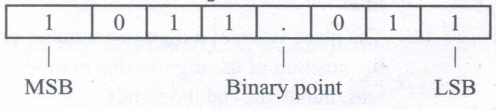
What is MSB, LSB and Binary point? Give example.
25.
Give the truth table of XOR gate
26.
Reason out why the NAND an NOR are called universal gates?
27.
Write the truth table of fundamental gates
28.
Write short note on ISCII.
29.
Write note on binary number System.
30.
What is Machine language?
31.
Define Transistor.
32.
Differentiate Optical and Laser mouse.
33.
Name any three output devices.
34.
What is an input device? Give two examples.
35.
How the read and write operations are performed by a processor? Explain.
36.
State whether the following numbers are valid or not. If invalid, given reason
37.
Identify the number system for the following numbers.
38.
Explain the basic components of a computer with a neat diagram.
39.
Define Decoder.
40.
Name the different types of CPU Register.
41.
What is instruction set?
42.
Name the measurement of clock speed of the computer.
43.
Name the Number system is used in general.
44.
List the types of information stored in a computer.
45.
Write the main advantages of using LED & LCD Screen.
46.
Write the limitations of impact printer.
47.
Why POST is essential?
1.
(d)
VGA connector
2.
(c)
pits
3.
(c)
decoder
4.
(c)
Cache memory
5.
(d)
Microprocessor
6.
(a)
NOT(OR)
7.
(a)
A
8.
(c)
D
9.
(a)
64
10.
(b)
American Standard Code for Information Interchange
11.
(c)
Word length
12.
(d)
Sixth
13.
(a)
Sixth
14.
(d)
Abacus
15.
(c)
Abacus
16.
(c)
Power on Self Test
17.
(a)
Warm booting
18.
(a)
Touch Screen
19.
(c)
RAM
20.
(a)
Vacuum tubes
21.
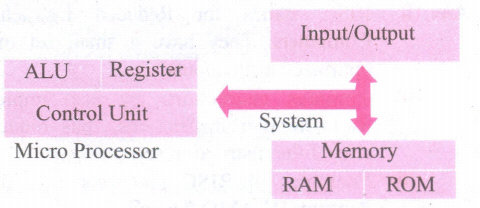
22.
(i) The microprocessor which is an Integrated Circuit. Microprocessors were first introduced in early 1970s. The first general purpose microprocessor, 4004 was developed by Intel Inc.
(ii) The microprocessor is a programmable multipurpose silicon chip. It is driven by clock pulses. It accepts input as a binary data and after processing, it provides the output data as per the instructions stored in the memory.
23.
1. The base or radix is 16. Thus it has 16 possible digit symbols. It uses the digits 0 to 9 plus the. letters A, B, C, D, E and F (with respect to 10, 11, 12, 13, 14, 15).
2. It is generally used in microcomputers. Eg. (ABC)16.
24.
(i) MSB (Most Significant Bit) - The leftmost bit carries the largest weight and hence, is called the MSB.
(ii) LSB (Least Significant Bit) - The rightmost bit carries the smallest weight and hence, is called the LSB.
(iii) Binary Point - It is used to separate the integer and fractional part of the binary number, Eg. (1011.011)2
25.
| A | B | A \(\oplus \)B |
| 0 | 0 | 0 |
| 0 | 1 | 1 |
| 1 | 0 | 1 |
| 1 | 1 | 0 |
26.
NAND and NOR gates are called Universal gates, because the fundamental logic gates can be realized through them
27.
a) AND gate truth table
| A | B | C |
| 0 | 0 | 0 |
| 0 | 1 | 0 |
| 1 | 0 | 0 |
| 1 | 1 | 1 |
b) OR Gate Truth table
| A | B | C |
| 0 | 0 | 0 |
| 0 | 1 | 1 |
| 1 | 0 | 1 |
| 1 | 1 | 1 |
c) Not Gate Truth Table
| A | A |
| 0 | 1 |
| 1 | 0 |
28.
(i) ISCII is the system of handling the character of Indian local languages. This as a 8-bit coding system.
(ii) Therefore it can handle 256 (28) characters. This system is formulated by the department of Electronics in India in the year 1986-88 and recognized by Bureau of Indian Standards (BIS).
(iii) Now this coding system is integrated with Unicode.
29.
(i) There are only two digits in the Binary system, namely, 0 and 1.
The numbers in the binary system are represented to the base 2 and the positional multipliers are the powers of 2.
(ii) The left most bit in the binary number is called as the Most Significant Bit (MSB) and it has the largest positional weight.
(iii) The right most bit is the Least Significant Bit (LSB) and has the smallest positional weight.
30.
(i) Machine language is a collection of binary digits or bits that the computer reads and interprets.
(ii) In first generation, machined language was used.
31.
(i) The transistor ("transfer resistance") is made up of semiconductors.
(ii) It is a component used to control the amount of current or voltage or used for amplification modulation or switching of an electronic signal.
32.
| Optical Mouse | Laser Mouse |
| Measures the motion and acceleration of the pointer. | Measures the motion and acceleration of pointer. |
| It uses light source instead of ball to judge the motion of the pointer. | Laser Mouse uses Laser Light. |
| Optical mouse is less sensitive towards surface. | Laser Mouse is highly sensitive and able to work on any hard surface. |
33.
(i) Monitor
(ii) Printer
(iii) Plotter
(iv) Speaker
(v) Multimedia projectors are the output devices.
34.
Input device is used to feed any form of data to the computer, which can be stored in the memory unit for further processing.
Example: Keyboard, mouse, Scanner, Fingerprint scanner, Track Ball, Retinal Scanner, Light pen etc.
35.
(i) The Central Processing Unit(CPU) has a Memory Data Register (MDR) and a Memory Address Register (MAR).
(ii) The Memory Data Register (MDR) keeps the data which is transferred between the Memory and the CPU. The Program Counter (PC) is a special register in the CPU which always keeps the address of the next instruction to be executed.
(iii) A bus is a collection of wires used for communication between the internal components of a computer.
(iv) The address bus is used to point a memory location. A decoder, a digital circuit is used to point to the specific memory location where the word can be located.
(v) The read operation fetches data from memory and transfers to MDR. A single control line performs two operations like read write using 1 or 0.
(vi) Also, the write operation transfers data from the MDR to memory.
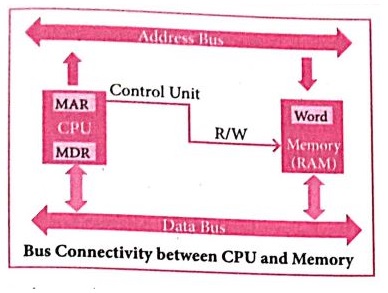
(vii) The word in the RAM has the same size (no. of bits) as the Memory Data Register (MDR).
(viii)The data bus has eight parallel wires to transfer data either from MDR to word or word to MDR based on the control(Read or write).
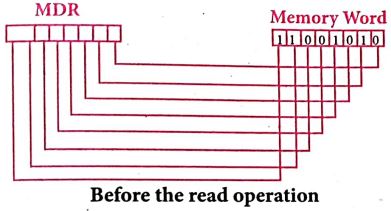
(ix) This control line is labeled as R/W, which becomes 1 means READ operation and 0 means WRITE operation. The content of MDR and the Word before the READ operation. Also figure shows the content of MDR and the Word after the READ operation.
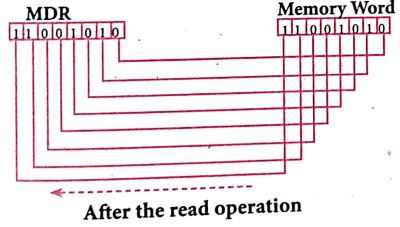
(x) The read operation transfers the data (bits) from memory word to data register. The write operation transfers the data (bits) from memory data registerto word.
36.
| S.No | Statement | Yes/No | Reason if invalid |
| 1 | 786 is an octal number | No | In octal number, the allowable digits is between 0 and 7 |
| 2 | 101 is a binary number | No | No Radix is mentioned |
| 3 | radix of octal number is 7 | No | Radix of octal number is 8. |
37.
| S.No | Number | Number System |
| 1 | (1010)10 | Decimal Number System |
| 2 | (1010)2 | Binary Number System |
| 3 | (986)16 | hexadecimal Number System |
| 4 | (750)8 | Octal Number System |
| 5 | (926)10 | Decimal Number System |
38.
Components of a Computer :
The computer is the combination of hardware and software. Hardware is the physical component of a computer like motherboard, memory devices, monitor, keyboard etc., while software is the set of programs or instructions. Both hardware and software together make the computer system to function. Every task given to a computer follows an Input-process - output cycle (IPO cycle).
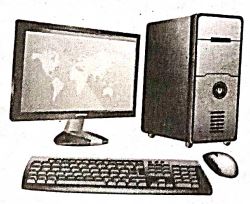
(i) Input unit: Input unit is used to feed any form of data to the computer, which can be stored in the memory unit for further processing.
Example : keyboard, mouse etc.
(i) Central Processing Unit : CPU is the major component which interprets and executes software instructions. It also control the operation of all other components such as memory, input and output units.
(iii) Arithmetic and Logic Unit : The ALU is a part of the CPU where various computing functions are performed on data. The ALU performs arithmetic operations such as addition, subtraction, multiplication, division and logical operations.
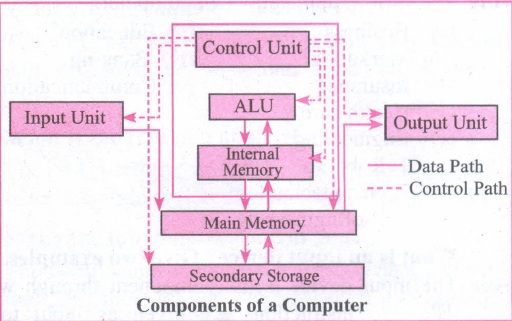
(iv) Control Unit : The control unit controls the flow of data between the CPU memory and I/o devices. It also controls the entire operation of a computer.
(v) Output Unit: An output unit is any hardware component that convey information to users in an understandable form. Example : Monitor, Printer etc.
(vi) Memory Unit: The Memory Unit is of two types which are primary memory and secondary memory. The primary memory is used to temporarily store the programs and data when the instructions are ready to execute. The secondary memory is used to store the data permanently. The Primary Memory is volatile, that is,the content is lost when the power supply is switched off. The Random Access Memory (RAM) is an example of a main memory. The Secondary memory is non volatile, that is, the content is available even after the power supply is switched off. Hard disk, CD-ROM and DVD ROM are examples of secondary memory.
39.
A decoder, a digital circuit is used to point to the specific memory location where the word can be located.
40.
(i) MAR (Memory Address Register)
(ii) MDR (Memory Data Register)
41.
Basic set of machine level instructions that a microprocessor is designed to execute is called as an instruction set.
42.
(i) MHz (Mega Hertz)
(ii) GHz (Giga Hertz)
43.
The decimal Number system is the number system used in general.
44.
(i) Numbers
(ii) Text
(iii) Graphics
(iv) Animations
(v) Audio
(vii) Video etc
45.
(1) It needs less space and looks slim.
(2) It consumes less power and does not radiate heat at the time of operation.
46.
(1) It is slow as compared to non-impact printers
(2) It is not best suited for graphics
(3) It is not possible to obtain colour output.
47.
If the hardware is not detected, a particular pattern of beeps will inform about the error. An error found in the POST is usually fatal (that is, it causes current program to stop running) and will halt the boot process, since the hardware check is absolutely essential for the computer's functions.

11th Standard Syllabus & Materials
11th Standard
TN 11th Tamil பீடு பெற நில் - செய்யுள் - காவடிச்சிந்து Important Questions And Answers Study Material - QB365 Set A
NEW11th Standard
TN 11th Tamil பீடு பெற நில் - உரைநடை - மலை இடப்பெயர்கள் : ஓர் ஆய்வு Important Questions And Answers Study Material - QB365 Set A
NEW11th Standard
TN 11th Tamil மாமழை போற்றுதும் - துணைப்பாடம் - யானை டாக்டர் Important Questions And Answers Study Material - QB365 Set A
NEW11th Standard
TN 11th Tamil மாமழை போற்றுதும் - செய்யுள் - ஐங்குறுநூறு Important Questions And Answers Study Material - QB365 Set A



Tamilnadu Stateboard 11th Standard Subjects

Maths

Commerce

Economics

Biology

Business Maths and Statistics

Accountancy

Computer Science

Physics

Chemistry
Maths
Biology
Economics
Physics
Chemistry

History
Business Maths and Statistics

Computer Science
Accountancy
Computer Applications
History
Computer Technology
Commerce
Computer Applications
Computer Technology

Tamil

English

French
Tamilnadu Stateboard Standards
