
 100% FREE ACCESS
11th Standard Syllabus & Materials
11th Standard
TN 11th Tamil இயற்கை வேளாண்மை,சுற்றுச்சூழல் -செய்யுள் - மனோன்மணீயம் Important Questions And Answers Study Material - QB365 Set A
NEW11th Standard
TN 11th Tamil என்னுயிர் என்பேன் -துணைப்பாடம் - இசைத்தமிழர் இருவர் Important Questions And Answers Study Material - QB365 Set A
NEW11th Standard
TN 11th Tamil மொழி கலை -செய்யுள் - ஒவ்வொரு புல்லையும் Important Questions And Answers Study Material - QB365 Set A
NEW11th Standard
TN 11th Tamil பீடு பெற நில் - இலக்கணம் - பகுபத உறுப்புகள் Important Questions And Answers Study Material - QB365 Set A
NEW11th Standard
TN 11th Tamil பீடு பெற நில் - துணைப்பாடம் - வாடிவாசல் Important Questions And Answers Study Material - QB365 Set A
NEW11th Standard
TN 11th Tamil பீடு பெற நில் - செய்யுள் - குறுந்தொகை Important Questions And Answers Study Material - QB365 Set A

Published on: 24/08/2026
Download Tamil Nadu 11th Standard Computer Applications question papers, model tests, one-mark questions, important questions, and public exam papers in PDF format. Free study materials and answer keys for TN State Board students.
Questions + Answers key
Take MCQ Computer Applications Test
1.
In HTML, a piece of text or image can be moved horizontally or vertically by using:
< marquee >
< img >
< embed >
< text >
2.
3.
Which of the following is a set of moral principles that regulate the use of computers?
piracy
programs
virus
computer ethics
4.
Distributing unwanted e-mail to others is called
scam
spam
fraud
spoofing
5.
Which one of the following tracks a user visits a website?
spyware
cookies
worms
Trojans
6.
Which one of the following are self-repeating and do not require a computer program to attach themselves?
viruses
worms
spyware
Trojans
7.
The important attributes used with the < form > tag are
method and action
name and size
post and get
type and name
8.
9.
A named set of certain style of character and number is:
Style
Character
Font
List
10.
Which of the following attribute is used to change text colour within body tag?
bgcolor
background
text
color
11.
Which of the following tag is a structural tag?
< html >
< h1 >
< br >
< p >
12.
HTML tags should be specified within:
[ ]
{ }
( )
< >
13.
HTML is acronym for
Hyper Transfer Markup Language
Hyper Text Markup Language
Hyper Transfer Makeup Language
Hyper Text Makeup Language
14.
How many types of websites are available?
3
2
4
6
15.
Range of Campus Network is
10 KM
5 KM
25 KM
20 KM
16.
Write a short note on Tamil Virtual Academy.
17.
Write two types of cyber attacks.
18.
What are Warez?
19.
What is the purpose of < input > tag?
20.
How will you define numbered list?
21.
What is pixel?
22.
What is a Dynamic web page?
23.
What is CC and BCC in an email?
24.
What is a website?
25.
What is the role of ICANN?
26.
What is a network?
27.
What are ethical issues? Name some.
28.
Write about encryption and decryption.
29.
What is the role of firewalls?
30.
Explain the attributes of < select > and < option > tags.
31.
Explain the main attributes used with < form > tag.
32.
Write HTML code to produce the following table:
| A | B |
| C |
33.
Write an HTML code to provide hyperlink to https://www.w3schools.com
34.
Briefly explain the attributes of < hr > tag.
35.
What are the attributes available in < html >tags?
36.
Write a note on two access methods of connecting to internet.
37.
Write a note on Hotspot internet service.
38.
Write the basic structure of a HTML program.
39.
Explain the do’s and don’t of safe surfing on internet.
40.
Write the different types of cyber attacks.
41.
What is piracy? Mention the types of piracy? How can it be prevented?
42.
Write HTML code to create the following table:
| A | B | |||
| C | D | E | G | |
| F | ||||
43.
What is Link and explain the types of links.
44.
Explain the types of list with suitable HTML code.
45.
Write an HTML code the show the following text:
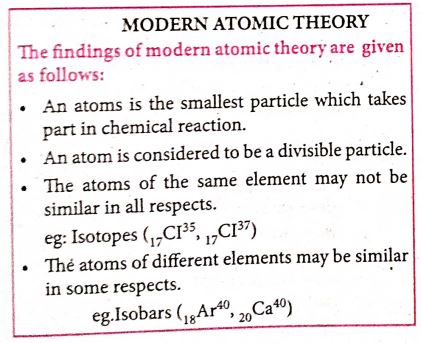
46.
Explain any five internet applications with suitable examples.
1.
(a)
< marquee >
2.
(c)
3.
(d)
computer ethics
4.
(b)
spam
5.
(b)
cookies
6.
(b)
worms
7.
(a)
method and action
8.
(c)
9.
(c)
Font
10.
(c)
text
11.
(a)
< html >
12.
(d)
< >
13.
(b)
Hyper Text Markup Language
14.
(b)
2
15.
(b)
5 KM
16.
With the objectives of spreading Tamil to the entire world through internet, Tamill Virtual University was established on 17th February 2001 by the Govt. of Tamilnadu. Now, this organisation functions with the name of "Tamil Virtual Academy'': It offers different courses in Tamil language, Culture, heritage etc., from kindergarten to under graduation level.
17.
The following are cyber attacks:
(i) Virus
(ii) Worms
18.
Commercial programs that are made available to the public illegally are often called warez.
19.
The purpose of < input > tag is to form controls, form controls are created by using < input > tag. The < input > is an empty tag used to create different form elements or controls such as text box, radio buttons so on.
20.
Numbered list is defined within the tag pair <OL>...</OL> tag. It is also called ordered list. It display items in a numberical or alphabetical order.
21.
Thickness of the horizontal line can be changed with size attribute.The size is given in terms of pixels. A pixel is one of the tiny dots that make up the display on computer. Generally, 72 pixels is equal to an inch. Pixel is usually referred as points.
22.
(i) Websites that display marks of Public Examinations and Entrance Examinations changes when different register numbers are given. Such websites are called as Dynamic websites.
(ii) Example: Websites of Government and Entrance Exams.
23.
(i) CC (Carbon Copy) : The CC (Carbon Copy) field allows you to specify recipients who are not direct addressees (listed in the "To" field). This field is optional.
(ii) BCC(Blind Carbon Copy): The BCC (Blind Carbon Copy) field is similar to CC, except the recipients are secret.
24.
A website is a collection of webpages. For example if there is a company that owns sri company.com then this website will have several webpages like Home, About us, contact us, Testimonials, Products Services, FAQ'S and others. The first page of the website is called a Home Page. All of these pages together make up a website.
25.
(i) The responsibility to promote global information exchange through the internet technology.
(ii) Internet Corporation for Assigned Names and Numbers(ICANN) administers the domain name registration.
(iii) It helps to avoid a name which is already registered.
26.
A network is a collection of interconnected devices (such as computers, printers, etc.).
27.
An ethical issue is a problem or issue that requires a person or organization to choose between alternatives that must be evaluated as right (ethical) or wrong (unethical).
Some of the common ethical issues are listed below:
1. Cyber crime
2. Software Piracy
3. Hacking
4. Use of computers to commit fraud
5. Sabotage in the form of viruses
6. Making false claims using computers.
28.
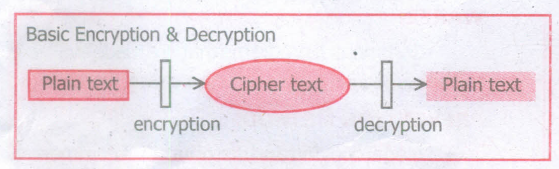
(i) Encryption: Encryption is the process of translating the plain text data(plaintext) into random and mangled data (called cipher-text).
(ii) Decryption: Decryption is the reverse process of converting the cipher-text back to plaintext Encryption and decryption are done by cryptography: In cryptography a key is a piece of information (parameter) that determines the functional output of a cryptographic algorithm.
29.
1. A fire wall is a computer network security based system that monitors and controls incoming and outgoing network traffic based on predefined security rules.
2. A firewall commonly establishes a block between a trusted internal computer network and entrusted computer outside the network.
30.
Attributes of <Select> tag:
(i) The <select> tag is used to create dropdown list box in HTML.
(ii) It provides a list of various options as a dropdown list.
(iii) This element is more helpful when a number of options are to be displayed in a limited space.
(iv) The <option> tag is used to specify list items.
(v) Name - Provide the name to the control, which is sent to the server.
(vi) Size - Determine the style of dropdown list box.
Size = 1 dropdown list box.
Size =2 List box
(vii) Multiple - Allows user to select multiple values.
Attributes of <option> tag :
(i) Selected - Indicate default selection.
(ii) Value - Value to be submitted to server.
31.
The important attributes used with the < form > tag are method and action attributes.
(i) Method : The method attribute of the form tag is used to identify how the form element names and values will be sent to the server. The get method will append the names of the form elements and their values to the URL. The post method will send the names and values of the form elements as packets.
(ii) Action: The action attribute identifies the server side program or script that will process the form. The action will be the name of a Common Gateway Interface (CGI) program written in programming languages, like Perl, JavaScript, PHP or Active Server Pages (ASP).
General Format of < form > tag
< Form method=get/post action= "back_end_server_script" >
Form elements
< /Form >
32.
<HTML
<BODY>
<TABLE BORDER ALIGN =CENTRE>
<TR>
<TH ROWSPAN =2 VALIGN=TOP>A
<TH>B
</TR>
<TR>
<TH>C
</TR>
</TABLE>
</BODY>
</HTML>
33.
< html >
< head >
< title > Hyperlink < /title >
< /head >
< body >
< a href = "https://www.w3 schools.com" > w3schools < /a >
< /body >
< /html >
34.
The < hr > tag having four attributes viz., size, width, noshade and color. These attributes are used to set size, width, 3D appearance and color to the horizontal line respectively.
The general syntax of < hr > tag with attributes:
< hr size = value width = value noshade, color = color_name/code >
(i) Size: Thickness of the horizontal line can be changed with size attribute.
(ii) Width: The width attribute specifies the horizontal width of the line
(iii) Noshade: The default view of a horizontal rule line is 3D. So, no need to specify the term "noshade" as an attribute with < hr > tag. If you specify the attribute "noshade" turn off 3D view, turns on 2D view.
(iv) The color attribute is used to change the default color to desired color.
35.
Attributes of < html > tag:
(i) The < html > tag is used to specify the beginning and closing of an HTML document. This tag does not have any effect on the appearance of a document. This is only used to make browsers and other programs, known that this is an HTML document.
(ii) < html > tag has two attributes viz. dir and lang to specify the text direction and language setting respectively.
| Attribute | Value to be set to attribute | Description |
| dir | Itr (align left-to-right) rtl (align right-to-Ieft) | dir attribute specifies the direction of the text to be aligned within the entire document. It is global attribute. i) Itr is the default value. ii) rtl is used for Arabian languages. |
| lang | Predefined language code English - en Tamil- ta Telugu - te |
lang attribute specify the language used within the document. Predefined language code will be used for this purpose. Malayalam - ml; Kannada - kn; Hindi - hi; French - fr; German - de; |
36.
Two access methods of connecting to internet are,
(i) Indirect Access: This is most common method used in home and office networks. The device e-g. computer connects to a network using Ethernet or Wi-Fi and the network connects to the Internet using Asymmetric digital subscriber line ADSL(cable or fibre.)
(ii) Direct Access: This is most common method used when travelling. The device e.g. smart phone connects directly to the Internet using 3G/4G mobile networks or public Wi-Fi.
37.
(i) Hotspot is a physical location where people can access the Internet.
(ii) Internet access over a wireless local area network(WLAN) by way of a router that then connects to an Internet service provider.
(iii) Hotspots utilize Wi-Fi technology, which allows electronic devices to connect to the Internet or exchange data wirelessly through radio waves.
(iv) Hotspots can be phone-based or free-standing. commercial or free to the public.
38.
| Opening Tag | Closing Tag | Description |
| <html> | </html> | The <html> tag identifies the document as an HTML document. All HTML documents should begin with <html> and end with </html> |
| <head> | </head> | The <head> tag contains information about the document, including its title, scripts used, style defnition and document descriptions. |
| <title> | </title> | The <title> tag contains the title of the document. The title specified between opening and closing tags appears in the title bar / page tab of the browser. <title> tag should be placed within <head> tag. |
| <body> | </body> | The <body> tag encloses all the tags, attributes and information to be displayed in the web page. <body> tag should be entered below the </head> tag. |
39.
Following is the do's and don't of safe surfing on Internet:
1. Don't give out your personal information - Don't put personal details such as your home address, telephone numbers or parent's work address online as cybercriminals can use this information to create a fake profile, with your details.
2. What goes online, stays online - Use privacy settings to make sure only your friends and family can see photos you post. Avoid posting holiday plans as criminals may track your movements
3. Check your security and privacy settings - Make sure your social network privacy settings are secured so only your friends can see your personal information and use your privacy settings to restrict who can see your posts, videos and photos
4. Password safety - Sharing your password with your parents is a sensible idea, but avoid sharing your password with your friends, even if they promise they won't tell anyone! Also, when setting your password, make sure it isn't something people may guess such as your pet's name. Use a mixture of letters, numbers and upper and lower case characters
5. Always protect your mobile device - Make sure your mobile phone is pin-protected so all your personal information stored on it is safe. Download a security app which allows you to remotely wipe any personal data, should your mobile be lost or stolen
6. Don't talk to strangers online or offline - Don't meet up with strangers and let your parents know if a stranger has tried to get in contact with you online
7. Listen to the adults who are known to you - Adults will always be worried about you. Help set their mind at rest and avoid chatting online with strangers
8. Be wary of unsecured or unknown websites - When shopping online, use reputable and known retailers.
9. Be careful what links you click on - Avoid clicking links in an email, Instant Message or on your social network unless you are sure the message is from someone you know.
40.
Functions of Cyber Attacks
| Cyber Attack | Function |
| Virus | A virus is a small piece of computer code that can repeat itself and spreads from one computer to another by attaching itself to another computer file.One of the most common virus is Trojan Trojan : A Trojan virus is a program that appears to perform one function (for example, virus removal) but actually performs malicious activity when executed. |
| Worms | Worms are self- repeating and do not require a computer program to attach themselves. Worms continually look for vulnerabilities and report back to the author of the worm when weaknesses are discovered |
| Spyware | Spyware can be installed on the computer automatically when the attachments are open, by clicking on links or by downloading infected software. |
| Ransomware | Ransomware is a type of malicious program that demands payment after" launching a cyber-attack on a computer system. This type of malware has become increasingly popular among criminals and costs the organizations millions each year. |
41.
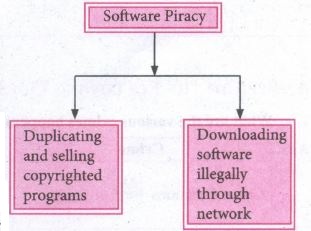
(i) Software Piracy is "unauthorized copying of software' The following show as a diayrammatical representation of software piracy.
(ii) Most of the commercial software is licensed for use at a single computer site or for use by only one user at any time, When a user buys any software, he becomes a licensed user for that software, He is allowed to make copies of the program for backup purposes but it is against the law to distribute duplicate copies to others such illegal copying and distribution of commercial software should not be practiced
(iii) An entirely different approach to software piracy is caled shareware, acknowledges the futility of trying to stop people from copying software and instead relies on people's honesty.
(iv) Shareware publishers encourage users to give copies of programs to friends and colleagues but ask everyone who uses that program regularly to pay a registration fee to the program's author directly. Commercial programs that are made available to the public illegally are often called warez.
42.
< /tables >
< table border=1 cellspacing=0 cellpadding=16 >
< tr >
< td rowspan=3 VAlign=top > A< /td >
< th colspan=4 > B< /th >
< /tr >
< td > C< /td >
< td > D< /td >
< td > E< /td >
< td rowspan=2 VAlign=top > G< /td >
< /tr >
< tr >
< th colspan=3 > F< /th >
< /table >
43.
Link isan important feature of HTML to connect web resources. Link in HTML is used to create hyperlinks to web content. Web content may be an HTML document or an external webpage or any multimedia content such as an image, video, audio, animation etc., or even a part of the current document.
There are two important things needed to create a link in HTML,
1. The name of the file or URL to Which you want to link
2. The text that will serve as the clickable link.
The anchor tag < A > is used to create links along with HREF attribute. HREF is abbreviated as "Hypertext Reference".
Internal Links: Creating a link to a particular section of the same document is known as Internal Link. To create an internal link, the attribute Name is used along with < A > tag. The Name attribute of < A > tag establish the link to the content within the document.
An HTML code to demonstrate Internal Linking:
< html >
< head >
< title > South India< /title >
< /head >
< body >
< A href = #TN > Tamil Nadu < /A >
< A Name =TN > < B > Tamilnadu < /B > < /A >
< p > Tamil Nadu literally 'The Land of Tamils' or 'Tamil Country' is one of the 29 states of India. Its capital and largest city is Chennai (formerly
known as Madras). < /p >
< /body >
< /html >
External Links : To Establish link with an external web page in known as external link. It is created by províding the URL of the external file in the HREF attribute of < A > tag of the current page.
An HTML code to demonstrate Internal Linking with an external websisite/webpage:
< html >
< head >
< title > Links< /title >
< /head >
< body >
< hI align=center >
Welcome to < br >
< A href= "http://www.tnscert.org" >
State Council of Educational Research and Training, Tamilnadu < /A >
< /h1 >
< /body >
< /html >
44.
HTML supports three types of lists viz. numbered, unnumbered and definition. These lists are called as Ordered List, Unordered List and Definition List respectively.
(1) Numbered List /Ordered List :Numbered listis created within the tag pair < OL > .........< OL > tag. The tag < LI > is used to present the list item in the list. Ordered list displays items in a numerical or alphabetical order. Both < OL > and < LI > tags are container tags. But the usual the practice, closing tag < /LI > is normally not used.
Program :
< html >
< head >
< title > Number List < /title >
< /head >
< body >
< OL >
< LI > Tamil
< LI > Telugu
< LI > English
< LI > Computer Application
< LI > Commerce
< LI > Accountancy
< LI > Economics
< /OL >
< /body >
< /html >
The output will be:
1. Tamil
2. Telugu
3. English
4. Computer Application
5. Commerce
6. Accountancy
7. Economics
(ii) Un-numbered List / Unordered List: Unordered lists are often referred as bulleted lists.Instead of numbers, each element in the list is prefixed with a special bullet symbol. Unordered list is surrounded within < UL > .........< /UL > tags. As discussed above, each list element is defined by < LI > tag.
Program:
< html >
< head >
< title > Unordered List < /title >
< /head >
< body >
< UL >
< LI > Chennai G Hr. Sec. School, Rotler Street, Chennai 600 112.
< LI > Karnakata Sanga Hr. Sec School, T. Nagar, Chennai 600 017.
< LI > S.M.B. Jain Hr. Sec. School, T. Nagar, Chennai 600 017.
< LI > Chennai G Hr. Sec. School, Nungambakkam, Chennai 600 034.
< LI > Chennai G Hr. Sec. School. Saidapet West,Chennai 600015
< LI > Santhome Hr. Sec. School, Mylapore, Chennai 600 004.
< /UL >
< /body >
< /html >
The output will be:
Chennai G Hr. Sec. School, Rotler Street, Chennai 600 112.
Karnakata Sanga Hr. Sec. School, T. Nagar, Chennai 600 017.
S.M.B. Jain Hr. Sec. School, T. Nagar, Chennai 600 017.
Chennai G Hr. Sec. School, Nungambakkam, Chennai 600 034.
Chennai G Hr. Sec. School, Saidapet West, Chennai 600 015.
Santhome Hr. Sec. School, Mylapore, Chennai 600 004.
(iii) Definition List :Definition list is different from other two types of list. No bullet or number is provided for the list items. In this list type, list the element has two parts.
1. A definition term
2. The definition description
Definiion list is surrounded within < DL > ............... < /DL > tags.
Definition term is presented in between < DT > ...............< /DT > tag and
Definition description should be surrounded within < DD > ..........< /DD > tag.
Program:
< html >
< head >
< title > Definition List < /title >
< /head >
< body >
< DL >
< DT > HTML< /DT >
< DD > Hyper Text Markup Language < /DD >
< DT > Webpage:< /DT >
< DD > A web page is a document that is suitable for the World Wide Web and web browsers, A web browser displays aweb page on a monitor or mobile device. < /DD >
< /DL >
< /body >
< html >
The output will be:
HTML:
Hyper Text Markup Language
Webpage :
A web page is a document that is suitable for the World Wide Web and web browsers. A web browser displays a web page on a monitor or mobile device.
45.
<html>
<body>
<h1><centre>modern atomic theory
</centre></h1><br>
<b>The findings of modern atomic theory are given as follows: </B><BR>
<ul>
<li> An atom is the smallest particle which takes part in chemical reaction.
<li> An atom is considered to be a divisible particle.
<li> The atoms of the same element may not be similar in all respects<BR>
eg: Isotopes (<sub>17</sub>(1<sup>35</sup>,<sub>17</sub>(1<sup>37<1sup>)
<li> The atoms of different element may be similary in some respects <BR>
eg: Isobars(<sub>18</sub>Ar<sup>40</sup>,<sub>20</sub>(a<sup>40</sup>)
</ul>
</body>
</html>
46.
(i) Internet telephony using VolP (Voice-over Internet Protocol) Example Skype
(ii) Job search : Nowadays, many people search for their jobs online using naukri.com, monster.com, recuritmentindia.com etc as it is quicker.
(iii) Online Shopping : The internet has also facilitated the introduction of a new market concept consisting of virtual shops. For example amazon.com
(iv) Stock market updates : Selling or buying shares sitting on computer through internet. Several websites like ndtvprofit.com, moneypore.com, provide information regarding investment.
(v) Travel : One can use internet to gather information about various tourist place .it can be used for booking Holiday tours. Some of the web sites providing this service are goibibo.com, makemytrip.com, olacabs.com.
(vi) Research: Research papers are present online which helps the researcher do a literature review.
(vii) Video conferencing : It enables direct face to-face communication across networks via web cameras, microphones, and other communication tools.

11th Standard Syllabus & Materials
11th Standard
TN 11th Tamil பீடு பெற நில் - செய்யுள் - காவடிச்சிந்து Important Questions And Answers Study Material - QB365 Set A
NEW11th Standard
TN 11th Tamil பீடு பெற நில் - உரைநடை - மலை இடப்பெயர்கள் : ஓர் ஆய்வு Important Questions And Answers Study Material - QB365 Set A
NEW11th Standard
TN 11th Tamil மாமழை போற்றுதும் - துணைப்பாடம் - யானை டாக்டர் Important Questions And Answers Study Material - QB365 Set A
NEW11th Standard
TN 11th Tamil மாமழை போற்றுதும் - செய்யுள் - ஐங்குறுநூறு Important Questions And Answers Study Material - QB365 Set A



Tamilnadu Stateboard 11th Standard Subjects

Maths

Commerce

Economics

Biology

Business Maths and Statistics

Accountancy

Computer Science

Physics

Chemistry
Maths
Biology
Economics
Physics
Chemistry

History
Business Maths and Statistics

Computer Science
Accountancy
Computer Applications
History
Computer Technology
Commerce
Computer Applications
Computer Technology

Tamil

English

French
Tamilnadu Stateboard Standards


