
 100% FREE ACCESS
11th Standard Syllabus & Materials
11th Standard
TN 11th Tamil இயற்கை வேளாண்மை,சுற்றுச்சூழல் -செய்யுள் - மனோன்மணீயம் Important Questions And Answers Study Material - QB365 Set A
NEW11th Standard
TN 11th Tamil என்னுயிர் என்பேன் -துணைப்பாடம் - இசைத்தமிழர் இருவர் Important Questions And Answers Study Material - QB365 Set A
NEW11th Standard
TN 11th Tamil மொழி கலை -செய்யுள் - ஒவ்வொரு புல்லையும் Important Questions And Answers Study Material - QB365 Set A
NEW11th Standard
TN 11th Tamil பீடு பெற நில் - இலக்கணம் - பகுபத உறுப்புகள் Important Questions And Answers Study Material - QB365 Set A
NEW11th Standard
TN 11th Tamil பீடு பெற நில் - துணைப்பாடம் - வாடிவாசல் Important Questions And Answers Study Material - QB365 Set A
NEW11th Standard
TN 11th Tamil பீடு பெற நில் - செய்யுள் - குறுந்தொகை Important Questions And Answers Study Material - QB365 Set A

Published on: 24/08/2026
Download Tamil Nadu 11th Standard Computer Science question papers, model tests, one-mark questions, important questions, and public exam papers in PDF format. Free study materials and answer keys for TN State Board students.
Questions + Answers key
Take MCQ Computer Science Test
1.
Convert (6213)8 to equivalent Binary number
2.
The hexadecimal sequence (25)16 has the decimal equivalent:
3.
How will you Rename a File?
4.
What is known as Multitasking?
5.
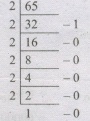
Write the 1's complement number and 2's complement number for the following decimal number: -65
6.
Differentiate Save and save As option.
7.
What are the different Operating Systems used in computer?
8.
What is multi-processing?
9.
What are the security management features available in Operating System?
10.
What is a GUI?
11.
What is multi-user Operating system?
12.
13.
14.
What is an instruction?
15.
What are the parameters which influence the characteristics of a microprocessor?
16.
Distinguish Primary and Secondary memory.
17.
Differentiate Input and output unit.
18.
Write the functions of control unit.
19.
What is the function of an ALU?
20.
What is a computer?
1.
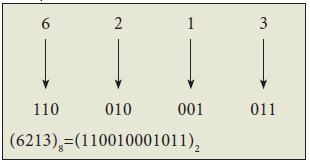
2.
(25)16 = 2 × 161 + 5 × 160
= 32+5
= (37)10
3.
Open File Explorer by going to My Computer, or by pressing Windows Key + E on your keyboard. Find the file you want to rename, select it and select Rename on the ribbon (or press F2 on your keyboard). Type the new name you want the file to have and press Enter.
4.
Multitasking is the running of multiple programs (sets of instructions) in one computer at the same time. Multitasking is used to keep all of a computer's resources at work as much of the time as possible.
5.
Binary equivalent of -65 = 1000001
8 bit format =01000001
1's Complement = 10111110
Add 1 to LSB =+1
2's Complement of -65 = 10111111
6.
| Save | Save as |
| This will save the document without asking for a new name or location. It will over- write the original. | This will prompt to save the document using a dialog box. You will have the ability to change the file name and/or location. If you choose the same file name and location it will over-write the original. Your working document will be the one you just saved. |
7.
Different operating system used:
1. Single user, single Task Operating system
2. Multi user operating system
3. Multiprocessing operating system
4. Distributed Operating system
8.
Multiprocessing is one of the features of operating system. It has two or more processors for a single running process. Each processor works on different parts of the same task or two or more different tasks.
9.
Security Management features:
File access level security, System level security, Network level security.
10.
GUI - Graphical User Interface - It allows the use of icons or other visual indicators to interact with electronic devices, rather than using only text via the command line. For example, all versions of Microsoft Windows utilize a GUI, whereas MS-DOS does not.
11.
A Multi-user Operating system is a computer operating system (OS) that allows multiple users on different computers or terminals to access a single system with one OS on it.
12.
13.
14.
Instruction is a command which is given to the computer to perform an operation on a piece of data.
15.
It depends on
(a) Clock speed
(b) Instruction set
(c) Word size
16.
| Primary Memory | Secondary memory |
| It is directly accessed by CPU. | It is not directly accessed by CPU. |
| The access of memory is done by making use of addresses or data buses. | Here the Memory access is done through the input and output channels. |
| The Primary memory is embedded with 2 types of technologies. They are RAM and ROM. | The secondary memory are stored in mass storage units like CD ROM, CD, DVD, Floppy disk storage. |
| Volatile in nature. | Non-Volatile in nature. |
| Much faster than the secondary Memory. | Slower than the Primary Memory. |
| Costlier than secondary memory. | Cheaper than the Primary Memory. |
| It is temporary memory. | Secondary memory is permanent. |
17.
| Input Unit | Output Unit |
| An input device feeds information to a computer system for processing. | output device reproduces or displays the results of that processing. |
| Input devices only allow for input of data to a computer. | output devices only receive the output of data from another device. |
| It is a peripheral device used to provide data and control signals to an information processing system such as computer. | It is a unit which sends data from the computer to another device. |
| Eg. keyboard, mouse | Eg. printer, monitor |
18.
The control unit controls the flow of data between the CPU, memory I/O devices. It also controls the entire operations of a computer.
19.
The ALU is a part of CPU where various computing functions are performed on data. ALU performs arithmetic operations such as addition, subtraction, multiplication, division and logical operations.
20.
Computer is an Electronic Machine, capable of performing basic operations like addition, multiplication, division etc. Computer accepts data as input, process it, produce output and stores it for future.

11th Standard Syllabus & Materials
11th Standard
TN 11th Tamil பீடு பெற நில் - செய்யுள் - காவடிச்சிந்து Important Questions And Answers Study Material - QB365 Set A
NEW11th Standard
TN 11th Tamil பீடு பெற நில் - உரைநடை - மலை இடப்பெயர்கள் : ஓர் ஆய்வு Important Questions And Answers Study Material - QB365 Set A
NEW11th Standard
TN 11th Tamil மாமழை போற்றுதும் - துணைப்பாடம் - யானை டாக்டர் Important Questions And Answers Study Material - QB365 Set A
NEW11th Standard
TN 11th Tamil மாமழை போற்றுதும் - செய்யுள் - ஐங்குறுநூறு Important Questions And Answers Study Material - QB365 Set A



Tamilnadu Stateboard 11th Standard Subjects

Maths

Commerce

Economics

Biology

Business Maths and Statistics

Accountancy
Computer Science

Physics

Chemistry
Maths
Biology
Economics
Physics
Chemistry

History
Business Maths and Statistics

Computer Science
Accountancy

Computer Applications
History
Computer Technology
Commerce
Computer Applications
Computer Technology

Tamil

English

French
Tamilnadu Stateboard Standards


